Effortlessly manage data through preview, delete, export, etc.

 100% Security Verified | No Subscription Required | No Malware

 :
: 
 ChatGPT
 Perplexity
 Gemini
 Claude
 Grok
Grok
In this article
Before you start
If you are comparing the Best open-source e-book readers on Android, start with your real reading needs instead of app popularity alone. The best choice depends on whether you read EPUB novels, large PDF manuals, comics in CBZ, or mixed libraries from different sources.
This guide on how to choose an open source ebook reader for android focuses on format support, privacy, offline use, installation source, and long-term usability on phones and tablets.
Check your ebook formats
Write down the file types you actually open most often. EPUB is common for books, PDF is common for documents, MOBI may still appear in older collections, and CBZ or CBR matter for comics and manga.
- Choose KOReader if PDF handling and advanced control matter most.
- Choose Librera Reader if you want broad format support in one app.
- Choose a simpler F-Droid reader if you mainly read EPUB files and want a lightweight setup.
Pick your install source
Open-source Android readers can be distributed through Google Play, F-Droid, or GitHub. F-Droid is often preferred by users who want transparent builds and fewer trackers, while GitHub may offer the newest releases sooner.
Review privacy and permissions
A good privacy-friendly reader should work fully offline for local books and ask only for reasonable file access. Check whether the app needs network access, analytics, or cloud sign-in before installing.

Match the app to your device
Some readers feel great on tablets but cramped on smaller phones, especially for PDFs. Also check Android version support, performance on low-memory devices, dark mode quality, and whether the app handles external storage or SD cards well.
Method 1: Choose by file format support
The fastest way to narrow down an open source ebook reader for Android is to begin with format compatibility. If the app struggles with your main files, other features will not matter.
-
Step 1List the formats you use every week
Separate your library into EPUB, PDF, MOBI, FB2, TXT, CBZ, and other file types. This prevents you from picking an app that is great for one format but weak for the rest.
-
Step 2Prioritize your hardest format
If you read technical PDFs on a phone, focus on PDF zoom, cropping, reflow, and contrast controls. If you mostly read novels, prioritize EPUB rendering, font control, and progress syncing options.
-
Step 3Map apps to use cases
KOReader is often the strongest open-source PDF ebook reader Android users consider for advanced reading controls. Librera Reader is a flexible all-rounder for mixed libraries. Simpler readers such as Book Reader are better for straightforward EPUB reading with less setup.
-
Step 4Check import and library behavior
See whether the app scans folders properly, remembers your last position, and handles metadata well. A reader that supports many formats but creates a messy library may still be frustrating.
Method 2: Compare privacy, updates, and install sources
After format support, compare how the app is maintained and distributed. This matters for safety, stability, and long-term trust.
-
Step 1Check where the app is available
A good F-Droid ebook reader Android users trust is easier to evaluate because the repository shows version history and source references. GitHub releases may be more current, while Google Play may be simpler for mainstream installation.
-
Step 2Review update frequency
Look for recent commits, release notes, and issue responses. A reader that has not been updated for a long time may have compatibility issues with newer Android versions.
-
Step 3Inspect permissions and offline behavior
A privacy-friendly ebook reader Android users prefer should let you read local files without forcing an account. File access is normal, but unrelated permissions should raise questions.
-
Step 4Decide how much control you want
F-Droid is ideal if you prefer transparent distribution and open updates. GitHub is useful if you are comfortable with manual APK installs. Google Play is easiest if convenience matters more than repository-level transparency.
Method 3: Test the reading experience before committing
Even the best free open-source ebook reader Android users recommend may not fit your habits. Test with your own files before you move your entire library.
-
Step 1Load three real sample files
Import one EPUB, one PDF, and one edge-case file such as a comic archive or older MOBI file. This gives you a quick picture of everyday performance.
-
Step 2Evaluate comfort settings
Check font choices, margins, line spacing, dark mode, screen rotation, and night reading tools. A strong Android open-source EPUB reader should make long reading sessions comfortable.
-
Step 3Test navigation and annotation tools
Try table of contents navigation, bookmarks, highlights, dictionary support, and search. Power users often prefer KOReader here, while casual readers may prefer a cleaner interface.
-
Step 4Watch for speed and battery use
Large PDFs, scanned books, and comics can reveal lag quickly. If the app stutters, drains battery, or crashes during page turns, keep looking.
Method comparison
Use this comparison to choose faster based on your main reading style, privacy expectations, and preferred installation source.
| Reader | Best for | EPUB | F-Droid or open distribution | Customization | Ease of use | |
|---|---|---|---|---|---|---|
| KOReader | Advanced reading, PDFs, power users | Very high | Moderate | |||
| Librera Reader | Mixed libraries and many formats | High | Moderate | |||
| Book Reader | Simple offline EPUB reading | Basic | Easy |
A simple decision rule works well: pick KOReader for PDFs and deep tuning, pick Librera Reader for broad format support, and pick a lightweight reader for clean EPUB-focused reading.
Common problems and fixes
Most selection mistakes come from choosing a reader based on popularity instead of your actual library and device.
- Unsupported files: Recheck supported formats before installing. If you need both EPUB and PDF, avoid overly minimal readers.
- Poor PDF reflow on phones: Favor KOReader or another reader with strong zoom, crop, and contrast controls instead of expecting every app to handle PDFs equally well.
- Confusing F-Droid or GitHub setup: Use F-Droid if you want easier open-source app management. Use GitHub only if you are comfortable verifying releases manually.
- No sync or backup: Many open-source readers focus on local, offline reading. If sync matters, confirm whether export, backup, or cloud options exist before adopting the app.
- Outdated builds: Check recent releases and issue tracking. An abandoned app can break after Android updates even if it still installs.
Why this Wondershare tool may help
While it is not an ebook reader, Dr.Fone - WhatsApp Transfer can still be useful if you share reading notes, document extracts, or book-related files through WhatsApp and want a safer way to back them up when switching Android devices. It may also help if your reading workflow involves sending PDFs or study references to yourself or others through chat.
If that matches your routine, you can check Dr.Fone - WhatsApp Transfer for backup and restore support on Android.
 Transfer WhatsApp across Android & iOS.
- Backup & restore WhatsApp to PC securely.
- Preview & export chats selectively.
- Works with all iPhone & Android models.
How to Use Dr.Fone - WhatsApp Transfer for how to choose an open source ebook reader for android?
To know whether this tool fits your case, review the matched guide steps extracted for the feature: Backup and Restore WhatsApp on Android.
-
Step 1 Select WhatsApp Transfer Tool
You have to initiate the process by downloading and installing Dr.Fone on your computer. Continue to follow the Toolbox > WhatsApp Transfer path to open the respective tool.

-
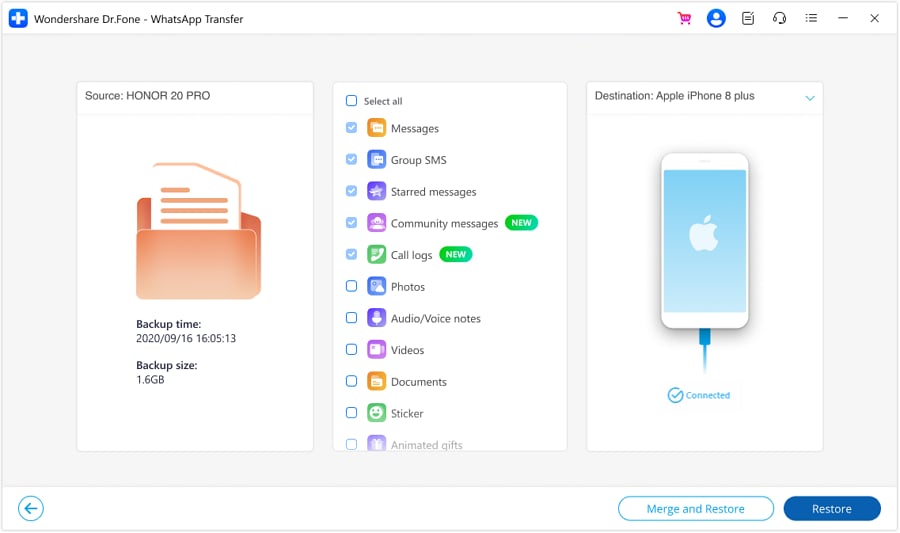
Step 2 Select Data to Restore
You now have the ability to select and restore specific data types from the chosen backup file. This feature now supports restoring various types of data, including messages, photos, voice notes, videos, files, call logs, and more, ensuring that you can restore exactly what you need. After selecting the data, click the Restore to Device button to proceed toward the restoration.
-
Step 3 Conclude Android WhatsApp Backup Successfully
With that, the backup of your Android device concludes and is displayed on the screen. To check out the backed-up data, click View It or continue to press OK for leaning back.
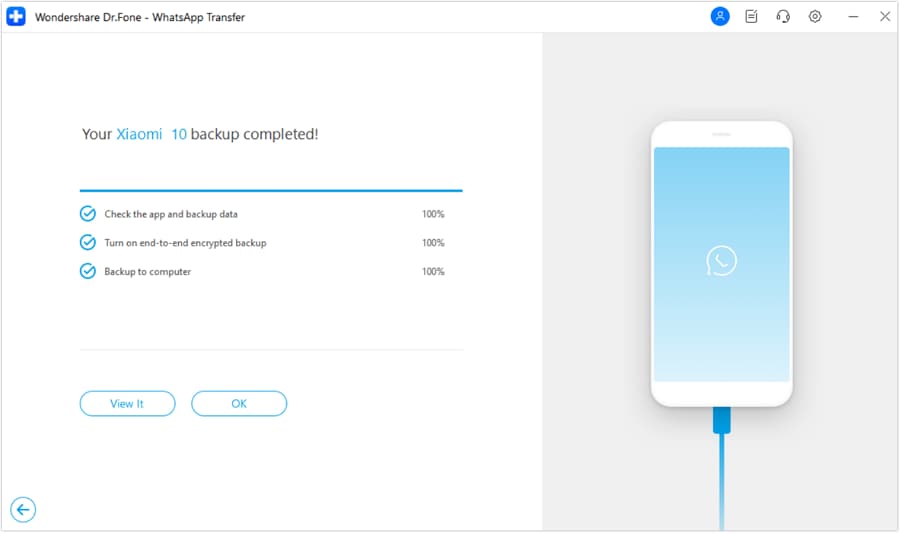
For readers who change phones often, keeping your related chats and attachments organized can reduce the chance of losing reading context during migration.




Conclusion
To choose the Best open-source e-book readers on Android, begin with file format support, then compare privacy, update activity, and reading comfort on your actual device. KOReader is a strong fit for advanced PDFs and heavy customization, Librera Reader works well for mixed-format libraries, and lightweight F-Droid options are better when you mainly want simple EPUB reading.
If you remember one rule, let it be this: the right app is the one that opens your files cleanly, works offline, respects your privacy, and stays comfortable during long reading sessions.
FAQ
-
1. What is the best open-source e-book reader for Android?
There is no single best choice for everyone. KOReader is often best for advanced control and PDFs, Librera Reader is excellent for broad format support, and simpler readers are best for lightweight EPUB reading. -
2. Which open-source Android ebook reader supports EPUB and PDF?
KOReader and Librera Reader are two of the most commonly considered options when you need both EPUB and PDF support on Android. -
3. Are open-source ebook readers on Android safe to use?
They can be safe if you install them from trusted sources such as F-Droid, official GitHub releases, or reputable app stores, and if the project is still actively maintained. -
4. Can I install an open-source ebook reader from F-Droid?
Yes. Many users prefer F-Droid because it makes it easier to discover and update open-source Android apps with transparent repository information. -
5. Which Android ebook reader is best for privacy and offline reading?
A privacy-focused reader should work fully offline with local files and require minimal permissions. F-Droid-distributed readers are often a good starting point for this use case. -
6. How do I choose between KOReader, Librera Reader, and Book Reader on Android?
Choose KOReader for advanced customization and better PDF handling, Librera Reader for mixed libraries and many formats, and Book Reader if you want a simpler EPUB-focused experience.
 Add Wondershare Dr.Fone as a preferred source on Google