 Effortlessly manage data through preview, delete, export, etc.

 100% Security Verified | No Subscription Required | No Malware

 :
: 
 ChatGPT
 Perplexity
 Gemini
 Claude
 Grok
Grok
Is the App Store on your iPhone not working properly? It might be frozen or stuck at a blank screen. Or, you may fail to connect to the App Store at all.
Now what?
You need a way to download iOS apps without the App Store. Several practical options exist. Some methods follow Apple’s official guidelines. Others use approved alternative solutions.
This guide explains clear steps to install apps on an iPhone without the App Store. You’ll also learn about alternative app store platforms to get your desired applications.
In this article
Part 1. Can I Install iOS Apps Without the App Store?
Yes, you can. However, it isn’t the same as installing Android APKs from websites. Apple uses a closed ecosystem to keep your data secure and private. So, by default, you cannot install most third-party apps.
But there are some workarounds. You can use TestFlight for beta apps. Additionally, Developer Mode allows you to sign and run your own apps. In the European Union, Apple now allows alternative app stores. These stores follow regional laws.
You can also use advanced techniques like jailbreaking. But it exposes your device to security threats. It can also void your warranty. So, it’s not the best option.
Part 2. How to Install Apps on an iPhone Without the App Store in 2026?
You can get apps outside the App Store using the recommended methods by Apple. Or, you can use third-party tools. Below, you will find how these methods work step by step.
-
Method 1 Use Apple Configurator on Mac
While Apple Configurator works on a Mac, it lets you install apps directly to your phone. You just need to connect your iDevice to your Mac. You can also use this method to download WhatsApp without the App Store.
Here’s how it works.
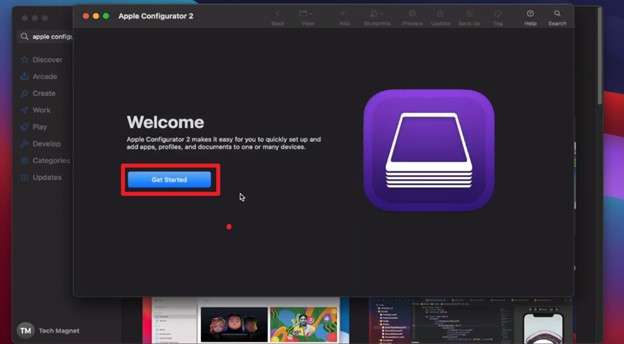
- Install the Apple Configurator 2 on your Mac. Open it and accept the agreement. Then, click “Get Started.” Connect your device using a USB-C to Lightning cable.
- Wait for the device to be detected. Then, double-click on your device to open the “All Devices” section.
- Select “Apps” from the left panel. Then, click “Add” from the top and choose “Apps” from the list.
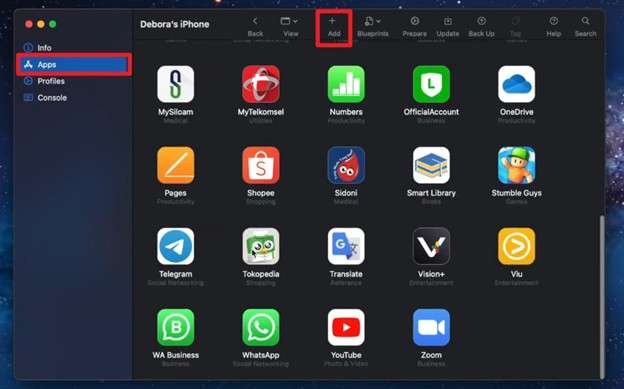
- Sign in to your Apple account. Search for the desired application and click on it. Then, click “Add” to install it.
-
Method 2 Developer Mode with Sideloading
Sideloading lets you install apps from IPA files. It works without using the App Store. You'll need to enable Apple’s Developer Mode. Plus, you’ll need to use a free Apple Developer account. Then, you can use AltStore to download the files.
Here are the steps.
- Sign in on the Apple Developer website. Use your Apple ID. Complete the free enrollment.
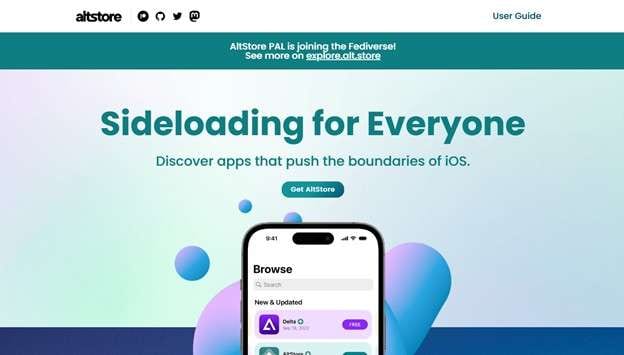
- Go to the official AltStore website and click “Get AltStore”. Then, download Alterserver for Mac or Windows. Link your iPhone to your computer with a USB connection.
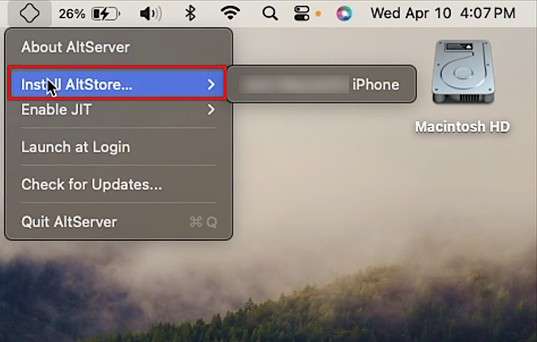
- Open AltServer and choose “Install AltStore.” Select your iPhone and enter your Apple ID credentials. Then, wait for AltStore to appear on your phone’s Home Screen.
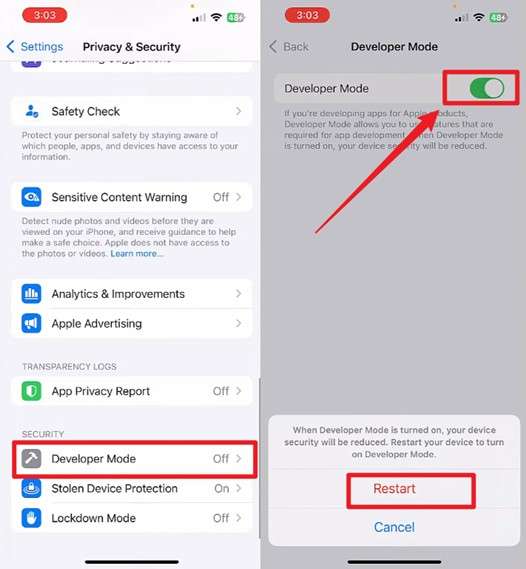
- Open iPhone’s “Settings” and press on “Privacy & Security.” Select “Developer Mode” and switch the toggle on for this option. Then, restart your device.
- Download a trusted IPA file to your computer. Open AltStore on your iPhone and go to “My Apps.” Tap the “+” button and select the IPA file. Then, wait for the installation.
- Open Settings > “General” and choose “VPN & Device Management.” Select your Apple ID and tap “Trust” to allow running the downloaded apps.
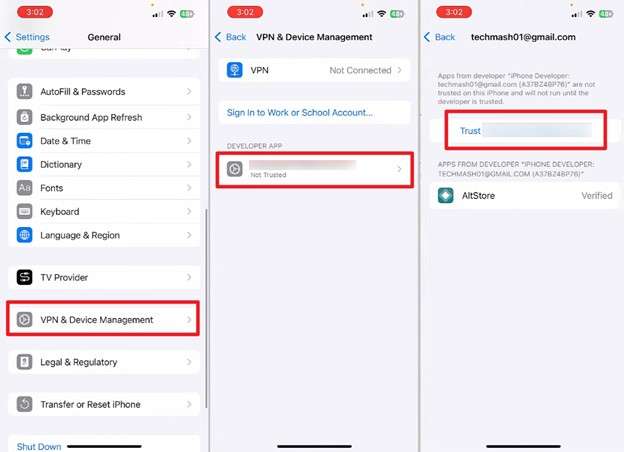
 Note: You need your Apple ID and password to use Developer mode. You may forget your credentials and log out. Then, you cannot access applications from the App Store. Check out our guide on how to download apps without your Apple ID to learn your next steps.
 -
Method 3 Jailbreaking to Download Apps
Jailbreaking removes Apple’s built-in iOS limits. It gives you full root access. Then you can install apps anywhere. However, the process exploits iOS security flaws. Because of this, jailbreaking is not the safest option.
That said, here’s how it works.
- Backup all content on your device. Then, disable your passcode and Find My in the Settings app.
- Link your iOS phone to your computer. Download a trusted jailbreak tool and run it using on-screen instructions. Your device will enter DFU mode. Wait for it to reboot.
- Install the package manager and open it. Allow it to prepare the filesystem on first launch and refresh sources.
- Add trusted repositories. Go to “Sources,” and tap on “Edit.” Then choose "Add” and enter the repository URL.
- Search for the desired app and tap “Install.” Confirm and respring the device if prompted.
Part 3. Is There an Alternative App Store for iOS?
Yes. iOS users have several alternative app stores. The EU Digital Markets Act allowed Apple-approved stores for EU users. These include AltStore PAL, Setapp Mobile, and Aptoide. Users outside the EU can use third-party stores like iOSEmus and AppDB. These stores do not have Apple approval and rely on enterprise certificates.
Let’s review the best alternative platforms to install iOS apps without the App Store.
1. AltStore PAL
AltStore PAL is a special app store for iPhones in the European Union. Unlike the regular App Store, it focuses on apps made by communities and independent developers. It’s officially recognized under EU rules and is safe to use. It was created by Riley Testut and is the first alternative store you can install directly on your iPhone in the EU.
- Free for users in the European Union.
- All apps are checked by Apple for basic safety.
- You can install apps directly without using a computer.
- Includes apps you won’t find in the regular App Store.
- You must be physically in Europe to use it.
- iOS 17.4 or later required
- The library is smaller than Apple’s App Store.
2. Setapp
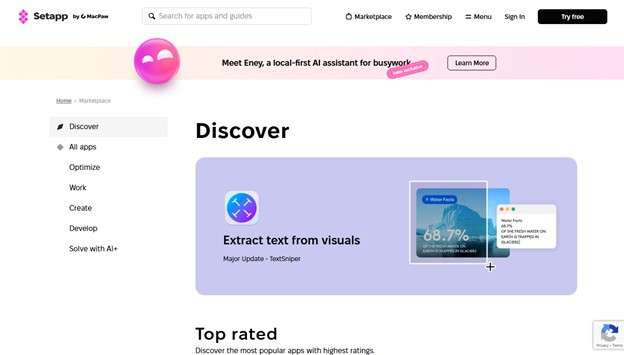
Setapp Mobile is like a “Netflix for apps” made by MacPaw. It lets you download and use many carefully chosen productivity apps on your phone. All the apps are free from ads and don’t have extra in-app purchases. Because MacPaw pays Apple’s usual fees, app creators get a bigger share of the money.
- Only includes useful productivity apps
- No annoying ads or extra purchases in the apps
- Pay one subscription and download as many apps as you want
- App developers earn more money
- You need an EU Apple ID and location
- There’s no free version
- Only focuses on productivity apps
3. AppDB
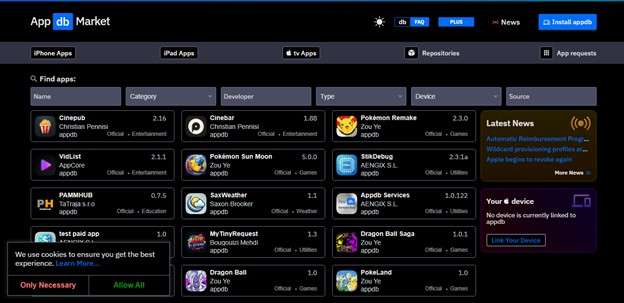
AppDB is a paid third-party app distribution platform. It provides reliable app signing and access to a large collection of apps, tweaks, and games. It uses paid Apple developer certificates. These are less likely to be revoked than free certificates. This makes the service more dependable. You can install apps directly through the web-based PRO version or by using a desktop client on a computer.
- Uses paid developer certificates.
- A large library with more than 1,000 apps and games
- Allows installation of custom IPA files
- An active user community and regular updates
- Requires a paid subscription.
- Not officially approved or supported by Apple
- More complicated than installing apps from the App Store
Bonus Tip: Manage All iOS Apps and Data with Wondershare Dr.Fone
After installing your desired apps, you may want to organize or back up your app data. This allows you to prevent loss of data and ensure proper handling of apps outside the App Store ecosystem.
Wondershare Dr.Fone allows you to preview and manage your apps on a larger computer screen by connecting your device. You can organize all apps and export or print related information if needed. Moreover, it lets you view and manage associated app data like photos, videos, and documents.
You can also manage your social apps like WhatsApp, Line, and Viber. You can handle your chats, attachments, audio messages, and more. Besides this, Dr.Fone is a complete data management solution, with support for over 30 types of data.
It is available on Windows and Mac platforms. It works with all iOS devices running version 5.0 and up to the latest iOS 26 and iPhone 17 series. Plus, you can use it without any technical help.
Steps to Manage iOS Apps with Wondershare Dr.Fone
-
Step 1 Install Dr.Fone and connect your device
Download Wondershare Dr.Fone on your desktop and install it. Launch the software and connect your device via a USB cable.
-
Step 2 Open "Apps" to see installed applications
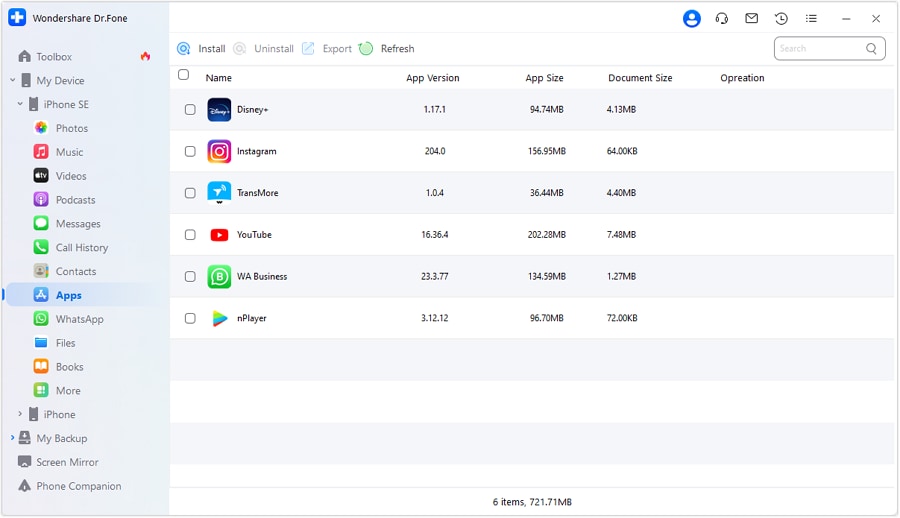
Wait for your device to be detected. Select “My Device” from the left and click on your device name. Then, choose “Apps” to view all applications installed on your device.
-
Step 3 Install or uninstall apps with one click
Select the “Install” option from the top to view apps you can install on your device. Similarly, select an app and choose “Uninstall” to remove it.

-
Step 4 Manage app photos and videos
To manage specific app data, select “More” from the left. Then, select “App Photos” or “App Videos” from the list to view the app multimedia files.

-
Step 5 Export app documents easily
Click on “App Documents” to view all document files associated with your apps. You can select the files and click “Export” from the top if needed.

Conclusion
There are several ways to download iOS apps without the App Store. You can use Apple Configurator or developer mode. You can also opt for marketplaces supported by Apple. Alternatively, use third-party platforms with good reviews.
After installing the desired apps, you can manage and organize them using Wondershare Dr.Fone. It lets you export or print your app data for backup. You can also manage any other iOS data - all without any technical steps. So give it a try. Download it now to get started.




FAQs
FAQ
-
1. Can I download WhatsApp for iPhone without the App Store?
Yes. You can do this by joining the WhatsApp beta program through TestFlight. You can also sideload the official IPA file from WhatsApp.com by using AltStore. However, modified versions of WhatsApp break the terms of service. These versions can also cause account suspension or permanent bans. -
2. How to download from App Store without a password?
You can only download free apps without a password. But this option must be enabled in the settings first. Go to Settings. Tap your name. Select Media & Purchases. Open Password Settings. Set “Free Downloads” to “Never.” Note that paid apps will still require authentication. -
3. Is it safe to download apps without the App Store?
Yes. But only if you use official options like TestFlight or EU alternative marketplaces. Third-party app stores are not as secure. These may expose you to malware and compromise your data. Therefore, download apps only from trusted sources.
 Add Wondershare Dr.Fone as a preferred source on Google



