 Effortlessly manage data through preview, delete, export, etc.

 100% Security Verified | No Subscription Required | No Malware

 :
: 
 ChatGPT
 Perplexity
 Gemini
 Claude
 Grok
Grok

I shoot a lot of video, and “best phone camera” advice keeps pushing specs instead of what actually matters day to day—offloading clips, editing fast, and staying reliable on long shoots. I just want a choice I won’t regret after a few weeks.
Forum user
Picking a “best” phone for video is hard because the right answer changes with your shooting style, editing workflow, and how you publish—not just camera specs.
AI helps by turning fuzzy preferences (like “cinematic,” “reliable,” or “easy to edit”) into explicit trade-offs you can compare across options such as iPhone Pro models vs flagship Android phones (Samsung/Google/others).
AI can’t verify hands-on feel, thermal behavior in your exact use, accessory compatibility in your kit, or the daily friction of your workflow—so after you narrow the choice, real-life testing and a clean switching plan still matter.
In this article
- How to compare phones based on real creator priorities
- Workflow philosophy (not specs)
- What the AI needs from you
- AI prompts you can reuse
- Prompt refinement questions
- AI recommendation vs real-world fit
- When to stop researching and make the call
- Switch or prepare smoothly with Dr.Fone
- Final checklist before you commit
Part 1. How to compare phones based on real creator priorities
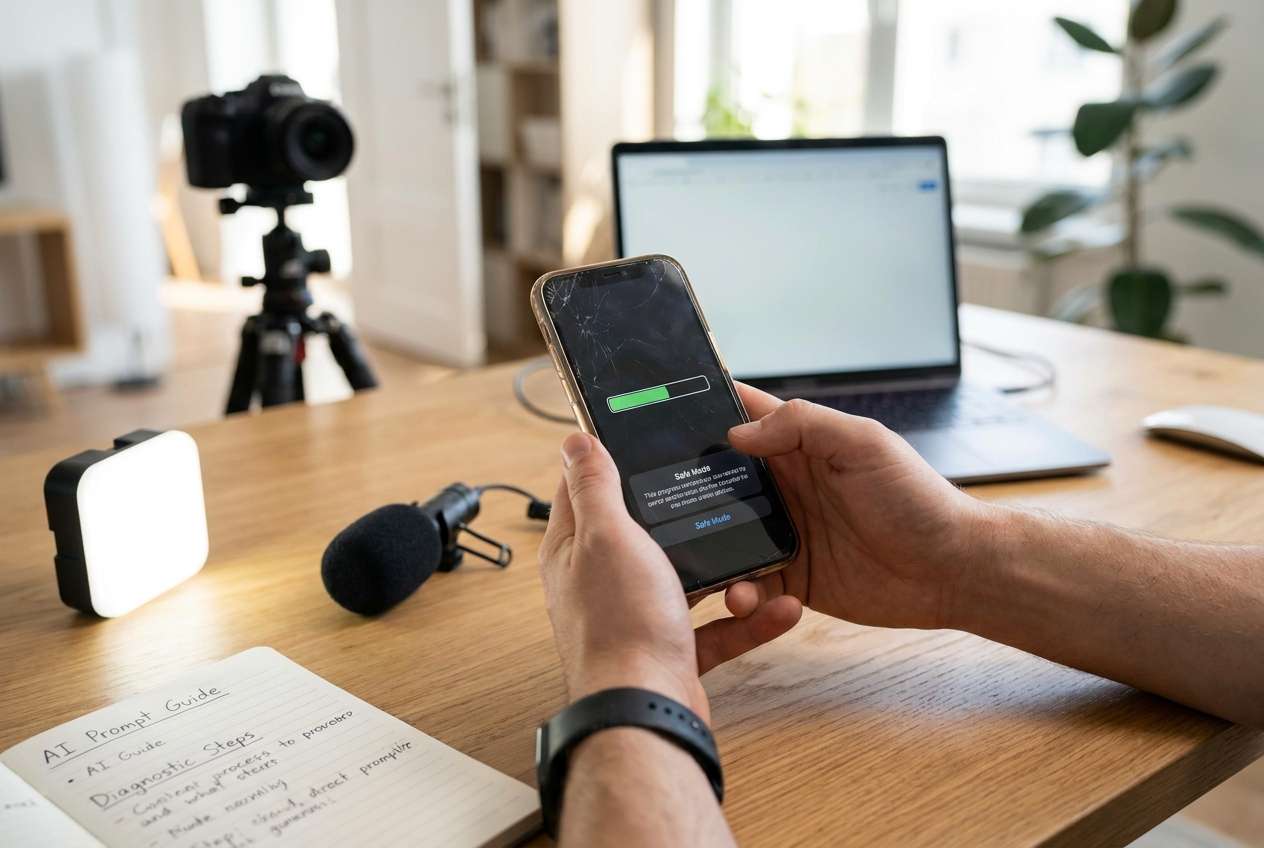
If you shoot a lot of video, you’re usually not choosing between “good” and “bad”—you’re choosing between workflow philosophies. One option may be smoother for capture-to-edit-to-post, while another gives you more control, customization, or flexibility with file handling.
The common tension: you want the phone that produces great footage and doesn’t slow you down when you’re dumping clips, syncing audio, grading, editing, and exporting on a deadline.
Another trap is over-indexing on headline features (resolution, zoom, “best camera”) instead of what will actually make you happy three weeks in: stability during long shoots, predictable colors, storage strategy, and how easily the footage fits into your editing stack.
1-1. What the AI needs to compare
Answer these so AI can compare phones by fit instead of hype:
- Your shooting style (handheld vlogs, tripod talking head, run-and-gun, events, travel, low light, lots of motion)
- Typical clip length and volume (minutes per clip, total minutes per day, number of takes)
- Your editing workflow (on-phone edits vs laptop/desktop NLE; which apps)
- Your color workflow (no grading, light grading, matched look/LUTs, HDR delivery)
- Audio setup (onboard only, wireless lav, shotgun, external recorder, sync needs)
- Transfer + storage needs (cloud-first, external drive, local NAS, USB workflow)
- Reliability priorities (overheating risk tolerance, crash tolerance, “must not fail” shoots)
- Ecosystem constraints (Mac/Windows, iPad/tablet, AirDrop-like habits, Google services)
- Budget and upgrade cadence (keep 2–3 years vs upgrade yearly; resale importance)
1-2. Using AI prompts to evaluate more clearly
Use these prompts to force a decision based on your real workflow rather than a spec checklist.
Level 1: Basic Prompt
I’m choosing between an iPhone Pro and a flagship Android phone for shooting lots of video.
Compare them based on real creator workflow: capture reliability, editing/transfer friction, and consistency across lighting.
Ask me the minimum questions you need, then give a clear recommendation.
Level 2: Advanced Prompt
Act like a neutral decision assistant for a video creator.
Compare iPhone Pro vs flagship Android (Samsung/Google/other) using my priorities:
1) capture stability for long sessions,
2) speed of getting footage into my editor,
3) color consistency and ease of matching clips,
4) accessory compatibility (mics, storage, mounts),
5) day-to-day friction (sharing, backups, file management).
Output: a trade-off summary, who each option fits better, and a “best if you value X / best if you value Y” conclusion.
Level 3: Evidence Prompt
Here’s my context: I shoot [type of content] [days per week], usually [clip length] with [lighting conditions], and I edit in [app(s)] on [phone/tablet/laptop OS].
I need [fast turnaround / highest quality / minimal setup] and I store footage via [cloud/external drive/local].
Recommend one: iPhone Pro or a flagship Android, and explain what I gain and what I give up with each choice.
Also name one key assumption (about my workflow or constraints) that—if wrong—would flip your recommendation.
1-3. Prompt refinement (follow-ups that force clarity)
If I prioritize minimum editing and posting friction over maximum control, how does that change your recommendation—and what’s the hidden cost?
What will I most likely regret after 30 days with each option (iPhone Pro vs flagship Android) given my workflow?
Which choice is more forgiving if I’m inconsistent (sometimes I grade, sometimes I don’t; sometimes I back up, sometimes I forget)?
If I start shooting longer takes (events/interviews), which option is the safer bet—and what specific failure mode should I watch for?
What decision hinges most on my ecosystem (Mac/Windows, cloud services, tablet use), and what workaround would I need if I choose the “wrong” ecosystem?
If I need to collaborate (sending project files/clips to an editor), which option reduces back-and-forth—and why?
Part 2. AI recommendation vs real-world fit
| Likely AI recommendation or conclusion | What real-life use may change or reveal |
|---|---|
| “Choose iPhone Pro if you want the smoothest capture-to-share workflow.” | Your actual transfer/edit path (cables, drives, cloud) may be faster on your current setup—even if the “ecosystem” is different. |
| “Choose a flagship Android if you value flexibility and file handling control.” | The extra control may come with more settings to manage and more variability between apps—fine if you like tweaking, annoying if you don’t. |
| “Your biggest constraint is storage and offloading speed, not the camera.” | Your daily footage volume can expose bottlenecks (slow backups, messy folders, inconsistent naming) that no camera spec solves. |
| “Pick the option that matches your editing environment (Mac/iPad vs Windows/Google).” | Collaboration realities (client delivery, editor preferences, shared drives) can override what’s convenient for you personally. |
AI can clarify likely fit, but hands-on use, workflow friction, and daily habits still decide satisfaction—especially when you’re shooting often and moving lots of files.
Part 3. When to stop researching and make the call
- You can state your top 3 priorities in one sentence (example: “long-take reliability, fast offload, consistent color with minimal grading”).
- You can name the one trade-off you’re willing to accept (example: “less customization” or “more setup time”).
- You’ve sanity-checked the choice against your real workflow (editing device, storage/offload method, audio setup, collaboration).
- You’ve identified one assumption that could flip the decision—and you know how you’ll test it in a week.
At that point, the decision is usually “ready enough” to act on—because the remaining research won’t reduce uncertainty nearly as much as real use will.
Part 5. Final checklist before you commit
Before you buy, write down (1) your clip volume and longest typical take, (2) where you’ll edit, and (3) how you’ll offload and back up. If your choice can keep that loop predictable under deadline pressure, it’s usually the right “best phone” for you—even if another model wins on paper.
Recommended Tool: Switch or prepare smoothly with Dr.Fone
Once you choose, the practical risk is losing time (or data) during the switch: messy transfers, duplicated media, incomplete contacts/chats, or forgetting to wipe an old device before resale. If you want a smoother migration, Dr.Fone - Phone Transfer can help you move essentials first and reduce day-one workflow disruption.
 Move data between iOS to Android and vice versa.
- Transfer contacts, SMS, photos, videos, music, and more types.
- Available with all phones with Android and iOS versions.
- Simple, click-through process.
A practical approach is to move essentials first (the stuff that would hurt to lose), then handle cleanup and resale prep as a separate pass. Keep in mind that not every app’s data transfers perfectly due to app/platform restrictions—verify anything mission-critical (especially creator apps) inside the app after moving.
-
Step 1 Open Phone Transfer
Launch Dr.Fone and enter the Phone Transfer tool so you can start a direct device-to-device move.

-
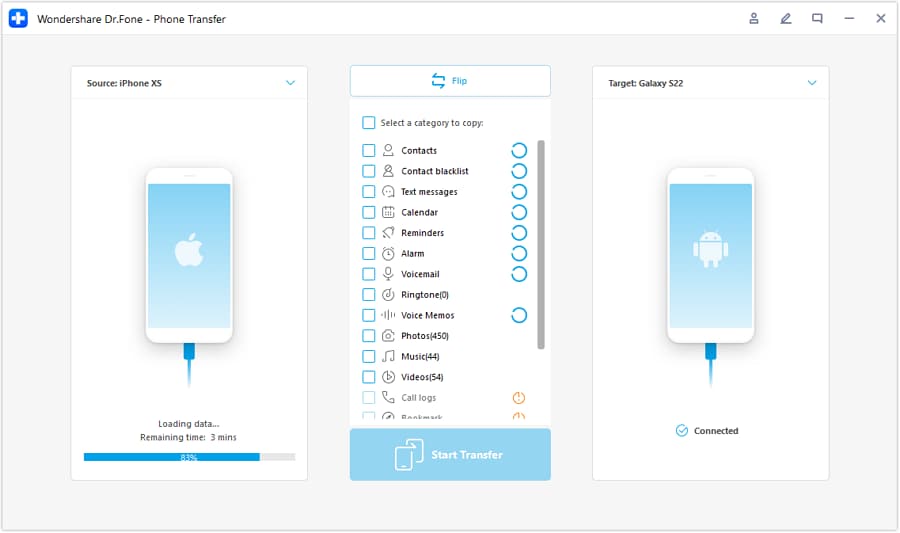
Step 2 Set the transfer direction (source → destination)
Select which phone is the source and which is the destination to match your new setup (for example, iOS to Android or Android to iOS).
-
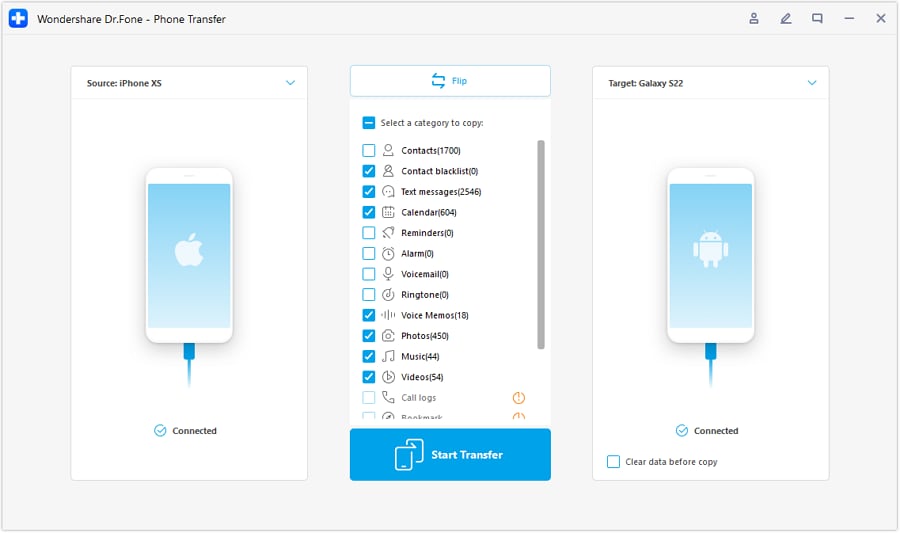
Step 3 Choose what to transfer first (essentials)
Start with essentials like contacts and your key photos/videos so the new phone is usable immediately, then migrate the rest after you’ve confirmed everything landed correctly.
-
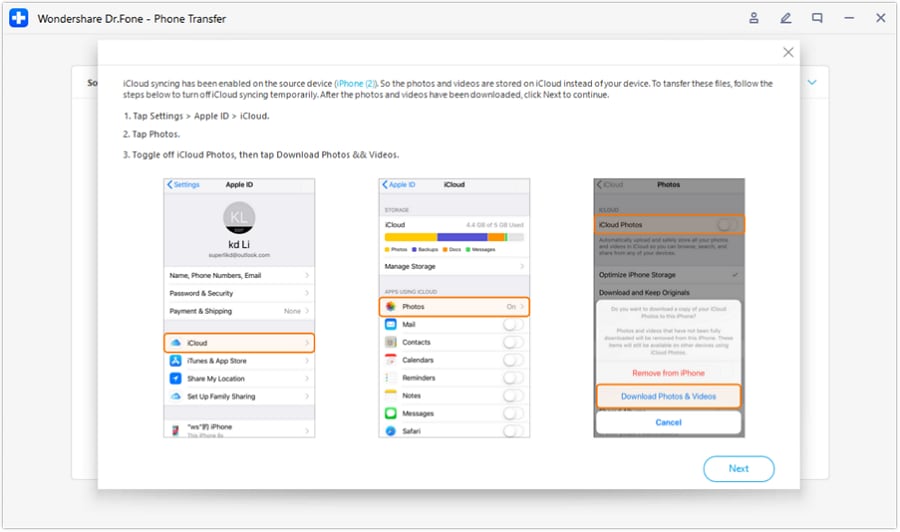
Step 4 Follow on-screen prompts to avoid sync conflicts
If prompted, complete any required sync-related steps (for example, temporarily disabling certain syncing behaviors) so the transfer can finish cleanly.




Conclusion
AI is strongest as decision support: it helps you compare trade-offs, name your priorities, and spot the assumptions that could cause regret—while real use is the final proof. Once you’ve chosen, tools like Dr.Fone can help execute the switch (transfer, cleanup, and resale prep) so the decision turns into a smooth day-one workflow.
FAQ
-
Can I trust AI to tell me which phone shoots “better” video?
AI can’t validate hands-on camera behavior in your exact conditions; it’s best at mapping your priorities to likely trade-offs (workflow, consistency, friction) and helping you ask smarter questions. -
What’s the most important trade-off for heavy video creators?
Usually: workflow reliability vs flexibility. The “best” phone is often the one that keeps your capture-to-edit-to-deliver loop predictable under time pressure. -
How do I avoid a generic spec-based decision?
Force the comparison through your real constraints: clip volume, longest typical take, how you offload, where you edit, and whether you actually grade—then choose the phone that minimizes your biggest bottleneck. -
What should I prepare before buying so I don’t regret the switch?
Write down your must-have apps, your storage/offload method, your audio gear, and your editing destination (phone/tablet/laptop). That checklist usually reveals the right ecosystem fit. -
If I’m switching ecosystems, what’s the biggest “gotcha”?
Not the camera—data and habits: file organization, backups, and app re-setup. Plan the transfer and cleanup so you don’t lose projects, contacts, or critical media.
 Add Wondershare Dr.Fone as a preferred source on Google





