 Effortlessly manage data through preview, delete, export, etc.

 100% Security Verified | No Subscription Required | No Malware

 :
: 
 ChatGPT
 Perplexity
 Gemini
 Claude
 Grok
Grok

I tried to “test my commute” before moving, but Google Maps, Waze, and transit apps all gave me different ETAs. I don’t need the best app on paper—I need the one that matches my priorities and won’t surprise me on a random Tuesday morning.
Reddit user, r/travel
Simulating a commute route before you travel (or relocate) sounds simple—until different tools give you different answers, and “best” depends on what you’re optimizing for.
AI helps most when you stop asking “Which is best?” and start turning your priorities (arrival certainty, live traffic, transit reliability, toll costs, parking, safety, battery) into explicit trade-offs.
AI still can’t feel real-world friction—like a confusing interchange, crowded platforms, poor GPS downtown, or the stress of a tight transfer—so you’ll want a small real-life validation step after you decide.
In this article
- How to compare a commute simulation based on real priorities
- Define the “random Tuesday” target
- Pick what you’re optimizing for
- Choose tools by uncertainty (traffic, transit, parking)
- Plan one lightweight validation
- What the AI needs to compare
- AI prompts to evaluate commute tools (Level 1–3 + refinement)
- AI recommendation vs real-world fit (and when to stop researching)
- After choosing: simulate and prepare smoothly with Dr.Fone

Part 1. How to Compare “Simulate a Commute Route Before Travel” Based on Real Priorities
You’re trying to estimate what your commute will actually be like before you commit—maybe for a new job, a temporary stay, or a move. You want something closer to “what happens on a random Tuesday at 8:10 AM” than a single ideal route.
The uncertainty: one app is great at live traffic, another is better at transit timing, and another is better at multi-stop planning. But you don’t want to test everything for days.
The decision tension is practical: you’re not picking an app for fun—you’re reducing the risk of being late, overpaying (tolls/parking), or choosing housing based on a commute that turns out to be unrealistic.
1-1. Define the “random Tuesday” target
Before comparing tools, define a specific scenario (day(s), arrival time, and mode). Otherwise, you’ll compare “best-case” routes that don’t match your real routine.
1-2. Pick what you’re optimizing for
“Shortest time” and “most predictable arrival” often point to different choices. Make your top success metric explicit so the comparison isn’t just a feature list.
1-3. Choose tools by uncertainty (traffic, transit, parking)
Different apps fail in different ways: driving ETAs can miss parking/search time; transit plans can miss real headways and transfer stress. Your main uncertainty should decide your main tool.
1-4. Plan one lightweight validation
AI can narrow your options, but one “dry run” (or a short week of checks) is what confirms whether the workflow and friction feel workable.
Part 2. What the AI Needs to Compare
Share the details below so the AI can compare methods based on your real constraints:
- Origin and destination (neighborhoods or rough areas is fine)
- Commute days/times (e.g., Tue–Thu, arrive by 9:00 AM)
- Modes you’re considering (drive, transit, bike, rideshare, mixed)
- Your top success metric (arrival reliability, lowest cost, least stress, shortest time, safest route)
- Constraints (tolls OK/not OK, must avoid highways, need parking, accessibility needs, stroller, etc.)
- Your tolerance (how much variability is acceptable—±5 min vs ±20 min)
- Whether you need multi-stop planning (drop-off, errands, park-and-ride)
- Phone context (iPhone/Android, data plan limits, battery concerns, car head unit/CarPlay/Android Auto)
Part 3. Using AI Prompts to Evaluate “Simulate a Commute Route Before Travel” More Clearly
Use these prompts to force a priority-based comparison instead of a vague “best app” answer.
3-1. Level 1: Basic Prompt
I need to simulate a commute route before travel. Compare Google Maps vs Waze vs Citymapper (or a local transit app) for my use case.
Focus on which one best matches reliability, cost control (tolls/parking), and least-stress navigation—not specs.
3-2. Level 2: Advanced Prompt
Help me choose the best tool to simulate my commute before traveling: Google Maps vs Waze vs Citymapper/local transit app.
1) Ask me 6–10 clarifying questions first (timing, mode, reliability needs, tolls/parking, safety/comfort, battery/data limits).
2) Then rank the options for my priorities and explain the trade-offs, including “who this is best for” and “who should avoid it.”
3) End with a simple decision rule I can use (e.g., “If X matters most, pick Y.”).
3-3. Level 3: Evidence Prompt
Context: I’m traveling/relocating and need to estimate a realistic commute for [days] at [arrival time].
I’m choosing between [driving vs transit] and I care most about [arrival reliability / lowest cost / least stress].
Constraints: [tolls yes/no], [parking uncertainty], [avoid highways], [accessibility], [weather], [battery/data].
Based on this, recommend whether I should rely mainly on Google Maps, Waze, Citymapper/local transit tools, or a combination.
For each option, state what I gain and what I give up, and identify one key assumption (about my timing, mode, or constraints) that would change your recommendation.
3-4. Prompt Refinement (Follow-up Prompts)
If I can only test one “dry run,” what single experiment should I do to validate your recommendation (time, day, and what to measure)?
What’s the most likely regret for each option (e.g., late due to variability, stress from aggressive reroutes, missed transfers, hidden costs)?
If my priority changes from “fastest” to “most predictable,” how does your ranking change and why?
What are the top 3 factors that make simulated commute times systematically wrong in my scenario (construction, event traffic, school zones, unreliable headways, parking search)?
Give me a simple scoring rubric (0–10) for each option using my priorities, and show the weights you chose.
Part 4. AI Recommendation vs Real-World Fit (and When to Stop Researching)
4-1. AI Recommendation vs Real-World Fit
| Likely AI recommendation or conclusion | What real-life use may change or reveal |
|---|---|
| “Use Waze if live traffic avoidance is #1.” | Reroutes may feel stressful or too aggressive; GPS accuracy and signal drops can change outcomes. |
| “Use Google Maps for balanced driving + broad coverage.” | ETA might be “average-case” and not reflect parking search time, pickup/drop-off delays, or building access. |
| “Use Citymapper/local transit tools for transit reliability planning.” | Real headways, platform crowding, and transfer stress can be worse than the plan suggests. |
| “Use a combo: transit tool for routing + Google/Waze for last-mile driving.” | App-switching friction, notification delays, and battery/data constraints may make the combo annoying in practice. |
AI can clarify likely fit and trade-offs, but hands-on use, workflow friction (app switching, alerts), and daily habits (buffer time, parking routine, walking pace) decide whether the choice feels “right.”
4-2. When to Stop Researching and Make the Call
- You can state your top 2 priorities (e.g., “predictable arrival” and “low stress”) and name what you’re willing to sacrifice (e.g., “not always the fastest”).
- You’ve identified the biggest uncertainty (traffic volatility, transit headway reliability, parking time) and chosen one tool that best addresses it.
- You have a simple decision rule (“If driving most days, prioritize X; if transit 3+ days/week, prioritize Y”).
- You’ve defined a lightweight validation plan (one dry run or one week of checks) and what would make you switch.
At this point, you’re no longer collecting endless opinions—you’re making a defensible choice with a clear fallback.
Part 5. After Choosing: Switch or Prepare Smoothly with Dr.Fone
Once you’ve chosen your approach, you may also want a practical way to simulate GPS movement along a planned route on your phone (for previewing timing, turns, or location-based behavior). One option is Dr.Fone - Virtual Location, which is designed for changing/simulating device location on iOS and Android.
 Set your map route to simulate GPS movement.
- Set your wanted movement speed.
- HD and large map view to check location.
- Fake GPS location to anywhere.
If your goal is to preview a route-like commute flow on your device, you can use a simple route simulation workflow like this:
-
Step 1 Activate One Stop Route mode
Choose the route simulation option for a single origin-to-destination trip.
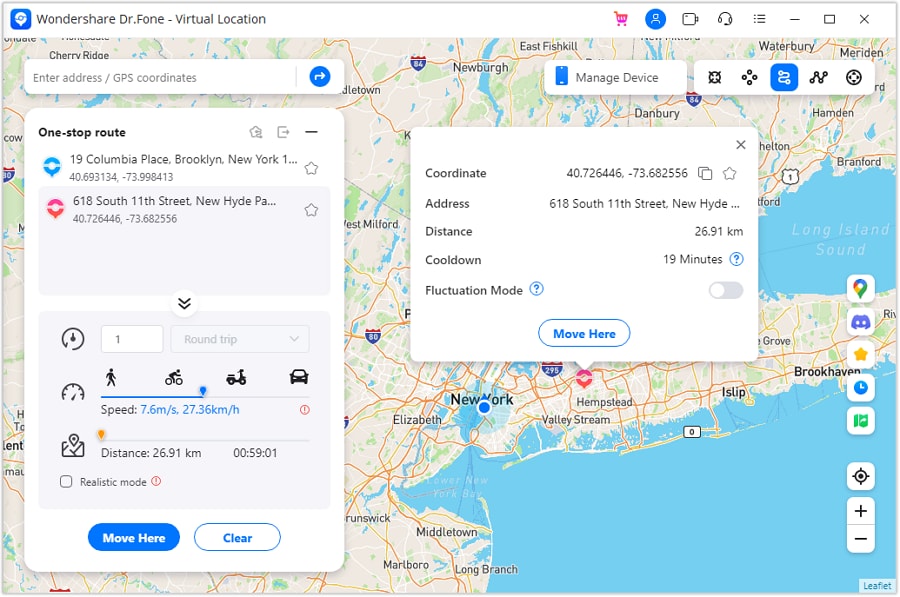
-
Step 2 Set parameters to simulate
Configure the route details and movement parameters (such as how the device “moves” along the route).
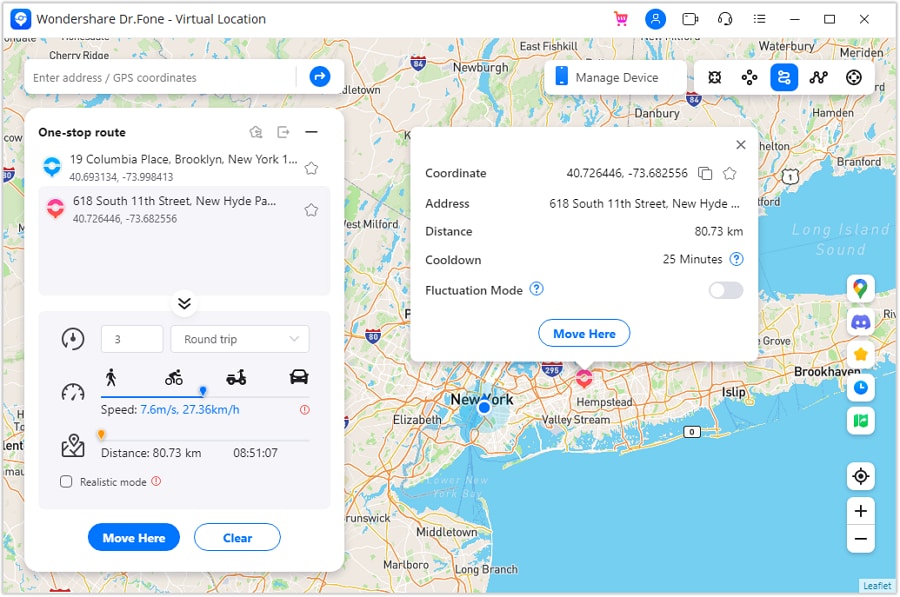
-
Step 3 Start One Stop simulation
Start the simulation and monitor how the route plays out on the map view.
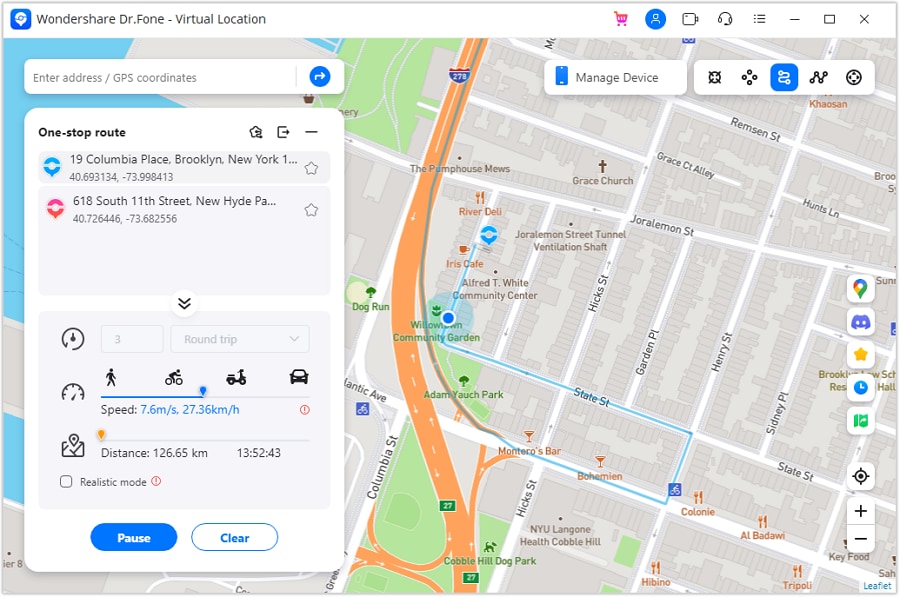
-
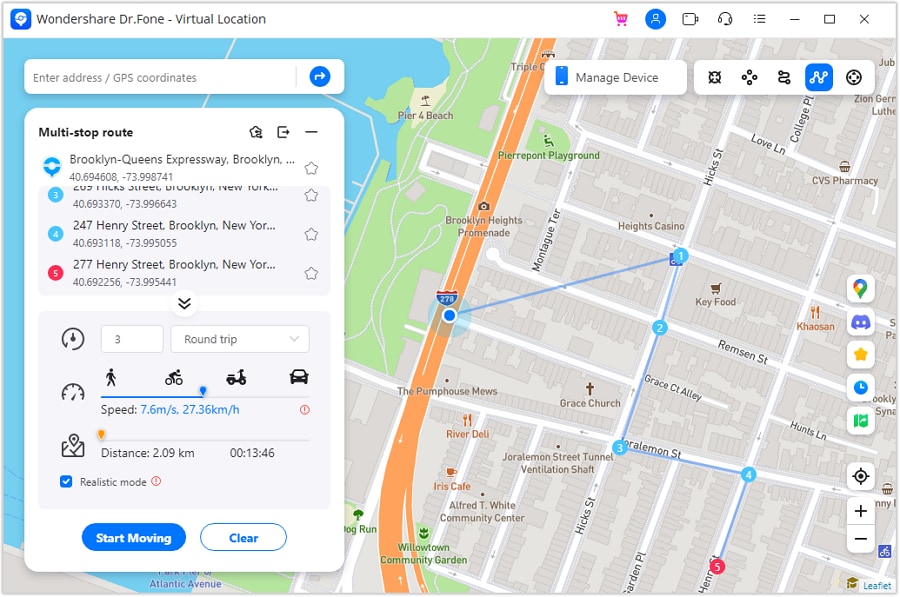
Step 4 Activate Multi Stop simulation (if your commute has errands)
If you need multiple stops (drop-off, errands, park-and-ride), switch to a multi-stop style simulation.
5-1. Transfer essentials to the phone you’ll commute with
Use Dr.Fone to move key data (like contacts, photos, and other personal content) to your primary commute device so setup doesn’t slow you down.

5-2. Clean up storage so navigation runs smoothly
Use Dr.Fone to help manage and remove clutter (duplicate/old files) so you’re not fighting low storage during travel days.
5-3. Prepare an old phone for handoff or resale
If you upgraded for better battery/GPS, use Dr.Fone to erase personal data on the old device before selling or giving it away.




Conclusion
AI is best used here as decision support: it turns “Which is best?” into clear trade-offs and a testable choice, while real-world use provides the final proof—and if your decision involves switching devices or prepping one for resale, Dr.Fone can help you execute that next step smoothly.
FAQ
-
Can I trust AI to pick the “best” commute simulation app?
Trust it to structure trade-offs and clarify fit; don’t trust it to replicate real traffic, transfer stress, GPS issues, or parking delays in your exact situation. -
What’s usually the most important trade-off when simulating a commute?
Predictability vs speed: the “fastest” route isn’t always the one that gets you there most reliably with the least stress. -
How do I avoid a generic, spec-based decision?
Force a priority ranking (reliability, cost, stress, time) and require “what you gain/what you give up” for each option based on your constraints. -
What should I prepare before I run a dry test of the commute?
Pick the exact arrival time target, decide your buffer (e.g., +15 minutes), and track one metric (arrival reliability) plus one friction point (parking or transfer difficulty). -
If I switch phones for commuting, what’s the safest way to move my stuff?
Plan the transfer before travel days, move essentials first, and confirm logins; tools like Dr.Fone can help with the transfer and cleanup, but app re-setup may still be required.
 Add Wondershare Dr.Fone as a preferred source on Google





