 Effortlessly manage data through preview, delete, export, etc.

 100% Security Verified | No Subscription Required | No Malware

 :
: 
 ChatGPT
 Perplexity
 Gemini
 Claude
 Grok
Grok

I’m just trying to play for 60–90 minutes without my battery dying halfway—and “best route” tips never match what actually drains my phone.
Forum user
“Best route” advice usually ignores what actually drains your battery: screen time, navigation habits, signal quality, and how often you stop to interact in-game.
AI helps when you’re torn between approaches (live navigation vs. quick waypoints vs. offline planning) by turning your vague preferences into explicit trade-offs you can choose from.
AI can’t verify how your phone behaves in your exact neighborhood (signal dips, heat, app bugs, brightness habits), so once you decide, the real test is a short trial run—and then handling any switching, prep, or cleanup you need afterward.

In this article
- Compare route approaches based on real priorities
- Convenience vs. coverage vs. battery safety
- Why live navigation can drain faster
- Why fewer checks can still fail in practice
- How safety and pacing affect battery outcomes
- What the AI needs to compare
- AI prompts to evaluate route options clearly
- When to stop researching and make the call
- Execute the plan smoothly with Dr.Fone
Part 1. Compare Route Approaches Based on Real Priorities
Most players aren’t choosing between “good” and “bad” routes—they’re choosing between convenience, coverage, battery safety, and how much phone handling they can tolerate for 60–120 minutes.
A common tension: live turn-by-turn navigation feels effortless but can keep the screen on and radios busy, while pre-planned loops with fewer checks save battery but risk missed spawns/stops and more “did I already go here?” moments.
Another uncertainty is safety and pacing: a battery-efficient plan that forces constant screen checks can be worse in practice than a slightly less efficient plan that lets you look up and walk smoothly.
Part 2. What the AI Needs to Compare
Share the following so the AI can compare route approaches in a way that matches your real play style:
- Your game style: farming stops/gyms/spawns, completing routes/tasks, raiding, casual walk, etc.
- Typical session length and time of day (heat + brightness needs matter)
- Your phone situation: model (roughly), battery health level if known, and whether you can bring a power bank
- Your mobility: walking only, biking, public transit mix, accessibility needs
- Your environment: dense city vs suburbs, hills, shade, indoor/outdoor stretches, signal quality (good/spotty)
- Your tolerance for phone handling: “screen mostly off” vs “I don’t mind frequent checks”
- The route options you’re deciding between (pick 2–3), for example:
- A) Live turn-by-turn navigation the whole time
- B) Pre-planned loop with 5–10 pinned waypoints, minimal navigation
- C) Offline map / downloaded area + manual checking
- Your non-negotiables: safety, staying near home, restrooms, avoiding crossings, avoiding crowds, etc.
Part 3. Using AI Prompts to Evaluate Route Options More Clearly
Use the prompts below to force a clear trade-off decision instead of a vague “it depends.”
3-1. Level 1: Basic Prompt
CopyI’m deciding between (Option A), (Option B), and (Option C) to plan a battery-safe route for a location-based game. Compare them mainly on battery impact, safety/phone-handling, and how likely I am to get lost or waste time. End with which option fits me best based on what I share next.
3-2. Level 2: Advanced Prompt
CopyAct as a decision assistant. Compare these route approaches for location games:
- Option A: live turn-by-turn navigation throughout
- Option B: pre-planned loop with pinned waypoints (minimal navigation checks)
- Option C: offline map/downloaded area + manual checks
My priorities (ranked): **[battery safety] [safety/less screen time] [coverage/efficiency] [simplicity]**.
My context: **[session length] [area type] [signal quality] [whether I have power bank] [walking/biking]**.
Deliver:
1) A trade-off summary for each option (who it’s best for, who should avoid it)
2) A recommended option for me
3) A “default plan” route structure (loop vs out-and-back, checkpoint frequency, when to stop and rest) that matches the recommendation.
3-3. Level 3: Evidence Prompt
CopyHere’s my real context: **[paste: device + battery health estimate + typical brightness + session length + neighborhood/signal + play goals]**.
I’m choosing between:
- Option A: **[describe]**
- Option B: **[describe]**
- Option C: **[describe]**
Recommend one option and explain it in “what you gain / what you give up” terms for each option. Also identify **one key assumption** you’re making that—if false—would flip your recommendation (for example: I bring a power bank, signal is stable, I can tolerate frequent screen checks, or I can pre-download maps).
3-4. Prompt Refinement (Follow-up Prompts)
Copy“Ask me 7 yes/no questions that will most change the recommendation, then re-rank the options after my answers.”
Copy“Where is the hidden battery cost in each option (screen-on time, GPS polling, signal hunting, app switching)? Explain which cost is most likely in my context.”
Copy“What’s the most likely regret with each option after 30 minutes (e.g., ‘I’m checking my phone too often,’ ‘I’m wasting time rerouting,’ ‘I’m missing clusters’)? Suggest one mitigation per option.”
Copy“If my battery drops faster than expected, give me a fallback route rule-set I can apply immediately (shorten loop, reduce checks, switch to waypoints, go to shaded area).”
Copy“Assume I care about safety first: redesign the recommendation to minimize road crossings, phone handling, and decision points—even if it costs some efficiency.”
Copy“Assume I care about efficiency first: redesign the recommendation to maximize stops/spawns per minute—then tell me the battery trade-off I’m accepting.”
3-5. AI Recommendation vs Real-World Fit
Likely AI recommendation or conclusion What real-life use may change or reveal “Pinned-waypoint loop (Option B) balances battery and simplicity.” Your area may have confusing paths/closures that force frequent screen checks anyway. “Offline map/manual checks (Option C) saves power if signal is weak.” If the game needs frequent data updates, offline maps won’t prevent battery drain from the game itself. “Live navigation (Option A) is best if you hate planning.” Turn-by-turn + high brightness + heat can drain faster than expected, shortening the session. “Shorter loops reduce risk and let you bail out early.” A loop can still feel inefficient if spawns/stops are uneven or temporarily reduced in your area. AI can clarify likely fit and trade-offs, but hands-on use, workflow friction (how often you unlock/check), and daily habits (brightness, multitasking, heat) still decide satisfaction.
Part 4. When to Stop Researching and Make the Call
- You can say, in one sentence, what you’re optimizing for (example: “90 minutes, low phone handling, stable battery, no getting lost”).
- You’ve chosen a primary plan and a fallback rule (what you’ll do if battery drops too fast or the area is crowded).
- You know your “regret trigger” (the one thing that will annoy you most) and you’ve added one mitigation.
- You’ve done (or scheduled) a 15–20 minute mini-test route to validate screen-check frequency and signal stability.
At that point, you’re not missing information—you’re ready to run a real trial and commit.
Part 5. After Choosing: Execute Your Plan Smoothly with Dr.Fone
If your route decision depends on simulating movement, changing how you play, or keeping your phone workflow stable during longer sessions, Dr.Fone - Virtual Location can help you set routes and reduce constant on-the-go adjustments.
 Set your map route to simulate GPS movement.
- Set your wanted movement speed.
- HD and large map view to check location.
- Fake GPS location to anywhere.

Below is a simple execution flow for simulating a route (useful when you want controlled pacing and fewer last-second decisions).
-
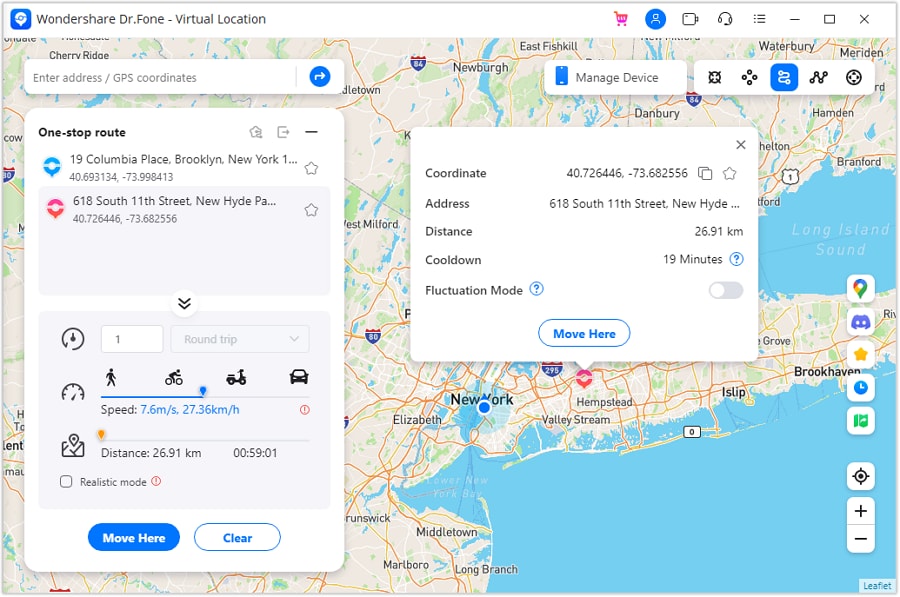
Step 1 Activate One Stop Route mode
Choose the One Stop Route option so you can simulate movement along a defined path with fewer mid-session changes.
-
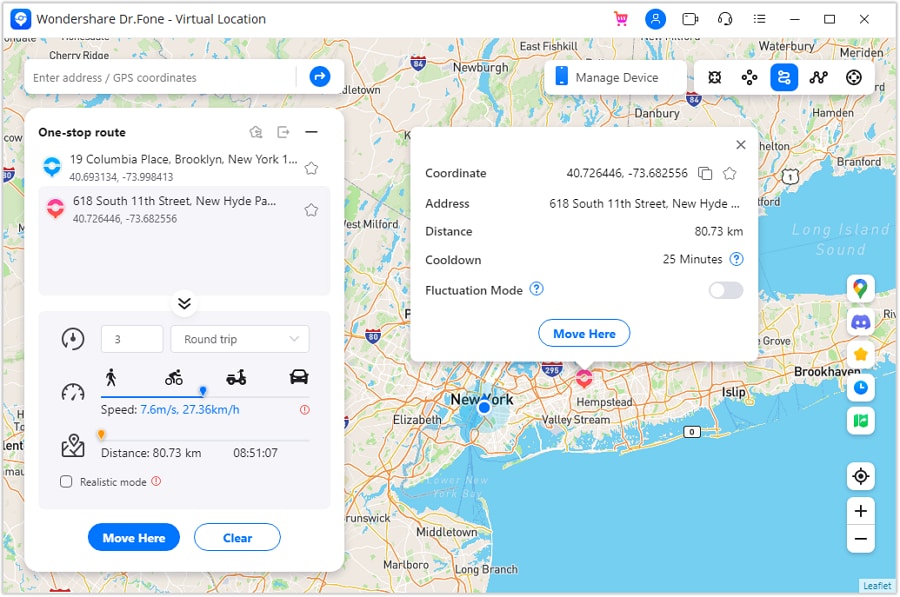
Step 2 Set parameters for the simulation
Set the route and movement settings (including speed) based on how steady you want the session to feel.
-
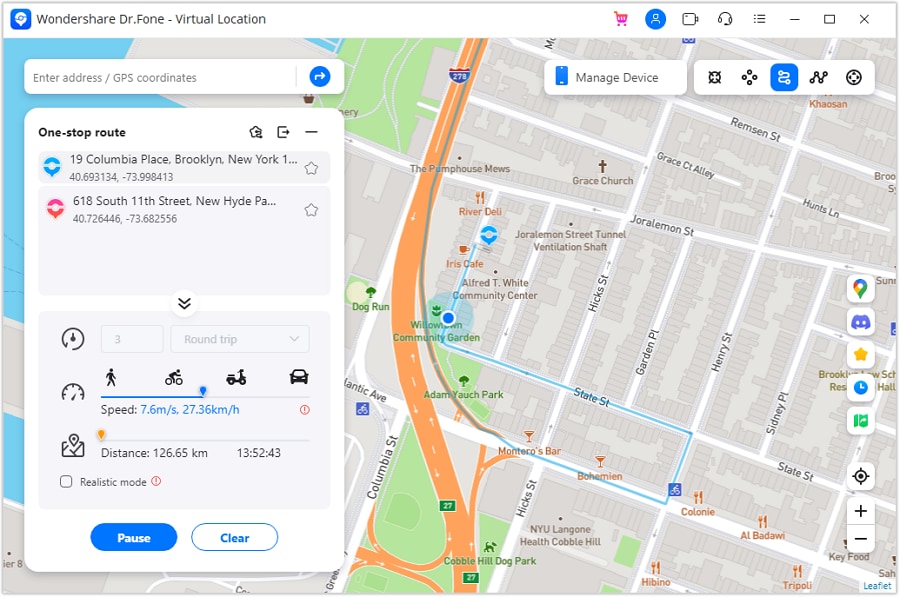
Step 3 Start the One Stop simulation
Start the simulation and monitor whether the pace matches your “battery-safe” plan (especially if you’re trying to reduce frequent manual checks).
-
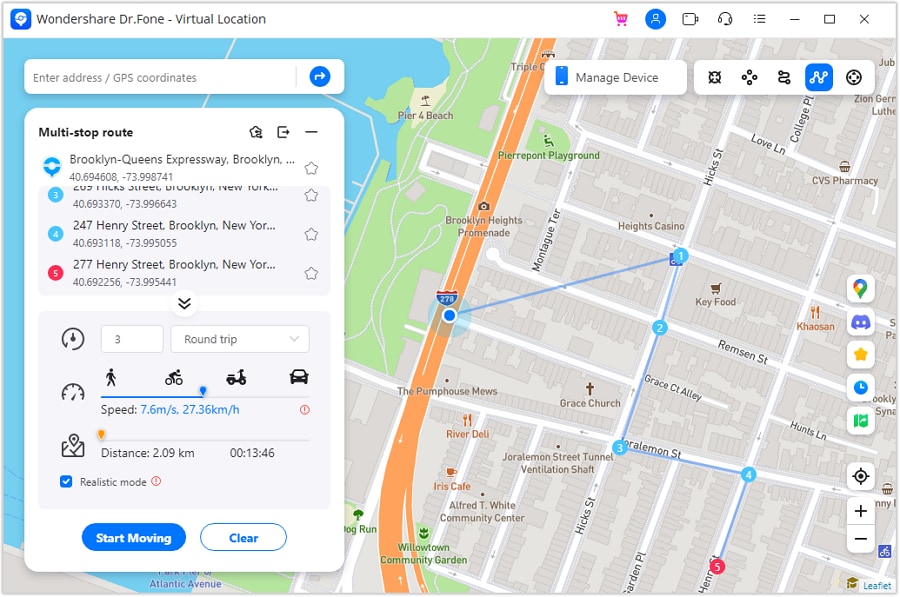
Step 4 Switch to Multi Stop simulation when you need more control
If you decide a waypoint-style plan fits better, use Multi Stop to simulate moving across several pinned stops with clearer checkpoints.


Conclusion
AI is best used to turn “which is better?” into a clear trade-off decision you can test quickly; real-world use is the final proof, and if your decision involves switching devices, backing up, cleaning up, or resale prep, Dr.Fone helps you execute that next step smoothly.
FAQ
-
Can I trust AI to tell me which route plan saves the most battery?
Use AI for comparing trade-offs and likely friction points, not for exact battery outcomes—your signal, heat, brightness, and habits dominate. -
What’s the single most important trade-off in battery-safe route planning?
Usually: efficiency vs. phone handling—the more often you check, navigate, and reroute, the more screen time and radio use you create. -
How do I avoid a generic, spec-based decision?
Describe your session length, signal quality, and how often you’re willing to look at your phone. Those beat device specs for real-world drain. -
What should I prepare once I pick an approach?
A short test route, a fallback rule-set (shorten loop, fewer checks), and a phone plan (backup/transfer/cleanup if you’re switching devices). -
If I’m switching phones for battery reasons, what’s the smoothest way to move?
Back up first, then transfer essentials; expect to re-login to some apps and verify which progress is account-based.


 Add Wondershare Dr.Fone as a preferred source on Google





