 Effortlessly manage data through preview, delete, export, etc.

 100% Security Verified | No Subscription Required | No Malware

 :
: 
 ChatGPT
 Perplexity
 Gemini
 Claude
 Grok
Grok

I keep reading “all-day battery” and “fast charging” claims, but I still can’t tell which phone will actually survive my commute and busy days. Specs aren’t helping me decide.
Reddit user, r/Android
Battery and charging comparisons look simple, but “best” answers often ignore how you actually use your phone day to day—idle time, screen-on habits, signal strength, and when you can plug in.
AI helps by turning fuzzy preferences (like “I want all-day battery” or “fast charging matters”) into a structured trade-off: endurance vs speed, consistency vs peak performance, and convenience vs long-term battery health.
AI can’t verify real-world feel—like whether a phone stays cool while charging, whether your commute ruins battery via poor signal, or whether your routine makes overnight charging unavoidable—so the decision still needs to map to your habits, not just claims.
In this article
- Part 1. Using AI prompts to evaluate battery life and charging
- Level 1: Basic prompt
- Level 2: Advanced prompt
- Level 3: Evidence prompt
- Prompt refinement follow-ups
- Part 2. How to compare based on real priorities
- Part 3. What the AI needs from you
- Part 4. AI recommendation vs real-world fit
- Part 5. When to stop researching and make the call
Part 1. Using AI prompts to evaluate battery life and charging more clearly
Use the prompts below to force explicit trade-offs instead of chasing headline numbers.
1-1. Level 1: Basic Prompt
I’m choosing between Phone A and Phone B and I care most about battery life and charging. Ask me the minimum questions needed about my daily routine, then summarize which phone is a better fit for my battery/charging needs and why.
1-2. Level 2: Advanced Prompt
Compare Phone A vs Phone B for battery + charging based on my real priorities, not spec headlines.
1) List the top 5 factors that will decide my experience (e.g., standby drain, screen-on endurance, top-up usefulness, charging heat, long-term battery health).
2) For each factor, explain who benefits more from A vs B and the trade-off.
3) End with a clear “best for me if…” decision rule for each phone.
1-3. Level 3: Evidence Prompt
Here’s my real usage: [describe weekday + weekend pattern, signal conditions, travel, charging access, and pain point]. I’m deciding between Phone A and Phone B.
Recommend one for me and explain:
- What I gain and what I give up with each option (battery endurance vs charging flexibility vs battery health).
- The one key assumption you’re making about my routine that, if wrong, would flip your recommendation—and how to test that assumption in the first week.
1-4. Prompt Refinement
If my goal is “never below 30% before dinner,” what daily pattern would make Phone A safer than Phone B, and what pattern would make that irrelevant?
Model two days: a “normal day” and a “worst-case day” (travel + weak signal + heavy maps). Which phone fails first, and what’s the likely failure reason?
I’m tempted by faster charging. Tell me when fast charging doesn’t actually reduce anxiety (because of my schedule), and what alternative habit would matter more.
If I keep the phone for 4 years, how should I weigh charging speed vs battery wear risk given my likely charging routine?
What single accessory (car charger, power bank, second charger, wireless pad) would reduce the difference between the phones the most—and does that change the smarter choice?
Part 2. How to compare phones by battery life and charging based on real priorities
Two phones can advertise similar “all-day battery,” yet one lasts longer in your routine because you use hotspot, live in a low-signal area, or scroll short bursts all day. Charging can be just as personal: 15 minutes can be “enough” for one person and meaningless for another.
The real tension is usually this: do you want maximum time away from the charger, or the ability to recover quickly when you forget to charge?
You’ll choose more confidently if you treat battery + charging as a system that includes your outlets, commute, work setup, travel frequency, and tolerance for battery anxiety.
Part 3. What the AI needs to compare
Give the AI enough context to compare your endurance needs against your charging opportunities:
- Your typical day (screen time, calls, navigation, camera, gaming, hotspot)
- Where battery drains happen (weak signal, heat, commuting, travel days)
- Charging access (desk charger, car, power bank, wireless pads, none)
- Your “failure point” (dies before bedtime, dies on commute, low-battery anxiety)
- Preference on charging style (short top-ups vs overnight)
- Long-term concerns (battery health, heat, keeping a phone 3–5 years)
- Your constraints (budget, size/weight tolerance, charger compatibility you already own)
Part 4. AI recommendation vs real-world fit
| Likely AI recommendation or conclusion | What real-life use may change or reveal |
|---|---|
| “Pick the phone with stronger endurance because you’re away from outlets.” | Your actual drain may be dominated by weak signal, hotspot, or specific apps, shrinking the advantage. |
| “Pick the faster-charging phone because you can top up easily.” | If you rarely have reliable top-up windows, charging speed won’t help when it matters. |
| “Choose the option that aligns with long-term battery health.” | Heat while charging, your case choice, and ambient temperature can change battery aging more than expected. |
| “Your routine suggests you’ll be fine with either; decide on secondary factors.” | Small friction (charger placement, cable availability, daily anxiety) can make one feel dramatically better. |
AI can clarify likely fit and expose trade-offs, but hands-on use—workflow friction, charging access, and daily habits—still decides whether you feel confident or constantly managing battery.
Part 5. When to stop researching and make the call
- You can state your top priority in one line (e.g., “I need endurance in weak signal,” or “I need 15-minute rescue charging”).
- You’ve identified your failure day and which phone is less likely to fail on it.
- You understand the main trade-off in plain language (what you gain / what you give up) and you accept it.
- You’ve named one “flip factor” (an assumption that could change the choice) and you have a simple way to test it quickly.
At this point, you’re not missing “one more spec”—you’re ready to decide based on how you actually live.
Product recommendation: switch or prepare smoothly after you choose
Once you’ve chosen a new phone, tools like Dr.Fone - Phone Transfer can help you execute the switch with less risk of data loss and less setup clutter that can create extra drain.
 Move data between iOS to Android and vice versa.
- Transfer contacts, SMS, photos, videos, music, and more types.
- Available with all phones with Android and iOS versions.
- Simple, click-through process.
Transfer what you actually need
Action: Use Dr.Fone to move essential data (photos, contacts, messages where supported) to the new phone so you can start clean without losing the important stuff.
-
Step 1 Open Phone Transfer
Launch Dr.Fone on your computer and enter the Phone Transfer module.

-
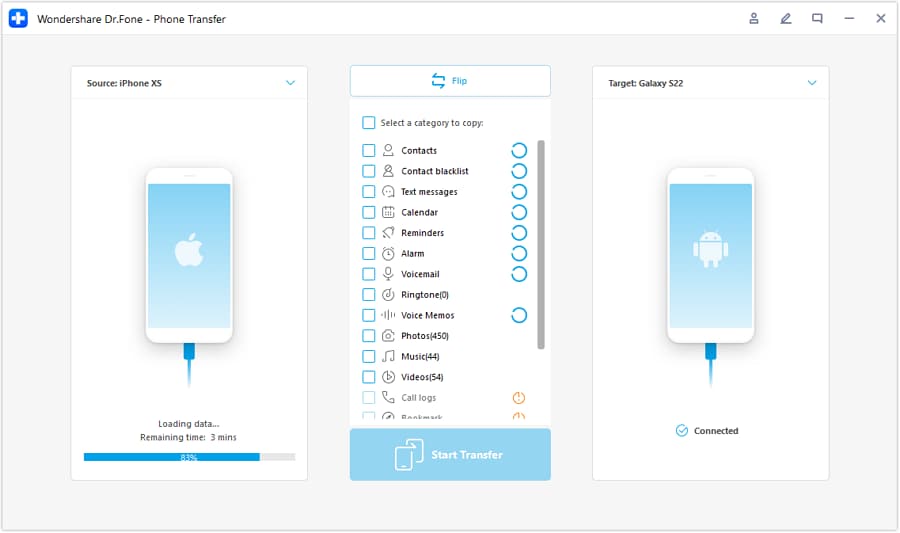
Step 2 Set the transfer direction
Select the correct path (for example, iOS to Android or Android to iOS) before proceeding.
-
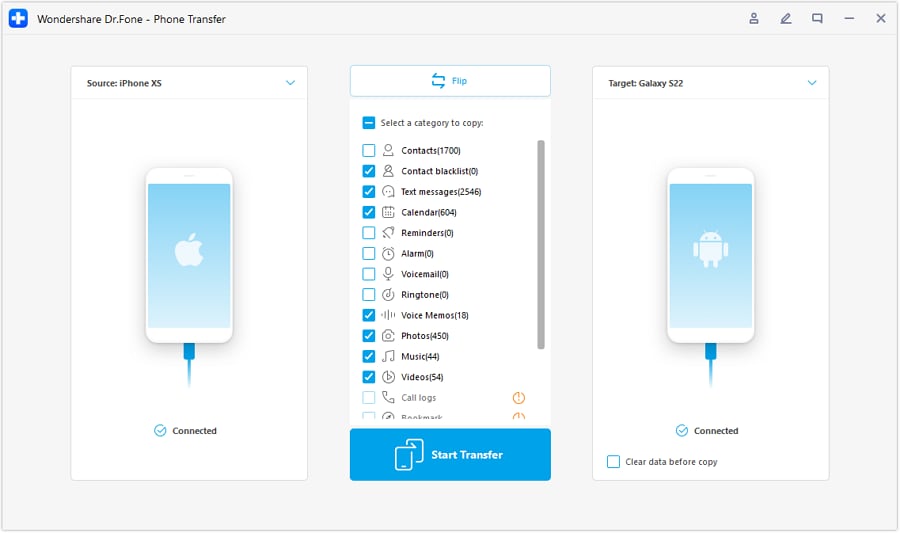
Step 3 Choose what to transfer
Select only the data you actually want to bring over, then start the transfer.
-
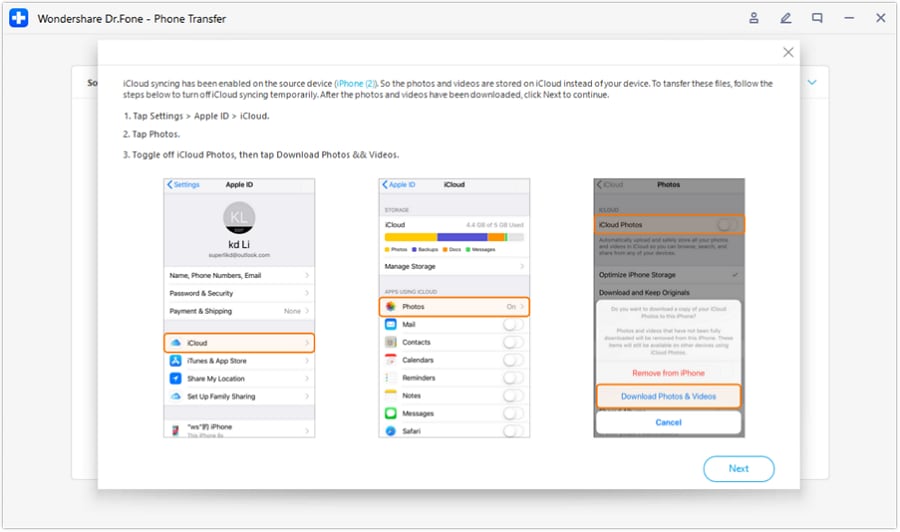
Step 4 Avoid sync conflicts if prompted
If needed, disable iCloud syncing during the process to prevent conflicts and interruptions.

Reduce battery-drain clutter during setup
Action: After moving data, use Dr.Fone to help remove unneeded items (duplicates/large files where applicable) so your new phone isn’t burdened by old storage bloat from day one.
Prepare the old phone for resale or handoff
Action: Use Dr.Fone tools to back up what you need and then wipe/erase personal data so you can sell or give it away with less risk.




Conclusion
AI is best used here as decision support: it turns “battery and charging” into explicit trade-offs matched to your day, while real use is the final proof; once you’ve chosen, Dr.Fone can help you execute the switch, reduce clutter, and prep the old phone smoothly if needed.
FAQ
-
Can AI really compare battery life and charging accurately?
AI can help you reason from your routine and known trade-offs, but it can’t validate real-world endurance for your exact apps, signal conditions, and temperatures. -
What’s the most important trade-off to decide first?
Whether you value endurance (fewer charging moments) or recovery (fast top-ups when you forget) more—this single choice usually clarifies everything else. -
How do I avoid a generic, spec-based decision?
Describe your “failure day” (travel, weak signal, heavy maps, hotspot) and your charging access. Then choose the phone that fails less often in that scenario. -
What’s a common regret point people miss?
Assuming fast charging solves everything—when their schedule doesn’t include consistent top-up windows or when charging heat/comfort becomes annoying. -
What should I prepare right after choosing?
A shortlist of what you’ll transfer, the accounts you must log into, and whether you’re starting fresh or cloning—this prevents messy setup that can create background drain. -
If I’m switching phones, what matters most to do cleanly?
Moving the right data, avoiding duplicate clutter, and securely wiping the old device if you’re selling or handing it down.
 Add Wondershare Dr.Fone as a preferred source on Google





