 Effortlessly manage data through preview, delete, export, etc.

 100% Security Verified | No Subscription Required | No Malware

 :
: 
 ChatGPT
 Perplexity
 Gemini
 Claude
 Grok
Grok

I asked AI for the “best route,” but it didn’t match my commute reality—time pressure, safety, and whether I’ll actually keep doing the plan when I’m tired.
Reddit user, r/pokemongo
“Best route” answers fall apart when your commute, safety constraints, and play style don’t match the assumptions behind the advice.
AI helps by turning vague goals (more stops, less time, less battery drain) into explicit trade-offs, so you can compare realistic options instead of chasing an idealized route.

AI can’t verify what your streets feel like at 8 a.m., how crowded your train is, or whether a detour is actually comfortable—so after you decide, real-world friction (and any phone switching/setup) still matters.
In this article
- How to compare commute-based route options based on real priorities
- A: No detours (“play what you pass”)
- B: Small consistent detours
- C: Separate dedicated gameplay loop
- How to choose what you can repeat
- What the AI needs to compare
- Using AI prompts to evaluate more clearly
- When to stop researching and make the call
- After choosing: switch or prepare smoothly with Dr.Fone
Part 1. How to Compare Commute-Based Route Options Based on Real Priorities
Most people end up choosing between three practical approaches: (1) stick to your exact commute and “play what you pass,” (2) add small, consistent detours to hit higher-density areas, or (3) separate gameplay from commuting and run a dedicated loop at a better time.
The uncertainty usually isn’t “which route has the most points,” but “which route will I still do when I’m tired, late, or the weather is bad.” The best plan is the one you can repeat without resentment.
The core tension: maximizing in-game value often conflicts with punctuality, safety, battery, and attention—especially if your commute includes transfers, driving, or crowded sidewalks.
Part 2. What the AI Needs to Compare
To compare your route options, the AI needs inputs that reflect your real commute constraints and how you actually play.
- Commute mode(s): walking, biking, bus/train, driving (and which parts you can safely play)
- Time windows: typical departure/arrival times, buffer time, how often you run late
- Non-negotiables: safety rules, no phone use while driving, no risky crossings, weather limits
- Your gameplay goal: steady daily progress vs event bursts vs resource farming vs exploration
- Your tolerance for detours: extra minutes you’d accept on “good days” and on “bad days”
- Stop density needs: prefer many quick stops vs fewer high-value clusters
- Consistency needs: same route daily vs rotating routes to avoid boredom
- Battery/data constraints: phone model, battery health, charging access, power bank availability
- Attention constraints: work messages, kids/school drop-off, crowded commute, motion sickness
- Frequency: how many days/week you want this to work without planning overhead
Part 3. Using AI Prompts to Evaluate More Clearly
Use these prompts to force a trade-off-based comparison (not a vague “optimize my route” answer).
3-1. Level 1: Basic Prompt
I want to build a commute-based route for location gameplay. Compare these three options for me: (A) no detours, (B) small consistent detours, (C) separate dedicated gameplay loop outside commuting. Tell me which fits best if I care most about consistency and not being late.
3-2. Level 2: Advanced Prompt
Help me choose between (A) no detours, (B) small consistent detours, and (C) a separate gameplay loop.
Ask me 8–12 clarifying questions first, then compare the options using: time reliability, safety/attention load, repeatability, gameplay value, battery/data impact, and “decision regret risk.” Conclude with who each option suits best and why.
3-3. Level 3: Evidence Prompt
Here’s my context:
- Commute: [walking/bus/train/driving], total time: [X], transfers: [Y]
- I can safely play during: [only walking / only waiting / never while moving]
- I’m late about: [never/sometimes/often], buffer time: [X minutes]
- My goal is: [steady daily progress / event grinding / exploration]
- Detour tolerance: [X minutes max], but on bad days only: [Y minutes]
- Battery/data: [phone model], battery health: [good/ok/poor], charging access: [yes/no]
Recommend A vs B vs C. For each option, state what I gain and what I give up, and name one key assumption that—if false—would flip your recommendation.
3-4. Prompt Refinement
Rank A/B/C for me using weights: punctuality 40%, safety/attention 25%, consistency 20%, gameplay value 15%. Explain the scoring and what would change the ranking.
What’s the most likely regret I’ll have with each option after 2 weeks, and what small rule would prevent that regret?
Assume I’ll only follow a plan that takes <2 minutes of thinking each morning. Which option survives that constraint, and how should I simplify it?
If weather is bad 2 days/week and I’m tired 3 days/week, how does that change your recommendation?
Give me a “minimum viable route” and a “good day upgrade” version for the same option, so I’m not forced into all-or-nothing detours.
What should I track for 7 days (arrival time variance, battery drop, stops hit, stress rating) to validate your recommendation quickly?
3-5. AI Recommendation vs Real-World Fit
| Likely AI recommendation or conclusion | What real-life use may change or reveal |
|---|---|
| “Choose no detours (A) if punctuality and consistency are top priorities.” | The route may feel boring, so you stop engaging after a week unless you add a small “good day” upgrade. |
| “Choose small consistent detours (B) if you have a reliable buffer.” | A detour that looks small on a map can be stressful due to crossings, crowding, or unpredictable signals. |
| “Choose a separate loop (C) if commute time is inflexible or unsafe for play.” | Your energy after work may be lower than expected, so the loop happens less often unless scheduled around a habit (errands, lunch). |
| “Optimize around clusters and waiting time (transfers/stops).” | Station layouts, GPS drift, and signal dead zones can make “waiting-time play” less reliable than the AI predicts. |
AI can clarify likely fit, but hands-on use, workflow friction, and daily habits still decide satisfaction.
Part 4. When to Stop Researching and Make the Call
- You can clearly name your #1 constraint (e.g., “I must not risk being late” or “I only play while waiting, not while moving”).
- You have a chosen default plan plus a fallback for bad days (so you don’t abandon the system).
- You know the main trade-off you’re accepting (more gameplay vs more stress, more variety vs less reliability).
- You’ve defined a 7-day test metric that will prove the choice worked (arrival time variance, battery drop, or “did I actually do it”).
At this point, you’re not missing information—you’re ready to validate a decision in real use.
Part 5. After Choosing: Switch or Prepare Smoothly with Dr.Fone
If your plan involves simulating a repeatable commute-like path for location gameplay, Dr.Fone - Virtual Location can help you run a controlled route and reduce day-to-day decision friction—while you keep safety and punctuality as the non-negotiables.
 Set your map route to simulate GPS movement.
- Set your wanted movement speed.
- HD and large map view to check location.
- Fake GPS location to anywhere.

5-1. Simulate a repeatable commute-like route (quick setup)
-
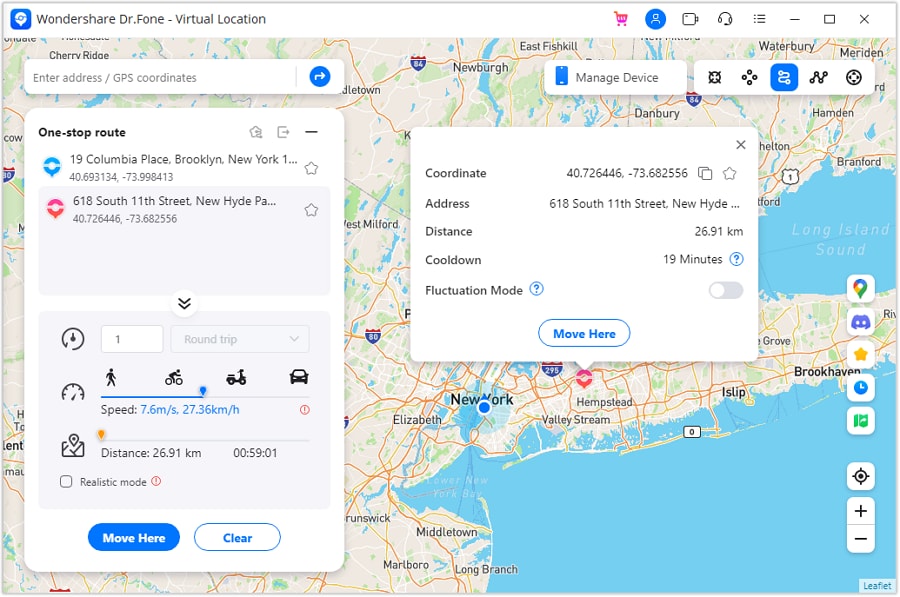
Step 1 Activate one stop route mode
Open the route simulation feature and switch to a one-stop style route mode to start planning a simple, repeatable path.
-
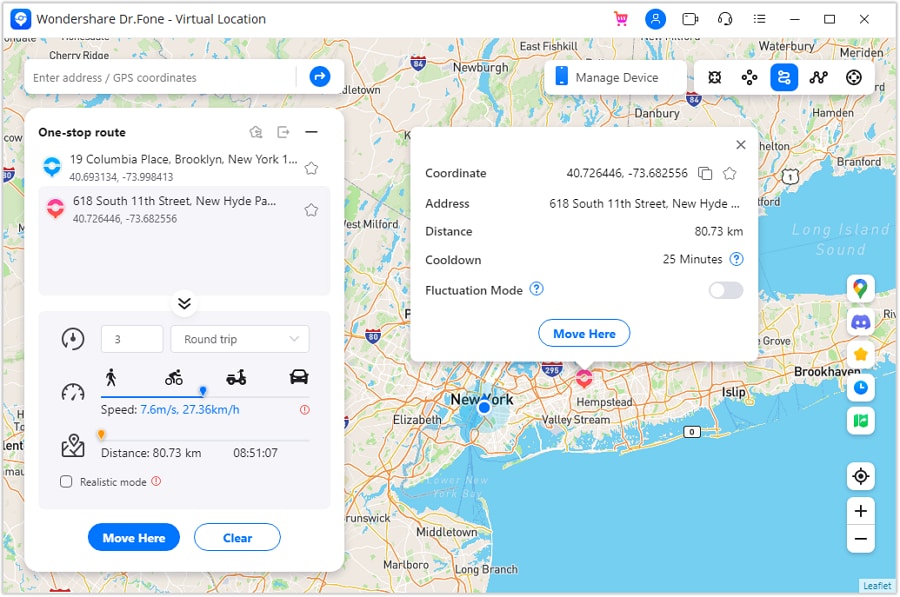
Step 2 Set parameters to simulate
Set the route parameters (including movement style and speed) to match your “minimum viable route” and reduce regret from over-optimizing.
-
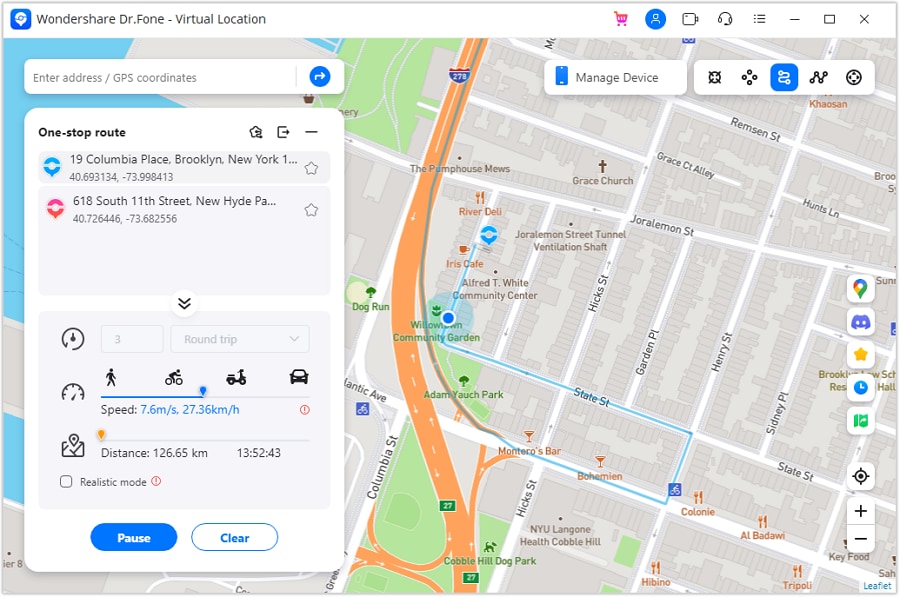
Step 3 Start one stop simulation
Start the simulation and monitor stability (battery drop and consistency) during your 7-day validation period.
-
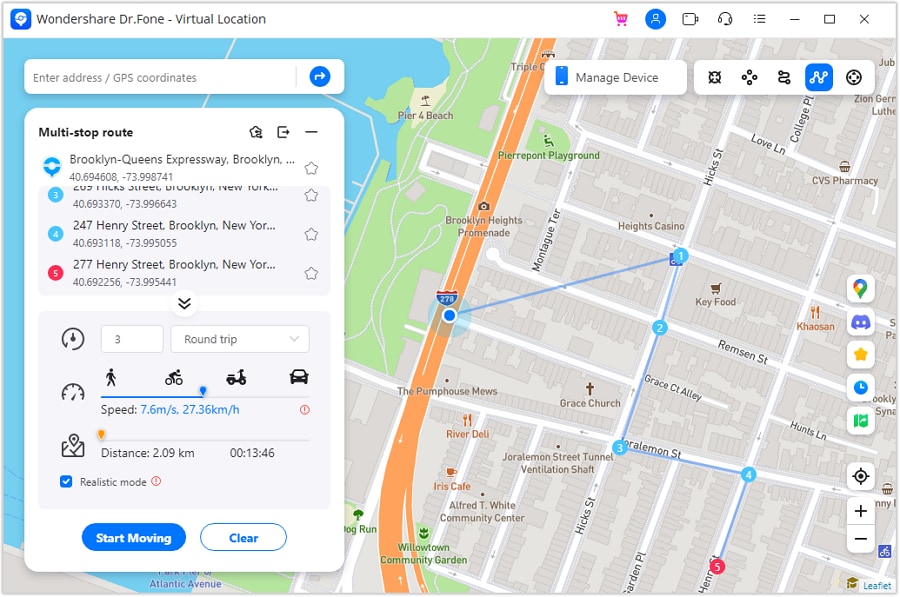
Step 4 Activate multi stop simulation (optional)
If your “good day upgrade” allows a bit more variety, use a multi-stop route to add controlled detours without changing your whole routine.
5-2. Transfer what you need to the phone you’ll actually carry
Action: Use Dr.Fone Phone Transfer to move key data (photos, contacts, messages, and other personal files you depend on) so your daily carry phone matches your new routine.
Limitation: Some app/game progress is account-based and may not transfer as “local data,” so confirm sign-in and sync before you wipe or switch.
5-3. Create a lightweight backup before you test changes
Action: Use Dr.Fone to back up important personal data before you reorganize storage, reset settings, or switch devices for better battery/GPS stability.
Limitation: A backup won’t fix weak signal areas or GPS drift on your route—it only reduces the risk of losing personal data during changes.
5-4. Clean up for reliability (or resale if you’re upgrading)
Action: If you’re upgrading phones, use Dr.Fone Data Eraser to help remove personal data from the old device before resale or hand-off.
Limitation: Always double-check you’ve signed out of key accounts and removed device access where needed; erasing data doesn’t automatically revoke account sessions elsewhere.




Conclusion
AI is strongest at clarifying priorities and making the trade-offs explicit so you can choose A vs B vs C with fewer regrets; real-world repetition is the proof. Once you’ve decided, tools like Dr.Fone help with the practical post-decision work—transferring, backing up, cleaning up, or preparing an old phone for resale—so your new routine is easy to sustain.
FAQ
-
Can I trust AI to “optimize” a commute route for location gameplay?
Trust it for structured trade-offs and a sensible plan, not for ground truth. It can’t confirm signal quality, crowd flow, safety, or how playable your exact sidewalks/stations are. -
What’s the single most important trade-off in commute-based route planning?
Reliability vs payoff: the route that yields the most in-game value often increases lateness risk, attention load, or decision fatigue—making it less repeatable. -
How do I avoid generic, spec-like advice (e.g., “just go where there are more stops”)?
Force constraints into the prompt: “no phone use while moving,” “max detour 6 minutes,” “must work on bad-weather days,” and “<2 minutes planning each morning.” -
What’s a simple way to validate my choice quickly?
Run a 7-day test and track only 3 numbers: average arrival time vs target, battery drop %, and a 1–5 stress rating. If stress rises, your route is too demanding even if the in-game results are great. -
If I switch phones to support this routine, what should I prepare first?
Confirm logins and recovery methods (email/2FA), ensure your essentials are transferred, and back up personal data before you wipe or trade in a device.
 Add Wondershare Dr.Fone as a preferred source on Google





