 Effortlessly manage data through preview, delete, export, etc.

 100% Security Verified | No Subscription Required | No Malware

 :
: 
 ChatGPT
 Perplexity
 Gemini
 Claude
 Grok
Grok

I can fake a route, but it always looks “too perfect”—constant speed, clean turns, no hesitation. I need something that feels human without becoming a huge setup project. Which approach actually makes sense?
Forum user
“Best” answers fall apart fast when you’re comparing ways to build a virtual route with natural speed variation—because the right choice depends on your goal, your tolerance for setup, and how “human” the movement needs to look.
AI helps by turning fuzzy preferences (“I want it to feel realistic”) into explicit trade-offs (control vs realism, simplicity vs repeatability, safety vs flexibility) so you can choose without endlessly hopping between tools and tutorials.
AI can’t confirm how a specific app behaves on your device, how brittle the workflow feels day-to-day, or what breaks after an update—so once you decide, real testing (and practical device management) still matters.

In this article
- Compare based on real priorities
- Why this is a workflow decision
- Realism vs setup tension
- What you’re optimizing for
- How to avoid “best tool” traps
- What the AI needs to compare
- AI prompts to evaluate options
- When to stop researching and decide
- After choosing: execute smoothly with Dr.Fone
Part 1. How to Compare Build a Virtual Route With Natural Speed Variation Based on Real Priorities
Most people get stuck because they’re not choosing a single feature—they’re choosing a workflow. Do you need something that looks human in short bursts, or something that can run repeatably for hours? Do you need a recorded route you can reuse, or do you need live control that adapts in the moment?
The tension usually shows up like this: the most “natural-looking” movement often requires more setup (route files, speed curves, pauses), while the easiest options tend to look robotic (constant speed, perfectly timed turns).
A useful way to compare is to decide what you’re optimizing for: believability, repeatability, fast setup, fine control, or low risk of breaking.
Part 2. What the AI Needs to Compare
Paste the following details so the AI can compare options against your real constraints:
- Your goal (e.g., app testing, demo recording, indoor training simulation, accessibility needs)
- Your platform and environment (iOS/Android, desktop companion or not, personal device vs spare device)
- Your candidate options (Option A / Option B / Option C with a one-line description of each)
- How “natural” it must look (micro-variations, pauses, stoplights, slowdowns on turns, etc.)
- Required control style (pre-planned route vs live steering vs hybrid)
- Repeatability needs (one-off vs reusable routes; consistent playback vs variability each run)
- Tolerance for setup and maintenance (low/medium/high)
- Failure cost (what happens if it glitches—minor annoyance or serious disruption)
- Time horizon (one session, week-long testing, ongoing workflow)
Part 3. Using AI Prompts to Evaluate Build a Virtual Route With Natural Speed Variation More Clearly
Use these prompts to force a trade-off-based decision instead of a vague “which is best” comparison.
3-1. Level 1: Basic Prompt
I’m choosing between Option A, Option B, and Option C to build a virtual route with natural speed variation.
Compare them based on realism, control, setup effort, and repeatability, and tell me which fits my situation best.
3-2. Level 2: Advanced Prompt
Help me choose the best approach for building a virtual route with natural speed variation using these options:
- Option A: [describe]
- Option B: [describe]
- Option C: [describe]
My priorities (ranked): 1) [priority], 2) [priority], 3) [priority].
For each option, explain: (a) where it will feel most “natural,” (b) where it may look patterned/robotic, (c) what maintenance/setup I’m really signing up for, and (d) who this option suits better in real use.
3-3. Level 3: Evidence Prompt
Context: I need virtual movement for [your use case].
I care most about [believability/repeatability/control/safety].
My constraints: [device/platform], [time to set up], [need for reuse], and [failure cost].
The options are:
- Option A: [describe]
- Option B: [describe]
- Option C: [describe]
Recommend one option.
Then explicitly list what I gain and what I give up with each option (not just the winner).
Finally, name one assumption you’re making that—if false—would flip your recommendation, and tell me how to test that assumption quickly.
3-4. Prompt Refinement
If the route needs to look “human,” what patterns are most likely to trigger “this looks simulated” (e.g., constant speed, perfect turns), and which option best avoids them with the least effort?
Assume I’ll only tolerate 10 minutes of setup per session.
How does that change your recommendation, and what would you simplify first?
What’s the “regret risk” for each option after two weeks of use (maintenance burden, lack of control, inconsistent results)?
Rank them and explain why.
If I need both repeatability (same route) and variation (different speed behavior each run), which option supports that best, and what compromises are unavoidable?
What would make each option fail in the real world (updates, permissions, routing glitches, device overheating, workflow friction), and how can I detect those risks early?
3-5. AI Recommendation vs Real-World Fit
| Likely AI recommendation or conclusion | What real-life use may change or reveal |
|---|---|
| “Choose a route-file / predefined route approach for repeatability.” | Route playback may feel unnatural at turns/stops unless you tune pauses and speed curves. |
| “Choose live control (joystick/manual) for maximum flexibility.” | Live control can be cognitively tiring and inconsistent; results may vary session to session. |
| “Choose a hybrid: pre-planned route + adjustable speed variation.” | Hybrid workflows can be fiddly; small configuration mistakes can create obvious patterns. |
| “Choose the simplest workflow if this is temporary.” | “Simple” may become costly if you need believable behavior and end up redoing takes/tests. |
AI can clarify likely fit and trade-offs, but hands-on use, workflow friction, and daily habits still decide satisfaction.
Part 4. When to Stop Researching Build a Virtual Route With Natural Speed Variation and Make the Call
- You can clearly state your top 2 priorities (e.g., “repeatability + natural slowdowns”) and which option serves them best.
- You’ve identified the main downside you’re accepting (e.g., “more setup” or “less realism”) and you’re okay with it.
- You’ve tested (or planned) one quick “flip-factor” check—one thing that would invalidate your choice if it fails.
- You can describe your chosen workflow in 3–5 steps without hand-waving or “I’ll figure it out later.”
At that point, you’re no longer missing information—you’re just delaying the trade-off.
Part 5. After Choosing Build a Virtual Route With Natural Speed Variation: Switch or Prepare Smoothly with Dr.Fone
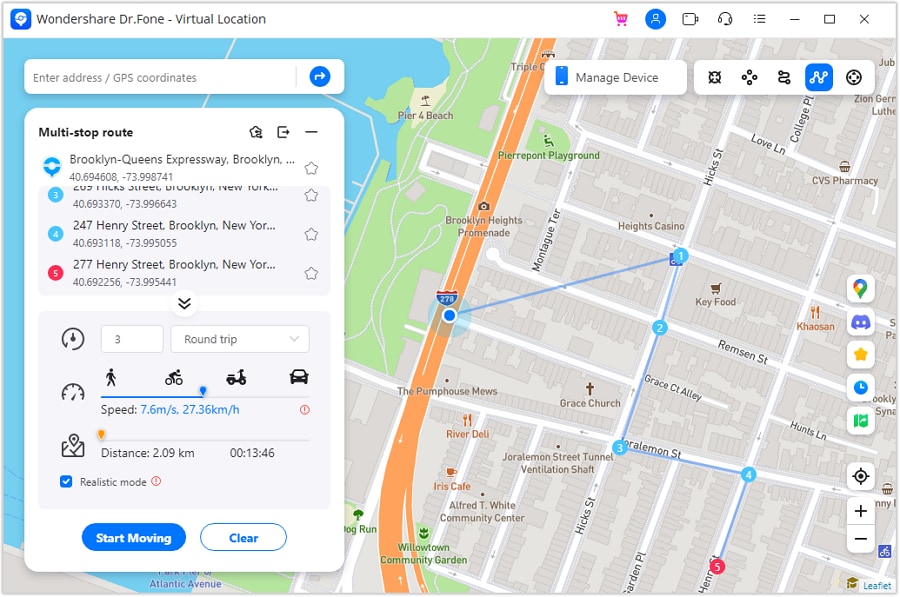
Once you’ve chosen an approach, the practical friction is often device-related: moving to a dedicated device, keeping test data separate, or preparing a phone for handoff/resale after experiments. If your plan involves simulating a route, Dr.Fone - Virtual Location can help you execute location changes and route playback more predictably.
 Set your map route to simulate GPS movement.
- Set your wanted movement speed.
- HD and large map view to check location.
- Fake GPS location to anywhere.
5-1. A practical device-prep checklist (to reduce friction)
- Move to a dedicated device (if your risk tolerance is low): Transfer essential personal data to a separate phone (or off a test phone) so your day-to-day device stays clean and stable. Limitation: transfer completeness depends on the data type and app restrictions—verify critical items (especially app-specific data).
- Back up before you change workflows: Create a backup before you install new tooling or change device settings, so you can roll back if something breaks. Limitation: a backup won’t always restore every in-app state exactly as it was—spot-check what matters.
- Prep for resale or handoff: Remove personal data before selling or giving the device away. Limitation: confirm you’ve signed out of accounts and disabled activation locks; erasing data doesn’t automatically remove all account bindings.
5-2. Example: set up a route simulation in Dr.Fone Virtual Location
-
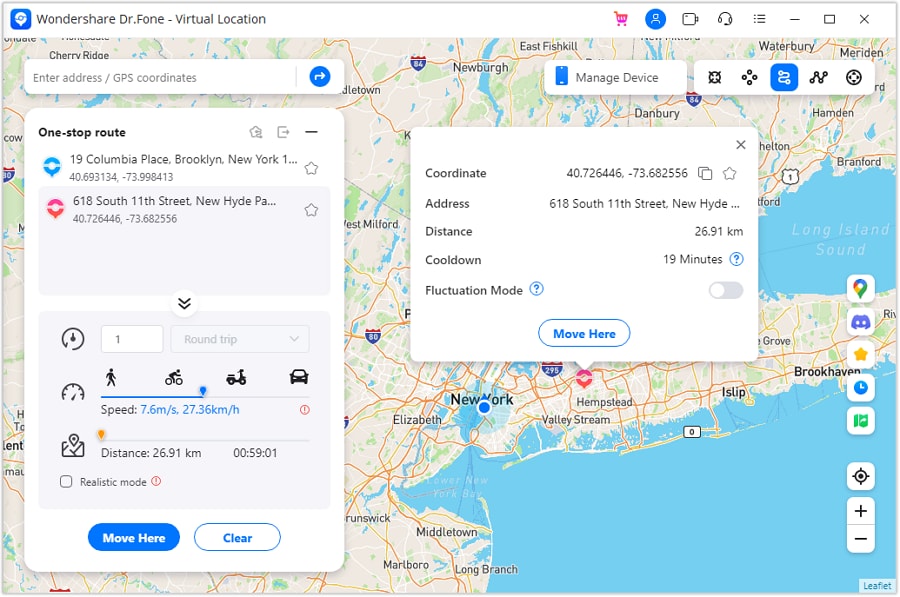
Step 1 Activate one stop route mode
Open the route feature and select the one-stop route mode to start planning a single segment.
-
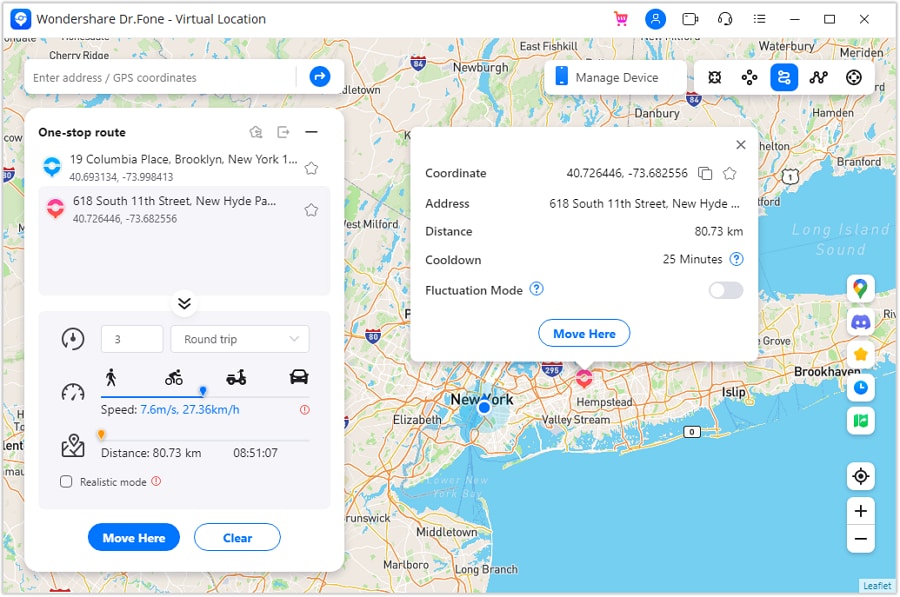
Step 2 Set parameters to simulate
Configure the route parameters (such as movement speed) before starting playback.
-
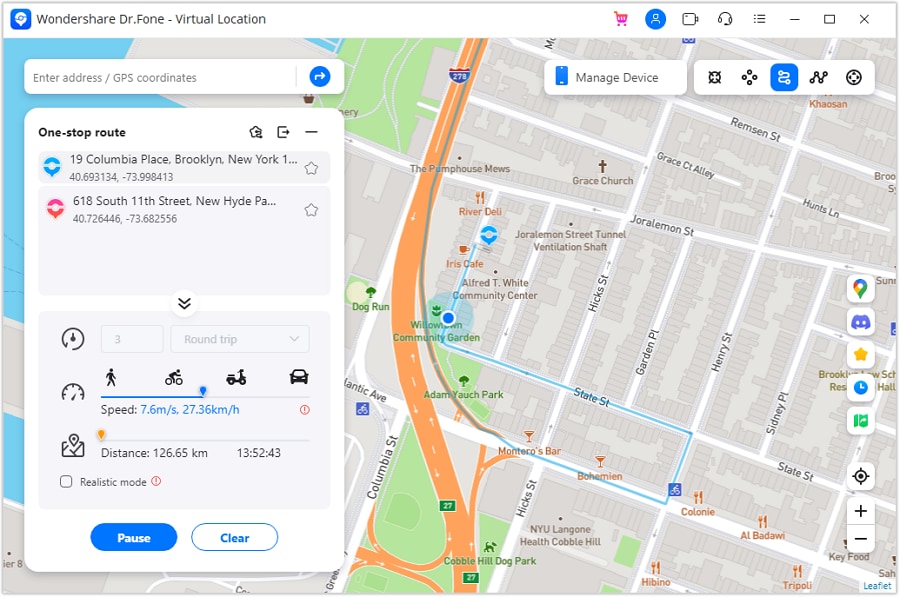
Step 3 Start one stop simulation
Start the simulation and observe the on-map movement to confirm the route behaves as expected.
-
Step 4 Activate multi stop simulation
If you need more complex movement, switch to multi-stop simulation to plan routes with multiple points.




Conclusion
AI is best used here as decision support: it turns “I want it to feel real” into concrete trade-offs and a clear pick, while real-world testing proves whether the workflow actually holds up—then tools like Dr.Fone help you execute the post-decision cleanup, transfer, or resale prep if you’re switching devices.
FAQ
-
Can I trust AI to choose the “best” option for natural speed variation?
Trust it to structure the trade-offs and highlight regret points. Don’t trust it to guarantee how smooth, stable, or “human” the motion feels on your exact device and setup. -
What’s the single most important trade-off in this decision?
Usually repeatability vs believability: the more repeatable the route, the more work you may need to avoid patterns; the more “human” it looks, the harder it can be to reproduce exactly. -
How do I avoid a generic, spec-based decision?
Force the comparison around your workflow: session length, setup tolerance, failure cost, and whether you need live control or reusable routes—then pick the option whose downside you can live with. -
What’s an assumption that commonly flips the recommendation?
“How natural is natural enough?” If minor speed jitter is sufficient, simpler approaches win; if you need realistic pauses/slowdowns at turns and stops, you’ll likely need more structured route logic and tuning. -
What should I prepare right after choosing?
A quick test plan (one short route), a checklist of “looks fake” patterns you’ll avoid, and a rollback plan (backup or a dedicated device) if the setup causes problems. -
If I’m switching phones or using a spare device, what’s the cleanest way to manage that?
Decide whether you’ll isolate work on a dedicated device; if yes, transfer what you need, back up first, and later erase personal data before resale/handoff (Dr.Fone can help with transfer, backup, and erase steps).
 Add Wondershare Dr.Fone as a preferred source on Google





