 Effortlessly manage data through preview, delete, export, etc.

 100% Security Verified | No Subscription Required | No Malware

 :
: 
 ChatGPT
 Perplexity
 Gemini
 Claude
 Grok
Grok

I only have a short window to play Pokémon GO each day, but I don’t want to pick a “quick” method that makes me anxious later. I’m trying to balance progress, effort, and risk.
Reddit user, r/pokemongo
Picking a “best” approach for Pokémon GO short-session route simulation is tricky because what matters most is usually risk tolerance, convenience, and how you actually play—not a single universal winner.
AI helps by turning fuzzy preferences (“I just want quick sessions”) into explicit trade-offs (risk vs. effort vs. realism), so you can compare options like a decision—not a debate.
AI can’t verify hands-on friction, device quirks, or how Niantic systems behave in your specific account context, so real-life fit and what you do after deciding (switching phones, transferring data, cleanup, resale prep) still matter.
In this article
- How to compare short-session route simulation
- What problem you’re actually solving
- Define your acceptable downside
- Quick pros/cons snapshot
- How to decide without over-researching
- What the AI needs to compare
- Using AI prompts to evaluate more clearly
- AI recommendation vs real-world fit
- When to stop researching and make the call
Part 1. How to Compare Pokémon GO Short-Session Route Simulation Based on Real Priorities
Most people considering short-session “route simulation” are trying to solve a practical constraint: limited time, limited mobility, weather, safety, or living far from good spawn areas.
The uncertainty is usually not “which one is strongest,” but “which approach gives me enough progress per day without putting my account (or device) at risk.”
A useful comparison focuses on your acceptable downside: are you optimizing for safety and legitimacy, minimum time spent, lowest ban risk, or lowest setup hassle?

What tends to work well
- Choosing a routine you can repeat daily without stress
- Picking goals that match your real environment (walkable vs not walkable, signal quality, safety)
- Being honest about “setup tolerance” (open-and-play vs tool-heavy workflows)
What commonly causes regret
- Optimizing only for speed and ignoring account anxiety
- Assuming AI can guarantee safety or predict account outcomes
- Choosing a plan that depends on ideal conditions you rarely have
Part 2. What the AI Needs to Compare
Share the minimum details below so the AI can compare options based on your constraints.
- Your goal for short sessions (e.g., catch streaks, gifts, buddy candy, eggs, raids, Routes)
- Your session length and frequency (e.g., 10 minutes daily, 30 minutes on weekends)
- Your risk tolerance (strictly within rules vs. willing to accept account risk)
- Your device/OS and constraints (iOS/Android, work phone vs personal, battery limits)
- Your environment (walkable area, GPS drift, safe places to play, weak signal zones)
- Your willingness to set up tools vs “open and play”
- What would feel like failure (ban scare, constant rework, unrealistic movement, poor results)
Part 3. Using AI Prompts to Evaluate Pokémon GO Short-Session Route Simulation More Clearly
Use these prompts to force a priorities-first comparison (not a specs-first argument).
3-1. Level 1: Basic Prompt
I’m trying to choose a Pokémon GO short-session route simulation approach. Compare these options for my situation: (1) strictly legit short sessions (walk when possible + Adventure Sync habits), (2) any form of simulated movement/location override, (3) not simulating at all and focusing on stationary tasks.
Help me pick based on risk, effort, and what I can realistically sustain.
3-2. Level 2: Advanced Prompt
Act as a decision assistant. First, ask me 8–10 clarifying questions about my play goals, schedule, and risk tolerance. Then compare these approaches using a trade-off matrix:
- Legit short sessions (walk + Adventure Sync + efficient in-game tasks)
- Any location/movement simulation (high-level discussion only—no instructions)
- Hybrid approach (mostly legit, with “no-play days” or non-movement tasks)
For each, explain who it fits best, what it costs (time, stress, setup), and the most likely regret points.
3-3. Level 3: Evidence Prompt
Here’s my context:
- Goal: [e.g., keep streaks, hatch eggs, buddy candy, complete Routes]
- Session: [e.g., 10–15 min weekdays, 45 min weekends]
- Environment: [e.g., not walkable, weather, safety concerns]
- Device: [iOS/Android model], battery health: [good/ok/poor]
- Risk tolerance: [low/medium/high], “account loss would be”: [devastating/annoying/acceptable]
- Setup tolerance: [low/medium/high]
Based on this, recommend one approach and rank the others. For each option, state what I gain / what I give up, and name one assumption that would change your recommendation (for example: if I become able to walk 15 minutes daily, or if account risk becomes unacceptable).
3-4. Prompt Refinement
If I choose the lowest-risk approach, what’s the most efficient 10-minute routine that still feels like progress (without relying on movement simulation)?
What single downside is most likely to make me quit each option after 2 weeks (stress, boredom, setup friction, fear of penalties, low rewards)?
If my top priority is “no account anxiety,” what options should be removed entirely—even if they’re convenient?
If my top priority is “maximum progress in minimum minutes,” what trade-off am I implicitly accepting, and what guardrails reduce regret?
What’s the smallest real-world change (schedule, location, habits) that would let me avoid simulation completely?
Part 4. AI Recommendation vs Real-World Fit
AI can clarify likely fit, but hands-on use, workflow friction, and daily habits still decide satisfaction.
| Likely AI recommendation or conclusion | What real-life use may change or reveal |
|---|---|
| “If account risk is low tolerance, prefer strictly legit short sessions.” | You may discover legit play feels too slow in your area, leading to frustration or burnout. |
| “If you can’t walk safely, shift goals to stationary tasks and accept slower egg/buddy progress.” | Your local spawns/stops may be too sparse, making even stationary tasks feel unrewarding. |
| “If you’re willing to accept risk, simulation is ‘efficient’ but comes with meaningful downside.” | The stress of uncertainty (penalties, warnings, lockouts) can outweigh the time saved. |
| “Hybrid is often the most sustainable: legit most days, optimize routines, skip movement-heavy goals.” | Your personality may prefer consistency; hybrid can feel like constant rule-making and second-guessing. |
Part 5. When to Stop Researching Pokémon GO Short Session Route Simulation and Make the Call
- You can clearly state your #1 priority (e.g., “no account anxiety” or “progress per minute”) and you accept the trade-off it implies.
- You’ve eliminated at least one option because it conflicts with your risk tolerance or lifestyle—not because of online opinions.
- You have a 7-day test plan that matches your real schedule (not an idealized one).
- You know your likely regret trigger (fear, hassle, boredom, low rewards) and how you’ll respond if it shows up.
At this point, you’re not missing information—you’re ready to validate your choice in real use.
Recommended Tool: Execute Your Plan More Smoothly
Once you’ve chosen an approach, the practical follow-through is protecting your data, reducing clutter, and making device changes painless. If you need a location tool for route-style simulation workflows, start with Dr.Fone - Virtual Location.
 Set your map route to simulate GPS movement.
- Set your wanted movement speed.
- HD and large map view to check location.
- Fake GPS location to anywhere.

To keep your routine consistent (and reduce “setup friction” regret), treat your workflow like a repeatable short-session plan: set a route style once, reuse it, and avoid constant reconfiguration.
-
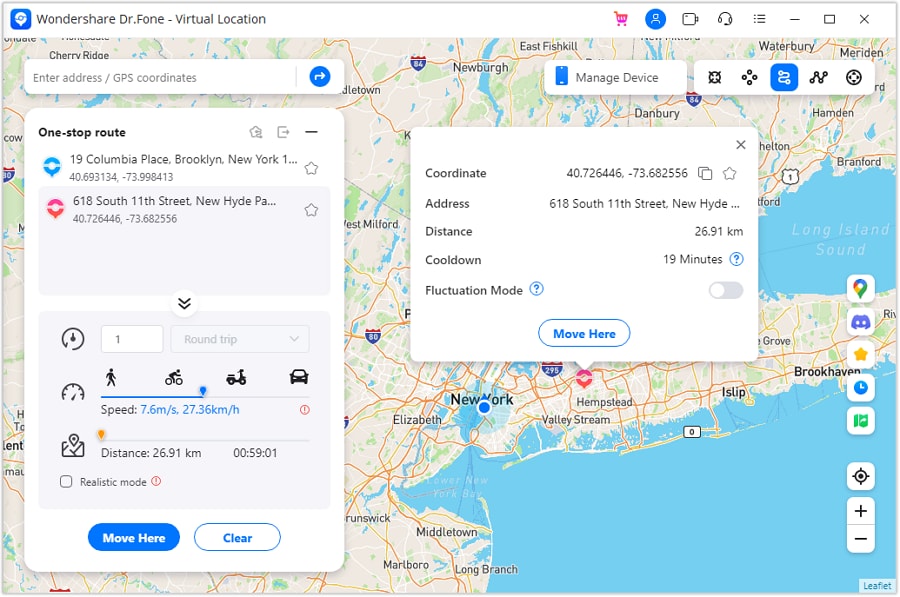
Step 1 Activate a route simulation mode
Choose a route simulation mode that matches a short-session routine, so you’re not rebuilding your setup every time.
-
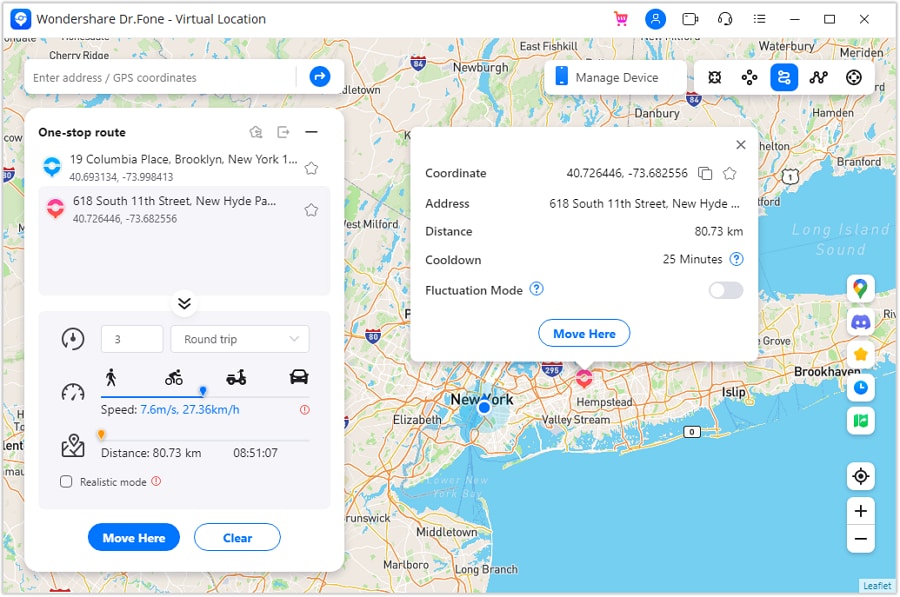
Step 2 Set realistic parameters you can sustain
Pick movement style and pace settings that you can keep consistent across days, which helps avoid “constant rework” as a regret trigger.
-
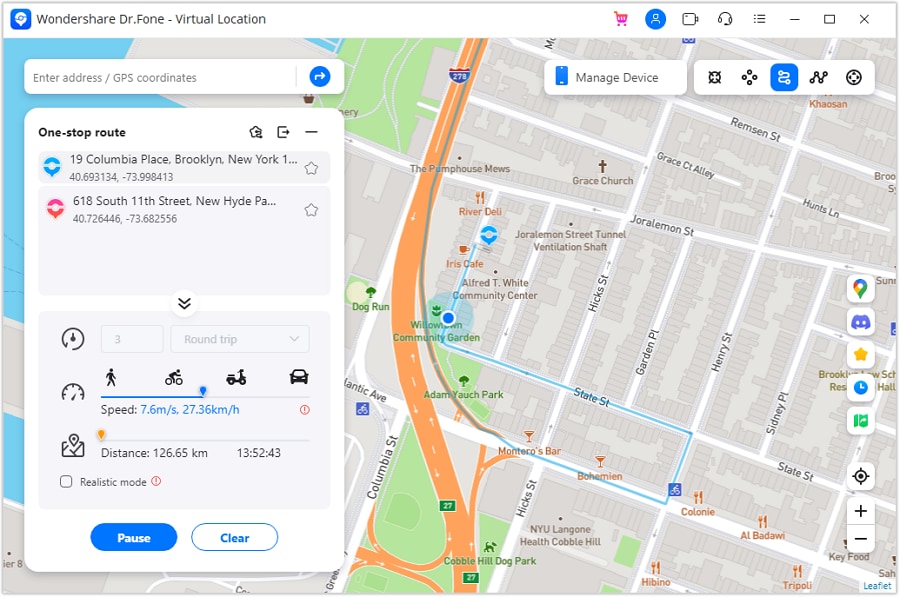
Step 3 Run a short test session before committing
Do a brief trial run to confirm the workflow feels smooth on your device and fits your time window.
-
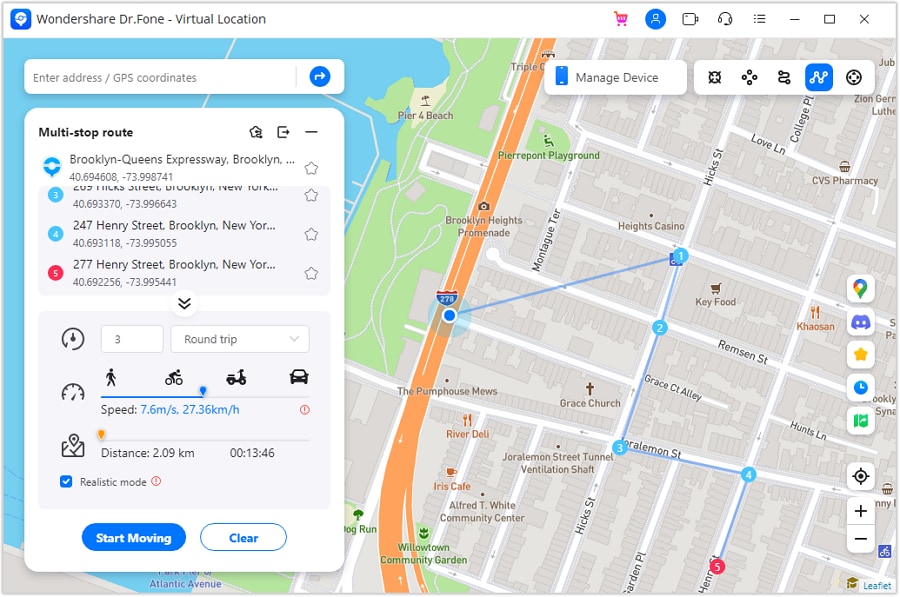
Step 4 Use multi-stop planning for repeatable routines
If your routine needs multiple points, save a multi-stop structure so your “10–15 minutes” stays predictable day to day.




Conclusion
AI is strongest as decision support: it helps you name priorities, expose trade-offs, and choose with fewer regrets—while real use is the final proof; once you decide, tools like Dr.Fone help you execute the practical switching, transfer, cleanup, or resale steps cleanly.
FAQ
-
Can AI tell me which option is “safe”?
AI can explain likely risk patterns and trade-offs, but it can’t guarantee safety or predict account outcomes for any specific user. -
What’s the biggest trade-off in this decision?
It’s usually convenience vs. account anxiety/risk—the more you optimize for time, the more you may accept uncertainty and stress. -
How do I avoid a generic specs-based decision?
Decide based on your daily constraints: time windows, safe mobility, tolerance for setup friction, and how bad a negative outcome would feel. -
What should I prepare after I choose?
A one-week routine, a clear success metric (e.g., “I can keep streaks without stress”), and a rollback plan if it feels unsustainable. -
If I switch phones, what matters most for a smooth transition?
Back up essential data, transfer the basics cleanly, and confirm your accounts/sign-ins before wiping or selling the old phone.
 Add Wondershare Dr.Fone as a preferred source on Google





