 Effortlessly manage data through preview, delete, export, etc.

 100% Security Verified | No Subscription Required | No Malware

 :
: 
 ChatGPT
 Perplexity
 Gemini
 Claude
 Grok
Grok

I keep seeing “best phone for creators” lists, but they don’t match how I actually shoot, edit, and deliver. I need a phone that fits my workflow, not just the best camera spec sheet.
Reddit user, r/videography
“Best phone for creators” depends less on specs and more on how you shoot, edit, store, and deliver—every day.
Generic “top lists” usually assume everyone creates the same way: same apps, same turnaround time, same tolerance for file friction, and same audience platforms. That’s why they often feel unhelpful once you try to map them to your actual workflow.
AI helps by turning fuzzy preferences (like “good video” or “fast editing”) into concrete trade-offs: capture reliability vs flexibility, speed vs control, ecosystem convenience vs cross-platform freedom.
AI still can’t validate hands-on feel—things like camera UI friction, heat under long recording, or whether your day-to-day sharing process annoys you. And once you decide, the real work is switching cleanly (files, chats, accounts) or preparing your old phone for resale.
In this article
- How to compare phones by real creator priorities
- The “pocket production pipeline” mindset
- Trade-offs spec sheets don’t show
- Start from constraints (apps, deadlines, storage)
- What a useful comparison looks like
- What the AI needs to compare
- Using AI prompts to evaluate more clearly
- When to stop researching and make the call
- After choosing: switch or prepare smoothly with Dr.Fone
Part 1. How to Compare Best Phone for Creators Based on Real Priorities
1-1. Think in terms of a “pocket production pipeline”
Most creators aren’t choosing a “phone camera”—they’re choosing a pocket production pipeline: capture → review → edit → export → publish → archive. The right phone is the one that makes that pipeline boringly reliable for your content.
1-2. Expect trade-offs that won’t appear on spec sheets
The tension usually comes from trade-offs that don’t show up on spec sheets: one option may be smoother for editing and publishing, another may be better for flexible file handling, and another may reduce time lost to troubleshooting.
1-3. Start from your constraints, not your wishlist
A helpful comparison starts with your constraints: what you create, how often you post, what apps you must use, where you store media, and whether you collaborate or hand files off to others.
1-4. Aim for workflow fit (and lower deadline risk)
When you compare options, prioritize what reduces friction under real deadlines: reliability, speed, sharing/handoff, and backups—then weigh those against flexibility and ecosystem convenience.
Part 2. What the AI Needs to Compare
Answer these so AI can compare options based on workflow fit, not hype:
- What you create most (short-form video, long-form video, photos, livestream, audio, mixed)
- Your editing style (quick trims vs layered edits, color work, captions, templates)
- Your “must-use” apps and where you publish (platforms + any client delivery needs)
- Typical shooting conditions (low light, movement, talking head, travel, indoor, events)
- File volume and deadlines (how many GB/week, how fast you need to turn content)
- Storage + backup habits (cloud-first vs local, external drives, cross-device workflow)
- Collaboration needs (AirDrop-like sharing, shared folders, handoff to editor)
- Budget and upgrade cycle (keep 2–3 years, resell yearly, buy used/new)
- Your current ecosystem (laptop/tablet, accessories, chargers, mics, gimbals)
Part 3. Using AI Prompts to Evaluate More Clearly
Use these prompts to force a decision around real creation habits and likely friction points.
3-1. Level 1: Basic Prompt
I’m choosing a phone for content creation.
Compare iPhone (latest Pro model) vs a top Android flagship for my workflow: capture, edit, export, post, and backup.
Ask me the minimum questions you need, then summarize which fits me better and why.
3-2. Level 2: Advanced Prompt
Act like a workflow consultant, not a spec reviewer.
Compare these options for a creator: iPhone Pro, Samsung Galaxy Ultra, Google Pixel Pro (or replace with my shortlist).
1) Start by asking up to 8 questions about my content, apps, storage, turnaround time, and sharing/collab needs.
2) Then score each option on: capture reliability, editing/publishing speed, file handling & backups, accessory/ecosystem fit, and “failure risk under deadline.”
3) Explain the trade-offs and who each option suits best (e.g., solo creator with fast posting vs creator handing footage to an editor).
3-3. Level 3: Evidence Prompt
Here’s my real workflow context:
- Content type(s): [e.g., daily short-form + weekly long video]
- Apps I must use: [list]
- Typical shoot: [indoors/outdoors, motion, low light, talking head, travel]
- Turnaround: [same-day/48h/weekly]
- Storage/backup: [cloud/local/external]
- Sharing: [handoff to editor? cross-platform?]
- Current devices: [laptop/tablet/OS]
- Budget + upgrade cycle: [details]
Based on that, recommend one phone direction (iPhone Pro vs Android flagship—name which Android line fits best).
Include:
- What I gain / what I give up with each option
- The top 3 workflow frictions I’m most likely to hit with the “wrong” choice
- One key assumption you’re making that would flip your recommendation (and tell me how to test it in a week)
3-4. Prompt Refinement
If my top priority is “publish faster with fewer steps,” which option reduces total touches from capture to upload—and what steps disappear?
Where will I most likely feel regret after 30 days: file transfer/backup, editing limitations, accessory compatibility, or platform lock-in? Explain why for my workflow.
If I lose access to Wi‑Fi/cloud for 48 hours, which choice is more resilient for storage, exporting, and delivering files?
Assume I collaborate with an editor on a different platform than mine. Which option minimizes friction, and what exact handoff method should I use?
If my content shifts from short-form to longer, heavier edits, which choice scales with less re-learning and fewer workarounds?
What’s the “silent cost” (extra subscriptions, adapters, storage upgrades, time lost) that your recommendation might be hiding?
3-5. AI Recommendation vs Real-World Fit
| Likely AI recommendation or conclusion | What real-life use may change or reveal |
|---|---|
| “Choose the option that matches your existing ecosystem for fewer steps.” | Ecosystem convenience can be outweighed if your must-use apps or delivery workflow behave differently than expected. |
| “Prioritize the phone with the most reliable capture for your shooting style.” | Long recording sessions may expose heat, storage pressure, or UI friction that AI can’t predict from your habits alone. |
| “Pick the option that makes file handling and backup simplest for your volume.” | Your actual tolerance for manual file management vs automation becomes obvious only after a week of real shoots. |
| “Go with what minimizes deadline risk and troubleshooting.” | Notifications, upload quirks, accessory behavior, and day-to-day ergonomics can add hidden friction you won’t feel until daily use. |
AI can clarify likely fit, but hands-on use, workflow friction, and daily habits still decide satisfaction.
Part 4. When to Stop Researching and Make the Call
- You can name your top two priorities (e.g., “fast posting” and “easy backup”) and accept what you’ll sacrifice for them.
- You’ve identified the one friction you refuse to live with (e.g., slow file handoff, unreliable focus, messy storage).
- Your shortlist is down to two directions (often iPhone vs Android, or two specific models) with a clear “why” for each.
- You know your flip factor (the one assumption that would reverse your decision) and you have a plan to test it quickly.
At this point, you’re not missing information—you’re choosing which trade-off you want to live with.
Part 5. After Choosing: Switch or Prepare Smoothly with Dr.Fone
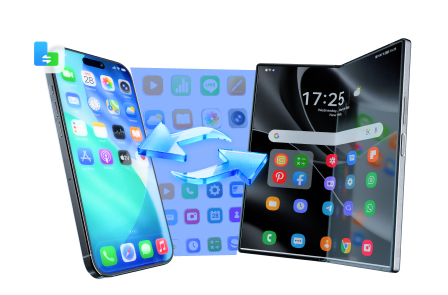
Once you’ve decided, the highest-leverage move is reducing migration risk: keeping your chats, photos, videos, and contacts intact, and leaving your old phone clean and ready (either as a backup device or for resale). If you need to move data between devices, Dr.Fone - Phone Transfer can help you do it in a controlled pass.
 Move data between iOS to Android and vice versa.
- Transfer contacts, SMS, photos, videos, music, and more types.
- Available with all phones with Android and iOS versions.
- Simple, click-through process.
Below is a straightforward execution flow for the transfer itself (so you can keep the switch predictable and avoid accidental omissions).
-
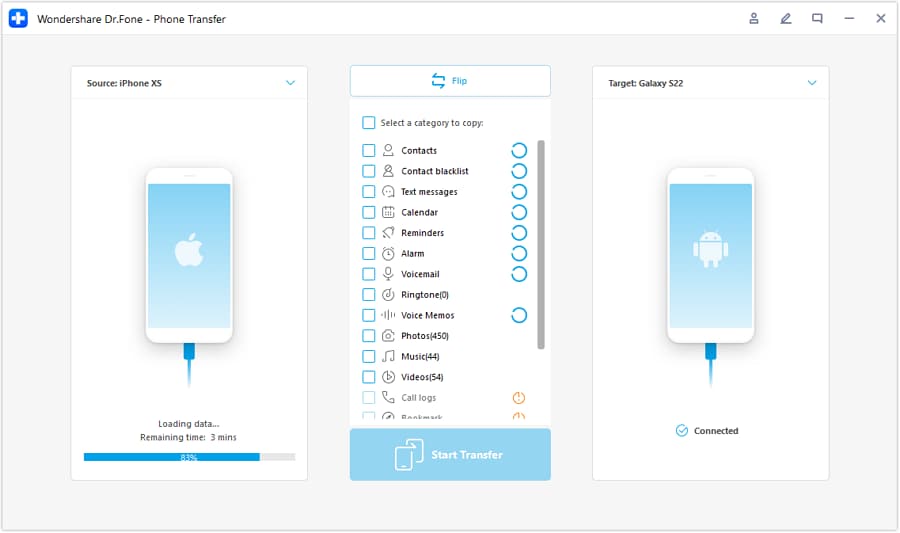
Step 1 Open Phone Transfer
Open Dr.Fone and go to the Phone Transfer feature to start a controlled migration pass.

-
Step 2 Set the correct transfer direction
Select the source and destination devices (for example, iOS to Android) before transferring anything.
-
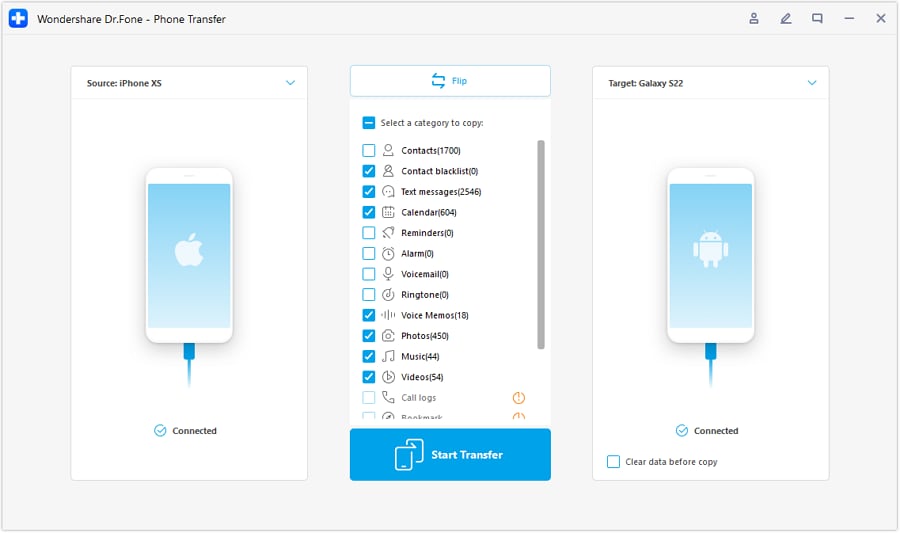
Step 3 Choose what to transfer
Pick only what matters for your creator workflow first (media, contacts, and other essentials where supported), then run the transfer.
-
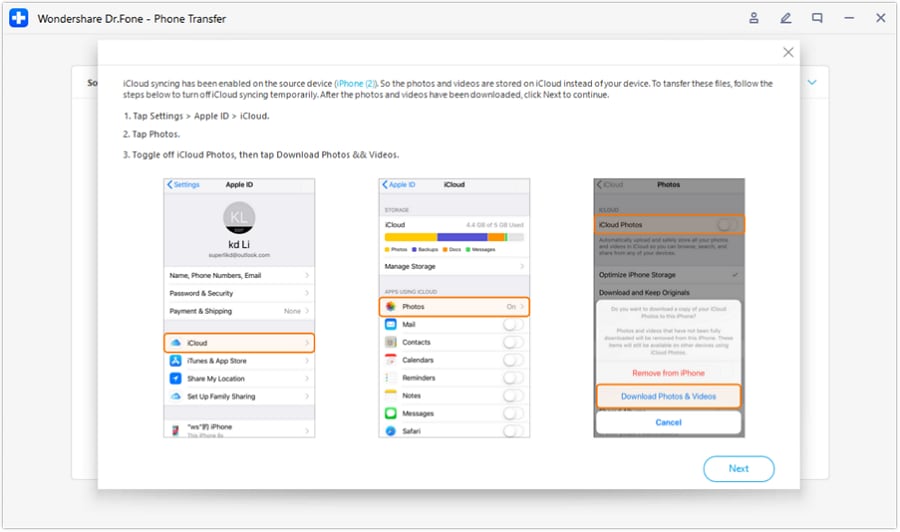
Step 4 Prevent unwanted syncing conflicts (when applicable)
During switching, review sync settings to reduce duplicates or unexpected library behavior while you validate your new workflow.
5-1. Transfer what matters (not everything)
Action: Use Wondershare Dr.Fone to move key data (photos/videos, contacts, messages where supported, and essential app data where possible) to your new phone in a controlled pass.

5-2. Reduce post-switch clutter and duplicates
Action: After migration, review and remove duplicate media or unnecessary large files so your creator workflow starts with clean storage and faster backups.
5-3. Prepare the old phone for resale or backup
Action: Back up what you’re keeping, then securely erase personal data and confirm accounts are signed out before selling or handing it down.




Conclusion
AI is strongest as decision support: it helps you choose the trade-offs you’ll actually live with, while real use proves whether the workflow feels effortless. Once you’ve chosen, tools like Dr.Fone help you execute the switch cleanly—so your creator setup improves immediately instead of turning into a data-migration headache.
FAQ
-
Can I trust AI to tell me the best phone for creators?
Trust it for clarifying trade-offs and fit based on your inputs, not for predicting “feel,” real capture quirks, or app-specific bugs you haven’t tested. -
What’s the single most important trade-off for creator phones?
Workflow friction: how many steps it takes to go from “shot” to “published + backed up,” and how often that process breaks under time pressure. -
How do I avoid choosing based on specs alone?
Describe your pipeline (capture → edit → export → upload → archive) and ask AI to optimize for time, reliability, and handoff—not camera specs. -
What should I prepare before I commit to one option?
Your must-use app list, your storage/backup plan, your typical weekly media volume, and your collaboration/sharing needs. -
If I’m switching platforms, what’s most likely to go wrong?
Logins/2FA, message history expectations, cloud library behavior, and inconsistent file naming/organization—plan the switch like a mini project. -
Does resale value matter in this decision?
It can—especially if you upgrade yearly. If resale is important, prioritize the option that keeps devices desirable longer and make the post-switch wipe/lock removal part of your routine.
 Add Wondershare Dr.Fone as a preferred source on Google





