 Effortlessly manage data through preview, delete, export, etc.

 100% Security Verified | No Subscription Required | No Malware

 :
: 
 ChatGPT
 Perplexity
 Gemini
 Claude
 Grok
Grok

I just need a cheap phone that survives a full day of classes without me hunting for an outlet, but every “best budget phone” list feels like it’s written for someone else.
Reddit user, r/PickAnAndroidForMe
Picking a “best” budget phone is rarely about one winner—it’s about which compromises you can live with for the next 1–3 years.
AI can help you turn “I want long battery and cheap” into a clearer set of trade-offs: what you’ll gain, what you’ll give up, and which option fits your daily student routine.
AI can’t feel the real-life friction (screen brightness outdoors, keyboard comfort for notes, camera lag, or how the phone holds up in a backpack), so you still need a reality check—and a smooth plan if you’re switching phones afterward.
In this article
- How to compare budget phones for students (real priorities)
- Why “best” depends on your day
- Battery confidence vs smoothness vs risk
- Define non-negotiables first
- Pick the right “deal type”
- What the AI needs to compare
- AI prompts to evaluate options clearly
- When to stop researching and make the call
- After choosing: switch or prepare smoothly

Part 1. How to Compare Best Budget Phone for Students with Long Battery Based on Real Priorities
Most students aren’t choosing between two identical phones—they’re choosing between types of deals: a new low-cost model, a refurbished midrange, or a used older flagship. Each can be “best” depending on what you do all day (notes, video lectures, commuting, gaming, part-time work).
The real tension is usually this: battery confidence vs overall smoothness vs risk. A cheaper phone might last all day but feel sluggish sooner; a used “better” phone might be faster but come with unknown battery health; a refurbished device may be the safest middle ground but not the cheapest.
Instead of chasing “top lists,” you’ll get a better result by deciding what you refuse to compromise on (battery reliability, cost ceiling, durability, repairs, updates) and letting the rest be flexible.
- New budget phone: lowest upfront risk and warranty, but performance “friction” can show up sooner.
- Refurbished midrange: often the best balance of cost + smoothness + lower risk (if the seller is reputable).
- Used older flagship: best “feel” and performance for the money, but highest uncertainty (especially battery health).
Part 2. What the AI Needs to Compare
Give the AI a short, realistic snapshot, then ask it to compare options in student terms:
- Your total budget (including case, screen protector, and possible battery replacement)
- Your current phone and why you’re replacing it (battery, storage, broken screen, slow performance)
- Your daily pattern (commute hours, hotspot use, long lecture days, gaming, video calls)
- Must-have apps (school portal, note apps, banking, transit, work apps)
- Battery expectations (e.g., “8am–10pm with 15–20% left”)
- Your tolerance for risk (used devices, unknown battery health, no warranty)
- Your preferred route: new budget phone vs refurbished midrange vs used older flagship
- Any deal constraints (carrier-only offers, unlocked required, dual SIM/eSIM needed)
- What matters more: battery longevity over years vs “all-day battery right now”

Part 3. Using AI Prompts to Evaluate Best Budget Phone for Students with Long Battery More Clearly
Use these prompts to force clearer trade-offs instead of endless browsing.
3-1. Level 1: Basic Prompt
I’m a student trying to choose the best budget phone with long battery.
Compare these options: (Option A: new budget Android), (Option B: refurbished midrange), (Option C: used older flagship).
Tell me which type fits me best based on battery reliability, total cost, and day-to-day smoothness.
3-2. Level 2: Advanced Prompt
I’m deciding between:
- Option A: new budget phone (lowest price, warranty)
- Option B: refurbished midrange (balanced price/performance, some warranty)
- Option C: used older flagship (best performance, highest battery-risk)
My priorities (ranked) are: 1) long battery through a full school day, 2) low regret over 12–24 months, 3) staying within $___ total, 4) reliability (fewer surprise repairs), 5) decent camera for notes/assignments.
Compare each option using a trade-off table and explain: who each option suits best, what compromises I’d feel in real student life, and what I should check before buying.
3-3. Level 3: Evidence Prompt
Here’s my real context: I’m on campus from __ to __, I use __ hours of video/Zoom, __ hours of music, __ hours of navigation, and I often forget to charge midday.
I need the phone to last from morning to night without anxiety.
I’m considering: (Option A details), (Option B details), (Option C details).
Recommend one option and explain:
- What I gain / what I give up with each option (battery confidence, smoothness, risk, long-term value)
- The most likely regret point for each choice
- One key assumption you’re making that would flip your recommendation (for example: “if the used phone’s battery health is below X,” or “if you keep phones longer than 2 years,” or “if you rely on heavy hotspot use”).
3-4. Prompt Refinement (Follow-up Prompts)
If I say “long battery,” translate that into measurable day outcomes (hours, usage patterns, charging habits) and show which option is most likely to meet it.
What’s the hidden cost for each option over 18 months (cases, repairs, battery replacement risk, chargers, storage upgrades), and which option is actually cheapest to own?
Rank the options by battery reliability over time, not just “battery today.” What behaviors (gaming, heat, fast charging) make the ranking change?
What would make me regret choosing the cheapest phone after 3 months, and what would make me regret paying more?
If I’m buying used/refurbished, give me a short inspection checklist that most reduces battery and reliability risk before I commit.
3-5. AI Recommendation vs Real-World Fit
| Likely AI recommendation or conclusion | What real-life use may change or reveal |
|---|---|
| “Refurbished midrange is the safest balance for students.” | Your campus day may involve brightness + hotspot + navigation that drains faster than expected. |
| “New budget phone is best if you need warranty and lowest cost.” | You may feel performance friction sooner (app reloads, multitasking, keyboard lag) even if battery is fine. |
| “Used older flagship is best value if you want smoother performance.” | Battery health uncertainty can turn “good deal” into daily charging stress or a replacement cost. |
| “Choose based on your risk tolerance and how long you keep phones.” | Case quality, charging habits, and heat exposure can dominate battery satisfaction more than the model choice. |
AI can clarify likely fit and trade-offs, but hands-on comfort, workflow friction, and daily charging habits are what ultimately decide whether the phone feels “right” for student life.
Part 4. When to Stop Researching Best Budget Phone for Students with Long Battery and Make the Call
- You can clearly state your top 3 priorities (e.g., “all-day battery, low total cost, low surprise risk”) and which option type best matches them.
- You’ve identified the one compromise you’re willing to accept (slower performance, higher upfront price, or used-device risk).
- You’ve validated the deal constraints that actually matter for you (unlocked vs carrier, warranty/return window, storage needs).
- You have a simple failure plan (what you’ll do if battery is worse than expected: return, exchange, replace battery, adjust settings).
At this point, you’re no longer “shopping”—you’re choosing based on a decision you can explain and repeat.
Part 5. After Choosing Best Budget Phone for Students with Long Battery: Switch or Prepare Smoothly
Once you’ve picked your phone type, the next risk is not the model—it’s a messy switch (missing photos, lost chats, duplicate contacts) or leaving personal data behind if you’re selling the old device. If you want a controlled way to move data between phones, Dr.Fone - Phone Transfer can help you transfer key items with a simple, guided flow.
 Move data between iOS to Android and vice versa.
- Transfer contacts, SMS, photos, videos, music, and more types.
- Available with all phones with Android and iOS versions.
- Simple, click-through process.
5-1. Transfer what matters (not everything)
Action: Move key data (contacts, photos, essential files) from the old phone to the new one in a controlled way. Limitation: Some apps and app-specific data may still require in-app sign-ins or their own export/backup steps.
-
Step 1 Open Phone Transfer
Launch Dr.Fone and open the Phone Transfer feature to start a guided transfer workflow.

-
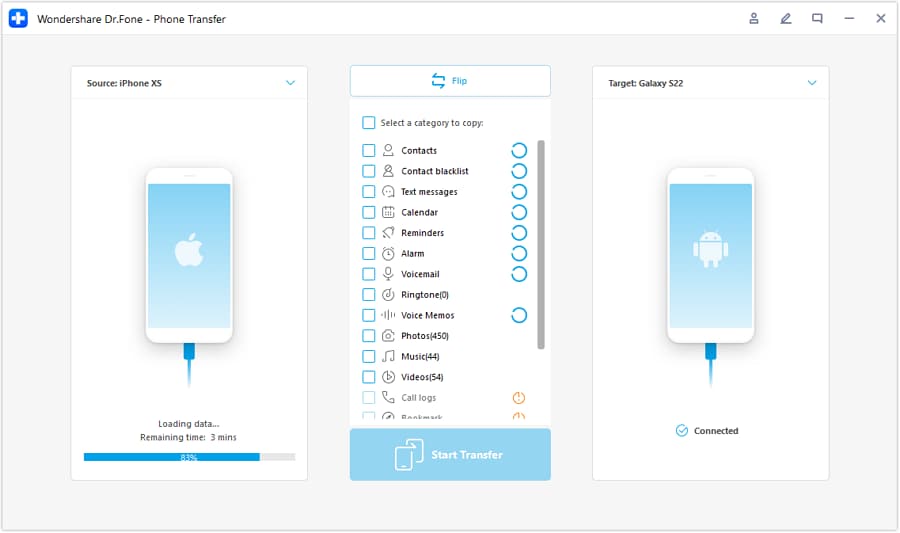
Step 2 Set the transfer direction
Choose which phone is the source and which is the destination (for example, iOS to Android or Android to iOS).
-
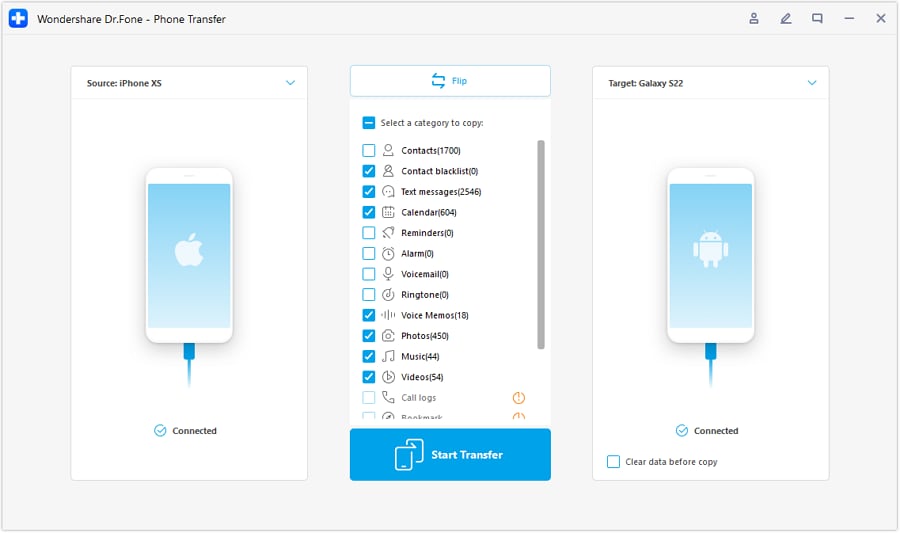
Step 3 Select what you want to move
Pick the data types you actually need for school and daily life (so you don’t bring unnecessary clutter to the new phone).
-
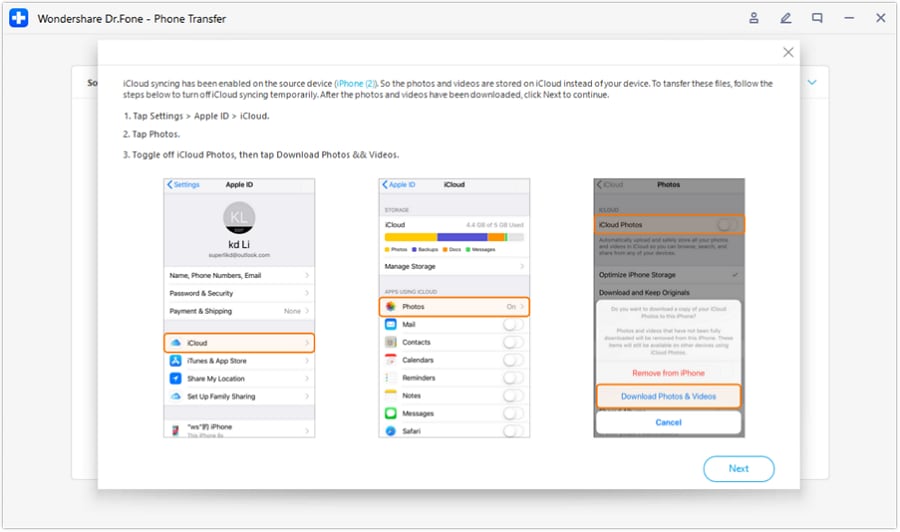
Step 4 Confirm required settings before transfer
Follow the on-screen guidance to avoid sync conflicts (for example, disabling iCloud syncing where required) so the transfer completes smoothly.
5-2. Do a quick cleanup before you judge the new phone’s battery
Action: Clean up duplicates/unneeded items so you start with cleaner storage and less background clutter. Limitation: Cleanup won’t “create” battery life—your actual usage patterns and settings still dominate results.
5-3. Prepare the old phone for resale or hand-me-down
Action: Erase personal data to reduce the chance of leaving recoverable information behind. Limitation: Always confirm you’ve signed out of key accounts and turned off device-specific locks before selling.




Conclusion
AI is best used here as decision support: it turns “long battery + budget” into clear trade-offs and a choice you can defend, while real daily use is the final proof—then Dr.Fone helps you execute the switch, cleanup, or resale prep smoothly once you’ve decided.
FAQ
-
Can I trust AI to pick the “best budget phone” for me?
Trust it to structure trade-offs and spot likely regret points. Don’t treat it as proof of real-world feel, battery consistency, or long-term durability.
-
What’s the single most important trade-off for students prioritizing long battery?
Usually: battery confidence vs device risk. New phones reduce risk; used phones may perform better but can bring uncertain battery health.
-
How do I avoid generic spec-based decisions?
Describe your day (hours on Wi‑Fi vs cellular, hotspot, brightness outdoors, video calls) and ask for outcomes like “gets me from 8am–10pm” rather than specs like mAh.
-
What assumption most often flips the recommendation?
How long you keep the phone. If you keep phones longer (2–4 years), reliability, updates, and battery aging risk matter more than a small upfront savings.
-
What should I prepare after choosing?
A short list of what you’ll transfer (contacts, photos, school files), what you’ll re-download, and how you’ll secure/erase the old phone if you’re selling it.
-
If I’m buying used or refurbished, what should I be most careful about?
Battery condition, return window, and account locks. A great price can become expensive if you can’t return it or if you must pay for a battery replacement immediately.
 Add Wondershare Dr.Fone as a preferred source on Google





