 Effortlessly manage data through preview, delete, export, etc.

 100% Security Verified | No Subscription Required | No Malware

 :
: 
 ChatGPT
 Perplexity
 Gemini
 Claude
 Grok
Grok

I keep comparing budget phones and I’m stuck—every model “wins” on a different spec, and I don’t know which trade-off I’ll actually feel every day.
Reddit user, r/Android
Picking the “best” budget phone is hard because the right answer depends on trade-offs you’ll actually feel every day—battery anxiety, camera reliability, app habits, and how long you’ll keep it.
AI helps by turning vague preferences (“good camera, smooth, not expensive”) into a structured comparison: what matters most, what you’re willing to compromise, and which choice reduces likely regret.
AI can’t verify real-life feel, signal strength in your neighborhood, or how a specific model behaves after months of updates—so once the decision is clear, the practical steps (switching, transferring, cleaning up, resale prep) still matter.

In this article
- How to Compare a Budget Phone Based on Real Priorities
- Common trade-offs that matter in daily use
- Ecosystem, pricing, and upgrade cycle factors
- How to define “best fit” instead of “best specs”
- How to use AI without over-trusting it
- What the AI Needs to Compare
- Using AI Prompts to Evaluate More Clearly
- When to Stop Researching and Make the Call
- After Choosing: Switch or Prepare Smoothly with Dr.Fone
Part 1. How to Compare best phone under budget using ai comparison prompts Based on Real Priorities
Budget-phone decisions usually come down to a few tensions: do you prioritize camera consistency or battery endurance, long software support or more hardware for the money, new vs refurbished, and “least hassle” vs “best value.”
You might also be balancing ecosystem lock-in (iMessage/FaceTime vs Android flexibility), local pricing swings, and whether you’ll keep the phone for 1–2 years or 4–5 years.
The goal isn’t to find a universal winner—it’s to identify the phone that best matches your daily use and your tolerance for compromises.
Part 2. What the AI Needs to Compare
Give the AI enough context to compare options the way you actually live with them:
- Your total budget (including tax, case, charger, repair plan if relevant)
- Country/region and whether you’re buying new, used, or refurbished
- 2–6 candidate phones you’re considering (or ask AI to suggest within constraints)
- Your top 3–5 priorities (camera, battery, small size, gaming, durability, updates, resale)
- Deal-breakers (no curved screen, no ads/bloat, must have eSIM/dual SIM, headphone jack, etc.)
- Current phone + what annoys you most about it
- Apps you rely on (social video, maps, banking, work tools, games)
- How long you plan to keep it and whether resale value matters
- Any carrier/network constraints and storage needs
Part 3. Using AI Prompts to Evaluate best phone under budget using ai comparison prompts More Clearly
Use these prompts to force trade-offs into the open instead of collecting endless specs.
3-1. Level 1: Basic Prompt
I’m choosing the best phone under my budget of [amount] in [country]. Compare [Phone A] vs [Phone B] for my priorities: [priority 1, priority 2, priority 3], and tell me which one fits me better and why.
Keep it practical: what will feel better or worse in daily use, not just specs.
3-2. Level 2: Advanced Prompt
Help me decide between [Phone A], [Phone B], and [Phone C] under [budget].
1) Ask me up to 7 clarifying questions that would change the recommendation.
2) Build a decision matrix using my answers with weighted priorities (0–10).
3) For each phone, list: who it’s best for, who should avoid it, and the top 3 trade-offs.
4) Give a final recommendation with a “most likely to satisfy me long-term” reasoning, not a spec summary.
3-3. Level 3: Evidence Prompt
Context: I’m coming from [current phone] and I’m frustrated by [pain points]. I use [apps/use cases] daily, I keep phones for [time], and resale value [matters/doesn’t]. My budget is [amount], and I’m willing to buy [new/refurb/used].
Recommend one option among [A/B/C]. For each option, explain:
- What I gain if I choose it
- What I give up compared to the others
- The single biggest risk/regret I should watch for
Also identify one key assumption you’re making that could flip your recommendation, and tell me what to choose if that assumption is wrong.
3-4. Prompt Refinement
If I prioritize least frustration for 2+ years over “best value today,” which phone wins and why?
Rank the options for camera reliability (not peak quality): moving subjects, indoor lighting, and video stabilization. Explain your logic without quoting benchmarks.
I’m sensitive to lag and UI friction. What’s the most likely source of everyday friction for each option (updates, storage, thermal throttling, app optimization)?
If I need strong resale value and low hassle selling later, how does that change the ranking?
What’s the smartest way to choose if I can’t test in person—what “proxy signals” should I use (return window, refurb grade, warranty, common failure points)?
Tell me which choice is the safest if I end up keeping the phone one year longer than planned.
3-5. AI Recommendation vs Real-World Fit
| likely AI recommendation or conclusion | what real-life use may change or reveal |
|---|---|
| “Pick the option with the best long-term support/resale for lower regret.” | You may dislike the size/weight, keyboard feel, or notification style enough to override the rational choice. |
| “Choose the best value option if you upgrade often and don’t care about resale.” | Battery aging, heat during video/gaming, or inconsistent camera behavior can make “value” feel expensive in daily annoyance. |
| “Go with the phone that matches your ecosystem (iOS vs Android) for less switching pain.” | Your specific must-have apps (banking, work profiles, wearables) may behave differently than expected on the new OS. |
| “Prioritize reliable battery + smooth basics over peak specs for budget phones.” | Network reception at home/work, charging habits, and screen brightness outdoors can dominate satisfaction more than specs. |
AI can clarify likely fit and make the trade-offs explicit, but hands-on use, workflow friction, and daily habits are what ultimately decide whether you’ll be happy.
Part 4. When to Stop Researching best phone under budget using ai comparison prompts and Make the Call
- You can clearly state your top 3 priorities and your one acceptable compromise (and you believe them).
- One option consistently wins for your priorities across scenarios (daily use, travel days, low battery days, indoor photos).
- You’ve identified at least one flip factor (a single assumption that would change the choice) and you know how to verify it (return policy, quick in-store test, checking carrier bands, etc.).
- You’d be comfortable owning the chosen phone for 6–12 months longer than planned if you had to.
Once you reach that point, more comparison usually adds noise—not clarity.
Part 5. After Choosing best phone under budget using ai comparison prompts: Switch or Prepare Smoothly with Dr.Fone
After the decision, the biggest risk is a messy transition: lost photos, duplicated contacts, forgotten chats, or leaving personal data behind if you’re selling the old device. To reduce that risk, you can use Dr.Fone - Phone Transfer to manage the switch in a guided flow.
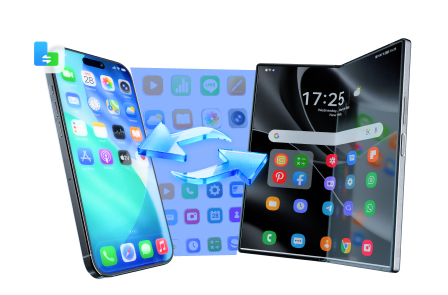
 Move data between iOS to Android and vice versa.
- Transfer contacts, SMS, photos, videos, music, and more types.
- Available with all phones with Android and iOS versions.
- Simple, click-through process.
-
Step 1 Open Phone Transfer and get your devices ready
Start Dr.Fone and enter the Phone Transfer flow so you can move essentials (photos, contacts, and more) from your old phone to the new one with guidance.

Limitation: Some app data (especially encrypted data or app-specific logins) may still require in-app sign-in or the app’s own migration method.
-
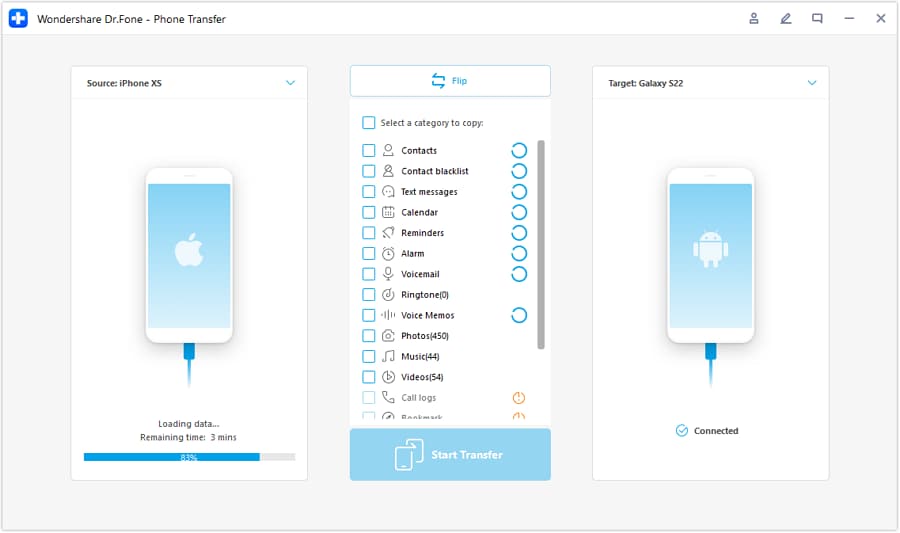
Step 2 Choose the correct transfer direction (old phone → new phone)
Select which device is the source and which is the destination before you start moving anything.
-
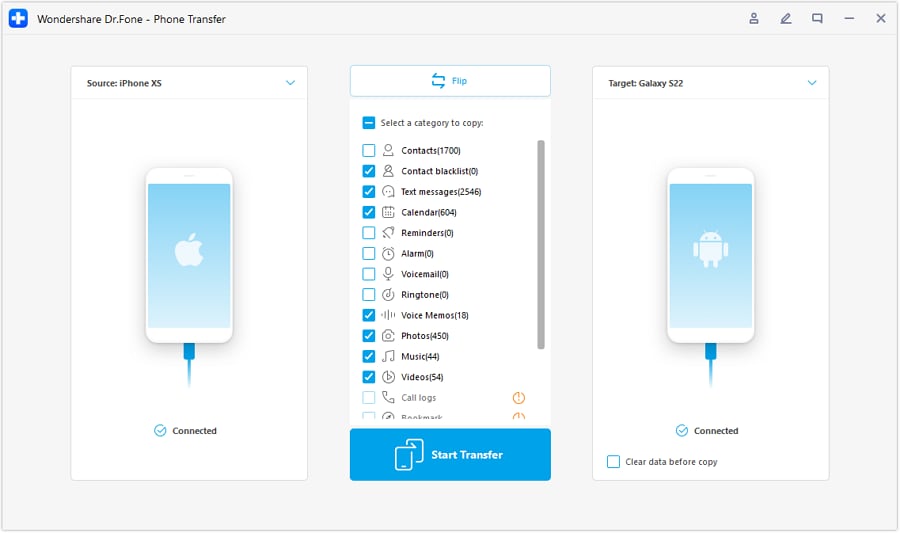
Step 3 Select what to move, then transfer
Pick the data categories you actually need so you don’t recreate clutter on a budget phone, then run the transfer.
Limitation: Deleting is reversible only if you have a backup—confirm what you’re removing before finalizing.
-
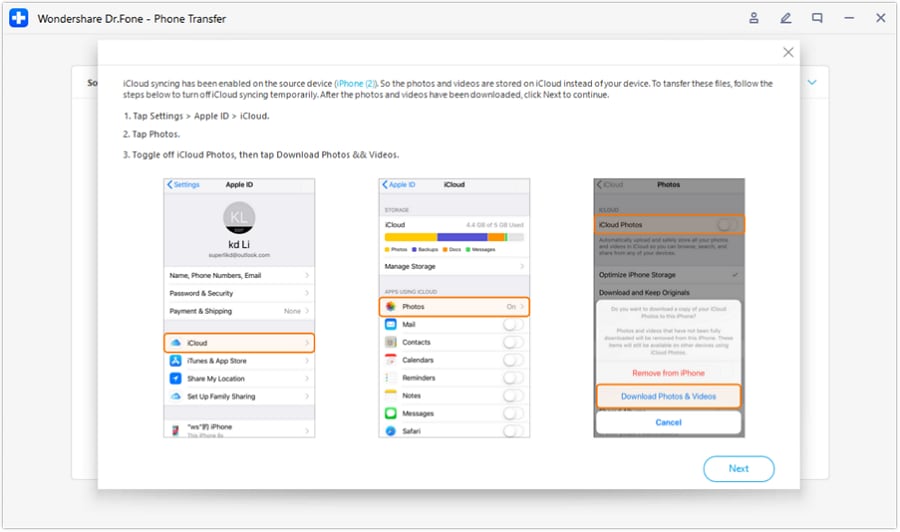
Step 4 Reduce sync conflicts and prep the old phone for handoff
If you’re moving from an iPhone, reduce iCloud syncing conflicts during transfer as needed. After you confirm everything is moved, back up what you need and use your phone’s factory reset to prepare the old device for trade-in or resale.
Limitation: Trade-in value still depends on carrier/store inspection, battery health, and cosmetic condition—not just reset status.




Conclusion
AI is best used as decision support: it clarifies priorities, makes trade-offs explicit, and highlights the assumption that could flip your choice; real-life use is the final proof, and once you’ve chosen, tools like Dr.Fone help you execute the switch (or resale prep) with fewer mistakes.
FAQ
-
Can I trust AI to pick the best budget phone for me?
Trust it to structure the decision and expose trade-offs; don’t trust it to guarantee “feel,” network performance, or long-term reliability for your exact unit. -
What’s the most important trade-off in budget phones?
Usually it’s “smooth, predictable daily experience” vs “more features/specs for the price.” The wrong side for you leads to the most regret. -
How do I avoid a generic spec-based decision?
Force the comparison to answer: what will annoy you weekly, what you need to work every day (camera consistency, battery, reception), and how long you’ll keep the phone. -
What should I prepare before buying?
A short list of must-have apps, your storage needs, your carrier constraints, and a plan for transfer (backup method + enough time to verify everything moved). -
Does refurbished/used change the recommendation?
Yes—return window, battery health, warranty, and refurb grading can matter more than small model differences under a tight budget. -
If I’m switching ecosystems (Android ↔ iPhone), what’s the hidden cost?
Rebuilding app logins, moving chats where possible, and re-learning settings/notifications—plan time for that, not just money.
 Add Wondershare Dr.Fone as a preferred source on Google





