 Effortlessly manage data through preview, delete, export, etc.

 100% Security Verified | No Subscription Required | No Malware

 :
: 
 ChatGPT
 Perplexity
 Gemini
 Claude
 Grok
Grok

I don’t need the “best phone on paper”—I need the phone that’s easiest to navigate on a bad day, with accessibility features that work predictably every time.
Forum user
“Best” depends on which accessibility needs must work flawlessly every day—and which compromises you can live with.
Generic lists usually rank phones by specs, not by the real friction points that affect accessibility: gesture consistency, screen reader reliability, voice control accuracy, and how predictable the interface feels under stress.
AI helps by turning your needs into explicit trade-offs, then matching them to the most likely-fit options (typically iPhone vs Android, and which Android flavor). AI can’t confirm hands-on comfort, fine-motor usability, or the “it just clicks” feeling—so after you narrow the choice, real-life trial and a smooth switching plan still matter.
In this article
- How to Compare the Best Phone for Accessibility and Easy Navigation Based on Real Priorities
- Two interaction models: consistency vs variety
- Daily navigation habits that matter most
- Reducing cognitive load vs keeping flexibility
- What to test early to avoid “regret risks”
- What the AI Needs to Compare
- Using AI Prompts to Evaluate More Clearly
- When to Stop Researching and Make the Call
- After Choosing: Switch or Prepare Smoothly with Dr.Fone
Part 1. How to Compare the Best Phone for Accessibility and Easy Navigation Based on Real Priorities
1-1. Two interaction models: consistency vs variety
Most people aren’t choosing between two “phones”—they’re choosing between two interaction models: a highly consistent ecosystem (often iPhone) versus more variety and customization (often Android, where experience can differ by brand).
1-2. Focus on daily navigation habits (not settings lists)
The uncertainty usually isn’t “Which has accessibility settings?” Both major platforms do. The uncertainty is which one fits your daily navigation habits: how you open apps, dictate text, read long content, answer calls, and recover when something goes wrong.
1-3. The real tension: fewer mistakes vs fewer regrets
The practical tension: you want the phone that reduces cognitive load and mistakes (missed taps, confusing gestures, inconsistent UI), but you also don’t want to regret losing flexibility, certain apps, or budget options.
1-4. Use AI to make trade-offs explicit, then validate by trial
AI can clarify likely fit and trade-offs, but hands-on use, workflow friction, and daily habits are what ultimately decide satisfaction.
Part 2. What the AI Needs to Compare
Share the details below so the AI can map your needs to the right trade-offs.
- Your primary accessibility needs (screen reader, magnification, hearing support, voice control, switch access, reduced motion, large text, color adjustments)
- Your navigation challenges (fine-motor control, tremor, low vision, attention/focus, memory load, sensitivity to clutter)
- What “easy navigation” means to you (fewer steps, consistent gestures, predictable back behavior, simpler settings, stronger voice-first use)
- Your current phone and what frustrates you most
- Must-have apps and workflows (messaging, email, banking, rideshare, healthcare portals, work tools)
- Support setup reality (who will help you configure it, and how often)
- Budget range and how long you plan to keep the phone
- Preference constraints (platform comfort, ecosystem ties, accessories you already own)
Part 3. Using AI Prompts to Evaluate the Best Phone for Accessibility and Easy Navigation More Clearly
Use these prompts to force a priority-first comparison instead of a spec-first debate.
3-1. Level 1: Basic Prompt
I’m choosing a phone mainly for accessibility and easy navigation. Compare iPhone vs Android for my situation and tell me which is the safer choice for fewer daily frustrations. Ask me any questions you need before recommending.
3-2. Level 2: Advanced Prompt
Help me decide between iPhone and Android specifically for accessibility and easy navigation.
1) List my top 5 decision criteria based on the details I share,
2) explain trade-offs for each platform against those criteria, and
3) tell me who each option fits better (including “best for” and “not ideal for”). Keep it focused on real daily use, not specs.
3-3. Level 3: Evidence Prompt
Here’s my context: [describe vision/hearing/mobility needs], [what makes navigation hard], [must-have apps], and [who helps me set up]. Recommend either iPhone or Android as my primary choice for accessibility and easy navigation.
For each option, spell out **what I gain vs what I give up**, and name **one key assumption** (about my needs or habits) that—if wrong—would change your recommendation.
3-4. Prompt Refinement (follow-ups)
If I choose iPhone, what are the top 3 “regret risks” for someone like me—and how can I test for them within 48 hours?
If I choose Android, what are the top 3 “regret risks,” especially around consistency across apps and settings—and how can I test for them quickly?
Which matters more for my situation: **interface consistency** or **customizability**? Explain using my examples, not generalities.
What’s the single accessibility feature or workflow that should be my “deal-breaker test,” and what’s the step-by-step script to test it in-store?
Assume my worst day (fatigue, low focus, shaky hands). Which option is more forgiving, and why?
If I rely on a family member/support worker for setup, which platform reduces ongoing support burden over time?
3-5. AI Recommendation vs Real-World Fit
| Likely AI recommendation or conclusion | What real-life use may change or reveal |
|---|---|
| “Choose iPhone for consistency and lower navigation surprises.” | You may find certain gestures uncomfortable, VoiceOver learning curve steeper than expected, or your must-have apps behave differently than you need. |
| “Choose Android for flexibility and tailoring the interface to you.” | Brand-to-brand differences (and app-to-app inconsistency) may create extra friction; you may spend more time tuning settings to stay comfortable. |
| “Prioritize the platform you already know to reduce cognitive load.” | Familiarity can mask a poor fit; a short trial might reveal the other platform is actually easier once configured. |
| “Your deal-breaker is voice-first control / screen reader reliability—test that first.” | Real environments (noise, glare, weak signal) can change voice accuracy and readability more than any on-paper comparison. |
AI can clarify likely fit and trade-offs, but hands-on use, workflow friction, and daily habits are what ultimately decide satisfaction.
Part 4. When to Stop Researching the Best Phone for Accessibility and Easy Navigation and Make the Call
- You can name your top 3 accessibility workflows (e.g., reading text, messaging, calls) and you’ve tested them in a realistic way (store demo or borrowed device).
- You know your non-negotiable (the one thing that must feel effortless) and which platform meets it with fewer steps.
- You understand the main trade-off you’re accepting (what you gain / what you give up), and it feels worth it for your day-to-day.
- You’ve identified one assumption that could flip your decision (e.g., “I’ll use a screen reader daily,” “I need deep customization,” “someone else will manage settings”) and you’ve validated it.
At that point, you’re no longer “still comparing”—you’re choosing with eyes open.
Part 5. After Choosing the Best Phone for Accessibility and Easy Navigation: Switch or Prepare Smoothly with Dr.Fone
Once the decision is made, the practical risk is losing data, duplicating clutter, or carrying over a messy setup that makes navigation harder than it needs to be. To reduce that risk, a guided transfer tool like Dr.Fone - Phone Transfer can help you move essentials with fewer surprises.
 Move data between iOS to Android and vice versa.
- Transfer contacts, SMS, photos, videos, music, and more types.
- Available with all phones with Android and iOS versions.
- Simple, click-through process.
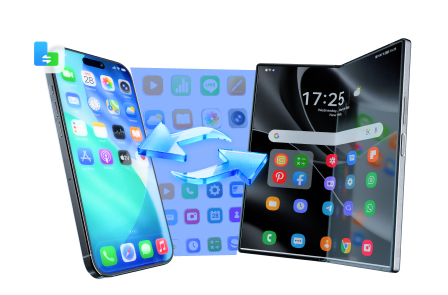
Below is a simple, accessibility-friendly switching flow you can follow to get set up quickly, then handle messaging continuity and privacy cleanup when you’re ready.
-
Step 1 Open Phone Transfer and start a transfer plan
Goal: transfer the essentials (contacts, photos, core files) so your daily basics work immediately on the new device.

-
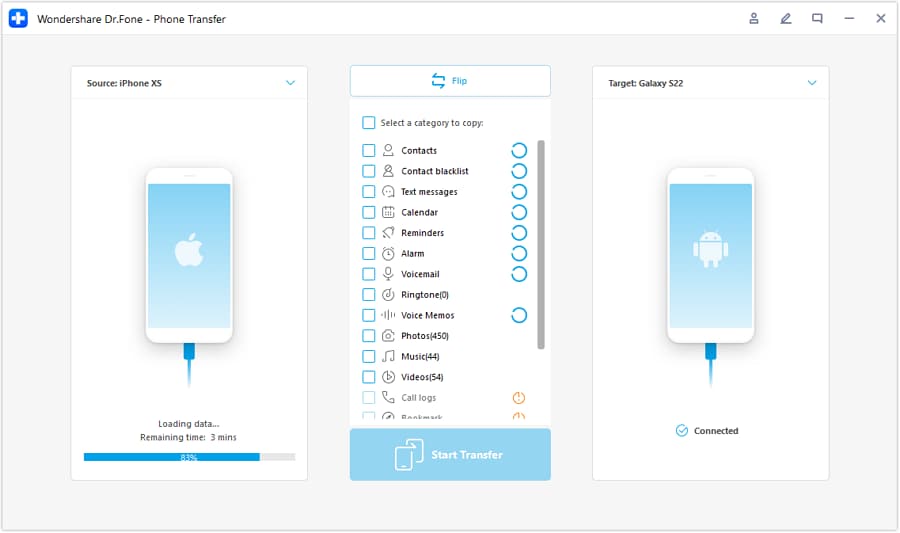
Step 2 Set the transfer direction (iOS ⇄ Android)
Pick the correct source and destination so you don’t accidentally move data the wrong way.
-
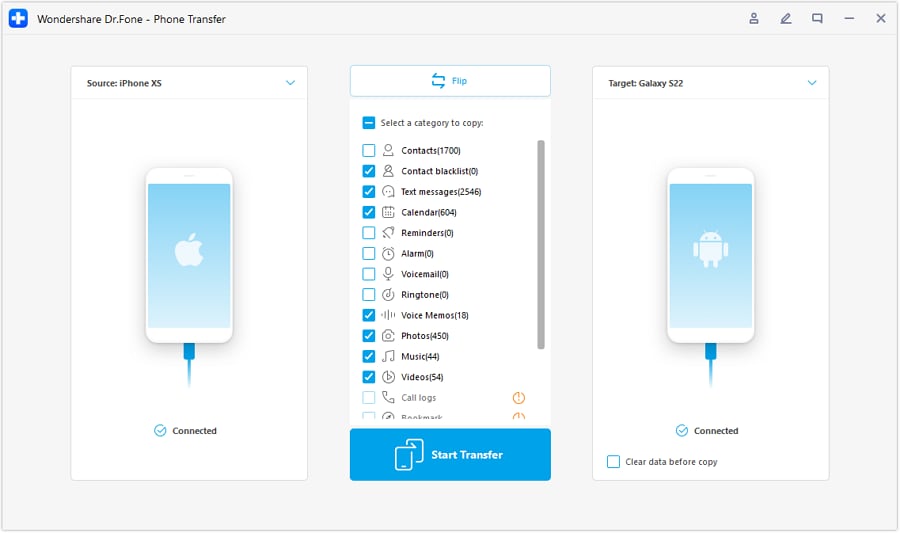
Step 3 Choose what to transfer (keep it focused on what you rely on)
Select only the data that supports your daily workflows first. Some app-specific data may not transfer cleanly and may require in-app sign-in or separate migration.
-
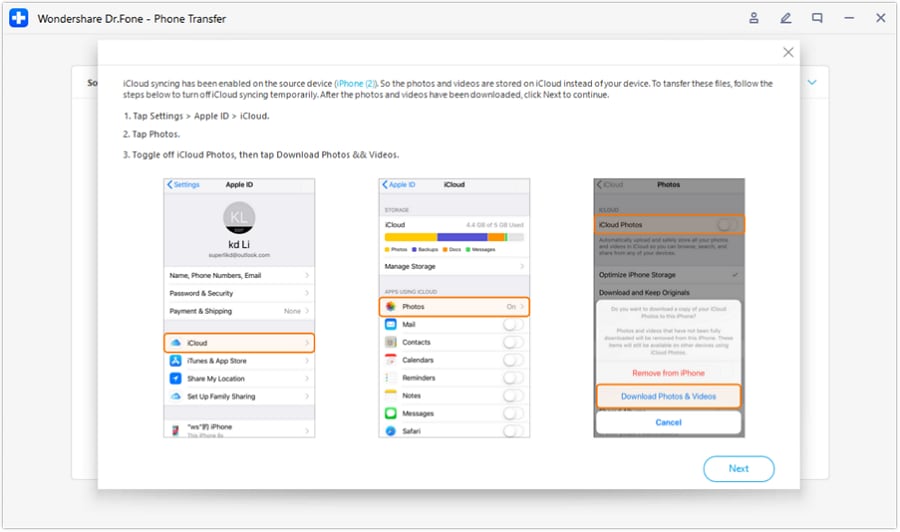
Step 4 Follow any prompts that prevent conflicts (for example, syncing)
If you see prompts that could interrupt the transfer (such as cloud syncing conflicts), follow the on-screen guidance before continuing.
Move chats you actually rely on: If your messaging history is part of accessibility (searching past info, saved details), use Dr.Fone’s WhatsApp transfer capability where applicable to keep continuity. Transfer support can vary by device/platform and messaging app version, so confirm compatibility before relying on it.
Clean up or prepare the old phone (accessibility-friendly exit): When you’re ready, Dr.Fone Data Eraser features can help remove personal data before resale or hand-me-down. Erasure is irreversible—double-check backups and account sign-outs first.




Conclusion
AI is best used to surface trade-offs and reduce decision ambiguity, but real use is the proof—and once you’ve chosen, tools like Dr.Fone help execute the switch, cleanup, or resale prep without turning the transition into another accessibility hurdle.
FAQ
-
Can I trust AI to pick the “best” accessible phone for me?
AI can rank likely fit from your stated priorities, but it can’t verify real-world comfort, gesture ease, or your personal learning curve. -
What’s usually the biggest trade-off in accessibility + easy navigation?
Consistency and predictability versus flexibility and customization—both can help accessibility, but they help in different ways. -
How do I avoid a generic spec-based decision?
Decide based on your top daily workflows (read, type, call, navigate) and test the exact steps you’ll repeat most, especially on a bad day. -
What should I prepare before switching phones?
A short list of must-have apps, your account logins, your accessibility settings checklist (text size, magnification, screen reader, reduced motion), and a backup plan. -
If I’m reselling my old phone, what matters most for privacy?
Back up what you need, sign out of accounts, and securely erase the device so personal data and accessibility-related history aren’t left behind.
 Add Wondershare Dr.Fone as a preferred source on Google





