 Effortlessly manage data through preview, delete, export, etc.

 100% Security Verified | No Subscription Required | No Malware

 :
: 
 ChatGPT
 Perplexity
 Gemini
 Claude
 Grok
Grok

My phone still works, but the battery drops fast and I’m constantly hitting storage warnings. I can’t tell if I should upgrade now or wait for the next release—especially if I’ll regret buying too early.
Forum user
Generic “best time to upgrade” advice misses the details that actually drive satisfaction—battery anxiety, camera reliability, storage pressure, and how long you plan to keep the next phone.
AI helps most when you use it to turn fuzzy preferences into explicit trade-offs, so you can see what you gain, what you give up, and what would make you regret the choice.
AI can’t verify how a phone feels in your hand, how stable your specific apps will be, or whether a new model’s real-world battery matches your routine—so you still need a reality check and a plan for switching (or preparing to sell) after you decide.
In this article
- Part 1. How to compare based on real priorities
- Assess your daily pain
- Estimate your upgrade window
- Relief now vs value later
- Risk reduction vs regret
- Part 2. What the AI needs to compare
- Part 3. Using AI prompts to evaluate more clearly
- Part 4. When to stop researching and make the call
- Part 5. After you decide: shift from research to execution
Part 1. How to compare “should I upgrade my phone this year or wait” based on real priorities

You’re not just choosing “new vs old”—you’re choosing between solving today’s friction (slowdowns, battery drops, storage warnings, broken port) and potentially getting more value by waiting (price drops, newer models, longer software support).
The uncertainty usually comes from mixed signals: the phone still “works,” but it’s costing you time, reliability, or enjoyment in small daily moments. Or you’re worried you’ll upgrade now and feel silly when the next release lands.
A practical way forward is to compare your current pain against your likely upgrade window, and decide whether you’re optimizing for relief now, value later, or risk reduction (e.g., avoiding a sudden failure).
Upgrade now (when it usually makes sense)
- Your pain is frequent and hits core tasks (work, navigation, communication, payments).
- You want immediate reliability and less day-to-day friction.
- You’re reducing the risk of a sudden failure (battery swelling, overheating, worsening damage).
Wait (when it usually makes sense)
- Your issues are occasional and not high-impact.
- You’re prioritizing value (price drops) and/or upcoming options (new models, longer support).
- You can tolerate the risk and have a backup plan if the phone degrades faster than expected.
Part 2. What the AI needs to compare
Answer these inputs once, and the comparison becomes much clearer:
- Your current phone model/age and what’s failing (battery health, lag, camera, storage, connectivity, screen damage)
- Your “pain frequency” (daily, weekly, occasional) and the top 2 tasks affected (work apps, photos, maps, payments, gaming)
- Budget range and comfort with refurbished/used vs new
- How long you want to keep the next phone (1–2 years vs 3–5 years)
- Your upgrade timing constraints (travel soon, new job, school, seasonal sales)
- Your risk tolerance for sudden failure (battery swelling, overheating, cracked screen worsening)
- Trade-in/resale value importance and whether you have backups
- Must-have changes you’re waiting for (camera jump, USB-C, storage tier, AI features, foldable, better battery)
Part 3. Using AI prompts to evaluate “should I upgrade my phone this year or wait” more clearly
Use these prompts to force a decision based on your priorities instead of generic upgrade cycles.
3-1. Level 1: Basic prompt
I’m deciding whether to upgrade my phone this year or wait. Ask me the minimum questions needed, then compare “upgrade now” vs “wait” using my daily pain points, budget, and how long I keep phones.
3-2. Level 2: Advanced prompt
Help me decide: upgrade my phone this year or wait.
1) Extract my top priorities (reliability, battery, camera, performance, storage, cost, resale).
2) Score “upgrade now” and “wait” against those priorities with clear trade-offs.
3) Tell me which option fits me better and what type of user each option is best for.
3-3. Level 3: Evidence prompt
Here’s my situation: [phone model + age], [battery behavior], [storage free space], [any damage], [top apps/tasks], [budget], [how long I keep phones], [upcoming events], [trade-in/resale importance].
Recommend “upgrade this year” or “wait,” and explain what I gain and what I give up with each choice.
Also name one key assumption you’re making that—if wrong—would flip your recommendation.
3-4. Prompt refinement (follow-up prompts)
If I upgrade now, what are the top 3 likely regret points for my usage—and how can I reduce each risk before buying?
If I wait, what are the top 3 failure/risk scenarios (battery, breakage, security/support, lost productivity) and how costly are they for me?
What’s the “good enough” threshold where upgrading becomes irrational (e.g., battery lasts X hours, storage stays above Y GB, lag is rare)? Help me set my thresholds.
Compare these two futures: (A) I buy now and keep it for 3–4 years vs (B) I wait 6–9 months and keep that phone for 3–4 years. Which gives me more total satisfaction and why?
What information would most change your advice (battery health %, repair quote, trade-in value, next-model release timing)? Tell me exactly what to check and report back.
3-5. AI recommendation vs real-world fit
| Likely AI recommendation or conclusion | What real-life use may change or reveal |
|---|---|
| “Upgrade now” because your pain is frequent and affects core tasks | The new phone may not feel meaningfully faster if your main bottleneck is network/app design, not hardware |
| “Wait” because your issues are occasional and value improves later | Your battery or storage may degrade faster than expected, turning “occasional” into “daily” within months |
| “Repair/replace battery first” as a cheaper relief option | Repair quality, turnaround time, and waterproofing/seal integrity can change the real outcome |
| “Upgrade now to maximize trade-in/resale value” | Actual trade-in offers can vary sharply by carrier, condition grading, and timing, changing the math |
AI can clarify likely fit and trade-offs, but hands-on use, workflow friction, and your daily habits still decide whether the choice feels right.
Part 4. When to stop researching “should I upgrade my phone this year or wait” and make the call
- You can name your top 2 upgrade drivers and they’re either frequent (daily/weekly) or high-impact (work, navigation, communication, payments).
- You’ve chosen a target timeline: now, after a specific sale/release window, or after a repair attempt—not “sometime soon.”
- You’ve sanity-checked the money: total cost (phone + taxes + accessories) versus repair cost and expected extra months of usability.
- You know your biggest regret risk (buying too early vs waiting too long) and you have a plan to reduce it (return window, case, battery check, backup).
At this point, you’re no longer collecting random opinions—you’re choosing a path with managed risks.
Part 5. After you decide: shift from research to execution
Once the decision is made, the practical risk shifts to execution: protecting your data, reducing setup friction, and (if upgrading) leaving the old phone clean and ready for trade-in or resale.
If you want a cleaner switching workflow, tools like Dr.Fone - Phone Transfer can help you move what matters and reduce the chance of “oops, I forgot that” during setup.
Product recommendation: Switch or prepare smoothly with Dr.Fone
After you choose “upgrade now” or “wait,” your next win is reducing switching friction: transfer only what you need, back up before major changes, and prepare the old device for trade-in or resale.
 Move data between iOS to Android and vice versa.
- Transfer contacts, SMS, photos, videos, music, and more types.
- Available with all phones with Android and iOS versions.
- Simple, click-through process.
-
Step 1 Open Phone Transfer
Launch Dr.Fone and enter the phone transfer feature so you can start a guided switching workflow.

-
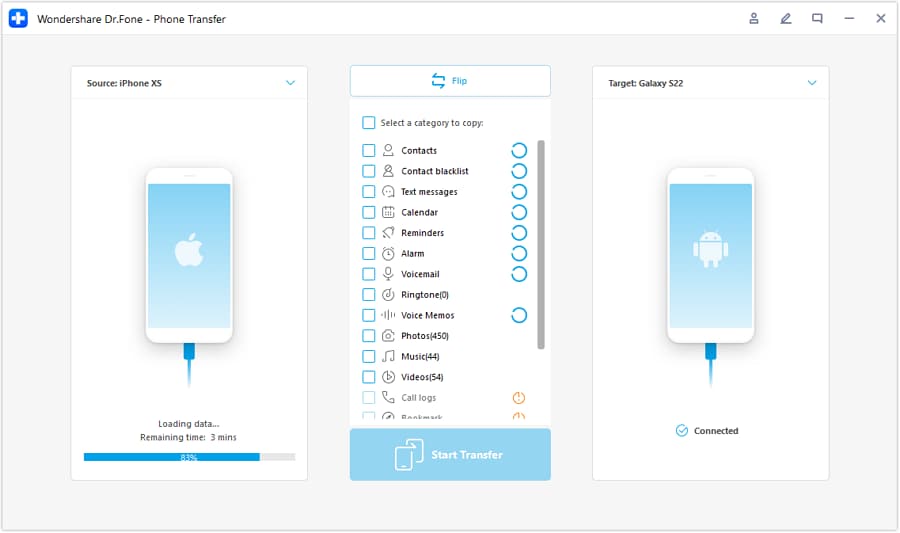
Step 2 Set the transfer direction
Connect both phones and select the correct direction (for example, iOS to Android or Android to iOS) before you move anything.
-
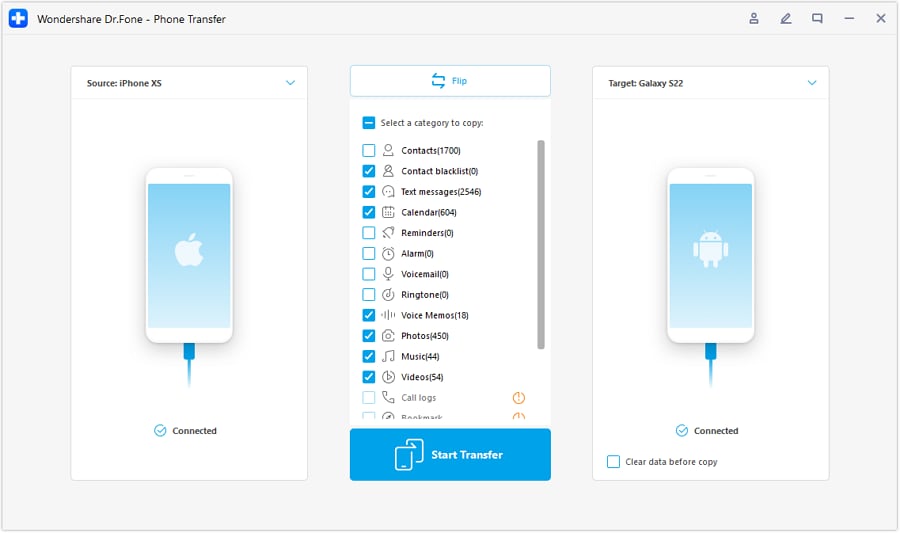
Step 3 Choose what to transfer (not everything)
Transfer key data you actually use (contacts, photos, and core files) so you don’t drag clutter onto the new phone.
-
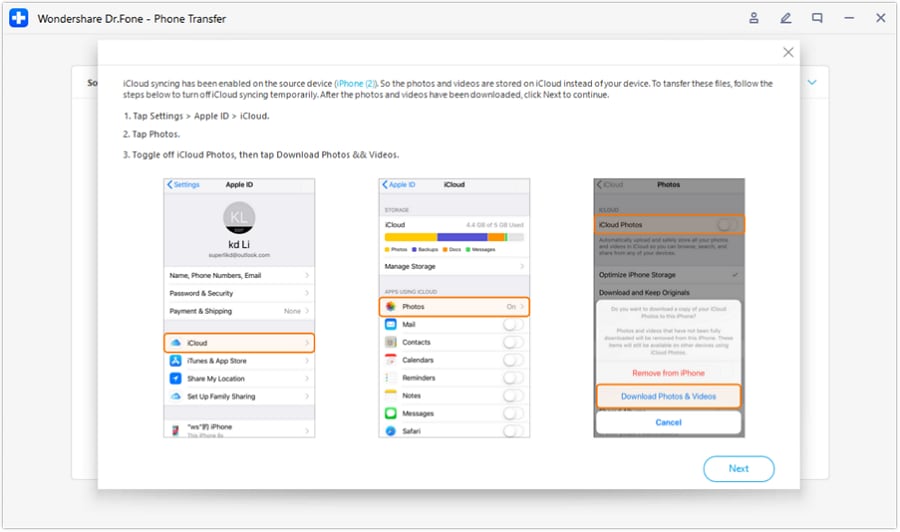
Step 4 Follow the on-screen requirements to complete the move
If prompted, complete required settings changes (for example, disabling iCloud syncing during certain transfers) to avoid interruptions.




Conclusion
AI is best as decision support: it helps you compare upgrade-now vs wait using your real priorities and regret risks, while real-life use is the final proof—and if switching (or selling) is next, tools like Dr.Fone help you execute the move cleanly once you’ve chosen.
FAQ
-
Can I trust AI to tell me whether to upgrade or wait?
Use AI to structure the trade-offs and highlight missing info, not as proof of real-world performance or reliability. -
What’s the single biggest trade-off in “upgrade now vs wait”?
You trade immediate relief and reliability (upgrade now) against potentially better value and newer options (wait). -
How do I avoid a generic spec-based decision?
Force the comparison through your pain frequency, must-do tasks, and time cost (missed photos, slow navigation, work delays), then decide what those are worth monthly. -
What information most often flips the recommendation?
Battery health/behavior, a realistic repair quote, your true trade-in value today, and whether a time-bound event (travel/job/school) makes reliability non-negotiable. -
If I upgrade, what should I prepare first?
Do a backup, list the apps/accounts you must re-authenticate, and decide what data you’ll transfer versus leave behind to avoid moving clutter. -
If I wait, how do I reduce the risk of being forced into an emergency upgrade?
Back up now, free storage headroom, monitor battery/overheating signs, and set a “fail point” (e.g., battery dies midday twice a week) that triggers upgrading.
 Add Wondershare Dr.Fone as a preferred source on Google





