 Effortlessly manage data through preview, delete, export, etc.

 100% Security Verified | No Subscription Required | No Malware

 :
: 
 ChatGPT
 Perplexity
 Gemini
 Claude
 Grok
Grok

“Short vs long” rarely has a universal winner—because the best route length depends on what you’re optimizing for (consistency, calorie burn, mood, time, or goal progress).
Forum user
AI can help you turn fuzzy preferences like “I want something effective” into clear trade-offs, so you can choose a route length that actually fits your day and your motivation patterns.
AI can’t feel your boredom threshold, motion sensitivity, or real-life schedule friction—so once you have a likely best-fit choice, your first week of use is still the real proof.
In this article
- Compare Short vs Long Route Lengths by Real Priorities
- Why both can be “best”
- What changes the answer (time, goal, derailers)
- Short vs long: felt trade-offs
- Turn “effective” into a decision
- What the AI Needs to Compare
- AI Prompts: Levels, Refinement, and Reality Check
- When to Stop Researching and Make the Call
- After Choosing: Simulate Routes and Keep Your Setup Smooth
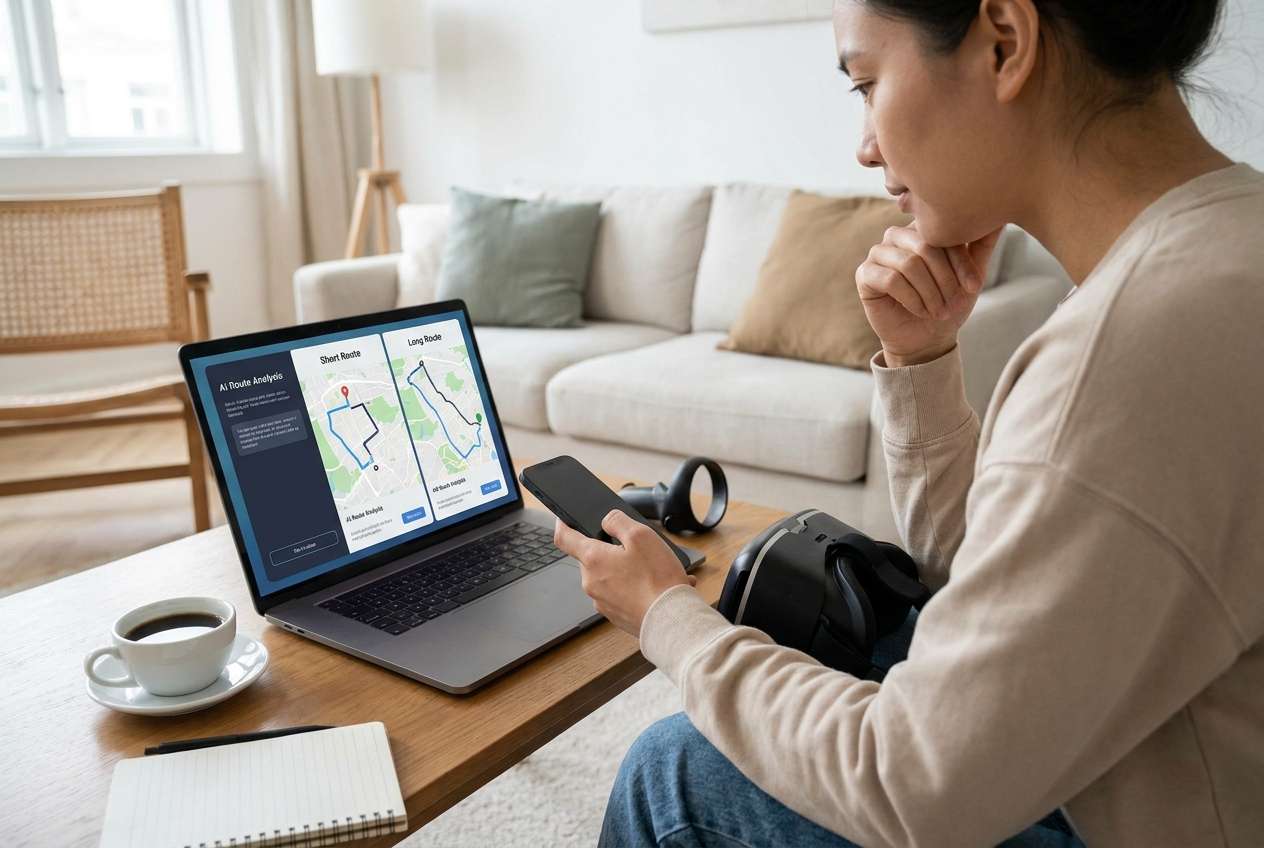
Part 1. Compare Short vs Long Virtual Walking Routes by Real Priorities
You’re trying to decide whether short virtual walking routes (quick sessions) or long routes (extended sessions) make more sense for your goals—fitness, stress relief, training consistency, or just “getting moving” without burnout.
1-1. Why short and long routes both “win”
The tension is practical: short routes are easier to start and repeat, while long routes can feel more “worth it” but may be harder to finish consistently.
1-2. What changes the answer in real life
Your best choice can change based on when you’ll do it (morning vs evening), why you’re doing it (health vs entertainment vs training), and what usually derails you (time, boredom, soreness, or motivation dips).
1-3. Short vs long: the trade-offs you’ll actually feel
Short routes (10–20 minutes): where they shine
- Low friction: easier to start, easier to repeat.
- Better for habit building and consistency.
- Lower risk of quitting mid-session on busy days.
Short routes: typical drawbacks
- May feel underwhelming, leading to “stacking” sessions without a plan.
- Progress can feel less immersive or less satisfying in one go.
- If intensity stays too low, improvements may feel slower.
Long routes (45–90 minutes): where they shine
- More immersion and a stronger “I made real progress” feeling.
- Good for endurance-style goals.
- Fewer sessions can still feel meaningful.
Long routes: typical drawbacks
- More likely to be skipped when life gets busy.
- Higher risk of stop-start cycles if you miss sessions.
- Recovery needs, boredom, or setup friction can derail consistency.
1-4. Use AI to clarify, then let a short trial decide
AI can clarify likely fit and trade-offs, but hands-on use, workflow friction, and daily habits still decide satisfaction—especially with consistency, boredom, and recovery.
Part 2. What the AI Needs to Compare
Share the details below so the AI can compare route lengths based on your real constraints, not generic advice.
- Your primary goal (consistency, endurance, weight management, stress, steps, recovery, enjoyment, etc.).
- Typical available time windows (and how predictable they are).
- Current activity level and any limitations (knees, feet, fatigue, motion sensitivity).
- What “virtual walking” means for you (app-based route, VR walk, treadmill + video, location-based game, etc.).
- Your biggest failure mode (skip sessions, quit mid-way, get bored, overdo it, soreness).
- Preferred intensity (easy pace, moderate, intervals) and recovery needs.
- Whether you prefer daily routine vs fewer longer sessions.
- What success looks like in 2 weeks and in 8 weeks.
Part 3. AI Prompts to Compare Short vs Long Routes More Clearly
Use these prompts to force a decision based on trade-offs you’ll actually feel day to day.
3-1. Level 1: Basic Prompt
Help me decide between short virtual walking routes and long virtual walking routes.
Ask me 5 questions about my goals, schedule, and motivation, then recommend one and explain why.
3-2. Level 2: Advanced Prompt
Compare short vs long virtual walking routes for me using a priority-based framework.
1) First, list the top 6 decision factors you think matter (consistency, fatigue, boredom, time friction, progress, enjoyment, etc.).
2) Ask me to rank those factors and share my weekly schedule reality.
3) Then give two profiles: “Short routes fit best if…” and “Long routes fit best if…”
4) Make the trade-offs explicit with a what-you-gain vs what-you-give-up summary for each option.
3-3. Level 3: Evidence Prompt
Context: I’m choosing between short virtual walking routes (10–20 minutes) and long routes (45–90 minutes).
My goal is: [insert goal].
My schedule: [insert time windows + how reliable they are].
My risk factors: [boredom, soreness, inconsistency, motion sensitivity, etc.].
My current baseline: [how often you walk now].
Task:
- Recommend short or long routes for the next 14 days and explain why.
- For each option, state clearly what I gain and what I give up.
- Identify ONE key assumption you’re making about me that could flip your recommendation, and tell me what to do if that assumption is wrong.
3-4. Prompt Refinement (follow-up prompts)
If I can only be consistent 3 days/week, does that push me toward longer routes or shorter routes? Show your reasoning.
What’s the most likely regret point with short routes for someone like me, and how would I prevent it?
What’s the most likely regret point with long routes for someone like me, and how would I prevent it?
Assume I’m overestimating my motivation by 20%. Recalculate the recommendation and explain what changes.
Give me a hybrid plan (short most days + one longer day, or vice versa). Explain when hybrid beats “all short” or “all long.”
3-5. AI recommendation vs real-world fit
| Likely AI recommendation or conclusion | What real-life use may change or reveal |
|---|---|
| “Short routes win for consistency, habit building, and low friction.” | You may feel underwhelmed and start “stacking” sessions anyway—turning short into long without planning. |
| “Long routes win for immersion, endurance, and feeling like you made real progress.” | Long sessions may be the first thing you skip when life gets busy, causing stop-start cycles. |
| “Choose based on boredom tolerance: long if you enjoy immersion, short if you get restless.” | Your boredom trigger might be format-specific (route content, pace, visuals), not length—fixing variety may matter more. |
| “Pick the option that best matches your weekly schedule windows.” | Hidden friction (setup time, environment, recovery needs) can make the ‘available window’ smaller than it looks. |
AI can clarify likely fit and trade-offs, but hands-on use, workflow friction, and daily habits still decide satisfaction—especially with consistency, boredom, and recovery.
Part 4. When to Stop Researching and Make the Call
- You can state your #1 priority (e.g., consistency, endurance, stress relief) and your #1 constraint (e.g., time, fatigue, boredom) in one sentence.
- You know your most likely failure mode (skip, quit mid-session, overdo it) and you’ve chosen the route length that minimizes it.
- You can explain the trade-off you’re accepting (what you gain / what you give up) without trying to “solve” it with more research.
- You have a 14-day test plan (when you’ll do it, how often, and what outcome you’ll measure).
At this point, you’re not guessing—you’re ready to run a small, realistic experiment and commit to one option.
Part 5. After Choosing: Simulate Routes and Keep Your Setup Smooth
Once you’ve decided on a short or long route approach, it helps to make your setup match your choice. If you need a practical way to set a route and simulate GPS movement for virtual walking, Dr.Fone - Virtual Location can help you plan and run routes with adjustable movement behavior.
 Set your map route to simulate GPS movement.
- Set your wanted movement speed.
- HD and large map view to check location.
- Fake GPS location to anywhere.

5-1. A simple route-simulation workflow (short or long)
-
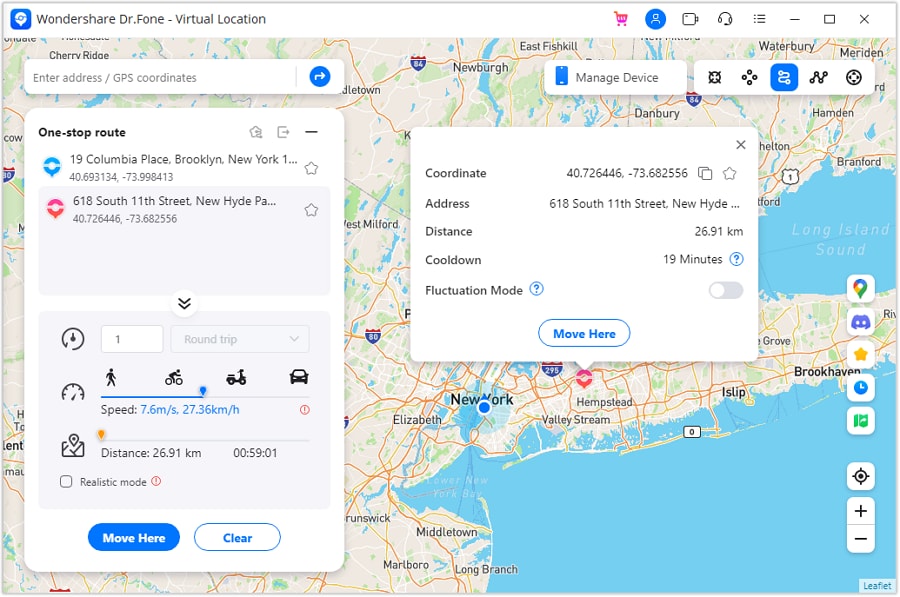
Step 1 Activate one-stop route mode
Choose the one-stop route option when you want a simple A-to-B walk that’s easy to keep short and repeatable.
-
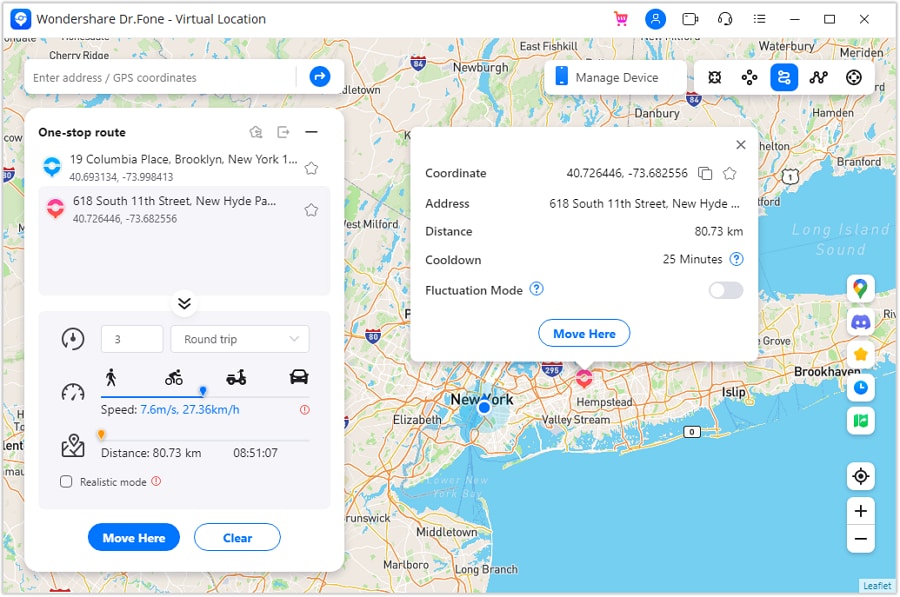
Step 2 Set parameters to simulate
Adjust key route parameters (like movement behavior and speed) so the session matches your intended intensity and time window.
-
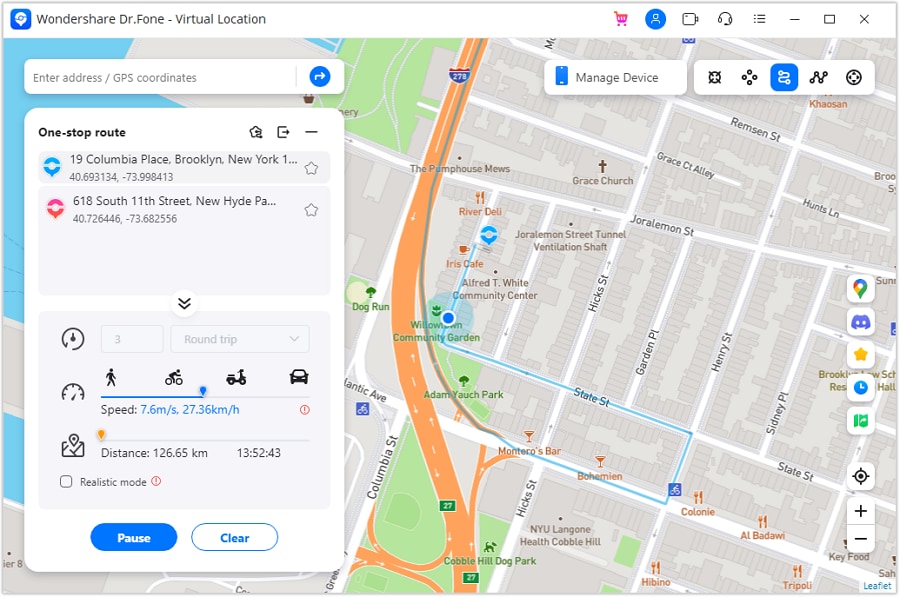
Step 3 Start one-stop simulation
Start the simulation and treat it like a 14-day experiment: track completion rate and how you feel (boredom, soreness, motivation) after each session.
-
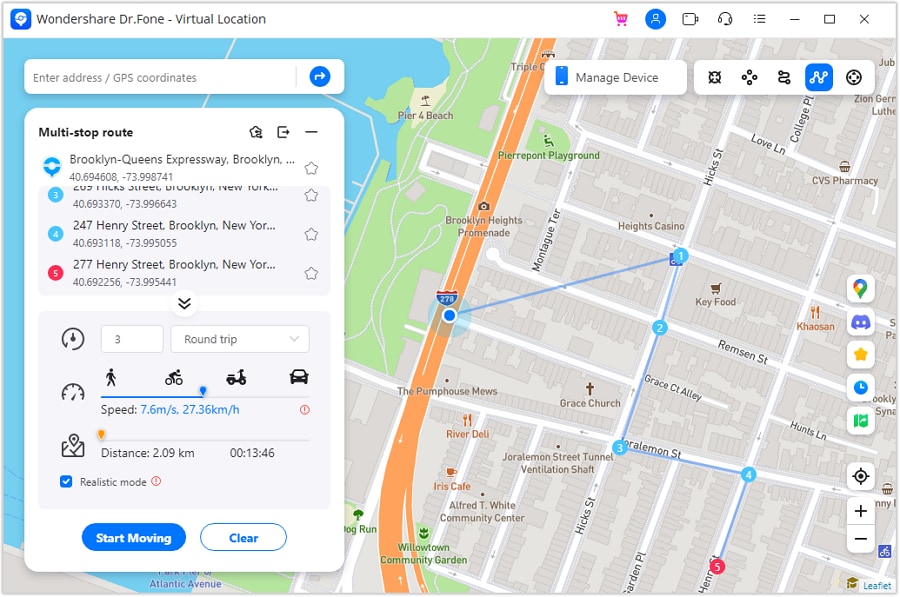
Step 4 Activate multi-stop simulation for longer, structured walks
If you’re testing longer routes, multi-stop planning can help you structure variety and reduce boredom by breaking a long session into segments.
5-2. Keep your device workflow from becoming the real bottleneck
Once you’ve chosen a route length, the practical work is making your setup support it—especially if you’re switching devices, consolidating accounts/data, or preparing a phone for resale after changing how you use walking/fitness apps.
- Transfer what you actually need: Move essential data (photos, contacts, messages, and other personal files you want to keep) if switching phones so your routine doesn’t get interrupted. Some app-specific progress may still require in-app login or the app’s own sync method.
- Clean up before you commit: Back up key data, then remove clutter (duplicate photos/videos or unused large files) so your device runs smoothly during regular sessions. Storage cleanup won’t fix app design issues (like boring content or poor pacing) that make long or short routes feel wrong.
- Prepare for resale or hand-off: Securely erase personal data if you’re selling or giving away a device after you’ve moved to a new setup. You still need to sign out of accounts and disable device locks/services (like activation locks) using the phone’s own settings.




Conclusion
AI is best used here as decision support: it helps you name priorities, expose trade-offs, and choose a route length you can sustain—then real use confirms it, and tools like Dr.Fone handle the practical switching/cleanup/resale steps if your setup needs to change.
FAQ
-
Can I trust AI to choose the “right” route length for me?
You can trust it to clarify trade-offs and match an option to your stated priorities; you can’t trust it to predict your real boredom threshold, recovery response, or day-to-day friction without a trial. -
What’s the single most important trade-off between short and long virtual walking routes?
Consistency vs immersion: short routes usually win on starting and repeating; long routes usually win on feeling fully “worth it” in one go. -
How do I avoid a generic, spec-like decision?
Decide based on your failure mode (skip, quit, overdo) and your real time windows—then pick the length that reduces that failure most. -
Is a hybrid approach just indecision?
Not if it’s intentional: hybrid often works best when you need daily consistency (short) but also want periodic endurance/immersion (long). -
What should I prepare right after I choose?
A 14-day schedule, a simple success metric (sessions completed, mood, steps/time), and one safeguard against your main failure mode. -
If I’m switching phones or cleaning up for resale, when should I do it?
After the decision is clear—so you only transfer, clean, or erase what supports the routine you’re actually going to run.
 Add Wondershare Dr.Fone as a preferred source on Google





