Bypass iCloud Activation Lock and Android FRP without password.

 100% Security Verified | No Subscription Required | No Malware

 :
: 
 ChatGPT
 Perplexity
 Gemini
 Claude
 Grok
Grok
Having a locked Moto G Stylus 5G is frustrating, whether it's screen-locked or network-locked. In either case, you may not have the important information at your fingertips or be able to choose another, lower-cost carrier. At some point, you might feel like your device is useless, but Moto G Stylus 5G unlock is possible through many methods.
For this, you need to know the clear difference between a network lock and a screen lock to choose the right option based on the lock situation. Thus, this guide will explain both lock types, uncover a workaround, and explain how Dr.Fone - Screen Unlock (Android) or Dr.Fone Online Unlock can save the device.
In this article
Part 1. What Do We Mean by “Unlock” on Moto G Stylus 5G?
According to the FCC guidance and Motorola Support, the “Unlock” refers to 2 different processes. This can either be a carrier or a screen lock, and this section explains the key difference. Once you get the idea of Moto G Stylus unlock methods, learn when security bypass should be avoided:
Screen Lock vs Carrier (SIM) Unlock Explained
Note that screen unlocking is a local security bypass while carrier unlocking is a network-level transition. To know the clear distinction between the two locks, review the table mentioned below:
| Feature | Screen Lock | Carrier (SIM) Unlock |
|---|---|---|
| What It Limits | Access to the phone's apps, settings, and personal data. | Ability to use the phone with other cellular network providers. |
| Why It Happens | Forgotten PIN, pattern, password, or biometric glitch. | The phone is tied to a specific carrier's network contract. |
| How To Fix It | Google Find My Device, recovery, factory reset, or unlocking software. | Official request to your carrier or using an IMEI unlock service. |
| Data Impact | Factory resets will erase local phone data; backups are required. | Safe for data; does not delete your photos, apps, or files. |

Part 2. Top Safe Methods to Unlock Motorola Screen Lock
If you want to unlock the Moto G Stylus 5G that you own, here are some tested methods you can try:
Method 1. Use Google Find My Device (If Enabled)
This method works remotely from another phone or a browser, as long as the device is signed in to your Google account and connected to the internet. Users can use the “Erase Device” option to bypass the screen lock in a legitimate, controlled way. In addition, the process requires proper account verification and is part of Motorola's security tools. Since you can rest and set up the device again after this, here is how it's done:
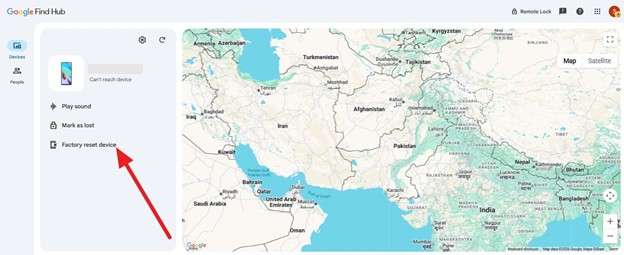
Step 1. On the Find My Device site, sign in with the Google Account associated with your locked Motorola. After that, choose the “Factory Reset Device” option in the “Devices” section.
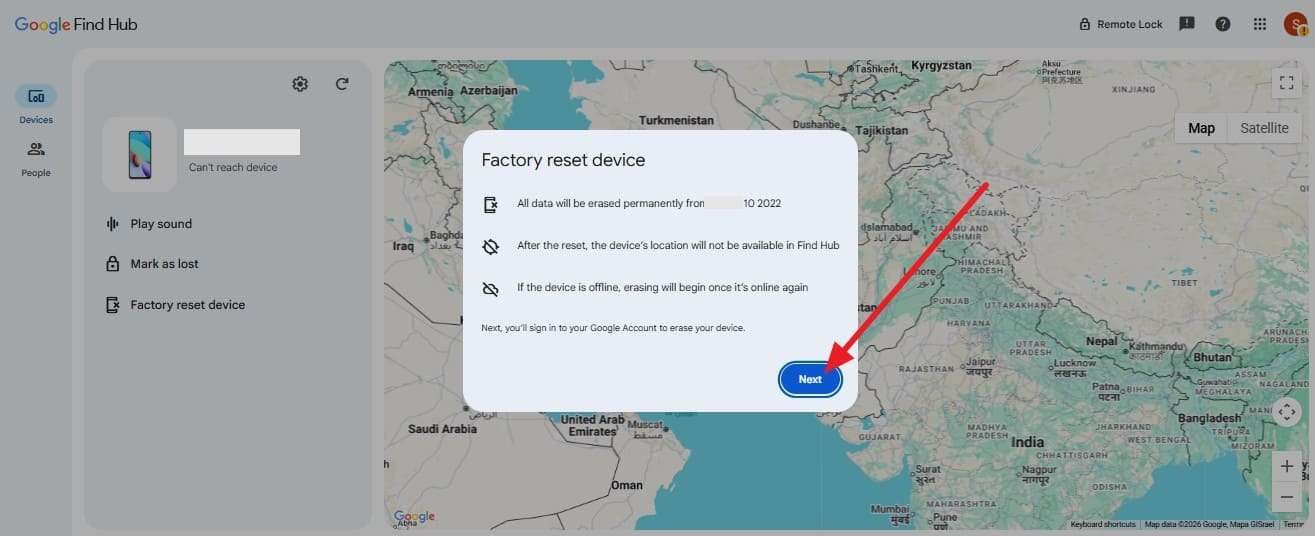
Step 2. Upon doing so, press the “Next” button in the pop-up menu and follow the given instructions to remove the screen lock. After the reset, the FRP will need you to log in with the exact Google account email and password previously used to set up the device.
Method 2. Use a Trusted Screen Unlock Tool – Dr.Fone - Screen Unlock (Android)
Let’s say you can’t recall the Google account details and want to avoid the FRP to unlock the Moto G Stylus 5G. In this case, you can use Dr.Fone - Screen Unlock (Android), as it allows you to bypass screen locks on 29 major brands. Whether it's Pattern, PIN, Password, Fingerprint & Face Lock, Dr.Fone claims to remove it in 5 minutes.
In addition, the process is automated via Special Mode access and needs no skills. It is compatible with all Motorola phones and tablets and can unlock Samsung & LG devices without data loss, from Android 5.0 onward. Overall, the process is fully guided and includes detailed alerts to ensure the unlocking is consensual and legitimate.
 Unlock Android phone in seconds.
- Remove PIN, pattern, password, fingerprint.
- Bypass Google FRP lock easily.
- Works on all Android brands & models.
- No tech skills required – user-friendly.

How to Use Dr.Fone - Screen Unlock (Android) for Moto G Stylus 5G?
To know whether this tool is the right method to unlock the Motorola G Stylus, let’s test its claims via the mentioned guide:
-
Step 1 Use the Screen Unlock Tool for Moto G Stylus
On the Dr.Fone toolbox, choose the “Screen Unlock” tool for Android and tap the “Unlock Android Screen” option.

-
Step 2 Pick the Moto G Stylus from the Dr.Fone List
After that, choose the Moto G from the 20-brand list, and the tool will automatically access Special Mode.

-
Step 3 Unlock Moto G in Dr.Fone Special Mode
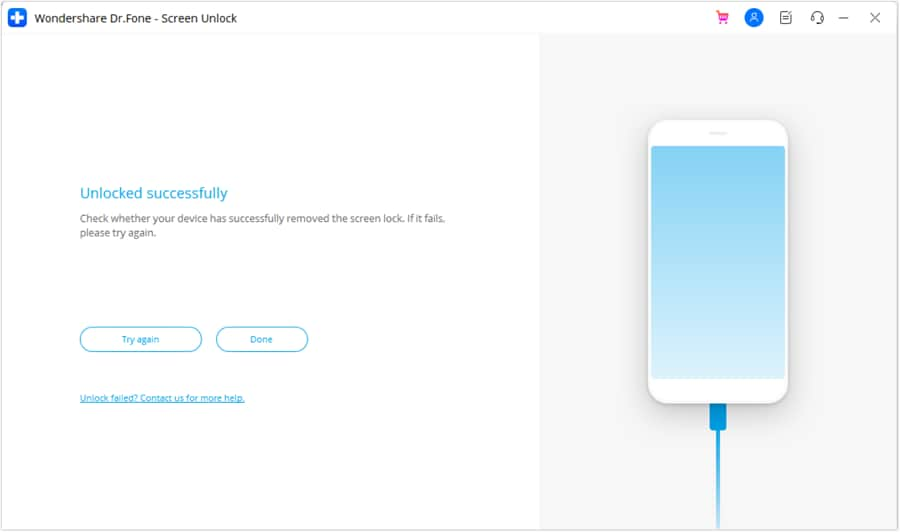
Since the process can vary by brand, the tool will remove the screen lock in 5 minutes in Special Mode. When it ends, press the “Done” button or “Try Again” if there is any issue.




Method 3. Factory Reset via Recovery
For the screen lock, you can also use this method for Moto G Stylus 5G unlock, but it wipes the data. This method uses button combinations and can easily reset the device, regardless of the issue you have. When the Moto G phone is restored to factory condition, the FRP requires details linked to a Google account during setup. So, if you have a backup and can tolerate data loss, follow the simple steps mentioned ahead:
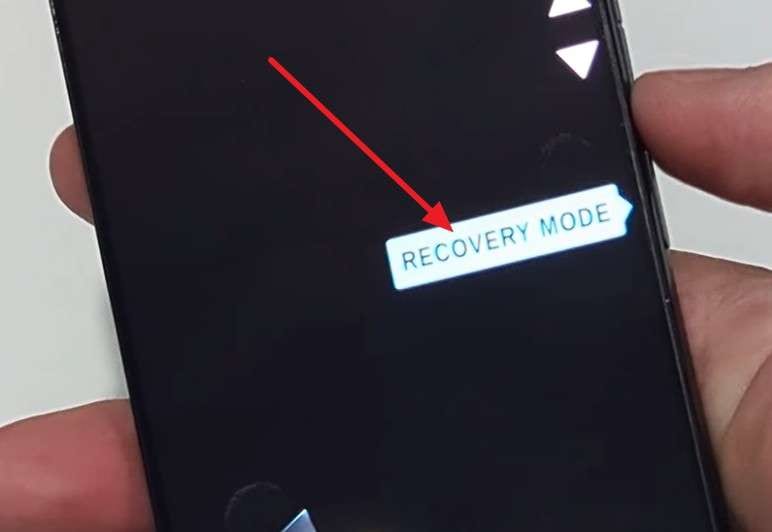
Step 1. Once the Moto G is powered off, press and hold the “Volume Down” and “Power” buttons until the fastboot/bootloader menu appears. Once that's done, press the volume keys to select “Recovery Mode” and press the “Power” key to confirm.
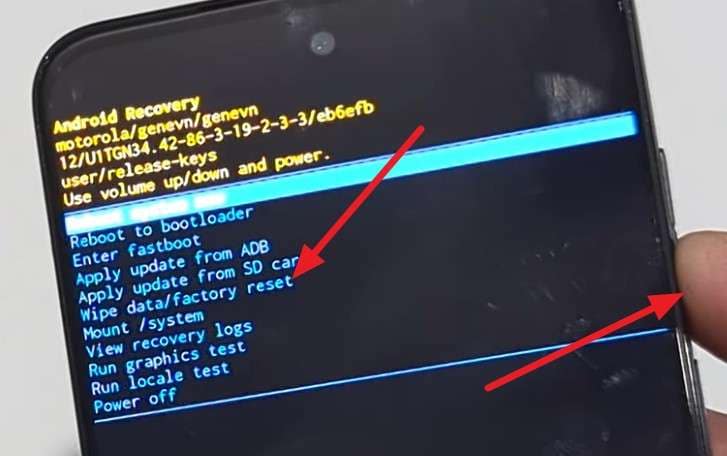
Step 2. Hold down the Power button and then tap the Volume Up button once, then release the Power button if “No command” appears. Select “Wipe Data/Factory Reset” from the Android System Recovery menu with the “Volume Down” button and press the “Power” button.
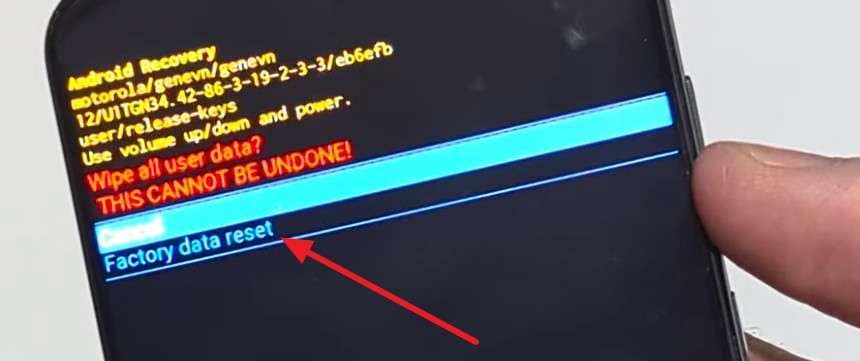
Step 3. Scroll to “Factory Data Reset” and press the “Power” button to confirm. Once the formatting is complete, select “Reboot System Now” using the Power button.
Pro Tip. How to Carrier‑Unlock Moto G Stylus 5G? [Optional Choice]
What if you want to network unlock the Moto G Stylus 5 G free, not screen unlock? If you want to regain the digital freedom to use a local SIM or switch to another carrier, try the given methods:
1. Check If Your Moto G Stylus 5G Is Carrier‑Locked
Since you need to confirm the “SIM Lock” status first, here is how it's done:
- Way 1. Test with a Different Carrier SIM Card (Quickest Method): As a quick test, turn off the device and install the non-carrier SIM with which you wish to switch. If alerts appear on the Moto G, such as “SIM Not Supported” or “Invalid SIM,” it is locked.
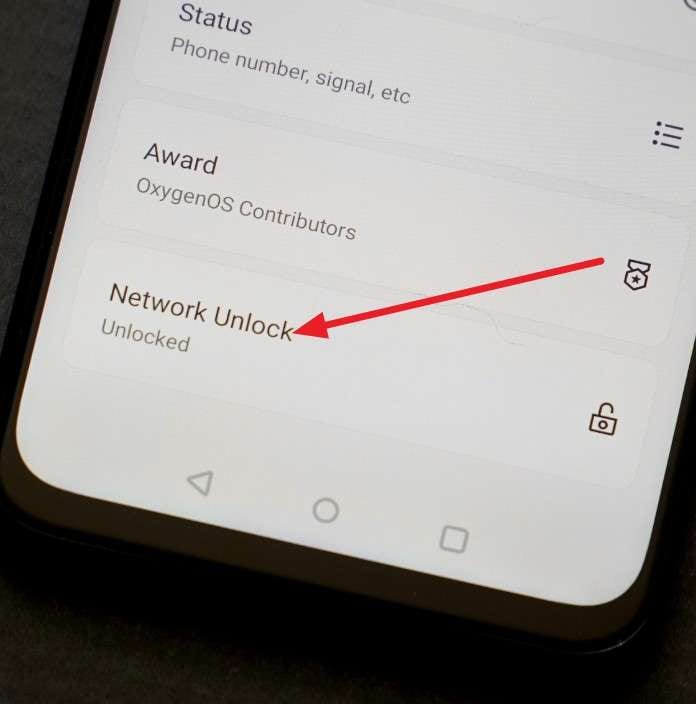
- Way 2. Check the Network Settings Menu: Before you carrier unlock the Moto G Stylus 5G, use the settings menu to confirm the lock status if you don’t have an extra SIM. To know what options to choose in the Settings, review the given steps for clarity:
Instructions. In the settings, select "About Phone," then "Device Details." If the field labeled under the "Network Lock" says lock, you can't use another carrier.
- Way 3. Contact Your Current Carrier Directly: If you can’t use any of the above options, contact the carrier helpline or log in to the account portal to see the device status. You just need to provide them with the IMEI details, and they will scan the database to verify the status.
2. Request an Official Unlock from Your Carrier (Recommended)
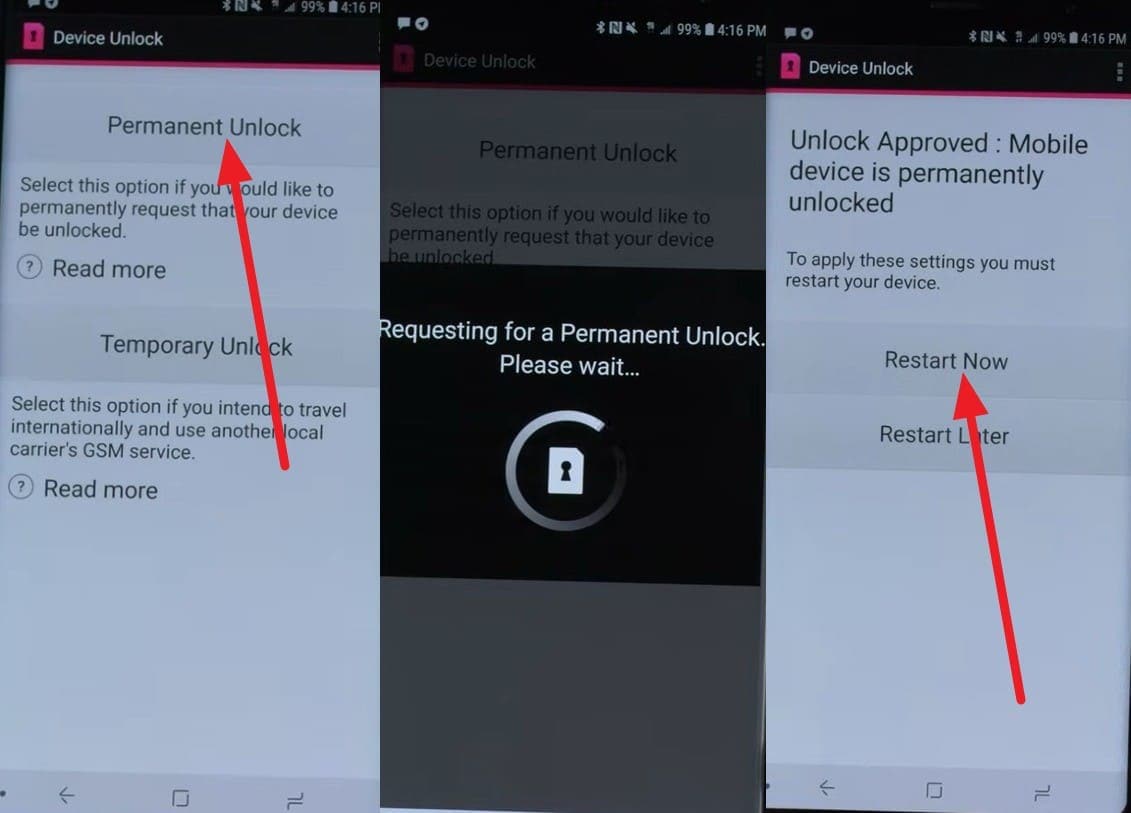
To unlock the carrier, you can contact the support as a safe and reliable option. Having the phone SIM locked, let’s take AT&T as an example to see how you can unlock the Moto G Stylus 5G. Since its web portal is limited to the Samsung, Apple, and Google brands, you can use its pre-installed Device Unlock app. There, you can choose from “Permanent and Temporary” unlock options, as guided below:
- The device must be fully paid for, and must not be reported as lost or stolen.
- The phone will not be unlocked if it's active on a different AT&T customer account; it must be in good standing.
- If you use a postpaid plan, your device must be active on the AT&T network for at least 60 days.
- For repaid users, the activation policy requires at least 6 months of paid service.
- If you have a 2-year contract, it must be completed in full, or the early termination fee must be paid.
Instructions. Grant the app the necessary permissions when prompted, then press the “Permanent Unlock” option. With the device connected to the Wi-Fi, the app will communicate with the carrier’s service to confirm the account status. If you meet the carrier's requirements, the device will be SIM-unlocked, and you can “Restart Now.”
3. Use an IMEI‑Based Unlock Service Carefully (Paid Option)
When you can’t meet the carrier's needs, use an online service like Dr.Fone Online Unlock to unlock the Motorola G Stylus. The tool supports major carriers and needs only IMEI details to legally remove SIM lock by submitting a closed request.
Since the tool comes with no hidden fees, you can track the unlock progress. The tool will take 24 hours to remove the carrier lock, and the removal will be permanent, regardless of any changes made afterward.
Part 4. How to Prevent Lock Issues in the Future (5 Tips)
| Tip | Action | Benefit |
|---|---|---|
| Enable Google Sync | Keep Find My Device and Google Account Sync active in settings. | Allows you to reset your password or locate the phone remotely. |
| Document Credentials | Store your PIN, Google password, and IMEI in a secure, physical place. You can use a password manager in this case. | Ensures you have a backup if your memory or digital vault fails. |
| Regular Backups | Use Google One or a PC to back up photos and data weekly. | Prevents data loss if a factory reset becomes the only way to unlock. |
| Check Carrier Status | Verify the device is fully paid off and unlocked before switching carriers. | Avoids service interruptions and “Invalid SIM” errors during travel. |
| Set Multiple Biometrics | Register multiple fingerprints and enable Face Unlock as a secondary option. | Provides a fallback if your primary finger is injured or the sensor glitches. |
Conclusion
The Moto G Stylus 5G unlock is possible if you know the clear difference between “Network” and “Screen” lock. Since the process varies for both situations, this guide has explained the difference and possible solutions to make the device usable. With Screen lock removal, a reset is needed with the Google account details. So, as an automated, simple option, you can use Dr.Fone - Screen Unlock (Android).
Whereas for the carrier lock, note that conditions vary by carrier. Hence, if you can’t meet the activation policy, use an online service like Dr.Fone Online Unlock to remove the SIM lock within 24 hours.
FAQ
-
1. How many times can I enter the wrong PIN before being locked out?
Ideally, your phone will lock after 30 seconds if you make 5 incorrect attempts. However, if you keep trying to enter the wrong passcode, this lockout time can be extended. -
2. Will a Factory Reset remove the carrier lock?
No, a factory reset will not remove PINs or pattern screen locks, nor personal data. The carrier lock is installed in device firmware, and can only be unlocked by official carriers or services such as Dr.Fone Online Unlock. -
3. Does unlocking the bootloader also unlock the carrier?
No, bootloader unlocking does not change network restrictions, but it does provide the ability to install some other software. You can still use carrier-based unlocking methods to switch to another carrier or local carrier SIM cards.
 Add Wondershare Dr.Fone as a preferred source on Google