Bypass iCloud Activation Lock and Android FRP without password.

 100% Security Verified | No Subscription Required | No Malware

 :
: 
 ChatGPT
 Perplexity
 Gemini
 Claude
 Grok
Grok
Imagine your smartphone suddenly stops recognizing your fingerprint after a 2026 security patch, or the touchscreen becomes unresponsive. These technical glitches can turn your essential device into an expensive paperweight in seconds.
While these system errors are frustrating, specialized recovery software can bridge the gap. In this guide, we dive into the ultimate battle: Dr.Fone vs. LockWiper to choose the best Android screen unlock tool in 2026. Here, we will skip general theories and compare the two tools based on success rates, device-specific recovery packages, and verified performance figures. So, review the details with us and learn how Dr.Fone handles system-level lockouts more effectively.
In this article
- Part 1. How Does an Android Unlock Tool Help Remove Screen Locks Easily?
- Part 2. Core Strengths of Dr.Fone for Locked Android Devices
- Part 3. iMyFone LockWiper — Key Features & Capabilities
- Part 4. Which Tool Handles Complex Locks More Effectively - Side-by-Side Look
- Part 5. LockWiper’s Smart System Test — A Unique Advantage
- Part 6. Ease of Use: Which Tool Is Simpler for Beginners
- Part 7. Common Drawbacks of LockWiper You Should Know
- Pat 8. Which Tool Offers Better Value for Screen Unlock Only
Part 1. How Does an Android Unlock Tool Help Remove Screen Locks Easily?
Before you make the choice, it's important for you to know how Android unlock tools remove screen lock safely. Basically, it turns complex steps into a simple workflow: Connect the device to the PC, select the remove lock option, and follow the instructions for a specific mode. Leveraging this facility, these tools can support PIN, pattern, password, fingerprint, and face lock in one place.
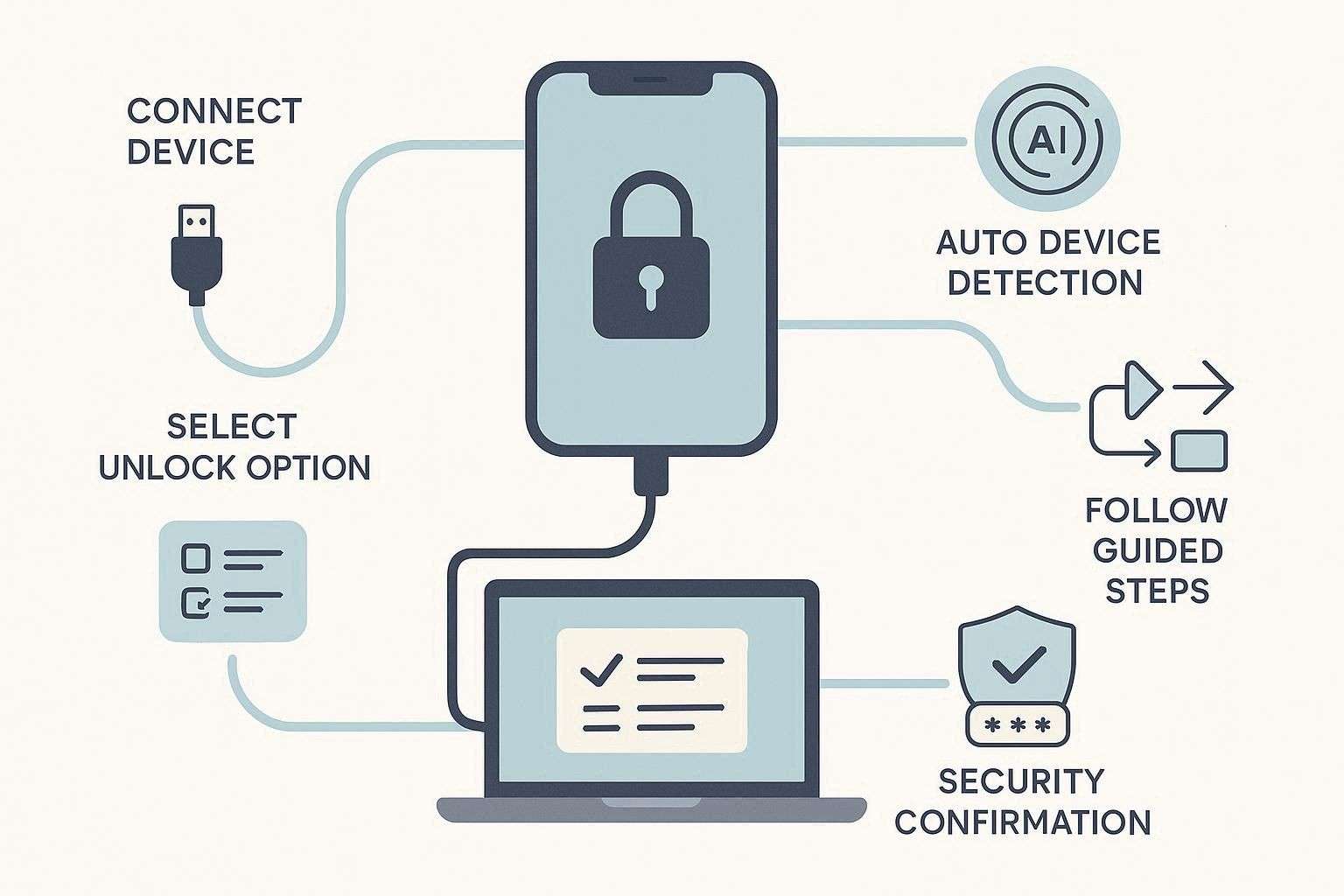
In most cases, the tool can automatically check your phone model and pick the right method, so errors stay low, and the process stays safe. To be on the safe side, it keeps users aware via security prompts, and if it's efficient enough, it will ask for consent and verification through codes. Thus, instead of long, manual work or a service visit, users can quickly unlock their phones.
Part 2. Core Strengths of Dr.Fone for Locked Android Devices
Dr.Fone - Screen Unlock (Android) by Wondershare claims to support 29 major brands and can bypass major screen locks, including Pattern, PIN, Password, Fingerprint & Face Lock. Unlike other options, the vendor says that Dr.Fone is updated weekly to provide the latest Android version and security patch support. When we verified that, we found out that Dr.Fone will offer Wiko brand support and one-click screen lock removal on Samsung Android 12.
With extensive brand support, if these updates are added, we think that Dr.Fone can be counted as one of the best Android screen unlock tools. So, while supporting major brands, it is compatible with earlier models like Meizu, HTC, Alcatel, POCO, TCL, Micromax, Maxwest, and Doogee. Overall, users can access this tool on Windows and Mac, and the tool claims a 100% success rate for local removal in 5 minutes.
 Unlock Android phone in seconds.
- Remove PIN, pattern, password, fingerprint.
- Bypass Google FRP lock easily.
- Works on all Android brands & models.
- No tech skills required – user-friendly.

Key Features of Dr.Fone Screen Lock
- Dr.Fone Android Versions Support: Since this tool is optimized for Android 5.0 and later, it can also bypass screen lock from stricter File-Based Encryption (FBE) introduced in newer OS versions. Additionally, its updated 2026 version includes an AI-matching engine that automatically identifies your OS version and selects the safest unlocking path.
- No Data Loss Option: For Samsung and LG models, the “Remove Without Data Loss” option lets you remove the lock while maintaining data integrity. Thus, this includes legacy powerhouses like the Galaxy S3/S4/S5/S6, Note 3/4/8, and LG G2/G3/G4. Here, the tool sends a file in Download Mode to bypass the passcode, while your data remains safe.
- Workflow and Ease of Use: Another major aspect we noticed is that it asks for user consent and a code like “000000” to remove the passcode on LG and Samsung devices. Limited to 2-3 steps, the tool provides detailed guides and video tutorials, making access to Download Mode seamless for all users. Whereas, in “Data Loss” situations, “Special Mode” access is automated after the AI-matching engine detects the brand.
- Support, Security, and Simple UI: We think a tool must list detailed device coverage, and Dr.Fone meets this criterion by offering support for device/version types in its UI. Additionally, the “Data Loss” and “No Data Loss” tabs are separate, helping users avoid accidental clicks and reducing the risk of human error. In case of any issue, 24/7 live support is available with AI chatbots assisting on weekends. It uses official code signing for security, so it is always downloaded from the official site, and it follows a clear privacy policy, with no personal data uploaded during unlock.
- Pricing Coverage: Users can leverage the 7-day free trial, which allows the tool to detect devices and help users make the right choice. Upon purchase, you get screen unlock for 1-5 mobile devices and 2 PCs across all plans. Since it is part of a full toolkit, users can also back up data before unlocking and repairing the system if any issues occur.
Guide to Unlock Screen Lock on Most Android Devices
-
Step 1 Locate the Dr.Fone Screen Unlock Android Tool
In the toolbox, select the Screen Unlock tool for Android, then connect the devices. After that, tap on the “Unlock Android Screen” and pick the Android brand from the list.

-
Step 2 Access the Special Mode to Remove Screen Lock
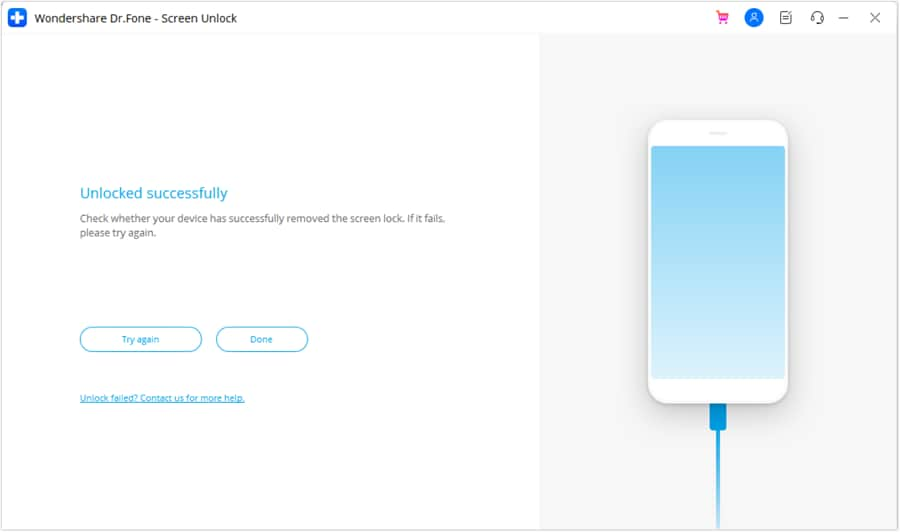
As the AI-matching engine detects the device, it automatically leads you to the “Special Mode.” Within 5 minutes, the tool will bypass the screen lock; tap “Done” to complete the process.




Part 3. iMyFone LockWiper — Key Features & Capabilities
In terms of the iMyFone LockWiper Android review. This tool lets users bypass screen locks from 21 brands. To bypass PIN, pattern, password, fingerprints, and face ID, this brand supports a range of devices, including LG, Xiaomi, Huawei, Motorola, Honor, Vivo, Google, Sony, HTC, and more. In addition, this unlock tool detects and matches the appropriate profile to ensure it is ready to perform the next step.
Key Features of LockWiper
- Android Version or Other Brand Support: For Android versions, this tool supports Android 2.3 – 2.3.7 through Android 11-15. This implies that the tool lacks the option to bypass Android versions 16 and higher. However, it supports the Wiko brand, as well as HTC, Sony, ZTE, Vivo, Asus, Infinix, Teco, Alcatel, and more. Additionally, compared to Dr.Fone, this is still under the brand list, as it lacks coverage for NOKIA, POCO, TCL, Micromax, Maxwest, Doogee, SHARP, Kyocera, and Redmi.

I would not recommend iMyFone LockWiper or its affiliated companies. I purchased it to remove Google FRP on Samsung and Redmi phones, but it did not work at all. I also tried it on an iPhone 6s to remove the screen lock, and it still failed. When I contacted support for a refund, they blamed a hardware issue and only offered a 30% refund. I am disappointed because I expected the software to work as advertised.
Liam McGrath
- Supported OS and Updates: Being Windows-only, this unlocker works on Windows 11/10/8.1/8/7. We think it's a major step back for the users who need a cross-platform solution, making Dr.Fone the best choice. Nevertheless, the tool has no fixed calendar for updates either, but the vendor claims to have relevant updates periodically and mentions “Free lifetime updates” in pricing plans.
- No Data Loss Option: Users can use this option only on Samsung devices, and the guide to accessing Download Mode is seamless. However, LockWiper, unlike Dr.Fone, doesn’t ask for user consent or a verification code, which makes it less secure.
- Ease of Use and Workflow: For steps that require physical interaction, LockWiper uses large, animated diagrams tailored to specific phone models. This makes it much easier for non-technical users to bypass screen locks, but failed attempts can affect the success rate. Unlike advanced tools, LockWiper skips manual USB debugging and installs drivers automatically during Smart System Test.
- Pricing Coverage and Support: An option limited to Windows-only and offering access to 1-5 Android devices across all plans, we think it's not cost-effective. Since there is no PC coverage, it is suggested to purchase this tool only if you need a one-time fix for a mainstream Android device, which is still expensive.
I am very disappointed with this product and feel it is a complete waste of money. I believe it does not work as promised and feels like a rip-off.
Maurits Wauters
I experienced no customer support, and the program did not work as expected. I also believe I was enrolled in ongoing payments even though I selected a one-time purchase.
Alpha Trion
Guide to Use LockWiper Screen Lock for All Android Devices
-
Step 1 Upon accessing the tool, choose the “Remove Screen Lock” mode and press the “Start” button.
-
Step 2 After that, connect the tool via USB, and the system test will fetch the device details. Confirm or choose manually if the information is incorrect, then tap the “Start to Unlock” button.
-
Step 3 Then, the tool will send the package to your device; follow the instructions to reset it. Once done, the tool will bypass the screen lock, so choose “Done” when it is completed.
Part 4. Which Tool Handles Complex Locks More Effectively - Side-by-Side Look
| Aspect | Dr.Fone – Screen Unlock (Android) | iMyFone LockWiper (Android) |
|---|---|---|
| Supported Lock Types | PIN, pattern, password, fingerprint, and face ID on most major brands. | PIN, pattern, password, fingerprint, and face lock on supported devices. |
| Device & Brand Coverage | 29 brands, strong support for Samsung, Huawei, Xiaomi, OnePlus, Motorola, Google, etc. Wiko brand and Samsung Android 12 bypass support is expected soon. Offers support for the latest Android 16 versions. Available for 1-5 devices and 2 PCs. | 21 brands with Wiko support. No Android 16 bypass support. 1-5 mobile devices in all plans. |
| Data Loss Risk (Screen Unlock) | “Remove Without Data Loss” option for Samsung and LG devices. Data loss situations require users' consent and “000000” code verification for safety. The process is fully automated on “Most” Android devices. | The “No Data Loss” option is only available for Samsung devices. Zero automation and the hassle of manually resetting the device. The “Smart System Test” also fails, as noted in their guide (Failed attempts require manual device selection). |
| Success Optimization Tools | Guided download/recovery modes per brand, live progress, and retry option to improve the success rate on hard locks. | Simple wizard with automatic detection; fewer advanced adjustments if the first attempt fails. |
| Ease of Use for Beginners | Clear step‑by‑step UI, on‑screen warnings, and confirmation code (“000000”) before unlock; safer for non‑technical users tackling complex locks. | Very simple 3‑step flow; great for basic forgotten PIN/pattern cases, but with fewer safeguards and explanations. |
| Extra Android Utilities | Part of a full toolkit (backup, recovery, system repair), letting you fix devices that are both locked and unstable. | Mainly focused on lock/FRP features, with fewer repair or recovery extras for problematic devices. |
| Best Suited For | Users who need a more robust solution for complicated lock situations, mixed brands, or many devices (shops, technicians, power users). | Users who mainly face simple forgotten screen locks on common models and want a quick, straightforward tool. |
Part 5. LockWiper’s Smart System Test — A Unique Advantage
Since vendors consider it a “Bonus/Plus” feature of their tool, it is a diagnostic feature designed to prevent device bricking during the unlocking process. Once the device is connected via USB, the Smart System Test automatically identifies the specific brand, model, and system version.
It checks the device’s current status to ensure it is stable for firmware download. So, if the system detects a mismatch between the selected mode and the device's actual hardware, it will pause the process to prevent permanent system damage.
Why Pre-Unlock System Detection Can Improve Success Rate
Based on this aspect, if you wonder Dr.Fone vs LockWiper: Which is better for screen lock, this section will conclude the debate to some extent. First, get to know the importance of system detection via the mentioned points:
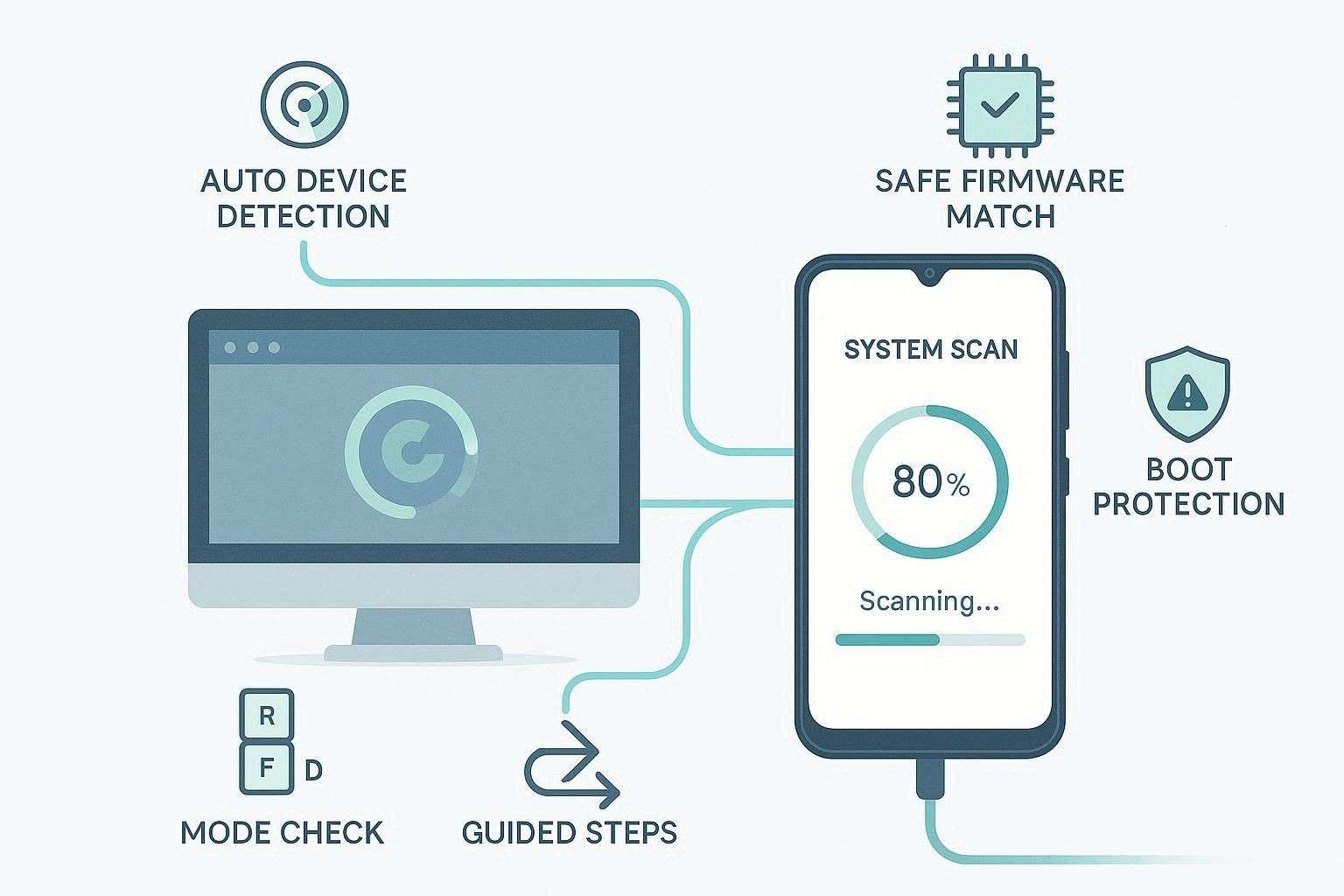
- Auto-detects device model and installs the correct firmware safely.
- Reduces the risk of boot loops and device soft-bricking.
- Chooses the safest unlock method: no-data-loss or full wipe.
- Check the device mode first: Recovery, Fastboot, or Download.
- Gives clear, model-specific steps for easier user guidance.
I used the LockWiper Smart System Test, but it did not work as expected and gave unreliable results. It failed to prevent errors during unlocking, and I feel it wasted my time and money.
John
After reviewing some users' reviews, we think that Dr.Fone's “Owner Verification” beats this system test. While using the tool, we noticed that device detection failed and needed manual effort. In fact, their guide clearly said that “if this fails, select the device manually,” making the Smart System Test unpredictable.
Additionally, Dr.Fone is part of an All-in-One Toolkit, so if the test detects a system error. It can seamlessly transition to the System Repair module to fix the software before attempting the unlock. So, if you think this system can improve the success rate, we think it can cause delays, and human verification via code and consent is much more convenient.
Part 6. Ease of Use: Which Tool Is Simpler for Beginners
Coming to an end, if you want to know which tool to choose between Dr.Fone vs LockWiper, review the given aspects:
Consistency vs Smart Detection: Real Performance Insights
Let’s see how Consistency vs. Smart Detection directly impacts your device's safety and unlocking success:
| Aspect | Dr.Fone – Screen Unlock (Android) | iMyFone LockWiper (Android) |
|---|---|---|
| Logic Type | Structured automated workflows with built-in device-specific scripting for consistent execution. | Adaptive workflows with AI-assisted detection that may vary by device response. |
| Recovery Path | Guided “Special Mode” access with streamlined steps, reducing dependency on repeated retries. | Includes automated modes, but may require fallback steps if detection or execution fails. |
| Consistency vs. Smart Detection | Automated Special Mode uses a device-matching engine to trigger optimized unlock paths, delivering stable and repeatable results across supported models. | Smart System Test attempts detection, but inconsistencies may lead to manual intervention in certain cases. |
| 2026 Compatibility | Broad compatibility across major Android brands, including support for newer system versions on tested devices. | Compatibility varies, with limited support for newer Android versions depending on device updates. |
| Reliability | High reliability for mainstream devices due to standardized workflows and reduced manual dependency. | Performance can vary on complex or niche devices due to reliance on adaptive detection. |
Which Tool Works Better Across More Devices - Device Compatibility
Since the “Smart System Test” aspect is clear, Dr.Fone also excels with its extensive support for 29 brands. Most importantly, you can access it on Windows, Mac, and Android 16 or later.
Part 7. Common Drawbacks of LockWiper You Should Know
- Supports only 21 brands, fewer than Dr.Fone.
- No support for Android 16 or the latest security patches.
- Pricing is not cost-effective since it excludes essential PC coverage.
- Smart System Test fails, affecting the success rate.
- Needs manual hassle to reset the device, no mode automation.
- Users report difficulty getting refunds due to alleged hardware issues.
- Customer service is email-only and often results in slow responses.
- It skips verification codes, increasing the chances of unauthorized access.
Pat 8. Which Tool Offers Better Value for Screen Unlock Only
Based on the pitfalls evaluated in the iMyFone LockWiper Android review, we think Dr.Fone offers better value for money. To validate that, we have mentioned the pricing details for both tools in detail:
Dr.Fone Pricing Plans
| Plans | Details |
|---|---|
| ● Monthly Plan: $29.95 ● Annual Plan: $39.95 ● Perpetual Plan: $49.95 ● Dr.Fone - Full Toolkit: $99.95/Year, $115.95/Perpetual |
● 1-month access to Screen Unlock (Android) ● Available for 1-5 mobile devices with 2 PCs ● Free software updates and technical support |
LockWiper Pricing Plans
| Plans | Details |
|---|---|
| Standard ● 1-Month Plan: $29.99 ● 1-Year Plan: $49.99 ● Lifetime Plan: $59.99 |
● Support 1 Android device ● Remove screen lock: Only Android |
| Full Toolkit 1-Month Plan: $49.99 1-Year Plan: $79.99 Lifetime Plan: $89.99 |
● Support 1 Android device and 1 iOS device ● Remove Android screen lock |
| Business $49.99 |
● All Features ● Free Updates |
Conclusion
In 2026, having the best Android screen unlock tool can save you from the frustration of an inaccessible device. Thus, this guide has compared Dr.Fone and LockWiper to determine how you can regain control without requiring expert technical knowledge or expensive repair-shop visits. In this regard, we have compared the key aspects and usage of both tools to make the right choice.
Based on the evaluation, we would say Dr.Fone - Screen Unlock (Android) is an all-in-one solution. It beats the LockWiper Smart System Test tool for verification and code coverage, and offers extensive brand support across 29 brands.
FAQ
-
1. Will using Dr.Fone or LockWiper to remove a screen lock erase my data?
Both tools wipe files on most modern phones to bypass the lock screen and reset your device. However, Dr.Fone keeps files safe on old Samsung and LG models, while LockWiper has this option only for Samsung devices. -
2. Which Android unlock tool is safer for my data: Dr.Fone or LockWiper?
Dr.Fone offers greater security because it asks for a code before it starts deleting your files. In contrast, LockWiper skips these extra checks, which may lead to accidental loss. -
3. Which tool is easier for complete beginners to use: Dr.Fone or LockWiper?
Dr.Fone is simpler for new users because it chooses the best path with a smart, automated mode. Meanwhile, LockWiper needs manual work if the system test fails, and this makes the task much harder.
 Add Wondershare Dr.Fone as a preferred source on Google