Bypass iCloud Activation Lock and Android FRP without password.

 100% Security Verified | No Subscription Required | No Malware

 :
: 
 ChatGPT
 Perplexity
 Gemini
 Claude
 Grok
Grok
Forgetting the lock screen passcode after changing it can leave you stuck, as you cannot open your device, check messages, or use any application. This situation is even more stressful when your valuable data is trapped inside.
While common, this situation often occurs at the worst possible time, necessitating a fast, reliable Android screen unlock tool. In 2026, mobile security has become more stringent, but software tools have evolved to keep pace. Therefore, this guide will introduce you to the “best Android screen unlock tool” of the industry: Dr.Fone and 4uKey.
In this article
- Part 1. Why Screen Lock Issues Are So Common on Android
- Part 2. Tenorshare 4uKey for Android — Screen Unlock Review
- Part 3. Dr.Fone Screen Unlock (Android) — Screen Unlock Review
- Part 4. Dr.Fone vs 4uKey: Screen Unlock Features Compared
- Part 5. Real‑World Screen Unlock Scenarios: Which Tool Handles What Better?
- Part 6. Pricing and Value Comparison: Screen Unlock Tools
Part 1. Why Screen Lock Issues Are So Common on Android
Before we start with the reasons, we came across a Forbes report stating that many phones with MediaTek chips have a security flaw. Researchers found they could get the PIN and unlock protected data before the phone fully starts. This process takes less than one minute and even works while the phone is still off.
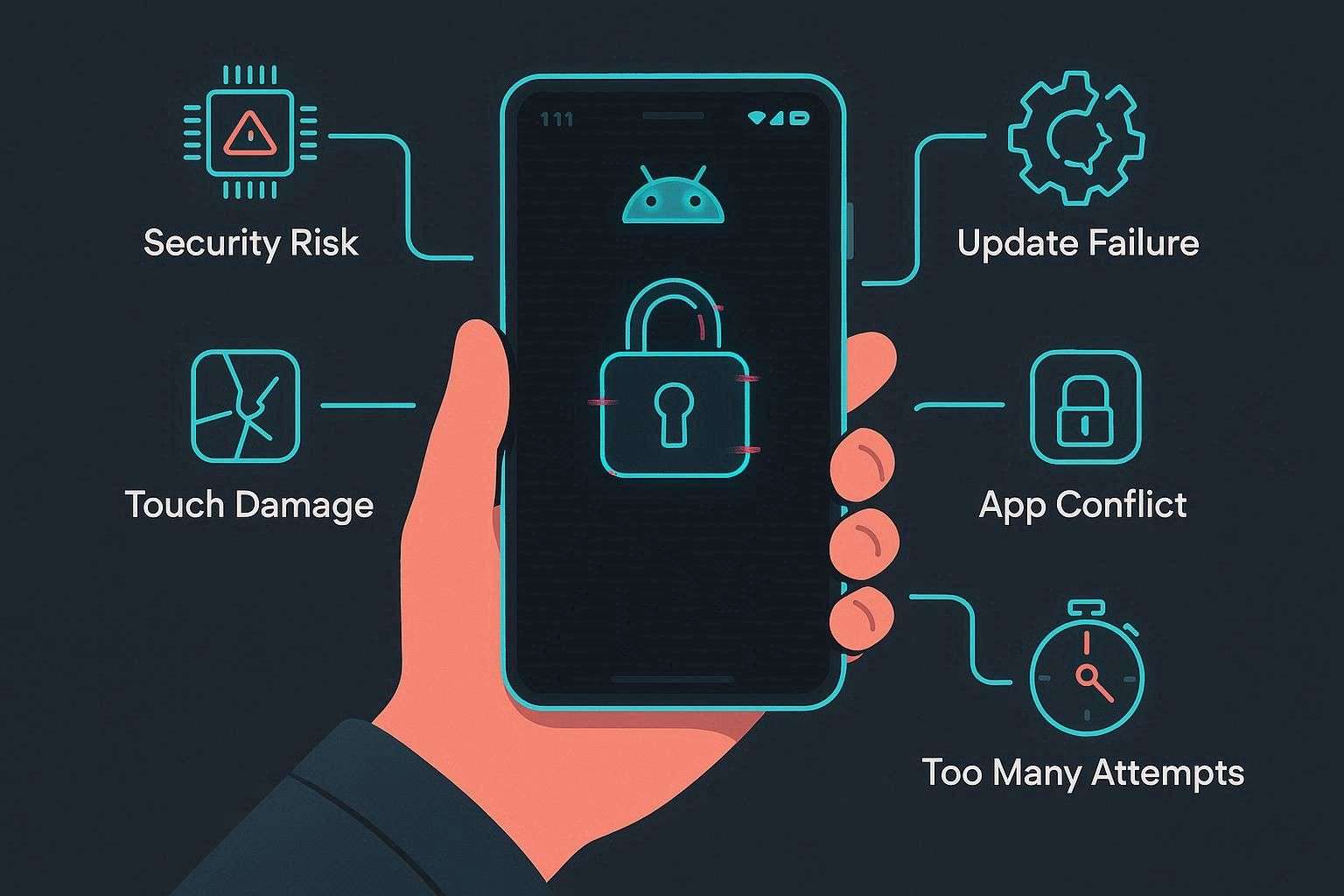
So, when this critical vulnerability using TEE poses a risk, attackers can change the passcode in minutes, leaving you stuck forever. At the same time, software bugs, failed updates, or third-party lock apps can freeze the screen or stop it from accepting the correct code. You might also have a broken screen, a faulty touch, or too many incorrect attempts, which can lock the device for a while.
Why Choosing a Reliable Screen Unlock Tool Matters?
Since the screen lock issue is common and threatening, picking the right tool between Dr.Fone vs 4ukey becomes vital. Therefore, we have highlighted why this quick action matters and how to choose the right option for your needs:
- Data Safety: There are many tools that unlock the screen by resetting or changing the system, which can permanently erase all data if something goes wrong. Therefore, choose a screen unlocker that either includes clear warnings and security prompts or offers “No Data Loss” on some supported devices.
- Security and Trust: If you opt for less-known tools other than Dr.Fone or 4ukey, the tool might need deep system access and full control. So, if the software is unsafe, it can steal your data, install malware, or compromise your phone's security. It is recommended to choose an unlocker that provides clear company details and avoids cracked tools to reduce the risk of hidden malware.
- Compatibility: Not all tools are designed to unlock all Screen lock types across major Android brands, and using the wrong one can fail or damage the system due to version differences. Thus, check the tool’s compatibility details, including Android version and brand support, as well as real success proof, before using any.
- Ease of Use: Too many tabs and cluttered steps in Recovery or Download mode can baffle users and lead them to take the wrong steps. Therefore, pick an option that offers a clear, detailed guide, separate options, and detailed images and video tutorials to avoid mistakes. For most Android versions, having automated access to a special mode is a plus if you can get it in any foremost tool.
- Support and Refund: Unlock issues, such as stuck processes or boot errors, can make the phone unusable, and a lack of support can lead to money and data loss. We know that all tools show download and purchase pop-ups when accessed. So pick one with active support, a clear refund policy, helpful guides, and strong reviews that demonstrate reliability and user trust.
Part 2. Tenorshare 4uKey for Android — Screen Unlock Review
Based on these considerations, let’s start with our Tenorshare 4ukey for Android review to see if it's the right choice. With support for 17 brands, it claims to bypass screen locks such as password, PIN, pattern lock, fingerprint, and face ID. Additionally, it ensures that users can remove the lock from Android 4-16 versions in 6 minutes (average) with 99% success rate.
Key Features of 4uKey
- Compatibility: Being accessible on Windows and Mac, this tool ensures it works well on all types of devices. However, 4uKey lacks support for the Wiko brand and many earlier versions, such as Meizu, HTC, Alcatel, POCO, TCL, Micromax, Maxwest, and Doogee.
- No Data Loss Option: Regarding the Unlocking solutions, it offers the “Keep Device Data” option only for early Samsung devices. Upon evaluation, we noticed that the tools automatically download data packages, but the guide to accessing Download Mode can confuse novices.
- Regular Updates and Support: The tool claims to offer regular updates, but we noticed its last update was V2.15.1 in 2025. This shows that it comes with common updates and fails to offer support for updates like the Wiko brand in the future. As for support, vendors say they are responsive and available 24/7. To validate that, we explored the user review, and they showed it was false and highly disappointing, saying that:

I had a very disappointing experience with this company because the product did not work as advertised. When I asked for help, they only offered a small refund and other software I did not need. I clearly requested a full refund many times, but they kept refusing and pushing other solutions instead of following their money-back guarantee. The support team was unhelpful and frustrating, and I had to mention a bank dispute before they took my request seriously. I do not recommend this company and suggest others avoid it to save time and trouble.
Jack Reacher
- Ease of Use and Workflow: 4uKey features include separate tabs and clear options to preserve data or to unlock with data loss. In addition, steps were limited to 3-4, with comprehensive security prompts, on supported models. However, as a beginner. If you prefer to use this tool, we think access Modes will delay and reduce the success rate. Most importantly, it lacks Mode automation, even for most brands.
I feel this is false advertising aimed at users who do not understand how SetupApp works, since these tools only restore or offer a basic tethered bypass.
appletech752
- Claims to remove most screen locks in under 6 minutes.
- Automatically downloads the package to prevent issues.
- Simple wizard process when using the “Keep Device Data” option.
- The no data loss option is limited to early Samsung devices only.
- Most phones need to be reset to remove the lock, deleting all data.
- The free trial is limited; you need a Pro license, which can be expensive.
- All the plans are limited to 1 PC access only.
- For most Android versions, mode access needs manual hassle, no automation.
- Comes with limited brand support as compared to other tools.
- Provides less frequent updates, with no proof of Wiko support in the future.
- Users report issues with the refund policy and unresponsive support.
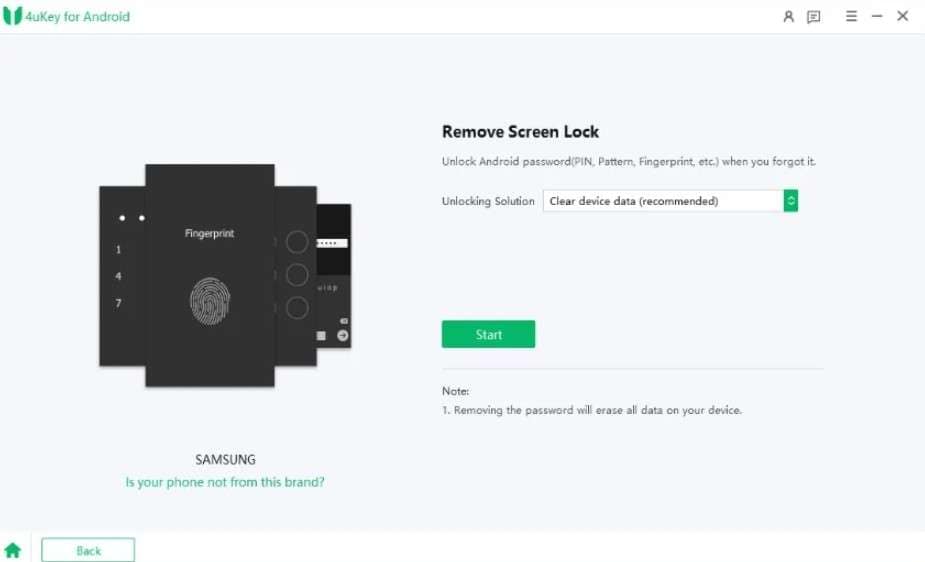
4uKey Guide to Unlock Android - With Data Loss
-
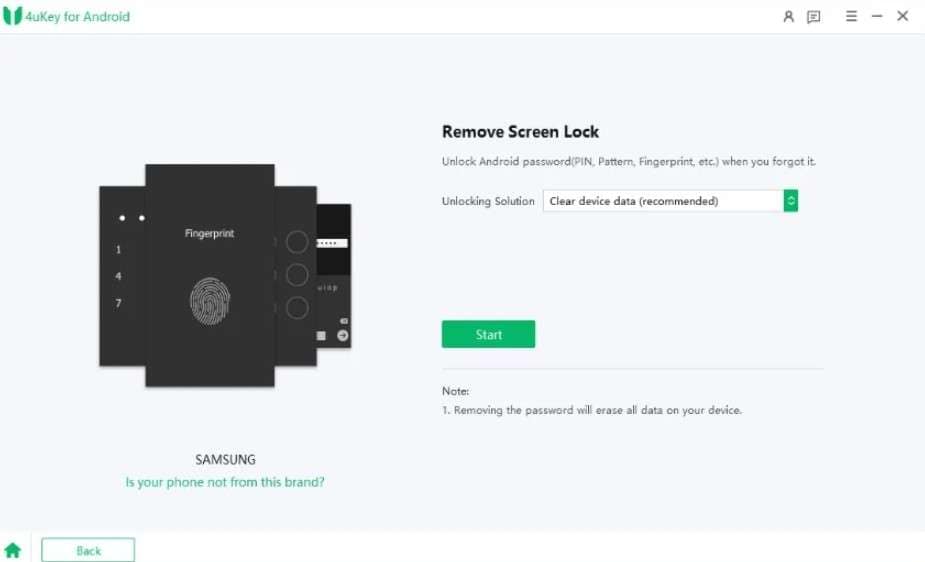
Step 1 As you tap the “Remove Screen Lock” feature, pick “Clear Data (Recommended)” as the “Unlocking Solution” and press “Start.”
-
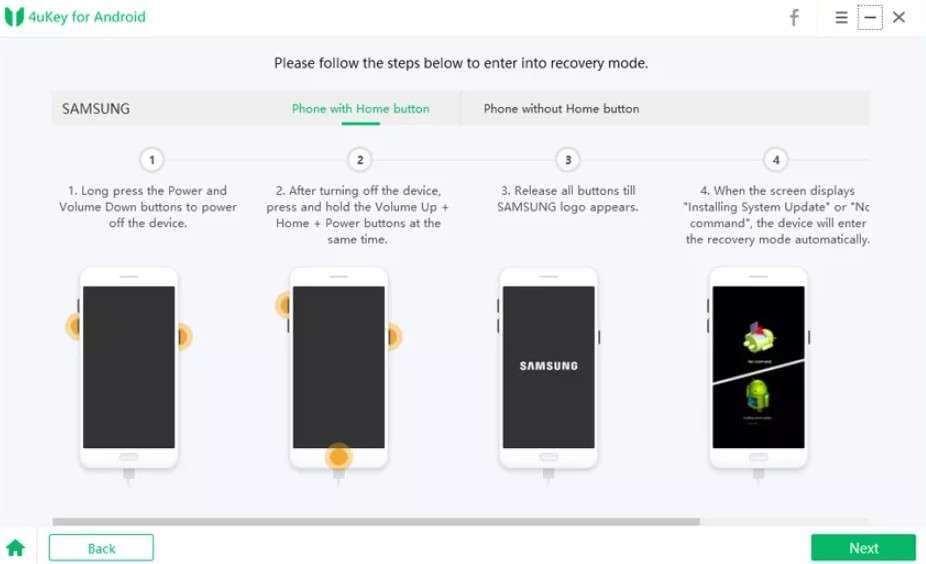
Step 2 After that, press the “Yes” button on the security prompt to access Recovery Mode as a non-Samsung user.
-
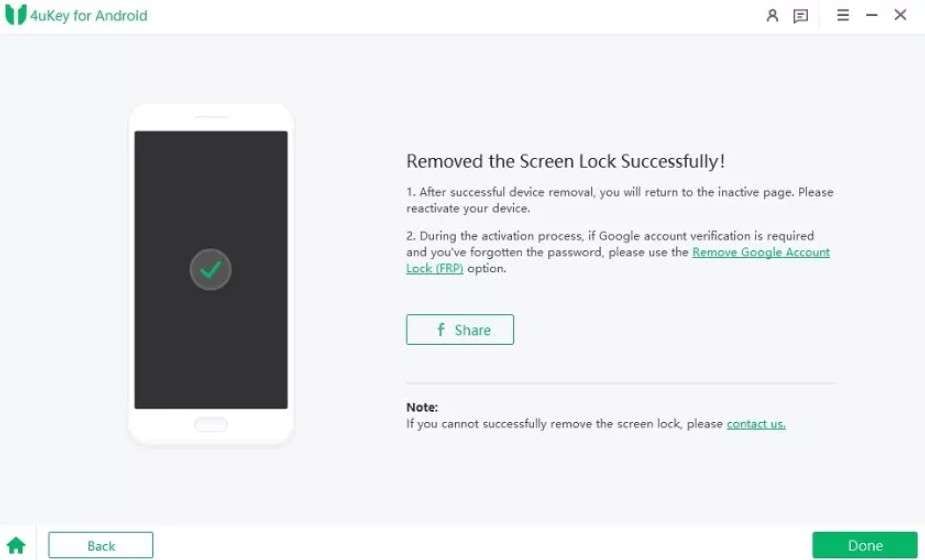
Step 3 Within 10-15 minutes, the tool will bypass the screen lock; when it completes, choose the “Done” button.

Pricing Details
| Plans | Details |
|---|---|
| ● 1 Year License: $39.95 ● 1 Month License: $24.95 ● Lifetime License: $49.95 |
● Free upgrades and technical support ● Unlock early Samsung, no loss |
In all its pricing plans, users can access only 1 PC and 5 Mobile Devices, which is concerning for cost-conscious users. Additionally, free trials are limited to device detection and may not work in most cases. In terms of money back claims after the failed trials, some Trustpilot users' reviews told another story, stating that:
I had a very bad experience with this company, as their product did not work on my Samsung S20 as promised. When I asked for a full refund, they refused and kept offering unwanted solutions, which made their money-back guarantee feel misleading.
Karin Berry
Part 3. Dr.Fone Screen Unlock (Android) — Screen Unlock Review
To continue with the Dr.Fone - Screen Unlock (Android) review, this tool by Wondershare supports 29 brands to bypass screen locks. From pattern to PIN, passcode, fingerprint, and face lock, the tool is easily accessible on Windows and Mac. In addition, this vendor claims a 100% success rate and a 5-minute time frame, and requires no learning curve for all types of users.
Offering this facility for Android tablets and phones, Dr.Fone displays a detailed device list in its UI that 4uKey lacks. Separate options for screen lock and FRP bypass, with and without data loss, make navigation seamless, limiting random clicks and mistakes. Most importantly, the tool ensures complete user control, as it needs user verification and agreement approval to commence lock removal.
 Unlock Android phone in seconds.
- Remove PIN, pattern, password, fingerprint.
- Bypass Google FRP lock easily.
- Works on all Android brands & models.
- No tech skills required – user-friendly.

Key Features of Dr.Fone Screen Lock
- Supported Android Brand & Versions: This tool is fully optimized for Android 5.0 and later, including the most recent 2026 security patches. Additionally, it can bypass the stricter File-Based Encryption (FBE) introduced in newer OS versions. Highlighting its brand coverage, it offers a screen lock removal option for Meizu, HTC, Alcatel, POCO, TCL, Micromax, Maxwest, Doogee, Kyocera, and HONOR, among others. Not just 4uKey, many other Android Unlock tools lacked this massive support, making Dr.Fone more useful for users with different phone brands and improving its overall compatibility.
I tried several tools without success, but Dr.Fone finally unlocked my Samsung S24 Ultra. I am very impressed, and I highly recommend it.
Kate
- No Data Loss Option: Rather than being limited to Samsung only, this tool offers the “Remove Without Data Loss” option for Samsung and LG devices. For Samsung, the list can range from the S3, S4, S5, S6, and the Note 2 through Note 8. In addition, for LG devices, it is compatible with flagship legacy models like the LG G2, G3, and G4, as well as the Optimus and Tribute series.
- Regular Updates: Compared to 4uKey, Dr.Fone is updated weekly to ensure the latest unlocking support for all upcoming versions. Their claim to offer Wiko brand support and one-click screen lock removal for Samsung Android 12 clearly proves this point. Based on this aspect, we think that adding this support will make Dr.Fone a better, more complete solution for users with different devices.
I found it simple and straightforward with no tricks or complications. I was a bit worried about granting access, but it turned out to be safe. It gave me peace of mind and worked without any fuss.
Shap
- Customer Support: As mentioned, the tool requires user consent and includes prompts to ensure safe, focused screen removal. In case of any issue, their human support is available on weekdays, and the AI chatbot assists on weekends. If you prefer a self-service approach, their Online Help Center features step-by-step video tutorials and guides.
- Ease of Use and Workflow: Although the process can vary depending on whether there is data loss or no data loss, using this tool is seamless. The tool uses an AI-powered detection engine to ensure a stable connection between the PC and the device, reducing the need to ask, “Is your phone not from this brand?” as in 4uKey.
I found Dr.Fone easy to use and would recommend it for unlocking phones or recovering lost data. In my case, I forgot my PIN after years of not using it, and Dr.Fone helped me unlock it and fix the problem in under 10 minutes.
Wan
Users can bypass locks in 2-3 simple steps in 5 minutes, and a detailed guide makes Modes access effortless. All in all, after the device enters the correct mode and the firmware download finishes, the tool definitely offers 100% success rate, as claimed.
What we loved was that the tool automatically accesses the Special Mode for “Most” Android versions, which is a plus point for novices. Since there was no such option in 4uKey, the tool requires less manual effort, and their claim of “No Learning Curve” proves true.
I found the process smooth, easy, and fast, and the screen lock removal worked very well. The pricing is fair with different plans, and I would use Dr.Fone again and recommend it.
Liz Spears
- Comes with more extensive Android brand support than 4ukey.
- No data loss option is available for Samsung and LG devices.
- Users can access up to 1-5 devices and 2 PCs in all its plans.
- The tool updates weekly, and Wiko brand support is expected soon.
- Automated Special Mode access for most Android devices.
- Claims 100% success rate and screen lock removal in 5 minutes.
- Supports major Android versions and FBE versions bypass options.
- Accessible on Windows and Mac, and cost-effective.
- Comes with separate tabs and requires user consent to remove the Samsung lock.
- AI-powered detection engine ensures smooth device connection.
- Non-Samsung and LG phones need to be reset to unlock the screen, deleting all data.
Guide to Remove Screen Lock on Most Android Devices
-
Step 1 Locate the Dr.Fone Unlock Android Screen Option
On the Screen Unlock tool for Android, tap the “Unlock Android Screen” option and choose the Android brand.

-
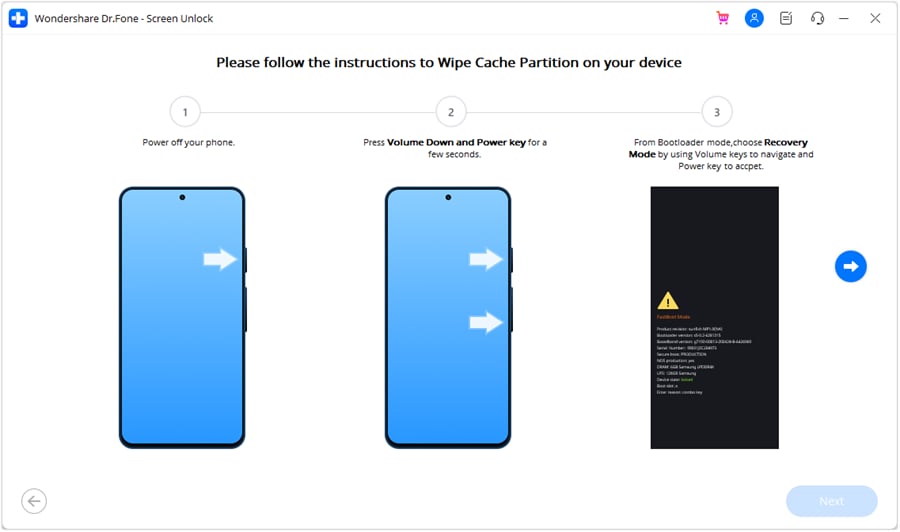
Step 2 Let the Tool Access Special Mode to Bypass Screen Lock
Once detected by the AI-powered detection engine, the tool will automatically detect the instructions to put the device in “Special” mode and unlock it within 5 minutes.
Pricing Details
| Plans | Details |
|---|---|
| ● Monthly Plan: $29.95 ● Annual Plan: $39.95 ● Perpetual Plan: $49.95 |
● 1-month access to Screen Unlock (Android) ● Unlock older Samsung/LG without data loss ● Available for 1-5 mobile devices with 2 PCs ● Free software updates and technical support |
I bought a one-month plan after some hesitation and faced an error while using it, so I first asked for a refund. I then received a solution by email, tried it, and it worked successfully. I found the app easy to use with a user-friendly interface. However, I wish there were a pay-per-use option because I only needed it for one device, while the plan covered multiple devices.
Mahdi Tariq




Part 4. Dr.Fone vs 4uKey: Screen Unlock Features Compared
| Metrics | Dr.Fone Screen Unlock (Android) | Tenorshare 4uKey for Android |
|---|---|---|
| Supported Lock Types | PIN, pattern, password, fingerprint, face | PIN, pattern, password, fingerprint, face |
| No‑data‑loss Unlock Option | Yes, on select Samsung/LG models | Very limited; only early Samsung devices. |
| Device/Brand Coverage | Very wide; 29 brands. Wiko and One-click screen lock removal for the Samsung Android 12 update are expected. Available for 1-5 mobile devices with 2 PCs | Limited, 17 brands only. No Wiko support. Available for 1 PC and 5 Mobile Devices |
| Screen‑lock Success Rate (Typical) | 100 % Success rate. Generally higher, especially on supported Samsung/LG lists. | Claims 99%, but failed Recovery Mode access causes delays. |
| Ease Of Use For Beginners | Very simple wizard, clear visuals, and prompts. Requires consent and code verification to remove the Samsung lock. | Simple, but the instructions can be a bit more technical |
| Guidance For Special Modes | Detailed steps for Download/Recovery modes per brand. Special Mode access on “Most” Android brands is fully automated. | Guided, but less detailed per‑brand walkthroughs |
| Windows/macOS Support | Yes, both platforms | Yes, both platforms |
| Integration With Other Tools | Part of a larger toolkit (backup, repair, etc.) for safer prep | Standalone focus on unlock, fewer extra tools |
| Trial Vs Paid | 7-day trial for detection; paid license to unlock | Trial for detection; paid license to unlock |
| Best Suited For | Users wanting maximum safety and guidance, especially on supported Samsung/LG devices | Users prioritizing quick unlock on basic Android devices |
Part 5. Real‑World Screen Unlock Scenarios: Which Tool Handles What Better?
We believe the best Android screen unlock tool for 2026 depends on how well it performs in real life. Therefore, we have mentioned some situations to help determine which unlocker caters to most Screen Lock issues:
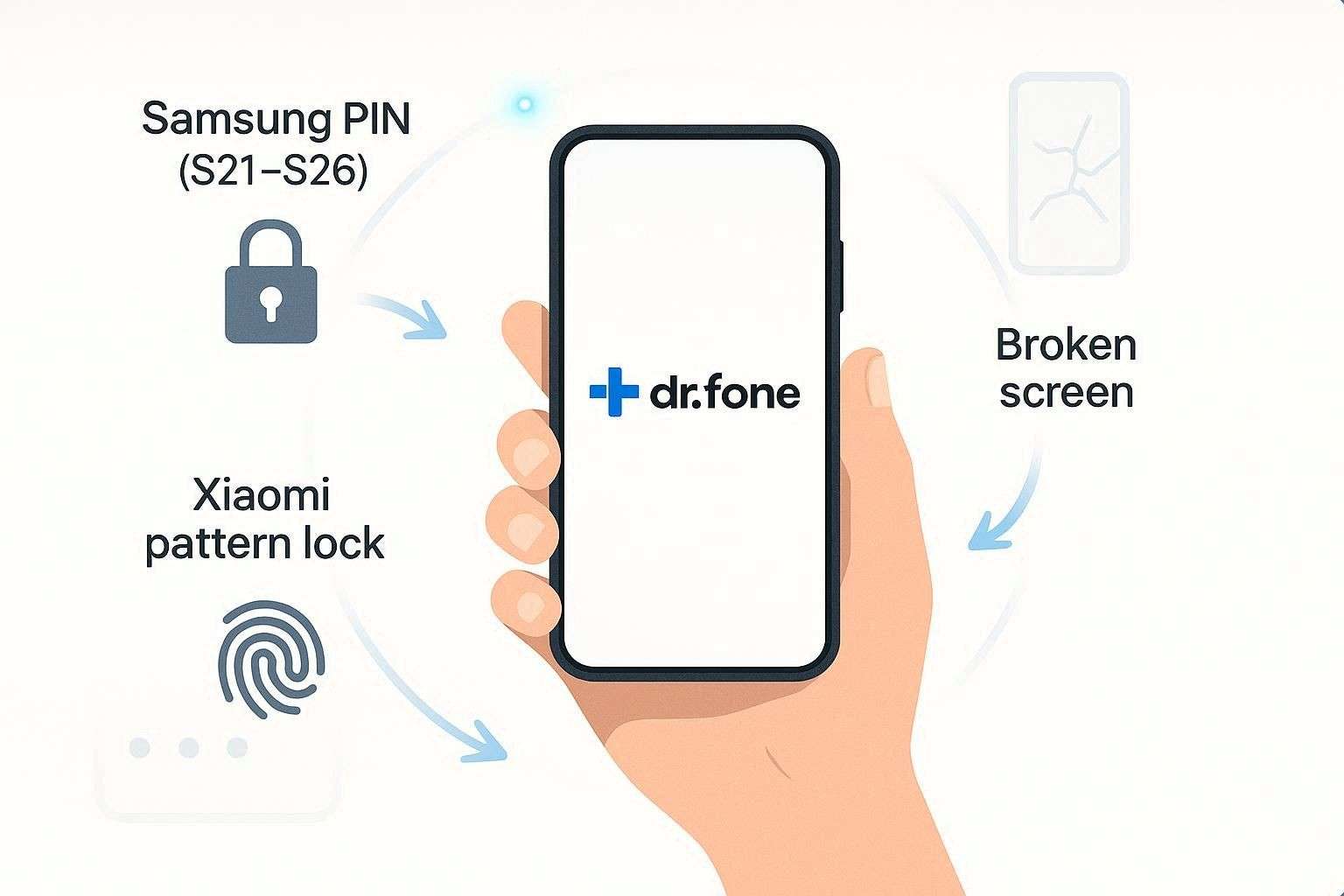
1. Forgotten PIN on a Samsung Galaxy (S21–S26)
Winner: Dr.Fone - Screen Unlock (Android)
Why: While other tools can reset the device, Dr.Fone is especially optimized for the latest Samsung security layers. Additionally, if you are using an older Samsung model (such as the Note 8 or S6) or an LG device, the tool can also preserve your data. Unlike 4ukey, it's not limited to Samsung devices and requires consent and verification via codes.
2. Pattern Lock on a Xiaomi or Redmi Device
Winner: Dr.Fone - Screen Unlock (Android)
Why: We know that 4ukey is exceptionally fast in finding PIN files within MIUI. However, it requires users to manually access Recovery mode, whereas Dr.Fone accesses “Special Mode” automatically with no hassle.
3. Broken or Unresponsive Touchscreen - Most Android Models
Winner: Dr.Fone - Screen Unlock (Android)
Why: This tool supports more brands than 4ukey, and its automated Mode access on most Android devices ensures that the screen lock is bypassed even if the device is broken.
User Experience and Support: What Real Users Say
After an update caused my Oppo Find X7 Face ID to fail, I used Dr.Fone to bypass the lock screen. The removal process was incredibly smooth and completely free of any complicated technical steps.
Lisa B
I was worried that my Sony Xperia 1 VI would be unusable after forgetting the password, but the Dr.Fone guide was exceptionally clear. The unlock process was quick, leaving my device as good as new in no time.
Kevin G
Part 6. Pricing and Value Comparison: Screen Unlock Tools
Between Dr.Fone vs 4ukey, if you look at the price, the 4ukey monthly plan is less expensive than Dr.Fone. However, if you look at the bigger picture, both tools cost the same, but 4ukey’s 1-PC access limitations don't make it the best unlocker. Thus, with massive brand coverage, mode automation, detailed guides/prompts, and access to 2 PCs, Dr.Fone is an all-around solution.
Conclusion
To wrap up, having an ideal Android screen unlock tool can save you from a complete digital lockout. Therefore, we have compared Dr.Fone and 4ukey in detail, covering key features, usage tests, and pricing. Based on our evaluation, we suggest using Dr.Fone - Screen Unlock (Android), as it offers extensive 29-brand coverage, 2PC access across all plans, and automated mode access for most models.
FAQ
-
1. Which tool is safer for my data: Dr.Fone or 4uKey?
Between the two tools, Dr.Fone is much safer, as it offers a “No Data Loss” option for Samsung and LG devices. On the other hand, 4uKey is just limited to early Samsung devices, and the results are inconsistent, too. -
2. Which is better for Samsung phones with a forgotten PIN, Dr.Fone or 4uKey?
Dr.Fone is the superior choice for Samsung devices due to its extensive database of model-specific recovery packages. Furthermore, its advanced AI-powered detection engine provides a more stable connection during the sensitive system-level unlocking process. -
3. Are Dr.Fone and 4uKey legal and safe to use on my own Android device?
Yes, both tools are safe to use when unlocking your personal device. Nevertheless, always ensure you download them from official websites to avoid malware.
 Add Wondershare Dr.Fone as a preferred source on Google