Bypass iCloud Activation Lock and Android FRP without password.

 100% Security Verified | No Subscription Required | No Malware

 :
: 
 ChatGPT
 Perplexity
 Gemini
 Claude
 Grok
Grok

I bought a used iPhone, but it's stuck on the Activation Lock screen. I heard about jailbreaking, but does jailbreaking an iPhone remove the iCloud lock for good?
A Concerned iPhone User
Apple's devices are known for their robust security, with the iCloud Activation Lock being a prime example. This feature, part of the Find My service, is designed to prevent unauthorized use of a lost or stolen iPhone or iPad. While excellent for security, it creates a significant hurdle for those who've purchased a second-hand device still linked to the previous owner's account.
This common predicament leads many to ask: does jailbreak remove activation lock? This comprehensive guide for 2026 will provide a clear answer, explore the mechanics of jailbreaking in relation to iCloud security, and introduce a trusted method to effectively bypass the Activation Lock.

In this article
Part 1. Does Jailbreaking Actually Remove the iCloud Activation Lock?
Let's address the central question directly: No, jailbreaking alone does not remove the iCloud Activation Lock. To understand why, it's crucial to know what each process does. Jailbreaking is the process of modifying the iOS operating system to remove software restrictions imposed by Apple. This allows you to install apps from outside the App Store and customize the device's appearance and functionality more deeply.
However, the Activation Lock isn't just a piece of software on your phone; it's a server-side security measure. It's tied to the device's unique hardware identifiers (like its IMEI and serial number) and linked directly to the original owner's Apple ID on Apple's servers. Since jailbreaking only affects the local software on the device, it cannot communicate with Apple's servers to deactivate the lock. Therefore, wondering 'does jailbreak bypass activation lock' leads to the same conclusion: it cannot achieve this on its own.
While jailbreaking is not the solution itself, it is often a necessary prerequisite for third-party tools that *can* bypass the lock. These tools use the elevated privileges gained from jailbreaking to circumvent the setup process and allow you to access the device. In essence, jailbreaking opens the door, but you still need a specialized key to get past the lock.
Part 2. The Most Reliable Method to Bypass Activation Lock on iPhone/iPad
Since jailbreaking isn't the complete answer, users need a more comprehensive and reliable alternative. This is where specialized software shines. Among the most trusted tools available, Dr.Fone - Screen Unlock (iOS) provides a powerful and user-friendly solution specifically designed for bypassing iCloud Activation Lock without needing the previous owner's Apple ID or password.
Dr. Fone simplifies a complex technical process into a series of guided steps. It handles the necessary procedures, including any required jailbreak, in a secure environment on your computer. This ensures that your device's integrity is maintained while effectively removing the barrier to access.
Key Advantages of Dr.Fone - Screen Unlock (iOS)
- Broad Device Support: Compatible with a wide range of devices, from iPhone 5S to the latest iPhone models, as well as various iPad generations.
- Always Up-to-Date: The software is regularly updated to ensure compatibility with the latest iOS versions and Apple's security protocols.
- User-Friendly Design: No technical expertise is required. The software provides clear on-screen instructions to guide you through every step.
- Dedicated Support: Access to a professional customer support team if you encounter any issues during the unlocking process.
 Unlock iPhone/iPad passcode in minutes.
- Remove Face ID, Touch ID, and screen lock.
- Bypass iCloud Activation Lock easily.
- Support all iOS versions and devices.
- Simple steps, no technical skills needed.
Step-by-Step Guide to Bypass the iCloud Activation Lock
Follow these instructions carefully to use Dr.Fone - Screen Unlock (iOS) and regain access to your device:
-
Step 1 Launch Dr.Fone and select the correct tool
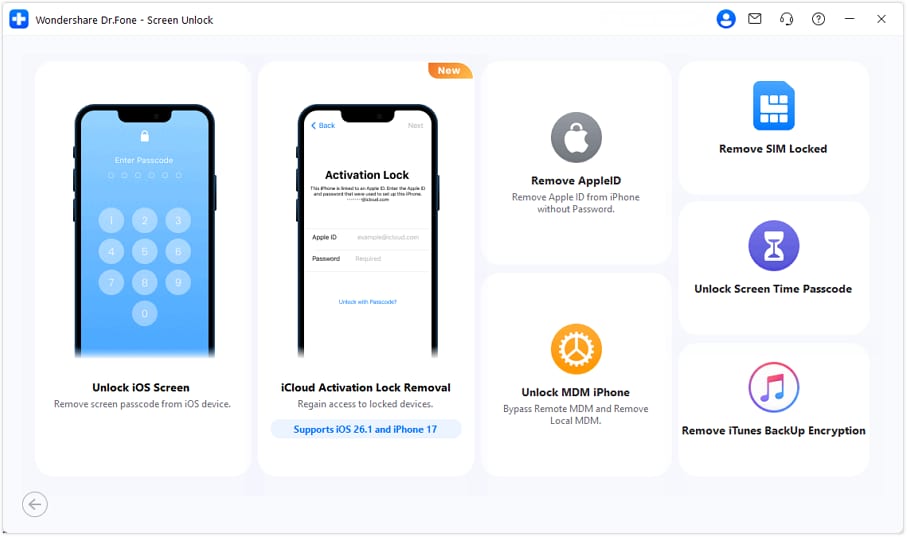
Begin by downloading and installing Wondershare Dr.Fone on your computer. Open the program, navigate to Toolbox > Screen Unlock, select the "iOS" option, and then choose "iCloud Activation Lock Removal" to start the process.
-
Step 2 Connect your device and start the process
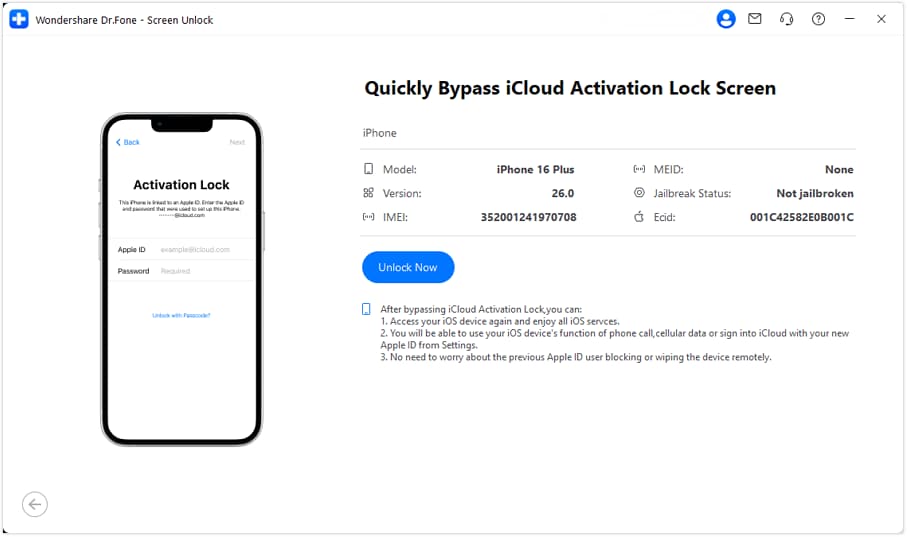
Use a USB cable to connect your iPhone or iPad to your computer. Once Dr.Fone detects the device, click on "Unlock Now." You will be prompted to read and agree to the terms and conditions before proceeding.
-
Step 3 Follow on-screen instructions to prepare your device
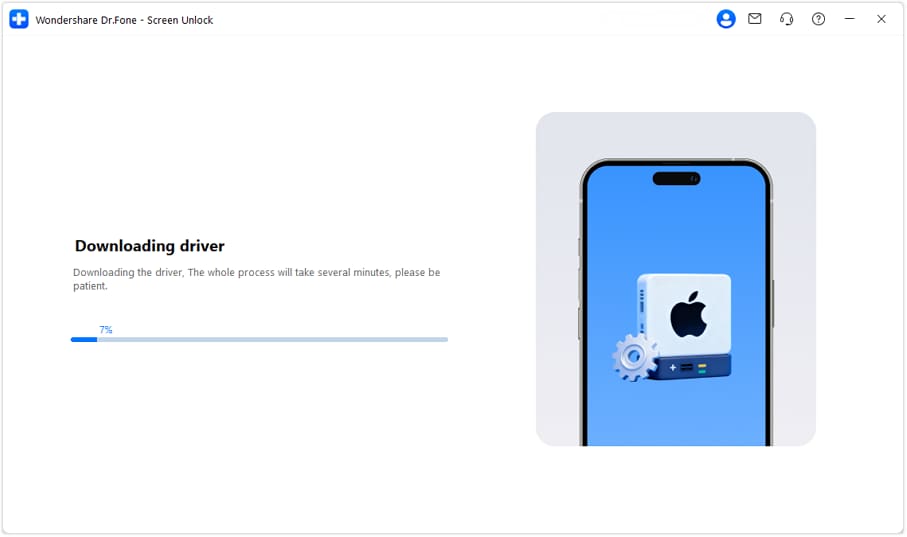
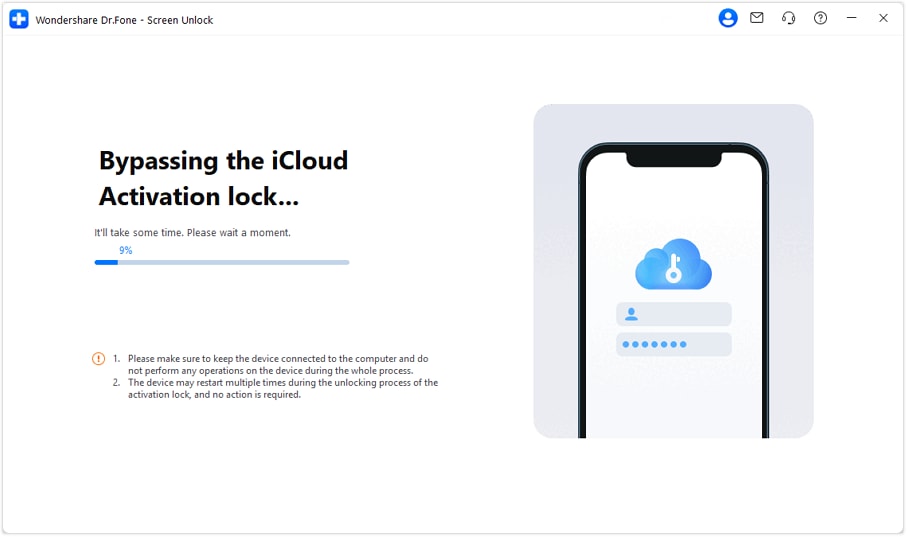
Dr.Fone will now guide you through putting your device into the correct mode for the bypass. Follow the on-screen instructions precisely. The software will then begin bypassing the Activation Lock. Do not disconnect your device during this time; it may restart several times.
-
Step 4 Complete the bypass and set up your device
Once the process is finished, a confirmation message will appear on the screen. Your device will restart one last time, and you will be able to access it without being stopped by the iCloud Activation Lock screen. You can now set it up as a new device.




Part 3. Alternative Techniques for Removing the Activation Lock
While using dedicated software like Dr.Fone is highly effective, it's worth knowing about other methods. These alternatives have different requirements and success rates, making them suitable for specific scenarios.
Method 1: Using the iCloud Find My Feature (Official Way)
The only official, Apple-supported way to remove an Activation Lock is through the previous owner's iCloud account. This method is the safest and most permanent solution but depends entirely on your ability to contact and cooperate with the seller. If they are willing to help, they can remove the lock remotely.
-
Step 1 Log in to iCloud.com
The previous owner needs to visit the iCloud website on any web browser and sign in with the Apple ID and password that is linked to the locked device. From the main menu, they should select the "Find My" service.

-
Step 2 Remove the device from the account
Inside Find My, they must click on the "All Devices" dropdown menu at the top of the screen and select the locked iPhone or iPad. An option to "Remove from Account" will appear. Clicking this and confirming the action will permanently disassociate the device from their Apple ID, thus removing the Activation Lock.

Method 2: Using Online Activation Lock Removal Services
For those who cannot contact the previous owner, various online services claim to remove the Activation Lock remotely. These services, such as IMEIUnlockSIM, typically require you to provide your device's IMEI or serial number and pay a fee.
However, you should approach these services with caution. The market is filled with fraudulent sites that take your money without delivering results. Success rates can be inconsistent, and there are potential privacy risks involved in sharing your device's unique identifiers. Always research a service's reputation and read reviews thoroughly before proceeding.
-
Step 1 Submit your device details
Visit the website of a reputable online service. You'll typically be asked to select your device model and enter its IMEI or Serial Number. Once submitted, click the unlock button to proceed.

-
Step 2 Complete payment and wait for confirmation
After providing the details, you will be directed to a payment page. Once the payment is made, the service will begin the remote unlocking process. This can take anywhere from a few hours to several days. You should receive an email confirmation once the lock has been successfully removed.
Conclusion
In conclusion, the direct answer to "does jailbreaking an iPhone remove iCloud lock?" is no. Jailbreaking modifies the device's operating system but cannot remove the server-side Activation Lock on its own. It is, however, a critical step used by advanced tools to bypass this security feature.
For users seeking a secure, effective, and straightforward solution, Dr.Fone – Screen Unlock (iOS) is the highly recommended choice. It provides a guided, all-in-one process that handles the technical complexities for you, ensuring you can regain access to your device safely and efficiently. Instead of navigating risky online services or complicated manual procedures, Dr.Fone offers a reliable path to unlocking your iPhone or iPad.
FAQ
-
1. Does jailbreaking an iPhone remove iCloud lock permanently?
No, jailbreaking itself does not remove the iCloud lock at all, let alone permanently. It only removes software restrictions on the device. Tools that use jailbreaking to bypass the lock provide a temporary solution; if you reset or update the device, the lock will likely reappear. -
2. Can 3uTools remove the Activation Lock?
While 3uTools is a versatile utility for managing iOS devices, its ability to handle Activation Lock is very limited. It may offer some functions that involve jailbreaking, but it is not designed as a dedicated iCloud bypass tool and often fails on newer iOS versions and devices. For a reliable solution, a specialized tool like Dr.Fone is recommended. -
3. Is it safe to use an online service to remove Activation Lock?
Using online Activation Lock removal services carries significant risks. Many are scams that will take your money without unlocking your device. Others may expose your device's private information (like its IMEI) to potential security threats. It is crucial to use a trusted, computer-based software solution instead. -
4. Will I lose my data after bypassing the Activation Lock?
Yes, bypassing the Activation Lock will erase all data and settings on the device. This is an unavoidable part of the process, as the tool needs to reset the device to its factory state to remove the link to the previous owner's account. There is no method to bypass the lock without data loss.
 Add Wondershare Dr.Fone as a preferred source on Google