Bypass iCloud Activation Lock and Android FRP without password.

 100% Security Verified | No Subscription Required | No Malware

 :
: 
 ChatGPT
 Perplexity
 Gemini
 Claude
 Grok
Grok
Imagine reaching out to your Moto G device on a trip only to find that its screen unlocked; apparently, you accidentally used your fingerprint too much. What makes this worse is that your device isn’t catching any signals just because its network is locked. In this chaotic situation, if you are wondering how to unlock your Moto G phone, this guide is here to help you reuse the device.
From bypassing the SIM lock to the screen, you will know what official options exist and what workarounds to try. When cleared with the screen and network lock, if you are stuck with FRP, know how Dr.Fone - Screen Unlock (Android) can help.
In this article
Part 1. What Does “Moto G Unlock” Mean?
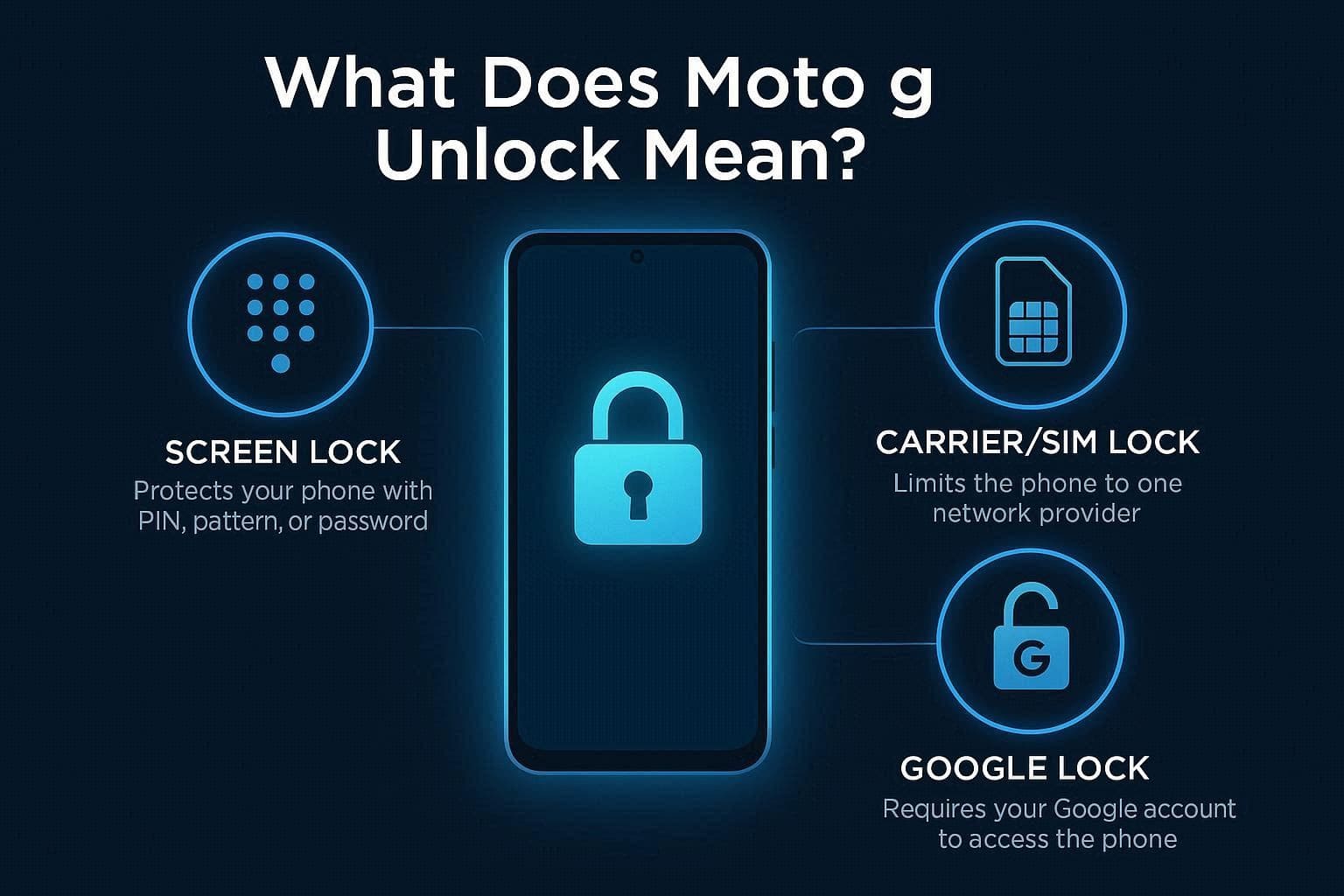
If one says their Moto G is locked, the question that comes to mind is “What Type of Lock?” Since it can be of 3 types, the given details explain how to use the right method to unlock the Moto G:
Types of Locks on Motorola Phones
- Screen Lock: It's a security barrier, like a PIN or passcode, that prevents unauthorized access.
- Carrier/SIM Lock: A restriction set by the service provider that stops the phone from working with SIM cards from other networks.
- FRP Lock: This is a Google security feature that requires your original account credentials to set up the phone after a factory reset.
Why Motorola Phones Are Locked
If you want to know why you can face such locks on the device, review the mentioned table:
| Reason for Lock | Lock Type | Purpose |
|---|---|---|
| Theft Protection | Screen Lock | Prevents strangers from accessing your private photos and messages. |
| Theft Deterrent | FRP Lock | Renders the phone useless to thieves even after a factory reset. |
| Contract Obligations | Carrier/SIM Lock | Ensures the phone is used on the provider's network until paid off. |
| Accidental Security | Screen Lock | Occurs when hardware fails, or a user forgets their PIN/Pattern. |
| Data Privacy | Screen/FRP Lock | Protects your files from being read if the device is lost. |
Part 2. Unlock Motorola G Phones: Carrier & FRP Fix Methods
With the basics cleared, here are some methods you can use to unlock the Motorola G, including screen, carrier, and FRP lock:
Official Carrier Unlock (Recommended)
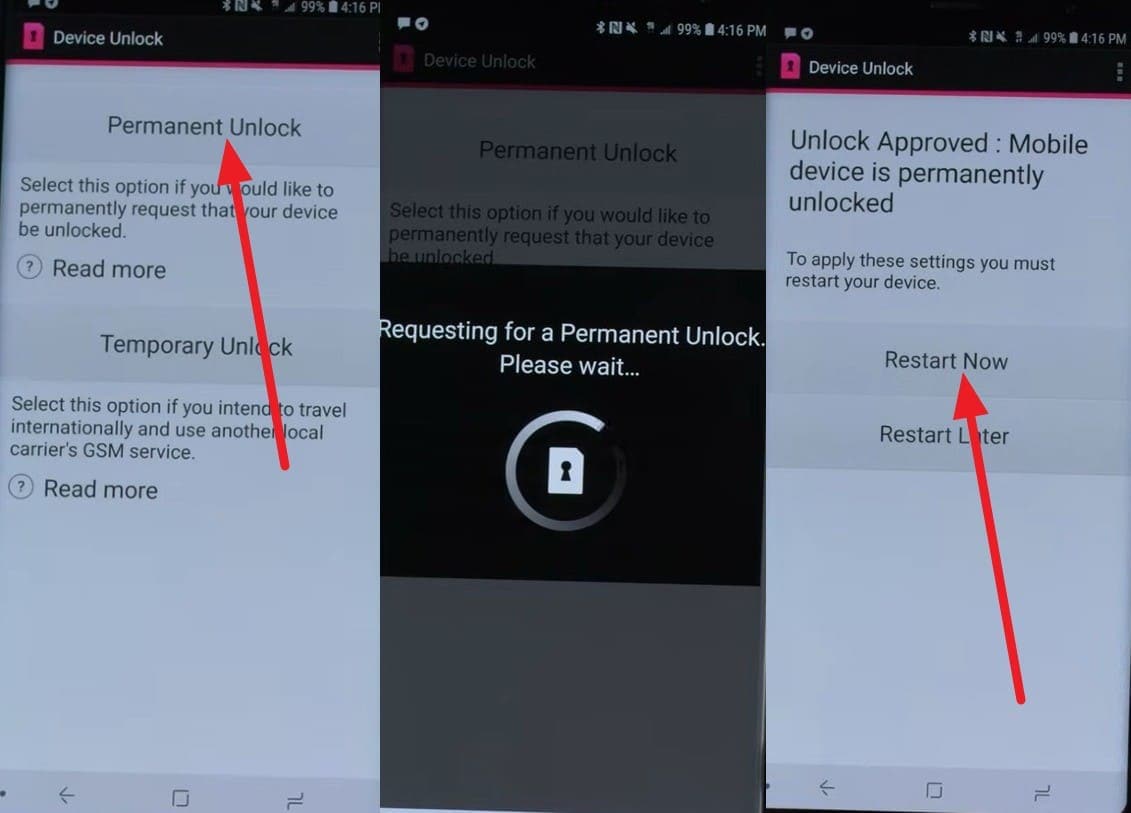
If there are no installment dues remaining or the device has not been reported as lost or stolen, you can use this method to remove the carrier lock. For instance, if the device is locked to AT&T and you meet the prepaid (6 months) and postpaid (60 days) activation limits, you can use the Device Unlock app. So, to know how you can choose between the Permanent and Temporary unlock options, here is the clear direction:

Instructions. In the Device Unlock app, select the “Permanent Unlock” option and wait until it confirms the account details with the carrier's servers. Once the lock is removed, you can pick the “Restart Now” option and use another carrier’s SIM.
Screen Unlock Methods (Forgotten PIN/Pattern/Password)
To screen unlock a Motorola G phone, the 3 reliable options are given in this section. Nonetheless, bear in mind that they will wipe the data and necessitate FRP during setup.
Option 1. Google Find My Device
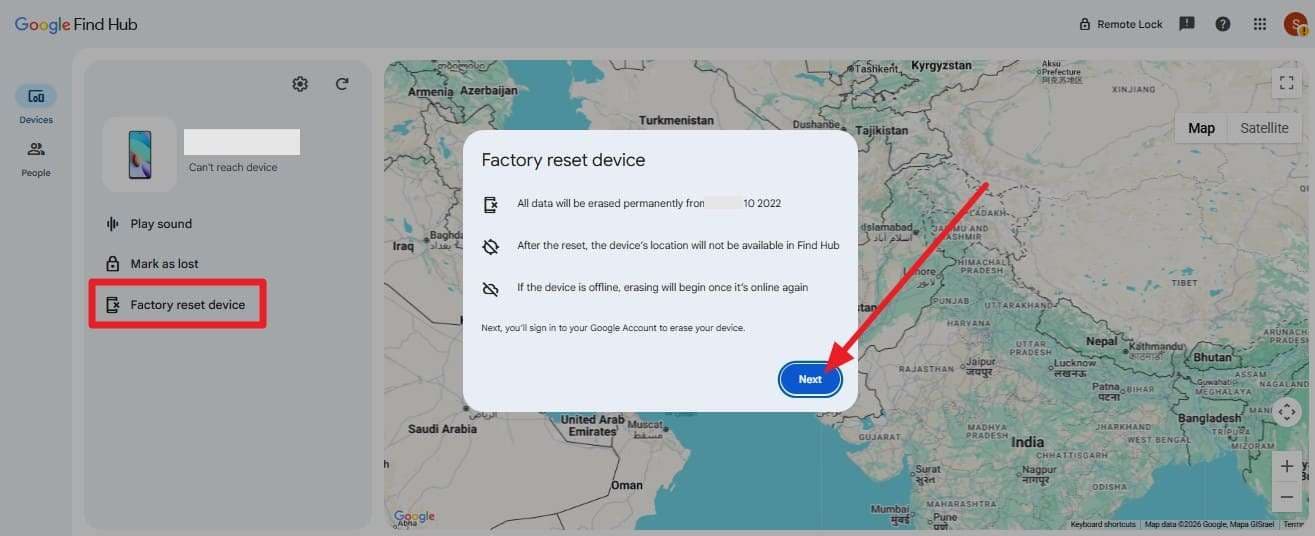
Google Find My Device (now part of Google Find Hub) is a safe method that can be performed remotely in a browser. So, if you know the correct Google Account details of the Moto G device you want to screen unlock, this will take mere seconds. Furthermore, you can also perform this action for a lost or stolen device, and it is guided below in detail:
Instructions. Press the sign-in button on the Find My Device site, and add the Google account details of the locked Moto G. Now, go to the “Devices” tab, tap the “Factory Reset Device” option, and choose “Next.”
Option 2. Device Reset Recovery
Simply by using the button combination, the Motorola Moto G Play unlock is possible via the Recovery Mode. The process erases all personal data, apps, settings, and the current screen lock, and returns the Moto G phone to factory condition. Therefore, experts' guidance says that if you have a backup, here is how you can reset the device on the go:
-
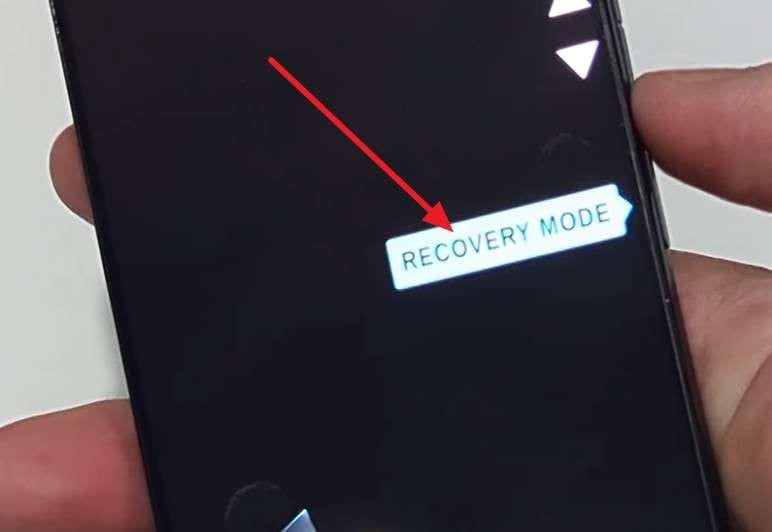
Step 1 Power off your device and access the “fastboot/bootloader” menu by pressing the Volume Down and Power buttons. After that, choose the “Recovery Mode” via Volume key and Power to confirm.
-
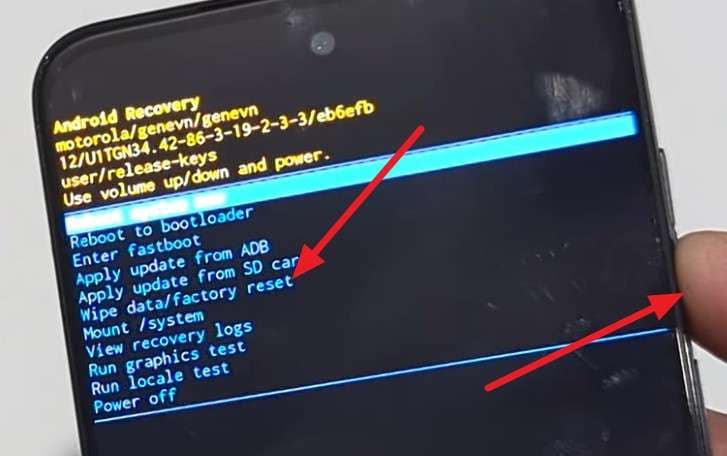
Step 2 If “No command” appears, hold the Power button, press the Volume Up button once, then release the Power button. In the Recovery menu, use the Volume keys to select “Wipe Data/Factory Reset,” and press Power to confirm.
-
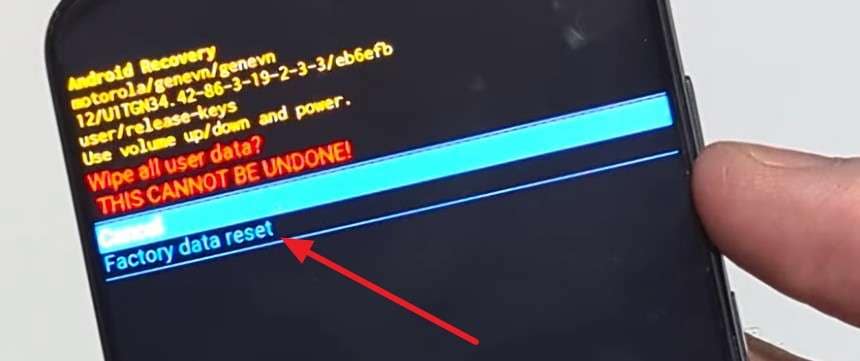
Step 3 Scroll down to the “Factory Data Reset” option through the Volume Down key and choose Power to continue. When the device is reset, confirm the “Reboot System Now” option using the Power button.
Option 3. Dr.Fone - Screen Unlock (Android) for Moto G Devices
When the button combination fails, or you can’t access any browser, install the Dr.Fone - Screen Unlock (Android) on PC or Mac for Moto G 5G unlock. Using this tool, users can remove the Pattern, PIN, Password, Fingerprint & Face Lock by accessing the Special Mode. Unlike other options, this access is automated and requires only that you select a device after connecting to the tool.
Furthermore, users can remove the screen lock without data loss on Samsung & LG devices. From Android 5.0 onward, the tool supports all Android phones and tablets, so older versions won’t be an issue. Overall, the automated screen lock removal will take 5 minutes (vendor claim) and is ideal for beginners who can’t reset the device in Recovery mode.
Simple Guide to Remove Screen Lock from Moto G Devices
To unlock the Moto G 5G, let’s perform a real-world test to know if it's the best screen lock removal option.
-
Step 1 Launch the Screen Unlock Tool from Dr.Fone Toolbox
Choose the “Unlock Android Screen” feature on the Screen Unlock Android tool after connecting the Moto G device.

-
Step 2 Choose Motorola and Let Dr.Fone Access Mode
From the given options, select “Motorola,” and the tool will automatically access Special Mode.

-
Step 3 Start Using Moto G When the Screen Is Unlocked
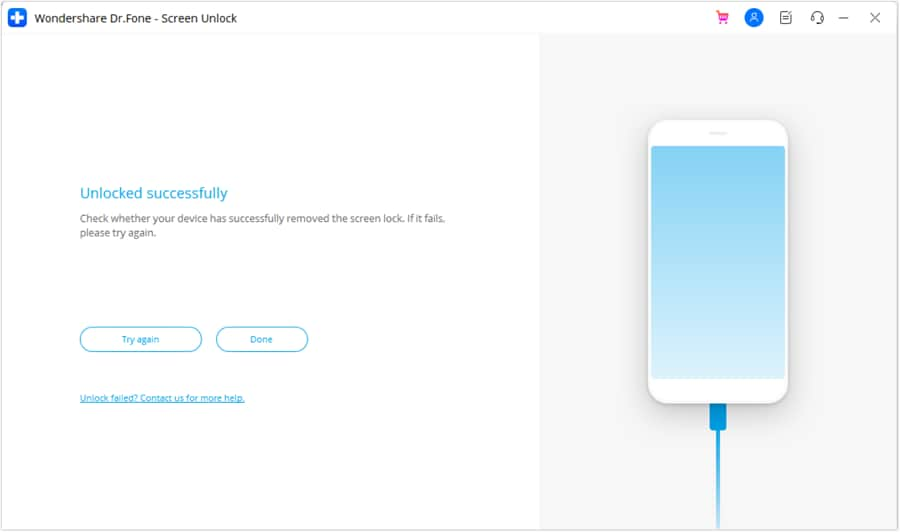
When the tool removes the Screen lock, pick the “Done” button, and you can start using the device.
FRP Unlock Methods (Google Account Protection)
If you have performed a reset to unlock the Moto G Power, the device will need FRP. So, if you need a way out of this lock, try the 2 options given in this section:
Option 1 Emergency Call/YouTube/TalkBack Browser Methods
Though the option is not official, you can still use such tricks on many Motorola devices, even those running Android 13 or 14. From the Start menu, you can use the Talkback option to access the “TalkBack Braille Keyboard” option and tweak with Google services. If you have enough time to try this option, here is how you can do that:
-
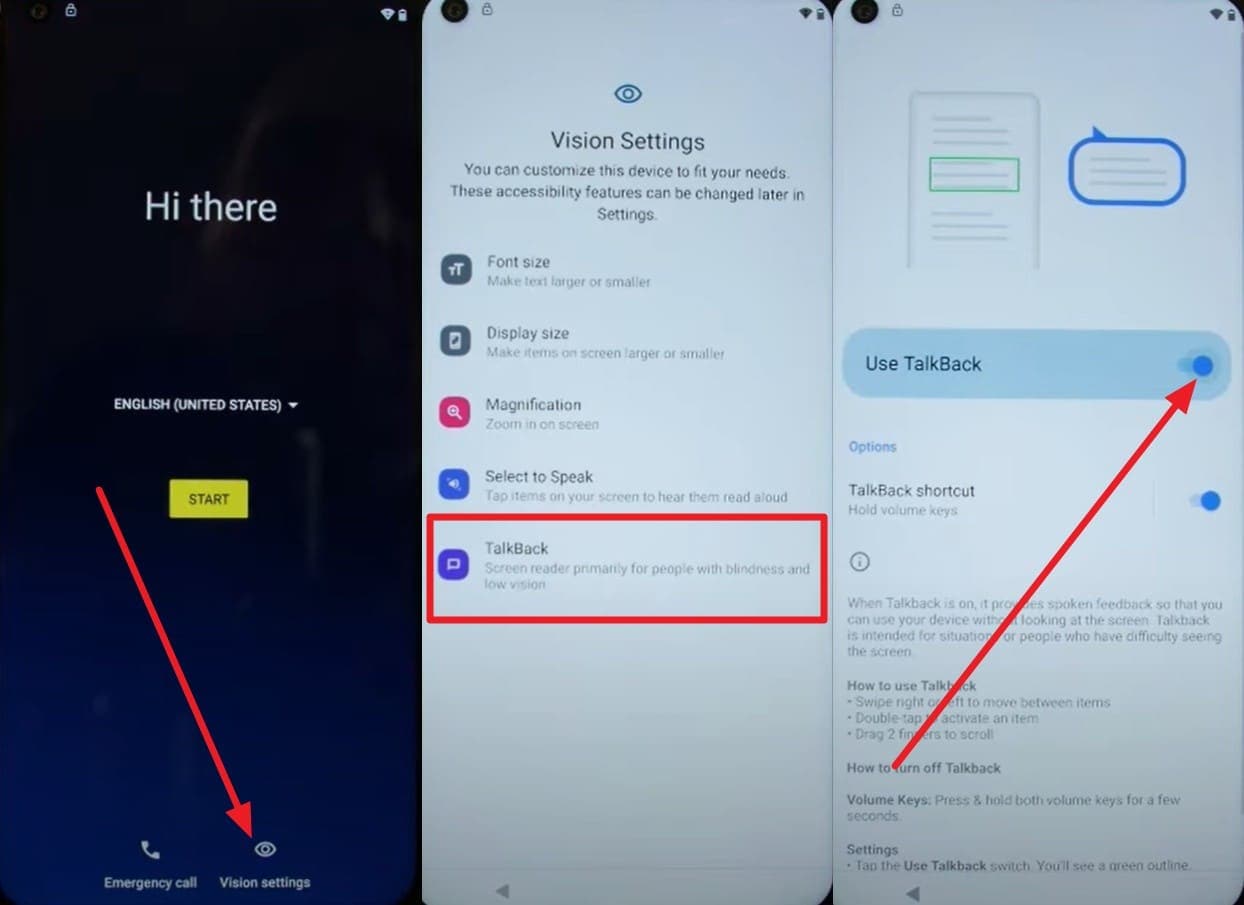
Step 1 On the “Start” menu, choose the “Vision Settings” option and toggle on “Use TalkBack” by picking the “TalkBack” option.
-
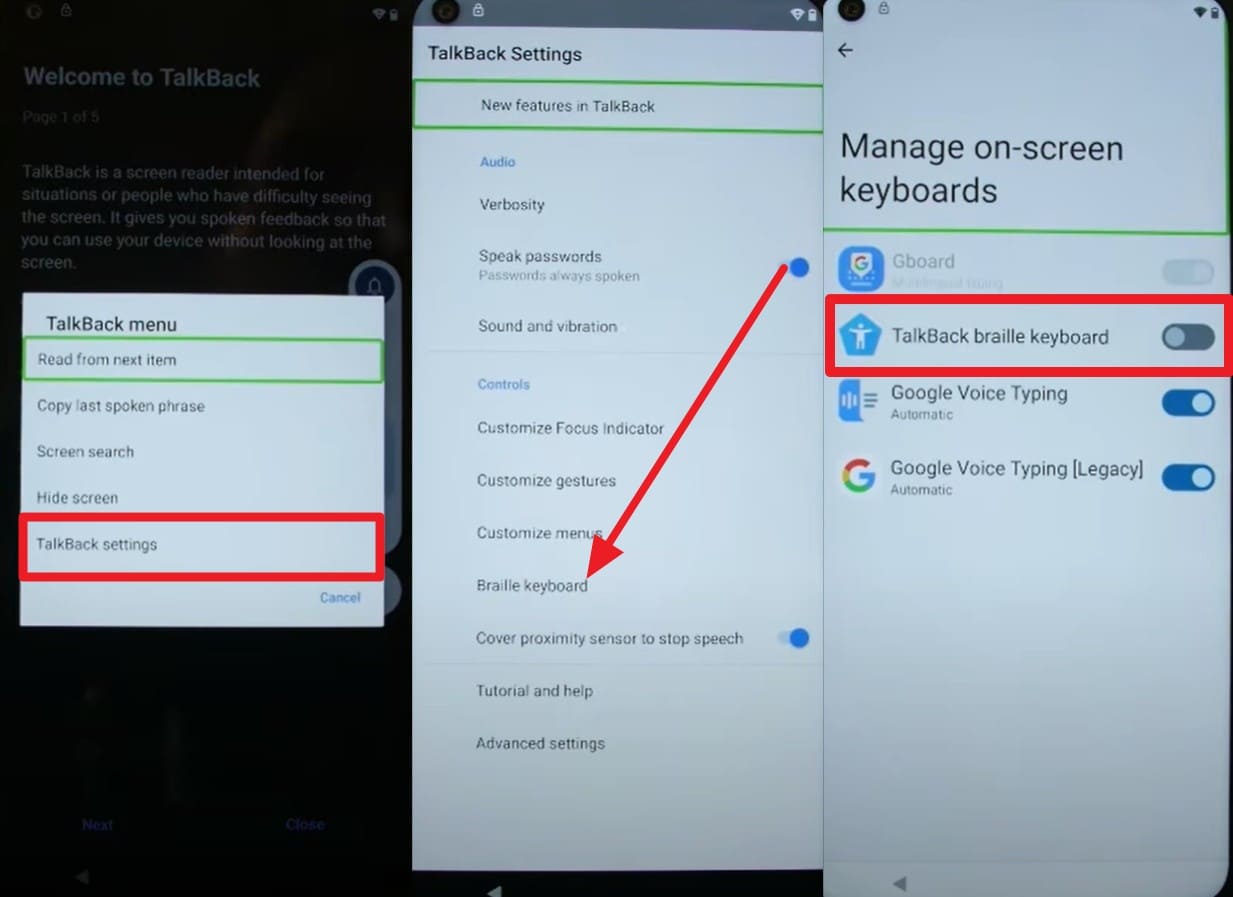
Step 2 Draw the L shape on the new interface so you can select the “TalkBack Settings” option in the popup menu. Opt for the “Braille Keyboard” and “Set Up Braille Keyboard” options, and enable the “TalkBack Braille Keyboard” option.
-
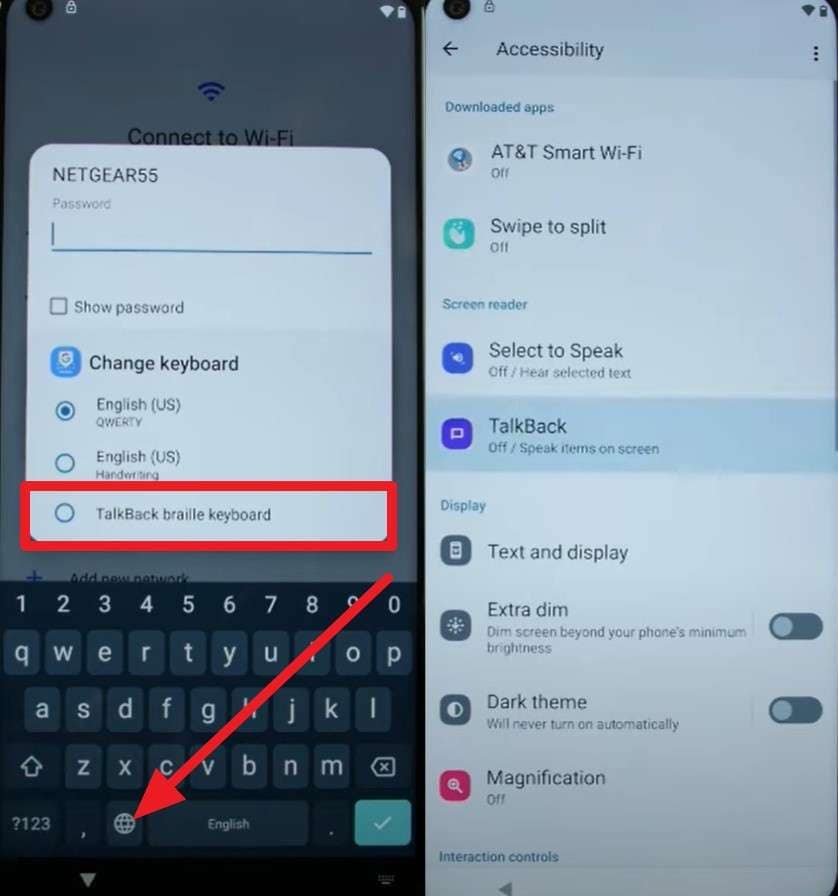
Step 3 On the popup menu, disable TalkBack, connect to the Wi-Fi, and press the “Globe” icon on the keyboard. Again, choose “TalkBack Braille Keyboard,” pick “Turn On in Accessibility Settings,” and access the “Accessibility” menu.
-
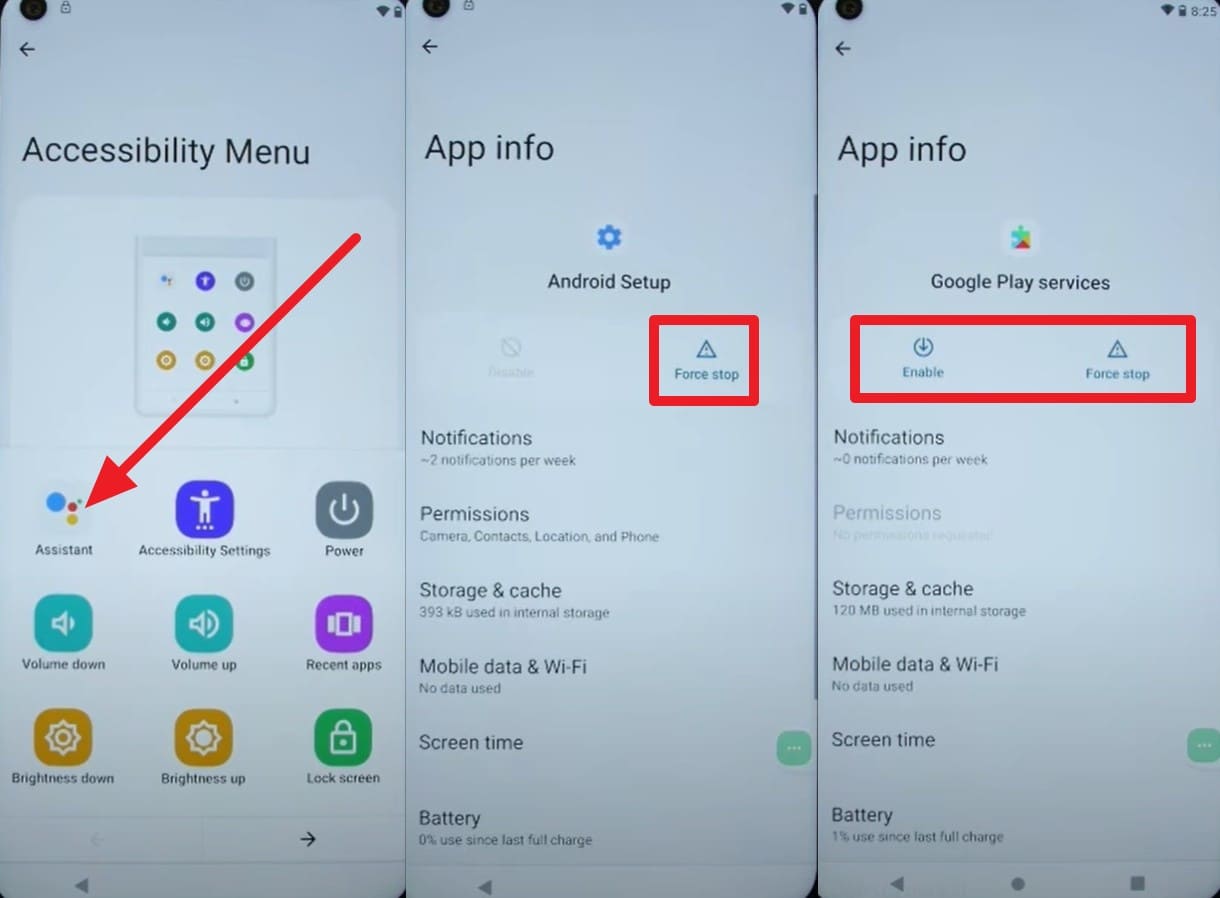
Step 4 Use the “Assistant” option to speak “Settings,” and choose “Open Settings.” In the Apps settings, “Disable” and “Force Stop” Android Setup and Google Play Services.
-
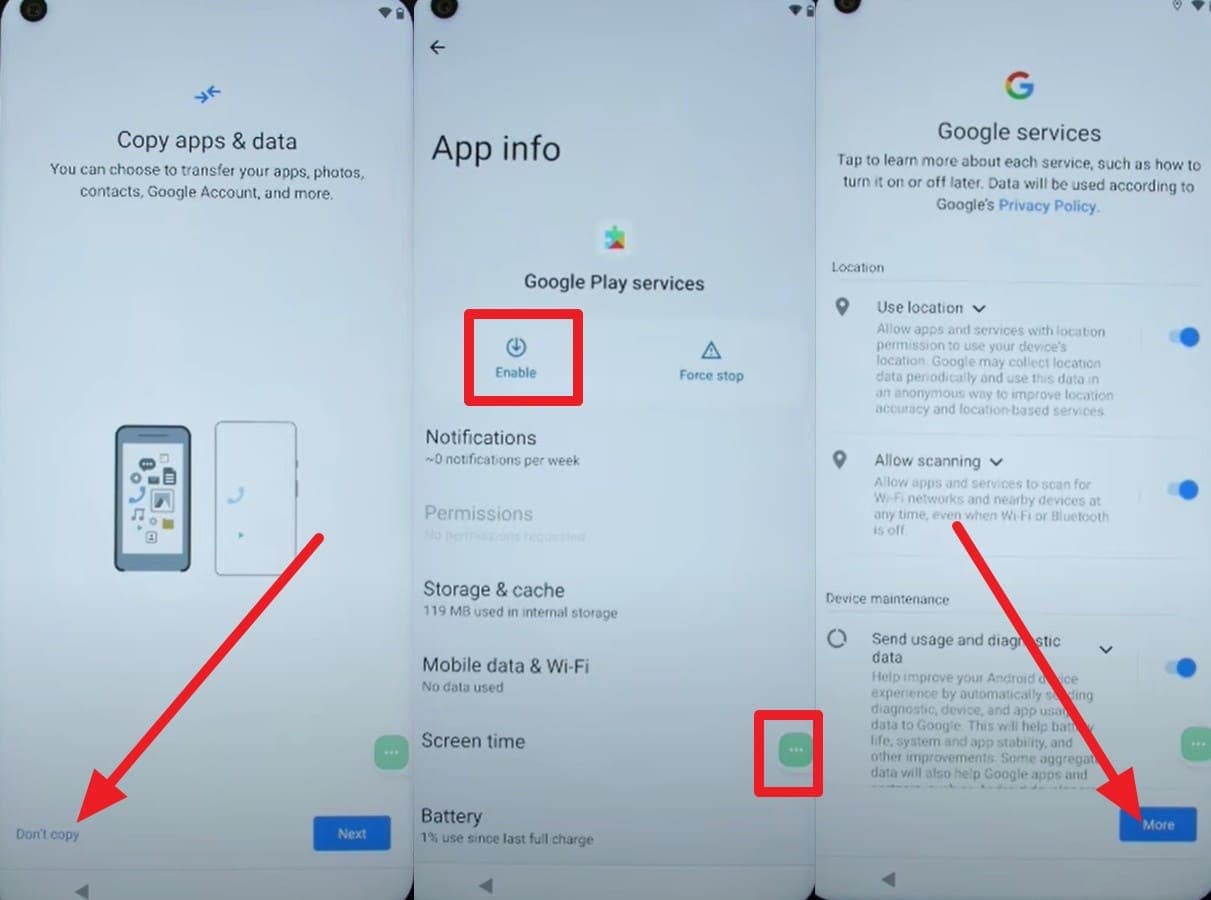
Step 5 When you get the setup screen with the “Just A Moment…” loop, choose the “Don’t Copy” option. Press the Accessibility icon to “Enable” Google Play Services, and pick “More” and “Next” options. Skip to add PIN on the upcoming interfaces, and the FRP bypass will start.
Option 2. Dr.Fone - Screen Unlock (Android) for Moto G Devices
On trips, when you don’t have the time to play tricks, use Dr.Fone - Screen Unlock (Android) Moto G Play FRP bypass Tool. Apparently, this tool is the pioneer in introducing Android 16 FRP removal, mainly for Samsung devices. Setting a legacy, this tool features AI-powered FRP removal, with clear alerts and code verification to ask for users' consent or to ensure the real owner is bypassing FRP.
Users can also leverage online FRP bypass for Android 15-17 beta for Samsung devices. Unlike others, the tool supports 13 major Android brands, including all US versions and chipsets. So, to know how you can remove FRP from the Moto G in 5 minutes, review the mentioned steps:
-
Step 1 Choose MediaTek CPU to Remove Moto G FRP
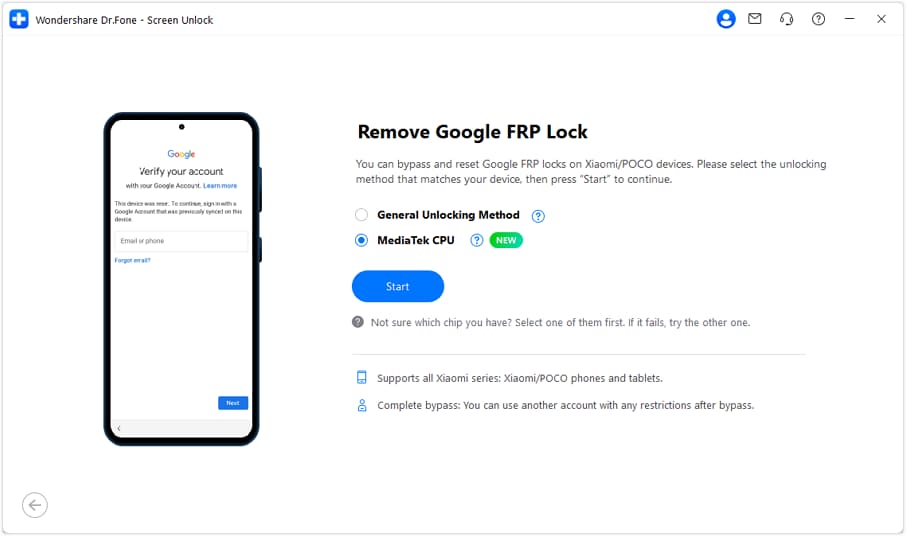
As you choose “Remove Google FRP Lock” on the Screen Unlock Android tool and pick Motorola from the list. Choose the “MediaTek CPU” unlocking method, and the tool will start installing relevant drivers.
-
Step 2 Install Drivers and Perform the Given Instructions
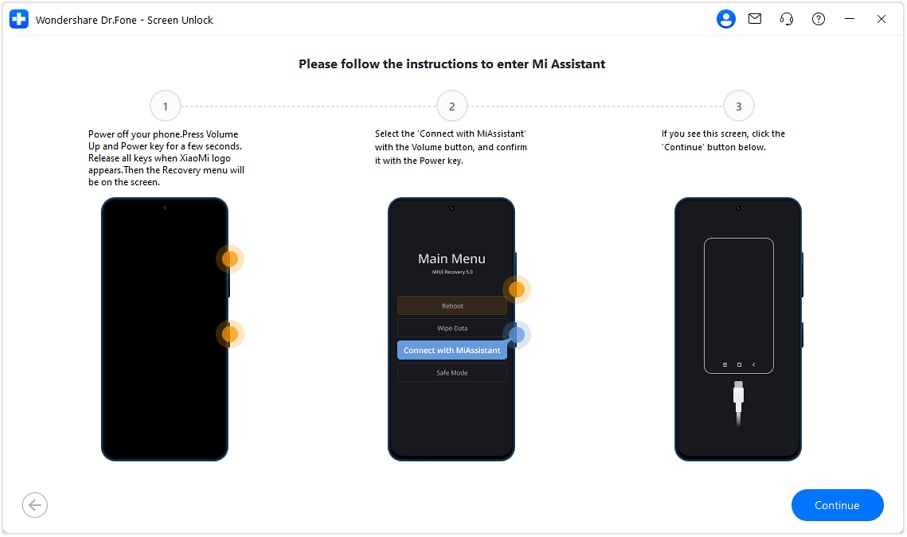
Power off the device and connect it to a PC, and follow the listed instructions. Upon doing so, the FRP lock will be removed, or you can try the General Unlocking Method (If Needed).




Part 3. 5 Safe Practices Before Unlocking Motorola Phones
If you want to avoid having a “Forgot Motorola phone password” situation at the urgent moments, follow these 5 expert tips:
| Practice | Action | Benefit |
|---|---|---|
| Verify Ownership | Ensure the device is not blacklisted or reported stolen via an IMEI checker. | Avoids legal trouble and ensures the Motorola Moto G Play unlock is permanent. |
| Full Data Backup | Sync photos and contacts to Google Drive or a PC before a screen bypass. | Prevents permanent data loss during a forgotten Motorola phone password reset. |
| Charge Battery | Ensure the phone has at least 50% battery before starting any unlock tool. | Prevents the device from bricking due to a power failure during firmware changes. |
| Check Carrier Dues | Confirm all installment plans are paid off before requesting a SIM unlock. | Ensures the carrier approves your unlock Moto G 5G request without rejection. |
| Enable Find My Device | Keep Find My Device active in settings for remote access in future emergencies. | Provides a free, official way to unlock a Motorola G phone without extra software. |
Part 4. When You Should Not Try to Unlock a Moto G?
Note that you should not try any Moto G Play unlock methods if you are not the owner or if the device is reported as lost or stolen. According to 2026 FCC reports and the CTIA Consumer Code, such models are flagged in the global database. So, if you try any means of unlocking, you can face legal penalties or criminal investigations by law enforcement.
Conclusion
To sum up, unlocking a Moto G phone is possible if you know what type of lock issue you are having. So, this guide has explained common locks and provided a detailed guide on how to bypass them. As a quick and simple option for FRP and screen lock, experts say Dr.Fone - Screen Unlock (Android) is a reliable choice.
Frequently Asked Questions
-
1. Can I get a network unlock for my Moto G 5G for free?
Yes, if you need to meet all carrier requirements, you can remove the SIM lock for free via the carrier’s web portal or app. -
2. How do I find my IMEI for a Motorola G Pure unlock if the screen is broken?
You can find the 15-digit IMEI printed on the original retail box, the SIM card tray, or “About” settings. -
3. Can I use a Moto G Power unlock tool to remove a lock without losing my photos?
Android screen unlock tools generally require a factory reset, which wipes data, unless you have a specific Samsung or LG model.
 Add Wondershare Dr.Fone as a preferred source on Google