 Bypass iCloud Activation Lock and Android FRP without password.

 100% Security Verified | No Subscription Required | No Malware

 :
: 
 ChatGPT
 Perplexity
 Gemini
 Claude
 Grok
Grok

If you searched for “FRP bypass app DM,” “FRP bypass APK DM,” or “DM Repair Tech FRP,” you are usually looking for the FRP resources published by DM Repair Tech. The important point is that these terms can refer to different APK links, shortcuts, PC tools, or device-specific guides rather than one universal tool that works on every Android phone.
Factory Reset Protection (FRP) is an Android device-protection feature that can require a previously synced Google Account or screen lock after a protected device is reset. For legitimate owners who have forgotten their credentials, Google recommends recovering the account or using the ownership-verification options available on the device before trying third-party utilities.
This 2026 review focuses on what FRP Bypass App DM and FRP Bypass APK DM actually refer to on DM Repair Tech, what users should verify before downloading anything, and where the biggest compatibility and safety limitations are. This distinction matters because the DM Repair Tech download page itself is an older resource page that links to multiple apps, shortcuts, and tools, while newer device-specific posts use different workflows depending on the model and Android version.
In this article
Part 1. What FRP Bypass App DM and DM Repair Tech Actually Refer To
FRP Bypass App DM is most closely associated with DM Repair Tech, a third-party site that publishes Android FRP resources. Its FRP pages include app shortcuts, APK links, PC utilities, device-specific tutorials, and paid unlock-service references. That makes “FRP bypass app DM” better understood as a resource/search label than as the name of one consistently versioned universal Android application.
FRP means Factory Reset Protection, Google's anti-theft verification feature. APK is the Android app installation package format. DM in this search context usually refers to DM Repair Tech or related download resources, not a special Android system feature.
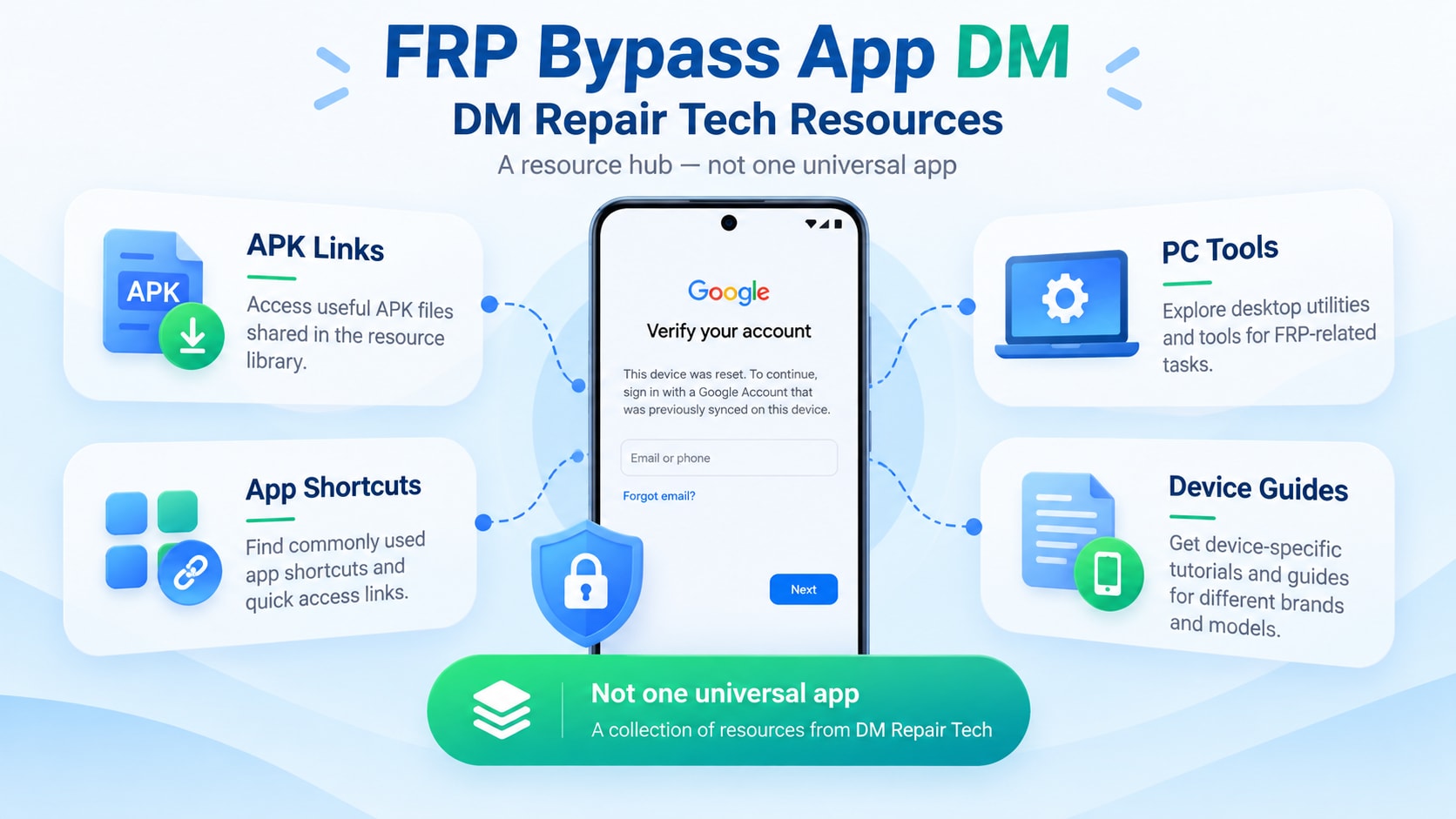
The distinction is important for searchers because several closely related terms can lead to different resources:
| Search Term | What It Usually Refers To | What to Verify |
|---|---|---|
| FRP bypass app DM | DM Repair Tech's FRP app/download resources and device-specific guides | Exact device model, Android build, page date, and linked file |
| FRP bypass APK DM | APK files or app shortcuts promoted through DM Repair Tech FRP pages | Whether the APK is intended for your Android version and device |
| DM Repair Tech FRP | The DM Repair Tech site, its FRP tutorials, tools, and related services | Whether the instructions are current for your model and security patch |
| FRP bypass DM / FRP unlock DM | A broader label used across DM Repair Tech posts for different bypass tools or workflows | Whether the post uses an APK, PC tool, chipset utility, or other method |
1.1 Is FRP Bypass APK DM One Universal Tool?
Not in the way the phrase is often presented. DM Repair Tech has a page titled “Download FRP Bypass APK DM” that groups many Android shortcuts and APK resources, while its model-specific guides reference different utilities for different phones. For example, recent indexed DM Repair Tech pages for Samsung models refer to tools such as SamFw, ST MTK Universal Tool, Chimera, or browser-based/app methods depending on the device.
That means a claim such as “FRP Bypass APK DM works on Android 5–15” is too broad unless it refers to a specific file, model, build, and security patch. The better question is: which DM Repair Tech method is intended for your exact phone and software version?
For additional FRP software categories, you can also review Dr.Fone's broader FRP bypass APK guide.
Part 2. Before Downloading FRP Bypass APK DM: Compatibility & Risk Checklist
Is FRP Bypass APK DM safe? Not by default. If you own the device and are considering a third-party FRP Bypass APK DM resource, verify the exact file and method before installing or running anything. Check the source, package name, app signature, requested permissions, and any Google Play Protect warning. DM Repair Tech includes content created across multiple years, and Android security behavior changes with device models, firmware revisions, and security patches.
-
Check 1 Confirm the Exact Device and Android Build
Do not assume a Samsung, Xiaomi, Huawei, or other Android method transfers to another model. Record the exact model number, Android version, and—when available—the security patch level before comparing it with a guide.
-
Check 2 Identify What the DM Page Is Actually Linking To
The DM Repair Tech ecosystem includes APKs, app shortcuts, PC-based utilities, chipset-specific tools, and model-specific tutorials. Check whether the page is describing an on-device APK or a separate Windows utility instead of assuming every “FRP bypass DM” result is the same program.
-
Check 3 Check the Publication Date and Current Compatibility
The main DM Repair Tech FRP Bypass APK page still carries older 2023-era labeling, while newer device posts use different techniques. Treat old compatibility claims as historical unless the exact method is documented for your current build.
-
Check 4 Prefer Ownership Recovery Before Third-Party Files
Google's official guidance says a protected device may require a previously synced Google Account or screen lock after a factory reset. If you are the legitimate owner and cannot sign in, account recovery or manufacturer support is the safer first route.
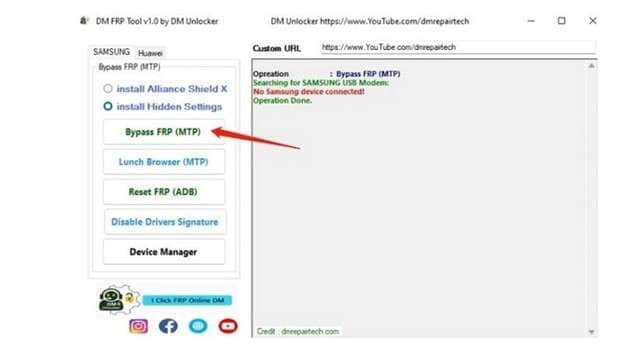

2.1 FRP Bypass App DM: Practical Pros and Limitations
The main value of DM Repair Tech is the breadth of device-specific FRP material it collects. The main limitation is the same: different pages can point to different tools, different years, and different workflows, making universal compatibility claims unreliable.
- Free access to many device-specific FRP guides and resource links.
- Strong coverage of Samsung-related FRP search topics.
- Provides multiple resource types rather than relying on one method.
- Useful as a reference point for identifying older device-specific approaches.
- “FRP bypass app DM” can refer to multiple resources rather than one universal tool.
- Older guides can become obsolete as Android security patches change.
- Some linked files or tools are hosted or developed by third parties.
- Compatibility needs to be verified at the model and software-build level.
 Unlock Android phone in seconds.
- Remove PIN, pattern, password, fingerprint.
- Bypass Google FRP lock easily.
- Works on all Android brands & models.
- No tech skills required – user-friendly.

Part 3. Dr.Fone - Screen Unlock (Android): Guided Alternative to FRP APK DM
If you would rather avoid installing an unknown FRP APK, you can use a guided FRP removal tool with documented device support. Dr.Fone - Screen Unlock (Android) provides FRP removal workflows for supported Android brands and versions, with on-screen steps instead of relying on an APK from an unknown source.
Beyond just bypassing FRP, Dr.Fone handles all screen lock types, including patterns, PINs, and even biometrics like Face ID. Crucially, for specific older Samsung models, it can remove locks without any data loss—a feature FRP APK DM simply cannot match.
Why professionals choose Dr.Fone over free APKs:
- Verified Success: Boasts a success rate of up to 99% on supported models.
- End-to-End Encryption: Uses AES-256 encryption to ensure your device data remains private.
- Guided Workflow: No manual driver hunting or root directory requirements; the software handles everything.
- One-Stop Utility: Fixes system errors and unlocks screens in one package.
3.1 How to Bypass FRP with Dr.Fone (Step-by-Step)
-
Step 1 Launch Toolbox
Open Dr.Fone on your computer. From the main dashboard, select the "Screen Unlock" module to begin the process.

-
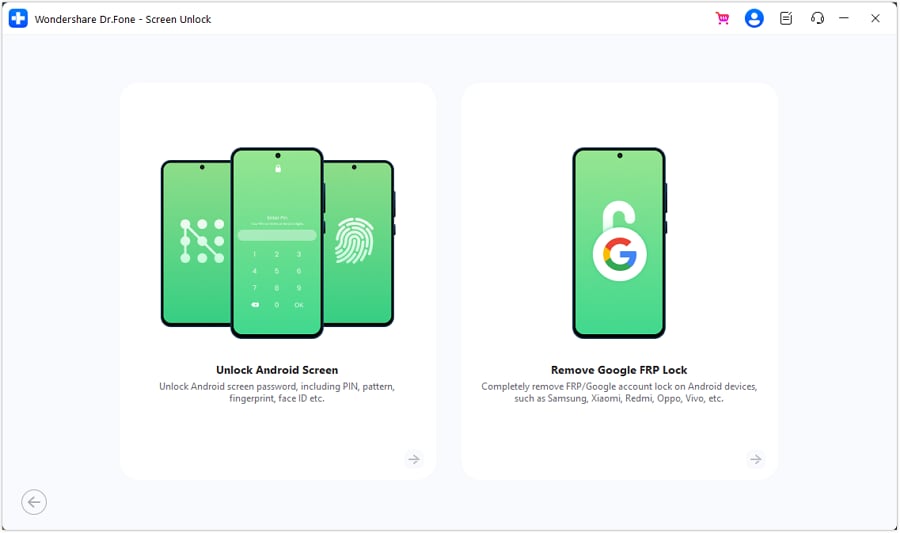
Step 2 Target FRP Removal
Choose "Android" as the device type. On the following screen, click on "Remove Google FRP Lock." You will then be asked to select your specific device brand from the list.
-
Step 3 Connection and Bypass
Follow the on-screen instructions to put your device into the required mode (usually involves holding Volume Up + Power while connecting to USB). Dr.Fone will automatically identify the device, download the necessary firmware component, and execute the bypass. Once the progress bar reaches 100%, your device will reboot without the Google lock.


Part 4. FRP Bypass APK DM vs. Dr.Fone: Key Differences
Choosing between a community tool and professional software depends on your risk tolerance and the age of your device. Below is a head-to-head comparison to help you decide.
| Feature | FRP Bypass APK DM | Dr.Fone - Screen Unlock |
|---|---|---|
| Device Support | Limited (Samsung focus) | 2000+ Android Models |
| OS Compatibility | Android 5 - 11 | Android 5 - Android 15 |
| Ease of Use | Moderate (Manual Steps) | High (Fully Automated) |
| Success Rate | Varies by Patch | 99% Reliable |
| Security | Low (Untrusted Source) | High (Official Encryption) |
| Update Frequency | Rare | Regular Monthly Updates |
| Cost | Free | Paid (with Trial) |
Conclusion
The most important thing to know about FRP Bypass App DM in 2026 is that the phrase does not reliably identify one universal Windows tool or one APK with fixed compatibility. DM Repair Tech acts more like a collection of FRP app links, utilities, tutorials, and model-specific resources, and the method can differ significantly from one device to another.
For legitimate owners, start with the Google Account or screen-lock verification paths Android provides after a protected reset. If you still evaluate a third-party FRP Bypass APK DM resource, verify the exact device model, Android build, security patch, publication date, and file source before proceeding. Avoid universal compatibility, “100% safe,” or guaranteed-success claims unless they are supported for the exact device and method being discussed.
FAQ
-
1. What is FRP Bypass APK DM?
FRP Bypass App DM is a search term closely associated with DM Repair Tech's FRP resource pages. Those pages can include APKs, Android shortcuts, PC utilities, device-specific tutorials, and unlock-service links, so the phrase should not automatically be treated as the name of one universal tool. -
2. Is FRP Bypass APK DM safe to download?
No universal compatibility is established. DM Repair Tech publishes different resources for different devices, and its indexed Samsung guides reference different tools and methods depending on the model and Android version. Always match the resource to the exact device and software build. -
3. Does FRP Bypass APK DM work on all Android phones?
There is no single answer because compatibility depends on the specific APK or tool, device model, firmware, and security patch. Older DM Repair Tech pages may describe methods that no longer apply to current Android builds, so check the date and device-specific instructions rather than relying on a broad version claim. -
4. Why is FRP Bypass APK DM not working on my phone?
Google's official guidance is to use a Google Account previously added and synced to the device or the available screen-lock verification option. If you cannot sign in, use Google Account recovery or contact the device manufacturer for ownership-recovery support. -
5. Where can I download FRP Bypass APK DM?
There is no single official download for every file labeled FRP Bypass APK DM. Different websites may use the same name for different files, so verify the source and package details before downloading. -
6. What can I use instead of FRP Bypass APK DM?
If you do not want to install an unknown APK, use an FRP removal method with clear device and version support. Dr.Fone - Screen Unlock provides guided FRP removal workflows for supported Android devices.
 Add Wondershare Dr.Fone as a preferred source on Google



