Bypass iCloud Activation Lock and Android FRP without password.

 100% Security Verified | No Subscription Required | No Malware

 :
: 
 ChatGPT
 Perplexity
 Gemini
 Claude
 Grok
Grok
Imagine staring at your Android screen with the “Try again in 30 seconds” message or worse, FRP lock. Whether it’s a disabled display or a Google account barrier, being locked out of your own hardware is a digital nightmare. Therefore, in this Android unlock tool comparison, we will compare Passixer and Wondershare Dr.Fone to determine which one can help you get out of this situation.
We’ll evaluate their effectiveness in bypassing lock screens and navigating the tricky details of FRP removal. Moving beyond surface-level marketing, note that this comparison is built on hands-on testing and technical factors.
From success rates, device compatibility, and processing speed, every aspect will highlight whether Dr.Fone truly earns its spot as the best Android unlock tool in 2026.
In this article
- Part 1. Passixer Android Unlocker —Review
- Part 2. What Is Dr.Fone Android Unlock — Review
- Part 3. Step-by-Step Process to Use Passixer Android Unlock Tool
- Part 4. How Dr.Fone Android Unlock Tool Works: Easy Setup Explained
- Part 5. Passixer vs Dr.Fone: Device, Lock Type, and Version Coverage Compared
- Part 6. Final Verdict: Which Android Unlock Tool Should You Choose?
Part 1. Passixer Android Unlocker —Review
Best For: Non-technical users and beginners who need a straightforward, guided interface.
Using Passixer, you can unlock multiple screen lock types, including password, pattern, PIN, fingerprint, and face lock. Users can leverage this facility on Android phones and tablets, and the simple interface makes this process seamless. In terms of compatibility, it's Windows-only and works on Windows 11/10/8.1/8/7.
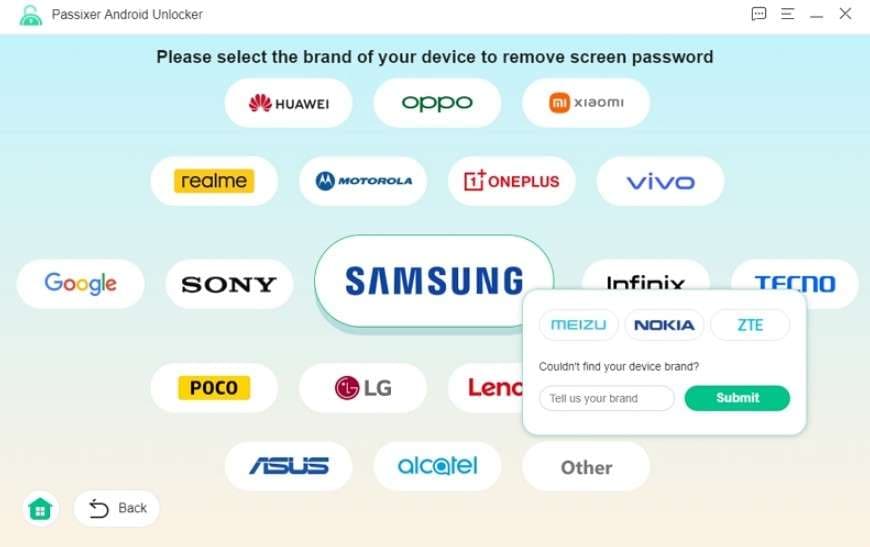
Key Features of Passixer Android Unlocker
To further know about the Passixer Android Unlocker screen and FRP lock details, here are some of its key features:
1. Screen and FRP Bypass Support: When asked how many brands it supports for FRP lock, we couldn't find that information in its UI because the tool hasn’t explicitly displayed their details. However, based on the guide and Google details, it is reported to support 15+ Android brands.
It doesn’t work?? also be a virus. Be careful. - Tosco h
2. Android Versions: Despite the unclear details on brands and options, it states to support Android 6.0 and above (Android 15 included). Unlike other Android unlock tools, this one does not support Android 16, and FRP support for Android 12 remains questionable.
3. No Data Loss Option: On earlier Samsung devices, such as the Note 3, Galaxy S5, and others, the tool supports the “No Data Loss” option. What we noticed was that there was no separate tab for such an option, making this claim purely marketing-driven.
4. Ease of Use and Process Design: For basic, less-controlled screen lock and bypass removal, this solution meets the needs. Details for USB debugging and Recovery modes are given, but it lacks clear safety prompts.
Pros & Cons of Passixer Android Unlocker
To choose between Passixer vs Dr.Fone, glance at some perks and pitfalls of this Android Unlocker:
- Unlocks most Android locks in one tool, no extra apps.
- Bypasses old Samsung phone locks without deleting user data.
- An easy three-step process helps beginners unlock their phones at home.
- Can be accessed only on Windows, no macOS support.
- There are no clear details on brand support for the screen and FRP lock.
- Fails to support FRP bypass for Android 16 and Android 12.
- No support for Wiko, Qualcomm, or Exynos chipsets.
- The “No Data loss” option remains clear in the tool and guides.
- US Model version support is not mentioned and is unclear.
- Users can access only 1 PC across all plans.
- Many refund and success rate reports are available for lock removal.
- The guide for USB Debugging and Recovery Mode is not suitable for novices, as it has no automation.
- It takes more than 10 minutes to bypass the screen and FRP lock.
- No clear FRP bypass support for Samsung S26 or S25.
Pricing Details
In addition to key details, determine the true reality of this tool as the best Android unlock software from its pricing details:
| Plans | Details |
|---|---|
| 1 Month License: $29.99 | ● 6 devices, 1 PC ● 1 Month Free Upgrades |
| Lifetime License: $49.99 | ● 6 devices, 1 PC ● Lifetime Upgrades |
We think that 1 PC access in this range is a bit pricey, plus some users claim issues with the subscription, stating that:
I spent days emailing back and forth, but after a week, they refused my refund despite the software issues I explained. Customer support felt terrible, and I see it as a complete waste of money. - anonymous
Part 2. What Is Dr.Fone Android Unlock — Review
Best For: Those who need a comprehensive, all-in-one mobile toolkit that pairs reliable lock removal with advanced features.
Dr.Fone - Screen Unlock (Android) is a well-known tool from Wondershare that claims to bypass Screen and FRP locks in 5 minutes. Additionally, you can use this tool to unlock Pattern, PIN, Password, Fingerprint & Face Lock from 29 Android brands. Since the tool updates weekly, support for Wiko and Samsung Android 12 is expected soon. This shows that the tool offers updated solutions for all upcoming models and needs no learning curve.
Regarding the Screen unlock tool for the latest Android versions, there is no manual hassle. This is because the tool itself accesses special mode upon device detection. In addition, it clearly lists details about the support device in its UI so users can easily decide whether it's the right choice. Unlike Passixer, which is limited to Windows, you can also access this tool on Windows and Mac via separate, guided tabs.
 Unlock Android phone in seconds.
- Remove PIN, pattern, password, fingerprint.
- Bypass Google FRP lock easily.
- Works on all Android brands & models.
- No tech skills required – user-friendly.

Key Features of Dr.Fone Android Unlock
In this Passixer vs Dr.Fone full review, if you want to know whether Dr.Fone is the right option, adhere to its key aspects given below:
1. FRP bypass Support: This tool clearly states that it can bypass FRP locks on 12 major brands, including Samsung, Xiaomi, Redmi, Oppo, Realme, Vivo, Motorola, etc. Compared to other tools, its FRP process is AI-powered for all Android 16 and Samsung S26/S25 devices, and the vendor claims 100% success rate on Samsung Snapdragon devices.
I removed the Google FRP lock on my Samsung Galaxy S9 that was linked to an old Gmail account. It failed on my old PC, but after contacting support and using a newer laptop with Smart Recommendation, it worked instantly. - Willem Herpels
Additionally, Dr.Fone is reported to be the first tool to offer the Samsung Android 16 FRP unlock option, and Android 12 is expected. From Qualcomm and MTK, it clearly lists the devices and supports FRP Bypass on Samsung Galaxy S26 Series. Users can leverage the FRP bypass online to further remove SIM, carrier, and MI Account locks on the go.
2. Android Version Support: From older versions to Android 16, this tool supports all types of Android versions. Overall, Dr.Fone supports over 2000 Android phones and tablets, including older models such as NOKIA, Micromax, Maxwest, and Doogee.
3. US Model Support and No Data Loss Option: It offers support for various US carrier versions of the Galaxy S3, S4, S5, S6, and Note 2, 3, 4, 8 (Verizon, T-Mobile, AT&T, Sprint). Other than Samsung, it is compatible with LG models, like older US flagship models like the LG G2, G3, and G4.
4. US Model Support (Where Data Loss Is Expected): Samsung, Pixel, Motorola, OnePlus, TCL, and ZTE US versions are supported. These US models may require a factory reset, which can lead to data loss during the unlock process.
5. Chipset Support: For Qualcomm Snapdragon, it uses special methods and EDL mode to bypass Google FRP on Snapdragon 8 Gen 1 to the latest chips. This includes flagship and mid-range devices from OnePlus, Xiaomi, and Sony that utilize Qualcomm hardware.
It took time, and I needed an EDL cable for my S22 Ultra, but it successfully removed the Google FRP lock. - jaxon
Regarding MediaTek (MTK), Dr.Fone can unlock MTK phones like Oppo, Vivo, and Realme using bootloader or VROM access. Additionally, it supports international and some US Samsung tablets using Exynos chips. Many recent updates ensure that it works with Exynos 2400/2500 in Galaxy S25/S26 international models.
6. Safety and Ease of Use: This Android Unlock tool uses official firmware downloads and recovery mode to reduce the risk of bricking devices during the unlock process. With a simple interface and clear security prompts, it provides key guides and screenshots to help beginners easily follow the steps to enter Download and Recovery Mode. Besides, it provides a “Try Again” option so users can repeat unlocking easily if the first attempt fails.
7. Free Trial and Pricing Coverage: With this Android screen unlocker, you get a 7-day free trial to determine device compatibility and usage. Upon purchase, users can access 2 PCs and 1-5 devices, which was usually limited to 1 PC in Passixer.
I was unsure at first, but it actually worked and bypassed Android FRP. The constant purchase notifications made it seem suspicious, but I still took a chance because it was cheap, and I’m glad I did. - H. Hoits
Pros & Cons of Dr.Fone Android Unlock
To know if this tool meets the criteria of the best Android unlock software, review some of its pros and cons in detail:
- Support 29 major brands for the screen and 12 for FRP bypass.
- Compatible with Android 16 lock bypass, Android 12 supports this.
- Updates weekly and will offer support for the Wiko brands.
- Allows users to bypass FRP from Samsung S26 devices.
- Supports multiple US versions and chipsets such as MTK, Qualcomm, and Exynos.
- No data loss option for Samsung and LG models, rare among Android Unlock tools.
- Access on Windows and Mac with a dedicated app.
- Simple, guided interface with clear safety prompts to access Download/Recovery mode.
- Handles screen, FRP, SIM, Screen Time, and MDM locks.
- Dr.Fone supports 2 PCs across all its pricing plans.
- Safer and faster than manual methods, with lower risk of bricking.
- Backed by Wondershare with tools for recovery, backup, and repair.
- “No data loss” is limited; some phones still get wiped during the unlock process.
Pricing Details
Having all these features, get to know the cost and features alignment of this tool in this Passixer vs Dr.Fone full review:
| Plans | Details |
|---|---|
| ● Monthly Plan: $29.95 ● Annual Plan: $39.95 ● Perpetual Plan: $49.95 |
● Available for 1-5 mobile devices with 2 PCs ● Free software updates and technical support ● 1-month access to Screen Unlock (Android) |
Dr.Fone is a better choice than Passixer when you consider its broader ecosystem, strong brand trust, and cross-platform support, rather than just its pure unlock performance. It also benefits from strong brand recognition and is widely known and featured in many software round-ups, which builds trust among less-technical users. Another advantage is cross-platform support with PC access to 2 rather than 1 in Passixer.
I tried several tools to unlock my Samsung S24 Ultra without success, but Dr.Fone finally worked and unlocked my phone. I’m very impressed and would highly recommend it. - Kate




Part 3. Step-by-Step Process to Use Passixer Android Unlock Tool
While reviewing this Android unlock tool, we tested it to determine whether it truly delivers what it claims. We installed this tool on Windows 11, used Xiaomi, and checked speed, success rate, and data loss. So, get to know this for yourself by adhering to the guide mentioned below and making the right choice:
-
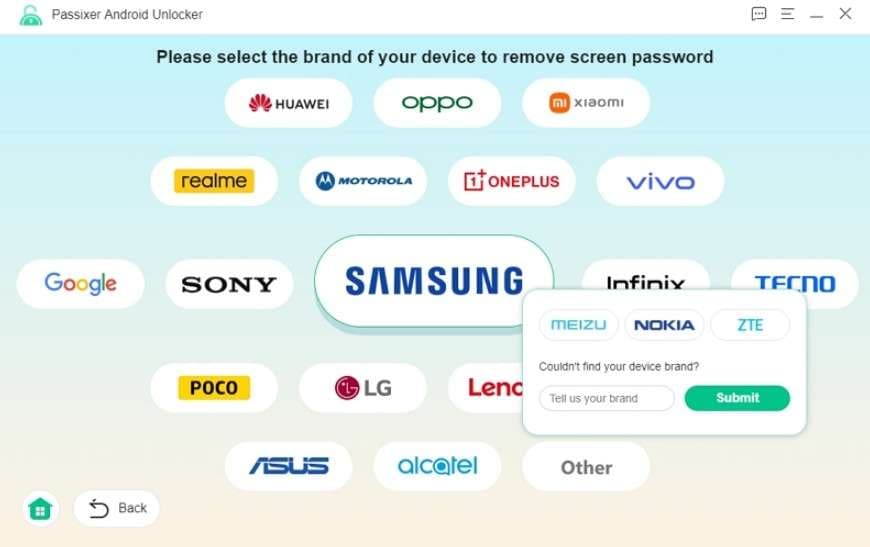
Step 1 Tap the “Remove Screen Password” option
During registration, select the Android brand.
-
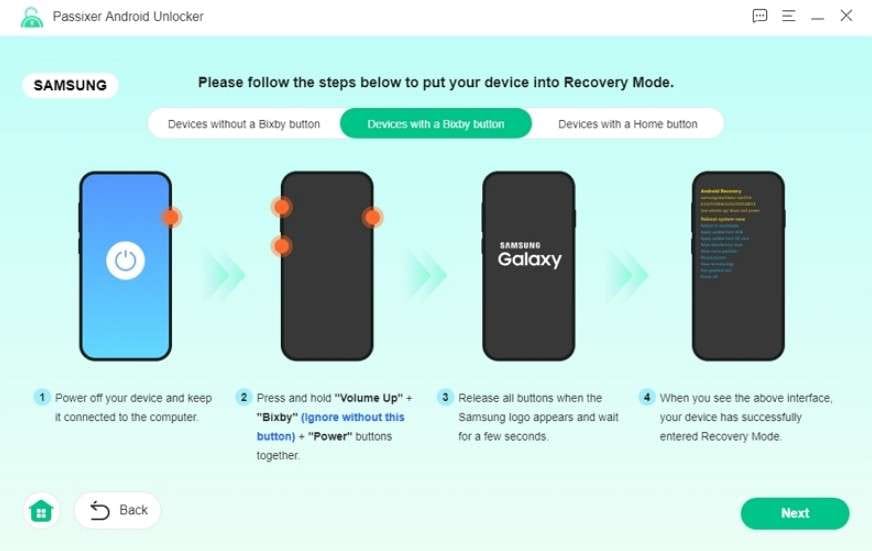
Step 2 Click the “Remove Now” button
After that, follow the instructions to access Recovery Mode.
-
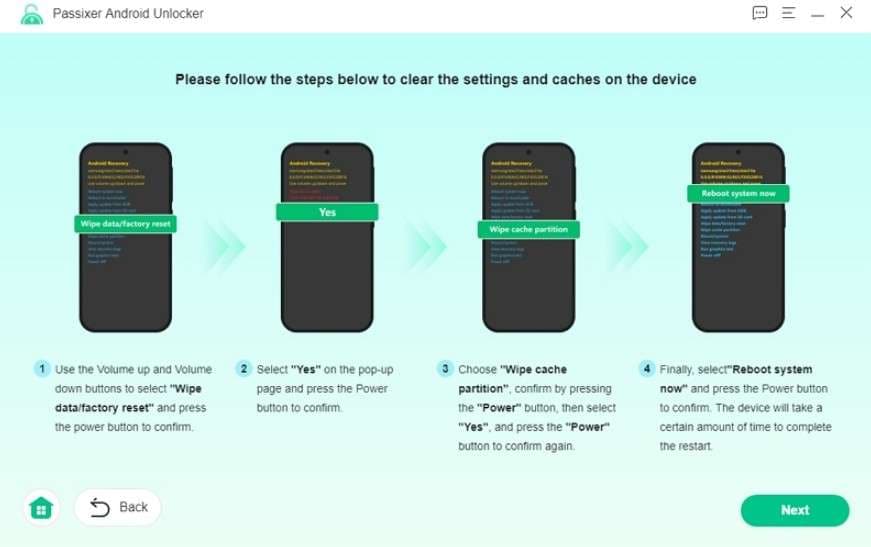
Step 3 Clear the phone's settings and cache
Use the given details, then choose the “Next” button.
-
Step 4 Press the “Confirm” button
After the cache is removed, the tool will begin the unlocking process. Once done, select “Ok” on the successfully removed interface and set up your Android phone again.
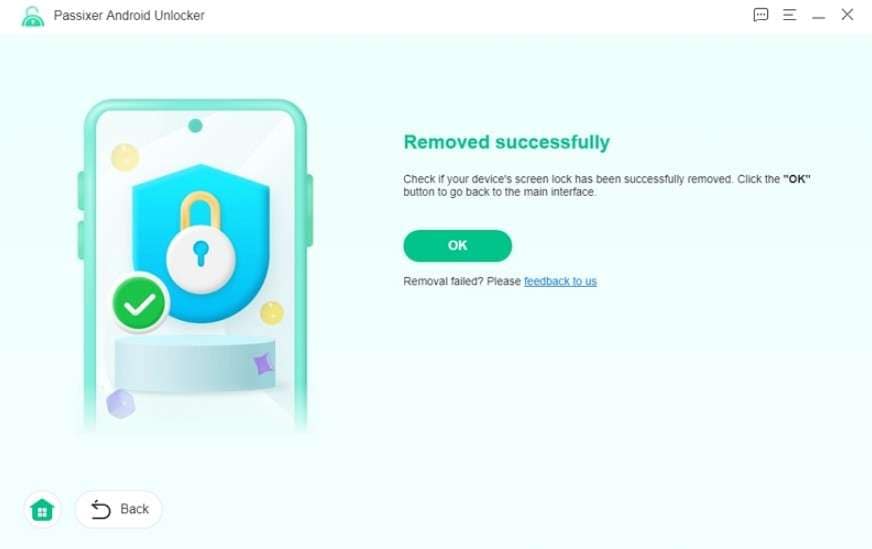
- Average Screen Unlock Time: More than 10 minutes
- Success Rate in Our Tests: Failed multiple times
Part 4. How Dr.Fone Android Unlock Tool Works: Easy Setup Explained
To test the Screen Unlock capability of Dr.Fone Android Unlock on most Android brands, adhere to the mentioned guide:
-
Step 1 Locate the Screen Unlock Tool on Dr.Fone Toolbox
Tap the “Unlock Android Screen” option in the Screen Unlock Android tool, then choose the brand.

-
Step 2 Unlock the Android Within 5 Minutes and Press Done
By doing so, the tool will automatically enter special mode and bypass the lock, so select “Done” when it concludes within 5 minutes.
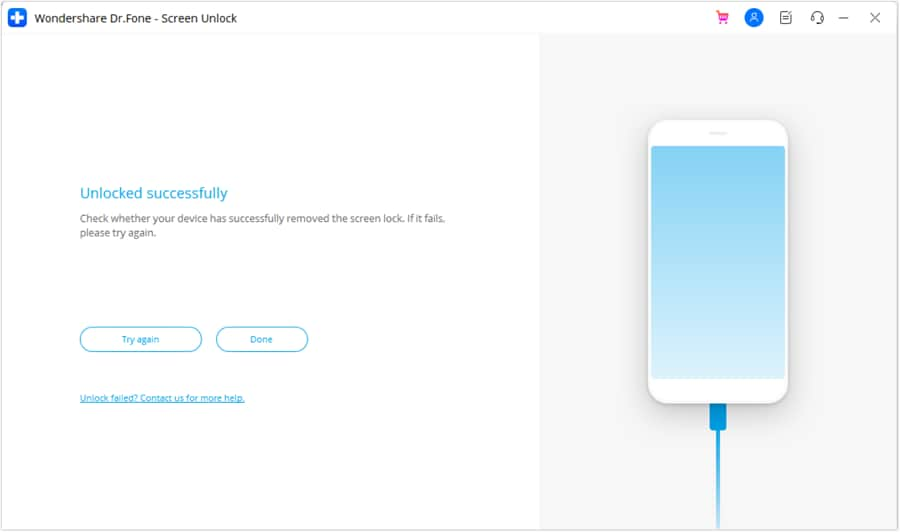
- Average Screen Unlock Time: 5 Minutes
- Success Rate in Our Tests: 100%

Part 5. Passixer vs Dr.Fone: Device, Lock Type, and Version Coverage Compared
Between Dr.Fone Android Unlock, let’s say you want a quick answer. In this case, go through the table given below and see which option excels:
| Metric / Factor | Passixer Android Unlocker | Dr.Fone Android Unlock (Screen Unlock) |
|---|---|---|
| Supported Platforms (PC) | Windows | Windows & macOS |
| Device Brands Covered | 15+ Major Android brands (Samsung, Xiaomi/Redmi, OPPO, Vivo, Realme, Motorola, etc.) | 29, very wide Android brand list + tight Samsung/LG integration and broader cross‑brand support |
| Android Version Coverage | Android 6.0 and above (Android 15 Included) | Broad Android range, heavily marketed support for the latest Android builds. Android 16 FRP bypass is supported, but support for Samsung Android 12 is expected soon. |
| Screen Lock Types Supported | PIN, pattern, password, fingerprint, face unlock | PIN, pattern, password, fingerprint, face unlock |
| Google FRP / Account Lock | FRP bypass for many popular Android brands | 12 brands FRP bypass with brand‑specific flows, strong marketing focus on FRP unlock |
| Other Lock Types (SIM, MDM, etc.) | Mainly screen lock + FRP | Screen lock, FRP, some SIM‑lock, and MDM/profile restrictions on supported models |
| “No Data Loss” Unlock Modes | Available for some older Samsung models only | Available for selected Samsung/LG models, more prominently documented and marketed |
| Ease Of Use (Ui & Guidance) | Clean wizard; simple but more “utility” style | Highly guided UI, many visual prompts, official tutorials, and videos for beginners |
| Learning Resources | Basic guides and blog tutorials | Extensive official guides, in‑app tips, videos, and third‑party tutorials |
| License Types | Short‑term or yearly licenses focused on Android unlock | Monthly/yearly and bundle licenses (Android unlock + other Dr.Fone modules) |
| Device Coverage | 6 devices, 1 PC | Available for 1-5 mobile devices with 2 PCs |
| Best-Suited User Type | Users who want a focused, budget‑friendly Android unlock utility | Beginners, families, and repair shops want a trusted, all‑in‑one Android unlock and repair suite |
Part 6. Final Verdict: Which Android Unlock Tool Should You Choose?
Based on our evaluation, we think that Dr.Fone Android Unlock is the best-suited option, as it's not just an unlock tool but a toolkit. Despite that, it offers more major brands and supports Android versions better than Passixer. Additionally, the tool supports unlocking screen locks on major Android brands, making it a hassle-free, beginner-friendly choice.
With frequent updates to new Android versions and models, users can get updated solutions for 1-5 devices and 2 PCs. Passixer is only suitable when you know how to manually access Recovery Mode, USB debugging, or clear caches, with minimal setup needed.
Conclusion
To sum up, when searching for an Android unlock tool, Passixer and Dr.Fone - Screen Unlock (Android) appear among many other options. Therefore, this guide has explored both tools in detail to help you decide which one pairs well with the pricing they claim.
Between the two options, we think Dr.Fone is the ideal choice. This is because brand support is massive, FRP and screen bypass are way more seamless than Passixer, and it can be accessed on Windows and Mac.
Frequently Asked Questions
-
1. Is it safe to use Android unlocking tools like Passixer or Dr.Fone?
These tools are generally safe when used correctly, but misuse can cause system errors or data loss. So, always follow official steps carefully and choose trusted software to reduce the risk of device damage or security problems. -
2. What’s the difference between screen lock removal and FRP bypass?
Screen lock removal clears the PIN, pattern, or password on your phone to enable normal access. However, FRP bypass removes Google account protection after reset, so the device can work normally again. -
3. Can I unlock my Android phone without losing data?
Sometimes Dr.Fone keeps data safe with the “Remove Without Data Loss” option, but results depend on device type and unlock method used. However, FRP or deep lock often forces a reset, so full data loss may still occur in many cases.
 Add Wondershare Dr.Fone as a preferred source on Google