Bypass iCloud Activation Lock and Android FRP without password.

 100% Security Verified | No Subscription Required | No Malware

 :
: 
 ChatGPT
 Perplexity
 Gemini
 Claude
 Grok
Grok
Are you searching for a reliable method to bypass the iCloud Activation Lock on your iPhone or iPad? This common issue arises if you've forgotten your Apple ID password or purchased a second-hand device that is still linked to the previous owner's account, rendering it unusable.
While many online tools claim to offer a solution, not all are effective, and some can even be scams. In this comprehensive review, we will closely examine the CheckM8 iCloud bypass tool. We'll analyze its features, effectiveness, and potential risks to provide you with all the necessary checkm8 info. We'll also present a powerful alternative if CheckM8 isn't the right fit for you.
In this article
Part 1. What Is CheckM8 and How Does It Work?
CheckM8 is a software tool developed to bypass the iCloud Activation Lock on various Apple devices, including iPhones and iPads. It's designed for situations where users are locked out of their devices due to a forgotten password or when they've acquired a used device with an active lock. The tool operates by exploiting a permanent, unpatchable bootrom vulnerability found in the hardware of millions of Apple devices (from iPhone 4S to iPhone X).
This exploit is the foundation for the checkm8 jailbreak process, which is a necessary step for the tool to function. By jailbreaking the device, CheckM8 gains deep system access to remove the Activation Lock. This process is complex and can be technically demanding for average users. It's important to understand that jailbreaking can void your device's warranty and expose it to potential security vulnerabilities, so using a checkm8 crack or similar tool requires careful consideration.
Key Features of the CheckM8 Tool
The CheckM8 iCloud bypass software offers a range of functionalities for Apple device users. Here are its primary features:
- iCloud Activation Lock Bypass: Its main function is to remove the iCloud lock on supported iPhone and iPad models.
- MDM Lock Removal: It can bypass Mobile Device Management (MDM) profiles, which are common on corporate or school-owned devices.
- Passcode Unlocking: The tool can address issues with forgotten screen passcodes, PINs, or Face ID locks.
- Carrier Lock Removal: CheckM8 also claims to unlock iPhones from specific carrier restrictions, allowing you to use any SIM card.
- Device Status Checks: It includes features to check the 'Find My' status, IMEI details, and iCloud lock status online before proceeding.
- macOS Support: The tool can also bypass macOS Activation Lock and remove EFI (Extensible Firmware Interface) security passwords on compatible Mac computers.
A Step-by-Step Guide to Using the CheckM8 Tool
If you've decided to proceed with the CheckM8 software, it's crucial to follow the instructions carefully. The process requires a Mac computer and a USB cable to connect your iOS device.
-
Step 1 Download and Launch the Software
First, visit the official CheckM8 info website to download the iCloud bypass tool onto your Mac computer. Once downloaded, install and run the application.

-
Step 2 Connect Your iOS Device
Use a certified USB cable to connect your locked iPhone or iPad to your Mac. The software should automatically detect your device.
-
Step 3 Jailbreak Your Device
The tool will check if your device has been jailbroken. If not, it will provide on-screen instructions to guide you through the jailbreaking process. This is a mandatory step for the bypass to work. Follow the prompts carefully to complete the jailbreak.

-
Step 4 Start the Bypass Process
Once the jailbreak is successful, return to the main interface and click the "Start" button to begin the iCloud Activation Lock bypass process.

-
Step 5 Place Your Order
The software will then prompt you to purchase a license to complete the unlock. Click on the "Order iCloud Bypass" option. After you have successfully made the payment, the tool will proceed with the final steps to unlock your device.

An Honest Look at the Pros and Cons of CheckM8
Before committing to the CheckM8 crack tool, it's essential to weigh its advantages against its significant drawbacks. This will help you determine if it's the right solution for your situation.
- Supports a wide range of iOS devices and versions.
- Compatible with both Wi-Fi and cellular (GSM) models.
- The user interface is relatively straightforward for a technical tool.
- Provides an integrated tool to facilitate the jailbreak process.
- Mandatory jailbreaking voids the device warranty and poses security risks.
- It is only compatible with macOS, excluding Windows users.
- The bypass is not permanent; a device reboot may relock it.
- There are reports of device malfunctions (e.g., non-working buttons) after use.
- The service is quite expensive, and success is not always guaranteed.
Part 4. The Best Alternative to CheckM8 for Safe Unlocking
If the risks and limitations of the CheckM8 tool, such as mandatory jailbreaking and Mac-only compatibility, are concerning, there is a more reliable and safer alternative available. Dr.Fone offers a powerful suite of tools, and its Screen Unlock function is specifically designed for these situations.
Dr.Fone - Screen Unlock (iOS) provides a hassle-free method to remove various locks, including the iCloud Activation Lock, without requiring you to jailbreak your device. This is a significant advantage as it preserves your device's warranty and protects it from security vulnerabilities. The software is designed for users of all skill levels, with a simple, click-through process that makes unlocking accessible to everyone.
 Unlock iPhone/iPad passcode in minutes.
- Remove Face ID, Touch ID, MDM lock, and screen lock.
- Bypass iCloud Activation Lock easily.
- Support all iOS versions and devices.
- Simple steps, no technical skills needed.

How to Use Dr.Fone to Remove iCloud Activation Lock
Follow these straightforward steps to bypass the iCloud Activation Lock on supported iOS devices (iOS 15.0 to 16.3) using Dr.Fone.
-
Step 1 Launch Dr.Fone and Select Screen Unlock
Download and install Dr.Fone on your computer (Windows or Mac). Open the program and from the main dashboard, go to Toolbox > Screen Unlock and select the iOS option.

-
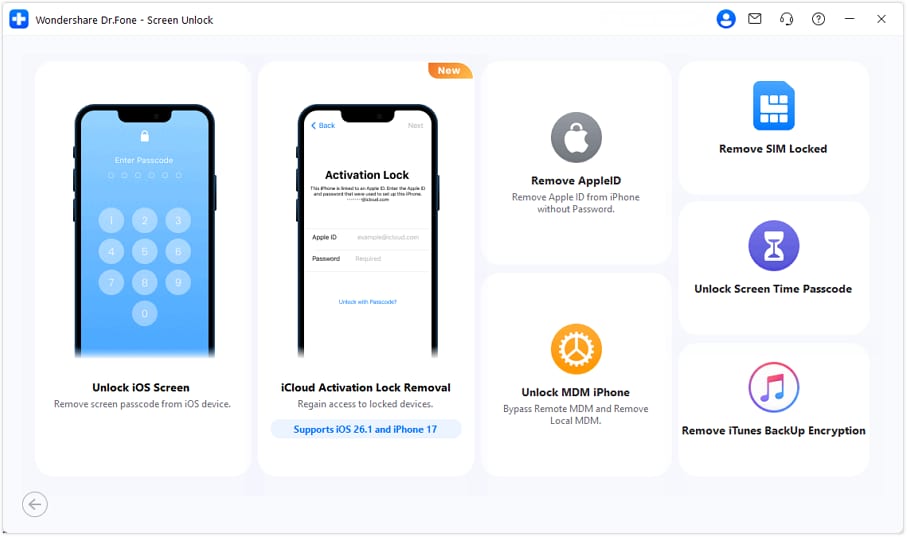
Step 2 Choose the iCloud Activation Lock Removal
On the next screen, you will see several unlocking options. Choose "iCloud Activation Lock Removal" to proceed.
-
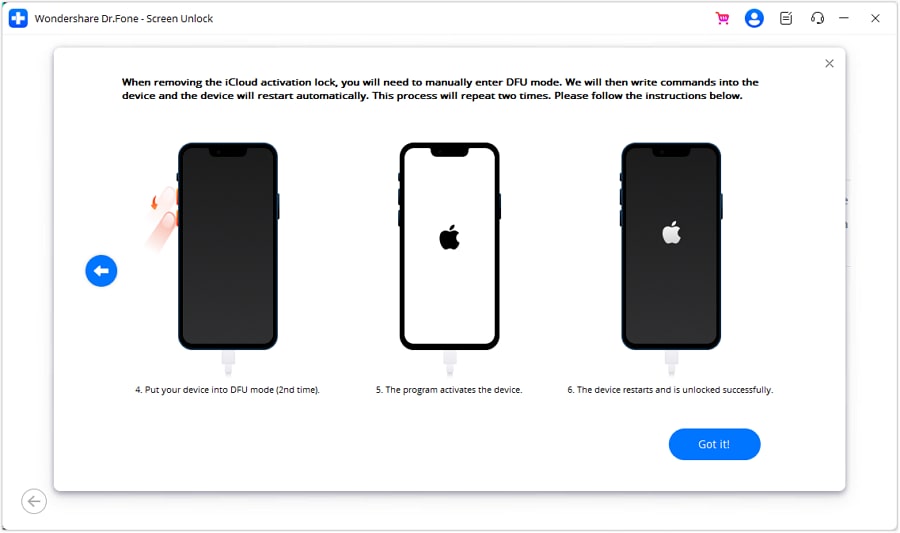
Step 3 Enter DFU Mode
Click "Unlock Now" and carefully follow the on-screen instructions to put your connected iPhone or iPad into Device Firmware Update (DFU) mode. You will need to do this twice to ensure the process works correctly.
-
Step 4 Complete the Removal Process
Once your device is successfully in DFU mode, Dr.Fone will automatically begin removing the iCloud Activation Lock. The process is quick, and a confirmation message will appear on the screen once it is complete.
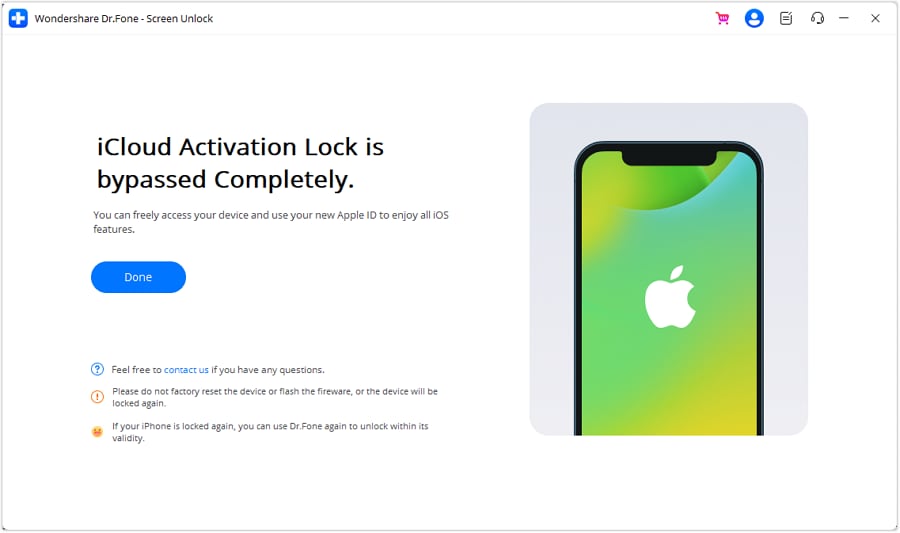
If you're dealing specifically with an iCloud activation lock, also consider Dr.Fone - iCloud Activation Unlocker. This specialized tool is designed to remove the lock so you can set up your own Apple ID and regain full control of your device.




Conclusion
Navigating the world of iOS unlocking tools can be challenging, and while the CheckM8 iCloud bypass tool presents a potential solution, it is not without significant drawbacks. The mandatory jailbreak process introduces security risks and voids your warranty, and its Mac-only limitation makes it inaccessible to many. Furthermore, the bypass may not be permanent, adding to the inconvenience.
For users seeking a more secure, reliable, and user-friendly alternative, Dr.Fone - Screen Unlock (iOS) is the superior choice. It effectively removes the iCloud Activation Lock without the need for jailbreaking, works on both Windows and Mac, and simplifies the entire process. By choosing the right tool, you can regain access to your device safely and efficiently.
FAQ
-
1. Is using the CheckM8 iCloud bypass tool safe?
Using CheckM8 involves jailbreaking your device, which inherently disables Apple's security features. This can make your device more vulnerable to malware and security breaches. Additionally, the process can be complex and may lead to device issues if not performed correctly. Tools that do not require jailbreaking, like Dr.Fone, are generally considered a safer option. -
2. Will I lose my data when bypassing the iCloud Activation Lock?
Yes, bypassing the iCloud Activation Lock with tools like CheckM8 or Dr.Fone will erase all data on the device. This is a necessary part of the process to remove the link to the previous Apple ID. It is not possible to preserve the data, so you should consider the device as being reset to factory settings. -
3. Is the bypass from CheckM8 or Palera1n permanent?
The bypass achieved through jailbreak-based methods like CheckM8 or a Palera1n iCloud bypass is typically semi-tethered. This means if you restart or fully power down your device, the iCloud lock may reappear, and you would need to run the bypass tool again. This is a major inconvenience compared to more permanent solutions. -
4. What are the key differences between CheckM8 and Dr.Fone?
The primary difference is the method. CheckM8 relies on a hardware exploit that requires a mandatory checkm8 jailbreak. In contrast, Dr.Fone - Screen Unlock (iOS) uses a different software-based approach that does not require jailbreaking, making it safer and easier for the user. Other key differences include:• Platform: CheckM8 is Mac-only, while Dr.Fone supports both Windows and Mac.• Complexity: The jailbreaking process with CheckM8 can be technically challenging, whereas Dr.Fone offers a simple, guided click-through interface.• Security: By avoiding jailbreaking, Dr.Fone maintains the device's original security integrity and warranty.
 Add Wondershare Dr.Fone as a preferred source on Google