Bypass iCloud Activation Lock and Android FRP without password.

 100% Security Verified | No Subscription Required | No Malware

 :
: 
 ChatGPT
 Perplexity
 Gemini
 Claude
 Grok
Grok
Erased your iPhone without signing out of your Apple ID? Now your device is stuck at the Activation Lock screen.
Until you sign in with the correct credentials, the device is locked completely. But what if you forgot your account details? You might stay locked out forever.
FRPFile iCloud Bypass Tool V2 claims to help you regain access. So you can use your device again. In this guide, I will review the tool in detail. You'll learn about its features, pros and cons, and how to download and use it.
In this article
- Part 1. What is the FRPFile iCloud Bypass?
- Part 2. Key Features of FRPFile iCloud Bypass
- Part 3. How to Download and Use FRPFile iCloud Bypass?
- Part 4. Common Issues with the FRPFile iCloud Bypass Tool and How to Fix
- Part 5. Pros and Cons of FRPFile iCloud Bypass
- Part 6. The Best Alternative to Bypass iCloud Activation Lock: Dr.Fone - Screen Unlock (iOS)
Part 1. What is the FRPFile iCloud Bypass?
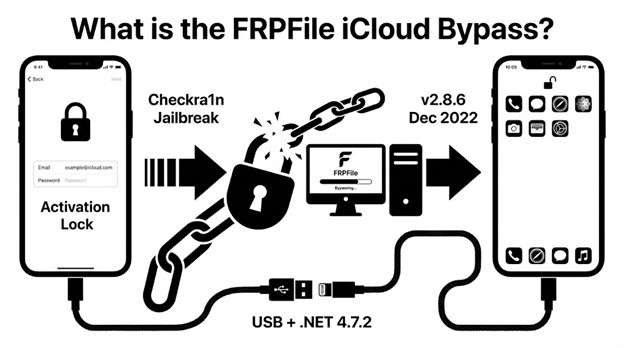
FRPFile All In One (AIO) iCloud bypass tool is a Windows-based program that allows you to remove iCloud activation lock from iOS devices. It is a free FRP File tool that can bypass iCloud lock with Checkra1n jailbreak. It supports a wide range of iPhone and iPad devices.
To bypass activation lock, the tool supports both tethered and untethered methods. In a tethered bypass, you must reconnect the device to the computer and repeat the process each time it restarts. You don’t need to reconnect in untethered bypass. The latest version of the tool is v2.8.6, which was released in December 2022. There are no latest updates available. This version requires NET Framework 4.7.2 and connects via USB cable.
Part 2. Key Features of FRPFile iCloud Bypass
FRPFile AIO v2 8.5 and 8.6 offer various useful features to help you bypass iCloud lock quickly. Let’s look at its key capabilities in detail.
2.1 Easy Activation Lock Bypass
The tool requires jailbreaking the device using checkra1n. After that, it offers a one-click method to remove the activation lock. The process is complete on its own. You don’t have to go through technical steps.
2.2 Broad Device Compatibility
This FRP File tool supports many older versions of the iPhone software and models. Here are the devices it is compatible with:
- iOS versions 12.0 through 14.8
- upto iOS 15.7.1 on select iPad Pro models
- 1st and 2nd generation iPad Air
- iPhone 5S up to iPhone X
- iPad mini 2 to 4 and iPad 5 to 7
Looking to bypass activation lock on iOS 15? Find the best tool in our roundup of the top 6 tools for iOS 15 iCloud bypass.
2.3 Passcode Bypass Capability
You can bypass activation lock on disabled iPhones. It can also remove screen lock passcodes on supported devices. You don’t need to know the original passcode or your Apple ID.
2.4 Free to Use
The FRPFile iCloud bypass tool V2 is available at no cost. This makes it more available to those on a tight budget. The free version does have limitations. There’s no cellular signal and no notification functionality.
2.5 Multiple Bypass Methods
The tool offers different bypass options, such as the hello screen bypass and passcode bypass. It can also erase all content while maintaining the bypass. So, you have flexible options for various lock scenarios and your needs.
Another way to remove iCloud lock involves a DNS bypass. Learn full details in our iCloud DNS Bypass guide.
Part 3. How to Download and Use FRPFile iCloud Bypass?
The FRPFile AIO v2 download is available directly on the FRPFile website. Let’s go through the steps to get the package file and use the tool to remove the activation lock.
-
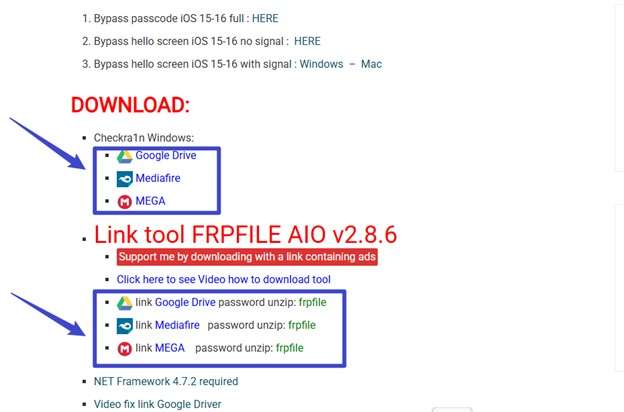
Step 1 Go to the FRPFile All In One iCloud Bypass page on the official website. Scroll to the “Download” section to get Checkra1n and download the FRP File AIO tool.
-
Step 2 Follow the outlined instructions on the screen to generate the download link. Then download the ZIP file on your device and extract it. Enter the password “frpfile” to unzip.
-
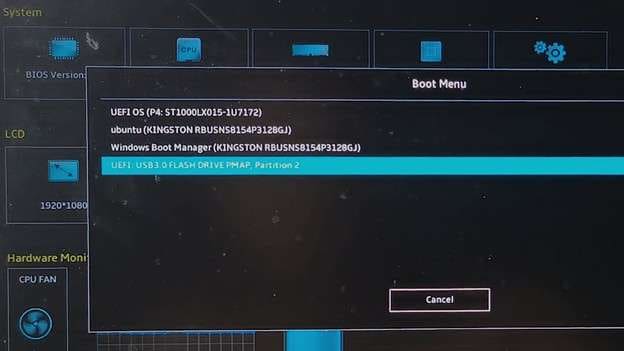
Step 3 Connect a bootable Checkra1n USB drive. Then, restart your computer and quickly press the “F2” key to enter the UEFI BIOS. Then press “F7” to enter the EZ Mode. From the Boot menu, select to boot with USB.
-
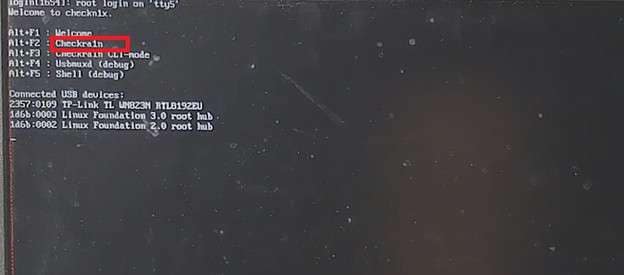
Step 4 Select the “Checkra1n” option. Connect your device and follow the instructions to jailbreak the device.
-
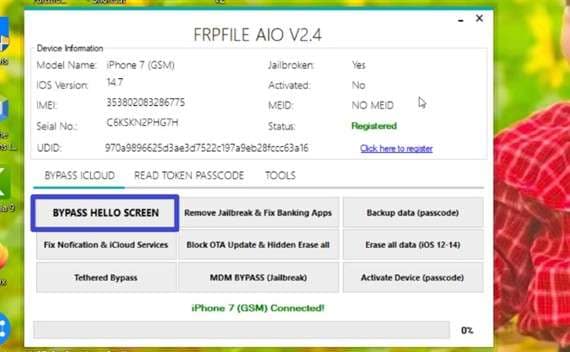
Step 5 Launch the FRP File AIO tool and register the tool using onscreen prompts. Then, select “Bypass Hello Screen” under the Bypass iCloud option.
-
Step 6 Wait for the process to complete. Then, your phone will turn on and launch the Home screen.
-
Step 7 Go to “Settings” and sign in to an Apple ID you remember. Enter the passcode to confirm to successfully bypass the activation lock.
Part 4. Common Issues with the FRPFile iCloud Bypass Tool and How to Fix
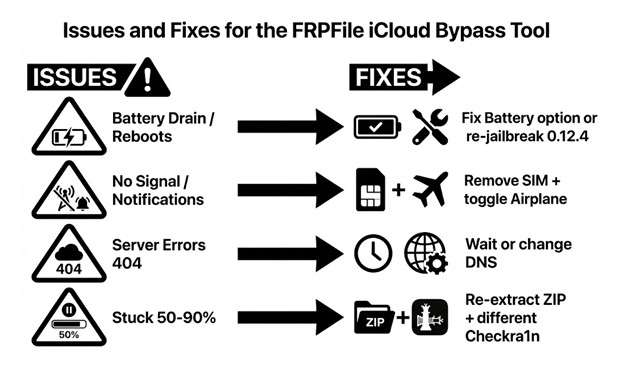
When using the FRPFile All In One iCloud Bypass tool, you may face some performance issues. These will slow down the bypass process or block it altogether. Let’s review these issues and what you can do to resolve them.

Battery Drain or Random Reboots
When operating the device, your battery may drain quickly. Otherwise, the device may return to the Hello or lock screen after bypass. In this case, use the tool’s “Fix Battery Drain” option several times. Alternatively, re‑jailbreak with checkra1n 0.12.4 for better results.
No Signal and Missing Notifications
In free bypass mode, you can access cellular service and iCloud notifications. These are disabled by default. If enabled, remove the SIM card and toggle Airplane Mode several times.
Server Errors
Sometimes, a 404 “server down” or maintenance message will appear. It stops the bypass process. Wait for the developer to restore the server. Try a different internet connection or DNS. Otherwise, use another checkra1n version on a different computer.
Stuck or Frozen Process
The bypass process may freeze between 50 to 90%. Or the program may close unexpectedly. To fix it, extract the ZIP file to your root directory again and re‑jailbreak the device. You can also test different checkra1n versions until the process completes successfully.
Part 5. Pros and Cons of FRPFile iCloud Bypass
- Completely free to download and use for iCloud bypass.
- One-click bypass requires no technical knowledge or command-line experience.
- Multiple bypass modes and scenarios are suitable for specific cases.
- It operates offline and does not require internet or additional tools.
- Also offers MDM bypass and fixes for various iOS problems.
- Requires jailbreaking, which voids the warranty.
- No support for the latest iOS versions.
- Lack of regular updates to address bypass issues.
- Outdated and plain interface design.
While FRPFile is a great free option, explore our roundup of the 7 best iCloud bypass tools to see how it compares with other popular solutions.
Part 6. The Best Alternative to Bypass iCloud Activation Lock: Dr.Fone - Screen Unlock (iOS)
FRPFile iCloud Bypass has several limits. It does not work with the newest iPhone models or recent iOS versions. In addition, it requires you to jailbreak your device. As a result, your phone becomes more exposed to security risks and privacy threats.
Dr.Fone - Screen Unlock (iOS) provides a stronger alternative. It removes iCloud activation lock without requiring a jailbreak. Therefore, the device keeps its original system security and data protection. The software also applies different bypass methods for specific iPhone models and iOS versions. This ensures better compatibility and performance.
That said, it supports all iOS models from the 5S to the iPhone 17 series. This includes the latest iOS 26. Moreover, you can operate the software without any technical help. The process is quick and easy.
 Unlock iPhone/iPad passcode in minutes.
- Remove Face ID, Touch ID, MDM lock, and screen lock.
- Bypass iCloud Activation Lock easily.
- Support all iOS versions and devices.
- Simple steps, no technical skills needed.

Steps to Unlock Activation Lock with Dr.Fone
-
Step 1 Download and launch Dr.Fone on your computer
Download Wondershare Dr.Fone on your desktop and install it. Launch the software and click “Toolbox” from the left. Select “Screen Unlock” and choose “iOS” as your operating system.

-
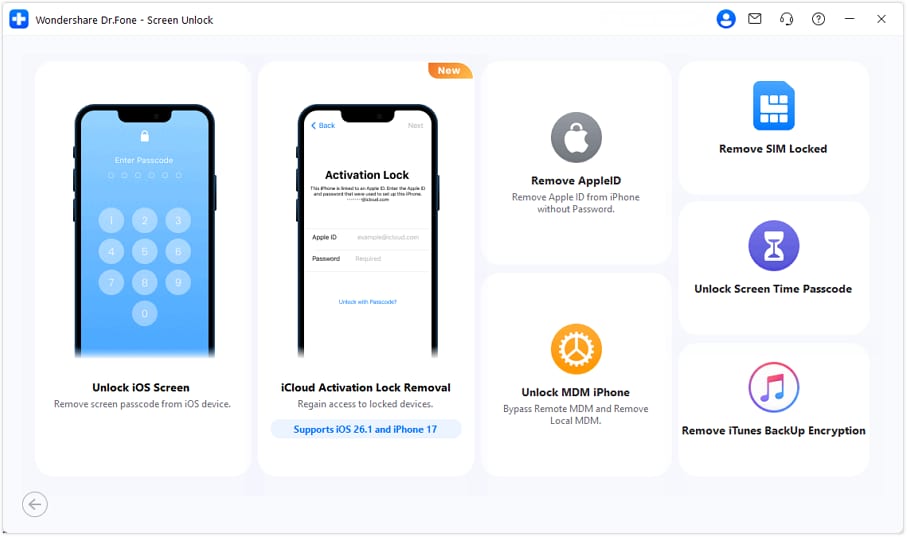
Step 2 Select Screen Unlock and choose iOS
Select the “iCloud Activation Lock Removal” mode from the many options available. Then, click “Start” to continue.
-
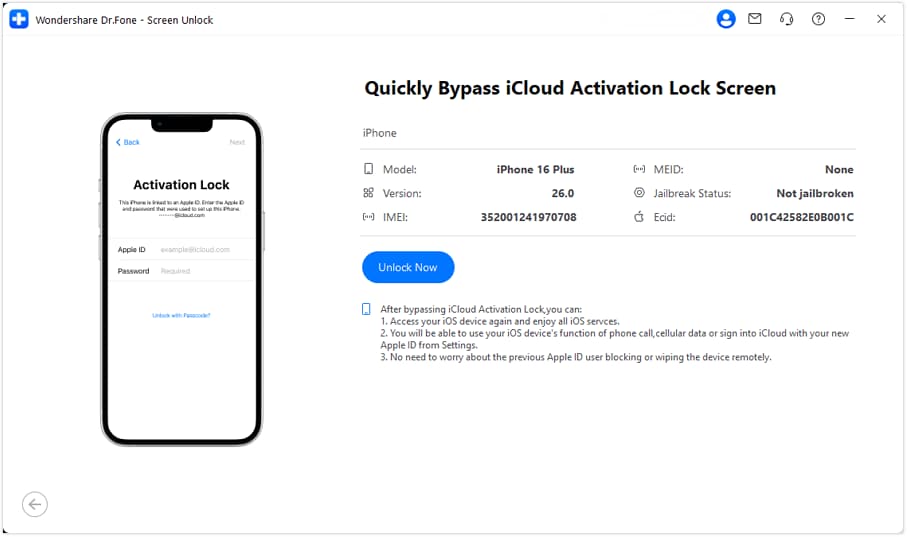
Step 3 Connect your iPhone via USB cable
Link your iOS device to your computer via a USB connection. Let the tool identify your device and show its information. From here, click “Unlock Now.”
-
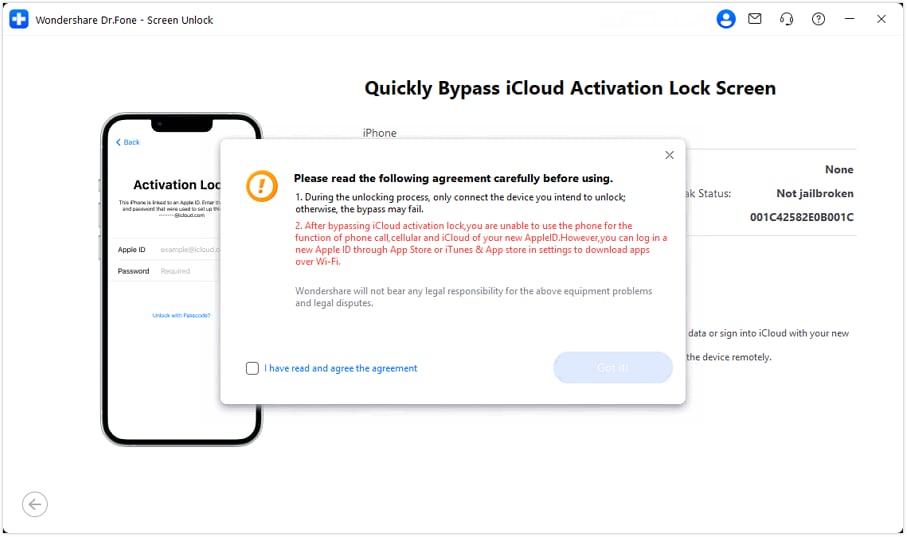
Step 4 Agree to terms and click Got it!
A pop-up message will appear. Read it thoroughly and check the box to accept the agreement terms. Then, click “Got it!”
-
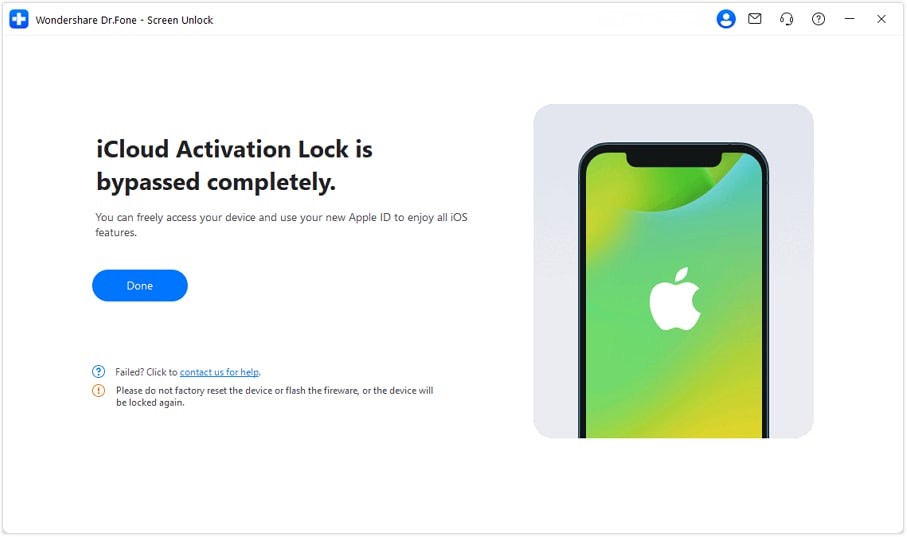
Step 5 Wait for driver download and unlock complete.
Dr.Fone will download the driver for your device. Then, it will start the bypass process. When it completes, you will see a message indicating a successful removal of the activation lock.
Conclusion
In summary, FRPFile iCloud bypass tool V2 provides a free way to remove the Activation Lock. However, you must jailbreak the device before you use it. The tool also supports only a limited number of iPhone and iPad models.
In contrast, Dr.Fone - Screen Unlock (iOS) offers a safer and more dependable option. You can remove the Activation Lock without jailbreaking the device. In addition, the software works with all iPhone and iPad models. It also supports the latest iOS 26.
Download it now to unlock iCloud lock and access your phone without an Apple ID or password.




FAQs About FRPFile iCloud Bypass
-
1. Is FRP File iCloud Bypass Tool Safe to Use?
FRPFile AIO iCloud Bypass tool is generally safe as long as you use it on legally owned devices. However, many users report antivirus alerts when downloading the program from unofficial websites. Also, the program may freeze or crash during the operation. -
2. Is the FRPFile tool entirely free, and are there hidden costs?
Yes. The AIO V2 tool is free to download and use. The basic serial number registration also does not require payment. However, certain advanced features require payment. These features include full signal support and specific device repair functions. You may need to pay credits, donate, or use a premium software to access them. -
3. How does serial number registration work for the free AIO tool?
First, open the registration page at frpfile.com/register-serialno/. Enable JavaScript in your browser. Input your device’s serial number in the relevant text field. Then, submit the form. The system processes the request and activates the tool for that specific device. -
4. What types of bypasses does the FRP File AIO tool support?
FRPFile AIO supports multiple bypass scenarios. These include the hello screen bypass with and without a signal. Plus, it also supports the passcode bypass. These functions are available for iOS 15 and iOS 16. -
5. Is the FRP File Ramdisk tool the same as the FRPFile AIO tool?
No. FRPfile Ramdisk Tool is a different program from the AIO tool. FRP File Ramdisk Tool installs a custom Windows-based ramdisk. This tool removes screen passcodes and activation locks. It does not jailbreak the device. It supports iOS versions 11 to 17. In contrast, FRPFile AIO uses a jailbreak method. It mainly supports iOS versions 12 to 14.8.
 Add Wondershare Dr.Fone as a preferred source on Google