Bypass iCloud Activation Lock and Android FRP without password.

 100% Security Verified | No Subscription Required | No Malware

 :
: 
 ChatGPT
 Perplexity
 Gemini
 Claude
 Grok
Grok
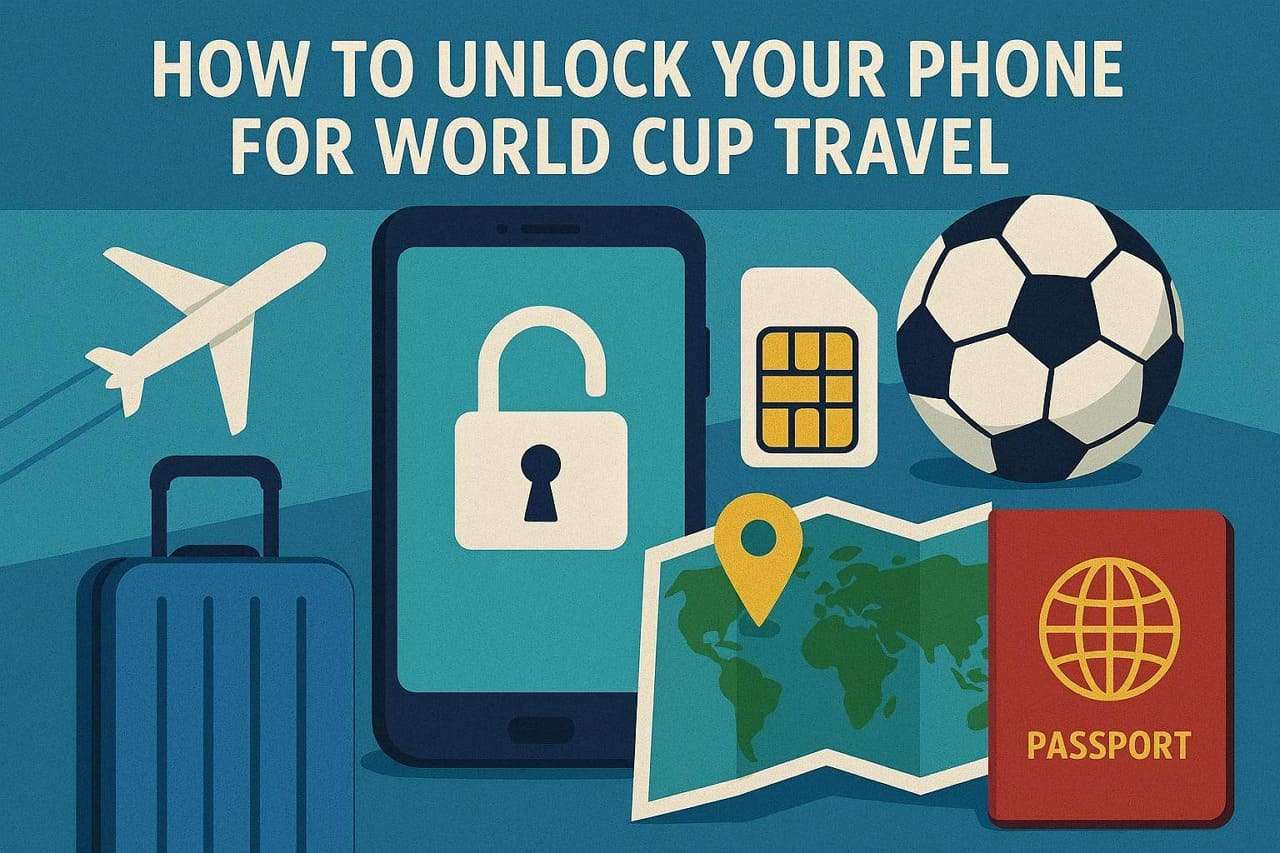
Imagine you landed in one of 16 host cities in the United States, Canada, and Mexico to watch the FIFA World Cup. However, your phone cannot connect to a local network because it is locked to your home carrier. Without mobile data, you cannot check match tickets, schedules, or navigate unfamiliar streets.
In this situation, you might wonder how to unlock your phone for World Cup travel so you can use local SIM cards. Hence, this guide explains why SIM gets locked and how to unlock it using official and online solutions, like Dr.Fone Online Unlock. In worst cases, this guide will also help you bypass screen locks using a versatile solution: Dr.Fone - Screen Unlock (Android).
In this article
- Part 1. What Does Phone Unlocking Mean for Travelers?
- Part 2. How to Check If Your Phone Is Already Unlocked
- Part 3. How to Unlock Your Phone for International Travel?
- Pro Tip. What to Do If You're Locked Out of Your Phone During World Cup Travel
- Part 4. Tips for Smooth Connectivity During World Cup Travel
Part 1. What Does Phone Unlocking Mean for Travelers?
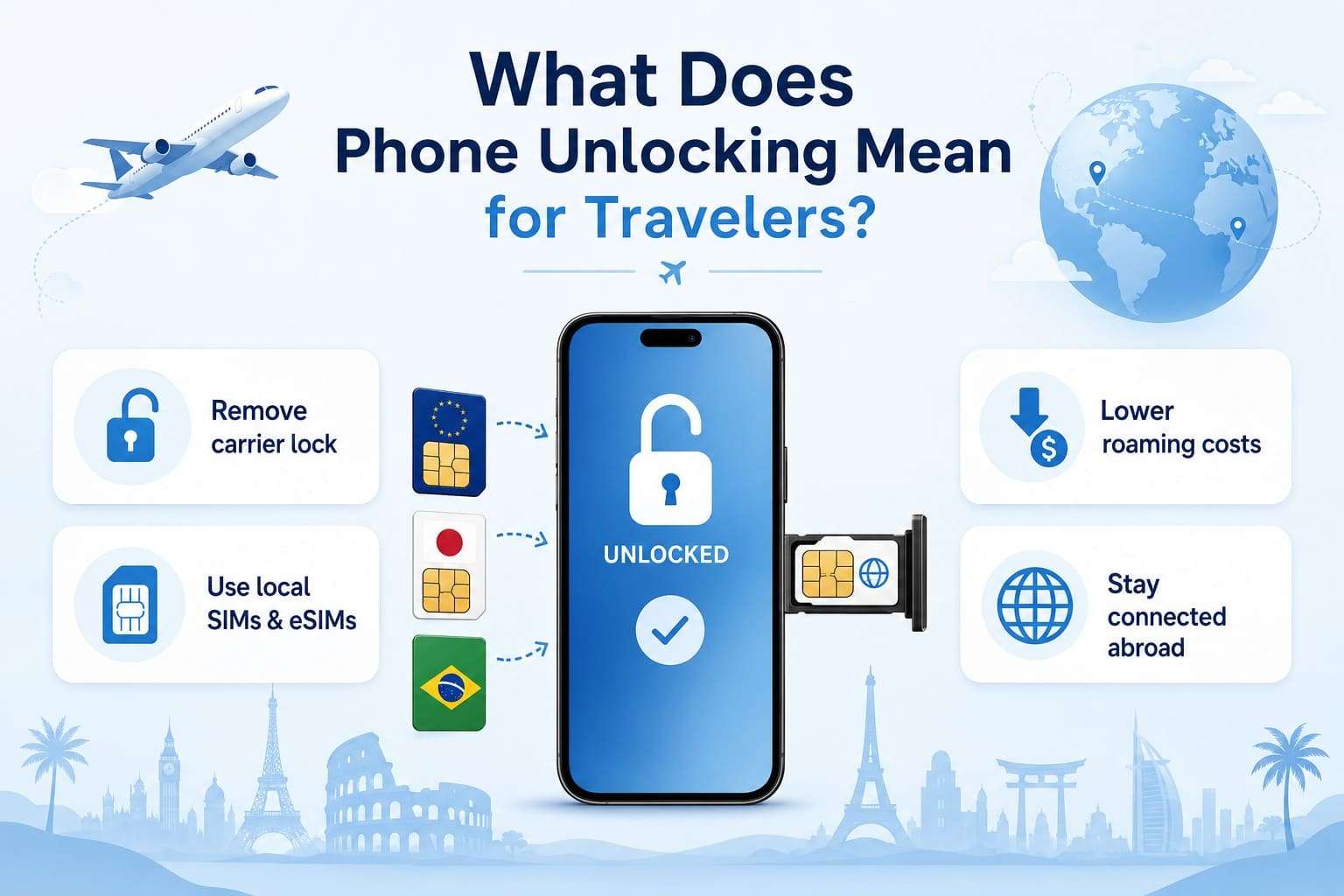
Though you want to avoid roaming charges during the World Cup, it's important to know what “SIM/Phone Unlock” actually means. This means to remove the carrier restrictions that limit your phone to one mobile network. Once the phone is unlocked, you can use local SIM cards and eSIM plans from different carriers. Hence, this gives you affordable mobile data and helps you stay connected by avoiding high international roaming fees.
Difference Between Locked and Unlocked Phones
For clarity, the following table shows the key differences between locked and unlocked phones.
| Feature | Locked Phone | Unlocked Phone |
|---|---|---|
| Carrier Use | Works only with one carrier | Works with multiple carriers |
| Local SIM Cards | Not supported | Supported |
| eSIM Options | Restricted | Can use different eSIM providers |
| International Travel | Higher roaming costs | Easier access to local plans |
| Network Flexibility | Limited | More freedom to switch networks |
| Best for World Cup Travel | Less convenient | More convenient |
How Carrier Locks Affect International Use
According to Info Justice and Law UniMelb reports, a carrier-locked phone works with one original network. Thus, it may not accept local SIM cards or eSIMs when you travel abroad, as mentioned. This prevents travelers from using cheaper local data plans and raises the urge to know how to unlock an iPhone or Android for international travel.
Why It Matters for World Cup Fans (Data, Maps, Tickets, Group Chats)
This matters the most for World Cup fans because they need to stay connected as they travel to the USA, Canada, and Mexico. Public Wi-Fi at stadiums and fan zones can become crowded on match days, which is why it's important to have your own mobile connection.
Part 2. How to Check If Your Phone Is Already Unlocked
So, if you want to use a local SIM during the World Cup trip, follow the mentioned ways to know if the phone is actually locked:
1. Test with a Different SIM Card
This is the quickest method because you just have to swap the SIM card for one from a different network provider. To do so, turn off the phone, insert a SIM from T-Mobile or AT&T, then power it on. If you immediately get a “SIM Not Supported” or “Invalid SIM” alert, the SIM is locked and can’t be used for FIFA World Cup travel.
2. Use Dr.Fone Online Unlock to Get a Detailed IMEI Report
If you don’t have a secondary SIM, you can use Dr.Fone Online Unlock IMEI Checker to get the device details. The tool just needs you to enter the IMEI and select the model from the IMEI Check tab. As you add the details, you can get a device details report that includes the warranty and activation status. Later, you can also save this report to submit as proof when you contact the carrier.

3. Check Phone Settings on Android
Users can also get the lock details from the device settings and later unlock the phone for World Cup travel. Since the direction varies from device to device, here are the standard ways to check the SIM Lock status:
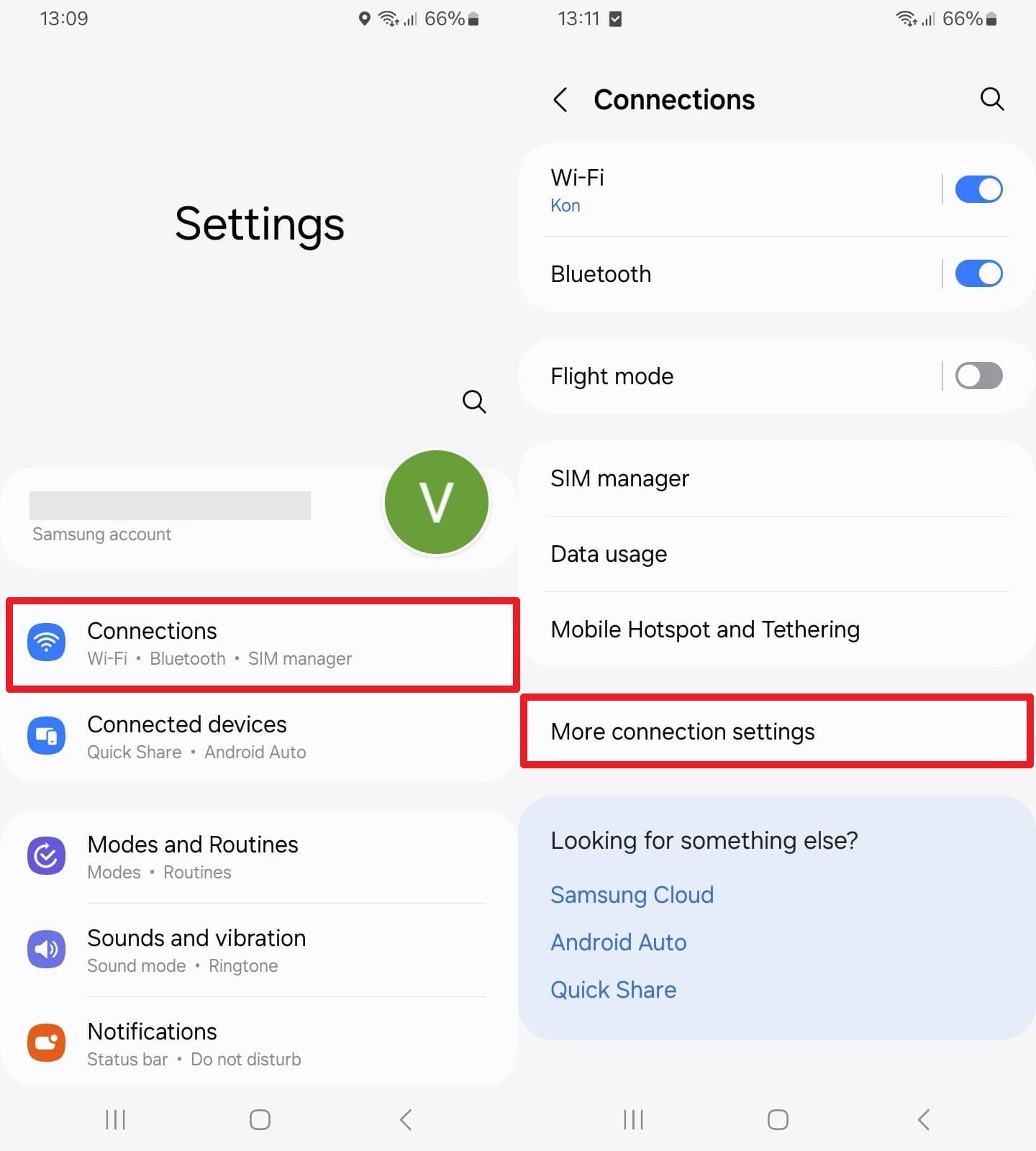
Instructions. Go to “Connection > More Connection Settings” and see the “Network Lock” option. There, check whether the option says “Locked” or “Unlocked,” and decide on the next action based on the status.
4. Check Carrier Status on iPhone
Apple also makes it easy to check the carrier lock status in the phone settings. Since you don’t have to insert the non-carrier SIM, here is how it's done in a few taps:
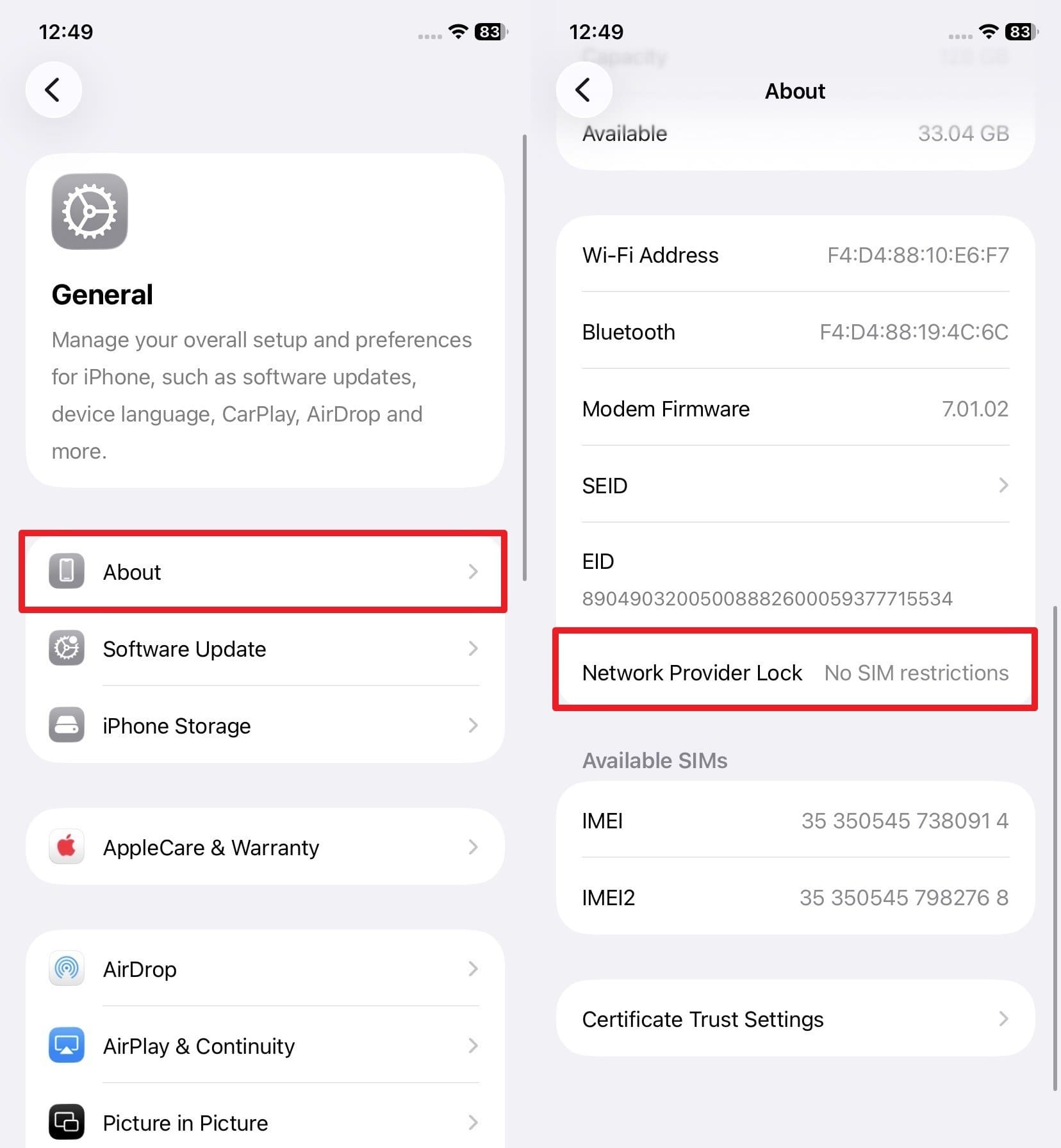
Instructions. Go to the “General > About Phone” settings and locate the “Network Provider Lock” option. If your phone says, “No SIM Restrictions,” it's unlocked and can be used in the FIFA World Cup.
Part 3. How to Unlock Your Phone for International Travel?
For the locked phones, if you want to use a local SIM during World Cup trip, try the mentioned ways:
1. Request Unlock from Your Mobile Carrier
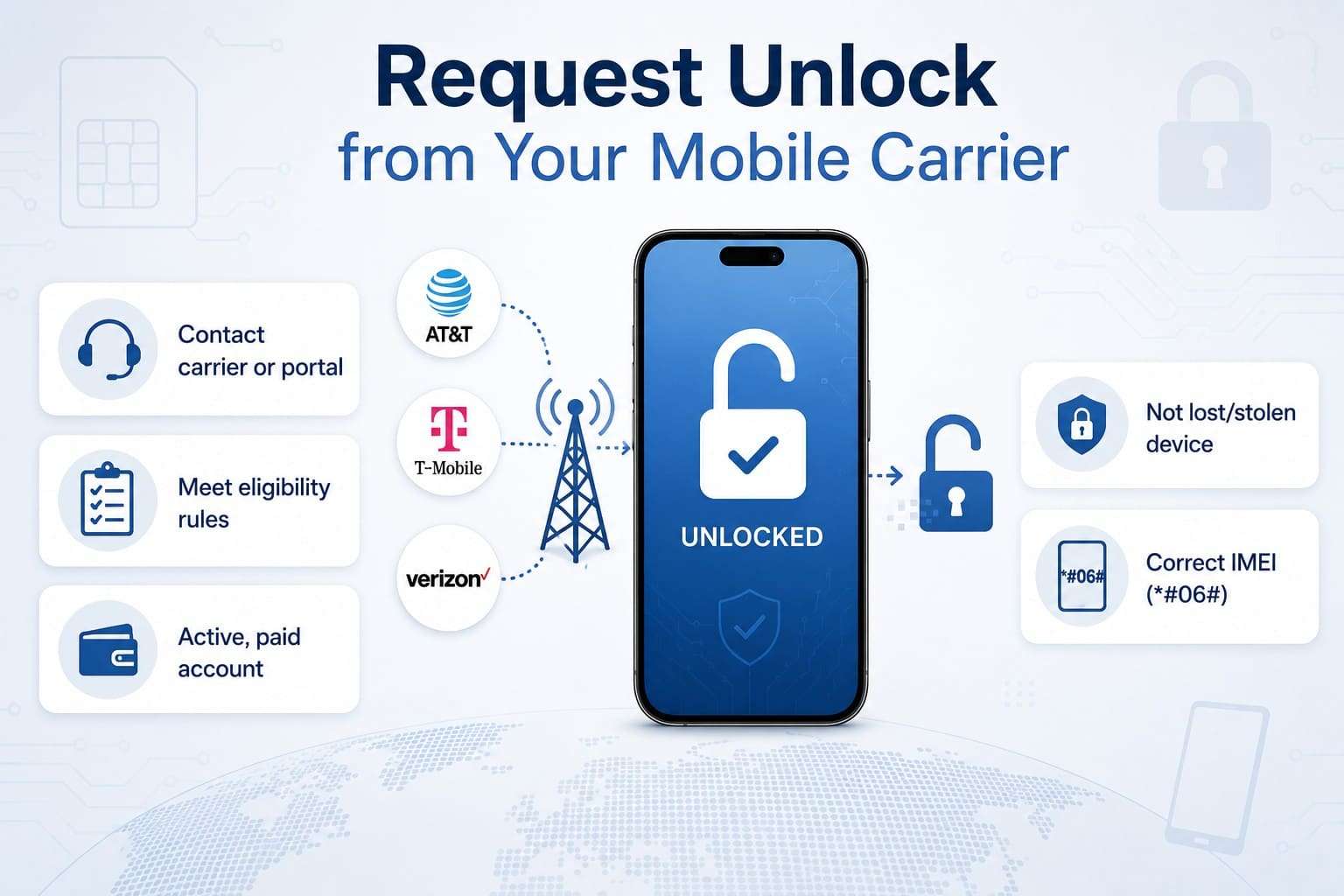
The official method is to contact the carrier or access the online portal and app to unlock the SIM. So, whether you use AT&T, T-Mobile, Verizon, or another carrier, the standard methods are detailed below. Regardless of the carrier you are locked to, ensure you meet the given general and carrier-specific unlock requirements:
General Unlock Requirements:
- Your mobile account must be active and in good standing with no past due charges.
- The phone must not be reported as lost or stolen nor involved in fraudulent activities.
- You must have the correct account holder and IMEI details, which you can access via the *#06# code or in the “About” phone settings.
Carrier-Specific Criteria:
Since the prepaid and postpaid activation policies vary by carrier, here are the details for AT&T, T-Mobile, and Verizon:
| Carrier | Postpaid Requirements | Prepaid Requirements |
|---|---|---|
| AT&T | Active for at least 60 days | At least 6 months of paid service |
| Verizon | Automatically unlocks after 60 days for eligible devices purchased before January 27, 2026. | Some prepaid plans may require up to 365 days of service |
| T-Mobile | Active on the network for at least 40 days | Requires $100 in refills or 365 days of active service |
Way 1. Contact the Carrier
When you can’t check the SIM lock status using the mentioned test or can't find a way to unlock it, this method is recommended. When you contact the representative, just provide the IMEI, and they will let you know whether your device can be unlocked. So, based on your network carrier, here are some key combinations you can try in 2026:
- Verizon: Dial *611 from your device, or call 888-294-6804 or 888-258-0939.
- AT&T: Call 1-800-331-0500 and provide the IMEI details when asked.
- T-Mobile: Contact on 1-800-937-8997 or 1-833-800-0323 for Business accounts.
Way 2. Carrier SIM Unlock - Web Portal
To avoid roaming charges during the World Cup, you can also access the carrier’s web portal and submit the unlock request. This method is best when you have a week or more left before the World Cup, since this can take 2-3 business days. So, take AT&T and iPhone as an example and follow the mentioned steps to know how it works:
-
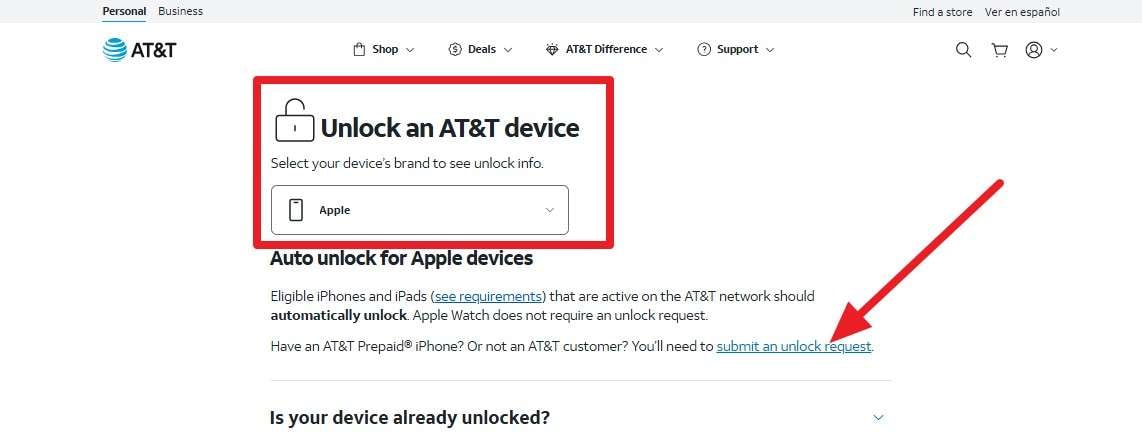
Step 1 Under the “Unlock An AT&T Device,” choose “Apple” on the AT&T Device Unlock site. Review the mentioned details when they appear, then tap “Submit an Unlock Request.”
-
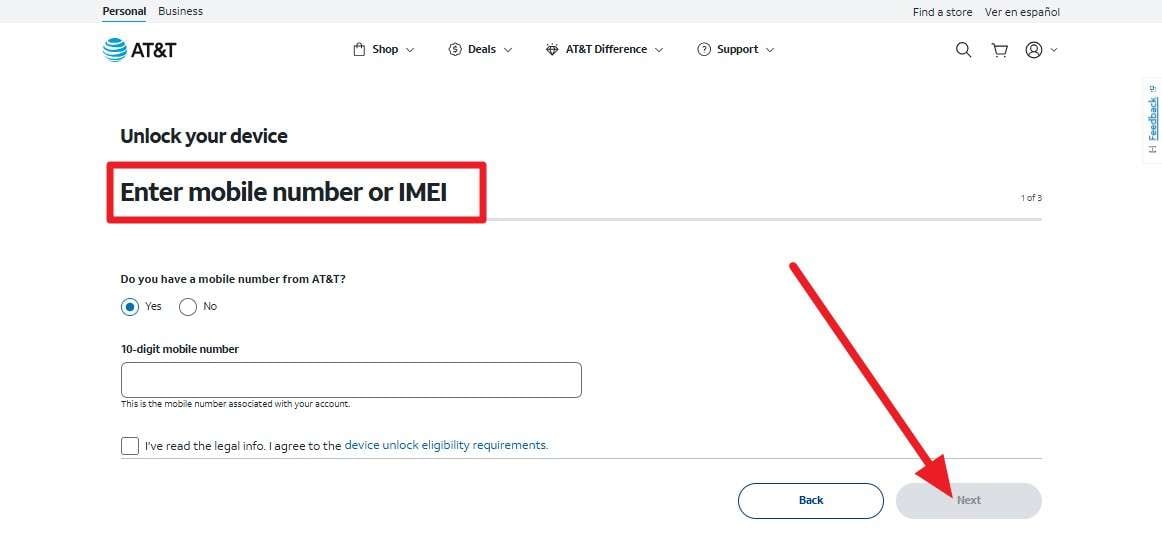
Step 2 Fill in the details in the “Enter Mobile Number or IMEI” section and click the “Next” button. After that, provide the email address, and the carrier will confirm whether the device can be unlocked within 24 hours. After the approval, AT&T will send the signal to Apple to commence the SIM unlock process before the World Cup.
-
Step 3 What To Do After Unlock or Approval
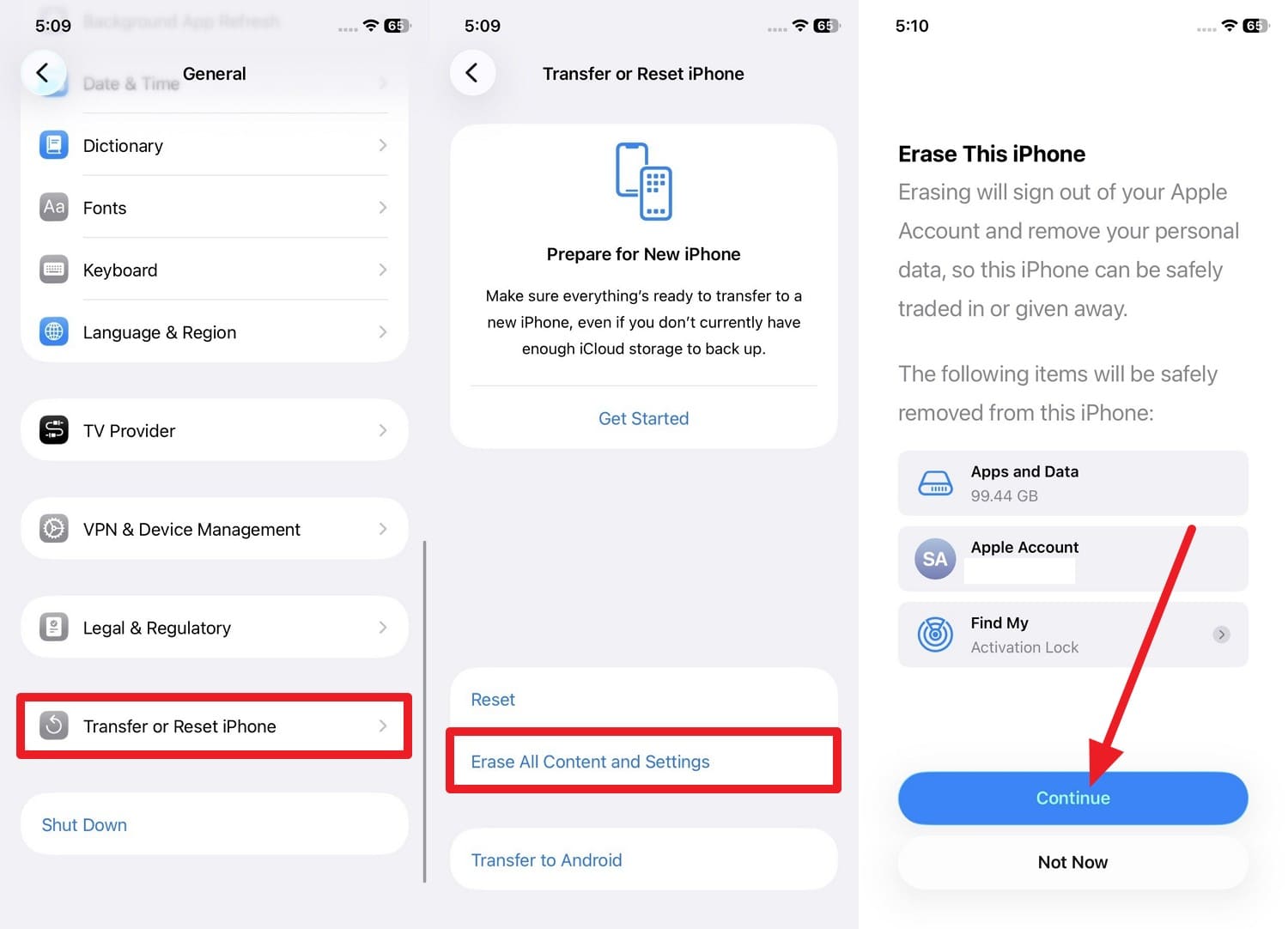
Once the SIM is unlocked, insert a new SIM and check whether it shows “No SIM Restrictions.” If you don’t have the SIM, erase the phone; this will also delete all your data. So, create a phone backup with Dr.Fone - Phone Backup, and follow the steps to erase the iPhone.
When you have an unlocked phone for World Cup travel, go to General > Transfer or Reset iPhone > Erase All Content and Settings > Continue.
Way 3. Device Unlock App
For the T-Mobile, MetroPCS, AT&T, or Cricket, you can use the preinstalled Device Unlock app. This is preferred for Android users, and how they work depends entirely on your carrier and the specific app. If you take Samsung as an example, here are the steps you can perform:
-
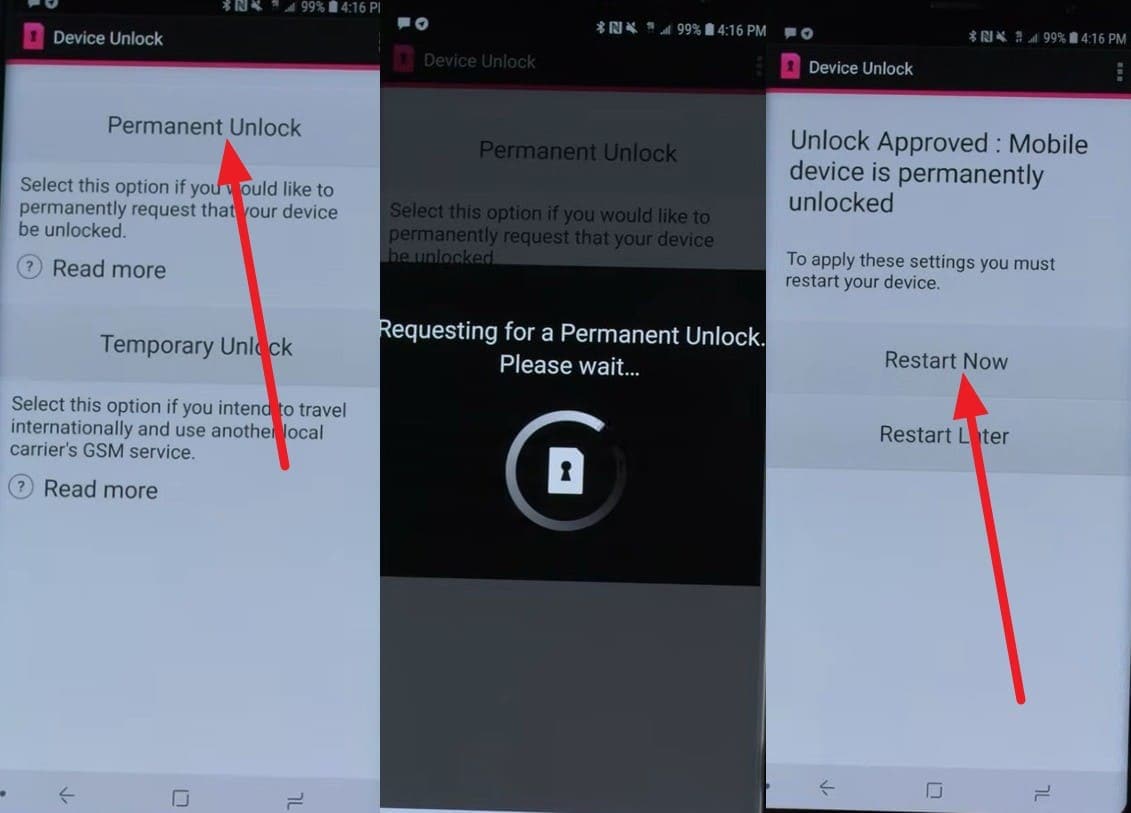
Step 1 Tap “Allow > Permanent Unlock,” and the app will communicate with the carrier when connected to a stable network. If all the conditions are met, the unlock will start, and you can tap the “Restart Now” button.
-
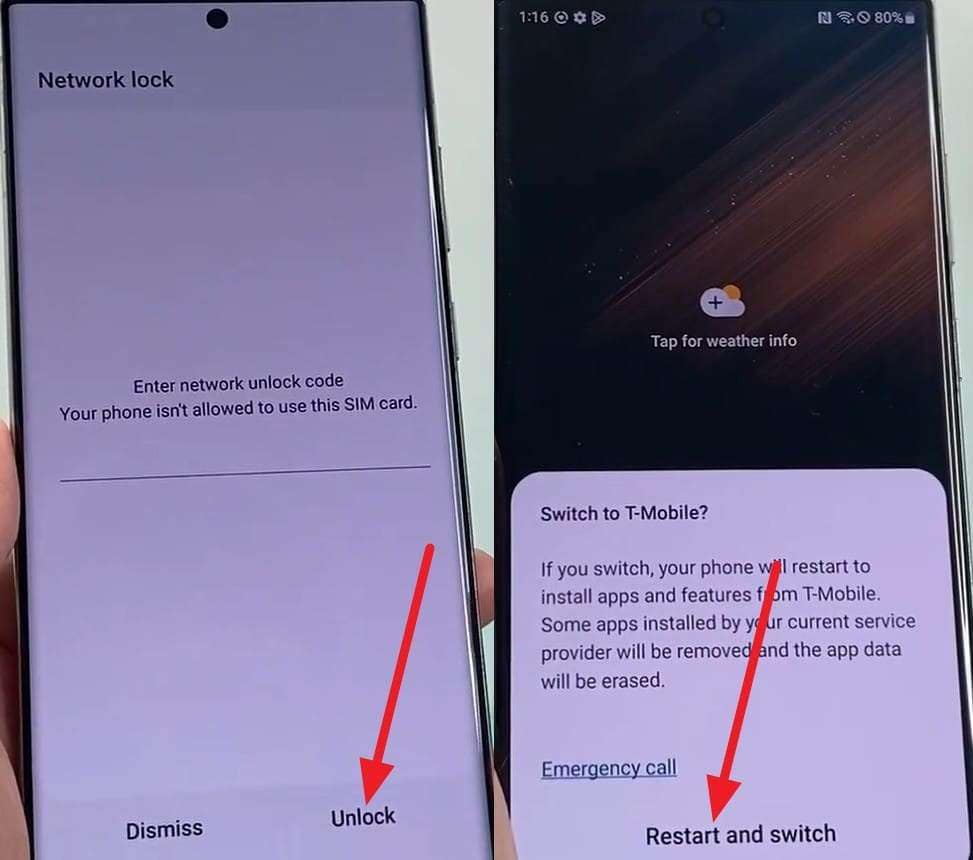
Step 2 Add the non-carrier SIM now, enter the unlock code you received, and select the “Unlock > Restart and Switch” option to use the phone locally during the FIFA World Cup.
2. Use Online Unlock Service - Dr.Fone Online Unlock
When you need to immediately use a local SIM during a World Cup trip and can’t wait for official approval, Dr.Fone Online Unlock can help. The tool supports major carriers like AT&T and T-Mobile, and the rest will be added in its weekly updates. Additionally, it needs only IMEI and carrier details, like official methods for user security.
Thus, this shows that the tool complies with the official rules and does not void the warranty. Furthermore, the request is processed within 24 hours and is submitted to the cloud without any jailbreak or modification. So, regardless of the device you unlock, the SIM lock is removed permanently in just 3 simple steps.
Guide to Remove the SIM Lock Before FIFA World Cup
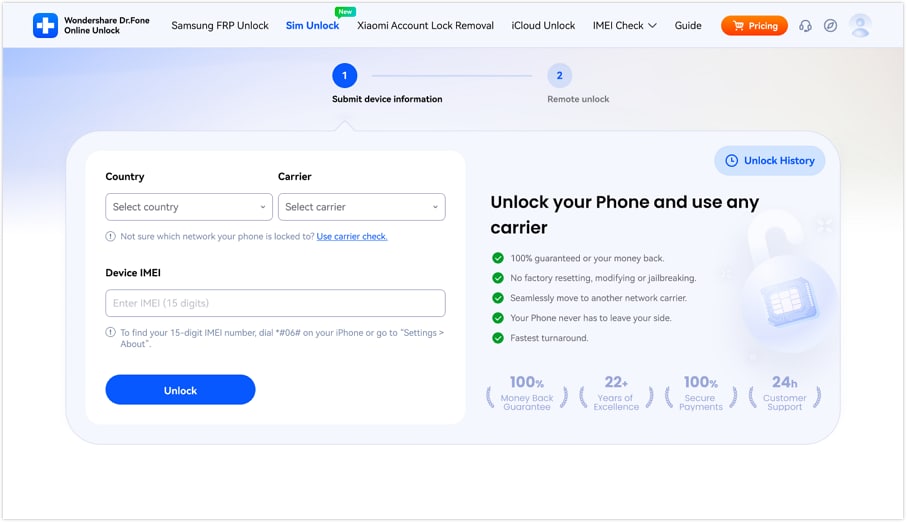
Step 1. Add the Device Details on Dr.Fone Online
On the Dr.Fone SIM Unlock page, tap the “Unlock” button as you add the required Carrier, Country, and IMEI details.
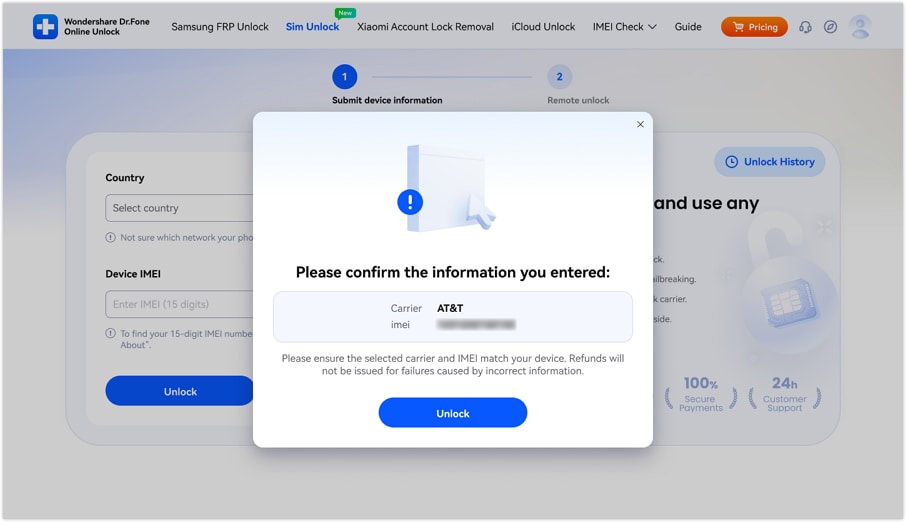
Step 2. Confirm the Details to Unlock the SIM
When the popup menu appears, review the details and click “Unlock” to submit the cloud SIM Unlock request before the World Cup.
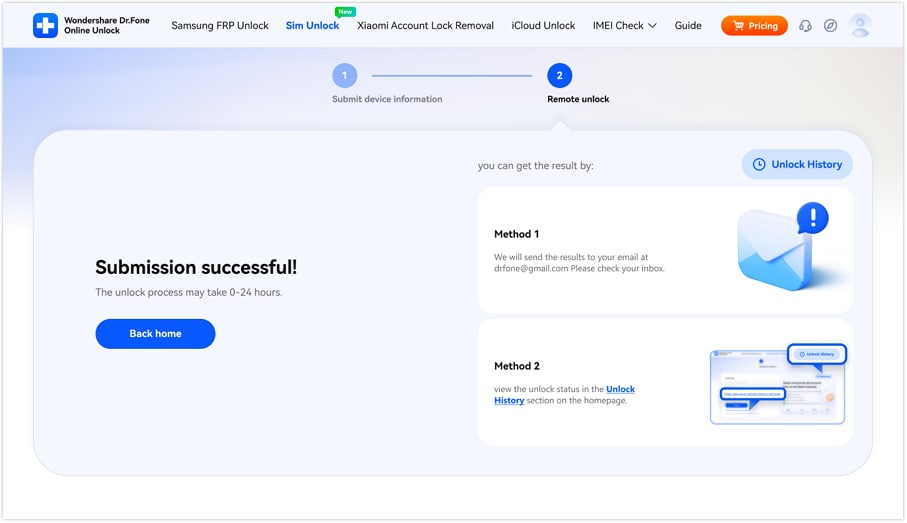
Step 3. Wait for 0-24 Hours to Unlock
Within 0-24 hours, your SIM will be unlocked, and you can use the provided methods to track its progress.
Pro Tip. What to Do If You're Locked Out of Your Phone During World Cup Travel
Even if you avoid roaming charges during the World Cup by unlocking your SIM, a screen lock can still leave you completely locked out of your phone. In such cases, Dr.Fone - Screen Unlock (Android) can help you regain access to your device. Its Android unlocker can remove all locks from 29 major brands, including Samsung and LG devices, without data loss.
Additionally, its iPhone unlocker removes MDM, SIM restrictions, and Activation Lock through a simple 2–3 step process. Let’s say if your Android screen is locked, follow this quick guide and learn about Dr.Fone automation for most Android models:
 Unlock Android phone in seconds.
- Remove PIN, pattern, password, fingerprint.
- Bypass Google FRP lock easily.
- Works on all Android brands & models.
- No tech skills required – user-friendly.

-
Step 1 Choose to Unlock Android Screen
Open the Android Screen Unlock tool from the “Toolbox” tab, choose “Unlock Android Screen,” and select your device model.

-
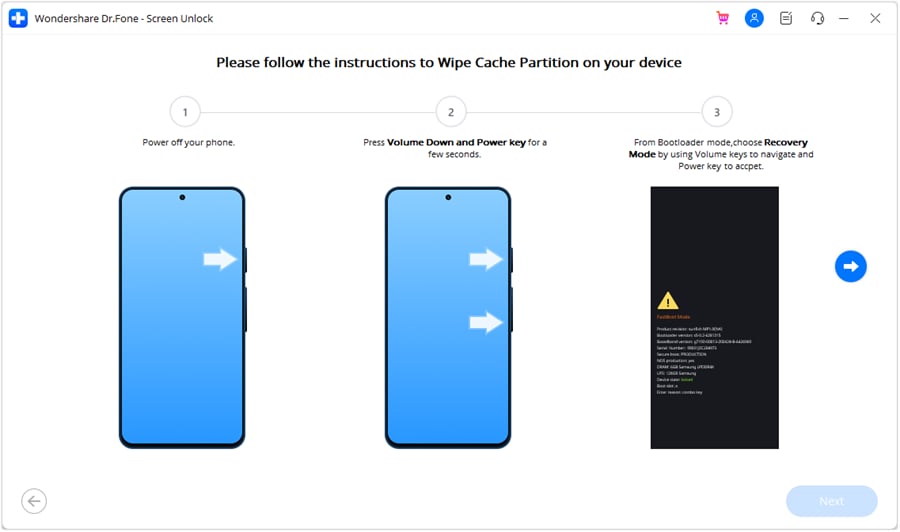
Step 2 Access Mode to Unlock Android Screen
Dr.Fone will automatically direct you to the special mode to unlock your device during the FIFA World Cup.




Part 4. Tips for Smooth Connectivity During World Cup Travel
To unlock an iPhone or Android for international travel, follow the mentioned tips for a smooth connection:
| Tips | Why It Helps |
|---|---|
| Unlock Your Phone Early | Use local SIMs and eSIMs without issues. |
| Install an eSIM Before Travel | Get data as soon as you arrive. |
| Download Offline Maps | Navigate even without the internet. |
| Save Tickets Offline | Access match tickets if the network is busy. |
| Carry a Power Bank | Keep your phone charged throughout match days. |
Conclusion
For SIM lock phones, this guide has explained how to unlock a phone for World Cup travel. Since official methods are tied to prepaid and postpaid limits and take days, Dr.Fone Online Unlock is the suggested same-day solution. For exceptional cases where the Android and iPhone screens are locked, Dr.Fone - Screen Unlock (iOS) and Dr.Fone - Screen Unlock (Android) can also help.
Frequently Asked Questions
-
1. Is carrier unlocking the same as removing my screen lock?
No, it's not the same as screen unlock, as it means removing network restrictions so you can use other SIMs. -
2. Does an eSIM also need an unlocked phone?
Yes, your phone must be carrier unlocked to use eSIM plans from different networks during your World Cup trip. -
3. How long before my World Cup trip should I request an unlock?
You should request an unlock at least a few weeks before your World Cup trip to avoid delays. If you want to unlock your phone within 24 hours, Dr.Fone Online Unlock can help and submit a cloud request.
 Add Wondershare Dr.Fone as a preferred source on Google