Resolve common problems and system crashes on both iPhone and Android devices.

 100% Security Verified | No Subscription Required | No Malware

 :
: 
 ChatGPT
 Perplexity
 Gemini
 Claude
 Grok
Grok
DroidKit's actual repair guide supports 4 brands: Samsung, Xiaomi, Redmi, and POCO. Dr.Fone - System Repair (Android) repairs exactly those same 4 brands. So, Dr.Fone vs DroidKit isn't settled by a compatibility list at all. It comes down to one hidden rule in DroidKit's guide: Xiaomi, Redmi, and POCO owners must unlock the bootloader before repair.
So, this guide compares Dr.Fone Android System Repair vs iMobie DroidKit. This will help you choose the tool that works for boot loops and black screens with fewer roadblocks. Based on the testing, get to know why Dr.Fone - System Repair (Android) is a suitable choice.
 Fix Android instantly – no skills needed.
- Solve boot loop, black screen, won’t turn on, etc.
- High success rate for all system issues.
- User-friendly interface with easy-to-follow steps.
In this article
- Part 1. Quick Call: Which Android Repair Tool Comes Out Ahead?
- Part 2. Product Snapshot: Dr.Fone Android Repair vs DroidKit
- Part 3. Android Test Bench: Phones, OS Builds, and Failure States
- Part 4. What Happens to Your Data During Android Repair?
- Part 5. Boot Loop to Black Screen: Scenario-by-Scenario Results
- Part 6. Firmware, ROM Matching, and Download Mode Workflow
- Part 7. Brand Coverage Can Decide the Winner
- Part 8. From Launch to Reboot: Speed and Usability
- Part 9. What Is Free, What Costs Extra, and Can You Get a Refund?
- Part 10. Strengths, Limits, and the Best Fit
Part 1. Quick Call: Which Android Repair Tool Comes Out Ahead?
Based on metrics, this section gives you a quick answer for Dr.Fone System Repair vs iMobie DroidKit comparison.
- Overall Winner: Dr.Fone - System Repair (Android), with a simpler repair workflow, Xiaomi-family data protection, useful mode tools, and better two-computer value.
- Best for System Repair: Dr.Fone, because DroidKit requires a bootloader unlock for MIUI 10 and above, which triggers a factory reset before repair.
- Best for Repair Workflow: Dr.Fone, with guided firmware matching and dedicated tools that simplify the required repair modes.
- Best for Beginners: Dr.Fone, since its mode tools simplify Download, Recovery, and Fastboot Mode operations directly from the computer.
- Best Value: Dr.Fone, at $19.95 monthly across two computers, while DroidKit’s longer refund window applies only to its yearly plan.
Recommendation: Choose Dr.Fone for straightforward Android repair, especially when preserving Xiaomi-family data and reducing manual repair steps are priorities.
Part 2. Product Snapshot: Dr.Fone Android Repair vs DroidKit
Given the quick verdict, the table below provides a detailed, side-by-side comparison of Dr.Fone vs DroidKit across key repair metrics.
| Metrics | Dr.Fone - System Repair (Android) | iMobie DroidKit System Fix |
|---|---|---|
| Android Issues Covered | Black screen, boot loop, stuck on logo, and other system errors | Boot loops, black and white screens, stuck modes |
| Supported Brands | Samsung, Xiaomi, Redmi, POCO | Samsung, Xiaomi, Redmi, POCO |
| Android Version Support | Android 5.0 and later | Android 6.0 and above |
| Repair Approach | Firmware matched to the connected model | ROM matched using the device PDA code |
| Root Requirement | No root required | No root, but MIUI 10+ requires bootloader unlocking |
| Firmware/ROM Handling | Device model detected and matching firmware prepared | PDA code detected automatically or entered manually |
| Data-Loss Risk | Xiaomi, Redmi, and POCO repair without data loss; Samsung repair may erase data | Bootloader unlocking erases data on MIUI 10+ devices |
| PC/Mac Support | Windows only | Windows and macOS |
| Free Tools | Samsung Download/Odin Mode, Android Recovery Mode, and Android Fastboot Mode are free | Firmware package can be downloaded free, but system repair requires payment |
| Pricing | Monthly Plan: $19.95 Annual Plan: $39.95 Perpetual Plan: $49.95 |
Monthly Subscription: $35.99 Yearly Subscription: $39.99 One-Time Purchase: $55.99 |
Part 3. Android Test Bench: Phones, OS Builds, and Failure States
A brand list tells you whether a repair can start, not what it costs. So, review the following details to know how Dr.Fone Android Repair vs DroidKit are compared:
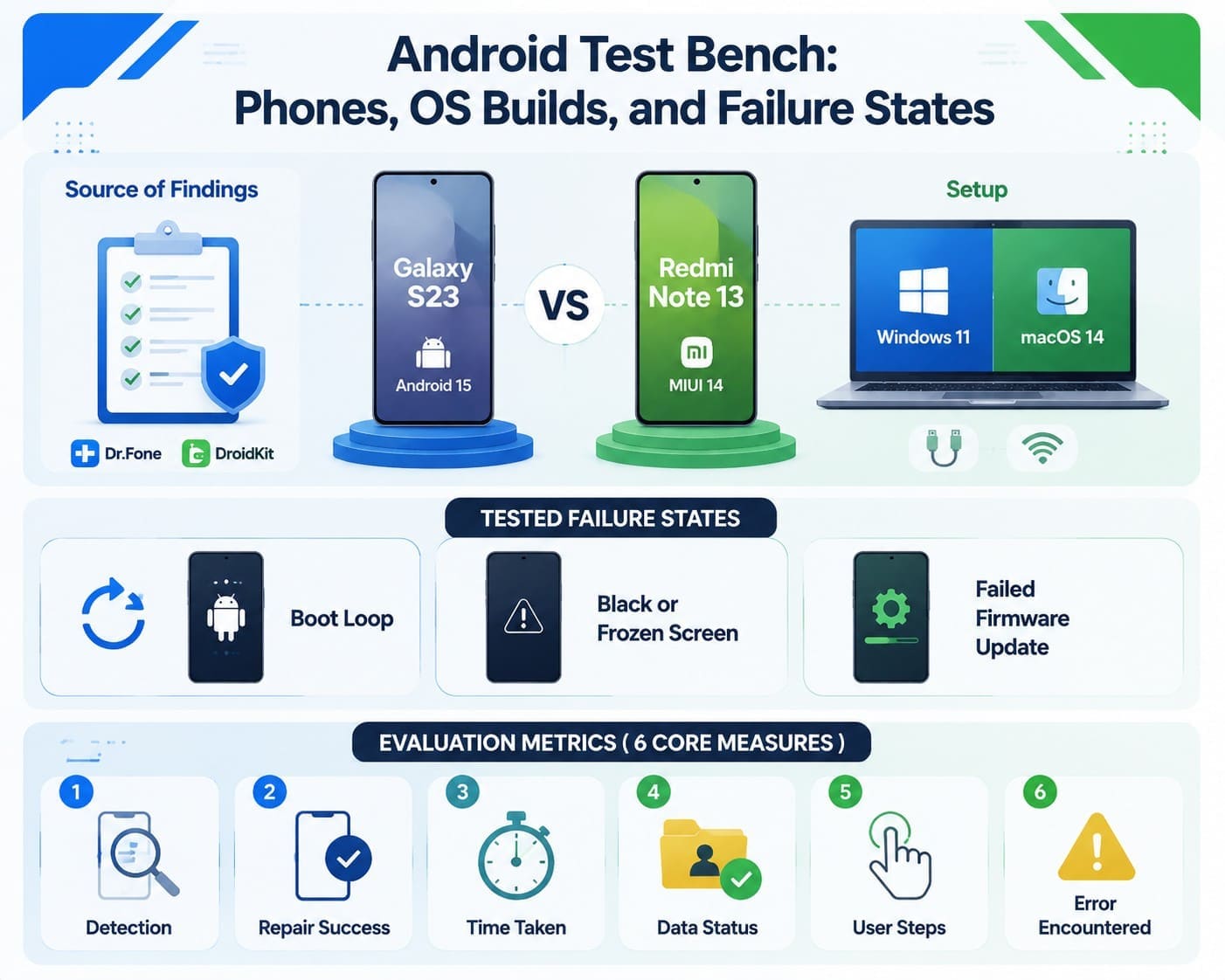
- Source of Findings: Every scenario draws from official brand tables, repair mode descriptions, free-version limits, and store terms published directly by Wondershare and iMobie.
- Hardware & Setup: The test bench pairs a Galaxy S23 (Android 15) with a Redmi Note 13 (MIUI 14). Both connect to a Windows 11 laptop and a macOS 14 Mac using identical cables and network conditions.
Tested Failure States
- Boot Loop: The phone restarts endlessly without reaching the home screen.
- Black or Frozen Screen: The device powers on, but the display remains entirely dark.
- Failed Firmware Update: An installation stops partway, leaving the system unbootable.
Evaluation Metrics
Six core measures apply to every test to know which is better: Dr. Fone vs DroidKit.
- Detection: How consistently does the software detect and recognize the Android device?
- Repair Success: Does the system restore normal operation?
- Time Taken: Total duration of the recovery process?
- Data Status: Whether user files remain intact or get erased?
- User Steps: The number of manual actions required?
- Error Encountered: Any roadblocks or error codes encountered along the way?
Part 4. What Happens to Your Data During Android Repair?
Android system repair reinstalls or modifies core system software, so data safety becomes a key factor in the Dr.Fone vs DroidKit comparison. Compare how both tools handle repairs and where data can remain intact.
Dr.Fone - System Repair (Android) Repair Process
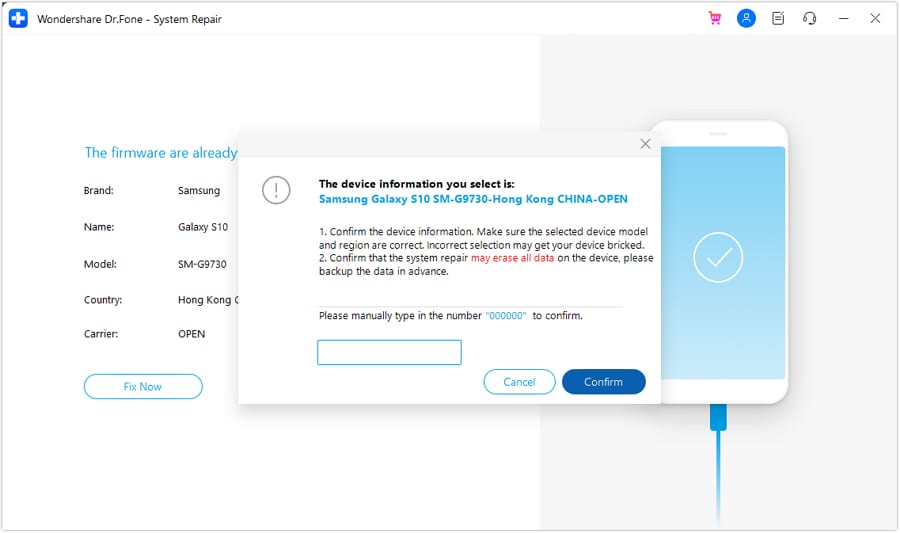
Dr.Fone reads your connected model, downloads the matching official firmware, and flashes it. Xiaomi, Redmi, and POCO phones are repaired without data loss and without an unlocked bootloader. For Samsung, the repair process erases device data, so Dr.Fone requires you to enter a confirmation code before proceeding.
DroidKit System Fix Repair Process
DroidKit follows the same process: it pulls an official Samsung ROM and flashes it through Download Mode. Its guide then adds two conditions that its product page doesn't mention.
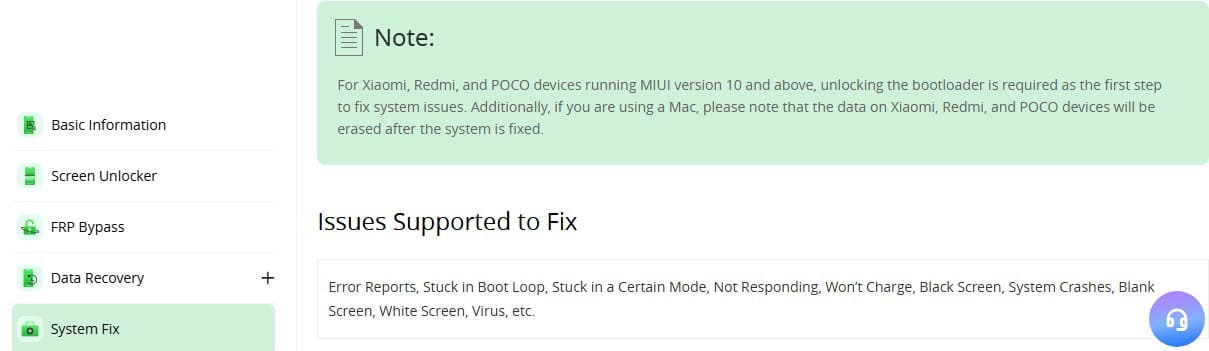
- The Bootloader Condition: Xiaomi, Redmi, and POCO phones on MIUI 10 or later need an unlocked bootloader before the fix can run.
- The Mac Condition: Repairing Xiaomi, Redmi, or POCO devices on a Mac erases their data once the repair process completes.
When Can Android Repair Erase Your Data?
Based on the repair details, the Dr.Fone Android System Repair vs DroidKit comparison table below highlights when data is lost:
| Data Risk Factor | Dr.Fone - System Repair (Android) | iMobie DroidKit System Fix |
|---|---|---|
| Xiaomi, Redmi, POCO | Data intact | Data will be erased during repair |
| Samsung | Warns that repair may erase everything | Data will be erased during repair |
| Bootloader Unlock Needed | No | Yes, on MIUI 10 and above |
| Backup Advised First | Yes, stated in its guide | No |
| Confirmation Before Flashing | A typed code | A button click |
Verdict: The Android Open Source Project states that unlocking the bootloader triggers a factory data reset to protect against unauthorized access. Dr.Fone preserves files by default, while DroidKit requires a data-wiping bootloader unlock on Xiaomi devices. This requirement can trigger the exact factory reset users want to avoid during system repair.
Part 5. Boot Loop to Black Screen: Scenario-by-Scenario Results
Beyond the repair approach, let’s test both tools against 3 scenarios. See which tool excels: Dr.Fone Android System Repair or DroidKit.
Scenario 1. Android Boot Loop Test
Dr.Fone and DroidKit handle boot loops by downloading matching firmware and forcing the phone into Download Mode to flash a clean system. While both tools successfully restore normal device operation, they come with a major data cost.
Dr.Fone warns that the repair will erase all user files on Samsung, while DroidKit forces Xiaomi, Redmi, and POCO users on MIUI 10 or higher to unlock their bootloader first. This triggers an automatic factory reset and wipes the device completely.
Scenario 2. Black or Frozen Screen Test
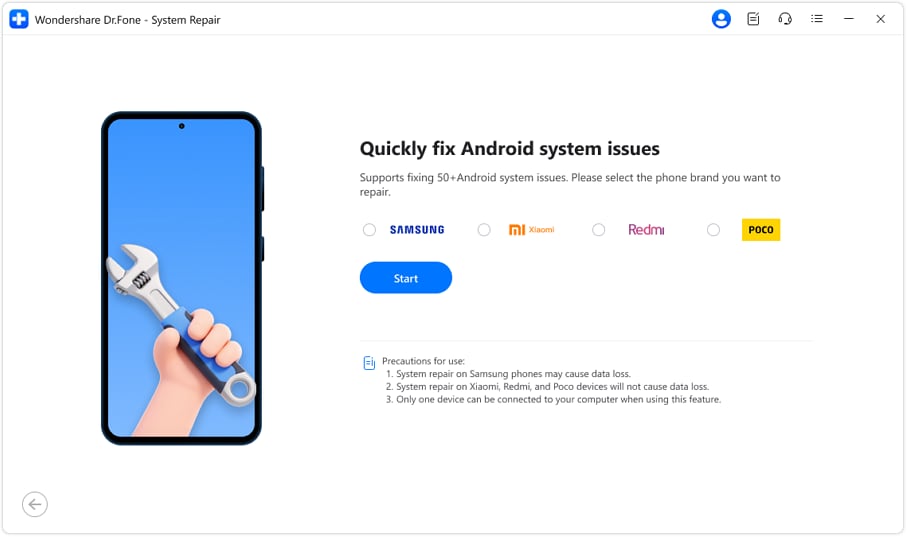
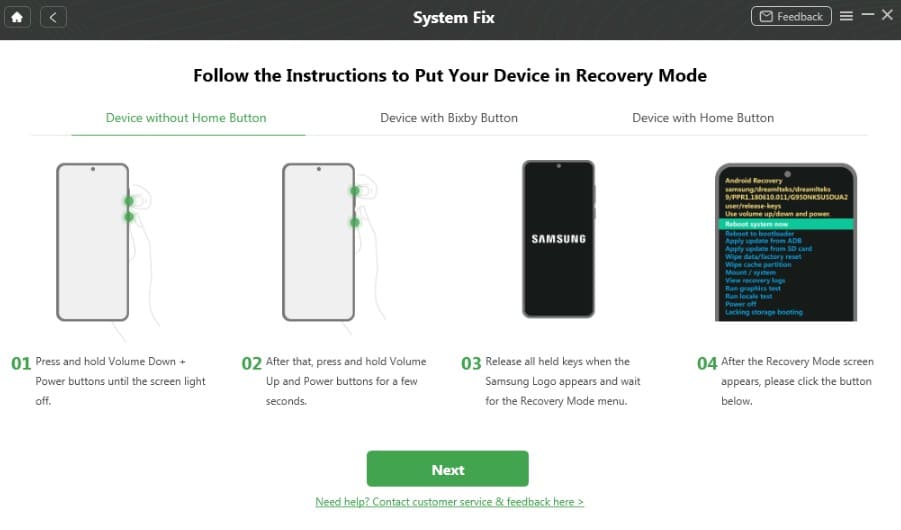
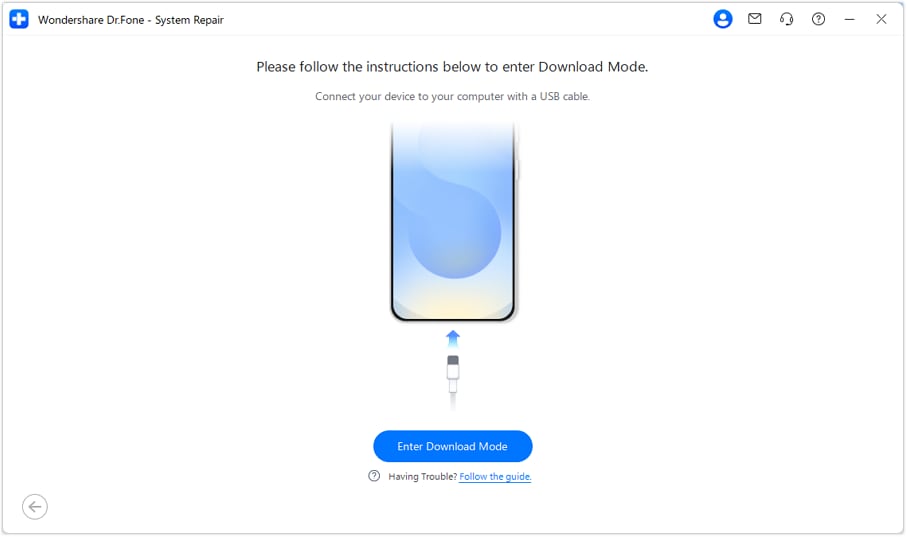
Dr.Fone and DroidKit treat black or frozen screens by pulling the phone into Download Mode from your computer without needing root access. However, their paths diverge once you reach that screen. Dr.Fone provides guided visual instructions based on physical button layouts, including Home, Bixby, or Volume buttons.
For supported devices, Dr.Fone also offers an automated Download Mode function that enters and exits the mode directly from the computer, avoiding manual button combinations. DroidKit, by contrast, relies on standardized recovery-to-download instructions or USB debugging status to trigger the flashing state. Unlike Dr.Fone, the instructions aren't even clear or easy to follow.
Scenario 3. Failed System Update Test
An interrupted update leaves the system unbootable, which is where Dr.Fone Android Repair vs DroidKit gets practical. Both reinstall a clean official build. DroidKit's free tier downloads the package but stops before applying it, so you'll need a license.
| Scenario Result | Dr.Fone - System Repair (Android) | iMobie DroidKit System Fix |
|---|---|---|
| Repair Success | All 3 scenarios across all 4 supported brands | All 3 scenarios, within its Mac and MIUI limits |
| Time Taken | Under 10 minutes claimed | No published figure |
| Data Status | Data intact on Xiaomi family | Data erased during applicable Samsung or Xiaomi repairs |
| Manual Steps | Connect and confirm | Button combinations and PDA code if needed |
| Errors Encountered | None documented | Detection failures noted in its guide |
| Best Performer | Xiaomi-family repairs | Mac-based repairs |




Part 6. Firmware, ROM Matching, and Download Mode Workflow
Both tools succeed or fail based on getting the right firmware onto your phone. Compare this aspect in the following iMobie DroidKit vs Dr.Fone Android System Repair details to choose the right pick:
Finding the Correct Firmware
Dr.Fone automatically identifies the connected device model and matches the appropriate firmware package. DroidKit automatically reads Android’s PDA code with USB debugging enabled. Without debugging, you need to find and enter the PDA code manually.
Preparing the Android Device for Repair
This creates one of the biggest workflow differences between the two tools.
- Dr.Fone: Provides a Download Mode tool for entering and exiting Download Mode from the computer on supported devices, reducing reliance on complex button combinations.
- DroidKit: Relies more on manual button combinations, with different instructions for devices with or without a Home button. If detection fails, you need to disconnect, reconnect, and repeat the required steps.
Installing the Firmware and Rebooting
From here, Dr.Fone System Repair vs iMobie DroidKit stops diverging. Each verifies your download, flashes the build, and restarts your phone automatically. Neither asks you to root anything, and neither claims to fix hardware.
Part 7. Brand Coverage Can Decide the Winner
At this point, you might wonder: Dr.Fone vs. DroidKit, which is better? Marketing pages and support guides disagree here, so compare what the guides tell you:
| Coverage Claim | Dr.Fone - System Repair (Android) | iMobie DroidKit System Fix |
|---|---|---|
| Supported Android Brands | 4Samsung, Xiaomi, Redmi, POCO | Samsung, Xiaomi, Redmi, POCO |
| Samsung on Windows | Supported | Supported |
| Samsung on Mac | Not supported | Android 5 to 11 only |
| Xiaomi Family Condition | No bootloader unlock is required | Bootloader unlock required on MIUI 10+ |
Verdict: Dr.Fone and DroidKit support the same 4 core brands. DroidKit adds Mac support but limits newer Samsung versions, while Dr.Fone offers broader Android compatibility on Windows.
Part 8. From Launch to Reboot: Speed and Usability
All those feature lists mean nothing if a complex process stalls you mid-repair. This comparison breaks down the exact hurdles standing between you and a fixed device when evaluating iMobie DroidKit vs. Dr.Fone Android System Repair.
| Workflow Point | Dr.Fone - System Repair (Android) | iMobie DroidKit System Fix |
|---|---|---|
| Software Installation | One installer, around 5 minutes | One installer on Windows or Mac |
| Device Recognition | Automatic once connected | Automatic with USB debugging enabled |
| Model or Code Selection | Device model handled automatically | PDA code entered manually without USB debugging |
| Download Mode Entry | One-click option from the computer | Manual button sequence on the device |
| On-Screen Instructions | Guided steps for all 3 modes | Guided instructions for 2 modes |
| Error Handling | Retry directly from the software | Disconnect, reconnect, and repeat |
| Steps You Perform | About 2–3 manual steps | About 4–5 manual steps without USB debugging |
Verdict: Dr.Fone minimizes manual effort with automated software detection and one-click commands from your computer. In contrast, DroidKit forces you through manual button sequences, code inputs, and cable reconnects.
Part 9. What Is Free, What Costs Extra, and Can You Get a Refund?
The two vendors set different limits on their free features, which can affect Dr.Fone Android System Repair vs. DroidKit affordability. Dr.Fone offers 3 free mode tools covering Samsung Download Mode, Recovery Mode, and Fastboot Mode. DroidKit lets users download the firmware for free but requires payment to complete the system fix.
| Purchase Term | Dr.Fone - System Repair (Android) | iMobie DroidKit System Fix |
|---|---|---|
| Entry Plan | $19.95 | $35.99 |
| Annual Plan | $39.95 | $39.99 |
| Lifetime Plan | $49.95 | $55.99 |
| Devices Covered | 1–5 devices, depending on plan | Up to 5 devices |
| Machines Per Plan | 2 computers | 1 computer |
| Free Before Paying | 3 free mode tools: Download, Recovery, and Fastboot | Firmware download is free; system fix requires payment |
| Refund Window | 7 days | 60 days on the yearly and perpetual plan |
Verdict: DroidKit offers a generous 60-day refund window on its yearly and perpetual plans and a useful free firmware download. However, Dr.Fone provides better multi-computer value, 3 free mode tools, and greater device flexibility.
Part 10. Strengths, Limits, and the Best Fit
At this point, you need a clear answer to Dr.Fone vs DroidKit: which is better? Compare the strengths and limitations of both tools to determine which one better suits your device, repair needs, and experience.
Dr.Fone - System Repair (Android): Strengths and Limitations
Strengths
- Xiaomi, Redmi, and POCO repaired with data intact and no bootloader unlock.
- Download, Recovery, and Fastboot Mode are all free, with no key combinations.
- 2 computers per license, and a plainly stated warning before Samsung flashing.
Limitations
- Windows only, with a macOS build still described as coming soon.
- 7 days to claim a refund, and Samsung repair may erase the device.
iMobie DroidKit System Fix: Strengths and Limitations
Strengths
- Runs on macOS as well as Windows, which Dr.Fone cannot match yet.
- 60-day money-back guarantee on yearly and lifetime plans.
- The free version downloads the firmware package before you pay.
Limitations
- MIUI 10 and above need a bootloader unlock, which factory resets the phone.
- Its Mac table stops at Android 11 for Samsung, and one computer per license.
Final Verdict: Dr.Fone Android System Repair vs DroidKit
To get an overall answer for Dr.Fone Android System Repair vs DroidKit comparison, go through the given metrics:
| Evaluation Factor | Winner | Key Advantage |
|---|---|---|
| Repair Reliability | Tie | Both tools repair system issues across the same four supported brands. |
| Data Risk | Dr.Fone | Repairs Xiaomi-family devices without requiring a bootloader unlock or prior data wipe. |
| Firmware Workflow | Dr.Fone | Automatically detects device models instead of requiring manual PDA code entry when debugging is unavailable. |
| Brand Coverage | Tie | Both support Samsung, Xiaomi, Redmi, and POCO, while DroidKit additionally supports Mac. |
| Speed & Simplicity | Dr.Fone | Provides convenient mode tools that reduce reliance on manual button combinations. |
| Overall Value | Dr.Fone | Supports two computers, offers three free mode tools, and has a lower monthly price. |
Conclusion
When evaluating Dr.Fone Android system repair vs. iMobie DroidKit, Dr.Fone wins for most users. DroidKit forces mandatory bootloader unlock that wipes Xiaomi-family data, while Dr.Fone repairs those devices without data loss. Furthermore, Dr.Fone avoids complex button sequences by offering automated mode entry from your computer. Although DroidKit supports macOS, Dr.Fone provides superior Windows value, 2 computer licenses, and a safer path out of system crashes.
Frequently Asked Questions
-
1. Does DroidKit System Fix support every Android brand listed on the main DroidKit website?
No, and the gap is wide. The main site counts 20,000+ models across brands including Huawei, Google, OPPO and Motorola. Its System Fix guide narrows that to Samsung, Xiaomi, Redmi and POCO, and the wider list applies to its other tools. -
2. Can Dr.Fone Android System Repair fix Xiaomi, Redmi, and POCO phones?
Yes, and it does so without losing data. Dr.Fone lists those 3 brands alongside Samsung and says the repair leaves your files in place, with no bootloader unlock needed first. -
3. Do Dr.Fone Android Repair or DroidKit require root access?
Neither of the two requires it. Both flash official firmware through Download Mode instead, which is why rooting never enters the process on either side. -
4. Which tool is better after an Android firmware update goes wrong?
Both tools can reinstall matching system firmware, but the better option depends on your device. For Dr.Fone vs DroidKit, which is better, a MIUI 10+ device can lose data with DroidKit’s bootloader unlock, while Dr.Fone preserves it.
 Add Wondershare Dr.Fone as a preferred source on Google