Resolve common problems and system crashes on both iPhone and Android devices.

 100% Security Verified | No Subscription Required | No Malware

 :
: 
 ChatGPT
 Perplexity
 Gemini
 Claude
 Grok
Grok
If you've ever been startled by an unexpected iPhone beep sound in a quiet room, you know how frustrating it is to check your screen only to find no notification. This phenomenon, often called "ghost beeping," can range from a minor annoyance to a symptom of deeper system instability. While an iPhone beeping is usually a standard alert for messages or low battery, it can sometimes indicate software conflicts or hardware malfunctions that require immediate attention.
Understanding why is my iPhone beeping is the first step toward restoring your device's peace and quiet. Whether your iPhone randomly beeps like a fire alarm or dings incessantly for no apparent reason, this 2026 guide will help you diagnose the root cause. From simple notification tweaks to advanced tools like Dr.Fone - System Repair, we provide ten proven methods to stop the noise and keep your iOS running smoothly.
In this article
Part 1. iPhone Beeping: What Does It Mean?
An iPhone making beeping noise isn't always a cause for panic. Often, it's the device trying to communicate a specific status update. However, knowing the difference between a functional chime and a system glitch is crucial. Below is a breakdown of when a beep is part of normal operation and when it signals a problem:
| Scenario | Normal Beeping Context | Abnormal Beeping Signs |
|---|---|---|
| App Notifications | Calendar alerts, emails, or SMS with banners. | iPhone beeps for no reason with no visible alert. |
| Battery & Power | Single chime when reaching 20% or 10% battery. | Repeated beeping despite the phone being fully charged. |
| Charging Logic | A short ding when the cable is first plugged in. | Constant beeping during charging (indicates port/cable failure). |
| Emergency Alerts | Government, Weather, or Amber Alerts. | High-pitched beeping that sounds like a smoke alarm without a cause. |
| Connectivity | Chimes for Wi-Fi joining or Bluetooth pairing. | Random beeping when moving between rooms with no signal changes. |
| System Bugs | Custom accessibility sounds you enabled. | Ghost sounds triggered by corrupted 2026 system files. |
Part 2. Common Causes of iPhone Randomly Beeps
If you find yourself asking, "why does my iPhone keep beeping?", the answer usually lies in one of these five categories. Identifying the trigger helps you choose the right fix more efficiently:
- Firmware & Software Glitches: Small bugs in the iOS code, particularly after a major 2026 update, can trigger "phantom" sounds. These occur when the system tries to execute a notification command that fails to render visually.
- Invisible Notification Overload: Some apps are configured to play a sound but are restricted from showing banners on the Lock Screen. This creates a situation where you hear the iPhone beep sound but see a blank display.
- Hardware Connection Failures: A loose charging port or a frayed internal ribbon cable can cause the iPhone to think it is being plugged and unplugged repeatedly, leading to a cycle of charging chimes.
- Rogue Background Apps: Outdated apps or those with internal timers (like health trackers or games) may malfunction in the background, causing the iPhone to randomly beep even when the app isn't active.
- Web Browser Adware: Certain malicious websites in Safari can trigger looped audio scripts. If your phone is beeping like a smoke alarm while browsing, it may be a script trying to trick you into clicking a fake security warning.
Part 3. How to Fix iPhone Randomly Beeping Quickly: 10 Proven Methods
Once you've identified why is my iPhone beeping, you can apply these solutions ranging from simple setting adjustments to deep system repairs. Let's start with the easiest checks first.
3-1. Basic Software Checks
Most instances of an iPhone making beeping noise can be resolved by managing how apps interact with your sound settings.
Solution 1: Audit Your Notification Settings
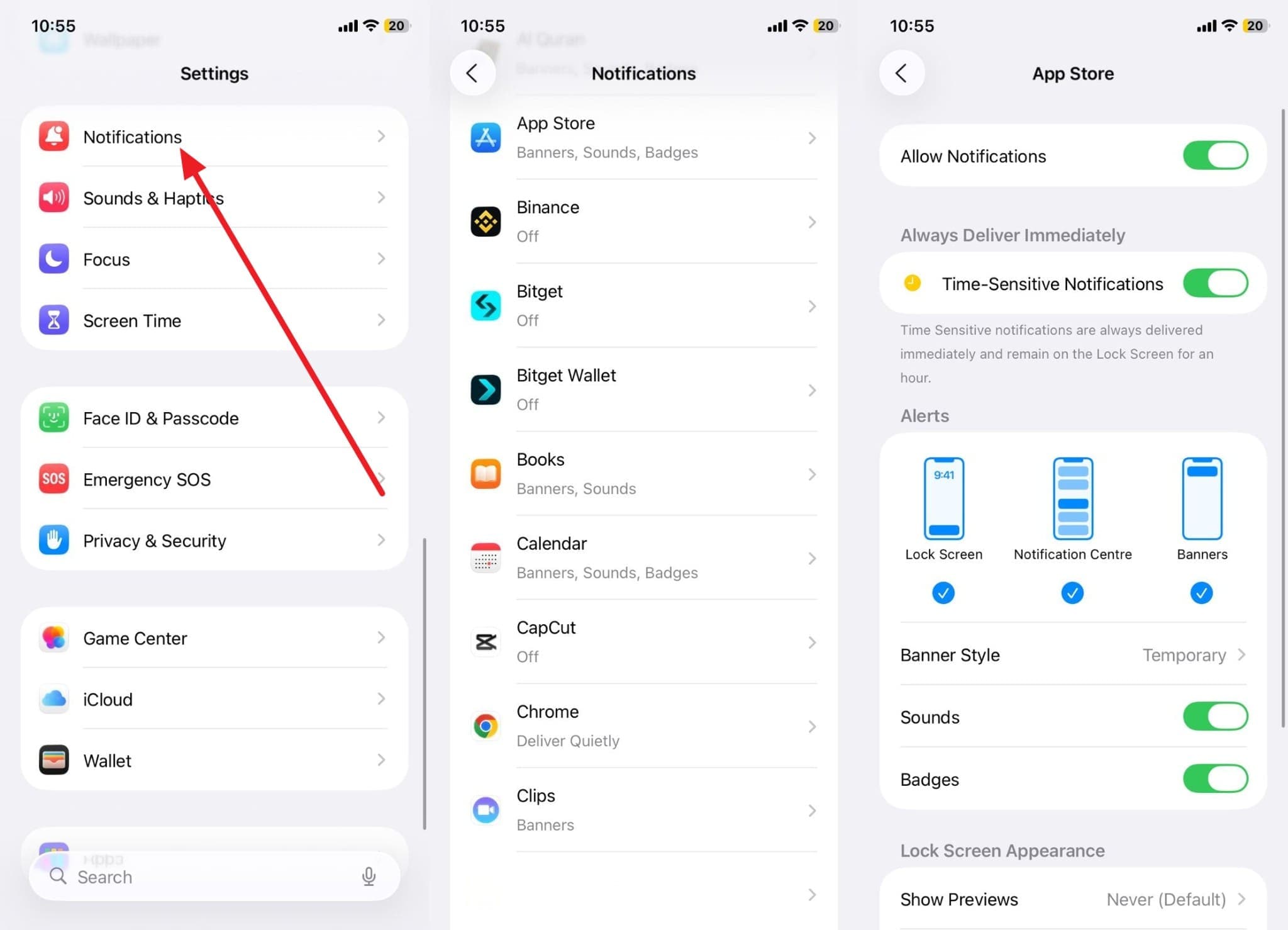
Many users don't realize that iOS allows "Sounds" to be toggled on even if "Banners" and "Lock Screen" alerts are off. This results in the iPhone randomly beeping without a visual clue. To fix this, navigate to Settings > Notifications and check each app for sound-only permissions.
Solution 2: Force Quit All Background Apps
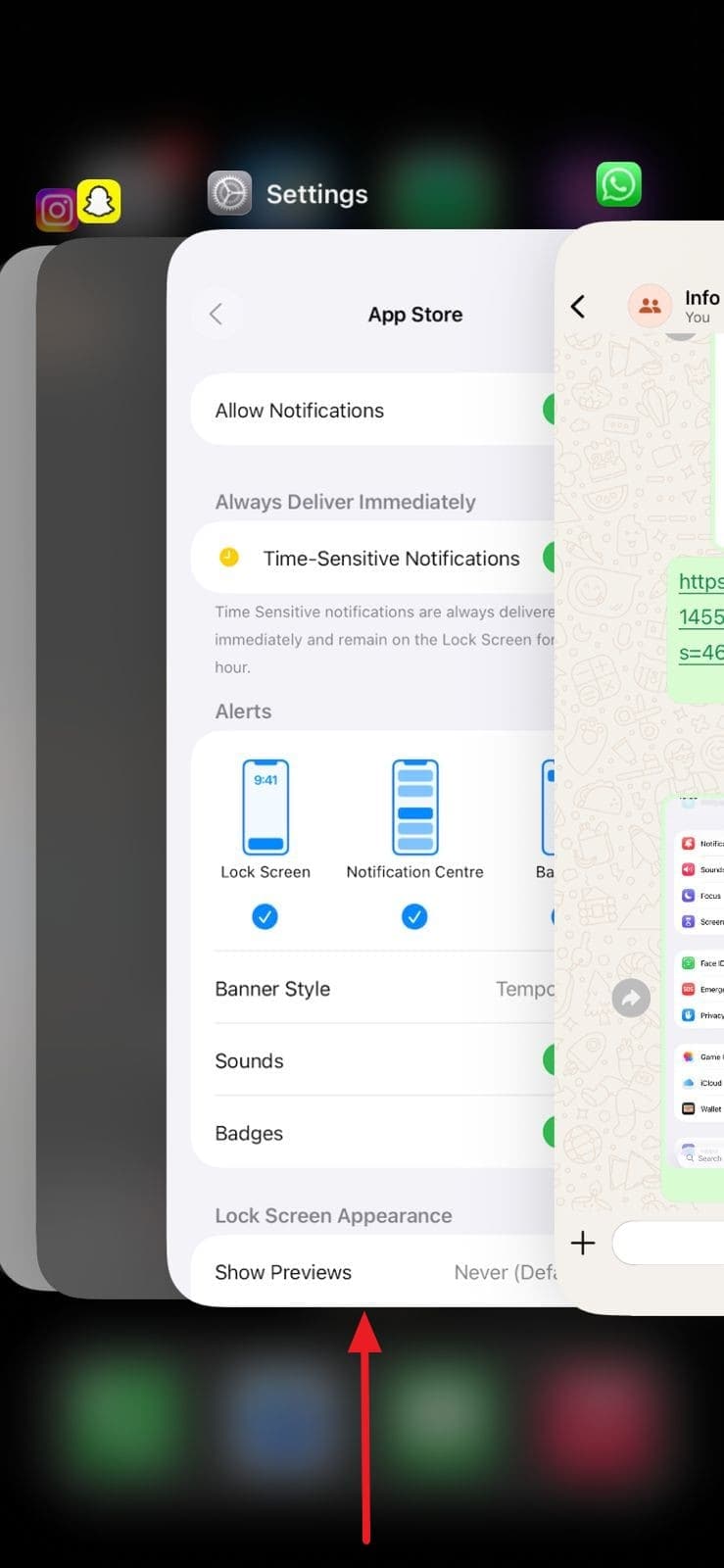
If an app has crashed or is stuck in a loop, it might be the reason why my iPhone keeps dinging. Force-closing all active windows refreshes the system memory and stops rogue processes from triggering audio alerts.
Instructions: Swipe up from the bottom (or double-click the Home button) and swipe away every open app card to clear the cache.
Solution 3: Update Outdated Applications
Apps not optimized for the latest 2026 iOS version can exhibit erratic behavior. Developers release patches to fix audio bugs and notification errors that cause unexplained beeping. Ensure your App Store > Profile section has no pending updates.
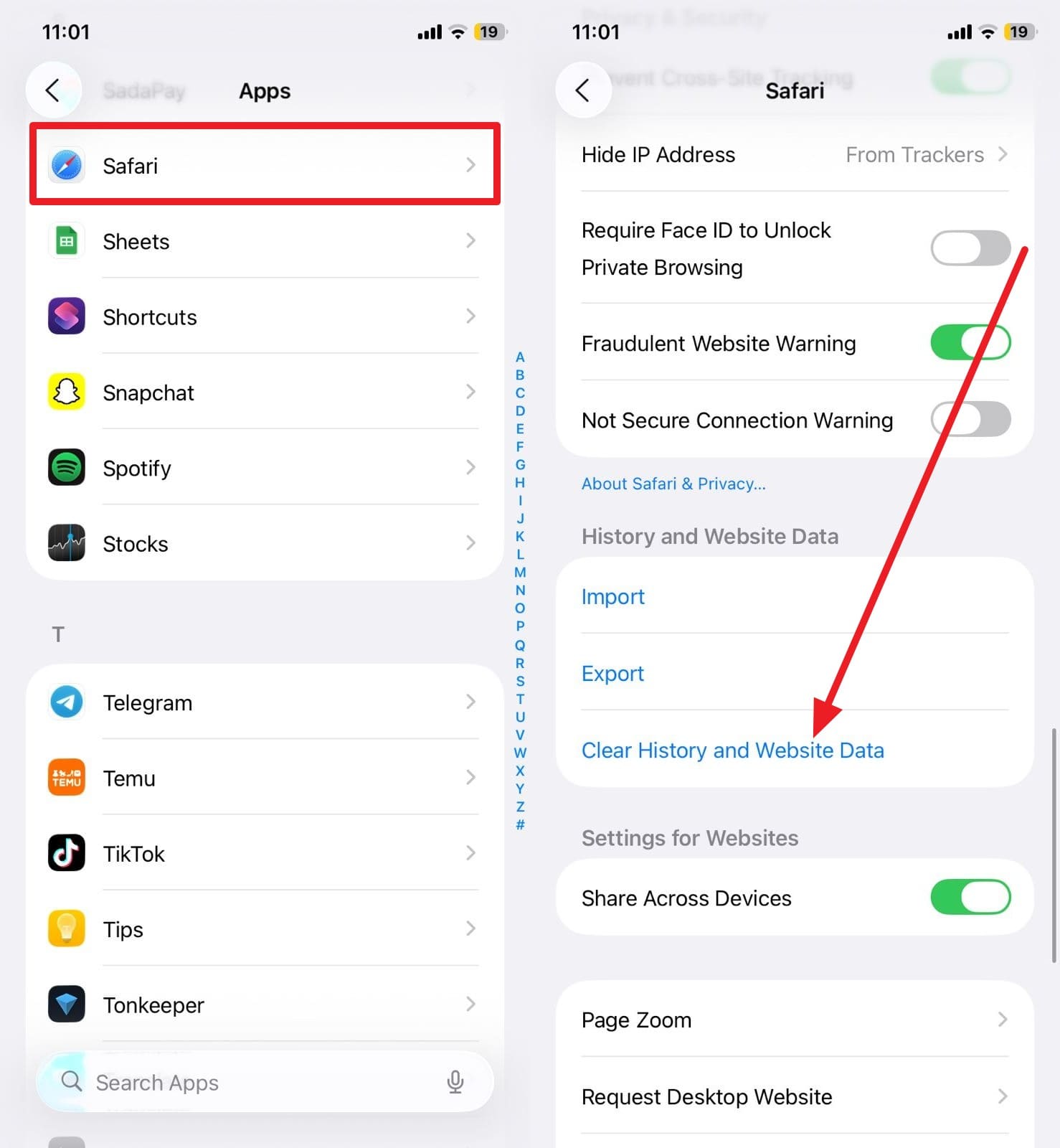
Solution 4: Purge Safari Cache and History
If your iPhone is beeping like a fire alarm while using the browser, it could be a malicious script. Clearing your history removes these scripts and prevents websites from triggering "ghost" alerts.
Instructions: Go to Settings > Apps > Safari and select Clear History and Website Data.
3-2. Adjusting System Settings
Solution 5: Disable System Vibrations
Sometimes what sounds like a beep is actually a short, sharp vibration on a hard surface. By disabling haptics temporarily, you can determine if the noise is a physical vibration or an actual iPhone beep sound.

Solution 6: Update to the Latest 2026 iOS Firmware
If why does my iPhone randomly beep is a question shared by many users on forums, it's likely a known bug that Apple has addressed in a recent patch. Always keep your software version current via Settings > General > Software Update.
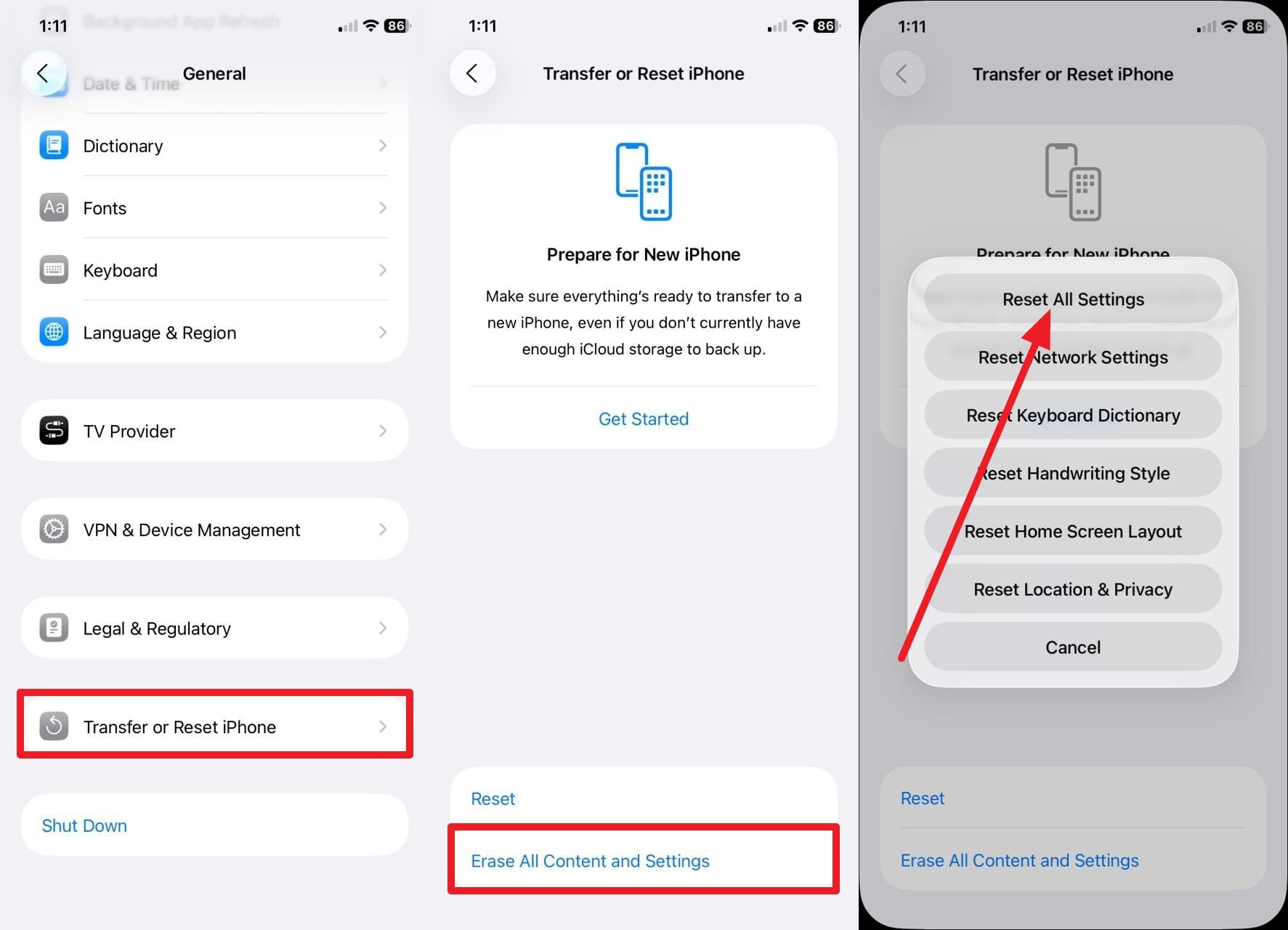
Solution 7: Perform a Full Settings Reset
When buried settings conflict with one another, a Reset All Settings command can act as a "soft" factory reset. This won't delete your photos or apps, but it will return all audio and notification configurations to their default state, often silencing the iphone beeping issue.
3-3. Advanced System & Repair Fixes
If basic settings don't stop your iPhone from making beeping noise, you may be facing a deeper operating system corruption or a hardware-level power issue.
Solution 8: Execute a Force Restart
A force restart is more powerful than a simple power-off; it cuts power to the hardware and forces the kernel to reload, which can kill persistent software loops causing the iPhone beep sound.
Step 1For iPhone 8 and Newer
Press and release Volume Up, then Volume Down. Hold the Side button until the Apple logo appears.
Step 2For iPhone 7/7 Plus
Hold both the Volume Down and Power buttons until the logo flashes on the screen.
Step 3For Older Models
Hold the Home and Power buttons simultaneously until the device reboots.
Solution 9: Deep Fix with Dr.Fone – System Repair (iOS)
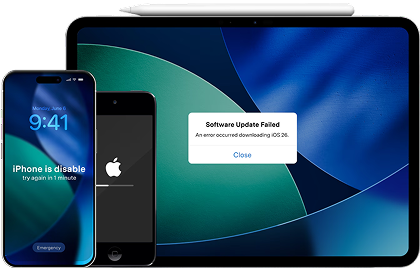
When you've tried everything and the iPhone randomly beeps, it indicates a corruption in the iOS system files. Dr.Fone - System Repair is a professional-grade tool that can fix over 150 iOS issues, including ghost beeping, boot loops, and black screens, without any data loss. It is the most reliable way to ensure your 2026 firmware is installed correctly and free of glitches.
 Fix iOS issues, no data loss.
- One-click repair for all iOS problems.
- Solve recovery mode, Apple logo, black screen, etc.
- Upgrade or downgrade iOS without iTunes
Steps to Fix iPhone Beeping with Dr.Fone:
Step 1Launch System Repair
Open Dr.Fone on your computer, navigate to the System Repair module, and select iOS Repair.
Step 2Select Standard Mode
Choose Standard Repair to fix the beeping issue while keeping your data safe. Follow the prompts to enter Recovery Mode.
Step 3Download & Repair
The software will detect your device model. Click Download to get the firmware, then Repair Now to finalize the fix.


Solution 10: Use MFi-Certified Charging Cables
If your iphone beeps for no reason while plugged in, it is likely a power surge or drop caused by non-certified cables. Cheap chargers often fail to maintain a steady current, causing the iPhone to trigger the charging sound repeatedly. Switch to an original Apple or MFi-certified cable to see if the noise stops.
Conclusion
An iPhone beeping without a clear notification is a sign that something—whether software or hardware—needs your attention. By auditing your notifications, clearing browser caches, and ensuring your iOS is updated to the latest 2026 version, you can resolve most cases of a phone beeping like a smoke alarm. For persistent, deep-seated system errors, tools like Dr.Fone - System Repair provide a safe, effective way to restore your device's stability without risking your personal data.
FAQ
1. How can I tell if a specific app is making my iPhone beep?
If the random beeping stops after you force-quit all apps, one of them was likely the culprit. You can identify it by checking Settings > Notifications and looking for apps with "Sounds" enabled but "Banners" disabled.2. Why did my iPhone just beep like a fire alarm out of nowhere?
This is usually an Emergency Alert (Amber Alert or Weather Warning). You can check these in Settings > Notifications at the very bottom of the page to see the history of official alerts.3. Can a dirty charging port cause my iPhone to randomly beep?
Yes. If dust or lint is inside the port, the charging cable may connect and disconnect rapidly. This triggers the "plugged-in" chime repeatedly, which sounds like random beeping.4. Does the iPhone beep sound indicate a virus or malware?
On iOS, it is very rare for a virus to cause beeping. However, "malicious" browser scripts in Safari can play looping audio to mimic an alarm. Clearing your Safari history will stop this immediately.
 Add Wondershare Dr.Fone as a preferred source on Google