Resolve common problems and system crashes on both iPhone and Android devices.

 100% Security Verified | No Subscription Required | No Malware

 :
: 
 ChatGPT
 Perplexity
 Gemini
 Claude
 Grok
Grok
Repair tools can look identical until your iPhone actually fails. On paper, these seem interchangeable. Both support 150+ iOS problems and provide guided firmware-based repair workflows. The real gap appears when you select a repair mode and consider data retention. That's what ultimately decides Dr.Fone System Repair vs iMobie AnyFix.
Dr.Fone - System Repair (iOS) clears a frozen Apple logo, a restart loop, and a failed update from its data-safe setting. iMobie AnyFix files all 3 under Advanced Repair, and its own page says that mode erases everything. Same fault, same firmware, different price for you. If you want to know more, review this comparison and know where Dr.Fone - System Repair (iOS) outshines AnyFix.
In this article
- Part 1. Quick Verdict: Where Dr.Fone and AnyFix Stand
- Part 2. Dr.Fone vs AnyFix Feature Snapshot
- Part 3. Test Bench: Devices, Problems, and Scoring
- Part 4. Two Repair Strategies Compared
- Part 5. What Happened During Our AnyFix vs Dr.Fone Tests?
- Part 6. Firmware Management and iOS Version Control
- Part 7. Compatibility: Which Tool Covers More of Your Setup?
- Part 8. Speed and Ease: Which One Requires Less Work?
- Part 9. Cost Comparison: Free Tools, Paid Repair, and Refund Terms
- Part 10. Dr.Fone vs AnyFix: Pros, Cons, and Best Fit
- Frequently Asked Questions
Part 1. Quick Verdict: Where Dr.Fone and AnyFix Stand
To get the quick answer for Dr.Fone system repair vs AnyFix comparison, review these metrics:
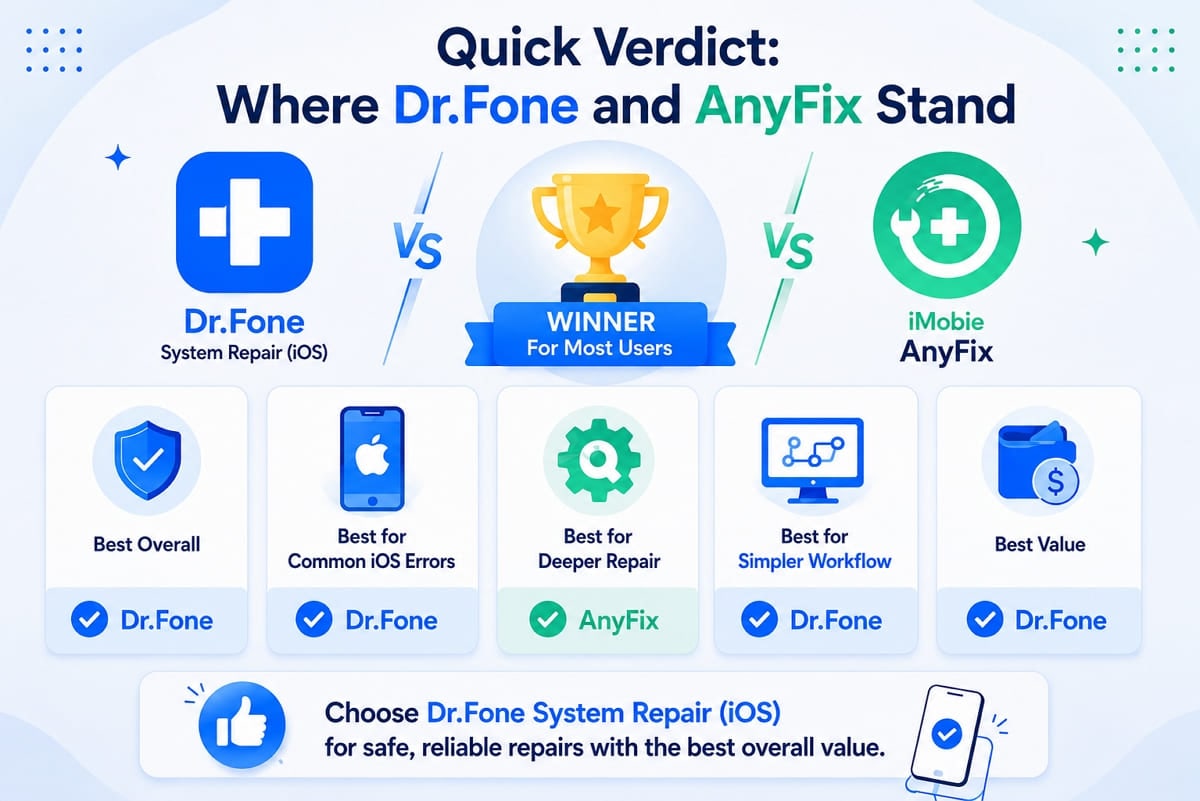
- Best Overall: Keeping your data through common iOS system problems gives Dr.Fone - System Repair (iOS) the overall edge.
- Best for Common iOS Errors: Apple logo, boot loop, and update failures can use Dr.Fone's data-safe Standard Mode, while AnyFix may require deeper repair modes.
- Best for Deeper Repair: AnyFix takes this one, as its Ultimate Repair mode targets severe system problems that its two lower modes cannot resolve.
- Best for Simpler Workflow: AnyFix requires iTunes to be installed beforehand, while Dr.Fone has no separate iTunes installation requirement.
- Best Value: Dr.Fone covers 5 devices and 2 computers, giving you broader computer coverage than AnyFix's comparable personal license.
Part 2. Dr.Fone vs AnyFix Feature Snapshot
Given the quick verdict, you might still wonder: Dr.Fone vs AnyFix, which is better? To answer this query, go through the mentioned table before you dive into details:
| Capability Line | Dr.Fone - System Repair (iOS) | iMobie AnyFix |
|---|---|---|
| Repair Levels | 3 repair modes, plus General Reset | 3 repair modes, ranked by severity |
| iOS Problems Covered | 150+ system issues, plus 200+ iTunes errors | 150+ system issues, plus 200+ iTunes errors |
| Data-Loss Risk | Standard Mode preserves user data | Advanced and Ultimate Repair erase data |
| Recovery Functions | Enter and exit Recovery Mode, plus DFU exit | Enter and exit Recovery Mode, but exit requires activation |
| Update Cadence | Supports current iOS versions, including iOS 27 | Supports current iOS versions, including iOS 27 |
| Hardware Reach | iPhone, iPad, and iPod touch | iPhone, iPad, iPod touch, and Apple TV |
| Free Use | General Reset, Recovery Mode entry/exit, DFU exit, and beta installation | Recovery Mode entry, iOS upgrade, and 1-Click device reset |
| Pricing | Monthly: $24.95 Annual: $49.95 Perpetual: $69.95 |
Monthly: $29.99 Annual: $49.99 Lifetime: $69.99 |
| Best For | Data-preserving repairs for common iOS issues | Deeper repair and Apple TV support |
Verdict: Both tools cover 150+ system issues, but their repair approaches differ. Dr.Fone stands out for data-preserving common repairs and broader free recovery functions, while AnyFix provides three severity-based modes and Apple TV support.
 Fix iOS issues, no data loss.
- One-click repair for all iOS problems.
- Solve recovery mode, Apple logo, black screen, etc.
- Upgrade or downgrade iOS without iTunes
Part 3. Test Bench: Devices, Problems, and Scoring
What a specification sheet won't tell you is which mode your fault lands in, so the sections below trace 3 of them through both apps. This section also explains how the iMobie AnyFix vs Dr.Fone System Repair comparison was done.
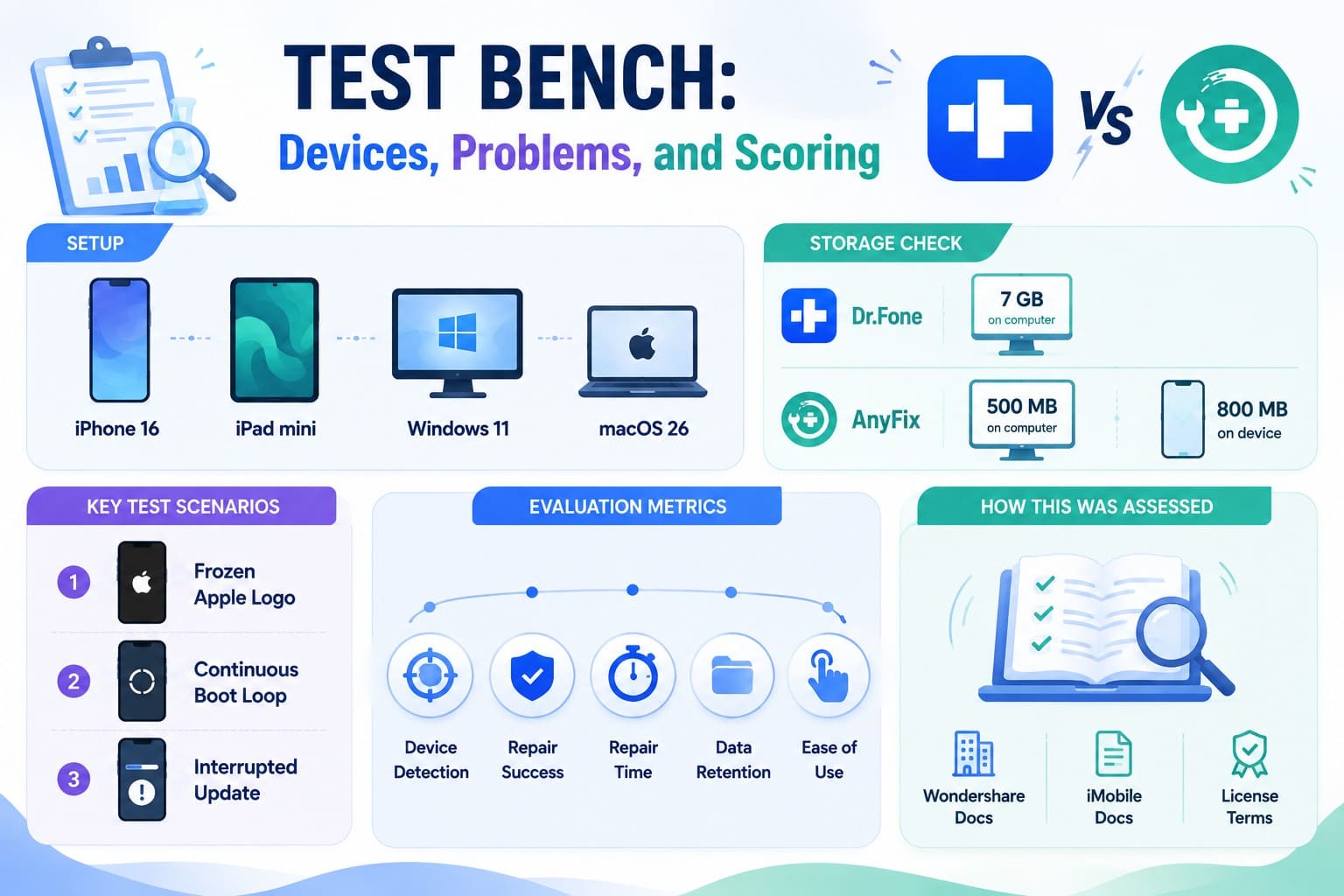
How This Was Assessed: No bench work sits behind these scenarios. They're built from what Wondershare and iMobie put in writing, meaning mode scopes, system requirements, free-feature lists, and license terms.
Setup: Picture an iPhone 16 and an iPad mini on iOS/iPadOS 26, plugged into a Windows 11 desktop and a Mac on macOS 26. Check your storage at both ends. Wondershare wants 7 GB of computer space, whereas iMobie asks for 500 MB there and another 800 MB on your handset.
Key Test Scenarios
3 standard iOS system errors form the baseline test:
- Frozen Apple Logo: Device hangs on boot and fails to load the home screen.
- Continuous Boot Loop: System restarts repeatedly without user input.
- Interrupted Update: Software update halts mid-process and leaves device unresponsive.
Evaluation Metrics
Each tool receives a rating across 5 core criteria for every scenario:
- Device Detection: Speed and accuracy when a computer reads a faulty unit.
- Repair Success: Frequency of complete recovery without secondary errors.
- Repair Time: Total duration from initial scan to final reboot.
- Data Retention: Protection of personal files and settings during recovery.
- Ease of Use: Overall clarity of interface prompts and navigation steps.
Part 4. Two Repair Strategies Compared
To start with the repair strategy comparison between Dr.Fone System Repair vs AnyFix, let's see which tool is better and why.
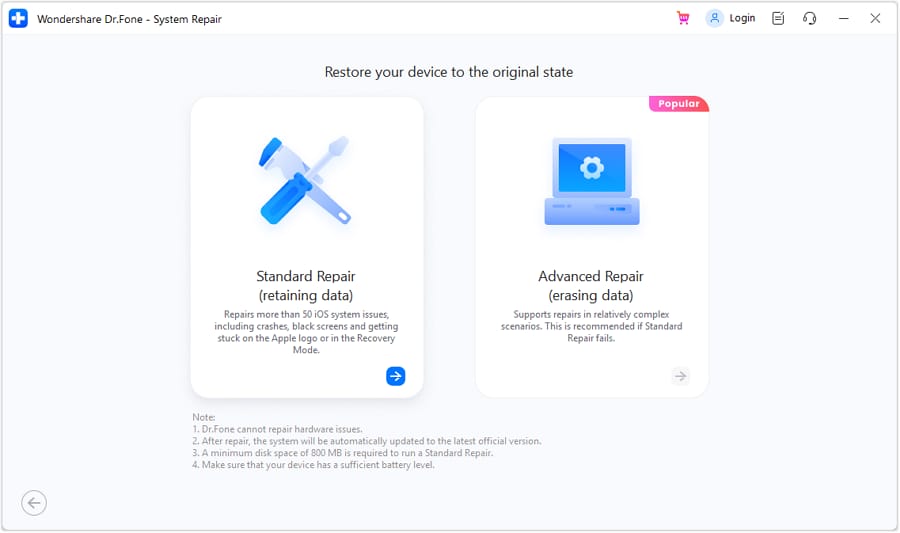
Dr.Fone - System Repair (iOS) Repair Levels
How much of iOS gets repaired separates Dr.Fone's 3 repair modes. General Reset separately restores system settings without deleting personal data. Standard Mode repairs common system problems while preserving your content. Advanced Mode performs a deeper repair that erases device data, while Anti-Recovery Mode permanently removes data to prevent later recovery.
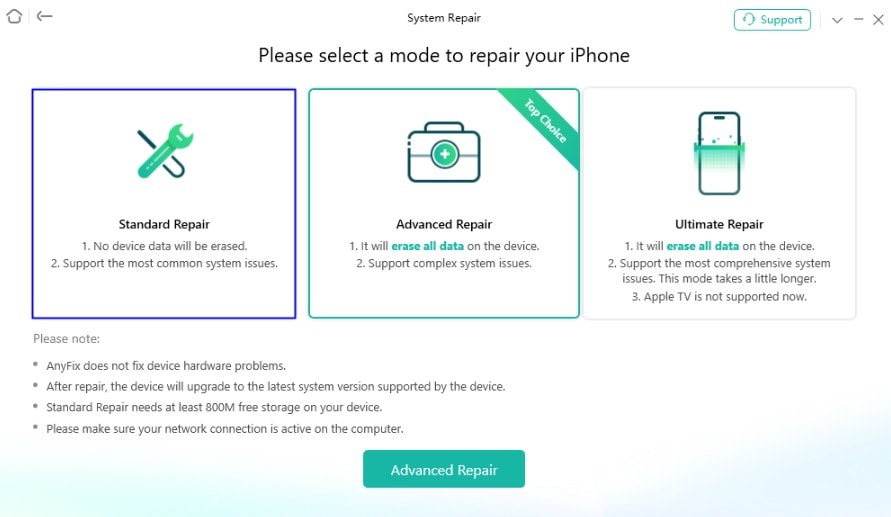
AnyFix Repair Levels
AnyFix sorts its 3 modes by severity instead. Standard Repair handles minor problems, including charging trouble and battery drain. Advanced Repair addresses more serious system issues, while Ultimate Repair targets severely unresponsive devices that lower modes cannot fix. Both Advanced and Ultimate Repair erase your device data during the repair process.
| Fault Routing | Dr.Fone - System Repair (iOS) | iMobie AnyFix |
|---|---|---|
| Stuck on Apple Logo | Standard Mode, data preserved | Advanced Repair, data erased |
| Boot Loop | Standard Mode, data preserved | Advanced Repair, data erased |
| iOS Update Failed | Standard Mode, data preserved | Advanced Repair, data erased |
| Black or Frozen Screen | Standard Mode, data preserved | Advanced or Ultimate Repair, data erased |
| Stuck in Recovery Mode | Free one-click Recovery Mode exit | Free entry, activation required for exit |
| Battery Drain, Charging Faults | General Reset or system repair, depending on cause | Standard Repair, data preserved |
| Dead, No Power at All | Repair may work when software-related | Ultimate Repair for severe system issues |
| Apple TV System Fault | Not supported | Supported through System Repair |

Part 5. What Happened During Our AnyFix vs Dr.Fone Tests?
Lets perform the 3 tests in this section so that you can choose the right pick based on your issues:
Boot Loop Test
A handset restarting on a loop is where Dr.Fone vs AnyFix for iPhone boot loop queries begin. Dr.Fone vs AnyFix for iPhone frozen screen sits right beside it. Dr.Fone handles both at Standard depth without touching your data. AnyFix routes the loop to Advanced Repair and the frozen screen to Ultimate, so your phone comes back working and empty.
Recovery Mode Test
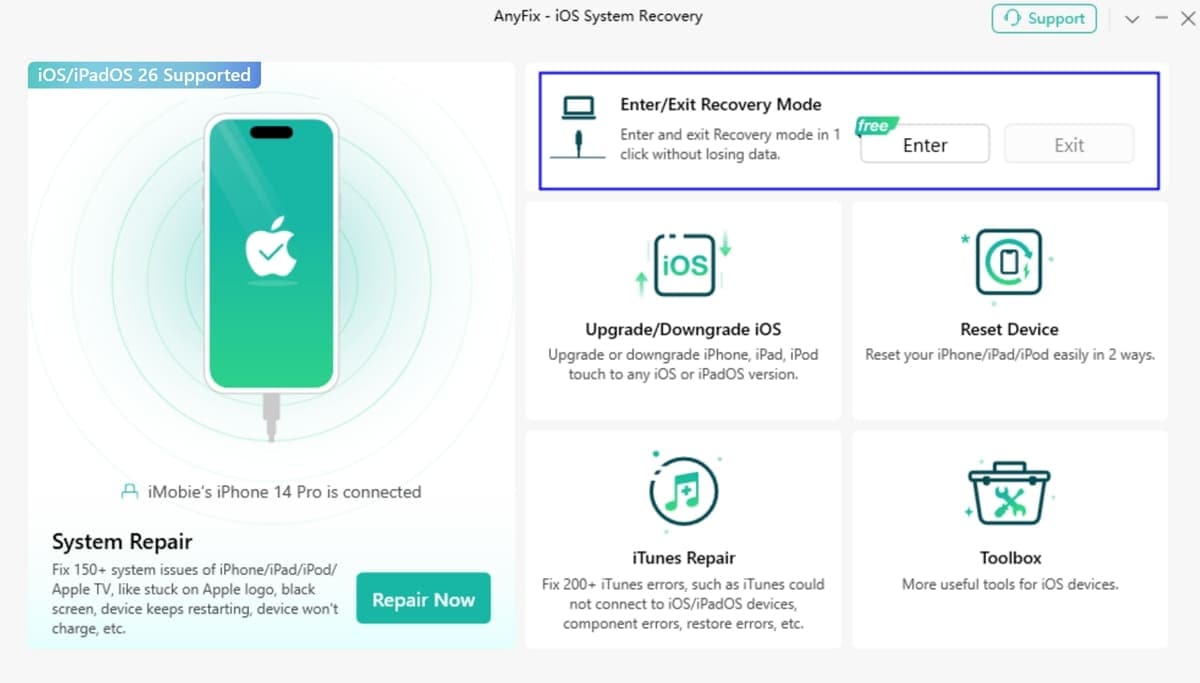
The 2nd fault is a stuck state rather than a broken system. A device pinned on the Connect to Computer prompt is what Dr.Fone vs AnyFix for iPhone stuck in recovery mode comes down to. Both apps put a phone into recovery mode at no cost. Getting yours back out is free on Dr.Fone, while iMobie's FAQ lists only recovery entry and device reset among its free functions.
Update Failure Test
The 3rd fault is an interrupted update, which may leave an iTunes error code behind. AnyFix supports 200+ iTunes errors, including 4013, 3194, 9006, and 1667. Dr.Fone also covers 200+ iTunes errors. The bigger difference is repair routing, since failed updates can use Dr.Fone's data-preserving Standard Mode, while AnyFix may require Advanced Repair, which erases device data.
| Scoring Line | Dr.Fone - System Repair (iOS) | iMobie AnyFix |
|---|---|---|
| Device Detection | Automatic on the cable | Automatic, once iTunes is present |
| Repair Success | All 3 resolved | All 3 resolved, at a deeper tier |
| Repair Time | Wondershare quotes about 10 minutes | iMobie publishes no figure |
| Data Retention | Full on all 3 | Preserved on Recovery Mode exit |
| Ease Of Use | 3 steps and no prerequisites | 3 steps behind an iTunes install |
| Overall Score | 4.5/5 | 2/5 |
Verdict: Dr.Fone wins because it repairs all 3 faults while preserving data and requires no extra software. AnyFix handles the same issues, but deeper repair modes can erase data, while Recovery Mode exit preserves it.
Part 6. Firmware Management and iOS Version Control
In addition to testing, learn which tool offers better iOS version control: Dr.Fone System Repair or AnyFix.
Workflow & System Requirements
Both applications identify connected devices automatically and fetch official firmware packages directly from Apple. However, pre-repair requirements differ significantly:
| Feature / Requirement | Dr.Fone - System Repair (iOS) | iMobie AnyFix |
|---|---|---|
| Model Detection | Automatic | Automatic |
| Prerequisites | None | Requires iTunes installation |
| PC Disk Space | 7 GB | 500 MB |
| Device Free Space | None required | 800 MB required on iPhone |
| Package Details | Shown during setup | Shown before download |
Version Control & Beta Access
Neither application requires a jailbreak, and both operate strictly within official Apple signature limits.
- Upgrades & Downgrades: Both Dr.Fone and AnyFix support iOS upgrades and downgrades, with data retention depending on the selected process.
- Beta System Access: Both tools support iOS beta installations without a developer account.
- Beta Costs: Dr.Fone provides free beta installations, whereas AnyFix includes beta access within its standard tier.
Part 7. Compatibility: Which Tool Covers More of Your Setup?
If compatibility is your concern in this Dr.Fone System Repair vs AnyFix comparison, this table offers detailed answers:
| Platform Check | Dr.Fone - System Repair (iOS) | iMobie AnyFix |
|---|---|---|
| iPhone and iPad | iOS 5.0 and later | iPhone 3G through iPhone 17 |
| Other Apple Hardware | iPod touch | iPod touch and Apple TV |
| Windows | Windows 7, 8, 10, and 11 | Windows 8, 10, and 11 |
| macOS | macOS 10.13 and later | macOS 10.13 and later |
| License Reach | 5 devices and 2 computers | Up to 5 devices and 1 computer |
Verdict: AnyFix reaches further back on hardware and further forward on macOS, though 2 limits offset that. Its published iPad list stops at the tenth-generation model, and a Windows 7 machine falls outside its requirements altogether.
Part 8. Speed and Ease: Which One Requires Less Work?
Target reach differs from total effort, so this scorecard measures every obstacle between you and a restored phone to determine Dr.Fone vs AnyFix: which is better:
| Workflow Stage | Dr.Fone - System Repair (iOS) | iMobie AnyFix |
|---|---|---|
| Initial Setup | Install, connect, and start repair | Install AnyFix and iTunes first |
| Repair Options | General Reset, Standard, Advanced, and Anti-Recovery | Standard, Advanced, and Ultimate Repair |
| Possible Delays | Device connection or firmware download | Connection, download, or 800 MB device space |
| Firmware Handling | Detects and matches compatible firmware | Detects and displays compatible firmware |
| Repair Guidance | Instructions for Recovery and DFU modes | Instructions for Recovery and DFU modes |
Verdict: Dr.Fone offers the simpler workflow with fewer setup requirements. AnyFix requires iTunes and 800 MB of free device storage, adding extra prerequisites before repair can begin.
Part 9. Cost Comparison: Free Tools, Paid Repair, and Refund Terms
To compare the cost factor between Dr.Fone vs AnyFix, review this section to choose the right pick:
| Cost Factor | Dr.Fone - System Repair (iOS) | iMobie AnyFix |
|---|---|---|
| Entry Plan | $24.95 monthly | $29.99 monthly |
| Annual Plan | $49.95 yearly | $49.99 yearly |
| Outright Purchase | $69.95, one-time purchase | $69.99, one-time purchase |
| Annual Cost Per Device | Around $10 across 5 devices | Around $10 across 5 devices |
| Free Features | Recovery entry/exit, DFU exit, and General Reset | Recovery entry, iOS upgrade, and device reset |
| Refund Window | 7 days | 7 days monthly; 60 days annual/one-time |
Cost-effective Pick: Both tools have nearly identical pricing across their paid plans. However, Dr.Fone provides broader license coverage with 5 devices and 2 computers across its plans, while AnyFix provides 1 computer and up to 5 devices.
Part 10. Dr.Fone vs AnyFix: Pros, Cons, and Best Fit
Everything above clearly concludes which tool is best and why. If you still ask: Dr.Fone vs AnyFix, which is better, take a look at some benefits and drawbacks.
Dr.Fone - System Repair (iOS) Pros and Cons
Here are Dr.Fone's key strengths and limitations across repair, data safety, and usability.
Pros
- Apple logo, boot loop, black screen, and update failures can be repaired without erasing data.
- Recovery Mode and DFU exits, General Reset, and beta installation are free.
- Every plan covers 5 devices and 2 computers, with no iTunes required.
Cons
- Asks you to free up 7 GB on the computer ahead of the download.
- A one-week refund claim window, and no Apple TV in its device list.
iMobie AnyFix Pros and Cons
As for AnyFix, here is what you need to know:
Pros
- 60-day money-back guarantee, the longest of any tool in this class.
- Around 20 iTunes error numbers spelled out on the overview page.
- Apple TV support and a device list running back to iPhone 3G.
Cons
- Advanced and Ultimate Repair erase data, targeting the most common faults.
- Requires iTunes, 800 MB of device space, and covers 1 device.
Best for Different Repair Needs
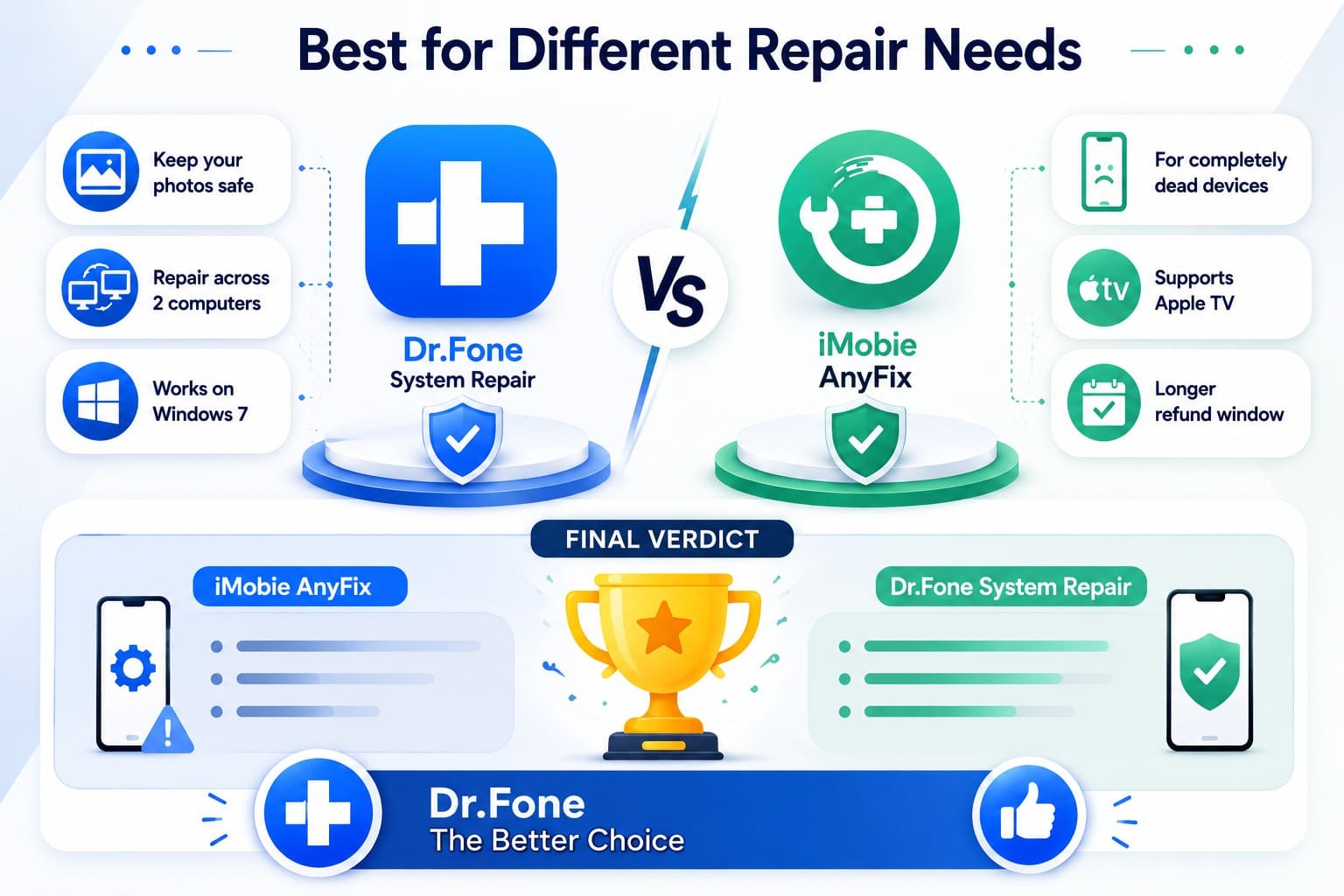
Between Dr.Fone System Repair or AnyFix, choose Dr.Fone when preserving unbacked data matters, or you need coverage across 2 computers. It also supports Windows 7. Pick AnyFix when you need Apple TV repair, its Ultimate Repair mode for severe system issues, or a longer refund window on annual and one-time plans.
Final Verdict
Settling Dr.Fone vs AnyFix comes down to where each vendor draws the line on erasing.
- iMobie AnyFix: Uses a strict severity scale where the Ultimate tier can revive completely dead devices. However, common issues like boot loops or update failures force you into Advanced modes that erase all personal files.
- Dr.Fone System Repair: Handles these common system errors through its data-safe Standard Mode. It also adds free Recovery Mode and DFU exits, beta installation, and broader computer coverage.
The Bottom Line: To recover your system without data loss, Dr.Fone is the clear winner.
Conclusion
The debate on Dr.Fone System Repair vs iMobie AnyFix centers on data safety and setup convenience. AnyFix targets unpowered devices or Apple TV models, but it forces total data loss during routine system repairs. Dr.Fone - System Repair (iOS) provides the superior solution. It resolves boot loops, frozen screens, and update failures safely without data loss or iTunes dependencies.




Frequently Asked Questions
-
1. Why does AnyFix offer multiple repair levels?
Each tier handles a different level of system damage. Standard Repair addresses minor issues while preserving your data. Advanced Repair targets more serious problems, while Ultimate Repair handles severe system failures. iMobie states that both Advanced and Ultimate Repair erase device data. -
2. Which tool is better for repeated boot loop problems?
Dr.Fone is the stronger choice for recurring boot loops because Standard Mode preserves your data during repair. AnyFix routes boot loop repairs through Advanced Repair, which erases device data each time. -
3. Can Dr.Fone or AnyFix repair iOS without iTunes?
Dr.Fone works without iTunes, while AnyFix lists pre-installed iTunes as a system requirement. This gives Dr.Fone a simpler setup with fewer software prerequisites before repair. -
4. Which tool is more suitable for older iPhone models?
Dr.Fone is the better overall choice, supporting devices running iOS 5.0 and later while offering data-safe repairs and broader license coverage.
 Add Wondershare Dr.Fone as a preferred source on Google