Move contacts, messages, photos, videos, app data, and more between iOS and Android.

 100% Security Verified | No Subscription Required | No Malware

 :
: 
 ChatGPT
 Perplexity
 Gemini
 Claude
 Grok
Grok
When a new iPhone is due soon, people often find themselves at a crossroads, deciding whether to purchase the iPhone 17 or wait for the iPhone 18. You might feel like you are missing out on future upgrades if you choose too easily, and being too late can mean you miss out on an improved phone experience.
Therefore, here is the comparison of iPhone 18 vs iPhone 17 along with the important differences, so that you know why to upgrade or delay. You will also get to know the hidden cost of delay with detailed tips on who should wait or buy. Nonetheless, if you choose to upgrade, learn how to ensure a safe migration using built-in and third-party tools, such as Dr.Fone - Phone Transfer.
In this article
- Part 1. iPhone 17 vs iPhone 18: What’s the Real Difference?
- Part 2. 5 Main Reasons to Buy iPhone 17 Now
- Part 3. What Are the Reasons to Wait for iPhone 18?
- Part 4. Hidden Costs of Waiting for iPhone 18
- Part 5. Who Should Upgrade to iPhone 17 Right Now?
- Part 6. Who Should Wait for iPhone 18?
- Part 7. How to Ensure Data Safety Before You Upgrade or Switch to an iPhone?
- Final Decision Guide: Should You Wait or Upgrade?
- Frequently Asked Questions
Part 1. iPhone 17 vs iPhone 18: What’s the Real Difference?
To determine whether to wait for iPhone 18 or buy iPhone 17, this section can help in decision-making. Review the detailed, quick overview-based table mentioned below and decide what to do:
| Category | iPhone 17 (Current) | iPhone 18 (Expected/Rumored) |
|---|---|---|
| Release Timing | Available now | Likely late 2026 (some models possibly 2027) |
| Chip | A19 | A20/A20 Pro, ~10–15% faster, more efficient |
| Display Size (Base) | 6.3‑inch OLED | Similar sizes; smaller Dynamic Island on Pro |
| Refresh Rate (Base) | 120 Hz ProMotion | 120 Hz; possible brightness/tuning gains |
| Ultra‑wide Camera | 48 MP | Likely improved low‑light and sharpness |
| Telephoto | Pro models only, 5x (17 Pro Max) | Potentially better zoom and low‑light (Pro) |
| Front Camera | 18 MP “square sensor” selfie (17) | Higher‑res / wider, more AI features (rumored) |
| Ai/Apple Intelligence | Supported, but first generation on A19 | Deeper integration, more on‑device AI on A20 |
| Modem/Connectivity | Qualcomm X80 5G, Wi‑Fi 7, Bluetooth 6 | iPhone 18 Pro is rumored to use Apple’s C2 modem |
| Battery Life (Mixed Use) | Strong all‑day; better than 15/16 in many tests | Targeted 10–30% efficiency gains (chip + modem) |
| Storage Options | Base 256 GB; higher tiers up to 1 TB | Similar tiers; higher‑storage models may cost more |
| Port & Charging | USB‑C, fast charging (~50% in ~20–25 min with 40 W) | Same port; possibly slightly higher charge speeds |
| Software At Launch | iOS 26 | iOS 27, longer support window |
| Design/Build | Flat edges, aluminum (17), titanium (Pro) | Minor refinement; same materials, new colors |
| Who It Suits | Ready to upgrade today; coming from an iPhone 13 or older; focused on value right now | Can delay upgrading; seeks major camera and AI improvements; already owns an iPhone 15 Pro or 16 Pro |
Part 2. 5 Main Reasons to Buy iPhone 17 Now
The decision on whether to buy the iPhone 17 or wait usually needs a logical explanation to make the right choice. Hence, this section has gathered possible reasons why one should buy the iPhone 17 right now:
-
1 Bigger Display Upgrade
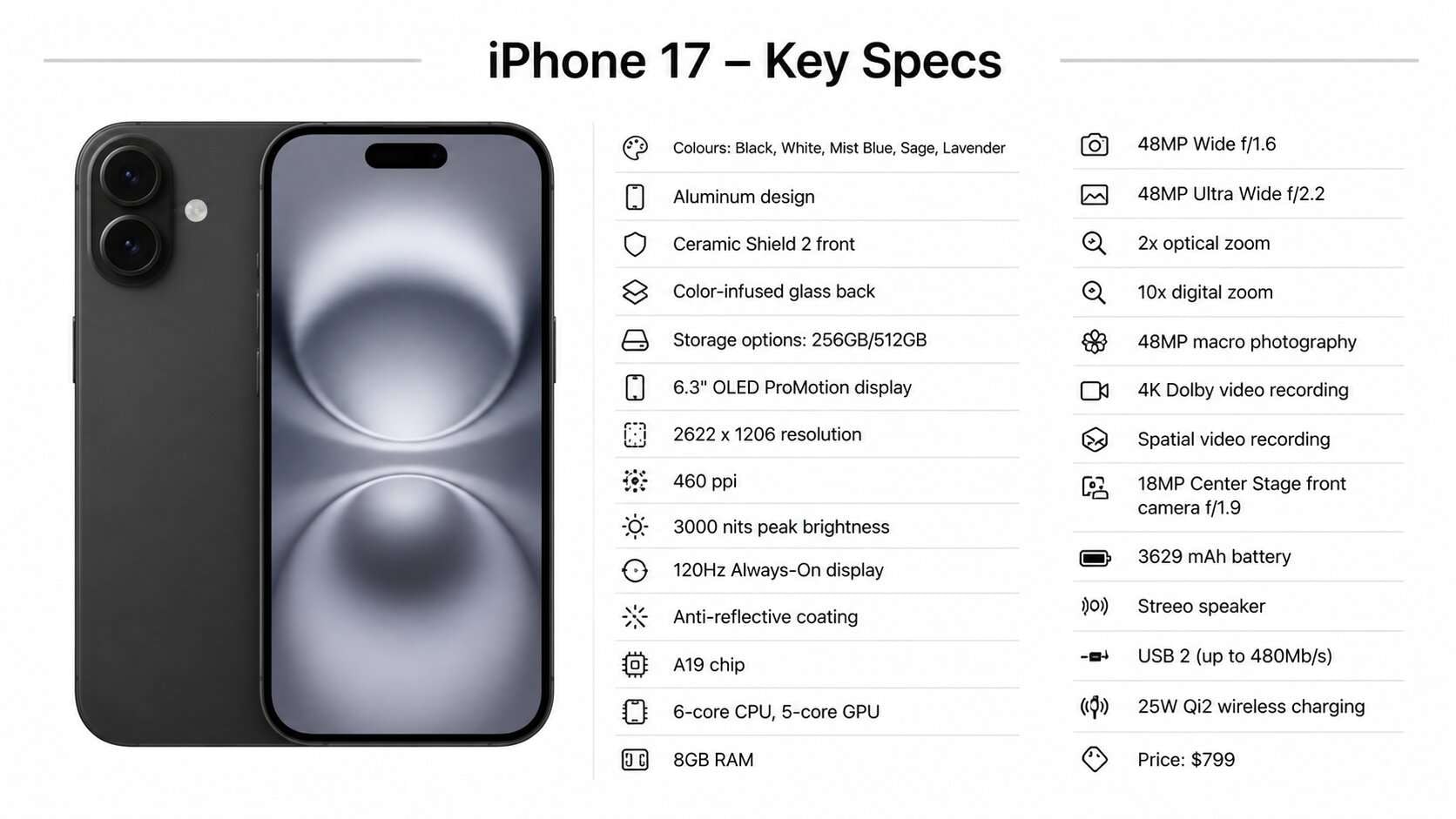
iPhone 17 has a 6.3-inch OLED screen with sharp 460 ppi resolution and 2,000,000:1 contrast ratio. Apple's page further says that the body weighs 6.24 ounces and has an aluminum design and Ceramic Shield 2 front with Color‑infused glass back. It also adds 120Hz ProMotion, making scrolling and gaming much smoother than on older models.
-
2 A19 Chip + Battery
Powered by the A19 chip, iPhone 17 is faster and handles multitasking and gaming easily. Besides this, the battery is ~3690 mAh and has smart power control to ensure good all-day battery life and increased security protection. Since its release on September 25, the model's price has started at $799, and it's a good time to buy, says MacRumors.
-
3 Improved Cameras
Dual 48 MP rear cameras to capture extremely detailed photos, one main and one ultra-wide. It also has next-generation portraits with Focus and Depth Control, so there are also improvements for low-light shots. In addition, Night Mode works faster and delivers clearer results, even in dark environments.
-
4 Connectivity & Safety
iPhone 17 is compatible with Wi-Fi 7, Bluetooth 6, 5G, and USB-C fast charging. Additionally, it includes MagSafe, IP68 water resistance, crash detection, and Emergency SOS for extra safety and future-proof use.
-
5 Long-Term Value
The base models start at 256GB-512GB storage, which gives more space from the start. Moreover, with long iOS support of 5-7 years, it remains up to date, secure, and useful for many years.
Part 3. What Are the Reasons to Wait for iPhone 18?
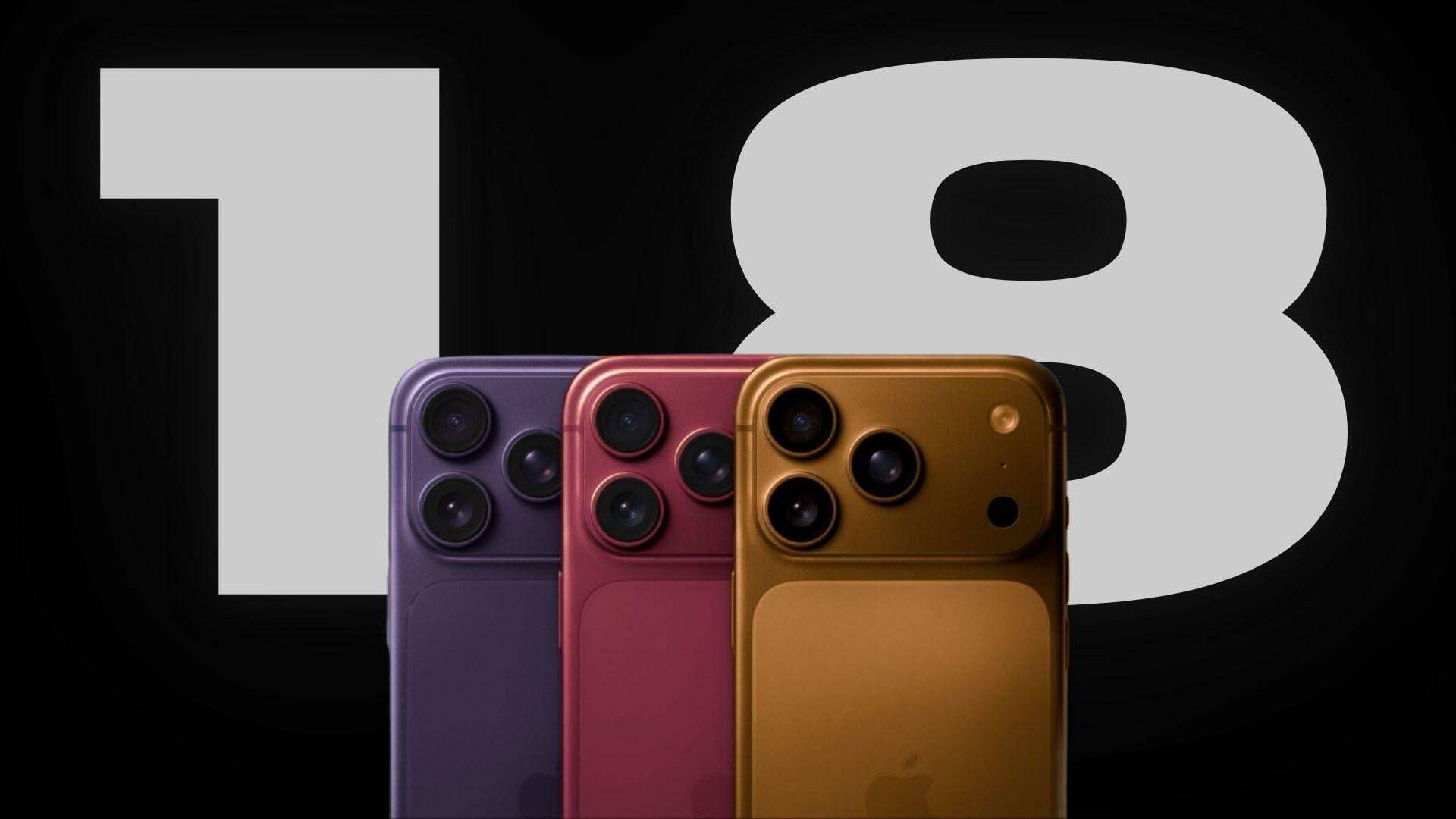
MacRumors reports that Apple will release the iPhone 18 Pro in September 2026, with multiple rumored upgrades. So, this section explains why you should wait for iPhone 18 rather than purchasing iPhone 17 this year:
-
1 A20 Chip Power Boost
iPhone 18 Pro is expected to use a new 2nm A20 Chip that will give around 15% faster performance and up to 30% better efficiency than iPhone 17. Though there will be no apparent design changes, it will have a C2 modem and will follow the “Split Launch Strategy.”
-
2 Better Camera Control
As rumored, Apple will launch the iPhone 18 Pro, the iPhone 18 Pro Max, and the iPhone Fold in the Fall 2026. Since the company will introduce the first foldable iPhone, it might include a variable aperture main camera. This will let you manually adjust blur and lighting for sharper photos, better portraits, and improved light shots, like with a DSLR. The iPhone 18 models will have a 24-megapixel front camera, up from 18 megapixels across the iPhone 18 models.
-
3 Cleaner Display Design
Rumors also say that the Pro models will have a “Smart Dynamic Island” display. In the Chinese leaker Ice Universe's video leaks, the bezels on the next-generation devices will remain the same as those on the iPhone 17 series. However, some Face ID components have been moved under the display. Thus, this gives creators a cleaner front look and provides users with more stable screen space while maintaining Face ID support.
-
4 Stronger Connectivity
iPhone 18 Pro may use Apple’s C-series 5G modem with built-in Wi-Fi 7 support. So, as this phases out Qualcomm modems, it will provide mmWave connectivity. Nonetheless, the C1X modem in iPhone 18e only supports sub-6GHz 5G speeds and does not support faster mmWave 5G. Despite that, the C2 modem will have a “Limit Precise Location” privacy feature to reduce the extent to which exact location is shared with mobile networks for better privacy.
-
5 Smarter Apple Intelligence
MacRumors further reports that the iPhone 18 lineup is expected to focus heavily on Apple Intelligence and an upgraded Siri. So, it will now handle on-device AI tasks like summarizing, editing, and smart assistance more smoothly.
Part 4. Hidden Costs of Waiting for iPhone 18
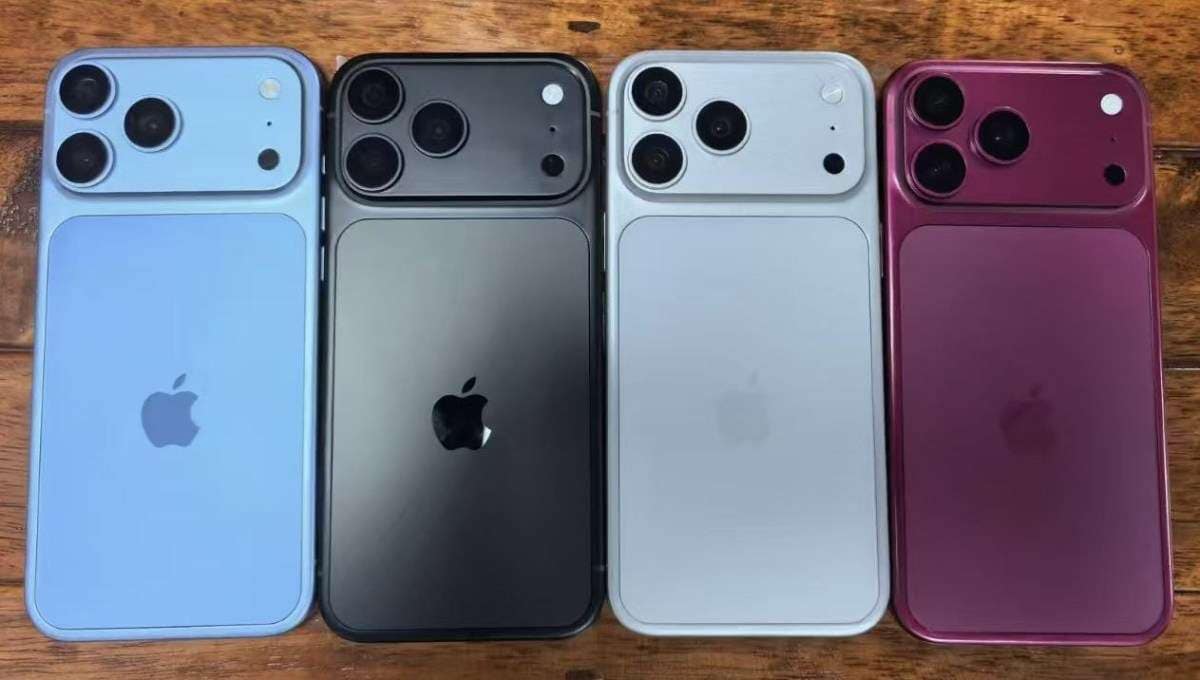
Given the possible upgrades in the iPhone 18 series, you might wonder whether to buy the iPhone 17 now or wait for the iPhone 18. To make this easier for you, review the 3 main hidden costs of waiting for the iPhone 18:
-
1 Delayed Upgrade Experience
If you wait for iPhone 18, the chances are you will be on your current phone for at least 8-9 months. This is because rumors suggest that the Pro models will be released in Fall 2026, while non-Pro models will launch in early 2027. During that time, you will be using outdated updates and will continue to experience issues such as battery drain or slow performance.
-
2 Possible Price Increase
Another notable aspect is that memory and storage costs are rising, and the iPhone 18 Pro and other models may become more expensive. According to Teltarif, the biggest price jump is expected for the 512GB and 1TB versions. This means you could pay more for the same amount of storage compared to the iPhone 17. Reports also suggest that there will be an increase of around $100 across some models due to the cost of RAM and flash memory. Thus, iPhone 17 remains the affordable option for some time, says SamMobiles.
-
3 Overhyped Expectations Risk
Based on the iPhone 18 vs iPhone 17 comparison, all iPhone 18 details are based on leaks and predictions; nothing is confirmed yet. Since plans can change, some updates, like full under-display Face ID, have already been scaled back to smaller upgrades, like a smaller Dynamic Island. So, if you wait and the upgrades are small, you may end up paying more for slight improvements and getting less overall value.
Part 5. Who Should Upgrade to iPhone 17 Right Now?
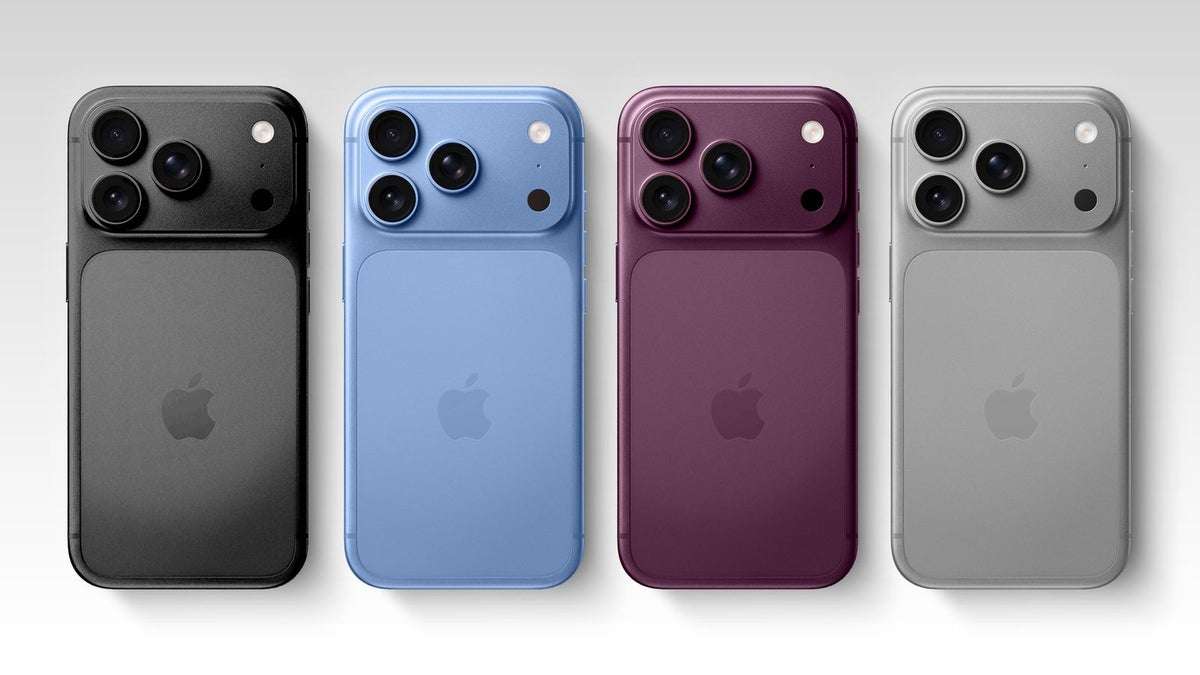
Despite the rumors, iPhone 13 or older, or anyone with iPhone 14 or iPhone 14 Plus issues, should not wait for iPhone 18. Moving to the iPhone 17 series will offer a 120 Hz display, an A19 chip, USB-C, better cameras, longer iOS support, and a completely new experience. Additionally, gamers and multitaskers can benefit from faster performance and stable gameplay while creators get better 48 MP cameras, clearer video, and stronger selfies.
Part 6. Who Should Wait for iPhone 18?
As an iPhone 17 or a strong iPhone 16 Pro user, iPhone 18 is expected to feel more like a small upgrade. It may bring larger changes, such as a variable-aperture camera, stronger AI features, and a faster A20 chip, so waiting makes sense if you want those improvements. If your current phone is smooth, has a good battery, and meets your daily needs, skipping a year won’t cause so much change.
Part 7. How to Ensure Data Safety Before You Upgrade or Switch to an iPhone?
As you decide to buy the iPhone 17 or wait for the iPhone 18, phone migration is a major concern for all iOS users. Hence, this section will explain safe migration and backup methods for moving data between devices without loss.
1. Quick Start iPhone Transfer Method
This method transfers everything between devices using Apple’s encrypted system and establishes a secure connection over Bluetooth and Wi-Fi. It also reduces mistakes since the setup guide walks you stepwise, as guided below:
-
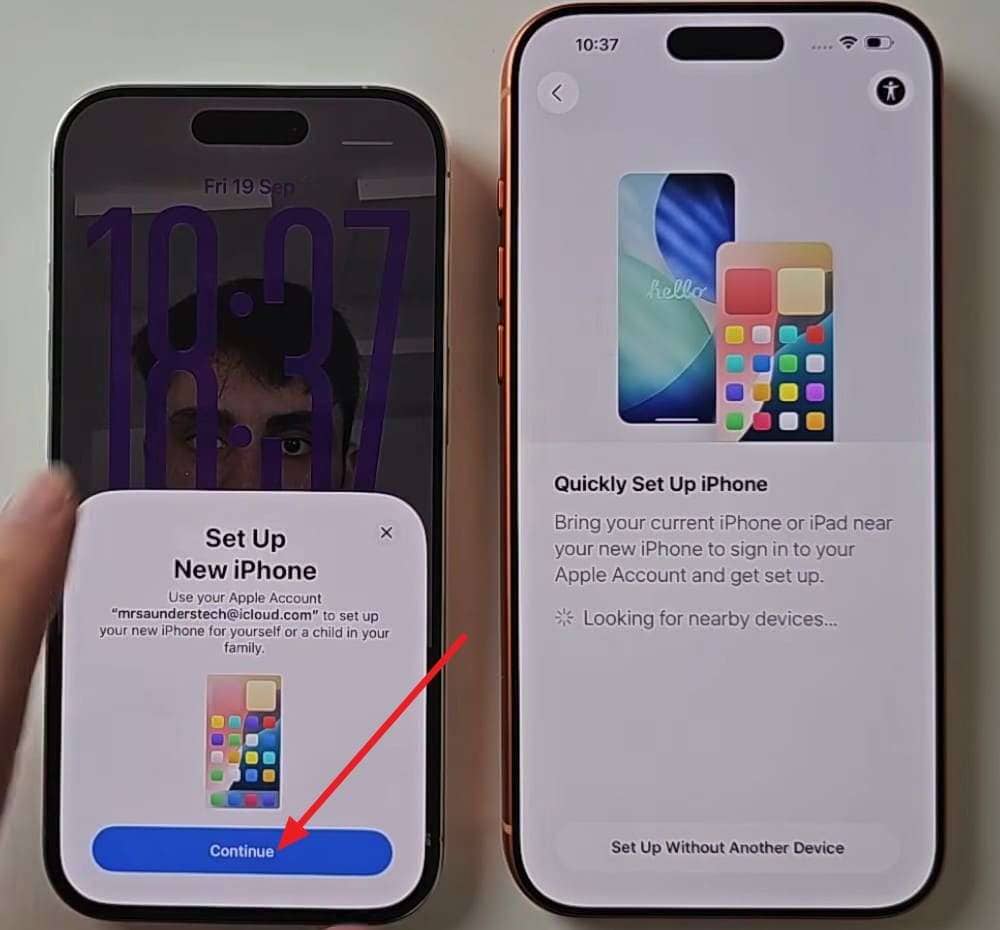
Step 1 With the phone connected to Wi-Fi and Bluetooth turned on, place the old iPhone near the new iPhone 17 or 18. Tap the “Continue” button on the current device, asking to set up the new device.
-
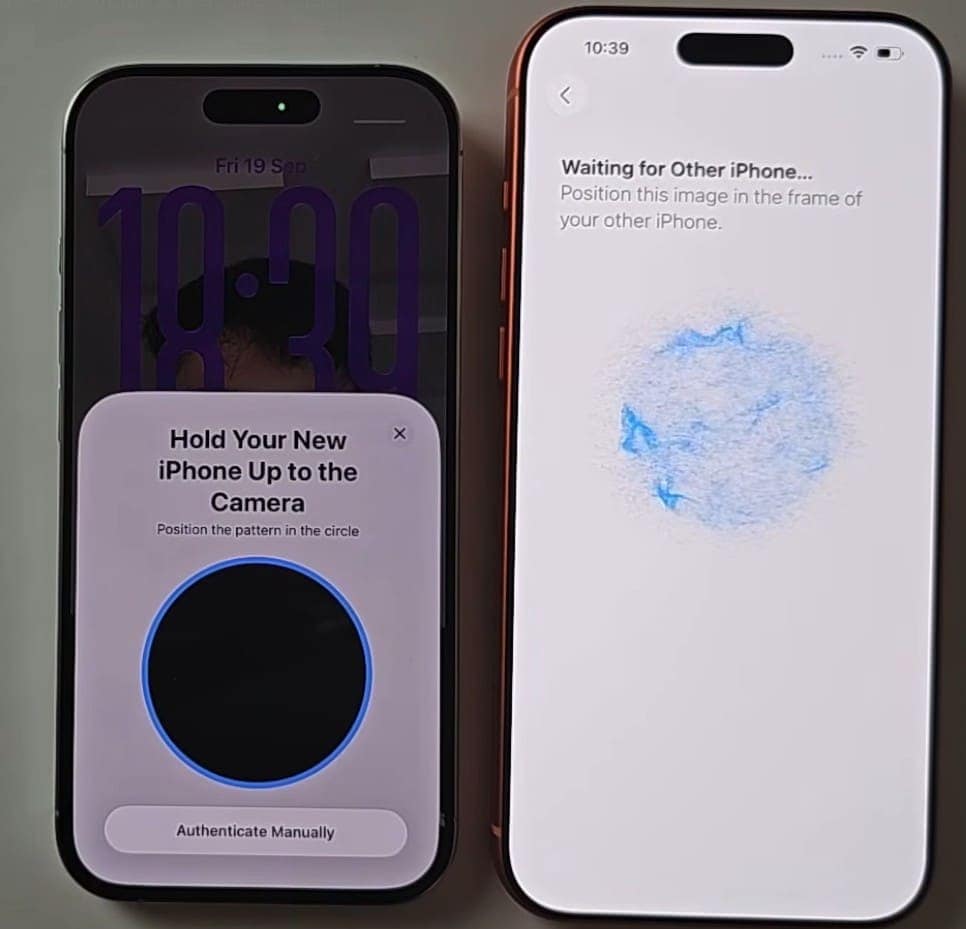
Step 2 When the animation appears, hold your previous iPhone over the new one to link the devices.
-
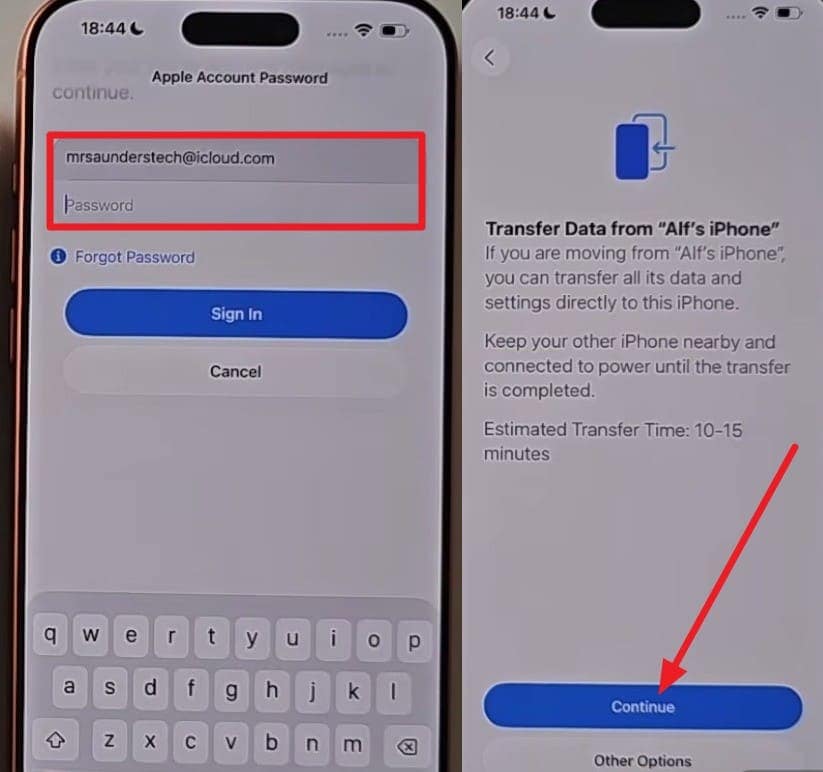
Step 3 Then, pick the “Set Up for Me” on the old phone, press “Continue” on the “Transfer All Data From (User) Phone” interface, and add Apple ID details when prompted.
-
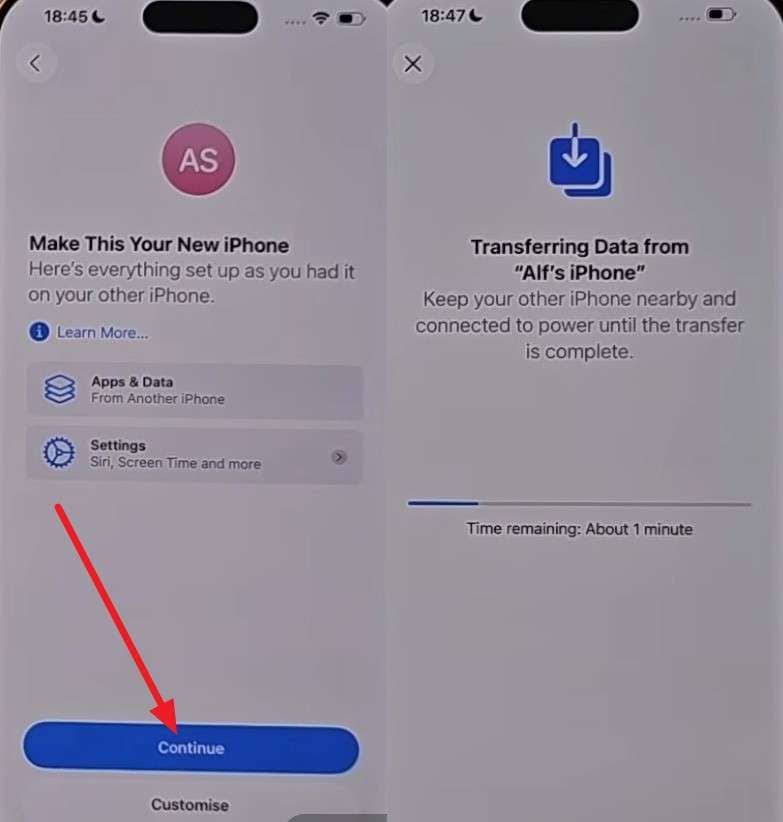
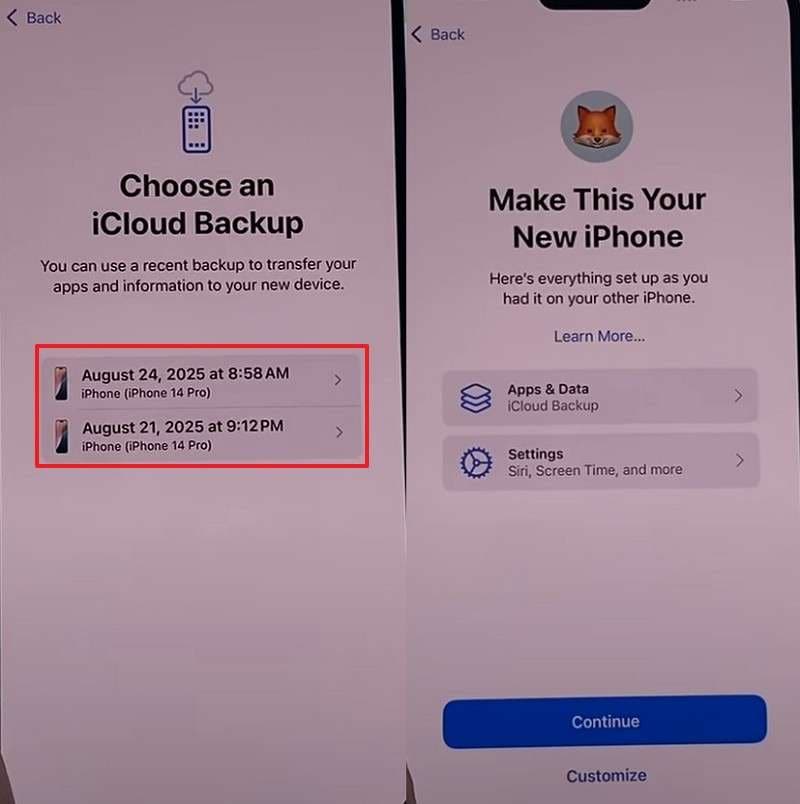
Step 4 Tap “Continue” on the “Make This Your New iPhone” screen to see the transfer progress bar.
2. Manual Backup Restore Method [Restore from iCloud Backup]
After the detailed iPhone 18 vs iPhone 17 comparison, you can also restore the iCloud backup to transfer data to the new device. This method creates an encrypted copy of the device, which is saved to your Apple ID. So, regarding backup and restore, the detailed steps are mentioned ahead for quick data migration:
-
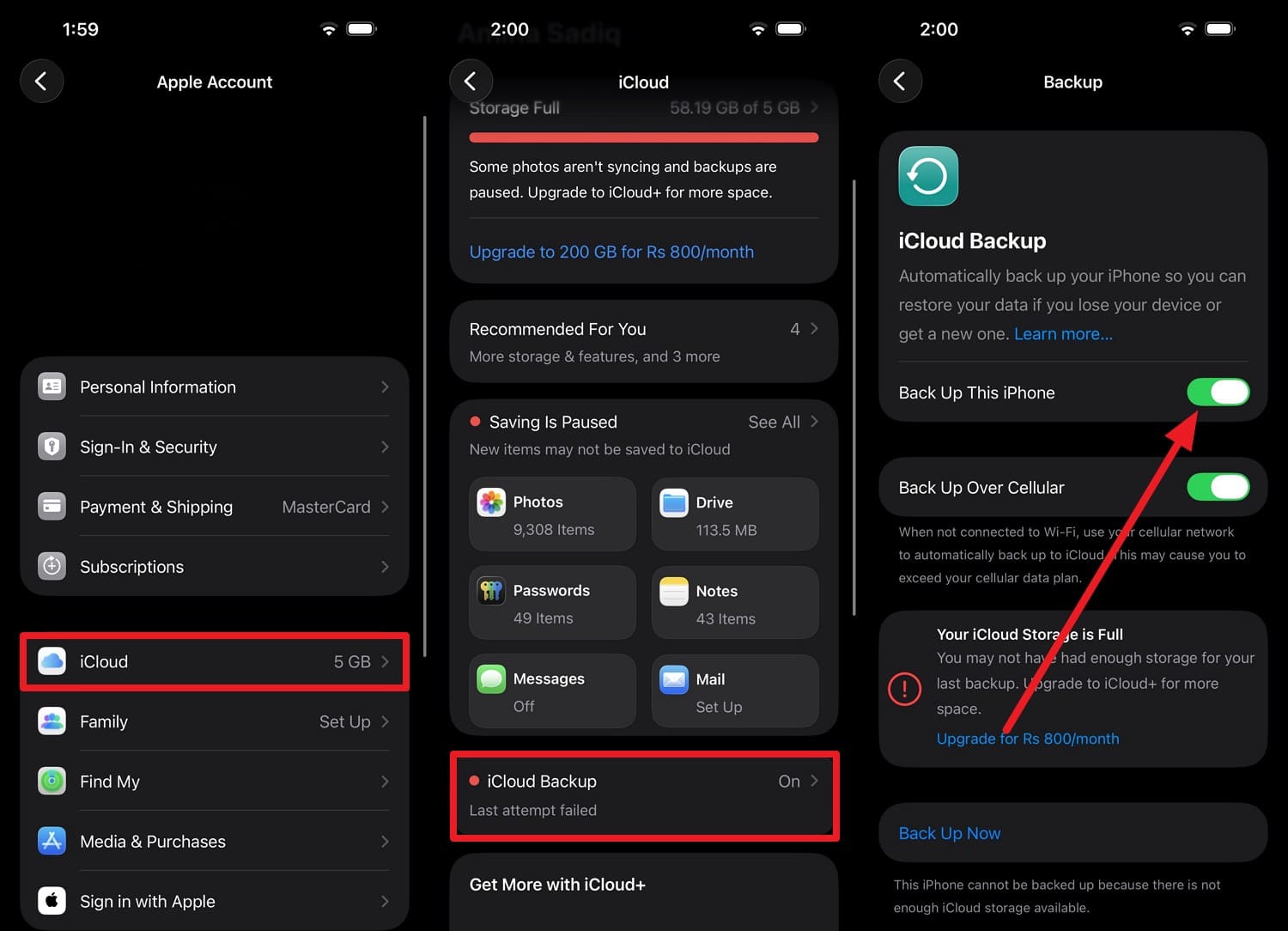
Step 1 On the old iPhone, tap the Apple ID in Settings, then choose “iCloud > iCloud Backup,” and enable the “Back Up This iPhone” feature.
-
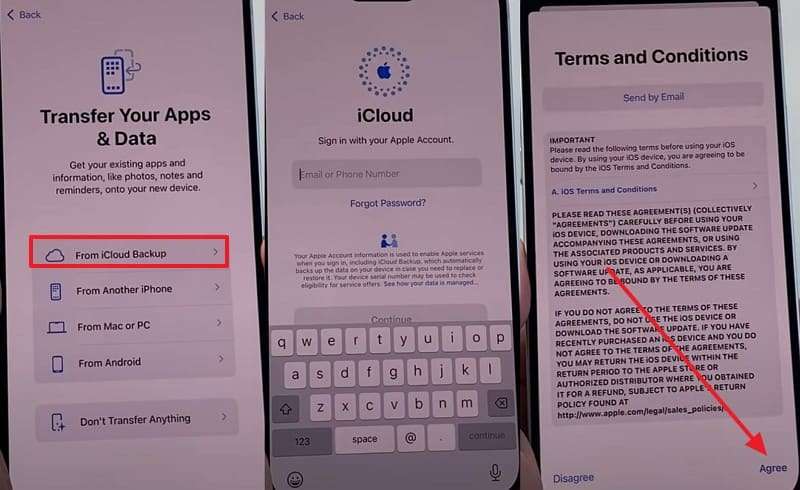
Step 2 Ensure your phone is connected to Wi-Fi and power while it completes. Now, continue setting up on the iPhone 17 or 18 and on the “Transfer Your Apps & Data” screen, pick “From iCloud Backup.” Add Apple ID, and “Agree” to the terms to continue.
-
Step 3 Choose the backup from the old iPhone, then tap “Continue” on the following screens. Stay connected to Wi-Fi, so everything can be fully restored.
3. Use Phone Transfer Tools (Dr.Fone – Phone Transfer) for Safe Migration
Whether you have decided to wait for iPhone 18 or buy iPhone 17, you can use Dr.Fone - Phone Transfer for quick data migration. Unlike Apple’s methods, it requires no extra setup and connects devices only via a USB cable. As this phone transfer tool is compatible with Android 16 and the latest iOS 26, you can choose to move around 12 data types to a new iPhone using a selective transfer option.
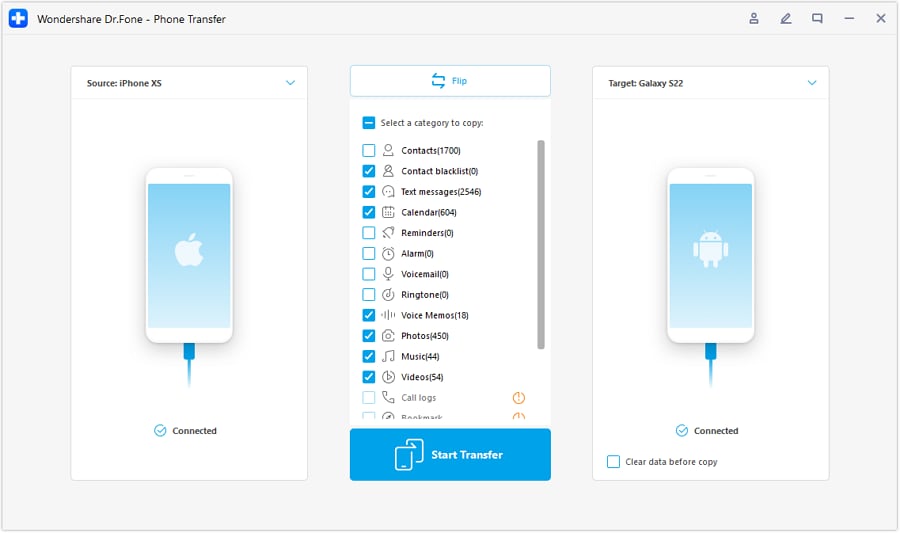
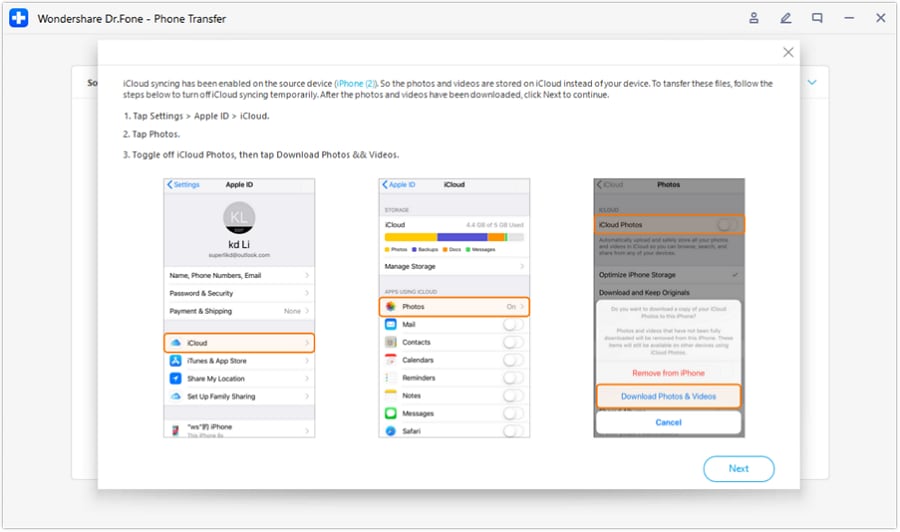
Furthermore, users can transfer data between Android and iOS in just 2-3 simple steps. The Flip icon makes it seamless to select the source and target devices for data transfer without loss. Since it only requires turning off iCloud syncing, the rest of the method is local, secure, and uninterrupted compared to others.
 Move data between iOS to Android and vice versa.
- Transfer contacts, SMS, photos, videos, music, and more types.
- Available with all phones with Android and iOS versions.
- Simple, click-through process.

Guide to Move the Data from Old iPhone to iPhone 17/18 with Dr.Fone
To verify all the claims of this tool, let’s perform a real-world test for iOS to iOS migration via the mentioned guide:
-
Step 1 Access the iPhone Transfer Tool
Whether you have decided to buy the iPhone 17 or wait, connect the device to the tool after picking the “Phone Transfer” tool.

-
Step 2 Choose to Move Data from Old to New Device
Use the “Flip” icon to distinguish between old and new iOS devices, select data types, and tap the “Start Transfer” button.
-
Step 3 Follow the Instructions for iCloud Syncing
Follow the instructions for disabling iCloud syncing, then tap the “Next” button to transfer data to the new iPhone.
Final Decision Guide: Should You Wait or Upgrade?
Between iPhone 18 vs iPhone 17, iPhone 17 gives stronger upgrades, so it's good if your phone is old or slow. However, iPhone 18 brings bigger AI, camera, and A20 chip improvements, but it is still based on leaks and not confirmed. Regardless of the decision you make, use Dr.Fone - Phone Transfer for quick and setup-free data migration between devices.




Frequently Asked Questions
-
1. Is it a bad time to buy the iPhone 17 if the iPhone 18 is close?
It is not a bad time to buy the iPhone 17 if your current phone is slow or old, because it already gives major upgrades and is available now. -
2. Will my data move automatically when I upgrade to iPhone 17 or 18?
Your data does not always move automatically, so you may still need tools like Quick Start, iCloud, or Dr.Fone- Phone Transfer to safely transfer everything. -
3. Do I need iCloud backup if I use Quick Start?
You do not strictly need an iCloud backup when using Quick Start, but it is still strongly recommended for added safety and full data protection. -
4. Is it safe to use third‑party transfer tools when changing phones?
Third-party transfer tools, like Dr.Fone - Phone Transfer, can be a safe option as they need no setup and allow data to be moved selectively.
 Add Wondershare Dr.Fone as a preferred source on Google