Resolve common problems and system crashes on both iPhone and Android devices.

 100% Security Verified | No Subscription Required | No Malware

 :
: 
 ChatGPT
 Perplexity
 Gemini
 Claude
 Grok
Grok
Dr.Fone and UltFone share similar complimentary tools for basic boot mode navigation. However, their advanced system repair capabilities diverge sharply. UltFone limits full system repair to Samsung devices, keeping the price lower. Conversely, Dr.Fone expands repair compatibility to Samsung, Xiaomi, Redmi, and POCO.
Dr.Fone costs approximately twice as much as its rival. Ultimately, buyers must weigh broader multi-brand repair support against total software investment. So, review this Dr.Fone Android System Repair vs UltFone Android System Repair comparison to determine whether Dr.Fone - System Repair (Android) is worth the investment.
In this article
- Part 1. Decision Snapshot: Dr.Fone Android Repair or UltFone?
- Part 2. What Does Each Android Repair Package Actually Cover?
- Part 3. Our Controlled Android Repair Trial
- Part 4. Repair Scope vs Data Risk: What Happens During a Fix?
- Part 5. Real-World Android Failures: How Each Tool Responds
- Part 6. Firmware Route: From Phone Detection to System Reinstallation
- Part 7. Brand Support vs Full-Repair Eligibility
- Part 8. How Much Time and Effort Does Each Repair Take?
- Part 9. Trial Access, Paid Features, Renewal, and Refunds
- Part 10. Trade-Offs and the Right Tool for Your Android Phone
Part 1. Decision Snapshot: Dr.Fone Android Repair or UltFone?
Most people want a quick answer to: Dr.Fone vs UltFone Android: which is better? Compare the following 6 key metrics to see which tool performs better and why:
- Overall Recommendation: Dr.Fone - System Repair (Android), because its full repair supports 4 phone brands instead of only Samsung.
- Better for Full System Repair: Dr.Fone, which repairs Xiaomi, Redmi, and POCO devices while preserving data and without requiring bootloader unlocking.
- Better for Recovery/Fastboot Utilities: Dr.Fone, since UltFone's FAQ limits 2 of its 6 free mode functions to 5 uses each. Repair Android System and One-click to Clear System Cache require payment.
- Better for Broader Brand Repair: Dr.Fone again, supporting Xiaomi, Redmi, and POCO alongside Samsung for full system repair.
- Cost-Friendly: UltFone costs roughly half across comparable plans and offers a lifetime license, but provides fewer repair features and limits full system repair to Samsung devices.
 Fix Android instantly – no skills needed.
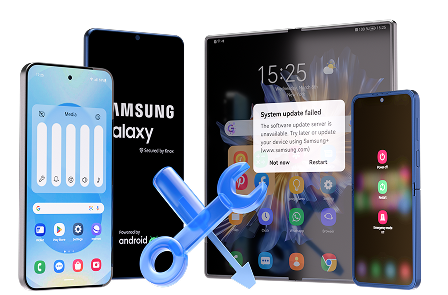
- Solve boot loop, black screen, won’t turn on, etc.
- High success rate for all system issues.
- User-friendly interface with easy-to-follow steps.
Part 2. What Does Each Android Repair Package Actually Cover?
Review this Dr.Fone System Repair vs UltFone Android System Repair comparison and get to know more about both tools:
| Comparison Area | Dr.Fone - System Repair (Android) | UltFone Android System Repair |
|---|---|---|
| System Repair Capability | Full system repair across 4 supported brands | Full system repair limited to Samsung |
| Supported Android Problems | 100+ issues, including boot loops, black screens, update failures, and bricked devices | 50+ issues, including boot loops, frozen screens, app crashes, and update failures |
| Eligible Phone Brands | Samsung, Xiaomi, Redmi, and POCO | Samsung only for full system repair |
| Mode Tools | 6 boot-mode operations with no published use limits | 6 boot-mode operations, with 2 limited to 5 free uses |
| Free Functions | All 6 mode tools are free; full system repair requires payment | Mode tools are free with some usage limits; full system repair requires payment |
| Firmware Handling | Confirms device details and matches the appropriate firmware package | Requires device information before matching the appropriate firmware package |
| Data-Loss Risk | Preserves data on Xiaomi, Redmi, and POCO; Samsung repair may erase data | Full system repair is advertised as preserving data |
| Platform Availability | Windows version available | Windows version available |
| Software Updates | Free updates during the applicable license period | Free updates based on the selected license period |
| Pricing | Monthly: $19.95 Annual: $39.95 Perpetual: $49.95 |
1 Month: $9.95 1 Year: $19.95 Lifetime: $29.95 |
| Device Coverage per License | Up to 5 devices and 2 computers | Up to 5 devices and 1 PC |
| Key Advantage | Broader full-repair coverage across Samsung and Xiaomi-family devices | Lower pricing for Samsung-focused system repair |
| Best For | Users needing full repair across Samsung, Xiaomi, Redmi, or POCO | Cost-conscious Samsung users with fewer repair needs |
Part 3. Our Controlled Android Repair Trial
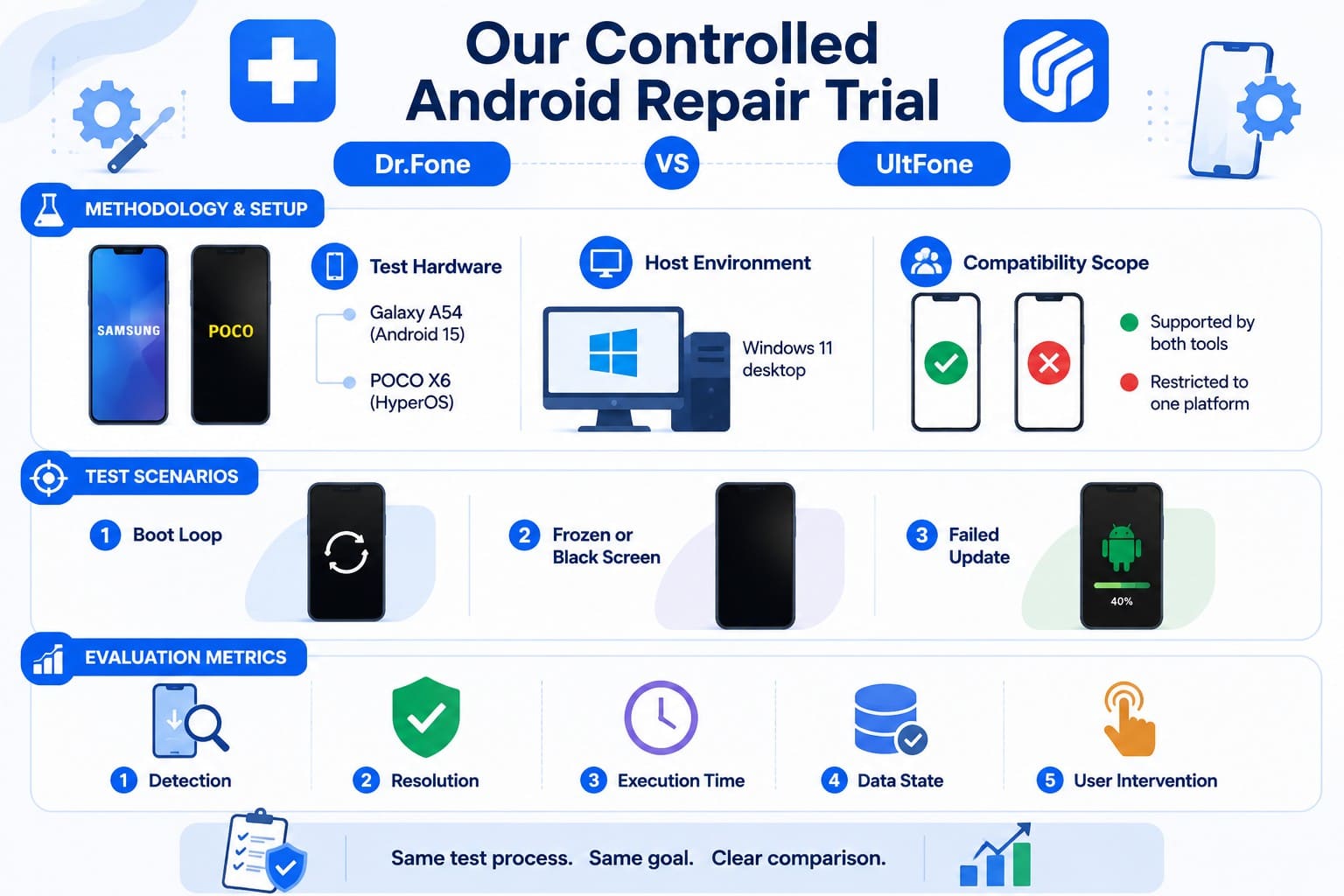
A specification table cannot show how software behaves when you connect a Redmi instead of a Galaxy. So, learn how this Dr.Fone Android System Repair vs UltFone Android comparison was done and what metrics were tested.
Methodology & Setup
These findings rely entirely on official vendor documentation, including eligibility notes, free-tier limitations, mode descriptions, and license terms.
- Test Hardware: Samsung Galaxy A54 (Android 15) and POCO X6 (HyperOS)
- Host Environment: Windows 11 desktop
- Compatibility Scope: One handset is supported by both utilities, while the other is restricted to a single platform.
Test Scenarios
Each device was subjected to 3 simulated failure states:
- Boot Loop: The handset cycles continuously through the boot logo without initialization.
- Frozen or Black Screen: Power is delivered to the device, but the display remains entirely unresponsive.
- Failed Update: An over-the-air (OTA) installation halts midway, preventing system boot.
Evaluation Metrics
The comparison evaluated 5 key outcomes for each repair scenario:
- Detection: Checks how successfully the software recognizes the connected device and identifies its required information.
- Repair Coverage: Assesses the tool’s ability to address the documented Android system fault.
- Repair Time: Compares the estimated repair duration stated in each vendor’s official documentation.
- Data Safety: Evaluates user data preservation and any documented risk of data loss during repair.
- User Intervention: Measures the manual input, device preparation, and interaction required throughout the repair workflow.




Part 4. Repair Scope vs Data Risk: What Happens During a Fix?
Based on the evaluation criteria, let’s compare the repair approach and data risk between Dr.Fone vs UltFone Android.
How Dr.Fone - System Repair (Android) Handles System Repair
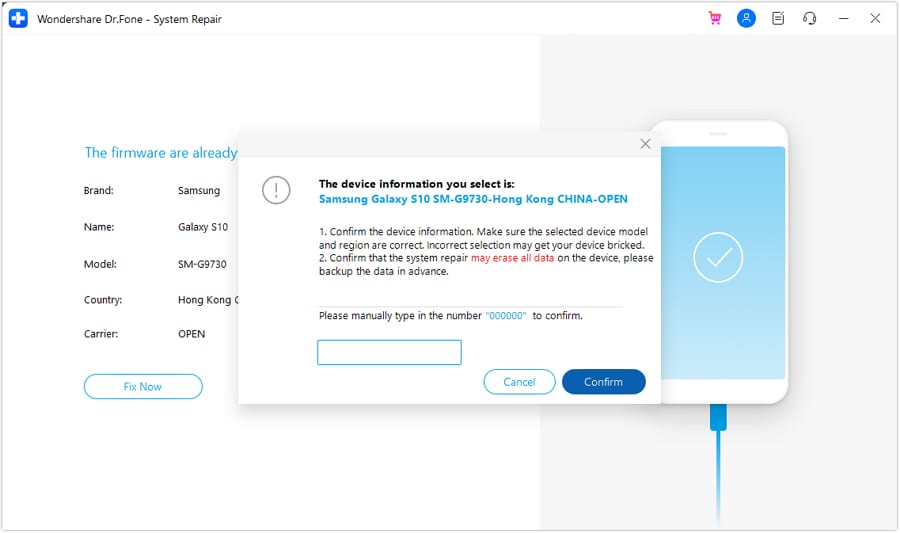
After you confirm the handset details, Dr.Fone downloads firmware matched to the device and guides it through Download Mode for repair. Xiaomi, Redmi, and POCO repairs are designed to preserve personal data.
Samsung differs because Dr.Fone's guide states that system repair erases device data and recommends creating a backup first. The repair workflow also requires confirmation before the firmware installation proceeds.
How UltFone Handles Android System Recovery
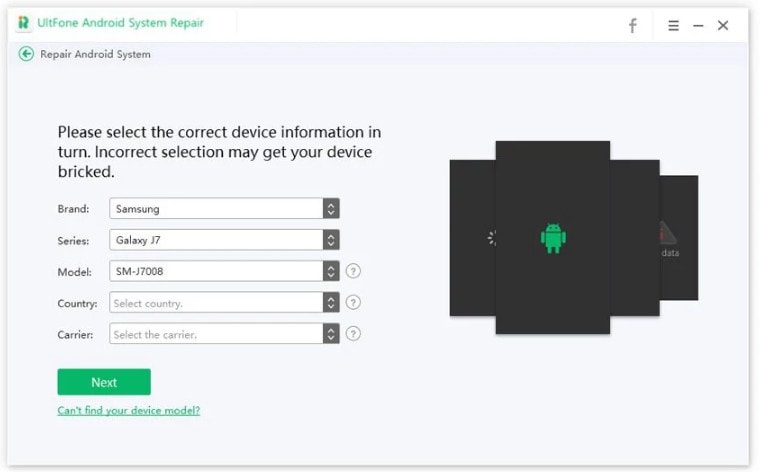
UltFone follows a 3-step repair process designed to resolve Android system issues without data loss. However, its full repair capability has one major limitation: Repair Android System supports only Samsung smartphones and tablets. UltFone highlights this restriction on its product page and FAQ. Although its free boot-mode tools support a broader range of Android devices, full firmware-based system repair remains limited to supported Samsung devices.
Which Repair Route Puts Less Data at Risk?
Compare both repair approaches side by side to understand the potential data-loss risk in this Dr.Fone Android Repair vs UltFone Android comparison table:
| Repair Metric | Dr.Fone - System Repair (Android) | UltFone Android System Repair |
|---|---|---|
| Samsung System Repair | Supported, with a data-erasure warning | Supported, advertised as preserving data |
| Xiaomi, Redmi & POCO Repair | Supported with personal data preserved | Full system repair not supported |
| Root/Bootloader Requirement | No root or bootloader unlocking required | No root or bootloader unlocking required |
| Backup Recommendation | Recommended before Samsung system repair | Recommended as a general precaution |
| Overall Data Risk | Data preserved on Xiaomi family; Samsung may erase data | Advertised as data-safe, but limited to Samsung |
Part 5. Real-World Android Failures: How Each Tool Responds
To choose the right pick between Dr.Fone vs UltFone Android, let's test Galaxy and POCO separately.
Endless Restart or Boot Loop
Both Dr.Fone and UltFone address boot loop errors through a firmware-based restoration process. Dr.Fone offers broader compatibility by supporting Samsung, Xiaomi, Redmi, and POCO devices. UltFone takes a streamlined approach but limits its deep system repair capabilities to Samsung hardware.
Frozen or Black Screen
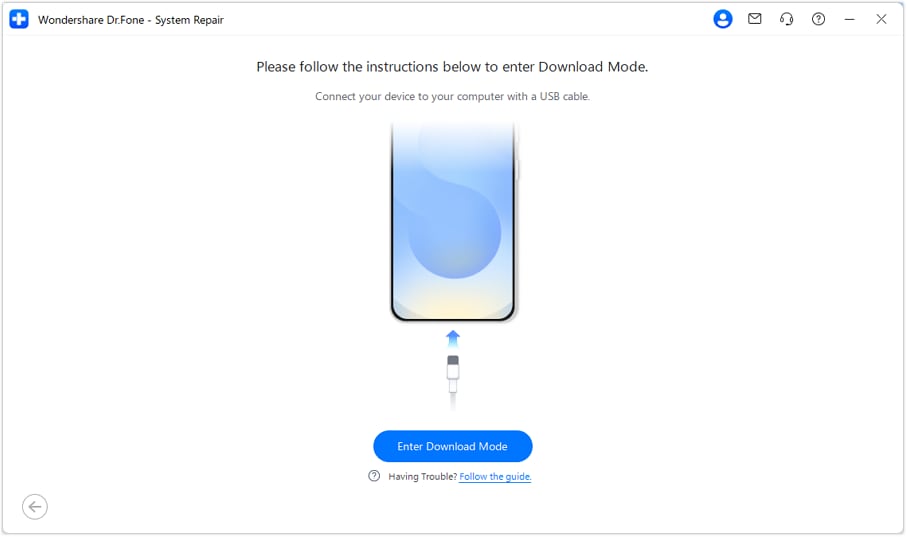
For frozen or black screens, both tools address similar system failures, but their setup differs. Dr.Fone can trigger Download Mode directly from the desktop, reducing manual steps. UltFone requires users to follow on-screen instructions and enter Download Mode using button combinations. The deciding factor is device compatibility: Dr.Fone supports Samsung, Xiaomi, Redmi, and POCO, while UltFone limits full system repair to Samsung devices.
Broken System Update
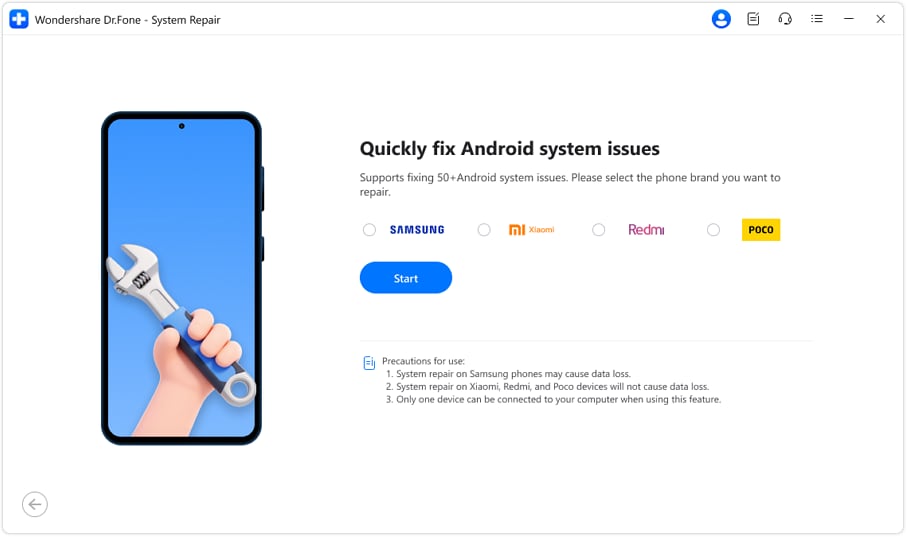
For a broken OTA update, both tools use firmware repair to restore a supported Samsung device. However, the key difference emerges when comparing support for non-Samsung devices. Dr.Fone extends full system repair to Xiaomi, Redmi, and POCO devices, while UltFone cannot perform the same repair on these brands because its full Android system repair remains limited to supported Samsung devices.
Based on the tests, get the overall score to know which one wins: Dr.Fone Android System Repair or UltFone Android:
| Comparison Result | Dr.Fone - System Repair (Android) | UltFone Android System Repair |
|---|---|---|
| Galaxy A54 Issues | All 3 scenarios supported | All 3 scenarios supported |
| POCO X6 Issues | All 3 scenarios supported | Full system repair unavailable |
| Device Detection | Detects the connected device and confirms model details | Detects the device, followed by manual device information |
| Data Handling | Preserves data on Xiaomi, Redmi, and POCO repairs | Advertised as data-safe for supported Samsung repairs |
| Download Mode Setup | Can automate Download Mode entry from the desktop | Requires manual button combinations with on-screen guidance |
| Overall Result | Broader repair coverage with fewer manual setup steps | Lower-cost repair option limited to Samsung devices |
Verdict: Dr.Fone supports all 3 repair scenarios across both Samsung and POCO devices. UltFone covers the same scenarios on the Galaxy A54 but cannot perform full system repair on the POCO X6 because its repair capability is limited to Samsung devices.
Part 6. Firmware Route: From Phone Detection to System Reinstallation
Both utilities follow a similar firmware restoration process, but their workflows differ in device preparation and Download Mode entry. Dr.Fone offers greater automation, while UltFone requires more manual input. Review how each tool moves from device detection to firmware installation in this section of the Dr.Fone vs UltFone Android comparison.
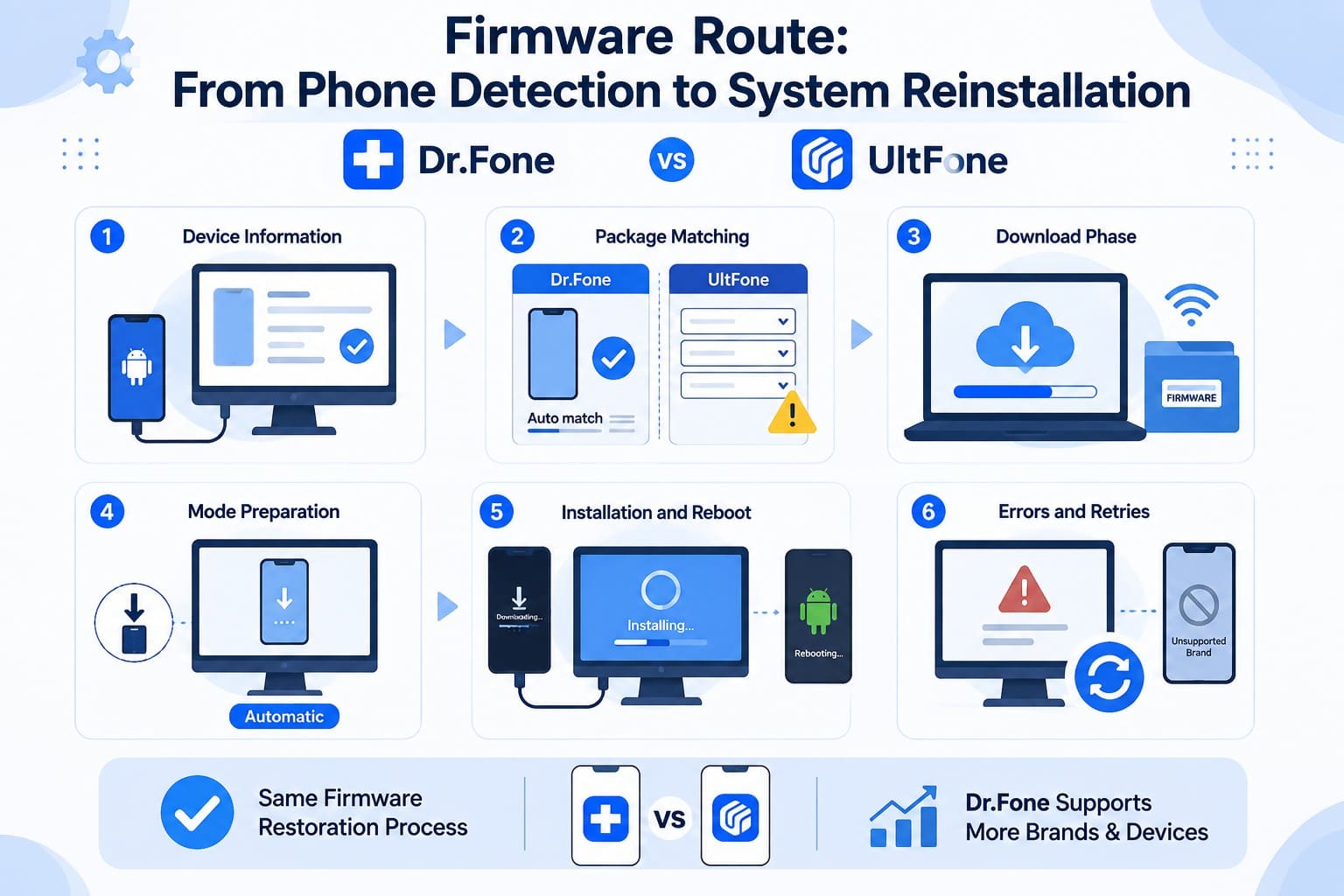
- Device Information: Dr.Fone detects the connected device and lets you confirm its details. UltFone requires users to manually select the device information needed for firmware matching.
- Package Matching: Dr.Fone matches firmware using the detected and confirmed device details. UltFone matches the package according to the device information manually provided by the user.
- Download Phase: Both applications download the required firmware package over the internet. Download time varies depending on firmware package size and network speed.
- Mode Preparation: Dr.Fone can automate Download Mode entry from the desktop. UltFone provides on-screen instructions for manually entering Download Mode using the appropriate button combinations.
- Installation and Reboot: After Download Mode preparation, both tools install the downloaded firmware and complete the system repair. Neither requires rooting the supported device.
- Errors and Retries: Failed firmware downloads can be attempted again. However, unsupported brands cannot proceed with full system repair, making device compatibility a key limitation.
Part 7. Brand Support vs Full-Repair Eligibility
Brand support and full repair eligibility are 2 different measures. In this UltFone Android System Repair vs Dr.Fone Android System Repair comparison, full repair eligibility matters most. Compare how both tools differ across the key compatibility areas below:
| Eligibility Line | Dr.Fone - System Repair (Android) | UltFone Android System Repair |
|---|---|---|
| Device Information Handling | Automatically detects device details for confirmation | Requires manual device information selection |
| Brands The Full Repair Reaches | Samsung, Xiaomi, Redmi, POCO | Samsung series only |
| Samsung Coverage | Major Samsung phones and tablets | Galaxy S, A, Note, and J series |
| Mode Tools vs Full Repair | Broad tools, four brands repairable | Broad tools, one brand repairable |
| Android Versions | Android 5.0 and later | Android 5.0 and later |
| Windows and macOS | Windows only, Mac unreleased | Windows only, no Mac announced |
Both Dr.Fone and UltFone provide free boot-mode utilities across a broad range of Android devices. The key difference appears in full system repair: UltFone limits this capability to Samsung, while Dr.Fone extends full repair support to Samsung, Xiaomi, Redmi, and POCO devices.
Part 8. How Much Time and Effort Does Each Repair Take?
Eligibility determines whether a repair can proceed with Dr.Fone Android System Repair or UltFone Android Repair. Once compatibility is confirmed, the key difference is how much time and manual effort each repair workflow requires. Compare them below:
| Effort Stage | Dr.Fone - System Repair (Android) | UltFone Android System Repair |
|---|---|---|
| Connection & Mode Prep | Connect via USB, auto-detect device, automate Download Mode | Connect via USB, manually select device info, enter Download Mode with button combinations |
| Device Information | Device details detected automatically for confirmation | Device information selected manually from available options |
| Firmware Download | Matching package downloaded after device confirmation | Matching package downloaded based on manually selected device details |
| On-Screen Guidance | Guided workflow with automated mode preparation | Guided workflow with manual Download Mode instructions |
| Where a Run Can Stop | Unsupported device or interrupted firmware process | Unsupported non-Samsung device or interrupted firmware process |
Verdict: The workflows differ mainly in device detection and Download Mode preparation. Dr.Fone automates more steps, while UltFone requires manual device selection and button combinations. More importantly, Dr.Fone supports full repair across four brands, whereas UltFone restricts this capability to Samsung devices only.
Part 9. Trial Access, Paid Features, Renewal, and Refunds
UltFone promotes its boot-mode tools as free, making free-tier limitations important in this Dr.Fone vs UltFone Android comparison.
Dr.Fone provides 6 boot-mode operations without published usage limits. UltFone offers the same 6, but its FAQ limits exiting Fastboot and Download Mode to 5 free uses each. Entering all 3 modes and exiting Recovery Mode remain unlimited, while system repair and cache cleaning require payment.
| License Line | Dr.Fone - System Repair (Android) | UltFone Android System Repair |
|---|---|---|
| Monthly | $19.95 | $9.95 |
| Yearly | $39.95 | $19.95 |
| One-Time | $49.95 | $29.95 |
| Devices And Computers | 5 devices, 2 computers | 5 devices, 1 computer |
| Refund Window | 7 days | 30 days |
Verdict: UltFone costs less across comparable plans and offers a lifetime license with a longer refund window. However, Dr.Fone provides full system repair across 4 brands. UltFone’s lower price delivers less repair coverage, making it most suitable for budget-conscious Samsung users.
Part 10. Trade-Offs and the Right Tool for Your Android Phone
This section answers Dr.Fone vs UltFone Android: which is better by comparing the key strengths and limitations of both Android repair tools.
What Dr.Fone - System Repair (Android) Does Well
- Repairs Xiaomi, Redmi, and POCO devices while preserving user data.
- Provides 6 free boot-mode operations with no published usage limits.
- Supports up to 5 devices and 2 computers per license, with a clear data-erasure warning before Samsung system repair.
Where Dr.Fone Has Limitations
- Only a week to claim a refund.
- It runs on Windows only, with a Mac version still unreleased.
What UltFone Android System Repair Does Well
- Half the price at every tier, plus a $29.95 lifetime license.
- 30-day money-back guarantee and a cache cleaner.
- Mode utilities documented across 1000+ models and Android 2.0 onward.
Where UltFone Has Limitations
- Full system repair stops at Samsung, so top 3 brands are out of reach.
- 2 free mode functions are capped at 5 uses, and 1 computer per plan.
Best Choice by Phone Brand and Repair Need
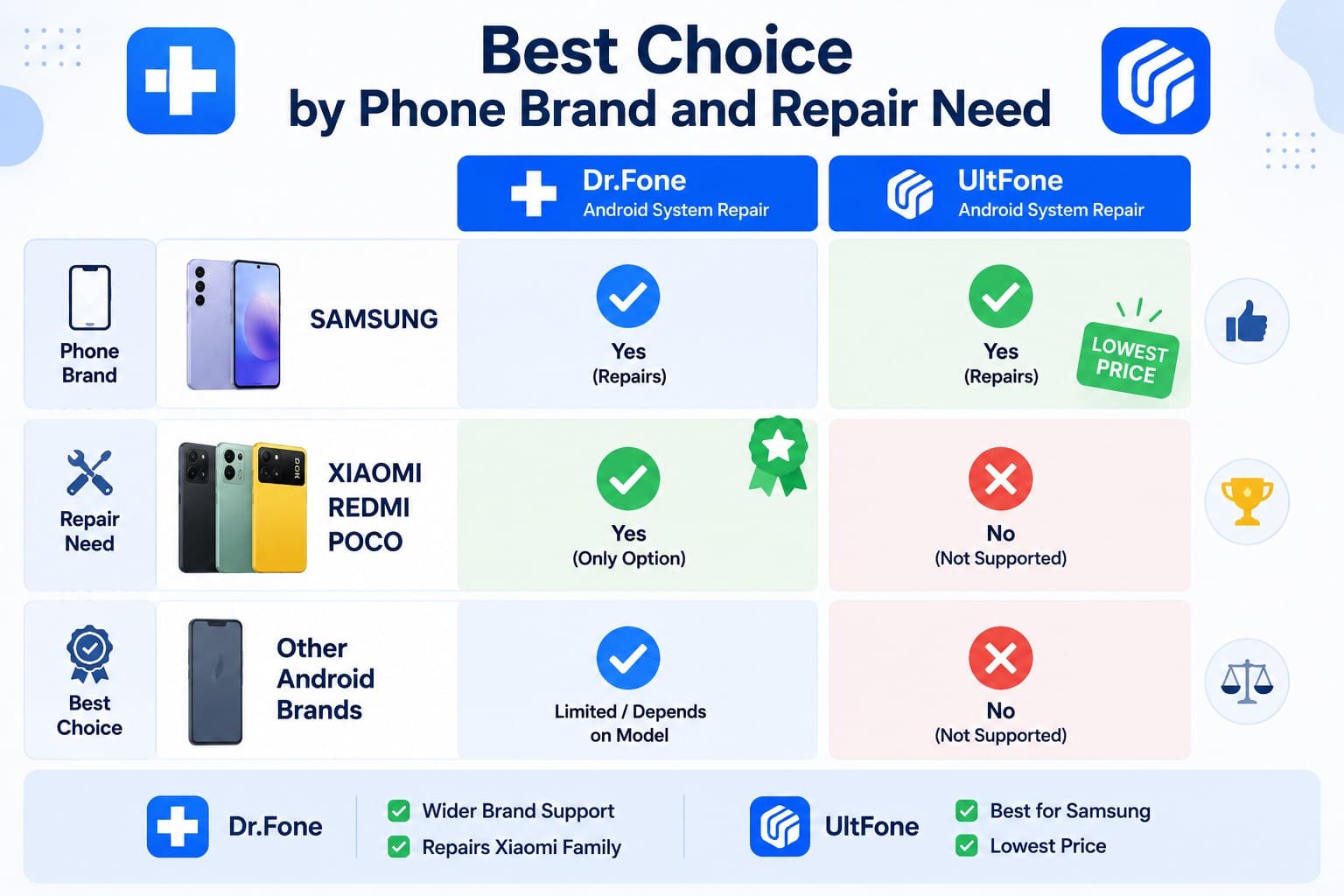
Choosing between Dr.Fone vs UltFone Android largely depends on your phone brand and repair needs. UltFone is a cost-friendly option for Samsung users. Dr.Fone provides broader full system repair, making it the stronger choice for Samsung, Xiaomi, Redmi, and POCO users who need wider device coverage.
Conclusion
Choosing between Dr.Fone Android System Repair vs UltFone Android System Repair comes down to repair coverage and cost. Dr.Fone supports full system repair across Samsung, Xiaomi, Redmi, and POCO while offering a more automated workflow. UltFone costs less and provides a lifetime license but limits full repair to Samsung. Overall, Dr.Fone is the stronger choice for broader compatibility, while UltFone suits budget-conscious Samsung users.
Frequently Asked Questions
-
1. Does UltFone full system repair work on every Android brand its mode tools support?
No. UltFone’s boot-mode utilities support a broad range of Android devices, including Samsung, Huawei, Xiaomi, and Google models. However, its Repair Android System feature is limited to supported Samsung devices, so boot-mode compatibility does not mean full system repair eligibility. -
2. Which is better for Xiaomi, Redmi, or POCO repair: Dr.Fone or UltFone?
Dr.Fone takes the lead here. It supports full system repair for Xiaomi, Redmi, and POCO while preserving user data. UltFone provides useful boot-mode tools for these devices, but its full firmware-based system repair remains limited to supported Samsung devices. -
3. What should you check before downloading a large Android firmware package?
Confirm the device model and other required details first to ensure the correct firmware is matched. Check available disk space, maintain a stable internet connection, keep the device charged, and avoid disconnecting the USB cable during the repair process. -
4. Which tool is more useful if your phone is stuck in Fastboot or Download Mode?
Both tools can exit Fastboot and Download Mode from a computer. However, Dr.Fone is more flexible because it has no usage limit for these free functions. UltFone limits exiting Fastboot Mode and Download Mode to five free uses each.
 Add Wondershare Dr.Fone as a preferred source on Google