Resolve common problems and system crashes on both iPhone and Android devices.

 100% Security Verified | No Subscription Required | No Malware

 :
: 
 ChatGPT
 Perplexity
 Gemini
 Claude
 Grok
Grok
You might have noticed that you are unable to send, receive, or show a read receipt in RCS after the iOS 27 Beta update. If so, many users now face this issue because of network problems, carrier limitations, or incorrect settings. There might be other reasons, and this guide will uncover them all to help you understand why RCS Messaging is not working in iOS 27.
Later, learn about the basic checks and carriers that support RCS messages and resolve the issue in simple ways. Of all ways, know how Dr.Fone - System Repair (iOS) can be a practical solution to resolve the system-level issue that causes RCS problems.
In this article

Part 1. Why is RCS Messaging Not Working in iOS 27?
Rich Communication Services is an upgraded messaging system on iPhone that lets you send high-quality media. There, you can also see typing indicators and read receipts to enjoy better conversations, and it works over the internet. However, if you face the RCS Messaging not working in iOS 27 issue after the update, the listed points can be the root cause:
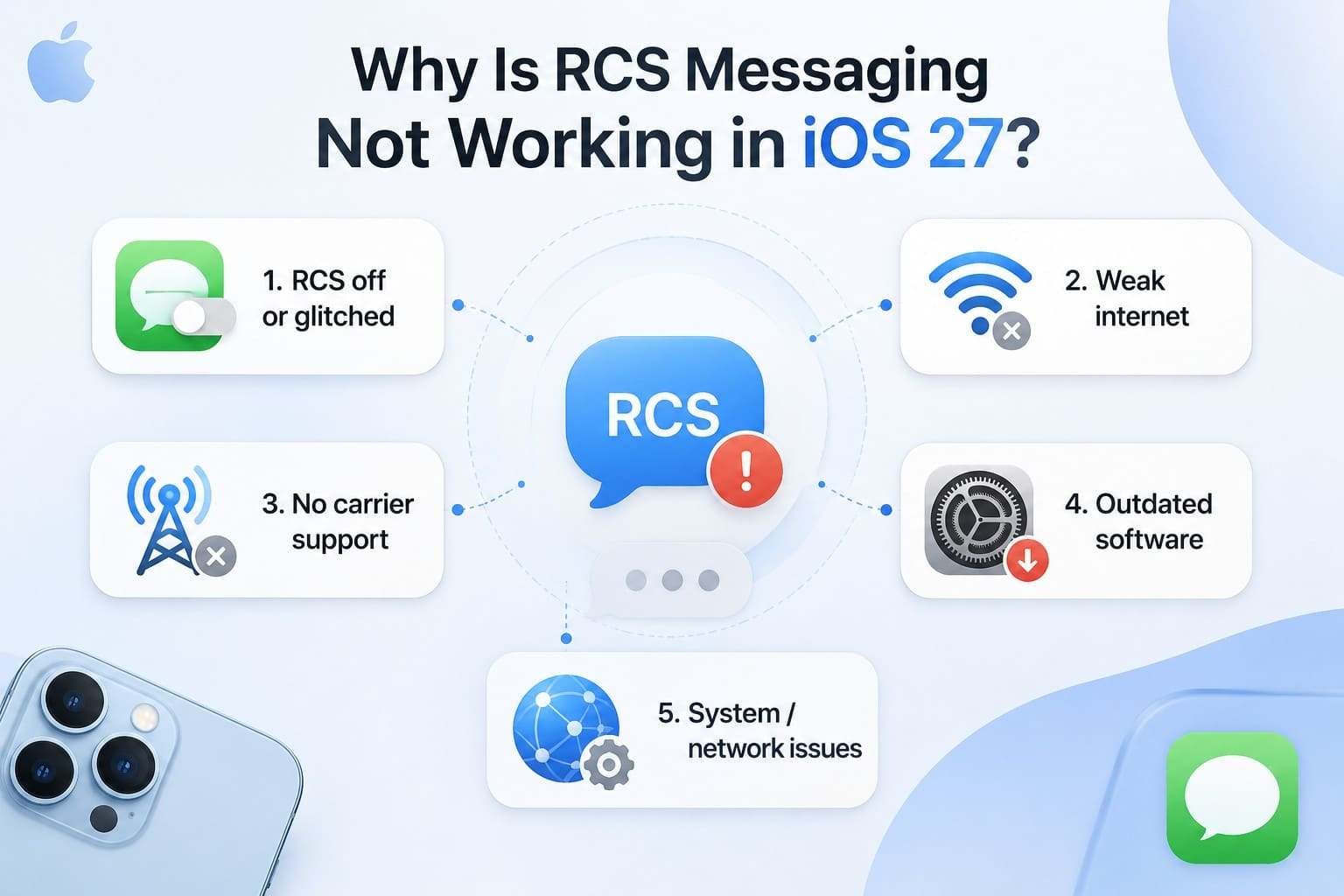
- RCS Off or Glitched: RCS might be disabled or stuck after the iOS 27 update, which can cause the message to fall back to SMS. Even if it looks enabled, it may not be properly registered with the carrier.
- Weak or No Internet: Note that RCS depends on stable Wi-Fi and mobile data to function properly in supported devices. A poor signal or no data connection will prevent messages from being sent or received.
- No Carrier Support: Some carriers or plans do not support RCS on iPhone at all, or availability depends on the region and wireless provider. In such cases, if the carrier has not enabled RCS for your phone number and account, the feature will not work.
- Outdated Software: An older iOS version or a missing carrier settings update can block or limit RCS features. Hence, this can cause compatibility issues where RCS is not fully activated or supported on the device.
- System or Network Glitches: iOS updates, SIM/eSIM changes, or network configuration errors can disrupt RCS configuration. In addition, these hidden system issues may affect RCS functions when everything looks correct.
Part 2. Quick Diagnostic Checklist
Use the following checks to determine what might be causing the RCS Messaging not working in iOS 27 issue before proceeding to the solutions.
| Check | What to Look For and Why |
|---|---|
| E2E Encryption Lock Icon | Locate the lock icon at the top of the chat. If the icon is missing, it means your carrier or your contact's carrier doesn't support encrypted RCS. |
| Carrier & Plan Support RCS on iPhone | Call the carrier to find out whether RCS is enabled on your iPhone plan, since it is tied to certain pricing tiers. |
| Active & Stable Data Connection | Verify that Wi-Fi or mobile data is enabled and available for Messages, as RCS requires a stable internet connection. |
| Chat Label Shows "RCS, not SMS" | Open the conversation and check the table below the contact's name. If it shows "SMS" or is blank, the RCS session was never established. |
| Failure Affects All Contacts or Just One | Send a message to 2-3 different people, and if only one contact fails, the problem is on their end. However, if RCS with everyone fails, the issue is likely on your device or with your carrier. |
Part 3. How to Fix RCS Messaging Not Working in iOS 27? 7 Fixes
If the RCS Messaging is not working in iOS 27 issue remains, here are 7 solutions you can try in 2026:
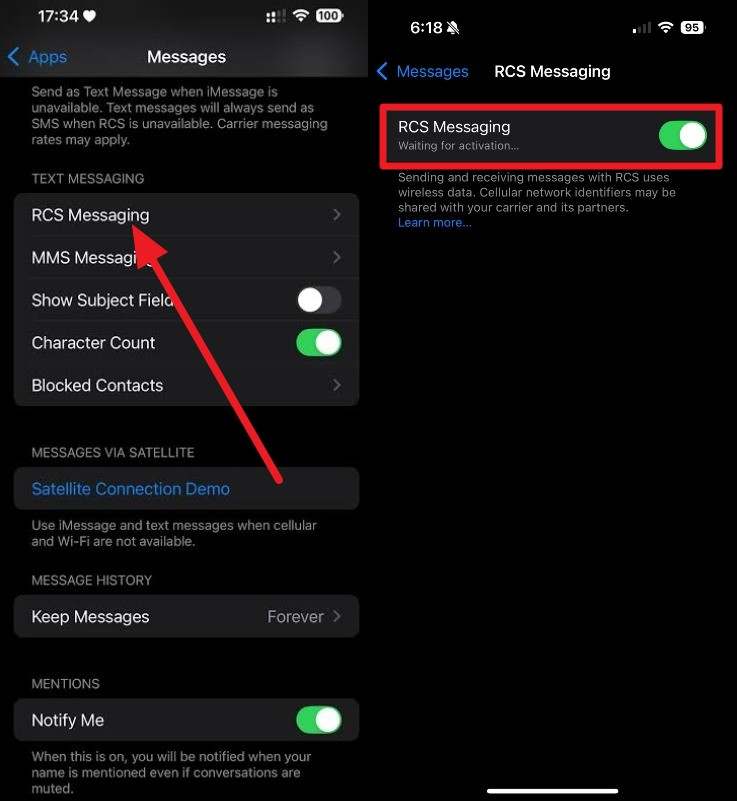
Fix 1. Toggle RCS Messaging Off and On
This can refresh the connection with the carrier, repair small glitches in iOS 27, and does not change other settings or data. Once done via the mentioned steps, it helps re-register RCS and fix issues when the feature is enabled but fails to work:
Instructions: From the "Messages App" settings in the Settings app, go to "Text Messaging > RCS Messaging > Toggle RCS Messaging on and off on iOS 27."
Fix 2. Restart Your iPhone
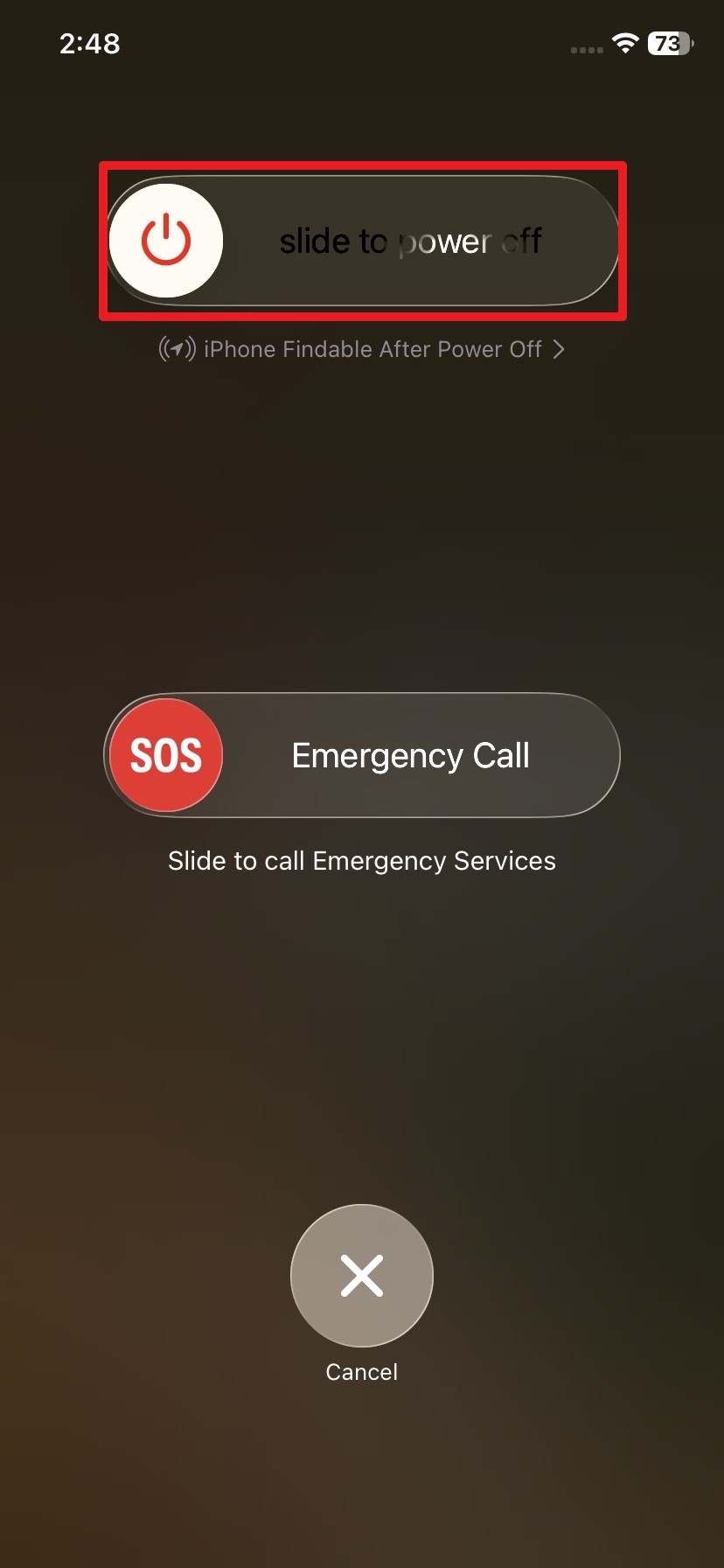
With this, you refresh the iOS and clear temporary glitches that may affect RCS in iOS 27. Additionally, it reloads system processes and can fix minor bugs in Messages or background services, as guided:
Step 1 Press "Power + Volume Up" and slide right on the "Slide to Power Off" slider to fix the RCS Messaging not working in iOS 27 issue.
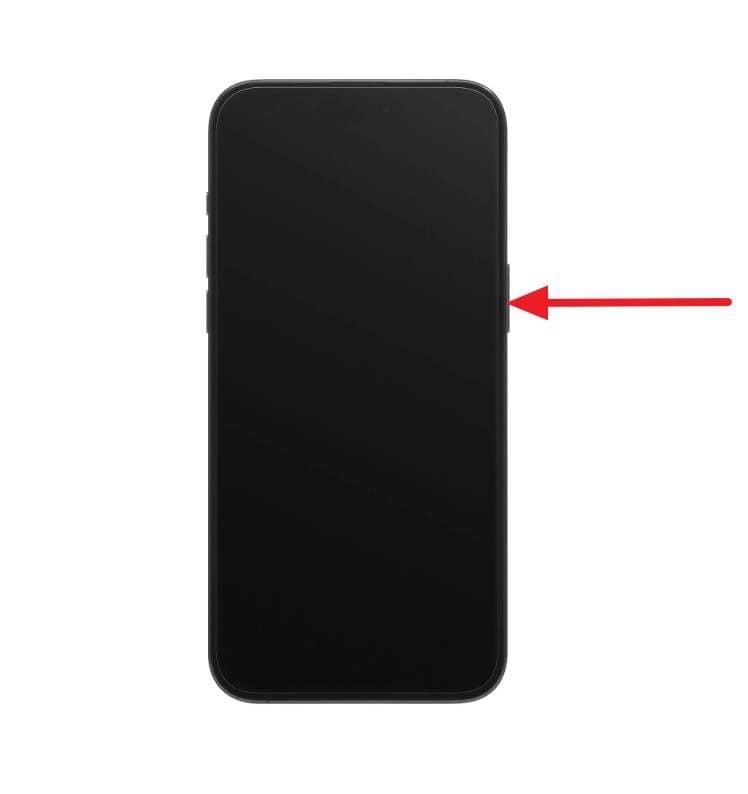
Step 2 After 30 seconds, hold the "Power" button to turn on the iPhone to see if the RCS works.
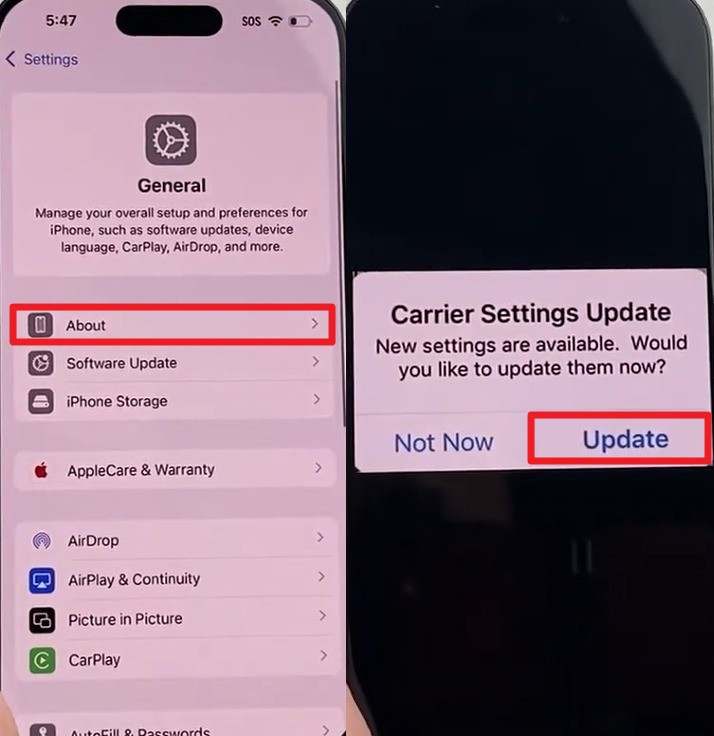
Fix 3. Update Carrier Settings
It is important because it installs the latest network profile from your carrier, which can enable or improve RCS support and fix message issues. This also saves the RCS messages shift to SMS and ensures your iPhone works correctly with the carrier's current RCS configuration, as shown:
Instructions: Go to "General > About > Wait for 30 Seconds" and tap "Update" if the popup appears to fix the RCS Messaging not working in iOS 27 issue.
Fix 4. Disable Wi-Fi Calling Temporarily
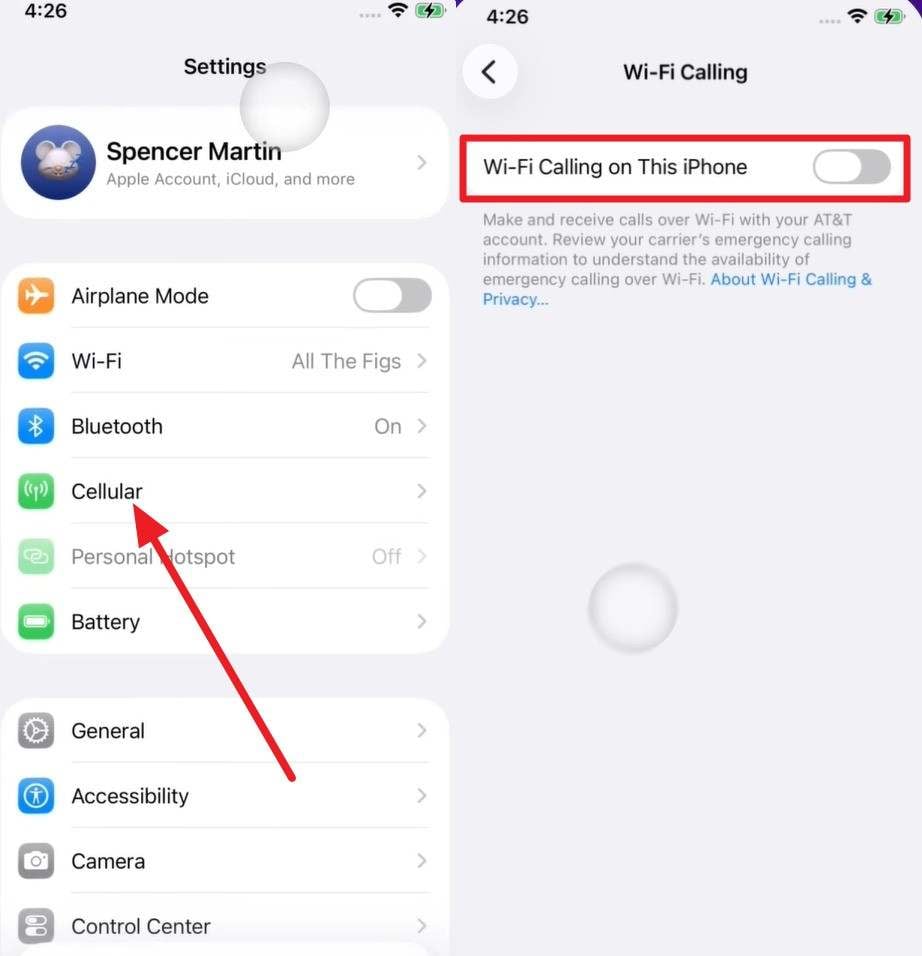
This option can conflict with how RCS routes messages over Wi-Fi or cellular networks and might compete for Wi-Fi bandwidth. Since this can cause RCS to get stuck or fail, it's best to disable it via the mentioned steps to force the phone to rely on the cellular network:
Instructions: Access the "Cellular Settings > Wi-Fi Calling" option and toggle off "Wi-Fi Calling on This iPhone" to fix the RCS Messaging not working in iOS 27 issue.
Fix 5. Use Dr.Fone – System Repair (iOS) to Fix Hidden iOS System Issues
When the RCS Messaging not working in iOS 27 issue is caused by deeper iOS 27 glitches, Dr.Fone - System Repair can help. You can try this tool when all the basic solutions have failed, and its Standard Mode will keep the data intact. Later, users can opt for its Advanced Mode if the RCS issue persists, but it can cause data loss.
Nonetheless, this tool by Wondershare is designed to resolve 150+ iOS problems and offers a detailed guide with clear prompts. There, you can get clear graphics to access Recovery Mode and exit DFU mode for free, which makes it suitable for cost-conscious users. With weekly updates for all the iOS versions, you can also use this versatile tool to resolve 200+ iTunes errors like 4013 and 1110 without any data loss.
Quick Guide to Fix the System-Level Issues That Affect RCS on iOS 27
To know how this iPhone system repair tool works in the real world, let's test its claims via the mentioned guide:
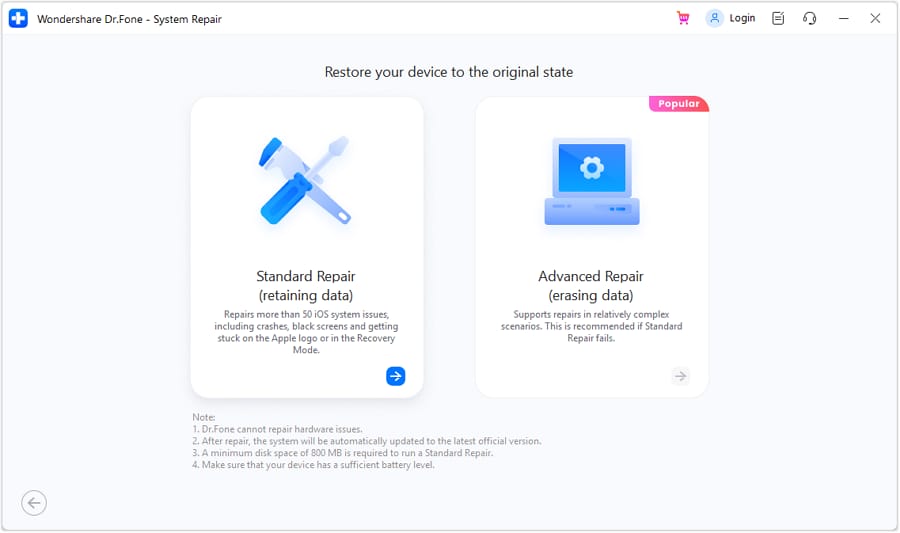
Step 1 Access System Repair for iOS in the Toolbox
From the System Repair tool for iPhone, access the "iOS Repair" tool and pick the "Standard Mode" to avoid any type of data loss.
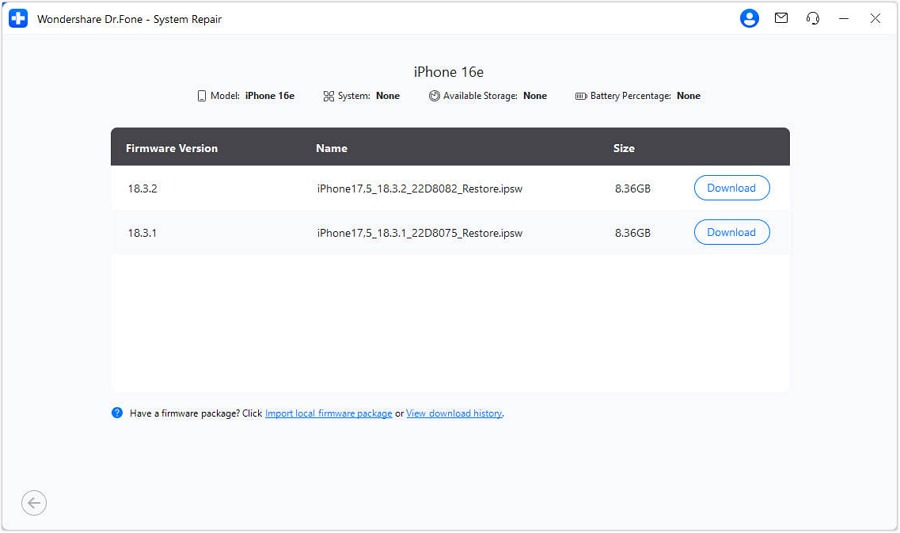
Step 2 Download iOS Firmware in Standard Recovery Mode
Follow the guide to access Recovery Mode, then tap the "Download" button to install the corresponding iOS firmware package.
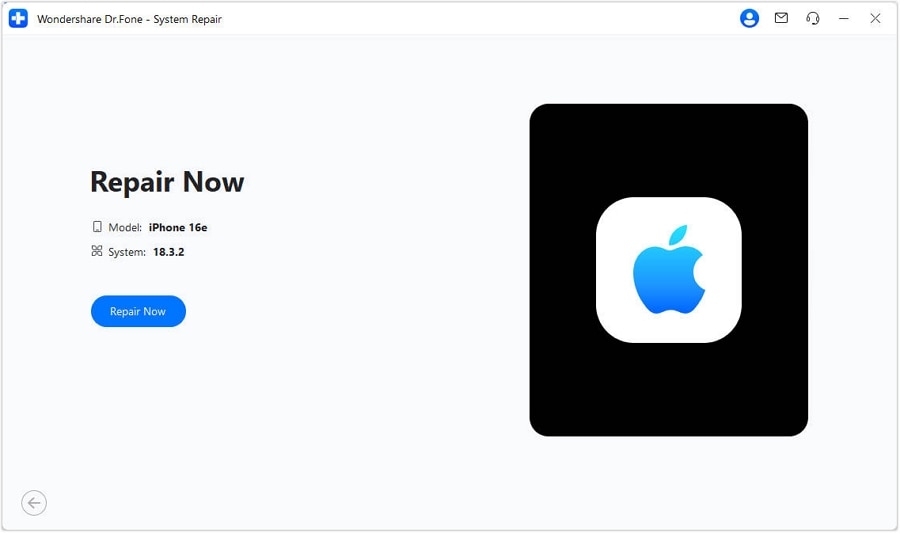
Step 3 Repair RCS Messaging Not Working in iOS 27 Now
Once installed, select the "Repair Now" button and let Dr.Fone resolve the RCS Messaging not working in iOS 27 issue.




Fix 6. Update to the Latest iOS 27 Version
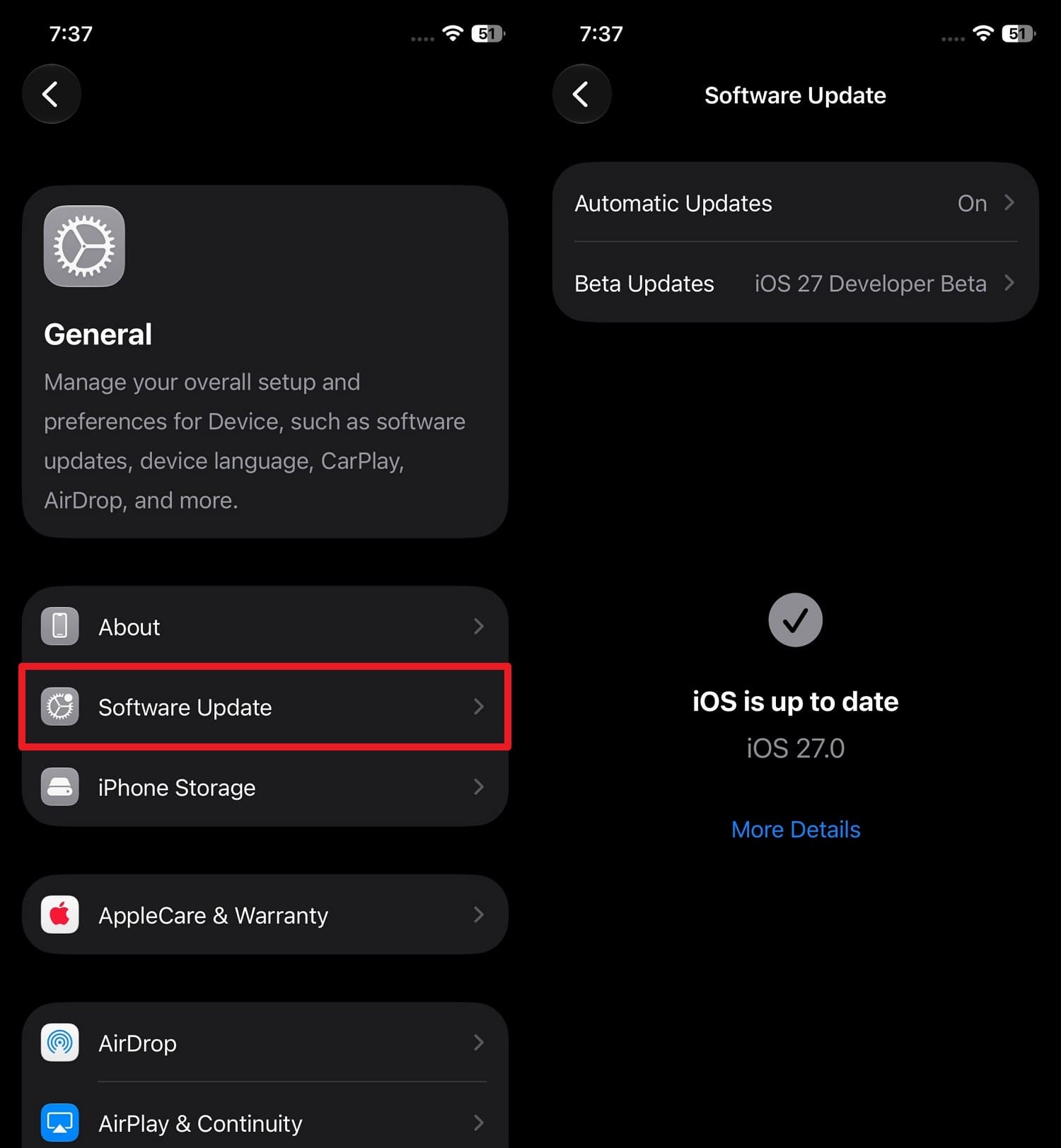
Apple regularly introduces bug fixes and improvements for Messages and RCS in new iOS 27 update patches. This ensures better compatibility with the latest RCS standards and improves message delivery, as demonstrated:
Instructions: Go to "General > Software Update" and press "Update Now" if the iOS 27 patch is available to resolve the RCS Messaging not working in iOS 27 issue.
Fix 7. Reset Network Settings
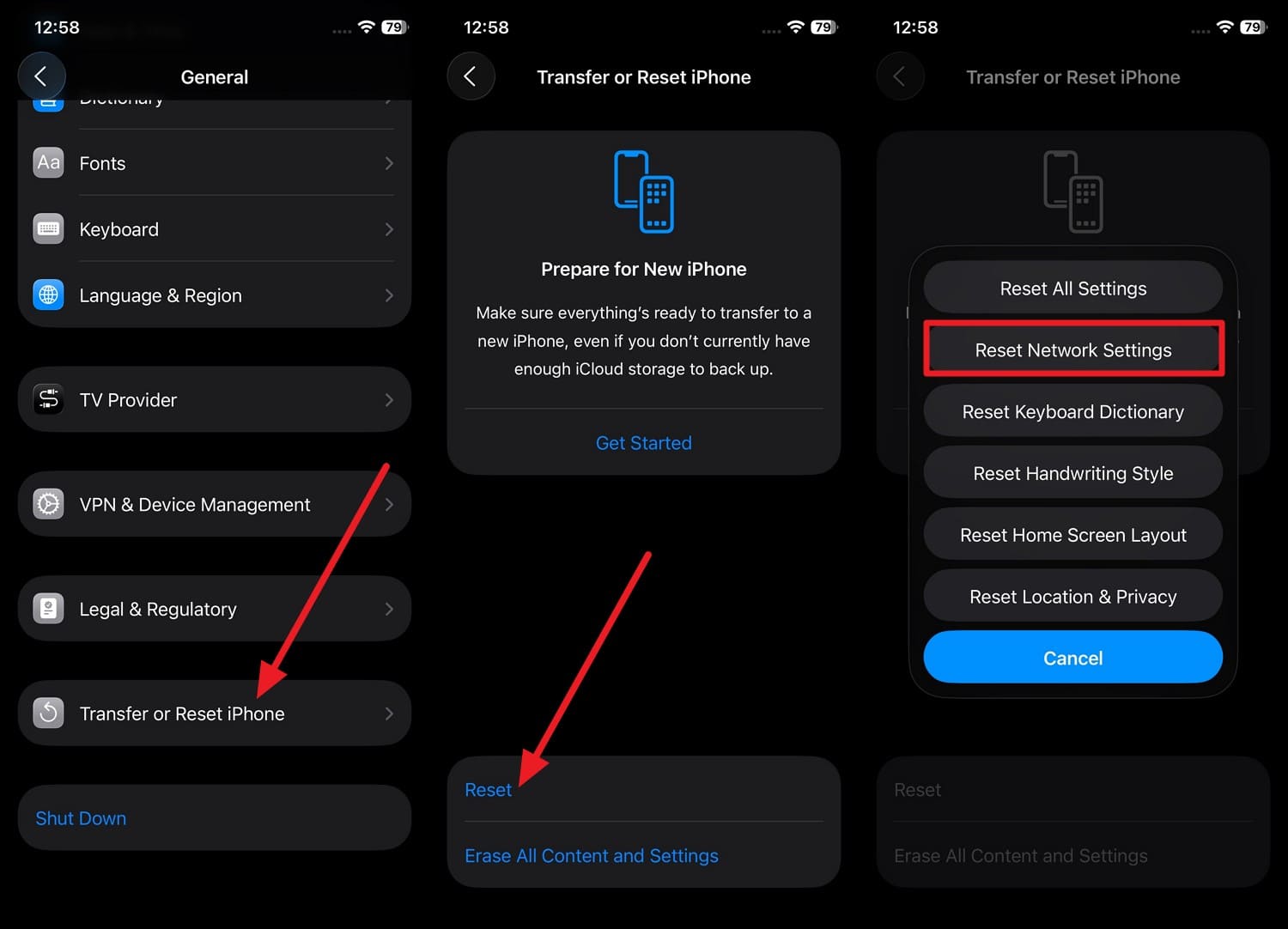
When the issue is caused by the broken network data, try this solution to remove saved Wi-Fi and VPNs, and other network configurations. Since it restores everything to default, the phone reconnects clearly, and the steps are mentioned below:
Step 1 To reactivate RCS services, go to "General > Transfer or Reset iPhone > Reset > Reset Network Settings."
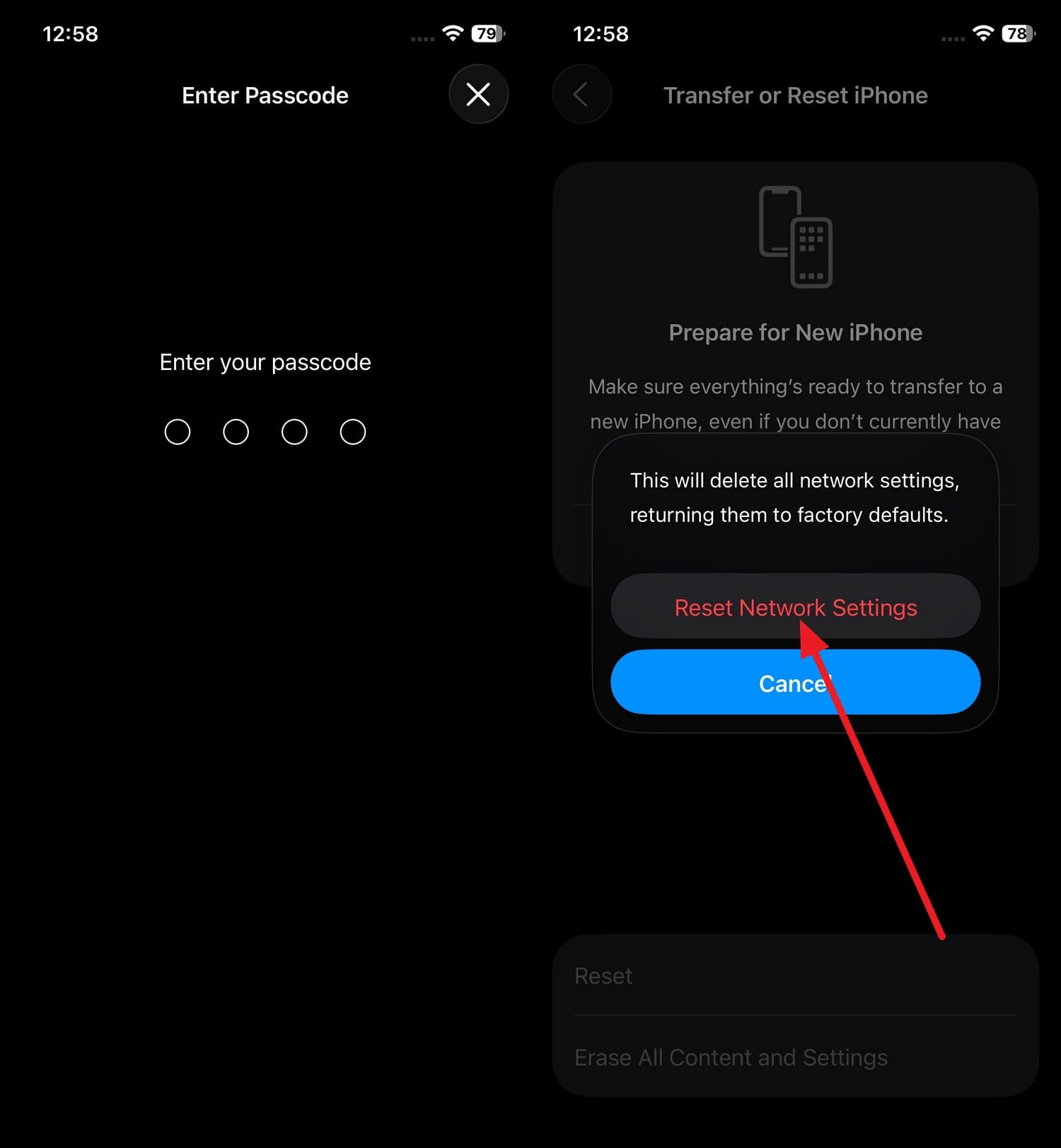
Step 2 Enter the iOS 27 device passcode twice and choose the "Reset Network Settings" option to resolve the RCS Messaging not working in iOS 27 issue.
Part 4. What If RCS Still Doesn't Work?
So far, Dr.Fone - System Repair (iOS) might have resolved the deeper system issues that cause the RCS Messaging not working in iOS 27 problem. However, if it remains, you can try these 4 advanced solutions to restore the RCS functionality:
Fix 1. Contact Your Carrier Support
Note that the RCS is controlled by your mobile network, not just your carrier settings. So, when you contact the carrier, it can check if your number is properly enabled for RCS and fix common account-level blocks and outages.
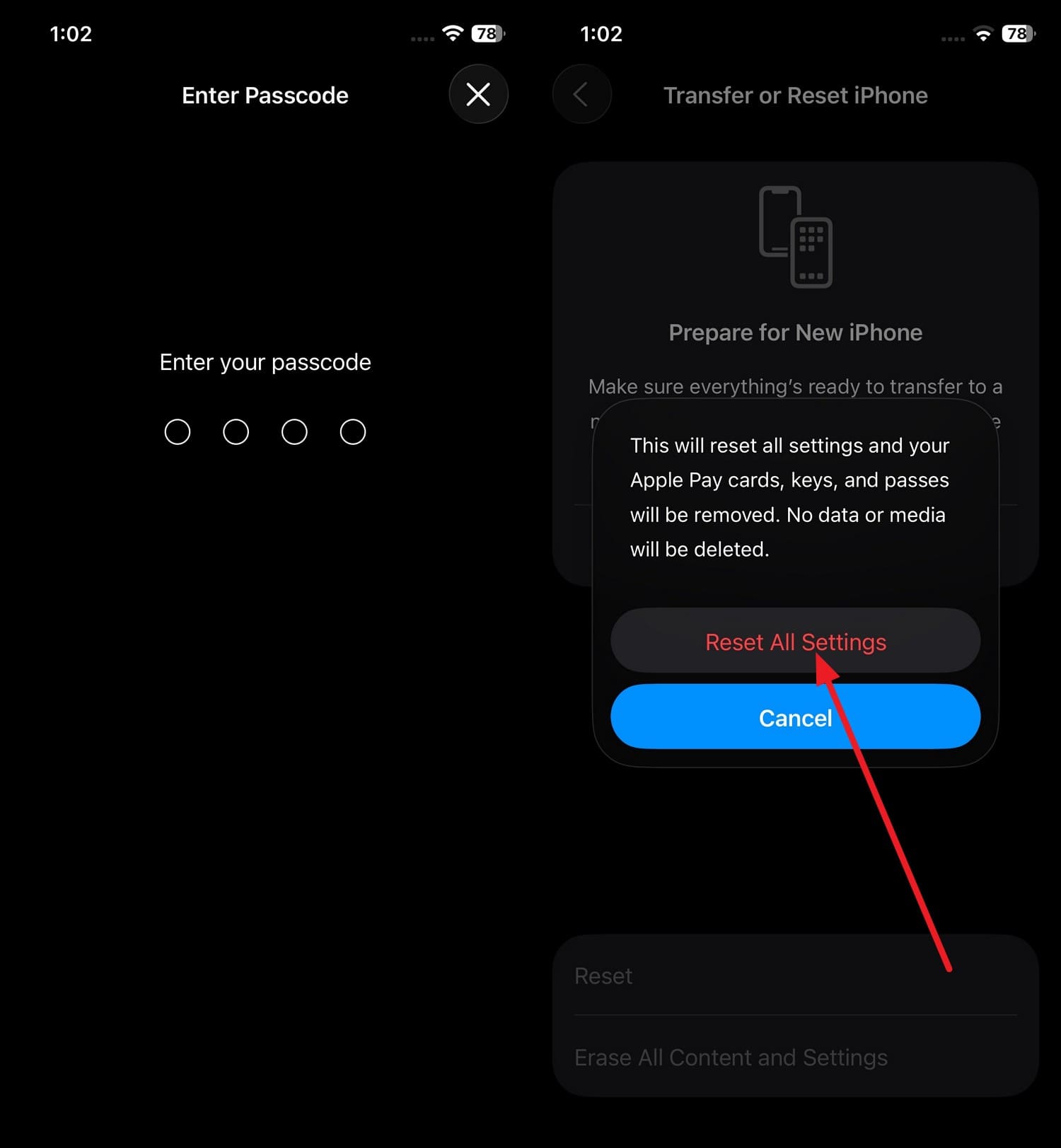
Fix 2. Reset All Settings
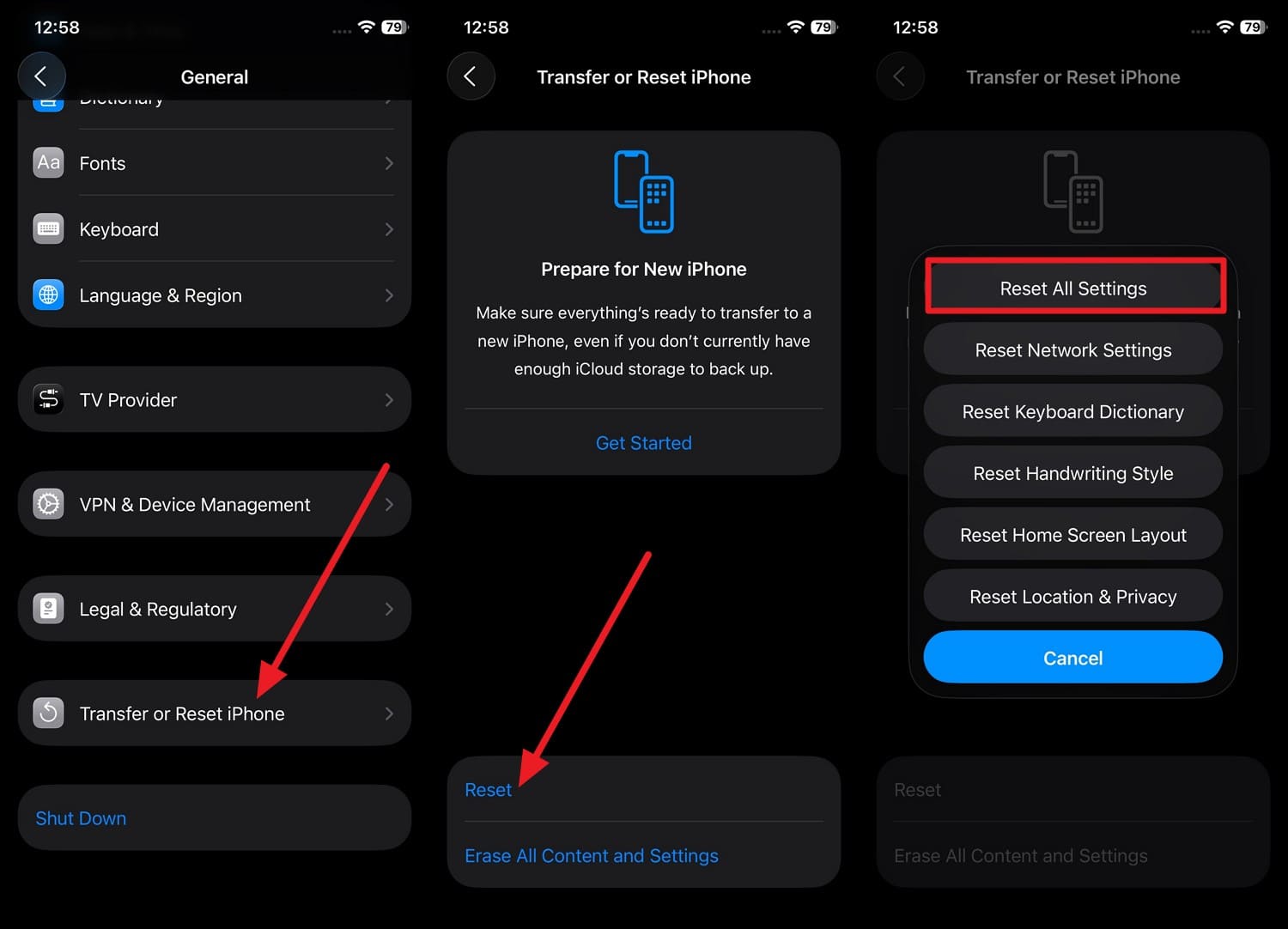
This restores all settings to their defaults and is a deeper troubleshooting solution that does not affect your data. Hence, it can resolve hidden system conflicts caused by multiple setting changes that may interfere with Messages and RCS functionality, as guided:
Step 1 To restore the correct system permission, go to "General > Transfer or Reset iPhone > Reset > Reset All Settings."
Step 2 Enter the passcode twice and tap "Reset All Settings" to resolve the RCS Messaging not working in iOS 27 issue.
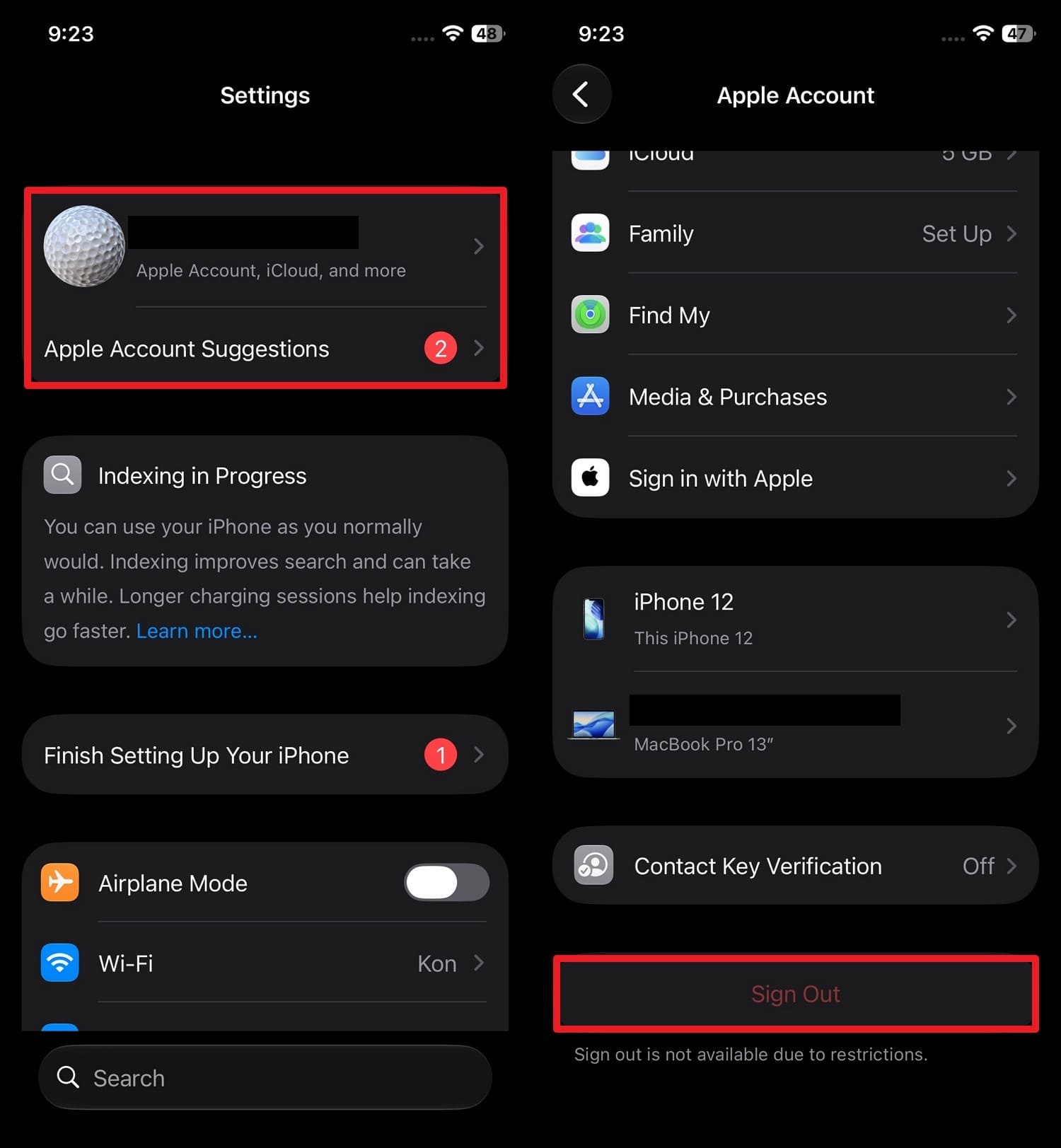
Fix 3. Sign Out and Back Into Your Apple Account
Unlike others, this solution refreshes how Messages, iCloud, and other Apple services are linked to your device. Thus, this can resolve the RCS-related glitches, re-authenticate Apple services, and force a fresh sync of Messages in iCloud, as shown:
Step 1 Tap "Apple ID > Sign Out > Choose what to keep > Add passcode to continue."
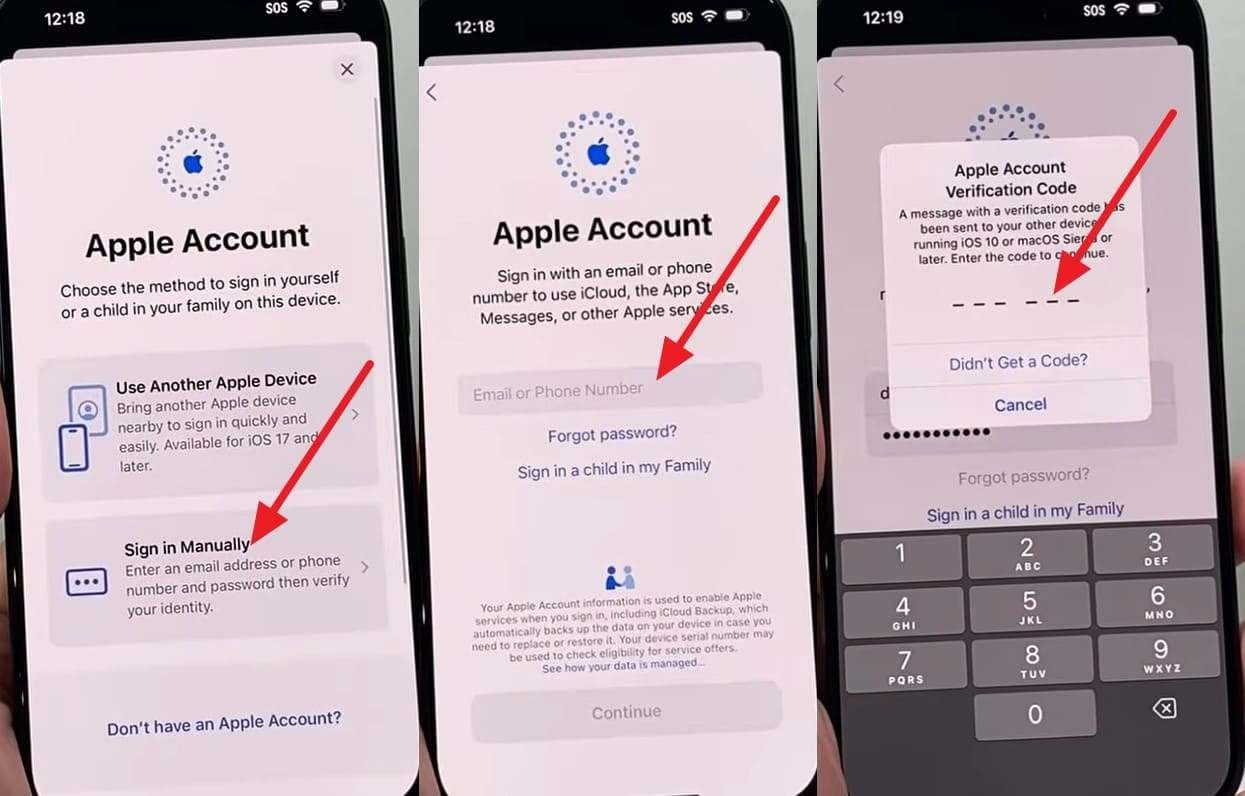
Step 2 Pick "Apple ID > Choose Sign In Manually" and add Apple ID and the code you received to sign back in and fix the RCS Messaging not working in iOS 27 issue.
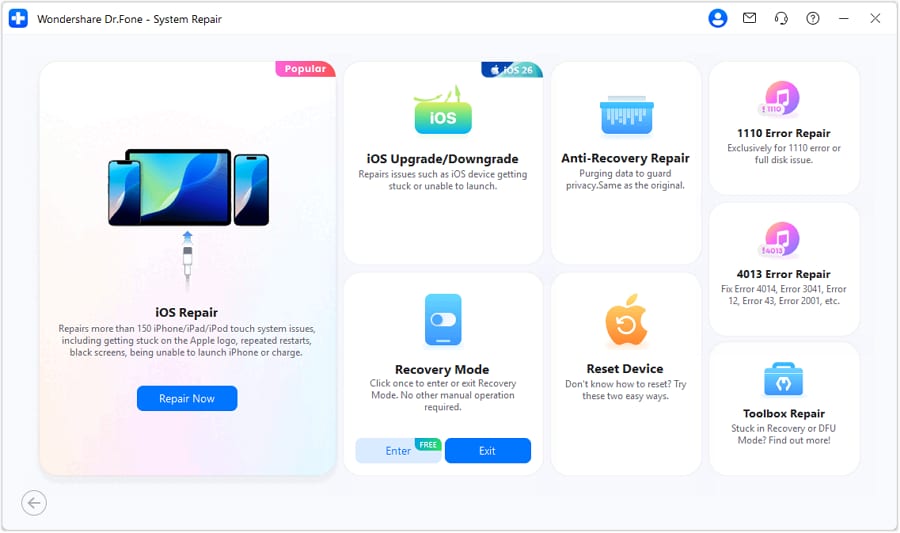
Fix 4. Downgrade iOS 27 Using Dr.Fone - System Repair
Let's say nothing worked for the RCS Messaging not working in iOS 27 issue, and you want a way back to the stable iOS version. Since traditional downgrade methods are risky, you can use Dr.Fone - System Repair to download a stable iOS firmware update. There, you just need a stable USB connection, and Dr.Fone will handle the rest, as demonstrated in the guide.
Conclusion
The RCS Messaging not working in iOS 27 issue is linked to multiple reasons, and this guide has listed all. So, perform the basic check and try the simple and advanced methods mentioned to restore RCS functionality. For the situations where the issue is deeply rooted and system-level, use Dr.Fone - System Repair to repair 150+ iOS issues or downgrade to a stable version.
FAQs
-
Does Low Power Mode affect RCS messaging on iOS 27?
Low Power Mode does not disable RCS messaging, and your phone can still send and receive messages via RCS. However, reduced background activity and network restrictions may occasionally delay message synchronization or notifications. -
Why do RCS messages work with some contacts but not others?
Both the sender and the receiver need to have RCS enabled, and it relies heavily on the cellular carrier's backend provisioning. So, if your contact has RCS turned off and uses a non-RCS carrier, your messages will fall into SMS. -
Does changing the SIM or eSIM affect RCS activation?
Yes, because RCS relies on the carrier provisioning to link your exact phone number to the messaging servers. When you swap SIM or eSIM, it can often cause your device to lose the verified number, and you get stuck on the "Waiting for Activation" alert.
 Add Wondershare Dr.Fone as a preferred source on Google