Bypass iCloud Activation Lock and Android FRP without password.

 100% Security Verified | No Subscription Required | No Malware

 :
: 
 ChatGPT
 Perplexity
 Gemini
 Claude
 Grok
Grok
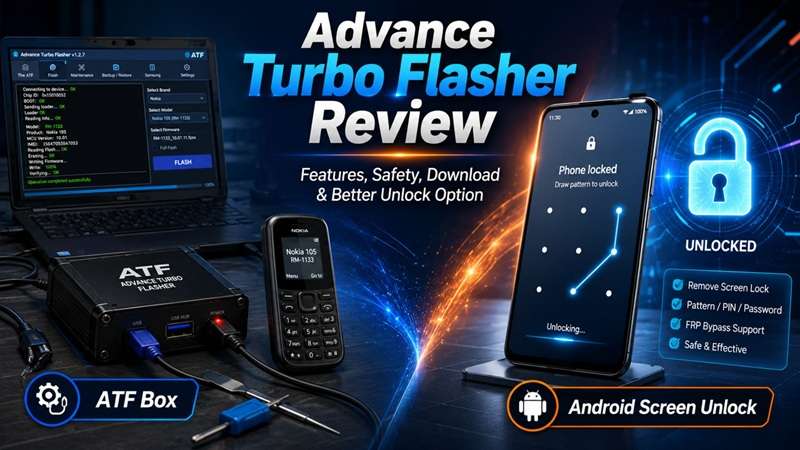
Advance Turbo Flasher once held an important place in mobile repair shops, mainly for servicing older Nokia phones. It can flash firmware, reset supported security codes, fix software faults, and recover some devices that fail to start. However, ATF is not a simple unlocking app. Most functions require the original hardware box, correct drivers, compatible firmware, and solid repair knowledge. Its support for recent Android phones is also limited.
This Advance Turbo Flasher review examines what the tool can still do, whether it remains safe and worth buying, how its latest known version works, and what users should consider when unlocking a newer Android device.
In this article
Part 1. Overview of Advance Turbo Flasher
1. What Is Advance Turbo Flasher?
Advance Turbo Flasher, also known as ATF, is a phone flashing and repair tool. Technicians often use it to install firmware, reset user codes, recover some dead phones, and carry out selected service tasks.
ATF is different from a normal Android screen unlock app. It is made for technical repair work. Users may need the correct USB drivers, suitable firmware files, and proper knowledge of phone flashing. Some functions may also require a software license or a supported hardware box.
Details about ATF are often spread across seller websites, repair forums, and download pages. For this reason, users should check the available version, supported phone models, and download source before installing the software.
2. Is Advance Turbo Flasher Still Worth Using?
The Advance Box Turbo Flasher may still be useful for technicians who work with older or selected supported phones. It offers more control than a basic unlocking app, but it also needs more skill and preparation.
However, ATF is not made to unlock every Android phone. The availability, supported devices, software version, and price may differ from seller to seller. Before purchasing or utilizing the tool, ensure that you check these details.
If you only want to remove an Android screen lock, a guided unlocking program may prove easier to use on supported phones. Still, many methods to remove the screen can delete the phone’s data.
3. Is Advance Turbo Flasher Free?
The Advance Turbo Box isn't a tool that is free. The cost of the driver detector typically varies between $60 and $150 depending on the package, software version, and seller.
Users may have to purchase both the software license and the corresponding hardware box or dongle to access all features. ‘When finally delivered, it is unclear what all the costs will include. The final cost can therefore depend on what is included in the package.’
It is necessary to buy from a trusted seller. Unknown sources may offer fake, incomplete, or counterfeit versions. Once the basic purpose, value, and cost of ATF are clear, the next step is to examine its features, benefits, and main drawbacks.
Part 2. Advanced Turbo Flasher Features, Pros, and Cons
Advanced Turbo Flasher is built mainly for trained mobile repair technicians. It offers several service tools for supported phones, with a strong focus on Nokia devices. These tools can help install firmware, fix software faults, reset user locks, and recover some phones that no longer start.
The Advance Turbo Box can still be useful for older devices. However, its support for newer smartphones and firmware versions is limited. This makes it less suitable for users who want a simple tool for every Android phone.
Key Features of Advance Turbo Flasher
- Firmware flashing: ATF can reinstall or update compatible firmware on supported phone models.
- User code reset: It can perform service-level lock and code reset tasks on selected devices.
- Dead phone recovery: The tool may repair a bricked or unresponsive phone when both the model and firmware are supported.
- Professional repair setup: ATF works with USB drivers, firmware packages, and special service modes used in repair work.
- Multiple service functions: The app can also be used to flash firmware, unlock the SIM, and repair the software.
- Compatible with all the Nokia, Samsung, HTC, LG, Sony Ericsson phones, and other brands.
- This tool performs multiple repairing and servicing functions.
- Can help with firmware installation, SIM unlocking, and software fault repair.
- Remains useful for technicians who work with older supported phones.
- ATF is a paid tool.
- Full use may require both a license and a hardware box or dongle.
- It does not support every Android phone or firmware version.
- The setup process can be difficult for new users.
- USB drivers and software settings must be installed and configured correctly.
Part 3. ATF Safety, Device Support
Is Advance Turbo Flasher Safe to Use?
Advance Turbo Flasher is usually safe when it comes from a trusted source and is used correctly. However, phone flashing always needs care. Installing the wrong firmware can cause the device to stop working. Copies obtained through piracy may also contain flawed or even dangerous files.
Make sure to remember these safety points.
- Get the ATF only from a verified or decent site.
- Stay away from cracked software files.
- Choose firmware manufactured for the specific phone model.
- Back up important data before starting, when possible.
- Follow each setup and unlocking step in the correct order.
- Use the official ATF Turbo Box or dongle for a stable connection.
These steps can reduce the risk of failed flashing, phone damage, or security problems.
What Devices Does ATF Support?
ATF works with several phone brands, but it is best known for its Nokia support. Compatible Nokia groups include Lumia devices, BB5 phones, and the Asha series.
The tool may also support selected models from these brands:
- Nokia
- Samsung
- Sony Ericsson
- LG
- HTC
Part 4. How to Free Download & Use Advance Turbo Flasher (Latest Version)
Using Advance Turbo Flasher is simple when you have the correct files and original ATF Box hardware. Download the latest available setup from a trusted source. Avoid cracked ATF releases because they may contain malware or may not work as expected.
What You Need
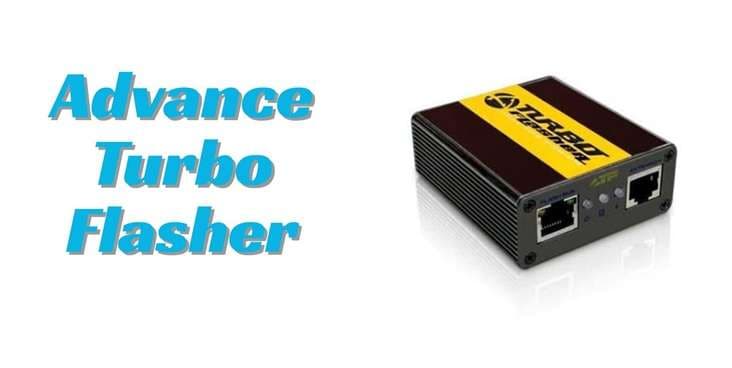
You need the original Advance Box Turbo flasher and its USB cable. The cable connects the ATF Box to your Windows computer.
After the box is connected, check the indicator light beside the Flash Bus option. The light shows that the hardware is detected and ready for use.
Step 1: Download and Install Advance Turbo Flasher
Search for a trusted Advance Turbo Flasher download for Windows. The package should contain the ATF setup file and required USB drivers.
Extract the downloaded ZIP file. Then open the installer and complete the setup process.
Step 2: Install the USB Drivers
Install the USB drivers included with the software package. These drivers allow the ATF Box and connected phone to communicate with the computer.
Without the correct drivers, the Advance Turbo Box may fail to detect your device. Restart your computer after the driver installation is complete.
Step 3: Connect the Phone and Choose Its Platform
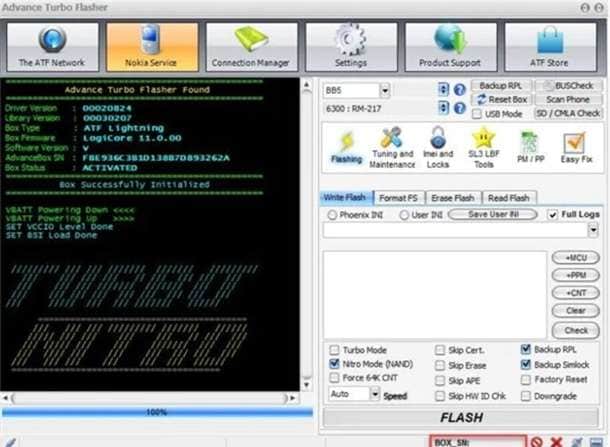
Open Advance Turbo Flasher. Connect the supported Nokia phone through the original ATF Box.
Select the platform that matches your device. Available options may include:
- BB5
- DCT4
- MeeGo
- MediaTek
- NXPlatform
Choosing the right platform helps ATF run the correct flashing or repair process.
Step 4: Flash the Phone Firmware
Open the Flashing tab. Select the firmware files made for your phone model. Then click FLASH.
Put the phone into Flash Mode and connect it to the computer. ATF will begin installing the firmware. Keep the phone connected until the process is fully complete.
Step 5: Reset the User Code if Needed
To reset a forgotten user code on a supported Nokia phone, open the Service tab. Select Reset (User Code).
Connect the phone in Test Mode and wait for the reset to finish. Restart the phone afterward and check whether the user lock has been removed.
Bonus: Unlock Modern Android Phones, Including Android 16, with Dr.Fone
ATF is made for deep repair work on older Nokia hardware. It becomes a poor match when the real problem is a forgotten PIN, pattern, password, fingerprint lock, face lock, or Google FRP on a newer Android phone.
Dr.Fone - Screen Unlock (Android) is designed for this more common task. Its official pages state that it supports more than 2,000 Android phone and tablet models.
Listed brands include Samsung, Xiaomi, Redmi, Oppo, Realme, OnePlus, Motorola, Vivo, Huawei, Google, Tecno, Infinix, and others. Its compatible FRP tools support Android 16 and below. However, Dr.Fone does not remove carrier network restrictions.
Why Dr.Fone Is Easier for Android Screen Unlocking
- Removes PINs, patterns, passwords, and other common screen locks
- Supports many current Android brands
- Gives clear model-based instructions
- Offers a no-data-loss option for selected older Samsung models
- Provides a wider removal route for other Android devices
- Does not require soldering or JTAG wiring
- Does not need an external repair box
- Guides users through each required device mode
 Unlock Android phone in seconds.
- Remove PIN, pattern, password, fingerprint.
- Bypass Google FRP lock easily.
- Works on all Android brands & models.
- No tech skills required – user-friendly.

How to Unlock an Android Phone with Dr.Fone
-
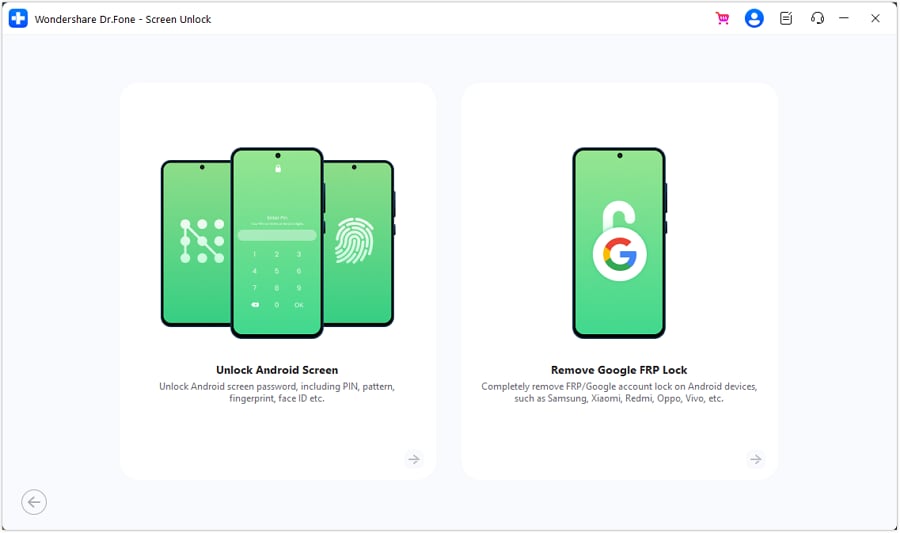
Step 1 Open the Android Screen Removal Tool
Launch Dr.Fone and go to Screen Unlock > Android. Select Unlock Android Screen to begin removing the lock from your device.
-
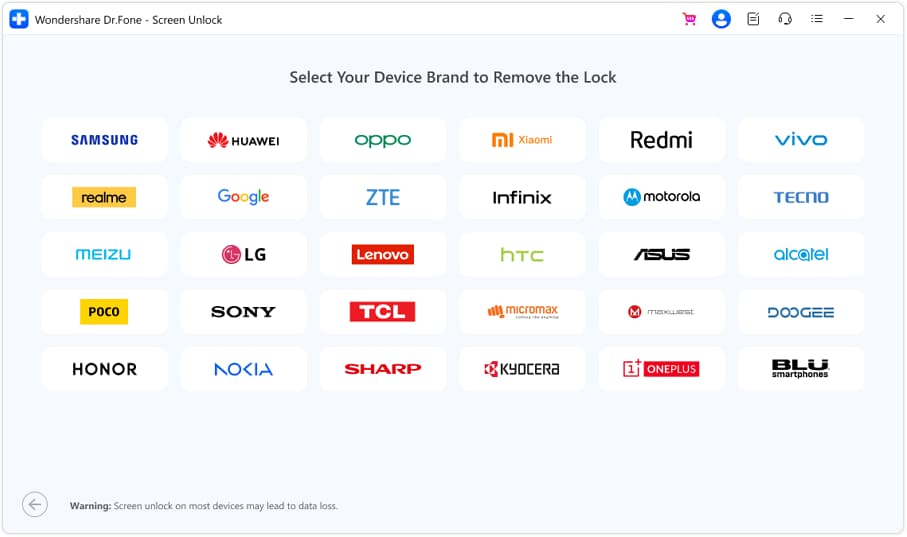
Step 2 Choose the Phone Brand and Enter the Required Mode
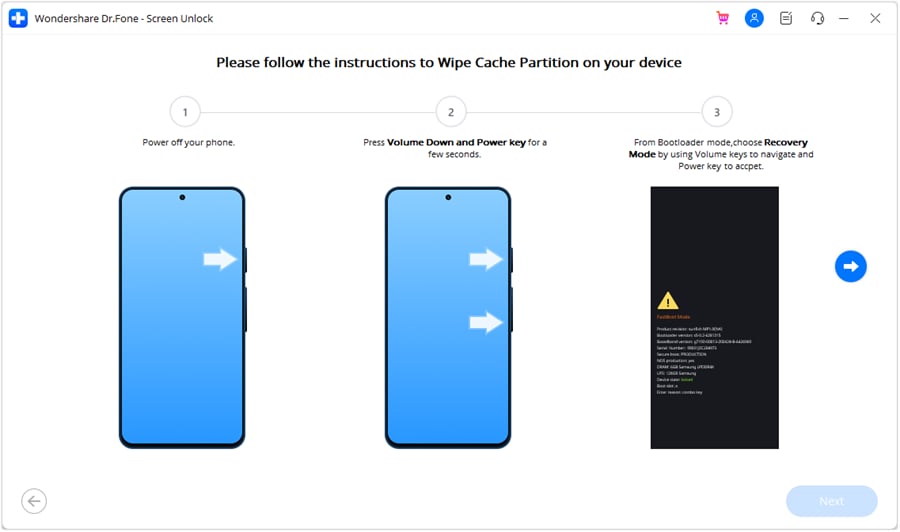
Select the brand of the locked Android phone. Dr.Fone will then show the correct steps for placing that device in the required mode.
For Samsung phones that don’t allow unlocking without data loss, choose Samsung first and then select 100% Remove Screen Lock.
Do what you see on the screen. The button combination varies by phone manufacturer. When the device goes into the correct mode, Dr.Fone will start removing the lock. The technique could result in the removal of all information on cellphone.
-
Step 3 Complete the Unlock Process
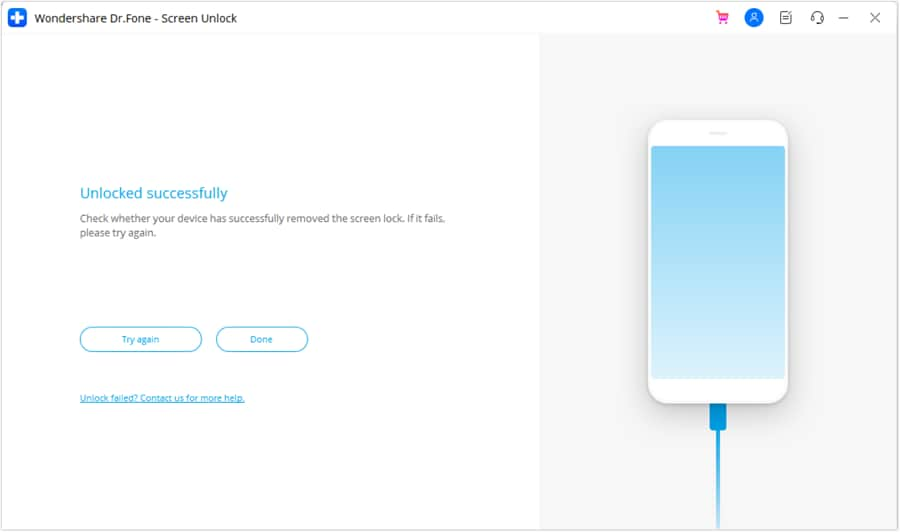
Keep the phone connected while Dr.Fone removes the screen lock. When the process finishes successfully, click Done.
If the attempt does not work, select Try Again and repeat the instructions carefully.




Conclusion
Advance Turbo Flasher still has value for technicians who repair older Nokia phones, flash firmware, reset supported codes, or recover selected devices. However, it needs the correct box, drivers, firmware, and repair knowledge, so it is not ideal for every Android user.
This Advance Turbo Flasher review also shows why modern screen locks need a simpler route. For supported Android phones, Dr.Fone - Screen Unlock offers guided steps for removing common locks without extra repair hardware. Some methods may erase data, so check device support and warnings first. Choose ATF for technical servicing tasks, and Dr.Fone - Screen Unlock (Android) for easier screen unlocking.
 Add Wondershare Dr.Fone as a preferred source on Google