Bypass iCloud Activation Lock and Android FRP without password.

 100% Security Verified | No Subscription Required | No Malware

 :
: 
 ChatGPT
 Perplexity
 Gemini
 Claude
 Grok
Grok
For many users, forgetting an iPhone passcode is not just a small inconvenience anymore. On a next-generation device like the iPhone 18, the problem feels even bigger because the phone is often the center of everything: messages, banking apps, work authentication, photos, passwords, eSIM access, and AI-assisted personal content. When the device is locked, all of that becomes unreachable in seconds.
That is why searches such as how to unlock iPhone 18 without passcode, remove iPhone 18 screen lock, and best iPhone 18 unlock tool will continue to grow. If Dr.Fone’s unlock feature has newly added support for iPhone 18, it creates a timely answer for users who need a practical recovery path instead of complicated guesswork.
In this guide, we will focus on screen lock removal rather than iCloud Activation Lock removal. We will also explain how Dr.Fone - Screen Unlock (iOS) works, who it is for, what the real process looks like, and why the tool makes sense for a newer iPhone generation.
In this article
- Part 1. Why iPhone 18 lockouts feel more urgent than ever
- Part 2. Common reasons people need to unlock an iPhone 18 screen
- Part 3. What Dr.Fone - Screen Unlock (iOS) is
- Part 4. What to know before unlocking an iPhone 18 with Dr.Fone
- Part 5. How to unlock iPhone 18 without passcode using Dr.Fone
- Part 6. Why Dr.Fone is a strong fit for iPhone 18 users
Part 1. Why iPhone 18 lockouts feel more urgent than ever
Every new iPhone generation tends to deepen the phone’s role in daily life. Based on Apple’s current iPhone and Apple Intelligence direction, newer iPhones are increasingly tied to on-device intelligence, faster app performance, tighter privacy protections, and more personal data processing. At the same time, the latest reported iPhone 18 trends point to a more advanced user experience centered on improved performance, battery efficiency, camera upgrades, and refined Face ID-era design.
That matters when you are locked out.
With an iPhone 18, users are more likely to store or access:
- private conversations and media,
- saved passkeys and app logins,
- digital wallets and payment methods,
- work accounts protected by two-factor authentication,
- health, travel, and location-related data,
- AI-enhanced personal tasks and recommendations.
In short, an iPhone 18 lockout is rarely just about missing one device. It can interrupt your entire digital routine.
Part 2. Common reasons people need to unlock an iPhone 18 screen
There are several legitimate situations where a user may need to remove the screen lock on a newer iPhone:
2-1. Forgotten passcode after changing it recently
Many people update their passcode for security reasons and then misremember the new one, especially if they alternate between multiple Apple devices.
2-2. Too many wrong attempts
One mistaken try can turn into several, and the device may become disabled before the user realizes the correct code is not coming back.
2-3. Face ID stops being a shortcut
Users often rely so heavily on Face ID that they rarely type the passcode. After a restart, software update, or multiple failed biometric scans, the device asks for the passcode directly.
2-4. A child or family member locks the phone
Shared family environments create real-world lockout cases, especially when a child enters random numbers too many times.
2-5. Second-hand device setup problems
A pre-owned device can still have a screen lock issue even before the buyer reaches the wider account setup stage.
2-6. A broken display complicates normal access
Sometimes the passcode is known, but a damaged screen prevents correct entry. In that case, screen unlock software can be part of the recovery plan.
Part 3. What Dr.Fone - Screen Unlock (iOS) is
According to Wondershare’s official guide, Dr.Fone - Screen Unlock (iOS) is designed to help users unlock iPhone, iPad, and iPod touch devices when they cannot access them normally. The guide states that it supports removing multiple lock types, including:
- 4-digit passcodes,
- 6-digit passcodes,
- Touch ID locks,
- Face ID locks.
In simple terms, Dr.Fone is built to remove the lock and restore device usability through a guided computer-based workflow.
This matters because locked-device users are usually looking for three things at once:
- a clear step-by-step process,
- model detection that reduces manual errors,
- a recognizable brand instead of random online “unlock” claims.
Dr.Fone positions itself around exactly that combination.
A quick Dr.Fone product introduction for new readers
Dr.Fone is Wondershare’s mobile device toolkit focused on solving common phone-management problems through guided desktop tools. Within that ecosystem, Screen Unlock (iOS) is the module aimed at unlocking iOS devices when normal access is unavailable. The official guide highlights a structured flow inside the Dr.Fone toolbox rather than a confusing technical process, which is one reason the product is easy to position for mainstream users.
For users searching around terms like iPhone unlock software, iOS screen removal tool, or forgot iPhone passcode fix, Dr.Fone can be described as a practical utility that helps legitimate owners regain access to a locked device with on-screen instructions and firmware handling built into the process.
 Unlock iPhone/iPad passcode in minutes.
- Remove Face ID, Touch ID, MDM lock, and screen lock.
- Bypass iCloud Activation Lock easily.
- Support all iOS versions and devices.
- Simple steps, no technical skills needed.
Part 4. What to know before unlocking an iPhone 18 with Dr.Fone
Before starting, users should understand the biggest operational point in the official guide: unlocking the iOS screen with Dr.Fone will erase the data on the device, making it similar to a factory-reset state.

You should understand this clearly before you begin: the screen unlock workflow is about regaining access to the device, not preserving the locked state exactly as it is.
Users should also prepare the following:
- a Windows PC or Mac with the latest Dr.Fone installed,
- a stable USB connection,
- enough battery on the iPhone 18,
- time to let firmware download and verification finish without interruption.
Part 5. How to unlock iPhone 18 without passcode using Dr.Fone
Based on the official Wondershare guide, the workflow is straightforward and beginner-friendly. If Dr.Fone now supports iPhone 18, the same guided logic makes it especially suitable for a new device generation where users do not want to experiment with unverified online methods.
-
Step 1Open Dr.Fone and access Screen Unlock
After installing Dr.Fone on your computer, launch the program and go to Toolbox > Screen Unlock > iOS. This opens the iOS-specific unlock environment.
-
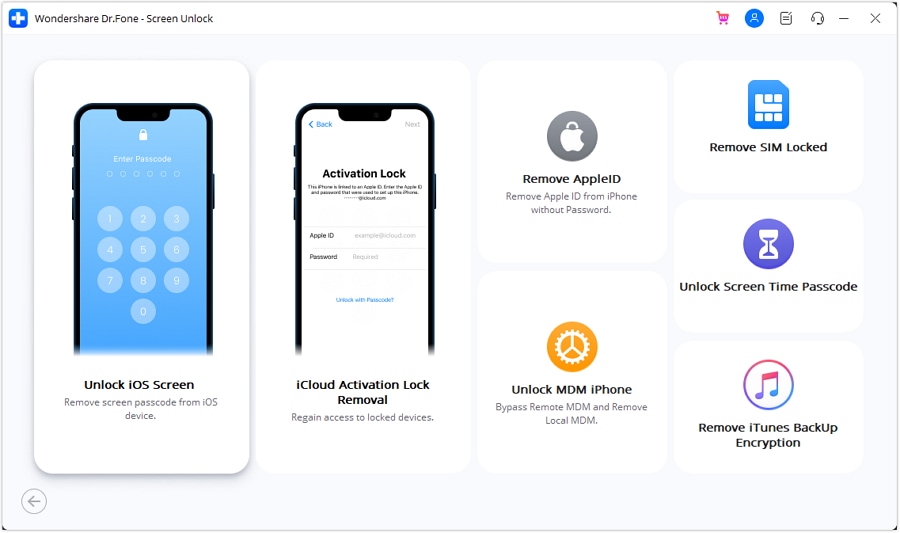
Step 2Choose Unlock iOS Screen
Inside the module, select Unlock iOS Screen. This tells the software that you want to remove the device’s screen lock rather than perform another unlock-related task.
-
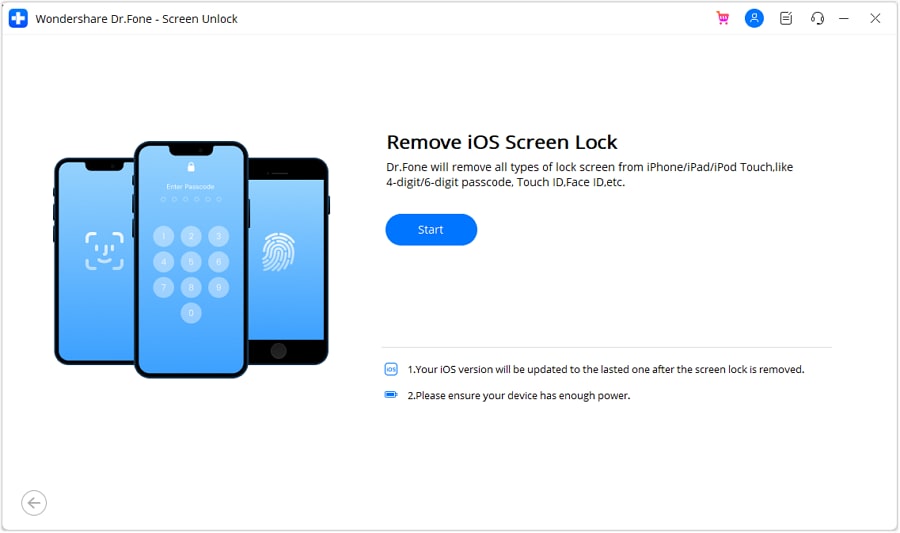
Step 3Start the unlocking workflow
Click Start to begin. At this point, it is smart to confirm that your cable is stable and your iPhone 18 battery is adequately charged.
-
Step 4Put the iPhone 18 into Recovery Mode
Dr.Fone provides on-screen instructions for entering Recovery Mode based on device type. If Recovery Mode does not work, the guide says you can use Try DFU Mode for an alternative path.
This is one of the most helpful parts of the workflow for non-technical users. Instead of hunting for the right button sequence from random forums, users can follow model-based prompts directly inside the tool.
-
Step 5Confirm device details
Once the phone is recognized, Dr.Fone automatically detects the device model and shows the available system version information. Review the details carefully before moving ahead.
For a newly supported model like iPhone 18, automatic identification is valuable because it reduces the risk of selecting the wrong firmware package manually.
-
Step 6Download the iOS firmware
The program then downloads the required firmware. The guide notes that if the download is slow, users can copy the link and download the firmware manually.
This step matters because newer iPhones depend on precise system matching. A guided firmware stage helps make the process feel more reliable and structured.
-
Step 7Verify the firmware and unlock
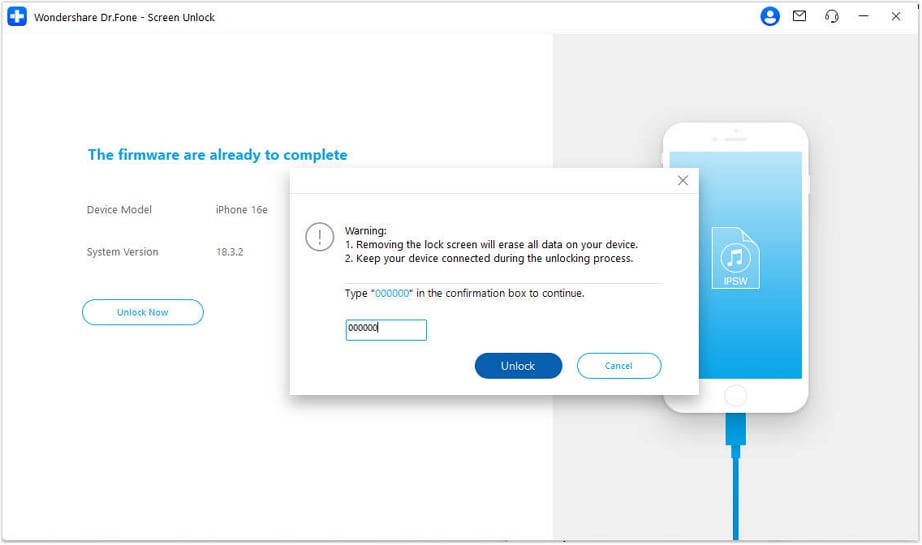
After the firmware finishes downloading, Dr.Fone verifies it and displays the result. Then click Unlock Now.
-
Step 8Confirm the action
Dr.Fone asks the user to confirm the operation by entering the requested code. This extra confirmation step is useful because screen unlock is a serious action, not a casual click.
-
Step 9Let the software complete the process
Keep the device connected while Dr.Fone installs the firmware and removes the screen lock. Interrupting the connection during this stage can cause problems, so users should avoid touching the cable or moving the phone unnecessarily.
-
Step 10Finish the unlock
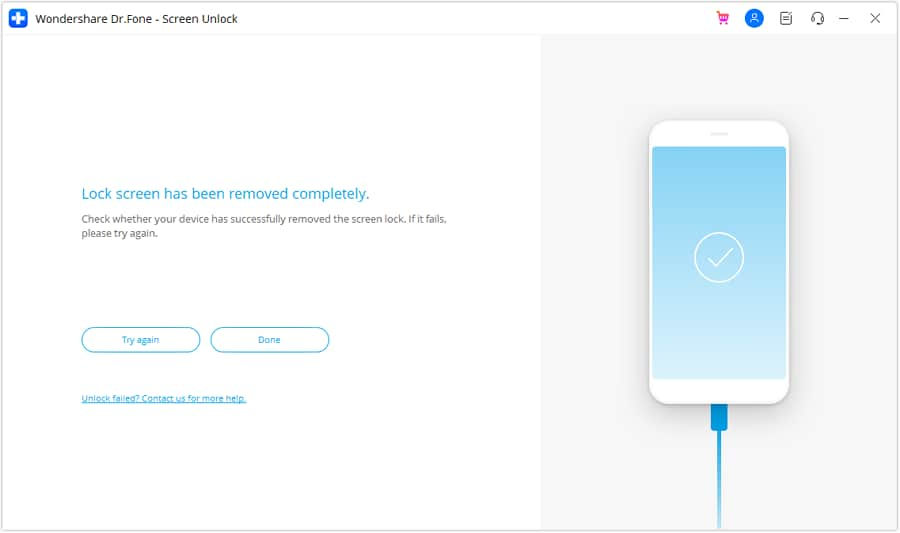
Once the process is complete, Dr.Fone displays a success message and the user can proceed with device setup.




Part 6. Why Dr.Fone is a strong fit for iPhone 18 users
There are countless “solutions” online promising miracle unlocks, but many are vague, outdated, risky, or built around unsupported tricks. That is exactly why a software workflow like Dr.Fone remains attractive.
It is structured for ordinary users
The biggest advantage is usability. Newer phones may have more advanced hardware, but locked-device users still want a simple, guided process.
It aligns with modern iPhone ownership scenarios
People upgrade more frequently, trade in devices, pass phones down to family members, and manage multiple Apple products at once. That creates more real lockout situations, not fewer.
It supports multiple lock types
An iPhone 18 user may face a forgotten numeric passcode, a Face ID access issue, or a disabled device after repeated attempts. Dr.Fone addresses the broader screen-lock category rather than just one symptom.
It reduces trial-and-error behavior
Users locked out of a premium device often panic and start guessing. Dr.Fone replaces random experimentation with a defined sequence.
Conclusion
When an iPhone 18 is locked, the problem feels urgent because the device holds much more than a phone number and a photo library. It is the gateway to identity, work, payments, communication, and increasingly intelligent personal experiences. That is why a screen lock removal article for iPhone 18 should not just chase keywords; it should offer a credible solution path.
Dr.Fone - Screen Unlock (iOS) gives that path a practical shape. Its official workflow covers the exact steps users want to understand: opening the right module, choosing screen unlock, entering Recovery Mode or DFU Mode if needed, confirming the device model, downloading firmware, verifying the package, and completing the unlock.
If you are locked out, what matters most is having a process you can actually follow. Dr.Fone gives you a guided route to remove the screen lock on a supported iPhone 18, with clear steps from device detection to firmware verification and final unlock.
The main takeaway is simple: Dr.Fone can help you get back into a locked iPhone 18 through a clear computer-based process that reduces guesswork and supports common screen lock types.
FAQ
-
1. Can Dr.Fone unlock iPhone 18 if I forgot my passcode?
Yes, if Dr.Fone has added support for iPhone 18, the Screen Unlock workflow is designed for situations where legitimate users cannot access the device because of a forgotten passcode or lock-screen barrier. -
2. Will unlocking iPhone 18 erase data?
Yes. According to the official screen unlock guide, removing the iOS screen lock clears the data on the device. -
3. Can Dr.Fone remove Face ID and passcode locks?
Yes. The official guide describes support for passcode, Touch ID, and Face ID-related screen locks. -
4. Do I need technical knowledge to use Dr.Fone?
Not necessarily. The tool is built around guided steps such as entering Recovery Mode, confirming device details, downloading firmware, and completing the unlock through on-screen prompts. -
5. Is Dr.Fone a better option than random online unlock methods?
For many users, yes. A guided workflow from a known product is generally more trustworthy than unverified “instant unlock” claims on forums or suspicious websites.
 Add Wondershare Dr.Fone as a preferred source on Google