 Bypass iCloud Activation Lock and Android FRP without password.

 100% Security Verified | No Subscription Required | No Malware

 :
: 
 ChatGPT
 Perplexity
 Gemini
 Claude
 Grok
Grok
TMT MediaTek Universal appears in many guides for FRP removal, factory resets, and MediaTek servicing. However, most pages still describe the older v2.0 even though the creator moved on to v3.0 in 2025. That gap makes it hard to know which version you're downloading, which phones it supports, and how safe the download source is.
This review breaks down TMT MediaTek Universal's real features, device compatibility, and the risks around third-party mirrors and mislabeled builds. It also explains where Dr.Fone - Screen Unlock (Android) fits for users who only need screen-lock or Google FRP removal on supported devices.
In this article
Part 1. What Is TMT MediaTek Universal?
TMT MediaTek Universal is a free Windows servicing utility mainly for Android devices using MediaTek chipsets. The creator's site links the tool to Bang Teksir / Teknisi Musafir and pitches it as a technician tool, not something a regular user would install. Its documented functions include MediaTek authentication handling, FRP-related servicing, factory resets, partition backup, NVData/NVRAM restoration, and other device-maintenance tasks.
The tool is aimed more at mobile-repair technicians and experienced Android users. This is because several functions work directly with device partitions and low-level MediaTek servicing. Therefore, treat it as a third-party utility, not an official MediaTek, Google, Samsung, Xiaomi, or Android tool. The creator distributes it through the Teksir site and Teknisi Musafir-related channels, not through those companies’ official software platforms.
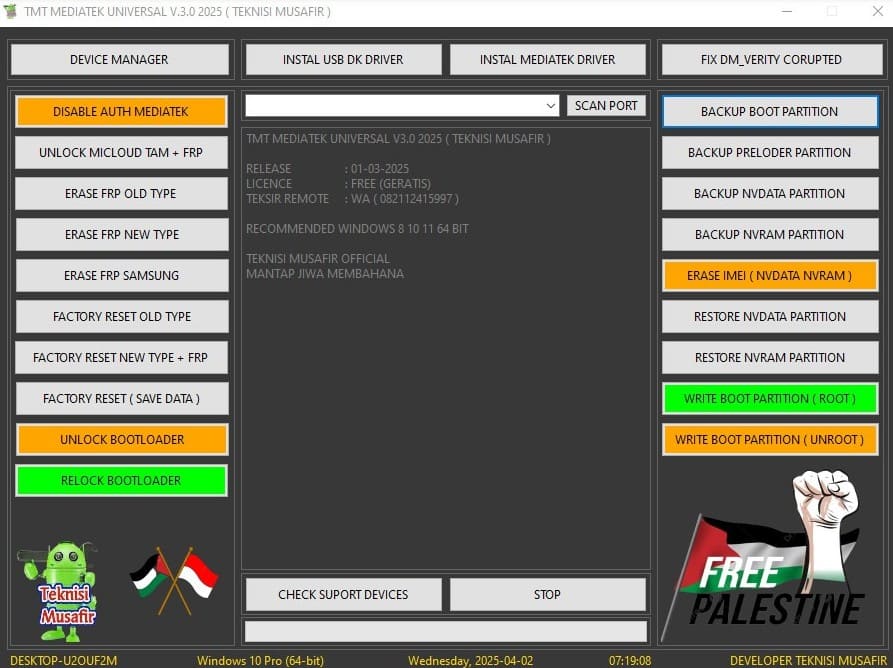
TMT MediaTek Universal v2.0 vs v3.0
The version history matters because some current 2026 pages still promote v2.0. Even though Bang Teksir’s own site published TMT MediaTek Universal v3.0 in 2025. For that reason, v3.0 is the latest creator-published release. The table below compares it with v2.0 for better clarity:
| Version | Release Period | Main Functions | Key Changes |
|---|---|---|---|
| v2.0 | 2024–2025 circulation | AUTH handling, FRP eraser, factory reset, MiCloud-related functions, Save Format MISC, drivers | Added port scan, PC-name display, stop control, and basic tool information |
| v3.0 | 2025 creator release | Keeps FRP/reset functions and adds partition backup/restore, boot partition work, NVData/NVRAM operations | Expanded partition backup/restore, security erase, and root/unroot boot-partition writing capabilities in v3.0 |
Part 2. What Can TMT MediaTek Universal Do?
The TMT MediaTek Universal v3.0 feature set goes beyond basic FRP and reset work. The creator’s 2025 release page lists authentication handling and other features mentioned in the sequential table:
| Feature | Purpose | Main Limitation |
|---|---|---|
| MediaTek AUTH Handling | Helps service supported MTK devices that require authentication access | Support varies by chipset and security state |
| FRP Functions | Covers old/new FRP cases and a Samsung MTK FRP option | Not guaranteed for every MTK device or security patch |
| Factory Reset | Provides old/new reset modes and a save-data reset option | Reset functions can still affect stored data |
| MiCloud Functions | Includes Xiaomi-related servicing on supported MTK devices | Device and firmware support is not universal |
| Partition Backup / Restore | Works with Boot, Preloader, NVData, and NVRAM partitions | Incorrect partition work can affect boot or device functions |
| Boot Partition Functions | Supports documented root/unroot boot-partition writing | Intended for compatible devices and advanced servicing |
Other v3.0 Functions
Version 3.0 also includes several supporting functions, and they are explained ahead for TMT MediaTek Universal:
-
1 Port Scan
Scans available service ports to detect a connected MediaTek device and establish communication with the tool.
-
2 Device and Driver Detection
Checks whether Windows recognizes the connected MediaTek device and whether the required drivers are working properly.
-
3 Save-Data / MISC Reset
Provides a reset option designed to preserve user data where supported instead of performing a complete data wipe.
-
4 Bootloader Servicing
Supports bootloader unlock and relock functions on compatible MediaTek devices, depending on the device and firmware.
-
5 DM-Verity Repair
Includes a function for fixing certain DM-Verity corruption issues that can affect verified boot on compatible devices.
Part 3. Which Devices Does TMT MediaTek Universal Support?
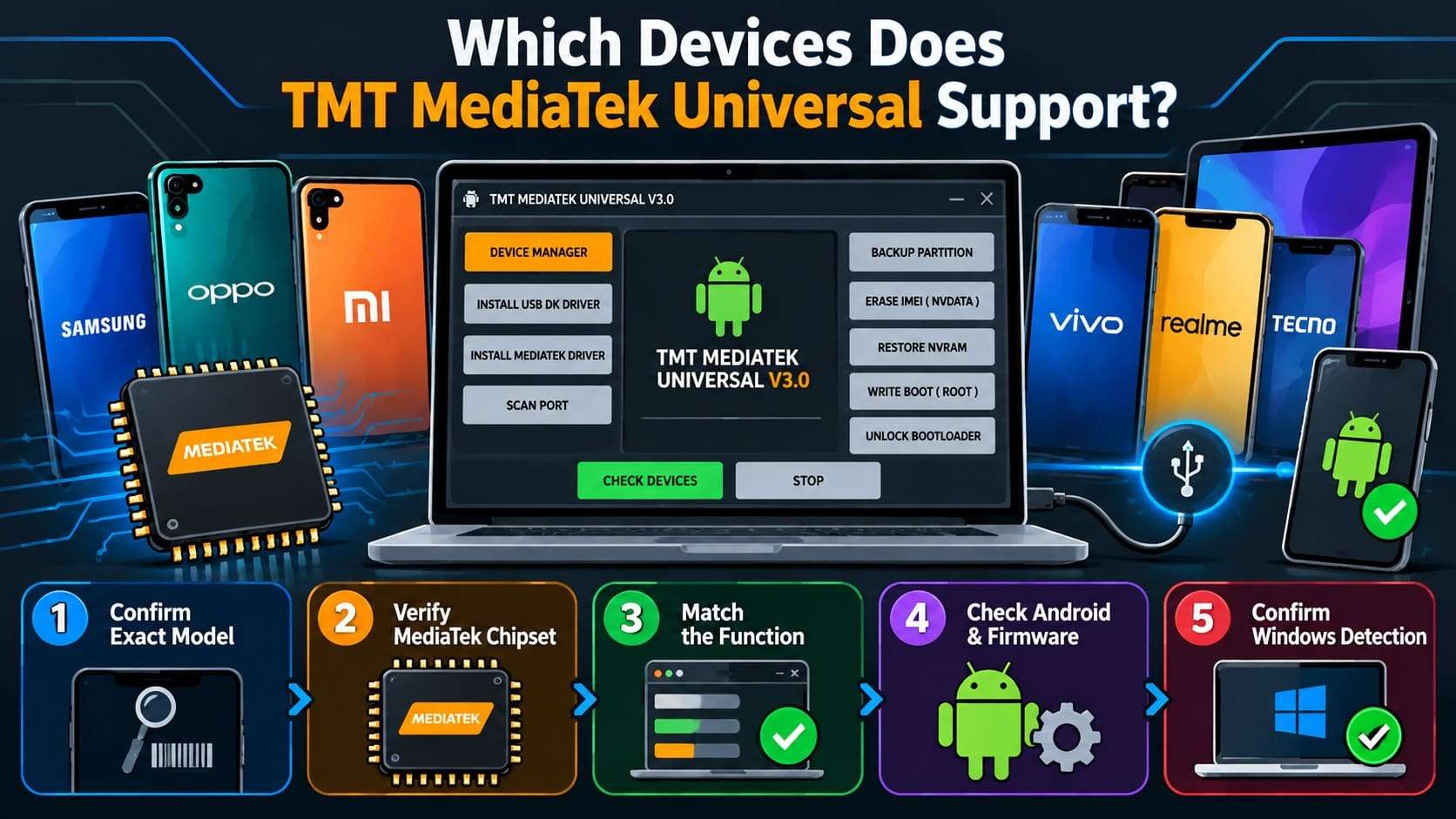
TMT MediaTek Universal v3.0 is intended mainly for Android phones and tablets using MediaTek chipsets. The creator’s v3.0 page documents MediaTek AUTH, FRP, reset, partition, and boot-related functions.
However, it does not provide a complete model-by-model compatibility database. Nonetheless, 2026 third-party guides mention Xiaomi/Redmi/POCO, OPPO, Realme, Vivo, Infinix, Tecno, itel, Nokia, Samsung, and other brands. Treat these brand names as examples, not proof that every model is supported.
How to Know Whether Your Phone Is Compatible
Before you use TMT MediaTek Universal, check these 5 points rather than relying on the brand name alone:
- Confirm the Exact Model: Check the phone’s complete model number or device code instead of relying only on its commercial name.
- Verify the Chipset: Make sure the exact device variant uses a MediaTek chipset. Snapdragon or Exynos variants are not compatible with TMT MediaTek Universal.
- Match the Required Function: Confirm that the needed feature, such as FRP removal, reset, AUTH handling, or partition backup, applies to that chipset and security version.
- Check Android and Firmware Details: Review the Android version, security patch, firmware revision, and boot state because these factors can affect feature compatibility.
- Confirm Windows Detection: Make sure Windows recognizes the device correctly and loads the required MediaTek drivers before TMT attempts to establish a connection.
Part 4. Is TMT MediaTek Universal Free and Safe?
Bang Teksir’s creator page lists TMT MediaTek Universal v3.0 2025 as a free 80 MB RAR download and provides multiple download mirrors. The archive is password-protected, as is common for third-party copies. However, “free” does not mean every copy found online is equally trustworthy. The main safety concern is therefore where the package comes from and what build it contains.
TMT v3.0 is also redistributed through GSM sites, Telegram channels, YouTube descriptions, and file hosts. Current mirrors do not always use the same archive or password. So, do not assume a download matches the creator-published package just because it has the same name.
Main Download and Reliability Concerns
To understand these risks better, the table below highlights the main concerns related to TMT MediaTek Universal downloads and usage:
| Concern | What to Know |
|---|---|
| No Mainstream App Store Distribution | The creator publishes it through a website and mirrors rather than the Microsoft Store or another mainstream software platform. |
| Third-Party Repackaging | GSM sites, Telegram channels, and file hosts redistribute v3.0 packages. |
| Older Builds in Search Results | Some pages still circulate v2.0 or older material even though the creator published v3.0 in 2025. |
| Password-Protected Archives | The creator’s v3.0 archive uses a RAR password, and other mirrors may use different passwords. |
| Windows Download Warnings | Microsoft advises downloading apps from trusted publishers and notes that unrecognized Internet downloads may trigger reputation-based warnings. |
| Data/Device Risk | Reset or partition-related operations can erase data or affect booting if used on the wrong device or configuration. |
Is TMT MediaTek Universal Still Useful in 2026?
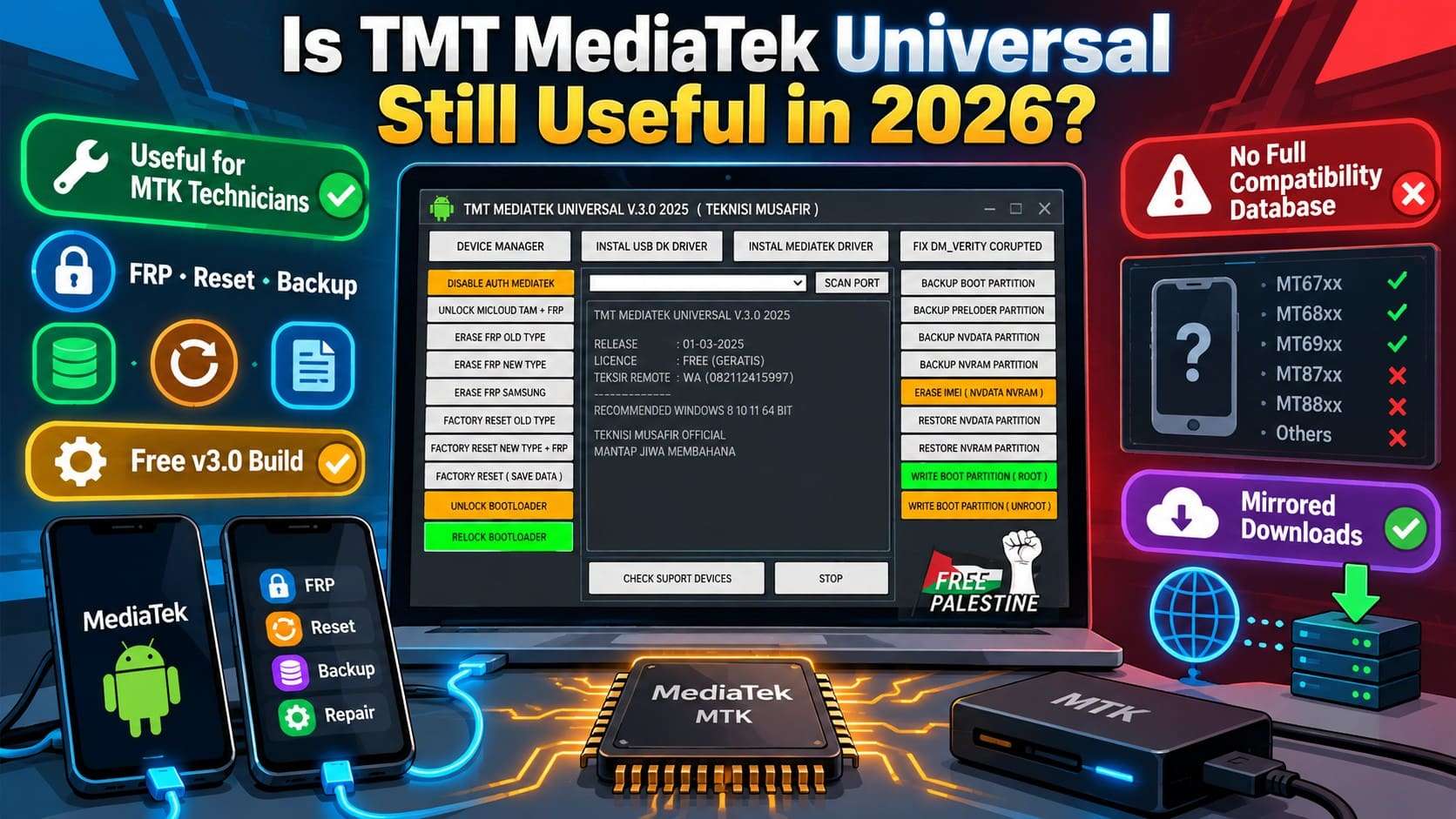
TMT MediaTek Universal can still be useful in 2026 for technicians who already work with compatible MediaTek hardware. Its creator-published v3.0 build combines FRP/reset functions with partition backup and restore. In addition, it features boot-partition work, port scanning, and other MTK servicing features without a paid license.
Nonetheless, the limitations are just as important. This tool requires more technical judgment than a normal consumer unlock utility. No creator-published compatibility database covers every chipset, Android version, or security revision. Download verification is also harder because the package is widely mirrored.
Part 5. A Safer TMT MediaTek Alternative for Screen Unlock and FRP: Dr.Fone – Screen Unlock (Android)
If you use TMT MediaTek Universal only for a screen lock or Google FRP, Dr.Fone - Screen Unlock (Android) takes a more focused route. It is designed for legitimate device owners who need guided Android unlocking. Unlike TMT MediaTek Universal, Dr.Fone is not limited to MediaTek hardware. It supports PIN, pattern, password, fingerprint, and face-lock removal on compatible Android 32 devices.
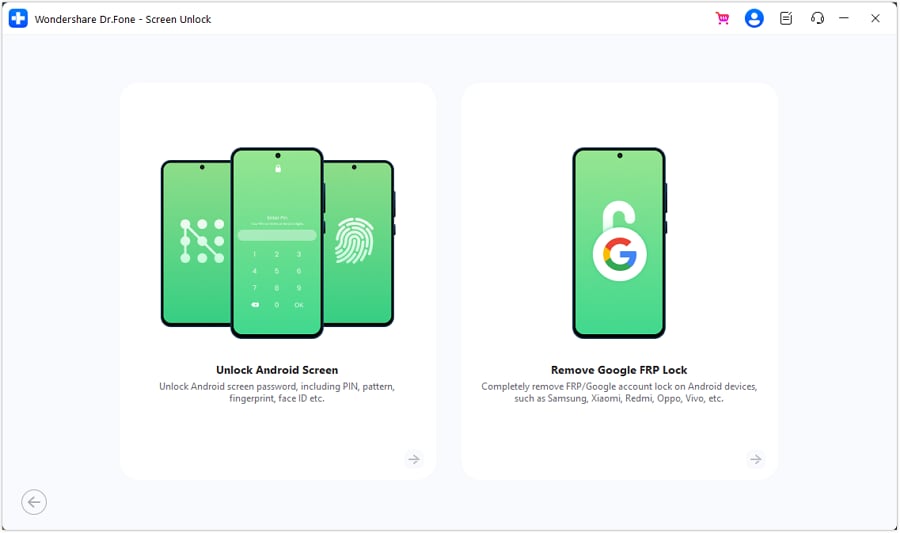
You can also benefit from Google FRP removal across brands such as Samsung and 20 others. It supports Android 16 and Samsung S26/S25 devices and allows you to remove the FRP lock online. The FRP bypass uses AI-powered recommendations, with brand-specific or grouped guidance available for supported devices. Selected Samsung Android 16 and Samsung MediaTek FRP workflows are also covered.
 Unlock Android phone in seconds.
- Remove PIN, pattern, password, fingerprint.
- Bypass Google FRP lock easily.
- Works on all Android brands & models.
- No tech skills required – user-friendly.

TMT MediaTek Universal vs Dr.Fone - Screen Unlock (Android)
These tools overlap in FRP work, but they serve different users. TMT MediaTek Universal is a technician-focused MTK servicing utility. Dr.Fone - Screen Unlock (Android) is centered on guided screen-lock and FRP removal. Review the table below to compare both tools:
| Factor | TMT MediaTek Universal | Dr.Fone - Screen Unlock (Android) |
|---|---|---|
| Main Purpose | MTK servicing and repair | Screen lock and FRP removal |
| MediaTek Focus | Yes | No |
| Screen Lock Removal | Limited / service-dependent | Yes, on 32 supported devices |
| Google FRP Removal | Yes, on supported MTK devices | Yes, across 21 supported brands |
| Recent Android Support | Depends on tool/device compatibility | Selected Android 16 workflows documented |
| Non-MediaTek Support | No main focus | Yes |
| Partition / NVRAM Tools | Yes | No |
| Firmware-Level Functions | Yes | No |
| Skill Required | Higher technical knowledge | Guided workflow |
| Documentation & Support | Creator/repair-site documentation | Official Wondershare guides |
| Best Use Case | MTK repair and servicing | Screen lock or FRP removal |
Guide to Use Dr.Fone to Bypass Screen and FRP Lock Efficiently
Once you know the TMT MediaTek Universal and Dr.Fone differences, review the given guide to unlock Android screens and bypass FRP with Dr.Fone:
1. To Unlock Screen Lock
-
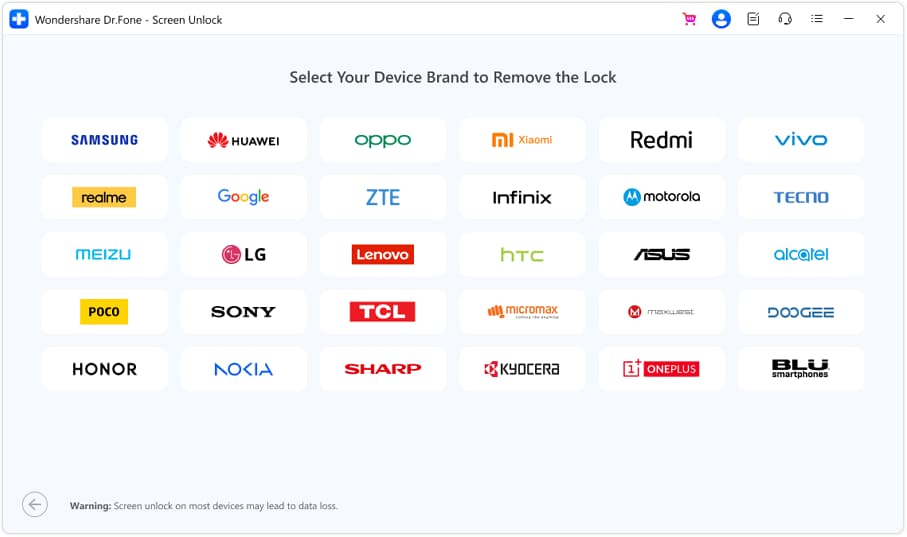
Step 1 Select Unlock Android Screen Mode
Open the “Screen Unlock” tool for Android and select “Unlock Android Screen” to choose the brand.
-
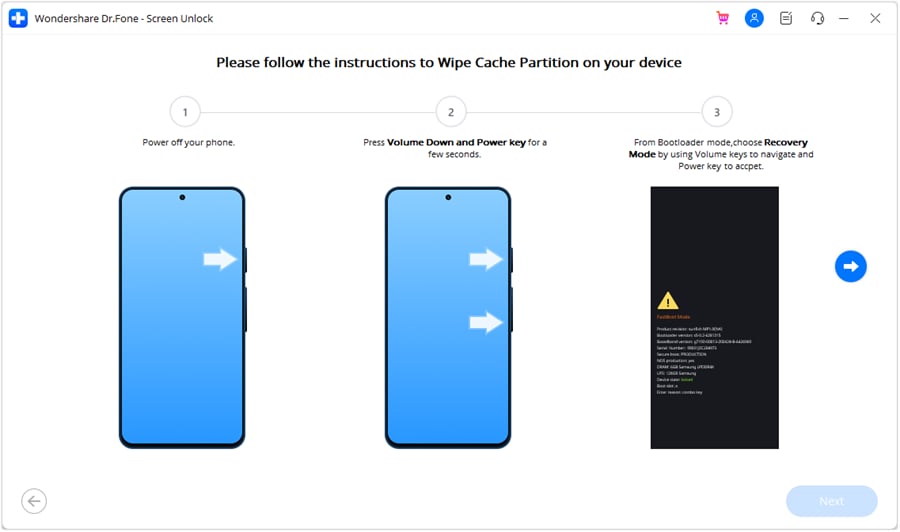
Step 2 Unlock Android in Special Mode
With the phone connected, follow the instructions, and the tool will access “Special Mode.” Dr.Fone will remove the screen lock in less than 10 minutes, with no manual hassle.
2. To Bypass FRP Lock (Samsung as Example)
-
Step 1 Access the Remove Google FRP Lock Option
Start Dr.Fone on your PC and plug in the Samsung phone or tablet with a USB cable. Inside the Screen Unlock (Android) tool, pick “Remove Google FRP Lock,” set the brand to “Samsung,” and press “Start.”
-
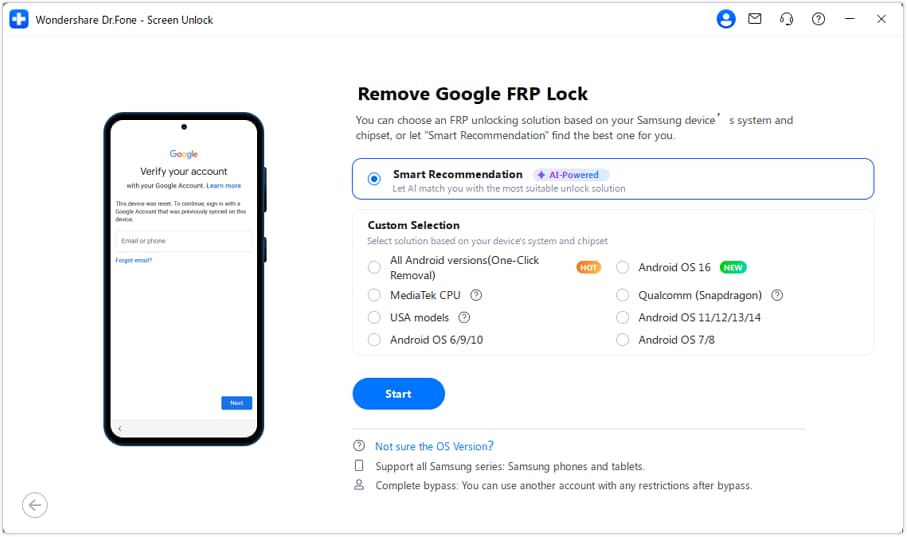
Step 2 Turn On Smart Recommendation
Enable “Smart Recommendation (AI-Powered)” and let Dr.Fone analyze the connected device to identify a suitable unlock method. Then, follow the on-screen instructions to complete the process using steps matched to your phone.
-
Step 3 Complete the FRP Removal
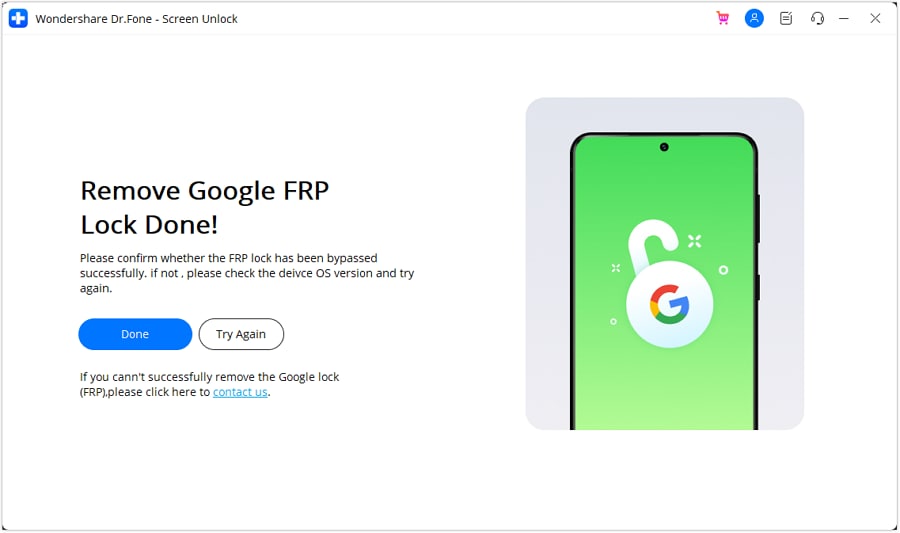
Once Dr.Fone removes the FRP lock, click “Done” to finish the process. If the removal does not complete successfully, select “Try Again” and follow the on-screen instructions.




Conclusion
To sum up, TMT MediaTek Universal still works for technicians handling MediaTek partition, FRP, and reset tasks. However, the mislabeled versions and third-party mirrors make it risky for anyone unfamiliar with MTK servicing.
If you just want your own phone's screen lock or Google FRP bypassed without touching firmware or partitions, Dr.Fone - Screen Unlock (Android) is the simpler route. It's guided, covers more brands than MediaTek alone, and gets the job done in minutes without the technical guesswork.
Frequently Asked Questions
-
Q1. Is TMT MediaTek Universal v3.0 newer than v2.0?
Yes, TMT MediaTek Universal v3.0 is the newer creator-published release from 2025. It expands on v2.0 with partition backup and restore, boot-partition functions, NVData/NVRAM operations, newer reset options, and interface changes. -
Q2. Does TMT MediaTek Universal work on Snapdragon or Exynos phones?
No clear support is documented for Snapdragon or Exynos devices. TMT MediaTek Universal is built mainly for Android phones and tablets using MediaTek chipsets. So, check compatibility by chipset rather than brand name alone. -
Q3. Can TMT MediaTek Universal remove Google FRP on every MediaTek device?
No, TMT includes FRP functions for supported MediaTek devices, including old/new FRP cases and a Samsung MTK option. However, support varies by chipset, security patch, firmware, and device state. -
Q4. Is Dr.Fone easier to use than TMT MediaTek Universal for FRP removal?
Dr.Fone - Screen Unlock (Android) uses a guided interface with brand-specific FRP instructions. TMT MediaTek Universal exposes more technician-focused MTK servicing functions. For users who only need FRP removal on a supported phone they own, Dr.Fone requires less low-level device handling. TMT suits users already familiar with MediaTek servicing and partition-level tools.
 Add Wondershare Dr.Fone as a preferred source on Google



