 Bypass iCloud Activation Lock and Android FRP without password.

 100% Security Verified | No Subscription Required | No Malware

 :
: 
 ChatGPT
 Perplexity
 Gemini
 Claude
 Grok
Grok
After an unauthorized factory reset, a Samsung device may require the previously synced Google account before you can use it again. This security lock is Factory Reset Protection, and technicians often use the GSM Prime tool to bypass this restriction.
The tool is real and free, but community developers created it without corporate support. This guide covers features, device compatibility, security risks, and safer alternative options. So, learn how to use it and why Dr.Fone - Screen Unlock (Android) can be the safest option.
In this article
- Part 1. What is GSM Prime Tool?
- Part 2. System Requirements for GSM Prime Tool
- Part 3. Devices and Models Supported by GSM Prime Tool
- Part 4. How GSM Prime Tool Works
- Part 5. Is GSM Prime Tool the Same as iKeyPrime?
- Part 6. How to Download and Use GSM Prime Tool
- Part 7. Pros and Cons of GSM Prime Tool
- Part 8. Common GSM Prime Tool Errors & Solutions
- Part 9. Try a Safer Alternative to GSM Prime Tool: Dr.Fone – Screen Unlock (Android)
Part 1. What is GSM Prime Tool?
GSM Prime Tool is a free Windows program that strips Factory Reset Protection (FRP) off Samsung phones. Some versions also include limited support for brands such as Xiaomi, Motorola, LG, and other Android devices.
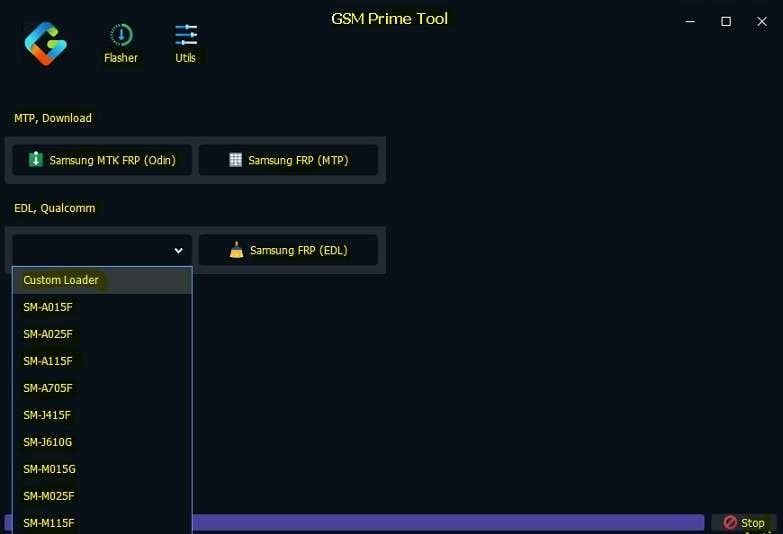
It communicates through supported service modes, while the exact FRP method varies by model, chipset, firmware, and patch. However, no official company supports or updates the tool, and there's no customer service. The software now circulates as PrimeToolX, so searches for the original name often lead to this updated release.
Key Features
If you search for GSM Prime Online FRP Android apps, here are the features you need to know about this tool:
- FRP Bypass: Removes Factory Reset Protection (FRP) on supported devices using compatible methods such as MTP, ADB, Download Mode, EDL, Test Mode, or other supported workflows, depending on the model.
- Samsung Service Tools: Perform FRP reset, factory reset, CSC changes, Odin flashing, Knox-related functions, and other Samsung service operations on supported devices.
- Screen Lock Functions: Remove supported PIN, password, and pattern locks where available, or perform a factory reset on compatible devices to restore access.
- Device Utilities: Access maintenance features such as entering service modes, enabling supported functions, rebooting devices, and performing basic service operations depending on the model and chipset.
Part 2. System Requirements for GSM Prime Tool
If you searched for "GSM Prime online apps Android APK" or GSM Prime Tool, note that it runs only on Windows. Before using it, make sure your computer and device meet these requirements.
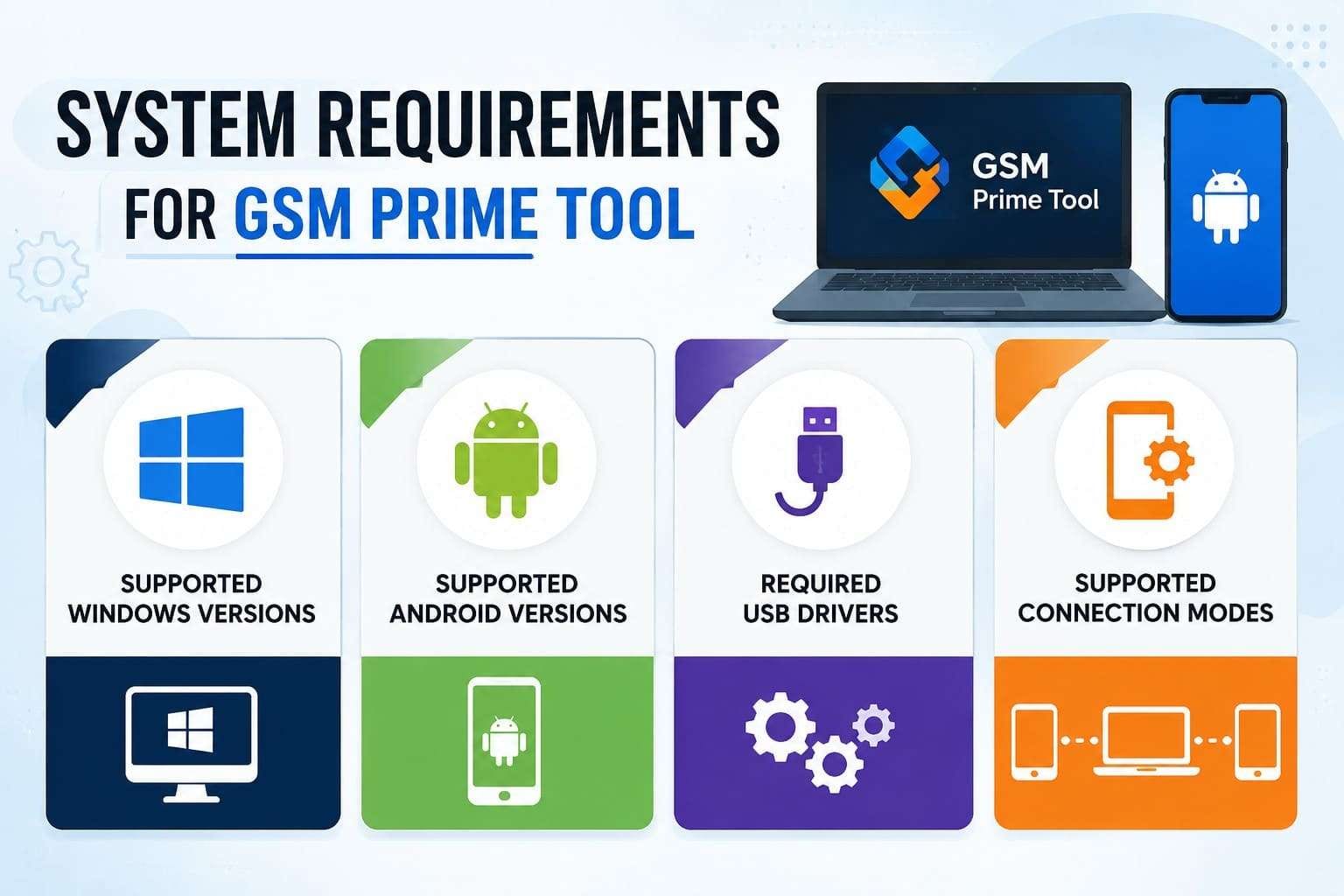
- Supported Windows Versions: Windows 7, 8, 10, or 11 (64-bit recommended). GSM Prime Tool is available only for Windows, with no official macOS or Linux version.
- Supported Android Versions: Roughly Android 5 through 13 for reliable results, with the newer PrimeToolX builds reaching further. Android 14 and 15 phones frequently fail to connect.
- Required USB Drivers: Install Samsung USB drivers and any required Qualcomm or MediaTek drivers based on the connected device and selected service mode.
- Supported Connection Modes: Supported modes include Samsung Download Mode, Test Mode, MTP, ADB, Qualcomm EDL 9008, and MediaTek Preloader or BROM on compatible devices, depending on the model and operation.

Part 3. Devices and Models Supported by GSM Prime Tool
GSM Prime Tool mainly targets Samsung devices, with limited support for select Xiaomi, Motorola, and LG models. Compatibility varies by exact model, chipset, Android build, and security patch level, and the given table explains all:
| Metrics | Samsung | Xiaomi / Redmi | Motorola | LG (Legacy) |
|---|---|---|---|---|
| Typical Operations | FRP removal, factory reset, CSC functions, flashing, and other supported service operations. | FRP removal and selected service functions on supported models. | FRP removal and selected service functions on supported models. | FRP removal and basic service functions on supported legacy models. |
| Supported Modes | Download Mode, Test Mode, MTP, ADB, EDL (supported models) | Test Point, ADB, Fastboot, or EDL (supported models) | ADB, Fastboot, or EDL (supported models) | EDL or other supported service modes |
| Example Models | Supported Galaxy A, M, J, S, Note, Z, and Tab series (varies by model and binary) | Supported Redmi, Xiaomi, and POCO models (varies by chipset and firmware) | Supported Moto G, Moto E, and selected Motorola models | Selected LG G, V, K, and Stylo series |
| Support Notes | Best-supported platform; compatibility depends on model, binary, firmware, and security patch. | Limited support; available features vary by model, chipset, firmware, and Android version. | Support depends on chipset, firmware, bootloader status, and available service methods. | Primarily older LG devices with limited ongoing compatibility updates. |
Part 4. How GSM Prime Tool Works
Whether you searched for GSM Prime online apps, Android APK, or GSM Prime Tool, here's how the software typically works on supported devices:
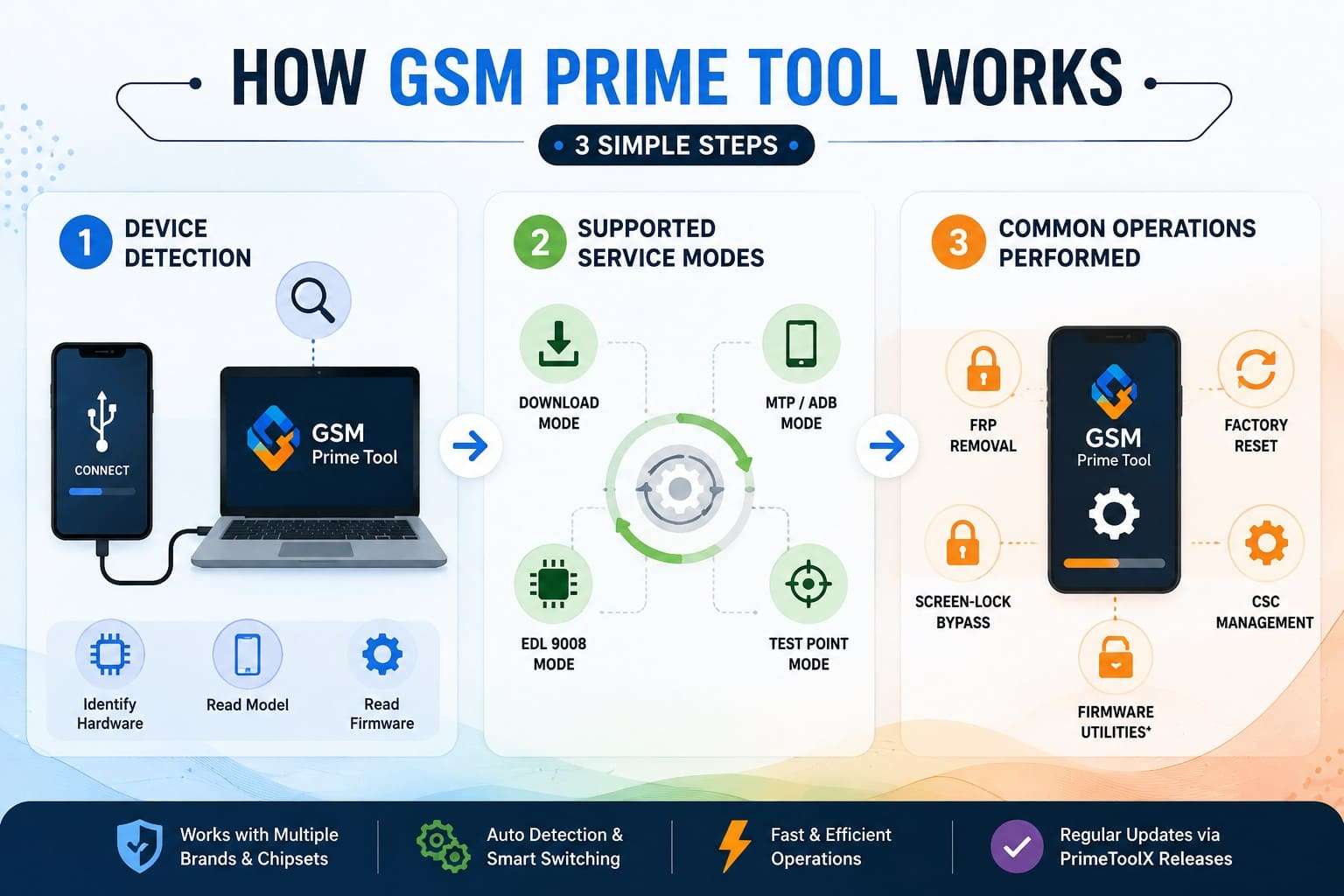
- Device Detection: Once the phone enters a supported service mode and the required drivers are installed, the tool detects the connected device and reads its basic information. The available connection method depends on the device model, chipset, firmware, and selected service operation.
- Supported Service Modes: GSM Prime Tool works through different service interfaces depending on the device model and operation. Supported modes include Samsung Download Mode, Test Mode, MTP, ADB, Qualcomm EDL 9008, and MediaTek Preloader or BROM on compatible devices.
- Common Operations Performed: It supports FRP removal, factory reset, CSC functions, Odin flashing, Knox-related operations, and other supported service tasks. Available features depend on the device model, chipset, firmware version, security patch, and software release.
Part 5. Is GSM Prime Tool the Same as iKeyPrime?
People often confuse GSM Prime with iKeyPrime since the names overlap. To know how both tools differ, explore the detailed table given in this section:
| Feature | GSM Prime Tool | iKeyPrime |
|---|---|---|
| Primary Purpose | Android FRP removal and supported device service functions | iCloud Activation Lock bypass for supported Apple devices |
| Supported Platforms | Windows tool for supported Android devices | Windows tool for supported iPhone and iPad devices |
| Main Security Lock | Google Factory Reset Protection (FRP) | Apple iCloud Activation Lock |
| Popular Device Support | Samsung, plus selected Xiaomi, Redmi, Motorola, LG, and other supported Android devices | Supported iPhone and iPad models |
| Connection Method | USB with Download Mode, Test Mode, MTP, ADB, EDL, or other supported service modes | USB connection with supported jailbreak workflow |
| Common Operations | FRP removal, factory reset, CSC functions, Odin flashing, Knox-related operations, and supported service tasks | iCloud Activation Lock bypass on supported Apple devices |
| Official Developer | Community-developed and distributed through GSM Prime/PrimeToolX releases | Commercial third-party software |
| Best For | Android users needing supported FRP removal and device servicing | Apple users needing Activation Lock removal on supported devices |
Part 6. How to Download and Use GSM Prime Tool
If you own the device and accept the risks laid out later, this section explains how to use the GSM Prime Tool:
-
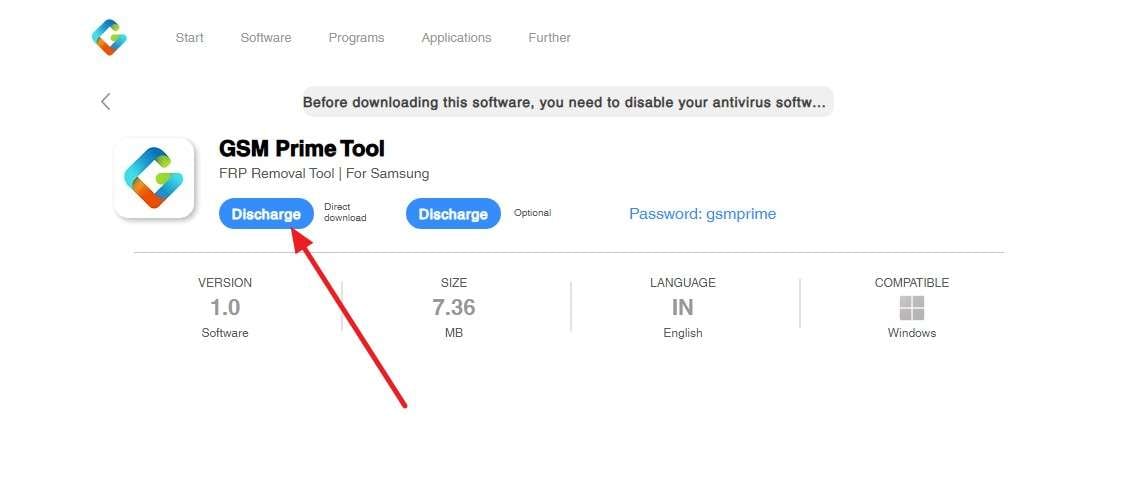
Step 1 Go to the official site > Choose the "Program" tab > Click "See More" on GSM Prime Tool > Pick the "Discharge" option for direct download.
-
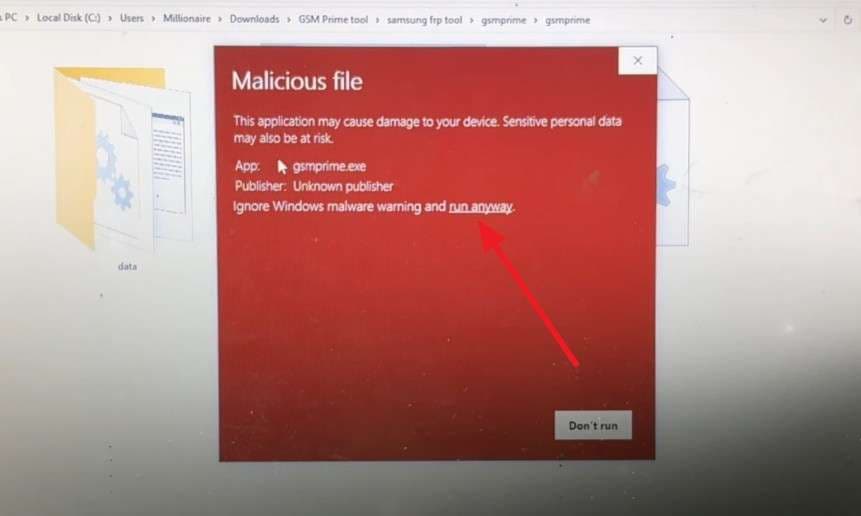
Step 2 Extract the file > Add the passcode > Select the “More Info > Run Anyway” option if you get the warning pop-up.
-
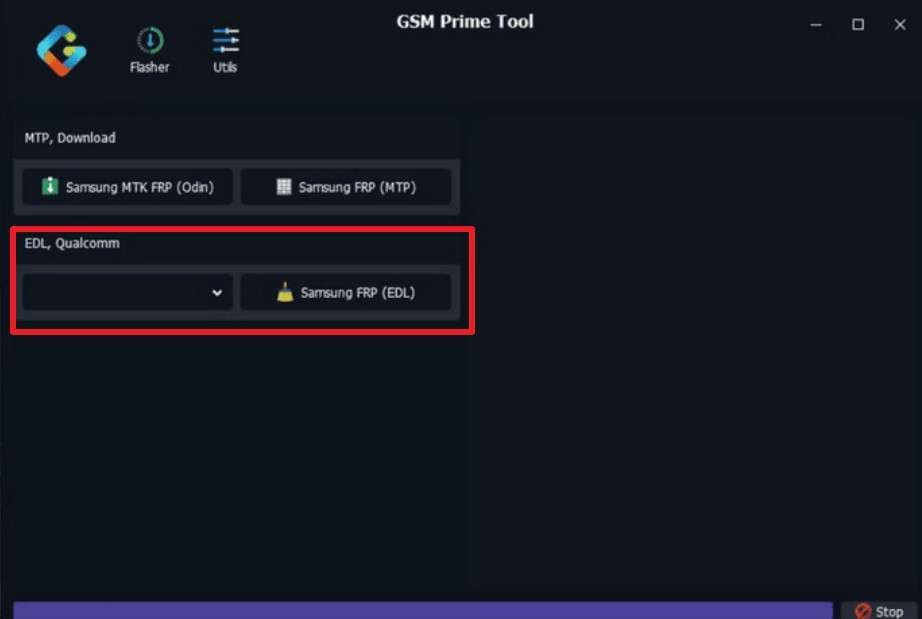
Step 3 Launch the tool as Administrator, place the phone into the required service mode (such as Download Mode, ADB, MTP, or EDL), and connect it through USB. Choose the options for “EDL, Qualcomm” and press the “Samsung FRP (EDL)” option to remove the FRP lock.
Part 7. Pros and Cons of GSM Prime Tool
After understanding how GSM Prime Tool works, take a look at its main advantages and limitations before deciding whether it's the right option for your needs.
- Clears FRP when the Google account genuinely can't be recovered.
- One tool covers FRP, firmware flashing, Knox, and soft-brick repair.
- Multiple entry modes mean a fallback when one connection fails.
- No per-use fee, unlike credit-based unlocking services.
- Wipes progress the moment a security patch closes the route it used.
- Success depends on the chipset and patch level, not just the model name.
- A wrong firmware or partition file can hard-brick the phone.
- Limited official documentation makes finding the correct software release more difficult.
Part 8. Common GSM Prime Tool Errors & Solutions
When using the GSM Prime Tool, this section explains what errors you can face and how to fix and prevent them:
| GSM Prime Tool Error | Cause | Quick Fix | Prevention Tip |
|---|---|---|---|
| Device Not Detected | Missing, outdated, or incorrect USB drivers. | Reinstall the required USB drivers and reconnect the device. | Install the correct USB drivers before connecting the device. |
| Waiting for Device | Incorrect service mode or connection method. | Re-enter the required service mode and reconnect the device. | Confirm the correct connection mode for your specific device. |
| FRP Removal Failed | Unsupported firmware, security patch, or device. | Try another supported method or a compatible PrimeToolX release. | Verify device compatibility before starting the operation. |
| Server Failed to Start | Program blocked by security software or missing files. | Verify the software files and review your security settings. | Download the software only from trusted sources. |
| Unsupported Device | Device or firmware exceeds current compatibility. | Use a supported device or compatible software version. | Check your device compatibility before using the tool. |
| Firmware Operation Failed | Wrong firmware package or device mismatch. | Download the correct firmware for your exact model. | Always verify the full model number before flashing. |
Part 9. Try a Safer Alternative to GSM Prime Tool: Dr.Fone - Screen Unlock (Android)
The biggest risks with GSM Prime online apps, Android APK, or the GSM Prime Tool are structural. Downloading untrusted files, disabling antivirus, lack of support, and a hard limit around Android 13 create serious exposure. This is why you should consider Dr.Fone - Screen Unlock (Android) to bypass FRP from 20 different brands in the safest manner. This tool offers real customer support if something goes wrong and updates weekly.
In addition, the tool is AI-powered for all Android 16 and Samsung S26/S25 devices. The Smart Recommendation (AI-Powered) can choose the right FRP unlock option for Samsung, or users can remove the lock online. Unlike other tools, it even offers separate, detailed guides for each Android model and version, with multiple Unlocking Methods.
 Unlock Android phone in seconds.
- Remove PIN, pattern, password, fingerprint.
- Bypass Google FRP lock easily.
- Works on all Android brands & models.
- No tech skills required – user-friendly.





Simple Guide to Bypass FRP on All Android Versions with Dr.Fone
Charge the Galaxy first, use a cable, and review the following guide to know how this tool is better than GSM Prime Tool:
-
Step 1 Select the Google FRP Bypass Feature
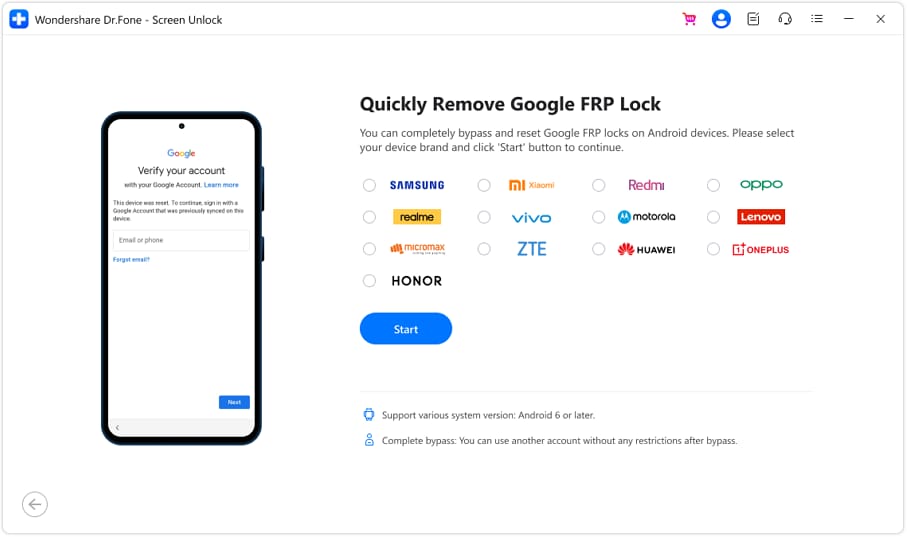
Open Dr.Fone with the phone plugged in, and go to the “Screen Unlock” tool for Android to choose the “Remove Google FRP Lock” mode. Pick “Samsung” from the device list and click on the “Start” button to commence.
-
Step 2 Tell It Which Galaxy You Have
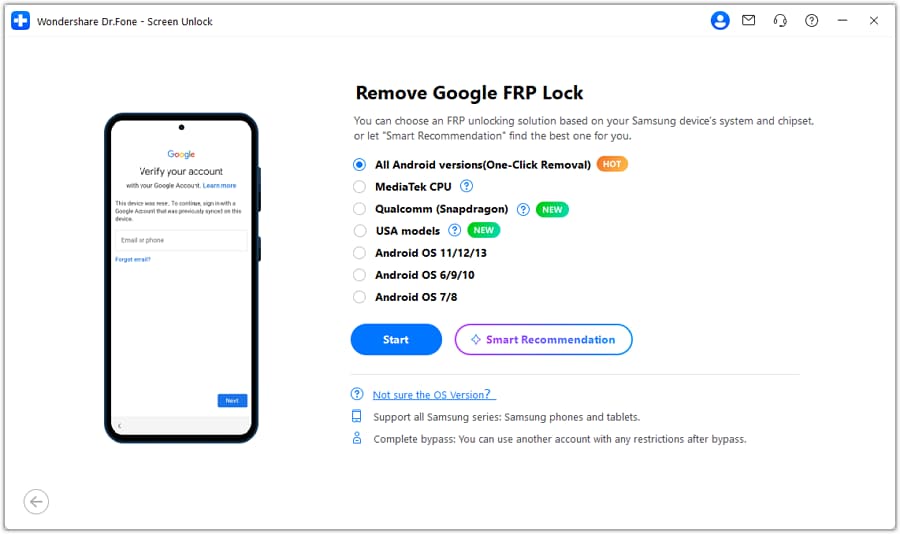
Pick “All Android Versions (One-Click Removal)” or “Smart Recommendation,” click “Start,” then follow the on-screen emergency dialer and Settings instructions.
-
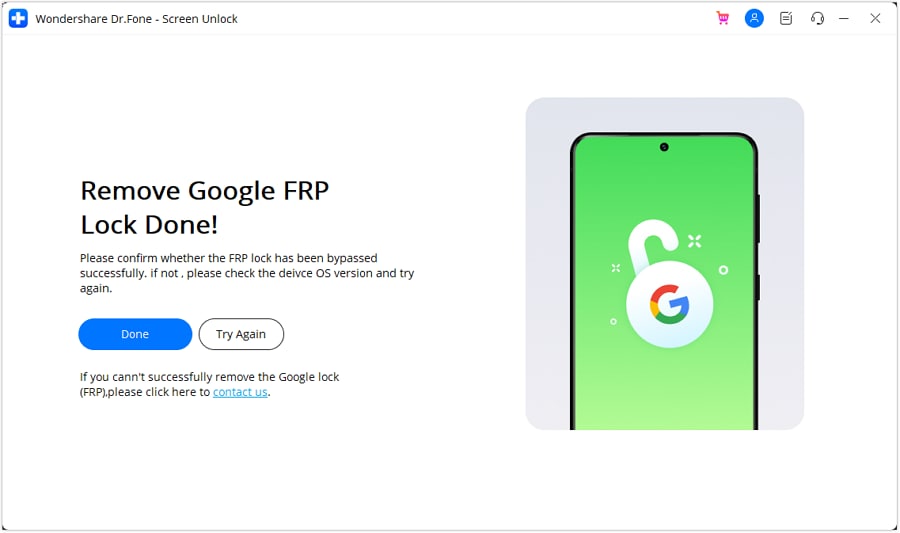
Step 3 Conclude the FRP Removal Process
Monitor the progress as Dr.Fone removes the FRP lock and press “Done” to conclude the process.
Recommended FRP Bypass Tool: GSM Prime Tool vs. Dr.Fone
This doesn’t matter whether you searched for GSM Prime online apps, Android APK, or GSM Prime Tool. The table below clearly shows why Dr.Fone - Screen Unlock (Android) is the suitable FRP lock removal option:
| Metrics | GSM Prime Tool (PrimeToolX) | Dr.Fone – Screen Unlock (Android) |
|---|---|---|
| Developer | Community-developed and distributed through GSM Prime/PrimeToolX releases. | Wondershare, an established software company with official support. |
| Cost | Free to download and use. | Paid license, with a free trial for supported features. |
| Android Coverage | Compatibility depends on the device model, firmware, security patch, and PrimeToolX release. | Regularly updated to support newer Android versions and compatible devices. |
| Supported Brands | Samsung, plus selected Xiaomi, Redmi, Motorola, LG, and other supported Android devices. | Supports FRP removal across 20 Android brands on compatible devices. |
| Antivirus | Security software may flag some releases depending on the download source. | Official installer works with standard antivirus protection enabled. |
| Malware Risk | Higher when downloaded from unofficial mirrors or modified third-party sources. | Downloaded from Wondershare's official website, reducing repackaging risks. |
| Ease Of Use | Technical; users manually choose modes, drivers, and service operations. | Guided workflow that helps detect the device and perform supported operations. |
| Driver Setup | Manual installation of Samsung, Qualcomm, or MediaTek drivers may be required. | Guides users through required drivers and setup during installation. |
| Extra Functions | FRP removal, flashing, CSC functions, Knox-related operations, and supported service tools. | FRP removal and screen unlock without advanced flashing or repair features. |
| Support | Community resources and publicly available documentation. | Official customer support and detailed documentation. |
| Best For | Experienced users performing supported Android service operations. | Users seeking a guided FRP removal and screen unlock solution. |
Conclusion
For budget Samsung phones on older Android builds, GSM Prime Tool can get the job done if you can safely manage the technical risks. Always attempt official Google account recovery first, as it is completely safe and free. If recovery fails, use Dr.Fone – Screen Unlock (Android) to remove the FRP lock from 20 brands with complete free support.
FAQ
-
1. Is GSM Prime Tool safe to download?
It carries real risk, since it comes from community sites with no official developer and asks you to disable antivirus. Cracked copies frequently hide malware, so scan any file and stick to the most trusted source you can find, or use a signed alternative instead. -
2. Does GSM Prime Tool work on Android 14 or 15?
Usually not. Reliable support generally extends through Android 13, and while newer PrimeToolX builds expand compatibility, Android 14 and 15 devices often fail to connect or detect properly. A maintained tool is a better choice for newer devices. -
3. What are the GSM Prime online FRP Android apps people search for?
Most “GMS Prime online FRP android apps” and APK results are unofficial mirrors or repackaged files rather than a real mobile version. The tool is Windows software that needs a PC and a USB connection. Any on-phone APK claiming to be it should be treated with suspicion and scanned first. -
4. Is GSM Prime the same as iKeyPrime?
No, GSM Prime removes Google FRP on Android, while iKeyPrime bypasses iCloud activation lock on iPhones. They share only the "Prime" name and serve entirely different devices.
 Add Wondershare Dr.Fone as a preferred source on Google



