Bypass iCloud Activation Lock and Android FRP without password.

 100% Security Verified | No Subscription Required | No Malware

 :
: 
 ChatGPT
 Perplexity
 Gemini
 Claude
 Grok
Grok
Being locked out of Activation Lock can spark instant frustration and lead many users to look for third-party utilities like IC Bypass Tool. However, IC Bypass Tool is not a single, clearly documented utility. Different versions and services appear under different names. This includes IC Bypass PRO, Universal, Ramdisk, and A12+. This is where differences in device support, cellular signal, pricing, and download source come in.
That's why you should check what a version supports before you download a file. This IC Bypass Tool review guide explains its reported compatibility, safety concerns, and limitations. Compare it with Dr.Fone - Screen Unlock (iOS) to know how this documented alternative can safely remove iCloud activation lock on supported devices.
In this article
- Part 1. What Is an IC Bypass Tool?
- Part 2. IC Bypass Tool Features, Compatibility, and Pricing
- Part 3. Is IC Bypass Tool Safe and Reliable?
- Part 4. IC Bypass Tool Pros and Cons
- Part 5. Best IC Bypass Tool Alternative: Dr.Fone - Screen Unlock (iOS)
- Part 6. What to Do Before Using Any Activation Lock Bypass Tool
Part 1. What Is an IC Bypass Tool?
IC Bypass Tool is a term used for several online utilities that claim to bypass Activation Lock on supported iPhones and iPads. Searches for this name include IC Bypass PRO, IC Bypass UNIVERSAL, IC Bypass RAMDISK, IC Bypass Tool v1.3, and IC Bypass A12+ with Signal. However, these names are not different versions of one standardized program. This is because their advertised device support and features vary by the source.
Activation Lock links an Apple device to an owner's account through Find My to prevent unauthorized access. As a result, IC bypass tools lack a universal standard, meaning versions like v1.3 and A12+ target entirely different hardware. So, always verify the device compatibility, iOS limits, cellular support, and pricing for the specific version instead of trusting the name.
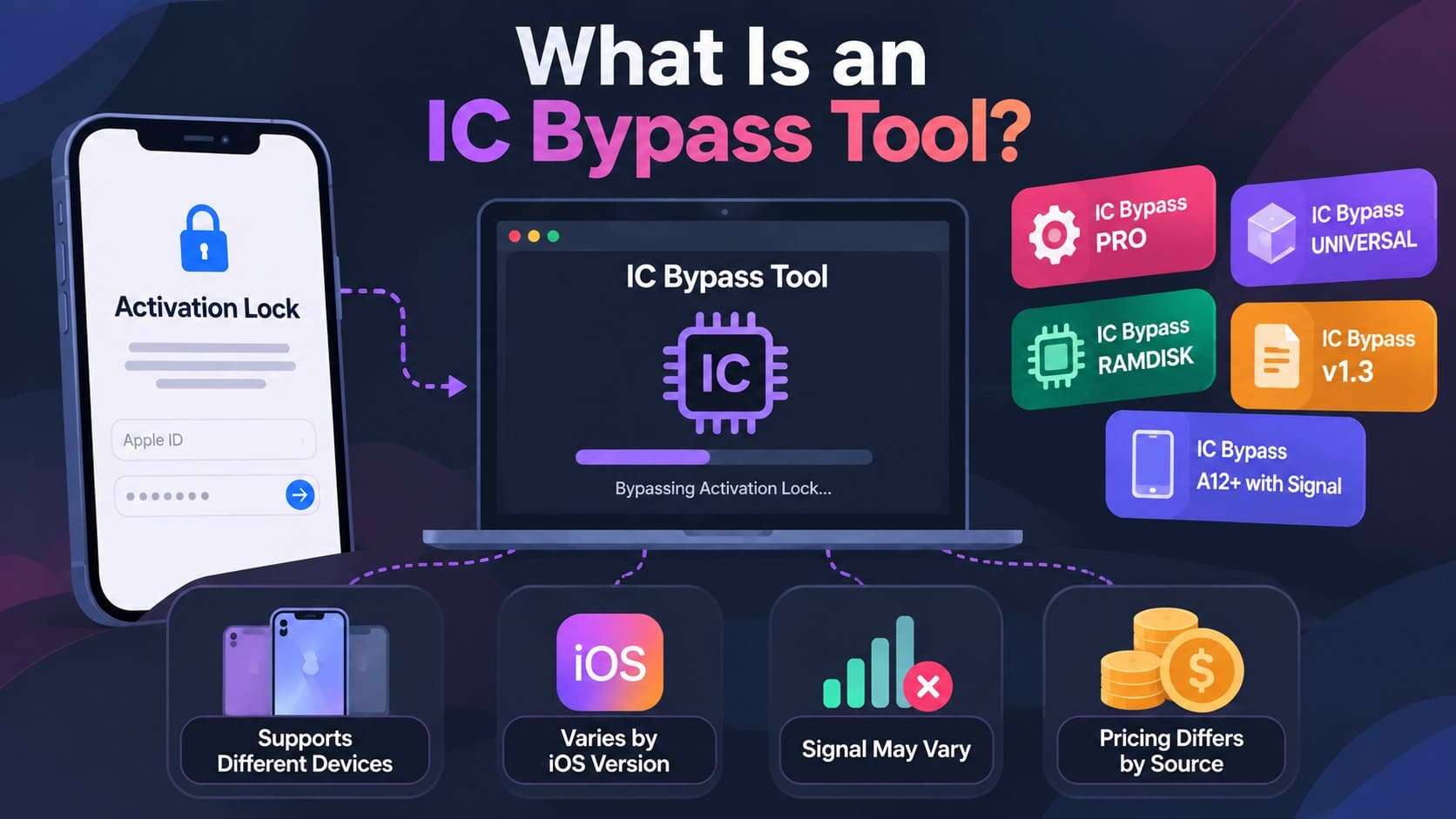
What Does “IC Bypass A12+ With Signal” Mean?
In an IC Bypass listing, IC Bypass Tool A12+ usually refers to devices that run on Apple's A12 generation or later. These include models such as the iPhone XR and iPhone XS. Whereas “With Signal” is a tag providers use to claim cellular services will remain working after the bypass. They also claim that the process will not force the phone onto Wi-Fi only.
Part 2. IC Bypass Tool Features, Compatibility, and Pricing
Since multiple providers offer the bypass IC tool under different names, features vary widely. Current listings also differ on the supported devices, iOS versions, cellular status, operating systems, and registration fees. Nonetheless, recent 2026 reviews consistently divide these variants into Pro, Universal, Ramdisk, and A12+ variants. Based on these details, the sequence table further highlights the key aspects of IC bypass variants:
| Factor | What Current Listings Report | What to Verify |
|---|---|---|
| Tool Versions | Searches include IC Bypass PRO, Universal, Ramdisk, v1.3, A12+, and A12+ With Signal. These should not be used as one standardized release line. | Exact version/provider before downloading or paying |
| Device Support | Support varies considerably. Some reseller listings offer IC Bypass for older 6S–X models, while A12+ listings cover devices from XR/XS to much newer generations. | Exact iPhone/iPad model and chip |
| iOS Support | IC Bypass ranges vary widely, with some warning against future iOS updates while others claim iOS 17 or iOS 26 support. | Exact iOS version at the time of use |
| Cellular Signal | Signals are not universal. Current listings explicitly separate “With Signal” and “No Signal/Without Signal” services. | Calls, mobile data, SIM/eSIM, and other cellular functions |
| Windows Support | Windows versions are common in current results. Multiple A12+ listings specifically call themselves Windows Tool services. | Whether that particular release supports the user's Windows version |
| macOS Support | macOS availability depends entirely on the product and provider. Current download directories show some A12+ utilities built strictly for Windows, while other bypass options offer cross-platform support for both Windows and macOS. | Exact macOS-compatible build rather than assuming cross-platform support |
| Download/Activation Cost | Downloads are often separate from services, with device registration fees changing by model and bypass type. | Registration fee, model-specific price, refund policy, and whether another payment follows download |
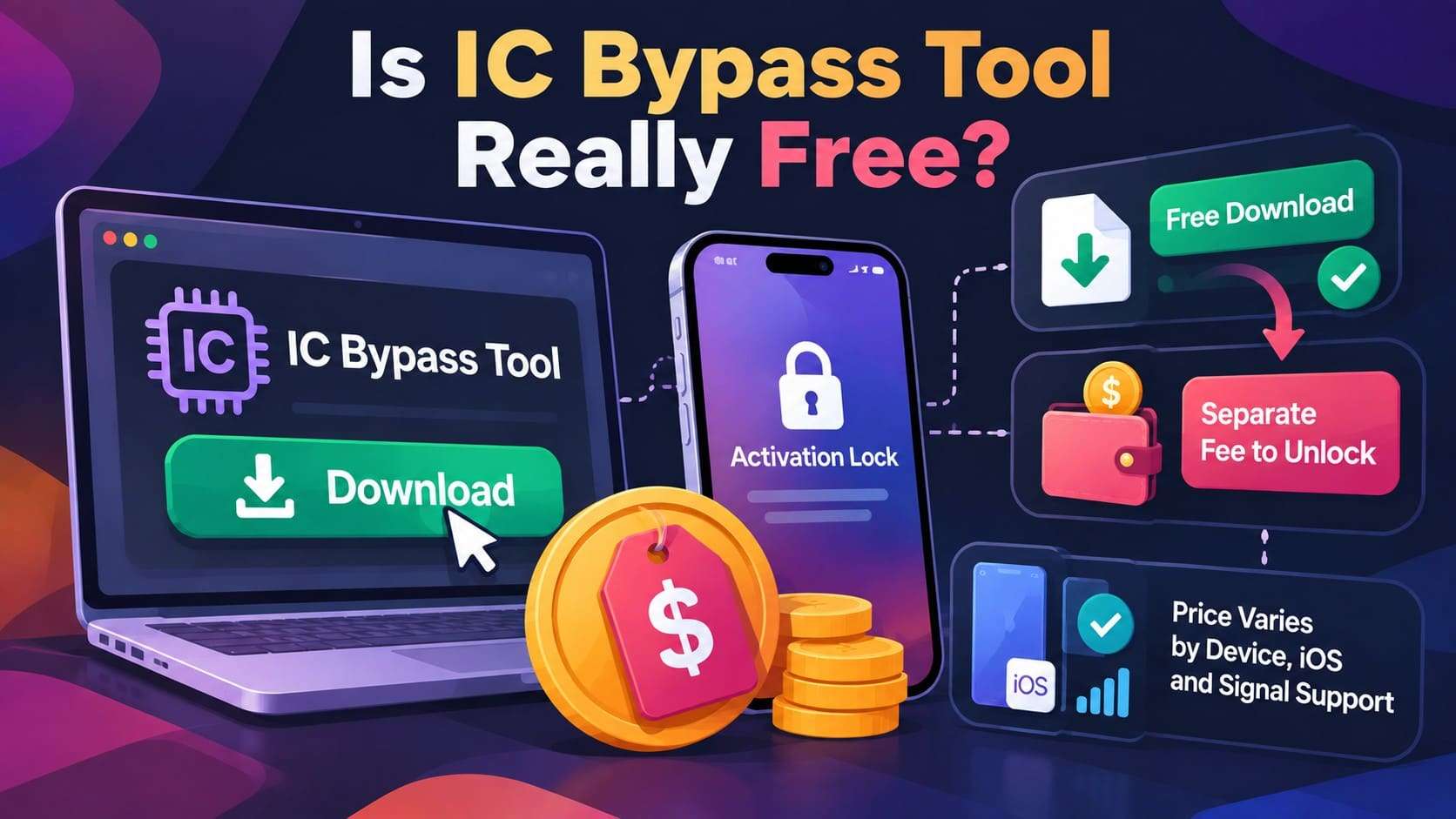
Is IC Bypass Tool Really Free?
A free IC Bypass Tool download does not mean that the service is completely free. Some sites offer free installers, but registering or unlocking your device usually requires a separate fee. In addition, the bypass tool price varies by the device model, software version, and cellular support. Always verify the model compatibility, iOS limits, signal status, and refund terms before you pay.
Part 3. Is IC Bypass Tool Safe and Reliable?
These third-party utilities vary widely by the developer, which is why they cannot be treated as completely secure or universally available. Current sources say that working files exist for the supported configuration, but compatibility, network signals, and pricing depend entirely on the specific provider.
There is also an important distinction between bypassing an Activation Lock screen and officially removing Activation Lock. Official methods involve authenticating with the linked Apple account or removing the device remotely through Find My. When these options no longer work, Apple says you must submit an official request with valid proof of purchase.
Warning Signs Before Downloading IC Bypass Tool
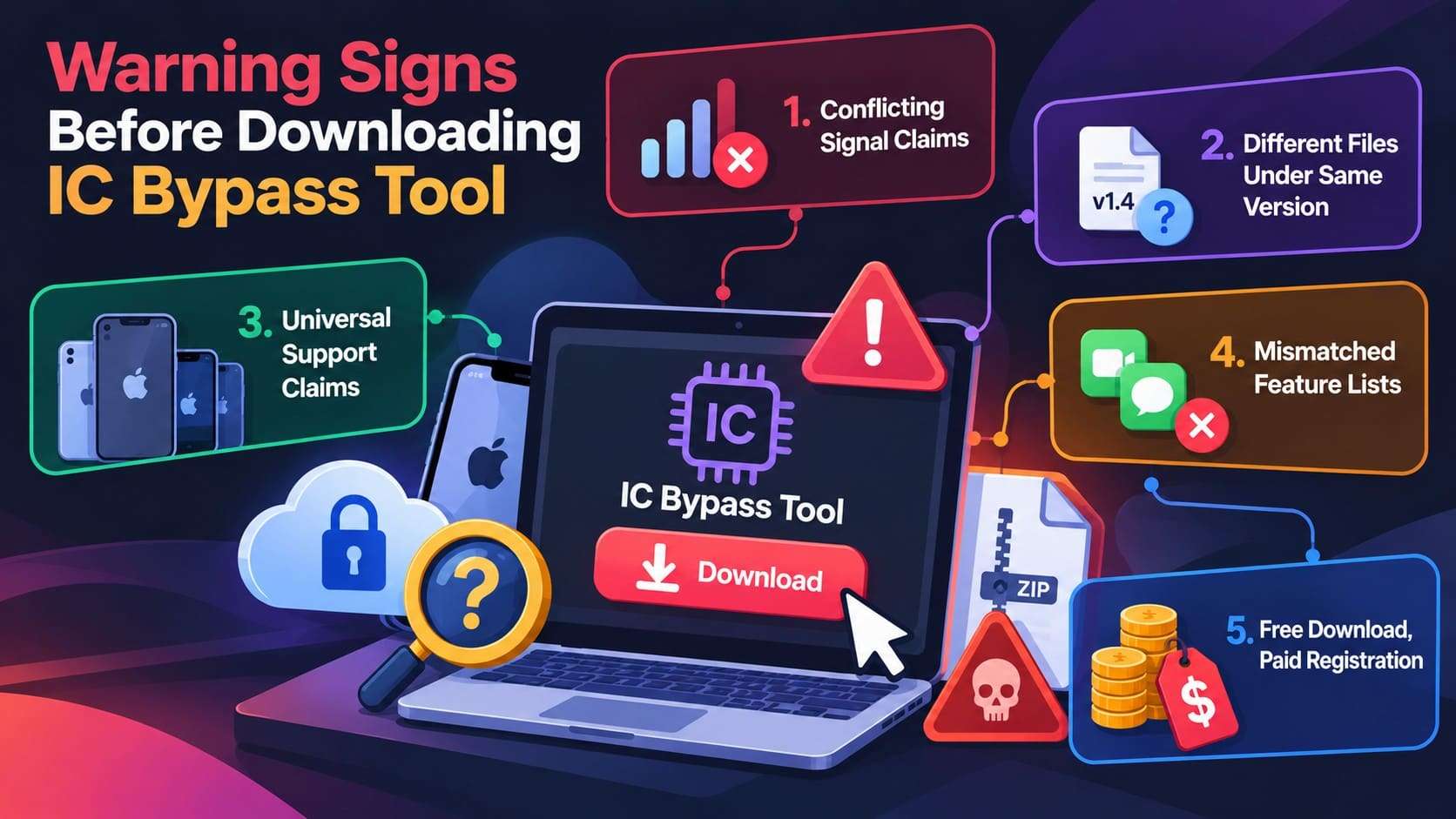
Before you download IC Bypass Tool v1.4, check the claims attached to specific files. Current listings disagree on what v1.4 supports, particularly for A12+ devices and cellular features. So, these 5 limitations need to be considered first:
-
1 Conflicting Signal Claims
One v1.4 listing claims signal support, while an A12+ listing describes its service as No Signal. Always verify cellular functionality for your exact model.
-
2 Different Package Details
The AliGSM Lab v1.4 listing shows a 12MB package. File details can vary across third-party sources, so verify the version, filename, and source before running anything.
-
3 Broad Support Claims
Be cautious with pages promising wide iPhone or iOS compatibility. The v1.4 listing claims A12 support from iOS 12 to iOS 18, while broader reviews note that compatibility varies by provider and version.
-
4 Mismatched Feature Lists
Bypassing Activation Lock does not guarantee normal feature functionality. The AliGSM Lab listing lists FaceTime and iMessage as working, while the HFZ A12+ page says they may not work.
-
5 Free Download, Paid Registration
A downloadable v1.4 package does not mean the bypass service is free. The AliGSM Lab listing shows activation as “Paid - Register,” so confirm registration costs before proceeding.
Does IC Bypass Tool Actually Work?
As mentioned, the active IC Bypass Tool provider, device model, and iOS version and variants vary. Since performance depends entirely on the chosen package, capabilities cannot be generalized across every device it claims to support. Newer A12+ variants carry unique differences. Some providers advertise cellular signal and access to services like FaceTime, iMessage, and iCloud. Others list signal and non-signal services separately.
A successful bypass also does not necessarily mean every iPhone feature will work normally afterward. Before you pay, confirm exact device and iOS compatibility, and which features remain available after the bypass. Check whether the provider restricts future updates, resets, or restores.
Part 4. IC Bypass Tool Pros and Cons
Multiple IC Bypass versions give you more device options. However, it also makes pricing, support, and post-bypass features harder to predict. Here is a quick summary of the main IC Bypass Tool pros and cons:
- Multiple variants target older devices and newer A12+ hardware.
- Providers offer separate signal and no-signal options for newer chips.
- Windows-based releases are easy to find among current IC Bypass listings.
- Some providers make the software package available without an upfront download charge.
- Separate options help distinguish older-device, A12+, signal, and no-signal services.
- No single, clearly verified source covers all IC Bypass variants.
- Similar names do not guarantee support for your specific device and iOS.
- Access to an installer does not necessarily include device registration or activation.
- Cellular connectivity and Apple services are not consistently offered across variants.
- Some providers restrict updating, resetting, or restoring the device after bypass.
Part 5. Best IC Bypass Tool Alternative: Dr.Fone - Screen Unlock (iOS)
If the varying versions and support claims of IC Bypass Tool make it difficult to determine what will work on a particular device, consider Dr.Fone - Screen Unlock (iOS). The tool offers a more clearly documented option for legitimate device owners. Rather than separately distributed bypass packages, it provides a dedicated iCloud Activation Lock Removal feature with published compatibility information and device-specific instructions.
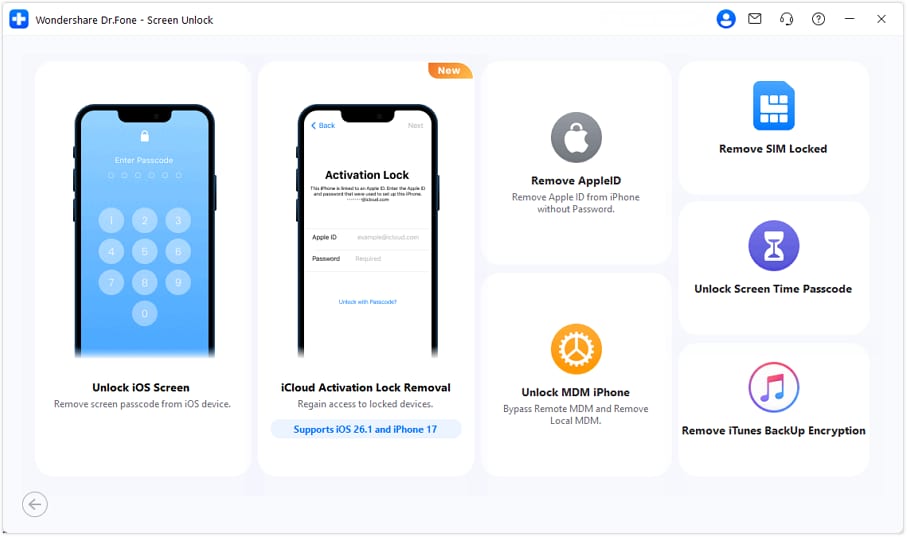
Dr.Fone is available for both Windows and macOS and supports selected older and newer iPhones and iPads. Its current documentation covers devices from the iPhone 5S to newer iPhone generations, including iPhone 18 and recent iOS releases like iOS 27. Nonetheless, the exact process depends on the device and system version. For certain models, Dr.Fone also provides an Activation Lock removal workflow that does not require jailbreaking.
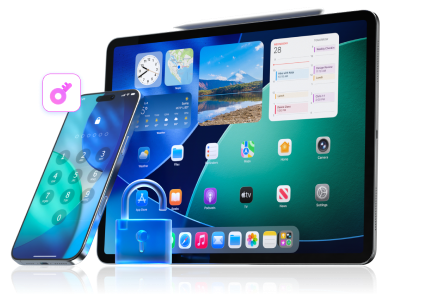
 Unlock iPhone/iPad passcode in minutes.
- Remove Face ID, Touch ID, MDM lock, and screen lock.
- Bypass iCloud Activation Lock easily.
- Support all iOS versions and devices.
- Simple steps, no technical skills needed.
IC Bypass Tool vs Dr.Fone - Screen Unlock (iOS): Detailed Comparison
The choice becomes clearer when you compare both options under the same criteria. With an IC Bypass Tool download, compatibility, pricing, and available features can depend on the particular provider and package. Dr.Fone - Screen Unlock (iOS), by comparison, offers a documented workflow, and the table below compares both options:
| Factor | IC Bypass Tool | Dr.Fone - Screen Unlock (iOS) |
|---|---|---|
| Official Product Website | No single verified official source covers all variants | Dedicated official Wondershare product and support pages |
| Device Compatibility | Depends on the specific Pro, Ramdisk, Universal, or A12+ variant | Publishes compatibility information for supported iPhones and iPads. |
| Recent iOS Support | Claimed iOS ranges differ between providers | Supports iOS/iPadOS 27 |
| Windows Support | Common among current versions | Official Windows version available. Windows 11, 10, 8.1, 8, 7 |
| macOS Support | Available for some variants, but not consistent | Official macOS version available. macOS 10.13 or later |
| Jailbreak Requirement | Depends on the device and bypass method | Certain supported newer-device workflows do not require jailbreaking. Jailbreak Required For: iOS/iPadOS 15.0-16.7.11, iOS/iPadOS 12.0-14.8.1 |
| Newer iPhone Support | A12+ services are advertised, but support varies by provider | Supports selected newer iPhone generations through documented workflows |
| Cellular / Feature Limitations | Signal, iCloud, FaceTime, and iMessage availability can vary | Feature limitations depend on the supported unlock method and device. |
| Guided User Interface | Experience varies between independently distributed tools | Provides a guided desktop interface with on-screen steps. |
| Documentation & Support | Depends on the individual provider or reseller | Centralized product guides, FAQs, and customer support from Wondershare |
How to Use Dr.Fone - Screen Unlock (iOS) to Bypass iCloud Activation Lock
Now that the differences between Bypass IC tool and Dr.Fone are clear, you might want to know how Dr.Fone works. The following steps explain how to bypass iCloud Activation Lock on a supported device with or without jailbreak:
-
Step 1 Open iCloud Activation Lock Removal
Access the “Screen Unlock” tool for “iOS” and select the “iCloud Activation Lock Removal” mode. Connect the iCloud-locked iPhone or iPad when prompted.
-
Step 2 Follow the Workflow for Your iOS/iPadOS Version
Follow the version-specific Activation Lock removal process below that matches your device’s iOS/iPadOS version:
- iOS/iPadOS 18.6–18.7.1 & 26.0–26.1: Press the “Start” and “Unlock Now” buttons and agree to the terms. The tool will install the necessary drivers and will lead you to the iCloud Activation Lock bypass stage. Keep the phone connected; your device will reboot during the process, and the iDevice will be unlocked.
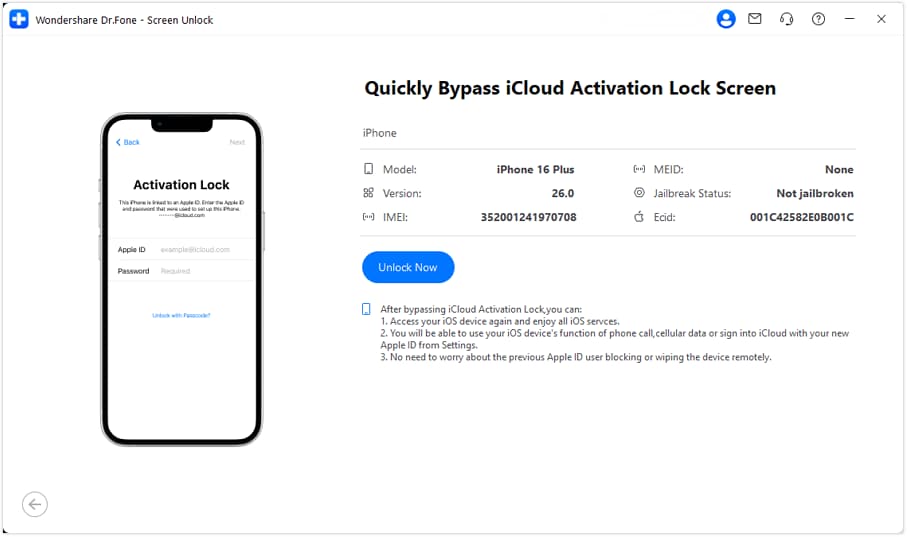
- For iOS 17.0.1–18.6: Dr.Fone supports iPhone XR within this range without jailbreaking. If the device runs an unsupported version, follow the “System Upgrade Guide” before continuing the Activation Lock bypass process.
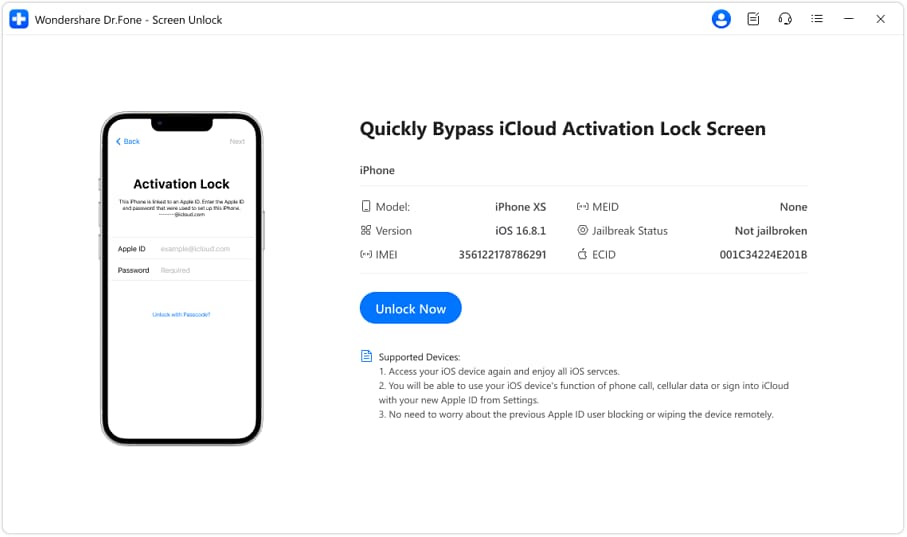
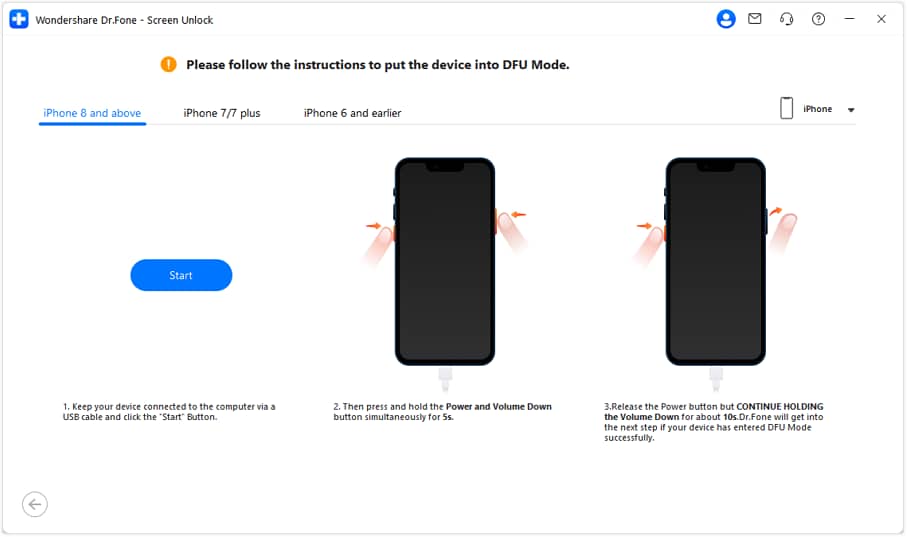
- For iOS/iPadOS 15.0–16.7.11: Agree to the terms, then follow the on-screen instructions to enter Recovery and DFU modes. Dr.Fone starts the jailbreak automatically and removes Activation Lock after the process completes.
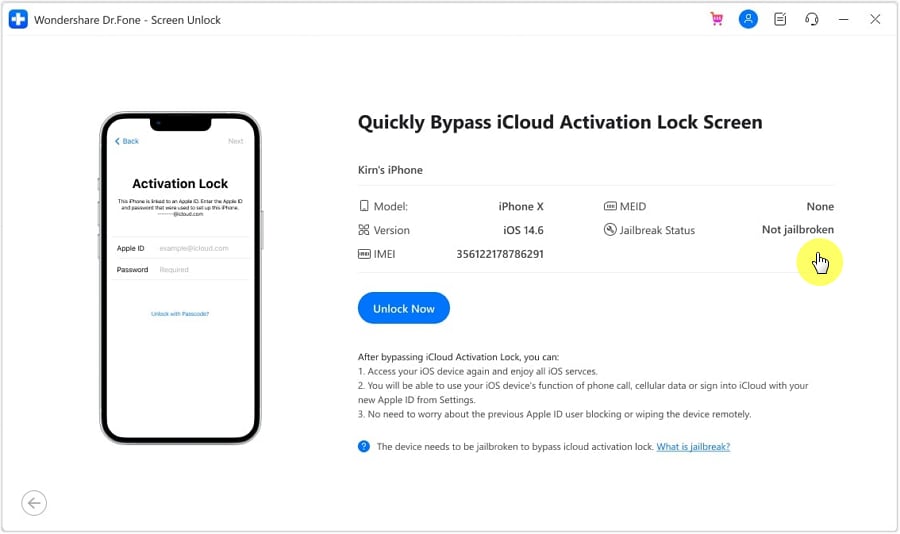
- For iOS/iPadOS 12.0–14.8.1: Select “Unlock Now” and confirm the GSM or CDMA device type. Follow the on-screen instructions to jailbreak your device, then let Dr.Fone proceed with the Activation Lock removal process.
-
Step 3 Complete the Activation Lock Removal
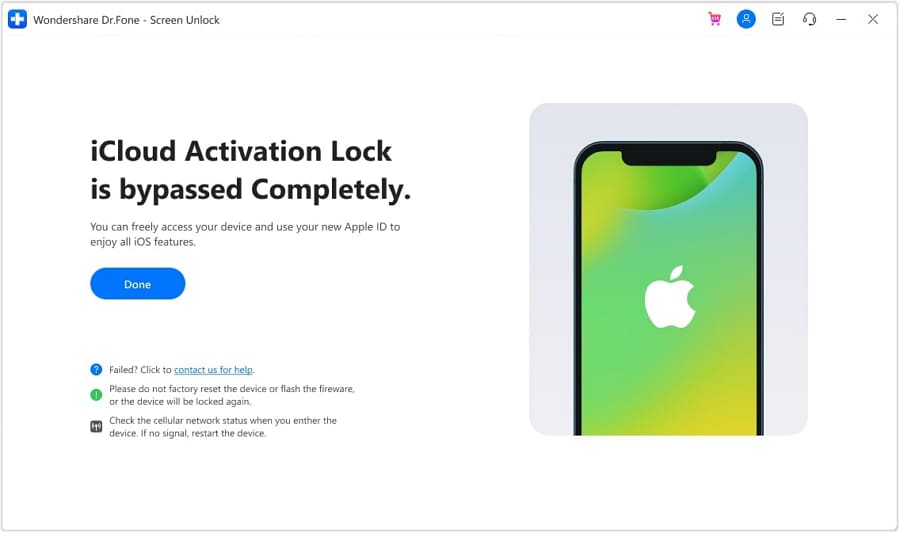
Keep the device connected until Dr.Fone finishes. Once Activation Lock is removed, the program displays a completion message; click “Done” and let the device finish rebooting before continuing setup. For older devices, check the stated limitations before you proceed.




Part 6. What to Do Before Using Any Activation Lock Bypass Tool
Whether you try Bypass IC Tool or Dr.Fone - Screen Unlock (iOS), this section is worth reading. Try Apple's official options first and make sure you have the information needed to recover the device legitimately. A few checks can save you from unnecessary changes or data loss and are mentioned below:
| Check First | What to Do |
|---|---|
| Try the Linked Apple Account | Use the Apple Account and password associated with the device, or the device passcode where Apple offers that option. |
| Contact the Previous Owner | For a second-hand device, ask the previous owner to remove it from their account through Find My. |
| Check Proof Of Purchase | If you own the device but cannot remove Activation Lock, Apple provides a support-request route for users with proof-of-purchase documentation. |
| Confirm The Device Status | Record the exact iPhone/iPad model and iOS/iPadOS version, and understand what functionality could change before using any third-party method. |
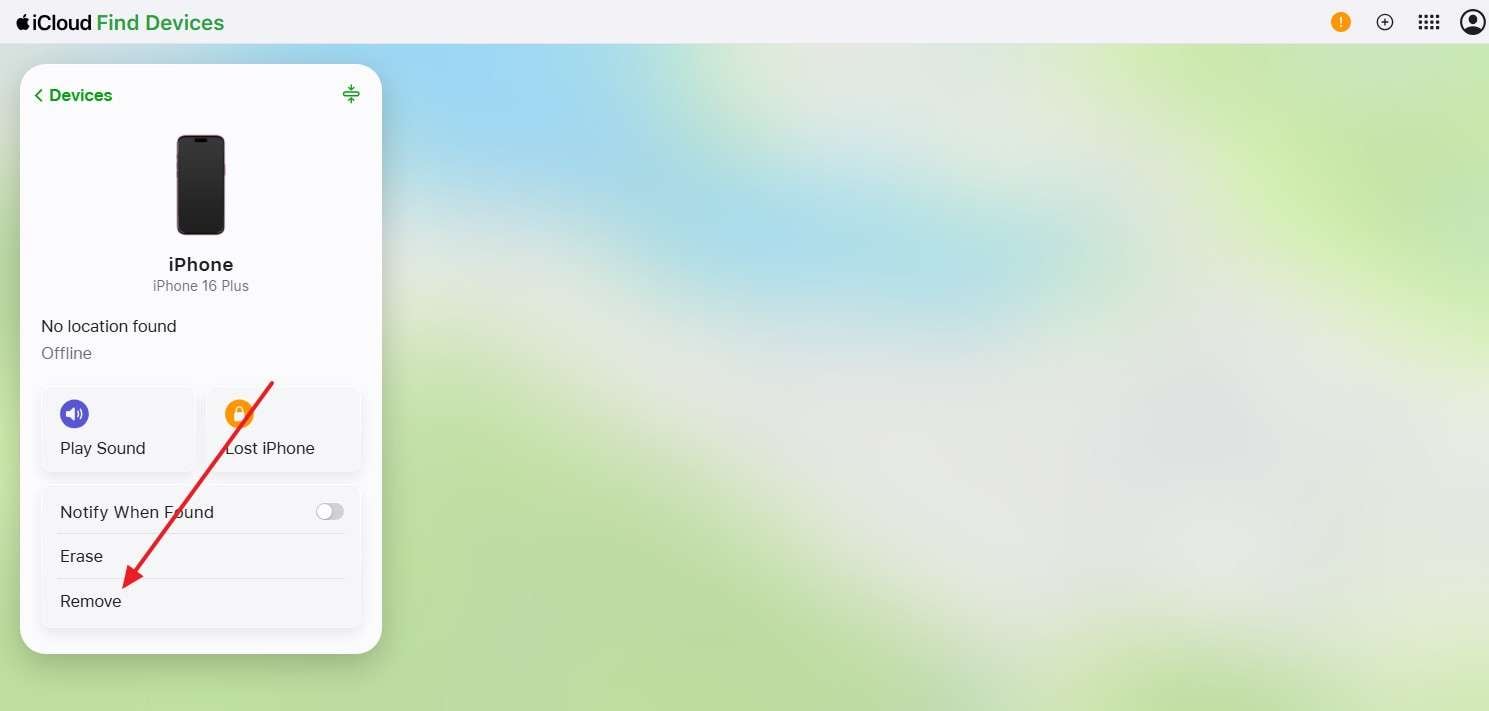
If you can contact the previous owner, ask them to remove the device from their account first. Do this before searching for IC Bypass Tool download options:
-
Step 1 Ask the owner to go to Find My (iCloud) and select the iPhone under the “Devices” section, then choose “Remove.”
-
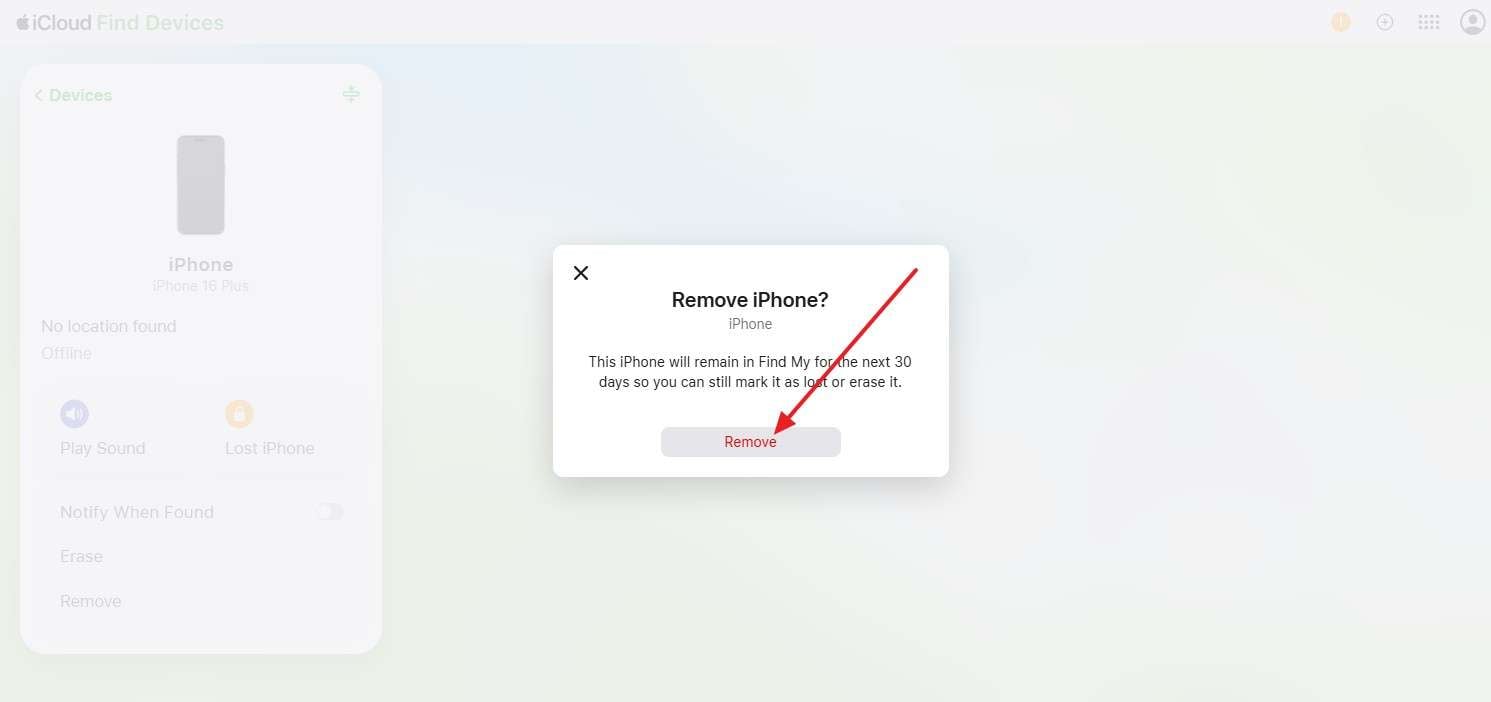
Step 2 Select “Remove” when prompted and follow the on-screen instructions. This removes Activation Lock and disconnects the iPhone from their Find My account.
Conclusion
This IC Bypass Tool review shows why checking the exact version, device compatibility, cellular support, and total cost is essential before using any bypass service. IC Bypass options can differ significantly across providers, especially for A12+ devices and signal support. For users who prefer clearer compatibility details and documented guidance, Dr.Fone - Screen Unlock (iOS) offers a more structured alternative for supported devices.
Before using any third-party bypass tool, try Apple’s official Activation Lock removal options first. If those methods are unavailable, compare the supported device, iOS version, feature limitations, and registration requirements carefully before proceeding.
Frequently Asked Questions
-
1. Is IC Bypass Tool really free to use?
Some IC Bypass Tool installers are free to download, but device registration or activation may require payment. The total cost depends on the device model, provider, bypass method, and whether cellular signal support is included. -
2. Does IC Bypass Tool A12+ keep cellular signal?
It depends on the specific device and service. Current listings offer separate A12+ “With Signal” and “No Signal” options. A12+ compatibility alone does not guarantee calls or mobile data, so verify signal support before paying. -
3. Does IC Bypass Tool work on the latest iOS versions?
Not necessarily. IC Bypass Tool compatibility varies by provider, version, and device. Some listings claim support for newer iOS releases, but an iOS update can affect compatibility. Always verify your exact iOS version before proceeding. -
4. Is Dr.Fone - Screen Unlock (iOS) easier to use than IC Bypass Tool?
Dr.Fone - Screen Unlock (iOS) provides a guided desktop interface with documented workflows for supported devices. Unlike IC Bypass Tool packages that vary by provider, Dr.Fone supports Windows and macOS, although certain workflows require jailbreaking.
 Add Wondershare Dr.Fone as a preferred source on Google