Bypass iCloud Activation Lock and Android FRP without password.

 100% Security Verified | No Subscription Required | No Malware

 :
: 
 ChatGPT
 Perplexity
 Gemini
 Claude
 Grok
Grok
A forgotten iPhone passcode can turn a working phone into one you cannot unlock. Things get more complex when Apple ID, Screen Time, MDM, or Activation Lock is involved. AnyUnlock aims to handle several of these lock types in a single desktop program. That sounds useful, but the real questions come before you pay: Does it support your exact iPhone? Will it erase your files? Is the free version enough? And how reliable is the service when an unlock fails?
This AnyUnlock review checks the current features, system support, and recent customer feedback. We also compare imobie AnyUnlock with another option for supported iOS locks.
In this article
- Part 1. Overview of AnyUnlock
- Part 2: How We Tested AnyUnlock: Performance, Speed, and Security
- Part 3: AnyUnlock System Requirements and Supported Devices
- Part 4: How to Use AnyUnlock?
- Part 5: Is AnyUnlock Safe?
- Part 6. What Users Say About AnyUnlock: Real Feedback
- Part 7. Best Free Alternative for iMobie AnyUnlock: Dr.Fone - Screen Unlock
- Part 8. AnyUnlock vs Dr.Fone: Which iPhone Unlocker Is Better?
Part 1. Overview of AnyUnlock
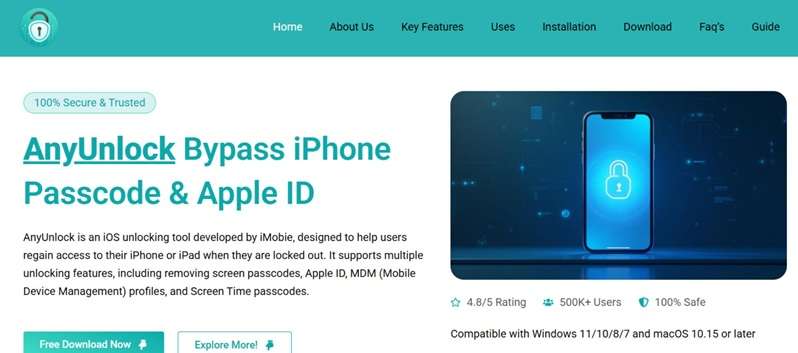
iMobie presents AnyUnlock as a tool to bypass certain security barriers and help users regain access to an iPhone or iPad. Before looking at its features, it is useful to see how the tool performs in key areas, as reported by users.
Overall, AnyUnlock receives a rating of 4/5. The scores indicate strong performance in quality, service, value, and returns. Shipping receives a slightly lower score and appears to be the main area for improvement.
- Quality (5/5) - Quality gets the highest rating at 5 out of 5. It is the strongest area in AnyUnlock's overall assessment.
- Service (4/5) - Service earns 4 out of 5. This score contributes positively to the tool's overall rating.
- Value (4/5) - Value also receives 4 out of 5. It remains one of the stronger points in the overall user assessment.
- Returns (4/5) - Returns score 4 out of 5, keeping this area in line with the ratings for service and value.
- Shipping (3.5/5) - Shipping's rating is 3.5 out of 5, which is the lowest score in the given section. By improving this part, the overall rating could go higher while we keep the strong ratings for service and quality.
AnyUnlock for iPhone and iPad helps recover in different situations. These are some of its important features.
1.1 Inside AnyUnlock: Its 4 Main Unlocking Tools
According to iMobie's official claims, AnyUnlock focuses on four main unlocking functions. Each one is designed for a different type of iPhone or iPad lock.
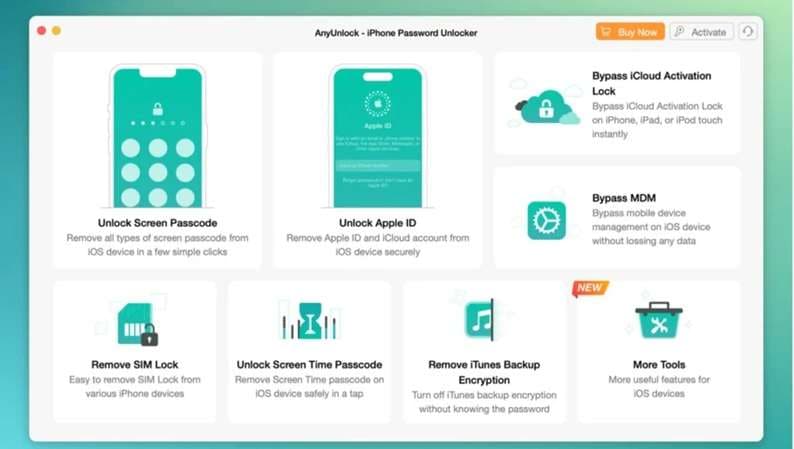
1. Unlock iPhone Screen Passcode
The Screen Unlocker is one of the main features of AnyUnlock for iPhone. It can remove several types of screen locks, including:
- 4-digit passcodes
- 6-digit passcodes
- Face ID locks
- Touch ID locks
- Alphanumeric passcodes
This can be useful when your device displays messages like iPhone Unavailable, Security Lockout, or iPhone Disabled. The procedure uses firmware download to restore the smartphone or tablet.
2. Remove Apple Account
AnyUnlock can remove an Apple Account from some supported devices without asking for the original password. This may help if you forgot the account details or bought a used device that still has the previous owner's account attached.
However, the result can depend on the status of Find My iPhone and the way the device is configured.
3. Remove Screen Time Passcode
If you've forgotten the Screen Time passcode and need to recover or delete it, iMobie AnyUnlock may help in many scenarios without a factory reset.
It is one of the more reliable features in the software and can also help when Screen Time settings are disabled.
4. Bypass MDM Restrictions
MDM, or Mobile Device Management, is often used on school and company devices. AnyUnlock includes an MDM bypass option that can:
- Remove MDM profiles
- Restore access to restricted settings
- Return the device to normal use
Its success depends on the condition and configuration of the device.
These four tools cover the main lock situations handled by AnyUnlock. However, the software also has clear strengths and limitations, which become clearer when examining its pros and cons.
1.2 AnyUnlock Pros and Cons: Where It Performs Well and Where It Falls Short
AnyUnlock can solve several common iOS lock issues, but it also has some limits worth checking first.
- Easy to use - The interface is simple, and most tasks need only a few steps.
- Wide device support - iMobie AnyUnlock works with many iOS devices and versions, both new and old.
- Saves time and effort - It can reduce the need for lengthy manual steps or contacting Apple support.
- No fully free version - Core unlocking features require payment, which may not suit users on a tight budget.
- Compatibility can vary - Some functions may not work smoothly on certain devices or iOS versions.
- Security and legal concerns - Some features may raise account security concerns. Users should review AnyUnlock's policies before use.
These points set a clear base for testing how AnyUnlock performs in real use.
Part 2: How We Tested AnyUnlock: Performance, Speed, and Security
AnyUnlock claims to handle lost passwords, iCloud Activation Lock, screen locks, and other access problems on iPhone and iPad. To assess it fairly, we focused on device support, unlock functions, speed, and security.
| Test Area | What We Checked |
|---|---|
| Testing Platforms | We used different iPhone and iPad models running various iOS versions to see how AnyUnlock performed across devices. |
| Unlock Features | We tested iCloud Activation Lock bypass, screen lock removal, and password recovery one by one to check how each function worked. |
| Unlocking Speed | We measured the time from starting each process to gaining access to the device. |
| Security Assessment | After unlocking, we checked device stability, iOS system integrity, and any possible security risks. |
Part 3: AnyUnlock System Requirements and Supported Devices
Before you download AnyUnlock, check whether your computer and iOS device meet its listed requirements.
| Requirement | Supported Details |
|---|---|
| Windows OS | Windows 11, 10, 8, 7, and Vista in 32-bit or 64-bit versions |
| macOS | Ventura, Monterey, Big Sur, Catalina, Mojave, High Sierra, Sierra, OS X 10.11, and OS X 10.10 |
| iOS | iOS 5 through iOS 26, including iOS 27 beta |
| CPU | Windows: 1 GHz or higher, 32-bit or 64-bit. Mac: 1 GHz Intel processor or higher |
| RAM | Windows: 256 MB or more, with 1024 MB recommended. Mac: 512 MB or more |
| iPhone Support | iPhone 15, 14, 13, 12, 11, XR, XS Max, XS, X, 8, 7, 6s, 5s, 4s, 4, and SE |
| iPad Support | iPad 9, 8, 7, 6, 5, 4, 3, 2; iPad mini, mini 2, 3, 4, 5, 6; iPad Air, Air 2, Air 3, Air 4; iPad Pro 2nd, 3rd, and 5th Generation |
| iPod touch Support | iPod touch 2, 3, 4, 5, 6, and 7 |
| Other Requirement | iTunes must already be installed on the computer |
| Category | Device Management, Data Recovery, and Phone Unlocker |
Part 4: How to Use AnyUnlock?
AnyUnlock is easy to use because the software walks you through every step. All you need is a computer, a USB cable, and the right unlock option before starting the process on the screen.
Step 1: Connect Your Device
Use a USB cable to connect your iPad or iPhone to the PC. Launch AnyUnlock and give it time to identify the device. If asked, tap Trust on your iPhone or iPad.
Step 2: Choose an Unlock Mode
Select the type of lock you want to remove. AnyUnlock shows different unlock options with on-screen instructions for each mode.
Step 3: Start the Unlock Process
Click Start to begin. The software runs the process automatically and shows the progress on screen. A notification appears when the process is complete.
Part 5: Is AnyUnlock Safe?
After looking at how AnyUnlock works, the next concern is safety. The tool is generally presented as safe to use, but some functions still have important limitations.
| Safety | Cautions |
|---|---|
| The installer is described as clean, with no malware detected. | iCloud bypass requires jailbreaking the device. |
| iMobie AnyUnlock can run offline after the first verification. | Some unlock functions can erase device data. |
| It can work without uploading personal data. |
Part 6. What Users Say About AnyUnlock: Real Feedback
User opinions about AnyUnlock are mixed. Reviews on Trustpilot include both successful and failed unlock attempts, while Reddit also shows concerns about specific functions.
Trustpilot Feedback
Positive experiences
- One user said MDM removal worked, although the restriction could return after a factory reset.
- Another reviewer reported unlocking an iPad without problems.
- A user also shared a positive experience after using AnyUnlock for a forgotten screen passcode.
Negative experiences
- One reviewer said the unlock process failed and support only suggested trying again.
- Another said the software worked once on an iPod but later stopped being useful.
- An iPad user reported that Activation Lock removal did not work as expected.
Reddit Feedback
A Reddit user reported that AnyUnlock failed to bypass MDM even though the feature was promoted for that purpose.
Part 7. Best Free Alternative for iMobie AnyUnlock: Dr.Fone - Screen Unlock
The mixed AnyUnlock reviews show that results can differ by device and lock type. If compatibility or performance is a concern, Dr.Fone - Screen Unlock gives users another iOS unlocking option to compare before making a choice.
Dr.Fone - Screen Unlock (iOS) is an iPad and iPhone unlocker tool. It is capable of bypassing iOS screen locks without a passcode. You can run iOS/iPadOS 7.0 or later on the iPhone, iPad, and iPod touch as per the official guide. Deleting a standard iOS screen lock clears out the data on the device.
This program can be downloaded for free or as a trial. Access to full functions may require a plan that you pay for.
 Unlock iPhone/iPad passcode in minutes.
- Remove Face ID, Touch ID, MDM lock, and screen lock.
- Bypass iCloud Activation Lock easily.
- Support all iOS versions and devices.
- Simple steps, no technical skills needed.

Key Features
Dr.Fone - Screen Unlock provides several iOS unlock options:
- Removes 4-digit and 6-digit passcodes, Face ID, Touch ID, and other supported screen locks.
- Removes Apple ID on supported devices.
- Provides iCloud Activation Lock removal.
- Supports MDM removal and Screen Time passcode bypass.
- Includes SIM-lock and iTunes backup encryption tools.
How to Unlock an iPhone with Dr.Fone
-
Step 1 Open Screen Unlock
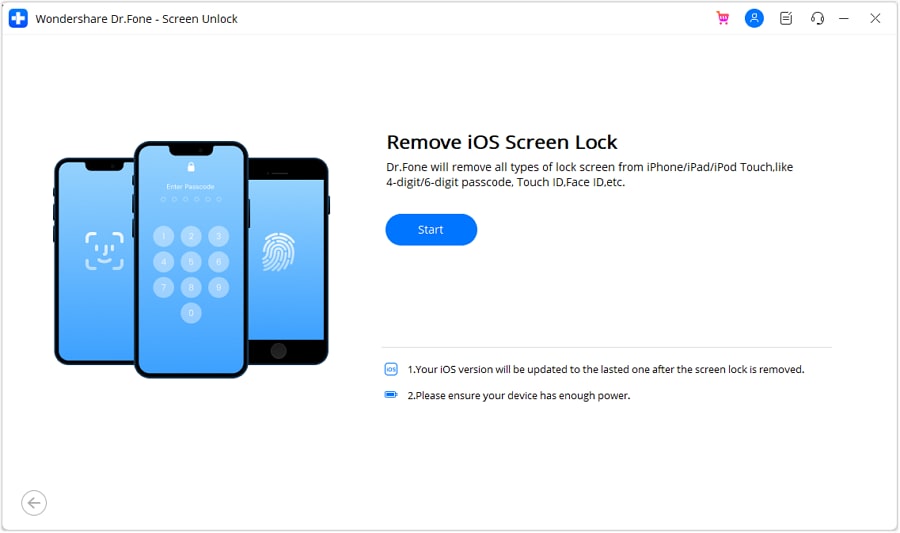
Install Dr.Fone and go to Toolbox > Screen Unlock > iOS. Select Unlock iOS Screen, then click Start.
-
Step 2 Proceed to recovery mode.
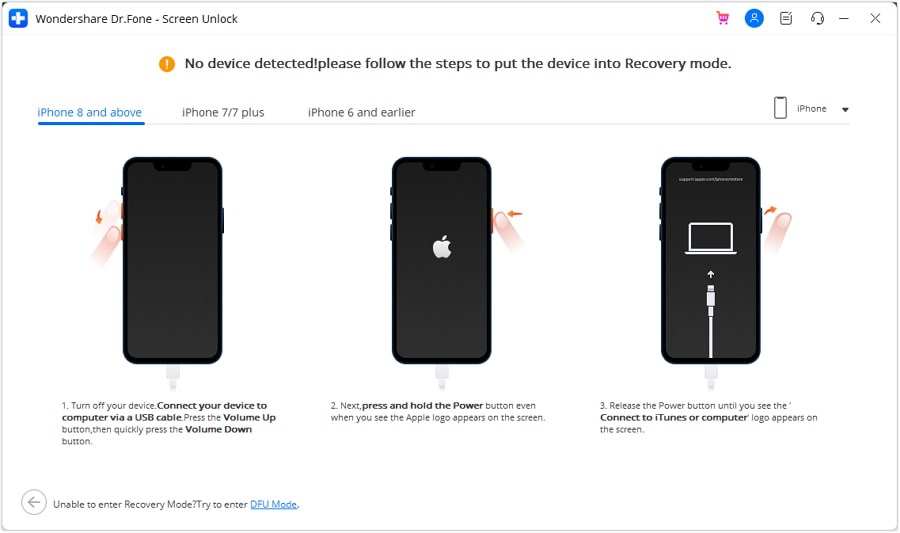
Use the on-screen instructions to put the iPhone or iPad into Recovery Mode. If this option doesn't work, Dr.Fone has a DFU Mode option too.
-
Step 3 Confirm the Device Details
Check the detected device model and system version. Make any needed changes, then continue.
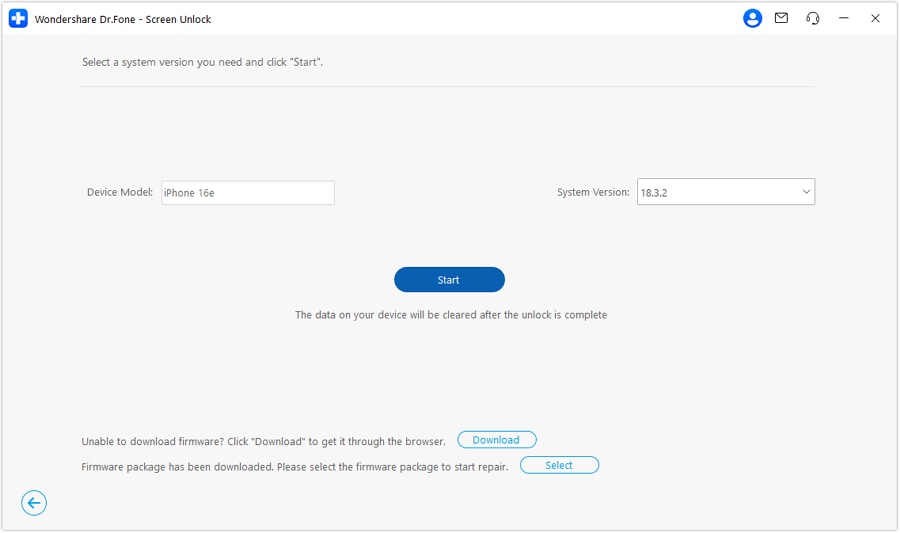
-
Step 4 Download the Firmware
Let Dr.Fone download the required iOS firmware package. Once it is verified, select Unlock Now and confirm the process.
-
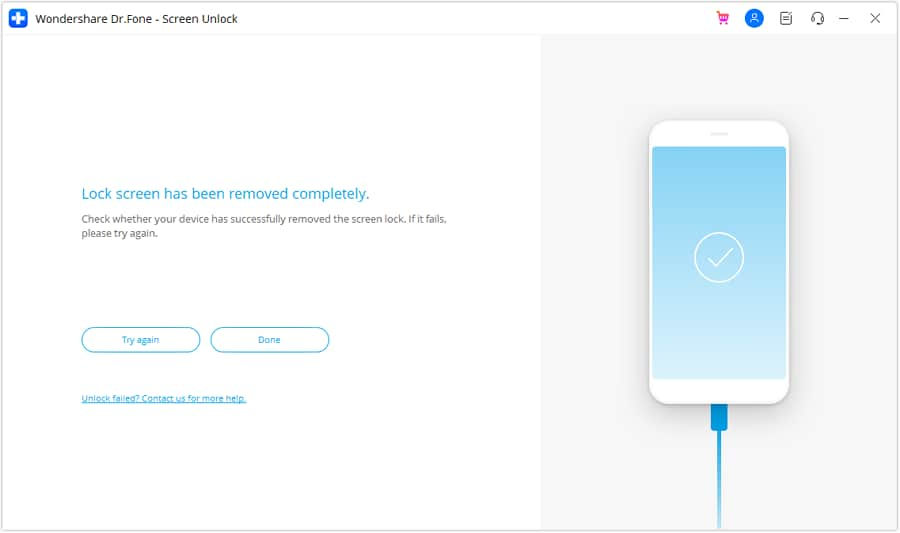
Step 5 Complete the Unlock
While the firmware is getting installed, keep the device connected. When the process finished, click Done.




Part 8. AnyUnlock vs Dr.Fone: Which iPhone Unlocker Is Better?
Both tools cover the main iOS lock problems, so the better choice comes down to compatibility, pricing, and the lock you need to remove. Here is the quickest comparison.
| Feature | AnyUnlock | Dr.Fone - Screen Unlock |
|---|---|---|
| Screen Passcode Removal | Yes. Supports PIN, alphanumeric codes, Face ID, and Touch ID. | Yes. Supports 4/6-digit codes, Face ID, Touch ID, and other screen locks. |
| Apple ID Removal | Yes. Available on supported devices without the password. | Yes. Removes Apple ID on supported iPhone and iPad models. |
| MDM Bypass | Yes. Supports local and remote MDM restrictions. | Yes. Can bypass MDM and remove MDM profiles without data loss. |
| Screen Time Passcode | Yes. Screen Time and Restrictions removal are supported. | Yes. Can remove Screen Time restrictions without data loss. |
| iCloud Activation Lock | Yes. Official support currently lists iOS 12–26.1. | Yes. Current product support includes iPhone 17 series and iOS 26.1. |
| Price | Full toolkit: $79.99/year for 5 devices/1 PC. Screen Unlock starts at $35.99. | $34.95/month, $49.95/year, or $59.95 perpetual for Screen Unlock (iOS). |
| Success for Common Locks | iMobie advertises a 99% overall success rate, but results still depend on device and lock type. | Wondershare describes a high success rate, but its main iOS page does not give one universal percentage for every lock. |
Conclusion
AnyUnlock is designed to solve multiple lock issues that may occur on your iPhone & iPad like screen passcode, Apple ID, MDM, Screen Time, iCloud activation lock, etc. Due to its basic interface and various tools, it is useful. However, support may vary depending on your device, iOS version, and lock type. Most core functions also require payment, and some procedures may erase device data.
For that reason, it is worth checking compatibility before you start.
If your device is not well suited to AnyUnlock, you can also consider Dr.Fone - Screen Unlock as another guided option for supported iOS lock problems.
 Add Wondershare Dr.Fone as a preferred source on Google