Bypass iCloud Activation Lock and Android FRP without password.

 100% Security Verified | No Subscription Required | No Malware

 :
: 
 ChatGPT
 Perplexity
 Gemini
 Claude
 Grok
Grok
Walk into any repair shop, and you'll spot a small USB key in the technician's laptop. This tool handles flashing, unlocking, and FRP jobs that free software cannot do. Since it is so important, you should research it before you buy one.
This review covers what the UMT Dongle does and the brands it supports. It also shows the true cost with activation fees and cables. After you get to know its benefits and drawbacks, learn why Dr.Fone - Screen Unlock (Android) can be a reliable choice.
In this article
- Part 1. What Is UMT Dongle?
- Part 2. Phones and Brands Compatible with UMT Dongle
- Part 3. UMT Dongle Price Breakdown
- Part 4. UMT Pro Dongle vs. NCK Pro Dongle
- Part 5. Is UMT Dongle Safe and Legal to Use?
- Part 6. Pros and Cons of UMT Dongle
- Part 7. How to Download and Set Up UMT Dongle
- Part 8. Is UMT Dongle Worth Buying in 2026?
- Part 9. A Simpler Alternative to UMT Dongle: Dr.Fone – Screen Unlock (Android)
- Frequently Asked Questions
Part 1. What Is UMT Dongle?
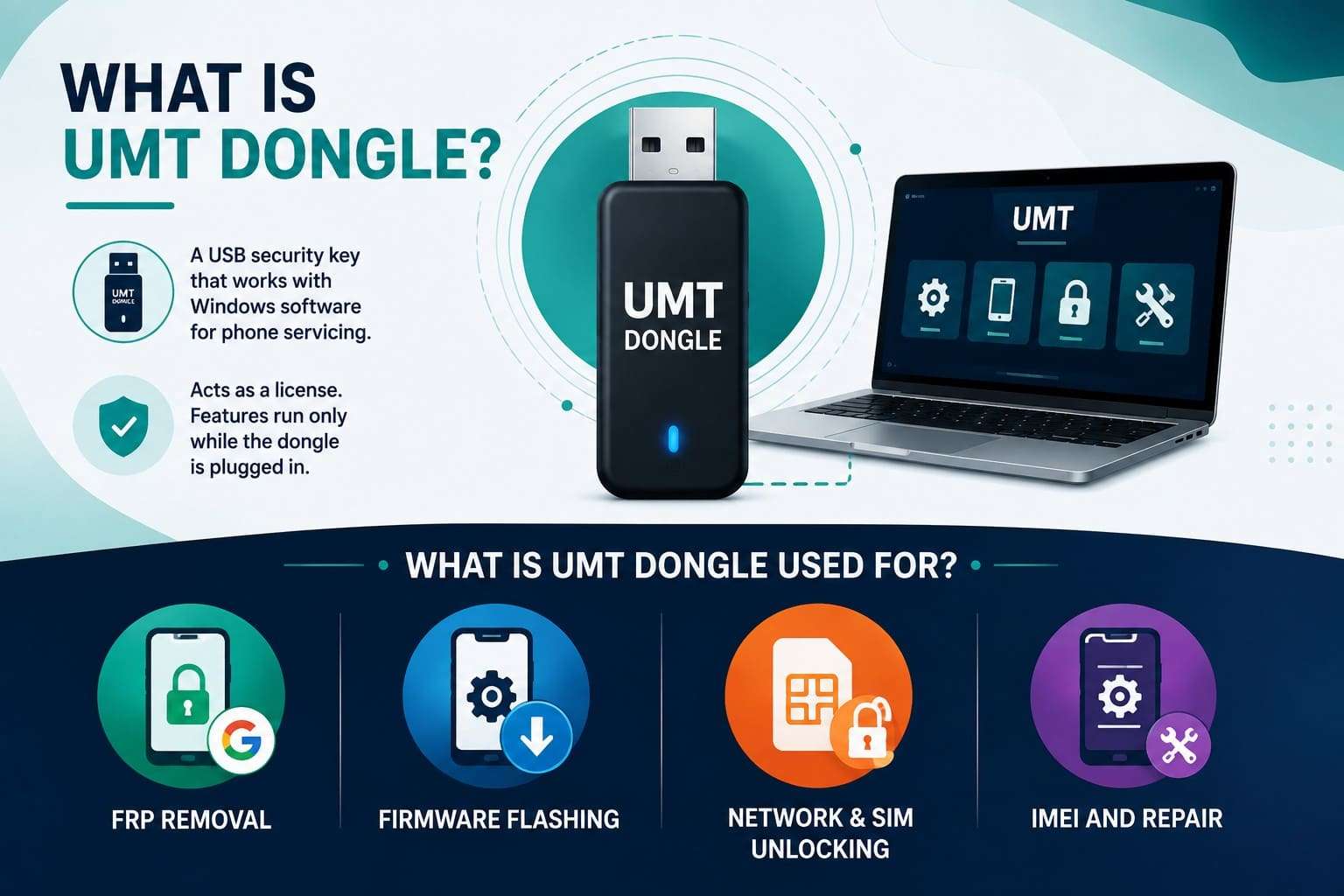
UMT Dongle, short for Ultimate Multi Tool, is a hardware USB security key paired with Windows software for phone servicing. The dongle acts as a license, and its features run only while the key is plugged in.
What Is UMT Dongle Used For?
Technicians reach for it when a reset or free app falls short. The following are its core tasks. Review them before searching for UMT Dongle download methods:
- FRP Removal: Clearing the Google FRP lock a reset leaves behind when credentials are lost.
- Firmware Flashing: Flash stock or service firmware to repair boot loops, restore software, unbrick devices, or reinstall the operating system. Supported modules also flash certain engineering and factory firmware packages.
- Network and SIM Unlocking: Removing carrier locks so a phone runs on another network.
- IMEI and Repair: Repairs IMEI, Bluetooth addresses, and EFS or QCN security data on supported devices. It can also restore lost locks or patterns, though features vary by phone model and chipset.
Key Features of UMT Dongle
UMT Dongle stands out because it gives a repair bench direct access to the chipset. If you want to know more about its key aspects, explore the given points:
- Multi-Chipset Modules: Separate Qualcomm, MediaTek, Samsung, and GSM engines, each tuned to its platform.
- Direct Factory Unlock: Unlock certain Qualcomm and Samsung devices directly through EDL or Download Mode. However, some procedures still need engineering firmware, root access, or specific software versions.
- Partition-Level Control: Backup, wipe, and restore individual Android partitions, not the whole device.
- Bulk Code Calculation: Generate batches of unlock codes at once, for volume repair work.
- Broad Device Support: Dedicated modules support Qualcomm, MediaTek, Samsung, Unisoc, and other chipsets. Regular updates bring new phone models and fresh security patch support.
UMT Dongle vs UMT Pro: What Is the Difference?
The name confuses many people, so this section simplifies the terms. The original UMT Dongle provides professional tools for servicing many Android devices across Qualcomm, MediaTek, Samsung, and GSM platforms.
UMT Pro combines UMT software with the Avengers applet on one smart card, expanding coverage without necessarily delivering faster updates across supported devices. Moreover, UMT Pro packs 2 products into one key, so technicians handling newer or rarer models lean that way. For most people, the standard dongle does the job.
Part 2. Phones and Brands Compatible with UMT Dongle
Before you learn about the UMT Dongle price, review this section to know about its compatibility:
| Phone Brand | Common Chipsets | Typical UMT Functions | Important Notes |
|---|---|---|---|
| Samsung | Qualcomm, Exynos, MediaTek | FRP, direct unlock, flashing | Direct unlock support varies by model, chipset, and security patch. |
| Xiaomi, Redmi, POCO | Qualcomm, MediaTek | EDL flashing, FRP, factory reset | Mi Account-related functions depend on the device model and security patch. |
| Oppo | Qualcomm, MediaTek | FRP reset, flashing, diagnostics, partition management | Newer ColorOS versions may restrict some service operations. |
| Vivo / iQOO | Qualcomm, MediaTek | FRP, flashing, lock reset, firmware repair | Some models require authorized service or specific boot modes. |
| Realme | Qualcomm, MediaTek | FRP removal, firmware flashing, partition repair | Support generally follows procedures similar to Oppo devices. |
| Motorola | Qualcomm, MediaTek | Flashing, FRP reset, software repair | Support varies by model, chipset, and security patch level. |
| Nokia (HMD) | Qualcomm, MediaTek | Flashing, FRP reset, firmware recovery | Feature availability varies by model generation. |
| Tecno / Infinix / Itel | MediaTek | Firmware flashing, repair, diagnostics | MediaTek support varies by model and security patch. |
| Huawei / Honor | Kirin, Qualcomm | Firmware flashing, repair, diagnostics | Many newer Kirin devices have limited service options because of security restrictions. |
| LG (Legacy) | Qualcomm | Firmware restoration, software repair | Primarily supports older devices because LG discontinued smartphones. |
| Alcatel, ZTE | Qualcomm, MediaTek | Flashing, FRP reset, selected service functions | Feature availability varies by model and supported module. |
How to Check Whether Your Phone Is Supported
Before purchasing UMT Ultimate Multi Tool, confirm that your exact phone model supports the operation you need.
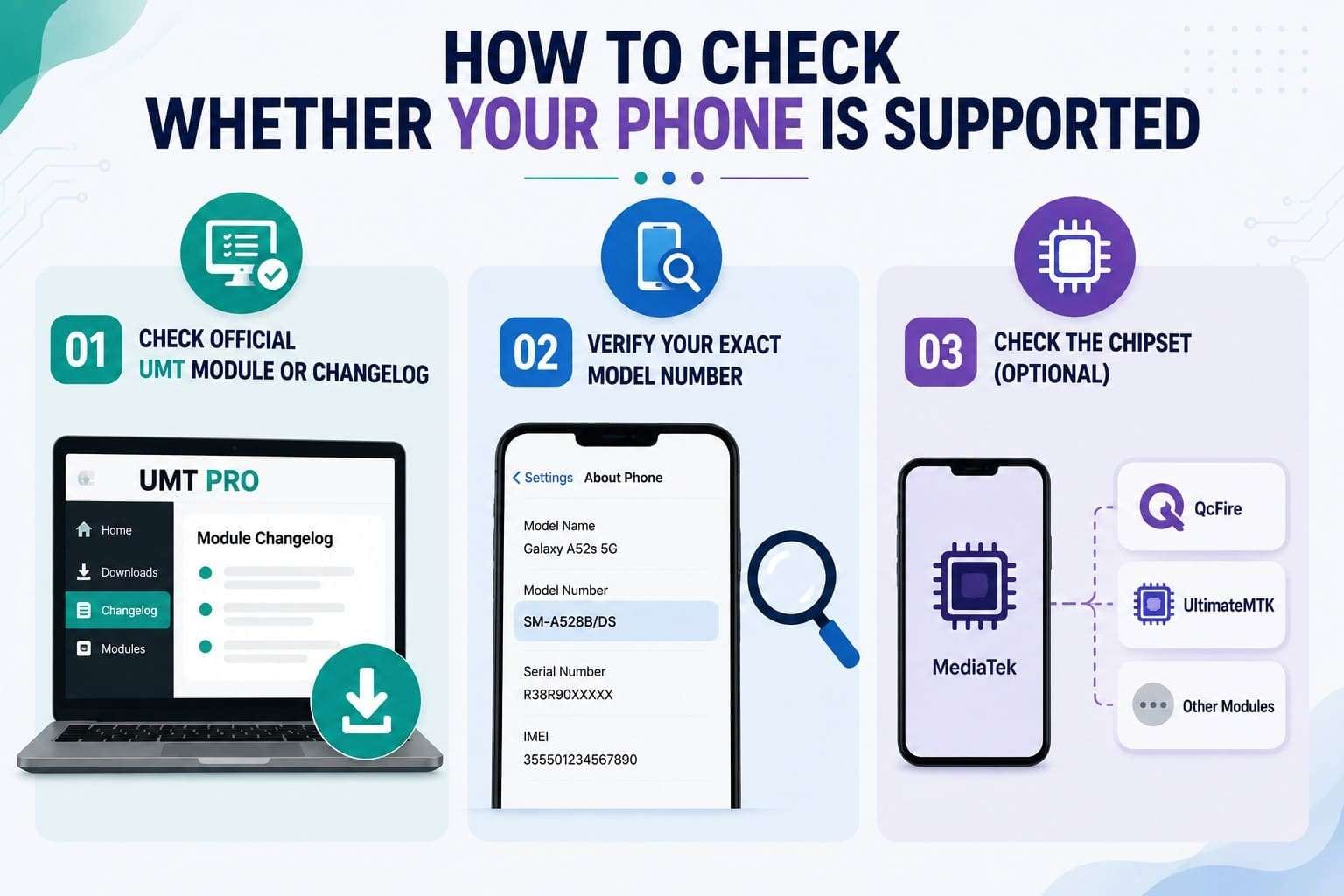
- Method 1. Check the Official UMT Module or Changelog
Check the official UMT or UMT Pro download page to view recent module logs. These logs show new phone models and supported functions whenever module software updates are released. - Method 2. Verify Your Exact Model Number
Go to Settings > About Phone on your device and copy the full model number. Search that exact number in UMT Support Access, official update logs, or GSM forums to ensure your required task is supported. - Method 3. Check the Chipset (Optional)
Use GSMArena or official specs to check the exact chipset of your unlisted phone. Match that processor to the right UMT module (such as QcFire or UltimateMTK), but remember that chipset match alone does not ensure full support for every security patch or model.
Part 3. UMT Dongle Price Breakdown
As for the UMT Dongle price, this section uncovers 2026 prices, though they shift by vendor and region:
| Vendor Item | Product Type | Price Range (USD) | Activation Included | Cables Included |
|---|---|---|---|---|
| UMT Dongle Only | Hardware key | $15–$40 | Varies by seller | Usually No |
| UMT Pro Dongle | Hardware key + software modules | $60–$80 | Usually 1 year | Varies by bundle |
| Smart Card Only | Replacement smart card | $20–$45 | Usually No | None |
| Dongle with Cables | Hardware bundle | $50–$75 | Varies by seller | Depends on bundle |
| 1-Year Activation or Renewal | Software activation | $30–$45 | Not applicable | None |

Part 4. UMT Pro Dongle vs. NCK Pro Dongle
UMT is the base platform, while UMT Pro combines UMT with the Avengers applet on one smart card. The NCK Pro Dongle is a different combination, bundling the NCK Dongle and UMT on one key. This is why the 2 overlap so much, and this table maps the differences:
| Feature | UMT Pro | NCK Pro |
|---|---|---|
| Supported Chipsets | Qualcomm, MediaTek, Samsung, Unisoc, and others through supported UMT modules | UMT-supported chipsets plus NCK-supported platforms |
| Supported Brands | Broad Android brand support through UMT modules | Broadest brand coverage using both UMT and NCK modules |
| Included Software | UMT modules with the Avengers applet | UMT modules together with NCK modules |
| Activation Model | Requires UMT activation renewal | Separate renewal requirements depend on the included UMT and NCK licenses |
| Setup Difficulty | Moderate with a single software ecosystem | Slightly higher because two software ecosystems are available |
| Update Frequency | Regular UMT module updates | Separate update schedules for UMT and NCK modules |
| Best Use Case | Android servicing using the UMT platform | Repair shops needing both UMT and NCK toolsets |
| Overall Value | Best for users focused on the UMT ecosystem | Better for technicians who regularly use both UMT and NCK modules |
Part 5. Is UMT Dongle Safe and Legal to Use?
The UMT Ultimate Multi Tool itself is legitimate software used by registered repair businesses worldwide, not malware. Legality depends on the usage; flashing or unlocking a device with owner consent keeps the process within standard repair practices. Apply the tool to an unverified phone, and the action becomes an unauthorized security breach.
For this reason, Google built Factory Reset Protection to lock wiped devices against theft. Proof of ownership is mandatory because it separates legitimate service from illegal bypass.
Safety Checks Before Using UMT Dongle
After you are familiar with the UMT Dongle and the UMT tool price, perform these security checks before use:
- Confirm you own the device, or have the owner's written authorization, before starting.
- Download the software only from the official UMT source, since mirrors can carry malware.
- Back up the phone where possible, since flashing and partition work can erase everything.
- Verify the firmware matches the model, since a wrong file is the top cause of a brick.
Part 6. Pros and Cons of UMT Dongle
Like any professional repair tool, the strengths and drawbacks of the UMT Dongle are clear and given below:
- Handles FRP, flashing, unlocking, and IMEI repair in one tool
- Provides deep chipset-level access across multiple Android brands
- Widely trusted and regularly updated for professional repair work
- Supports direct Samsung Qualcomm unlocking without root
- Bulk code calculation improves high-volume repair efficiency
- Requires hardware purchase and annual activation
- Has a steep learning curve for beginners
- Windows driver setup can be challenging
- Too expensive for occasional or single-device use
- Limited support for the latest flagship security updates
Part 7. How to Download and Set Up UMT Dongle
To continue with the usage and UMT Dongle download process, review this section in detail:
UMT Dongle System Requirements
- PC or laptop with an available USB 2.0 or USB 3.0 port.
- Genuine UMTv2/UMT Pro Dongle containing an active, working smart card.
- A Windows PC, 7 through 11, 32- or 64-bit, with no Mac or Linux build.
- The UMT Card Driver, the Qualcomm QDLoader 9008 driver for EDL work, and the MediaTek VCOM pack for MTK phones.
- A current one- or two-year activation on the smart card, and a stable internet connection.
What You Need Before Setup
- An activated UMT or UMT Pro with its card seated.
- The official launcher for the latest module setups.
- Ideally, the original, plus an EDL cable for Qualcomm work.
- Matched to the exact model, if flashing.
How to Install and Activate the Software
With drivers ready, the install is short and is guided below for the UMT Dongle:
-
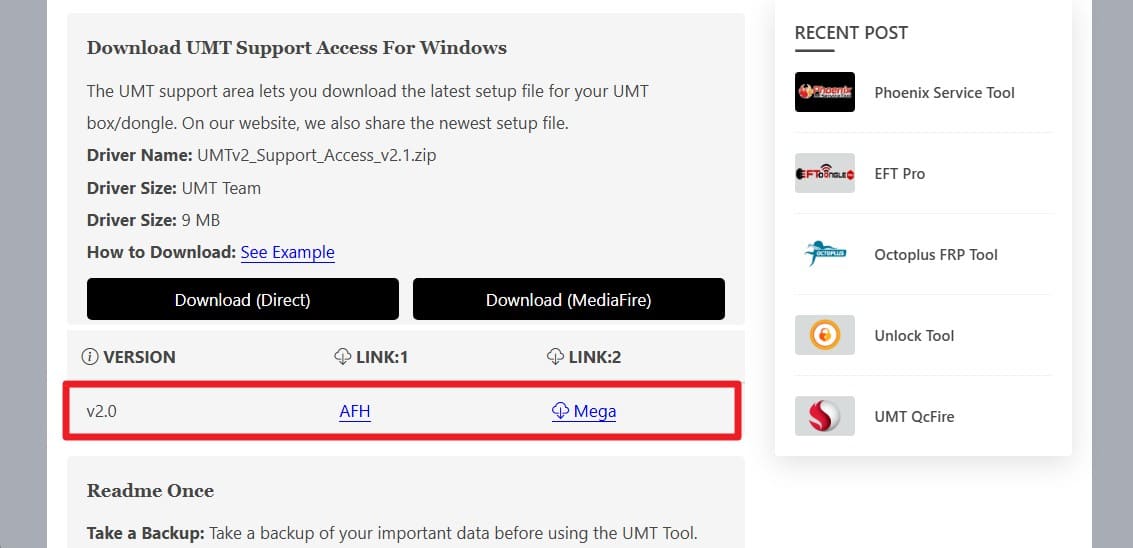
Step 1 Go to the official GSM-Forum to download the latest UMT Support Access. Download the setup package to your hard drive and extract the files with WinRAR.
-
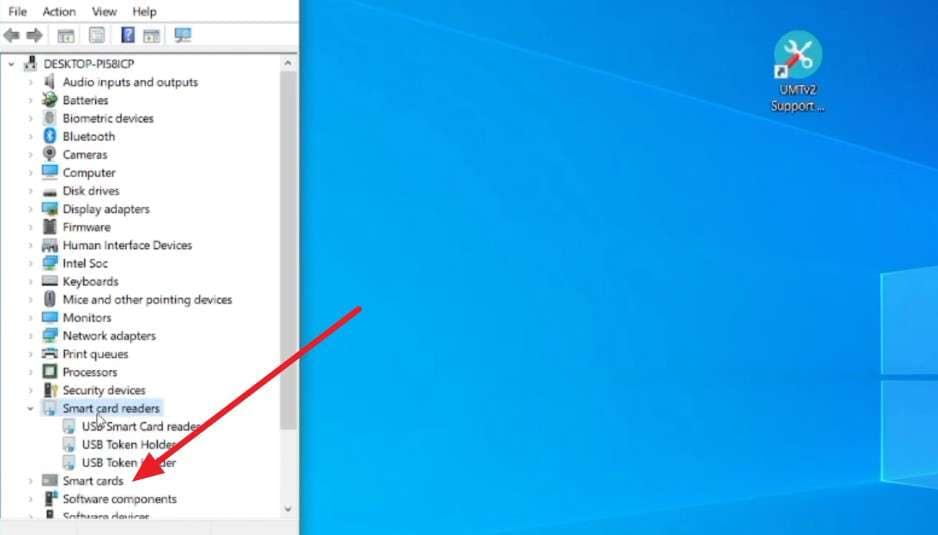
Step 2 Run the UMT Card Driver, then seat the dongle in a rear USB 2.0 port. Open Device Manager and confirm the “Smart Card” reader appears with no yellow warning mark.
First Card Setup Most Users Miss
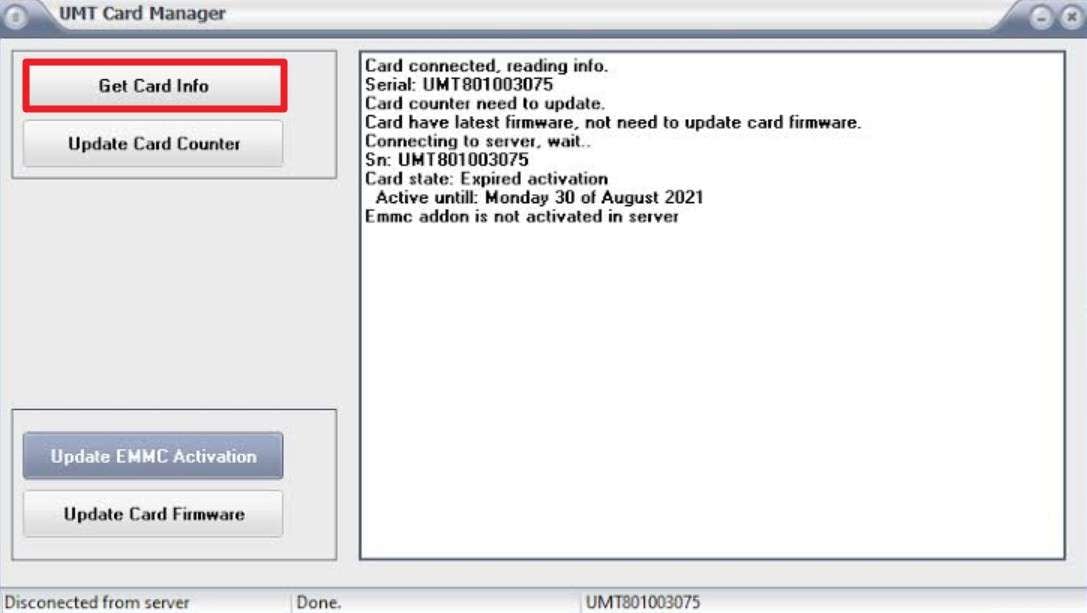
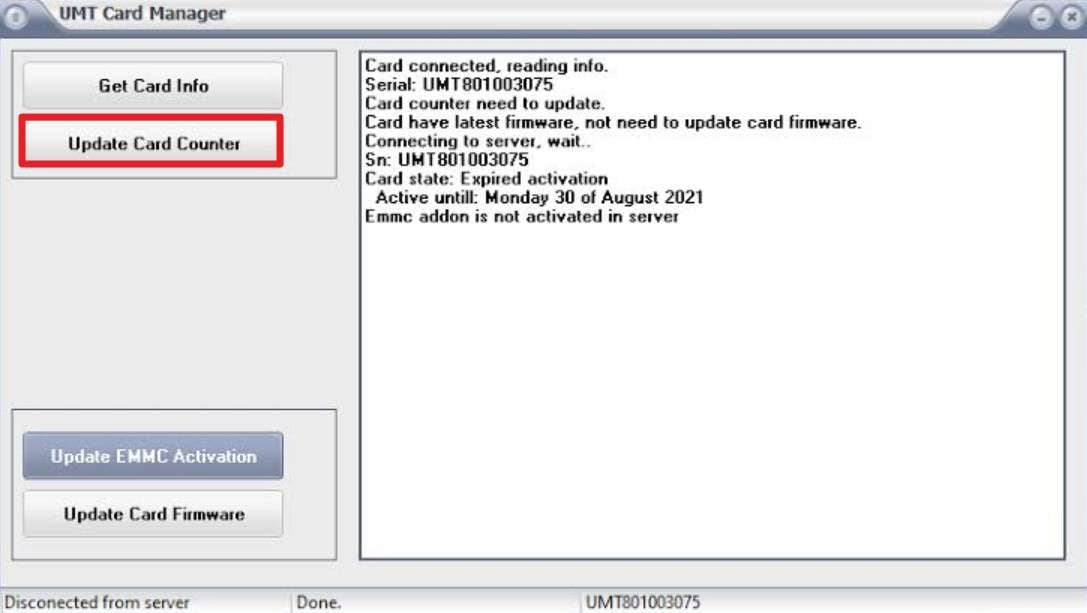
Initialize the smart card in UMT Card Manager before any module runs, or you'll hit the “card update required” error.
-
Step 1 Open UMT Card Manager and click “Get Card Info” to read the serial and activation date.
-
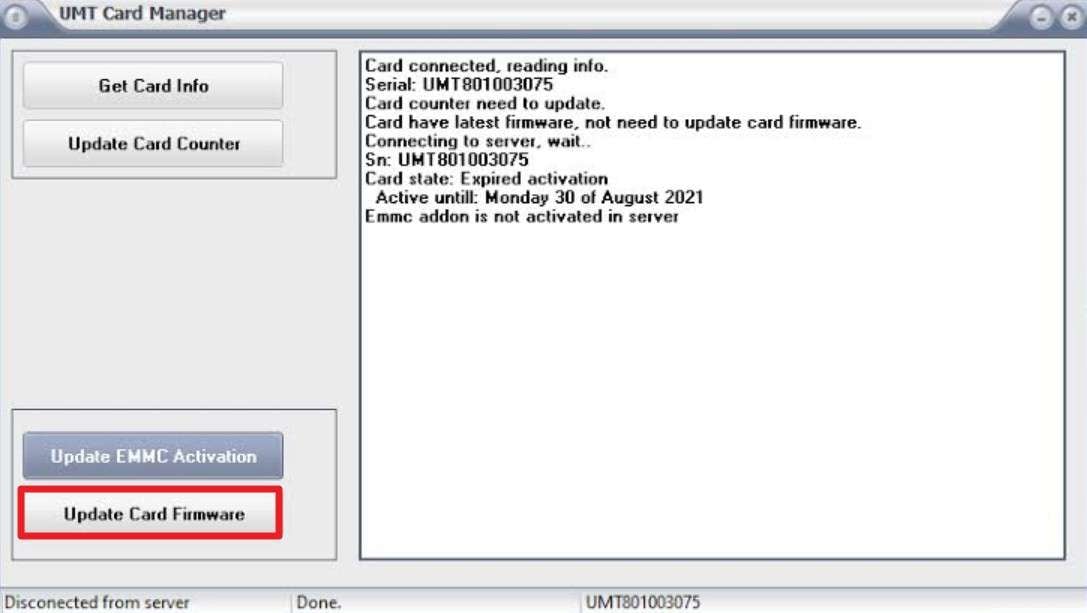
Step 2 Click “Update Card Firmware” to bring the card current, and let it finish.
-
Step 3 Tap “Update Card Counter” to clear the update flag, then close the manager.
General Workflow for Using UMT Dongle
With the card initialized, here are the steps to reset FRP with UMT Ultimate Multi Tool:
-
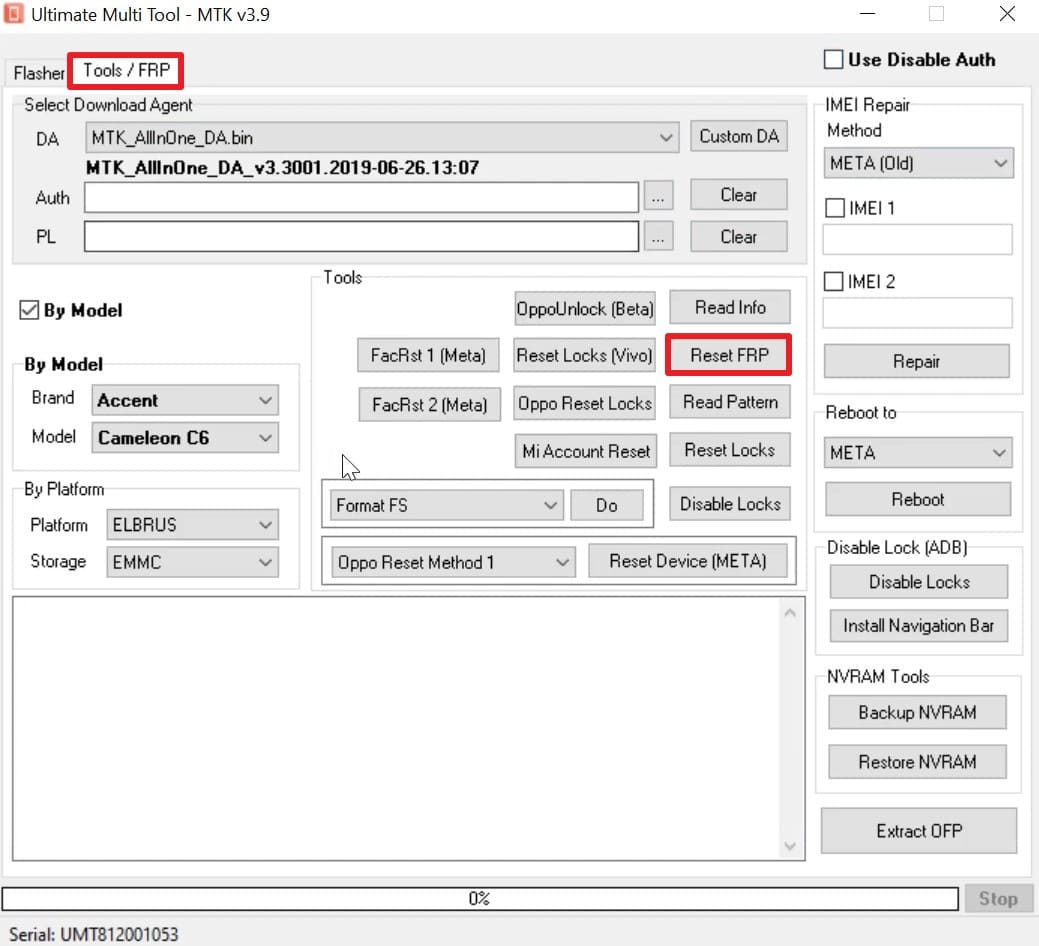
Step 1 Open the module for your chipset, whether QcFire for Qualcomm, Ultimate MTK for MediaTek, or Ultimate GSM.
-
Step 2 Select the “Tools/Falsh” tab and press the “Reset FRP” button. Put the phone into the required mode, EDL 9008, Download, or BROM, and connect the cable. You can also manually choose the “By Model” or “By Platform” settings if needed.
-
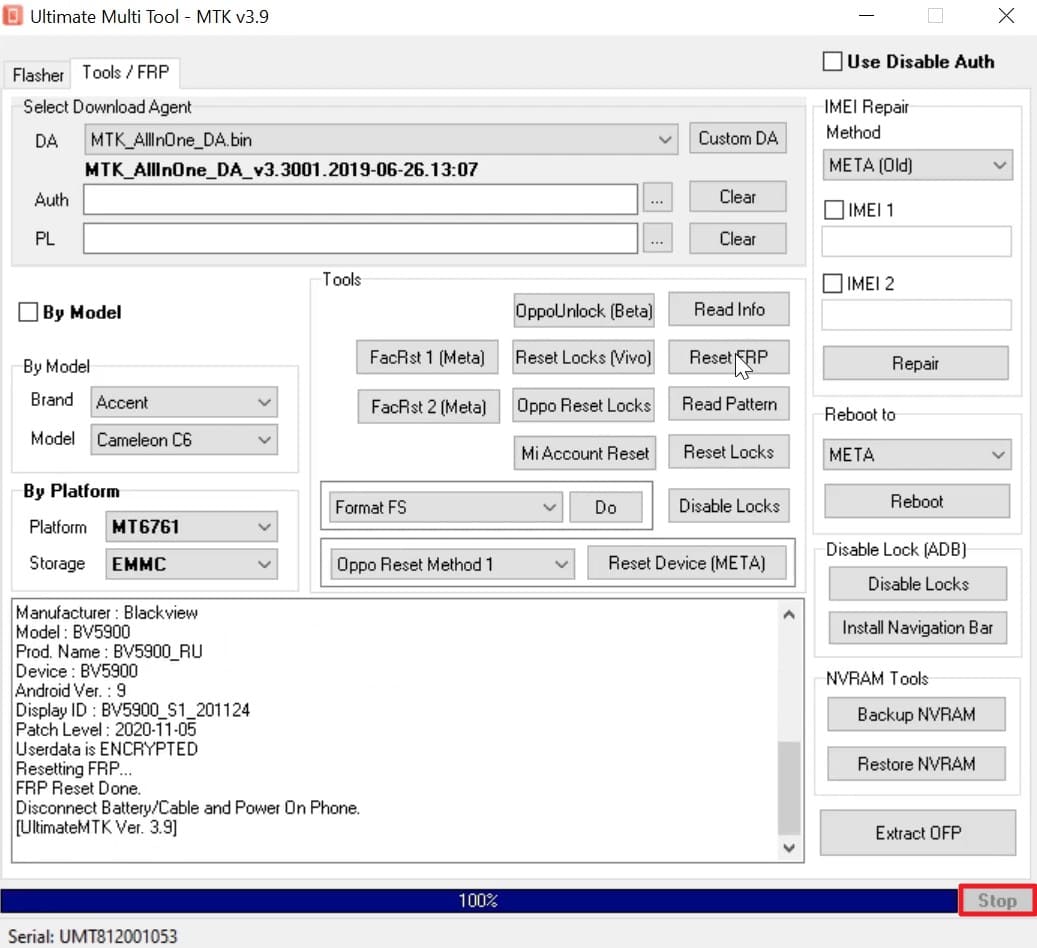
Step 4 Start the operation, watch the log, and wait until it reaches 100% or “Stop” if needed.
Part 8. Is UMT Dongle Worth Buying in 2026?
The UMT Dongle value depends on the total usage volume. For a busy shop, UMT proves to be cost-effective. High job volume offsets annual fees and hardware costs. For a single device, UMT lacks financial sense. Tool costs, activation fees, and setup effort exceed the value of one job.
Part 9. A Simpler Alternative to UMT Dongle: Dr.Fone – Screen Unlock (Android)
For a single Google lock, most of a Dongle's overhead is wasted effort. Dr.Fone - Screen Unlock (Android) handles Samsung FRP from a computer with nothing extra to buy. In addition to Samsung, it can also remove FRP from 19 Android brands without the hassle of driver installation. With just a USB cable connection required, it supports MediaTek CPUs and offers a general unlocking method for most Android brands.
For Samsung FRP bypass, you can do it online, or the desktop’s Smart Recommendation feature picks the suitable unlock solution based on the model. Nonetheless, Dr.Fone offers simple and detailed guides for each Android brand, and an intuitive interface makes navigation seamless. The tool supports major US models and chipsets, along with Samsung Galaxy S26 Series and all Samsung Snapdragon devices.
 Unlock Android phone in seconds.
- Remove PIN, pattern, password, fingerprint.
- Bypass Google FRP lock easily.
- Works on all Android brands & models.
- No tech skills required – user-friendly.

Guide to Remove Google FRP Lock on All Samsung Devices
When the UMT Dongle download process baffles you, learn how to remove the FRP lock via Dr.Fone easily:
-
Step 1 Access the Google FRP Removal Tool
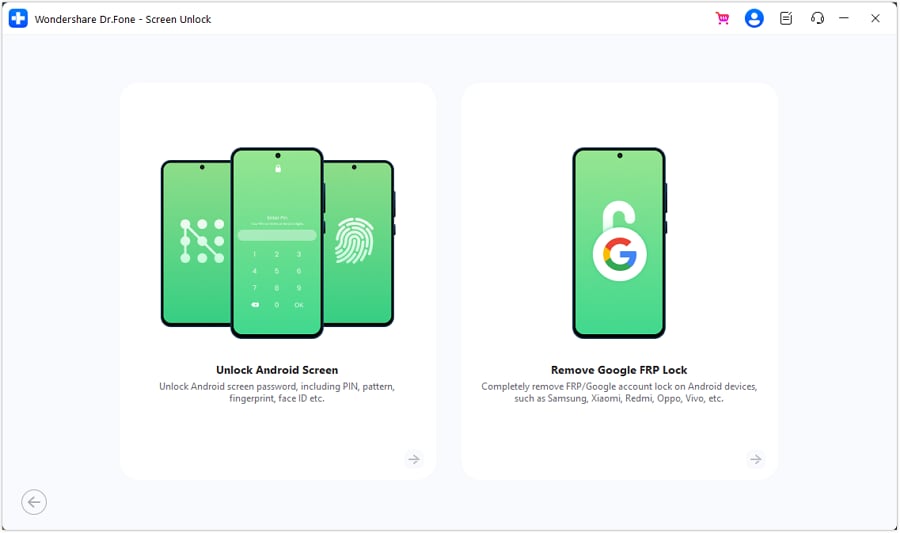
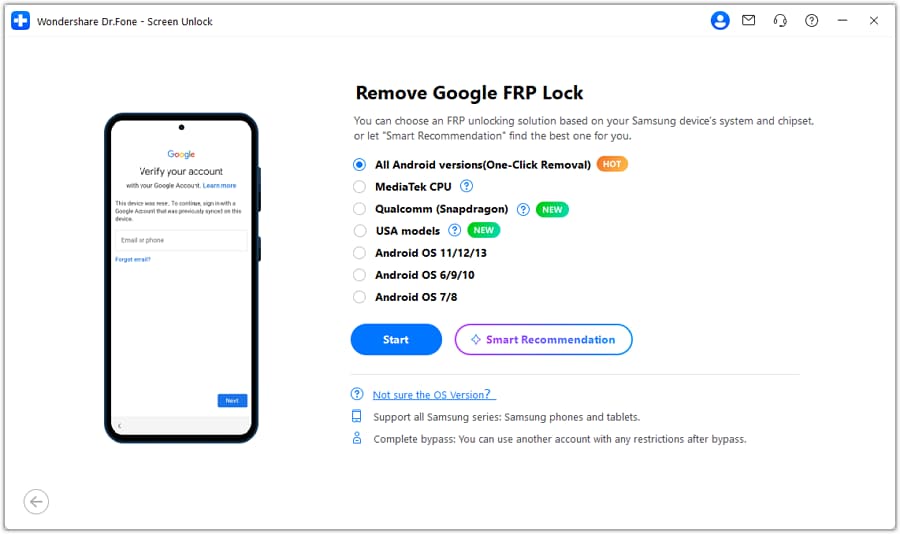
Connect the handset, and on the Screen Unlock tool for Android, press the “Remove Google FRP Lock” option.
-
Step 2 Confirm the Device and Method
Pick “Samsung” from the list and enable “Smart Recommendation (AI-Powered)” or “All Android versions (One-Click Removal)” before clicking on “Start” to continue.
-
Step 3 Follow the Prompts on Screen
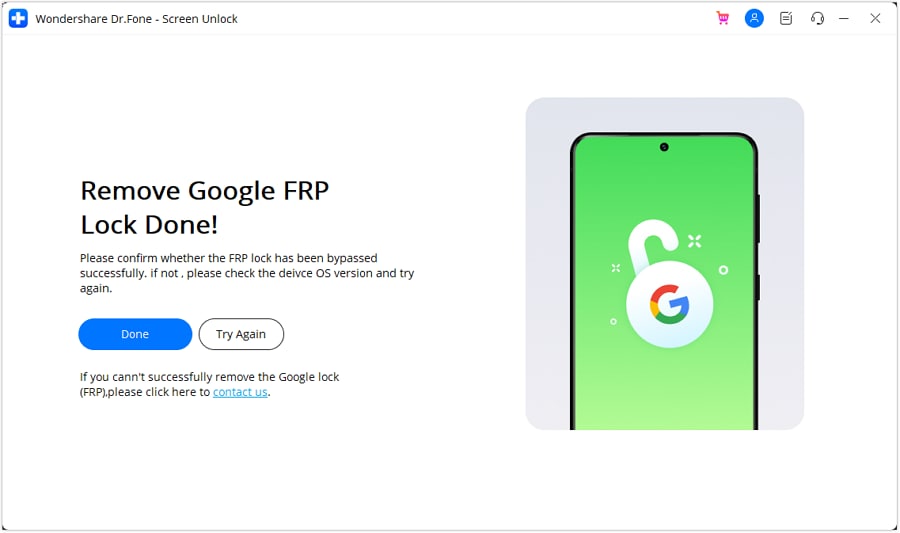
Repeat the dialer and menu actions the tool demonstrates, wait while it finishes, and choose the “Done” option when FRP is bypassed.




Why Dr.Fone May Be a Better Choice for Beginners
Beginners face a steep learning curve because UMT Ultimate Multi Tool lacks guided instructions. Conversely, Dr.Fone - Screen Unlock (Android) provides detailed, separate guides for each model. Most of all, it offers weekly updates for all upcoming Android models and versions.
Conclusion
UMT Dongle remains a solid investment for active repair shops with daily job volume. A single locked phone does not justify the hardware, activation, and setup costs. For personal devices, recover your original Google account or use Dr.Fone - Screen Unlock (Android) without expensive dongles.
Frequently Asked Questions
-
1. What is the UMT Dongle price in 2026?
The dongle alone runs roughly $15 to $40, while a UMT Pro dongle sits around $60 to $80. Add the yearly activation, usually $30 to $45, and cables, since the cheapest listings include neither. -
2. Is the UMT Dongle download free?
The download is free, but its features unlock only with an activated dongle plugged in. Without the key and a current activation, the setup runs in a limited state. -
3. What is the difference between UMT and NCK Pro?
UMT is the base tool; NCK Pro bundles the full NCK Dongle with UMT on one key. It covers more legacy brands but needs two separate yearly activations to stay current. -
4. Do I need a UMT Dongle just to remove an FRP lock?
No, and it's usually overkill for one job. An app like Dr.Fone, or recovering the original Google login, clears a single FRP lock with no hardware to buy.
 Add Wondershare Dr.Fone as a preferred source on Google