Bypass iCloud Activation Lock and Android FRP without password.

 100% Security Verified | No Subscription Required | No Malware

 :
: 
 ChatGPT
 Perplexity
 Gemini
 Claude
 Grok
Grok
The word “unlock” does two completely different jobs, and mixing them up wastes hours. A carrier lock stops a rival SIM from working. A screen lock keeps you at the PIN prompt on a phone that's otherwise fine. Each one needs its own fix, and they share almost nothing.
This guide explains the term Moto G Play unlock and covers carrier and screen/FRP lock situations. For these lock issues, get to know why Dr.Fone - Screen Unlock (Android) and Dr.Fone Online Unlock are suggested choices.
In this article
- Part 1. What Does "Unlock" Mean for Moto G Pure & Play?
- Part 2. How to Carrier-Unlock a Moto G Pure & Play
- Part 3. Is the Moto G Pure & Play Sold Unlocked?
- Part 4. Forgot Your Moto G Pure & Play Password? Here Are Your Options
- Part 5. How to Unlock Moto G Pure & Play Without a Password
- Part 6. What If Moto G Pure & Play Asks for a Google Account After Reset?
Part 1. What Does "Unlock" Mean for Moto G Pure & Play?
Identify your specific phone lock first so you do not waste time on the wrong fix. From the following table, you will get to know what type of Motorola Moto G Play unlock you are facing:
| Lock Type | What It Prevents | Recommended Solution |
|---|---|---|
| Carrier or SIM lock | Using a SIM from any network except the original one | An official carrier unlock, or an IMEI-based online service |
| Screen PIN, password, or pattern | Getting past the lock screen into the phone itself | Desktop unlock software, a remote erase, or a recovery reset |
| Factory Reset Protection | Finishing setup after a reset without the old Google login | The original account credentials, account recovery, or FRP removal tool. |
Part 2. How to Carrier-Unlock a Moto G Pure & Play
To carrier unlock Moto G Pure or Play, the solutions are simple and explained in this situation:
Find the Original Carrier and IMEI Number
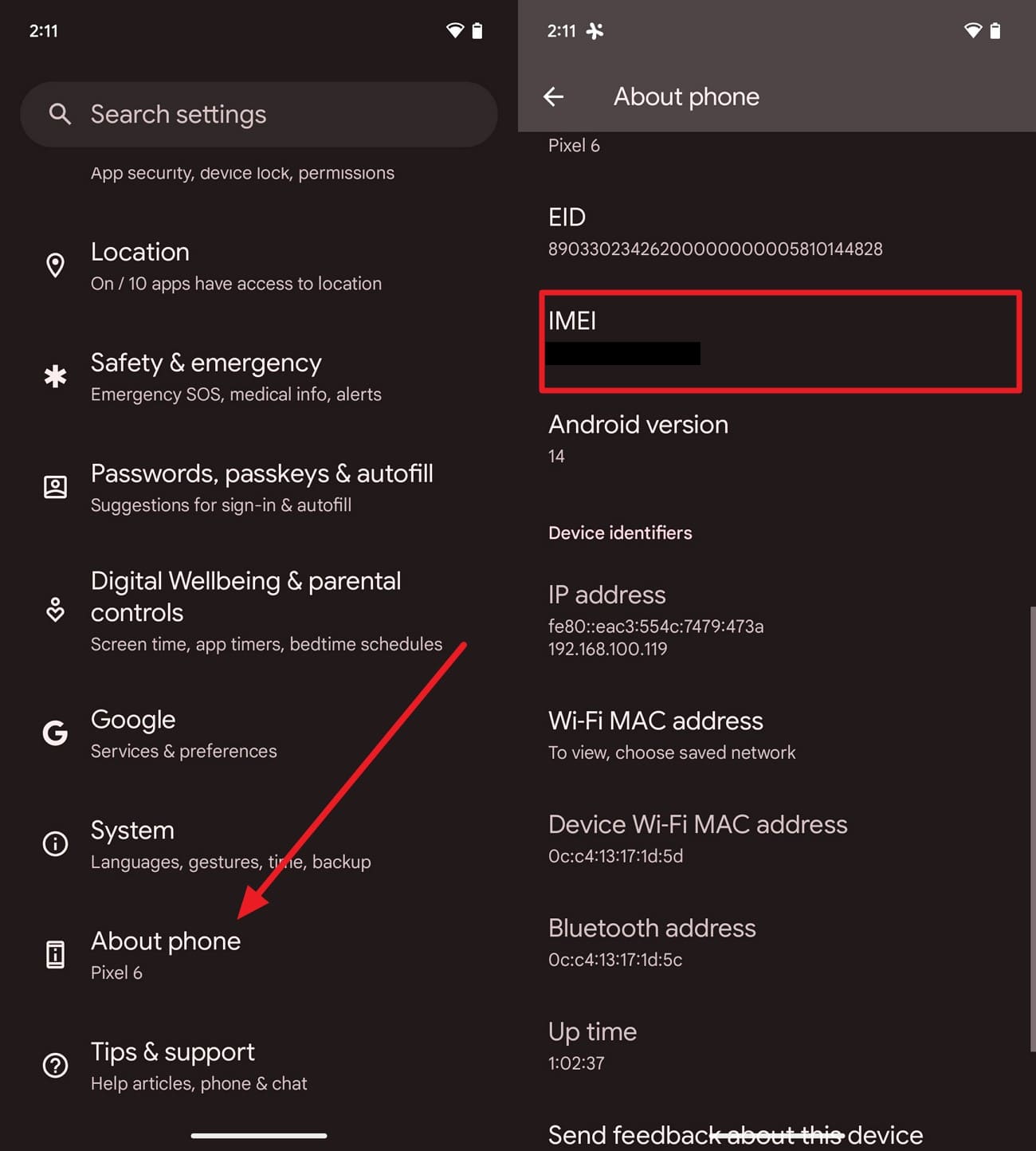
Dial *#06# on the keypad to display the 15-digit IMEI, or find it under “Settings > About Phone > IMEI". Identify the network that originally sold the phone, which is not always the one you use now. Note whether the line was prepaid or postpaid, since the two follow different eligibility clocks.
Method 1. Request an Official Carrier Unlock
This route is free and permanent, and it's the one to try before paying anyone. The FCC's consumer guide sets out the commitments carriers made. Postpaid phones qualify once the contract or installment plan is settled. Prepaid handsets qualify no later than a year after activation.
Prerequisites:
- Confirm the phone is fully paid off and the account sits in good standing.
- Check that the handset was never reported lost or stolen, which disqualifies it outright.
- Have your account details, phone number, and IMEI ready.
-
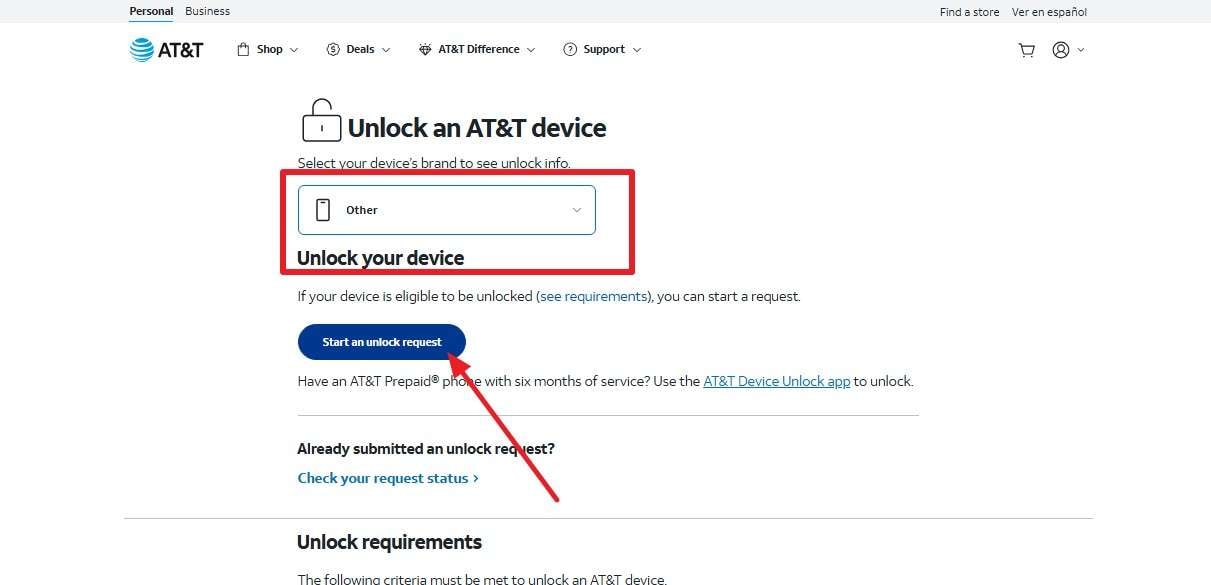
Step 1 Go to your specific carrier’s official portal, such as AT&T Device Unlock, and pick “Other” under the “Unlock Your Device” section. Click on the “Start an Unlock Request” button and continue.
-
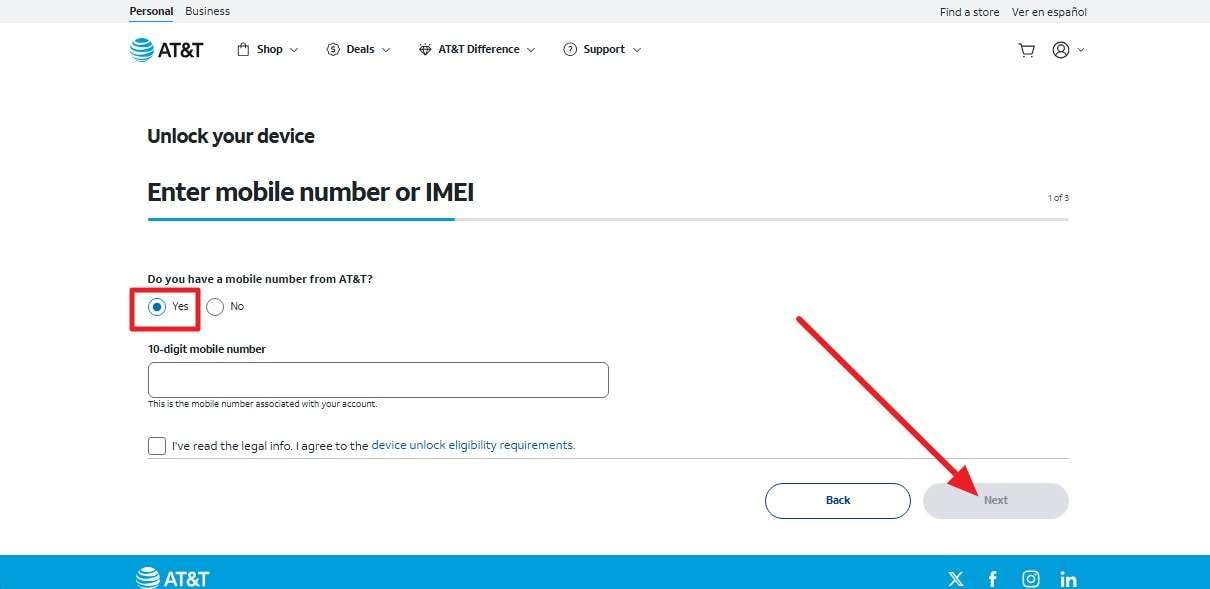
Step 2 Press “Yes,” add the 10-digit mobile number on the new screen, and click “Next.” The carrier will ask you to add your email details. Wait until you receive instructions or an unlock code. Then, insert the new SIM and enter the code you were sent.

Method 2. Dr.Fone Online Unlock: Alternative Carrier-Unlock Solution
The official carrier unlock routes can take days, so if you need a quick way to carrier unlock Motorola G Pure, use Dr.Fone Online Unlock. This tool only needs IMEI details and requires no jailbreak or wiping the device's data. Most of all, it processes the cloud request within 24 hours, and the unlock stays permanent. Unlike the official method, you can track the unlock process or access the detailed history as proof.
Guide to Submit a Dr.Fone Online Unlock Request
Have the IMEI written down before you begin, and follow the mentioned guide to remove the carrier lock:
-
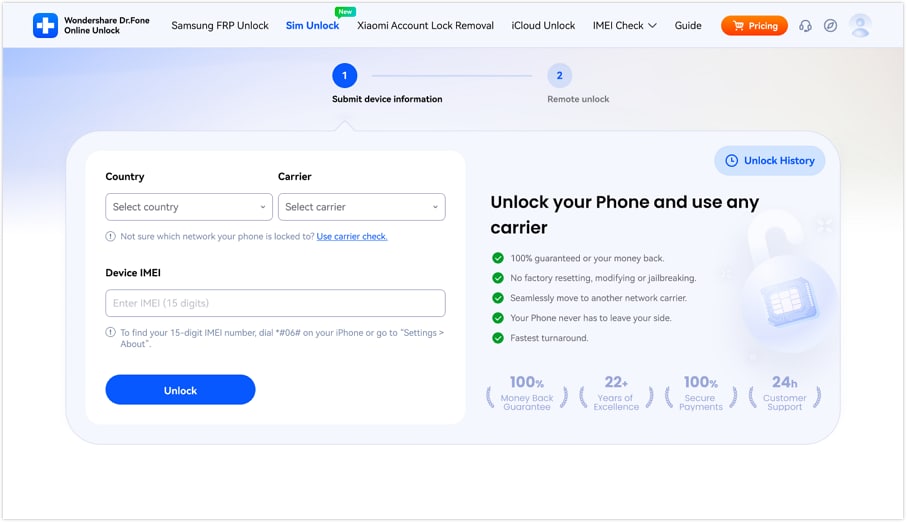
Step 1 Open the Online Unlock Page
Load the Dr.Fone SIM Unlock page in any browser and start a fresh request. To do so, add the country, carrier, IMEI details, and press the “Unlock” button.
-
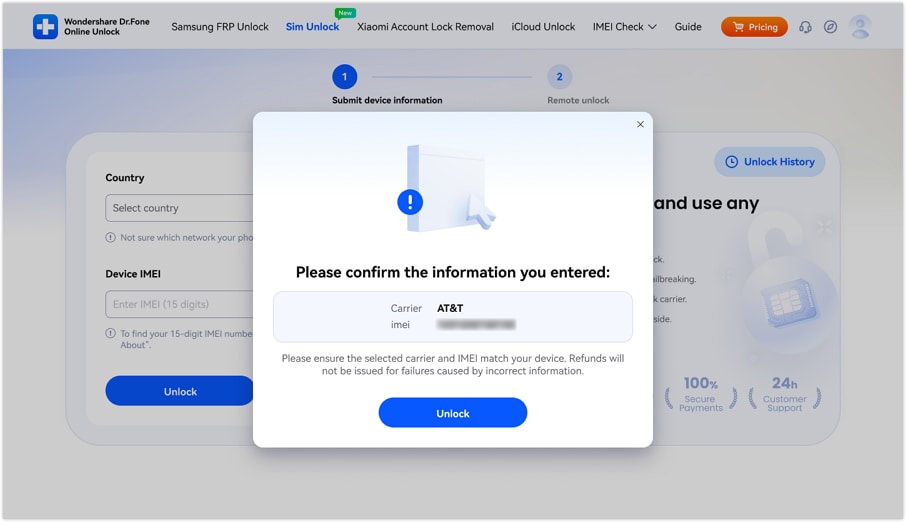
Step 2 Confirm Carrier and IMEI Details
Read the confirmation screen back against the phone before committing and tap “Unlock” to submit the cloud request.
-
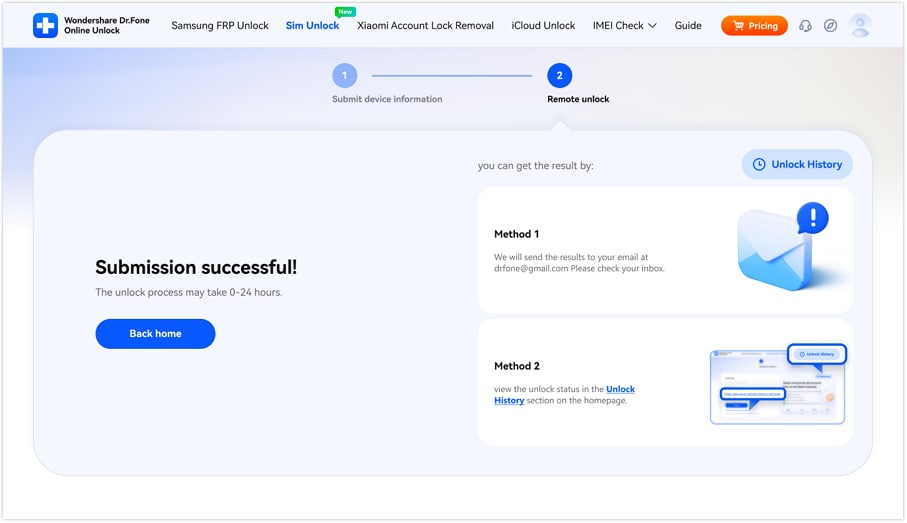
Step 3 Track the Carrier Unlock Request
The result arrives by email, and the “Unlock History” page shows progress in the meantime.
Part 3. Is the Moto G Pure & Play Sold Unlocked?
Moto G Pure and Play models come in both factory-unlocked and carrier-locked versions. As a result, the lock status depends on where the phone was purchased and its carrier variant, not simply the model name. A “Motorola Pure unlocked” phone frees you from network restrictions, but it still needs the right LTE/5G bands to work on a new carrier. Before switching networks, verify both the phone's unlock status and its network compatibility.
How to Check If a Moto G Pure & Play Is Carrier-Locked
Through the 3 given methods, you can check if the Moto G Pure & Play model is carrier-locked or not:
Method 1. Insert Another Carrier's SIM Card
This quickest test needs only a spare SIM belonging to another network. Power down, swap in the other carrier's SIM, and switch the phone back on. Watch for a “SIM not supported” or network-lock prompt, which confirms a lock. A normal signal means you're clear.
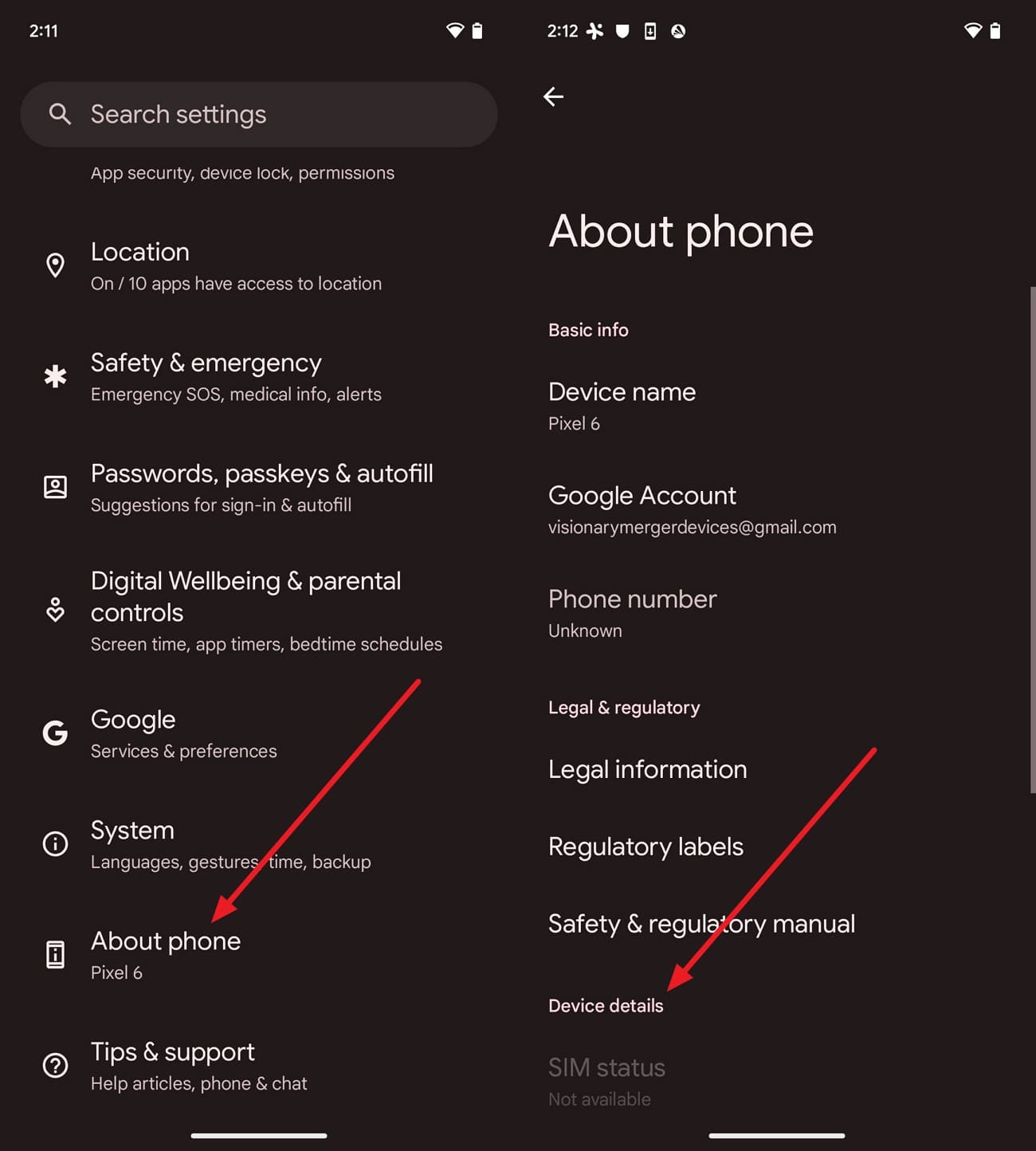
Method 2. Check Carrier and Network Information
Instructions. Open “Settings > About Phone” and review the carrier or SIM status where available. If no lock information appears, confirm the status with your carrier using the IMEI.
Method 3. Contact the Original Carrier
For a definitive answer, only the original carrier can confirm the phone's status. Contact the carrier's support team with the IMEI ready. Ask them to verify whether the phone is locked and, if so, what requirements remain before it qualifies for unlocking.
Part 4. Forgot Your Moto G Pure & Play Password? Here Are Your Options
If your Moto Pure unlocked situation is linked to screen lock, determine what type of lock you are stuck with via the given table:
| Situation | Can You Access the Phone? | Will Data Be Erased? | Correct Recommended Solution |
|---|---|---|---|
| Forgot PIN | No | Usually Yes | Screen unlock software or factory reset |
| Forgot Password | No | Usually Yes | Screen unlock software or factory reset |
| Forgot Pattern | No | Usually Yes | Screen unlock software or factory reset |
| Fingerprint Not Working | Yes, if another unlock method (PIN, pattern, or password) is known | No | Use the backup screen lock (PIN, pattern, or password) or remove the screen lock after unlocking |
| Google Account After Reset (FRP) | No | Already Reset | Sign in with the previously synced Google account or use a supported FRP solution |
Compare the Screen-Unlock Methods
For screen unlocking the Moto G Pure, compare the possible unlock options in this section:
| Method | Computer Needed | Google Account Needed | Erases Data | Best For |
|---|---|---|---|---|
| Dr.Fone – Screen Unlock (Android) | Yes | No | Yes (Moto models) | Guided screen unlock |
| Google Find Hub (Remote Erase) | No | Yes | Yes | Phone linked to your Google account |
| Recovery Mode Factory Reset | No | No | Yes | No computer available |
Which Unlock Method Should You Choose?
For those who need a quick answer for Motorola G Pure screen unlock, glance at the given table:
| If You... | Best Choice |
|---|---|
| Forgot Your Screen PIN or Face FRP Lock | Dr.Fone – Screen Unlock (Android) |
| Still Have Access to Your Google Account | Google Find Hub |
| Don't Have a Computer | Recovery Mode Factory Reset |
| Need Step-By-Step Guidance | Dr.Fone – Screen Unlock (Android) |
| Are You Preparing to Sell the Phone | Dr.Fone – Screen Unlock (Android) |
Part 5. How to Unlock Moto G Pure & Play Without a Password
To screen unlock Moto G Pure without a passcode, try the 3 main methods listed in this section with detailed guidance.
Method 1. Dr.Fone – Screen Unlock (Android): One-Click Solution to Unlock Moto G Play/Pure
When you are stuck on the screen or FRP lock, Dr.Fone - Screen Unlock (Android) allows you to remove screen lock from 32+ Android brands and FRP from 19+. For most Android brands, the screen unlock process is automated and needs no skills or mode access. It never asks for the Google account, which matters when those credentials went missing too.
As for the FRP, it's AI-powered for all Android 16 and Samsung S26/S25 devices and can be done online as well. Since the tool supports all lock types, it's a comprehensive unlock solution with an intuitive interface and detailed guides. Unlike other tools, only Dr.Fone supports Wiko, TECNO, Infinix, & itel FRP, and offers weekly updates.
 Unlock Android phone in seconds.
- Remove PIN, pattern, password, fingerprint.
- Bypass Google FRP lock easily.
- Works on all Android brands & models.
- No tech skills required – user-friendly.

Simple Guide to Clear a Moto Screen Lock with Dr.Fone
Keep the Moto above roughly 20 percent charge and follow this guide to have your Moto G Pure unlocked:
-
Step 1 Launch Screen Unlock and Link the Phone
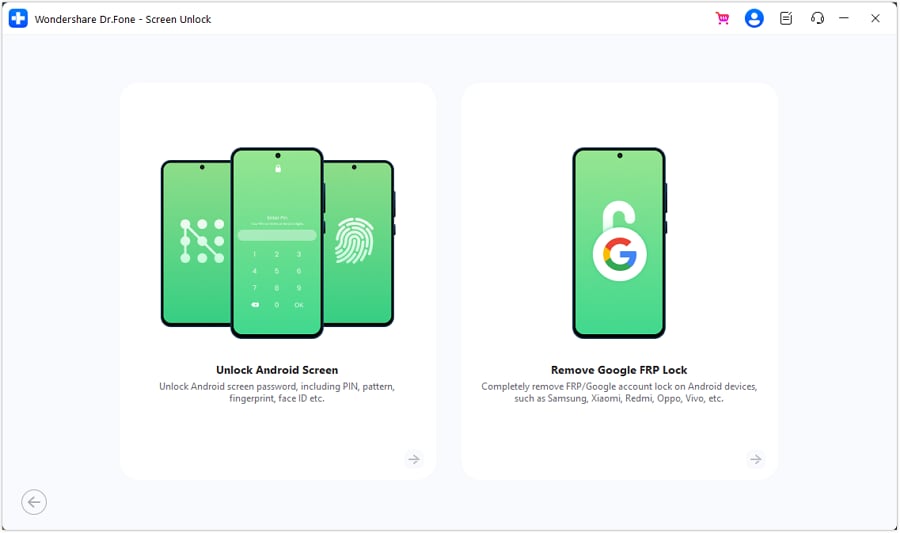
With Dr.Fone installed and the Moto plugged in, pick the “Screen Unlock” tool for “Android” and select “Unlock Android Screen” from the panel.
-
Step 2 Pick Your Model from the List
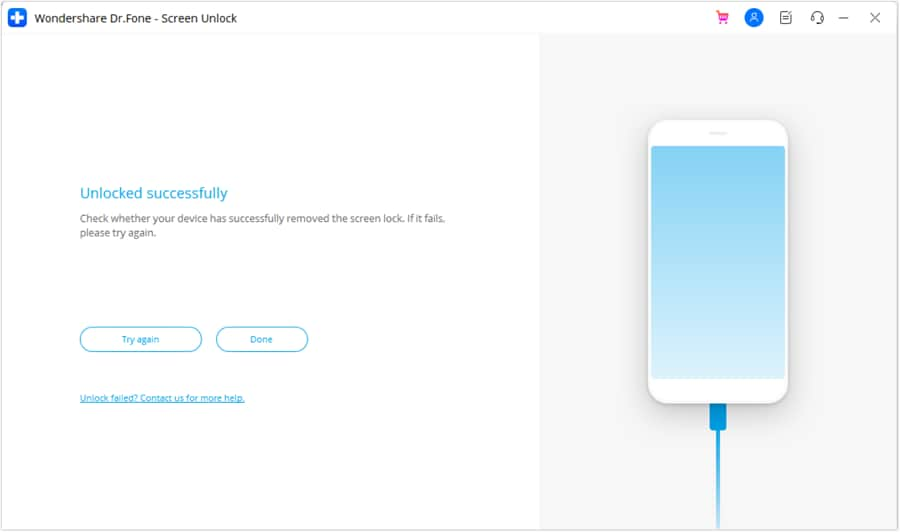
Select “Motorola” and follow the on-screen instructions to enter the required Special Mode. Once the screen lock removal finishes, click “Done” to complete the process.




Method 2. Erase Moto G Pure/Play with Google Find Hub
Find Hub cannot remove a screen lock directly. Its only option is a remote wipe that deletes all data to clear the lock. To use this online method, you can follow these instructions to unlock Moto G Pure:
-
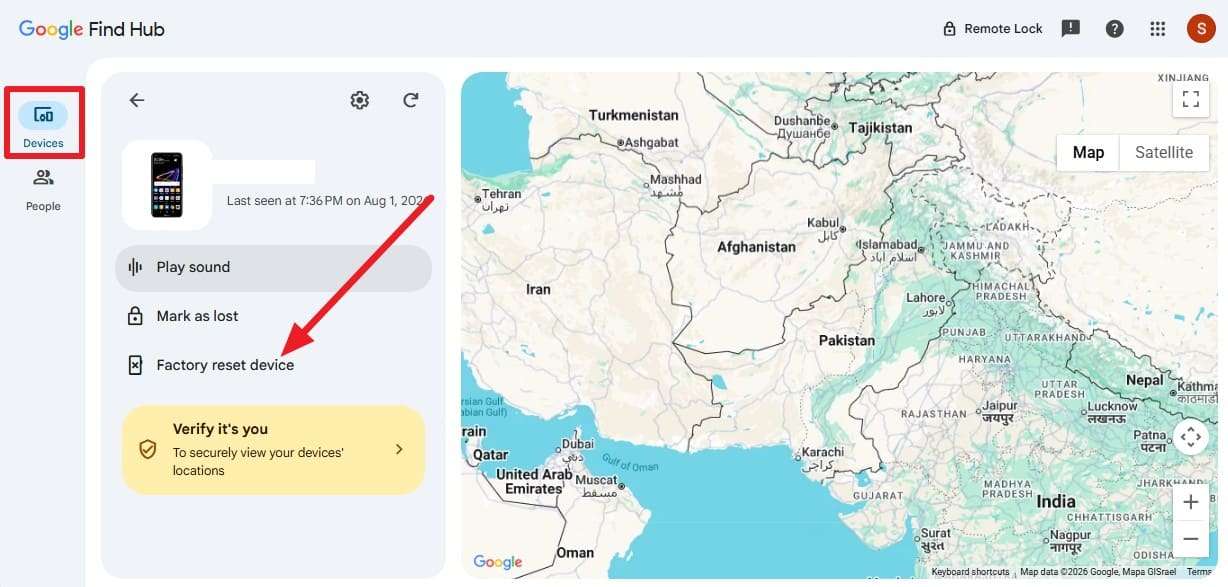
Step 1 Sign in to Google Find Hub and go to the “Devices” tab to choose the Moto G Pure/Play and the “Factory Reset Device” option.
-
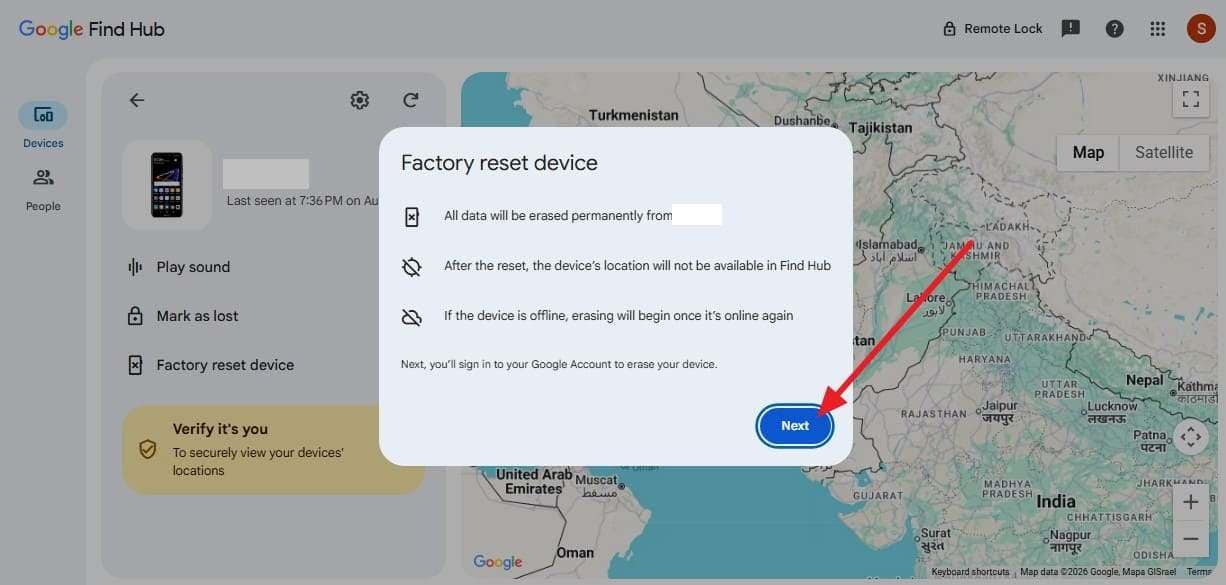
Step 2 Choose the “Next” option in the pop-up and continue to erase the device.
Method 3. Factory-Reset Moto G Pure/Play in Recovery Mode
Without computer or Google account access, the hardware buttons become your remaining option. Motorola documents this Recovery Mode sequence for the Moto G Pure. To know how to use this method for the Motorola G Play unlock, review these steps:
-
Step 1 Switch the Moto off completely, then press “Power” and “Volume Down” at the same time until the bootloader screen loads.
-
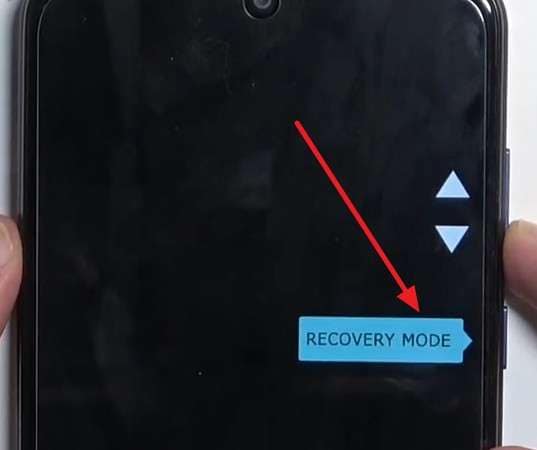
Step 2 Press the “Volume Down” button until “Recovery Mode” is highlighted on the screen. Press “Power” to choose it.
-
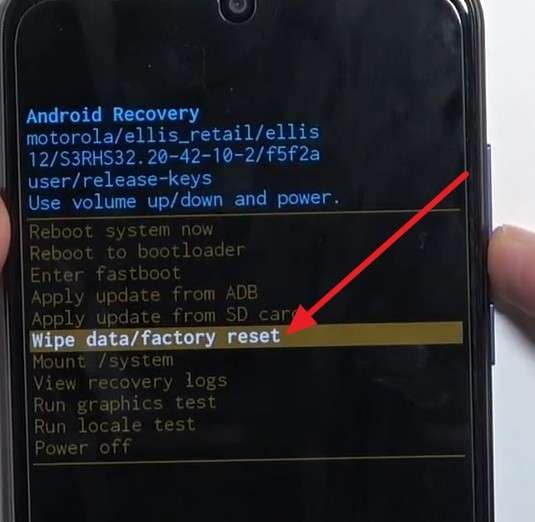
Step 3 If “No Command” appears, press and hold the “Power” button, then press the “Volume Up” button once. Scroll down with the “Volume Down” button and access the “Wipe Data/Factory Reset” option with the “Power” button.
-
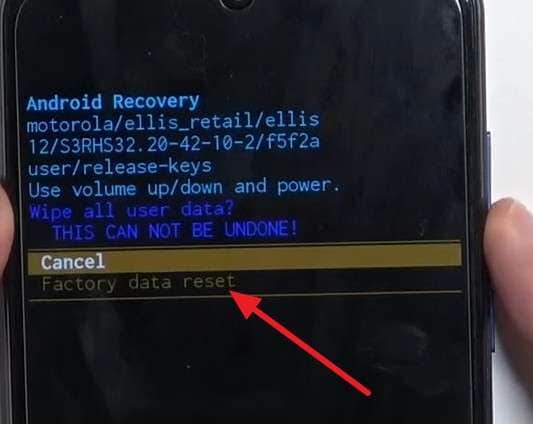
Step 4 Choose “Factory Data Reset” via the “Volume Down” key and confirm the action with the “Power” button.
Part 6. What If Moto G Pure & Play Asks for a Google Account After Reset?
Here's the trap that catches people after every method above. A wipe doesn't remove Factory Reset Protection, so setup still demands the last Google account signed in. Entering those credentials completes setup. If you've only forgotten the password, use Google's account recovery process to regain access before signing in.
If the account belongs to a previous owner, ask them to detach the handset from their Google profile, which lifts the check at its source. If neither works, Dr.Fone – Screen Unlock (Android) carries a separate “Remove Google FRP Lock” function for supported models. Check the Moto against that list first, and run it only on the smartphone you own.
Conclusion
Sorting which Moto G Play unlock situation you're facing does most of the work here. A carrier lock clears through the network for free once the phone qualifies. An IMEI service fills the gap when eligibility rules leave you stranded. When the official method takes days, get your phone carrier unlocked in 24 hours with Dr.Fone Online Unlock.
A forgotten screen lock is harder because every route wipes a Moto G Pure. Choose based on what's in front of you, and back up anything reachable first. Keep the Google login ready for the setup screen waiting on the other side. As a collection solution for Screen and FRP lock, you can use Dr.Fone – Screen Unlock (Android).
FAQ
-
1. Does unlocking a Moto G Pure/Play erase my data?
A carrier unlock changes a network flag and touches nothing on the phone. Screen-lock removal is the opposite, since every available method wipes a Moto G Pure/Play completely. -
2. Can I unlock a Moto G Play/Pure for free?
Yes, if it qualifies with the carrier that sold it. Official unlocks cost nothing once the device is paid off and the waiting period has passed, so exhaust that route before paying a service. -
3. How do I know if my Moto G Pure/Play is already unlocked?
Slot in another network's SIM and watch what happens. A normal signal means it's unlocked, while a "SIM not supported" message confirms the restriction is still active. -
4. Will a factory reset remove the Google account lock?
No, and this surprises most people. Factory Reset Protection survives a wipe by design, so the setup screen still asks for the last account that was signed in on that phone.
 Add Wondershare Dr.Fone as a preferred source on Google