Bypass iCloud Activation Lock and Android FRP without password.

 100% Security Verified | No Subscription Required | No Malware

 :
: 
 ChatGPT
 Perplexity
 Gemini
 Claude
 Grok
Grok
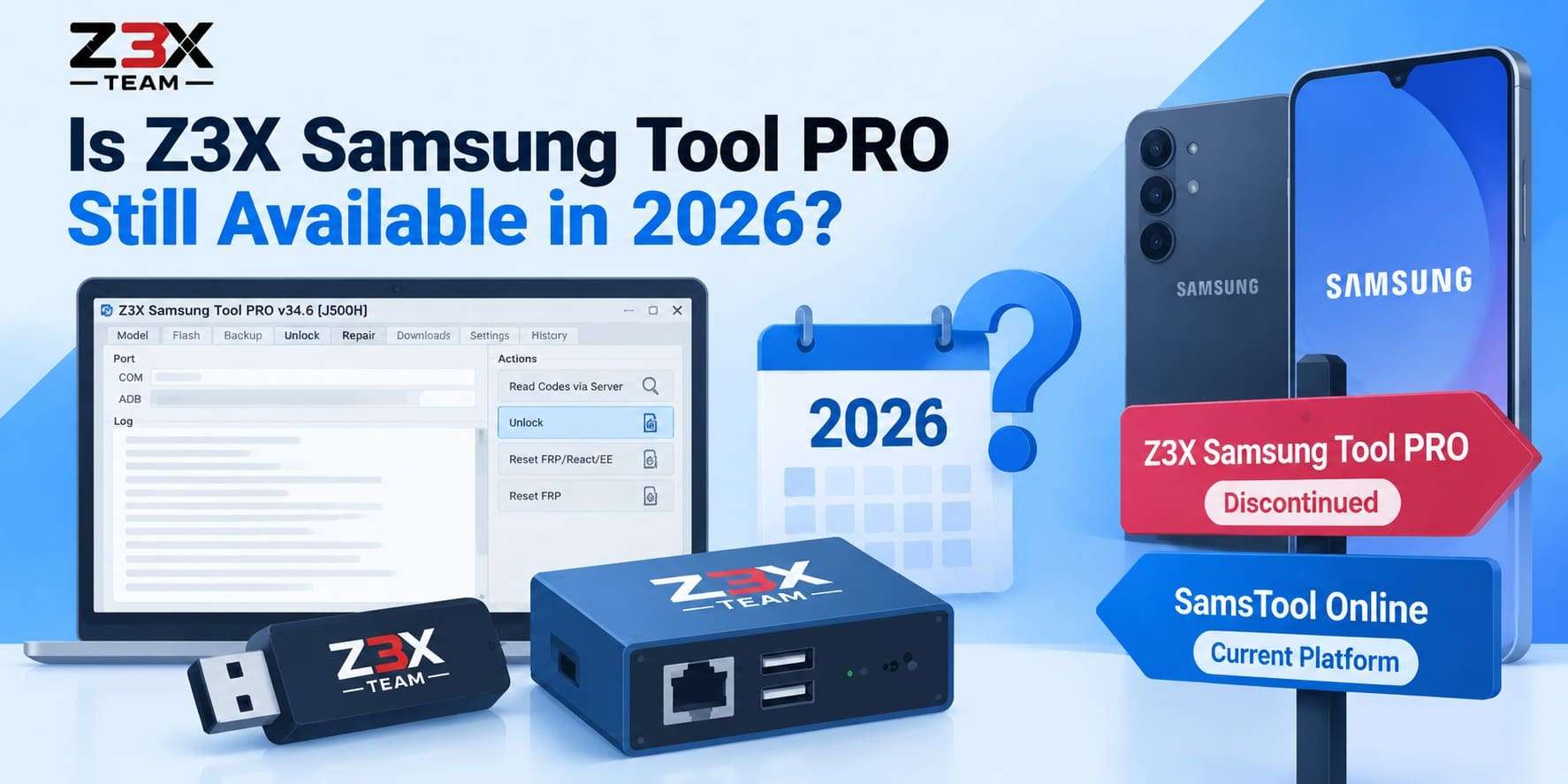
An older utility can feel confusing when the developer has completely changed the platform. Many searches for the Z3X Samsung Tool focus on downloads, but the official status clarifies the situation. Samsung Tool PRO is discontinued and replaced by SamsTool Online, changing how technicians and device owners access current support.
This review explores what the legacy software offered, how the new subscription model works, and where support stands today. Professional technicians can use the updated Z3X platform for firmware and network servicing, while everyday users facing screen locks or Google verification issues can consider Dr.Fone - Screen Unlock (Android) as a simpler, consumer-friendly alternative.
In this article
Part 1. What Is Z3X Samsung Tool PRO?
The Z3X Samsung Tool was built for Samsung phone servicing on Windows, mainly for repair technicians rather than everyday phone owners. The later Z3X Samsung Tool PRO expanded that platform with server-based functions and newer repair solutions. However, it still requires compatible Z3X hardware and activation to run.
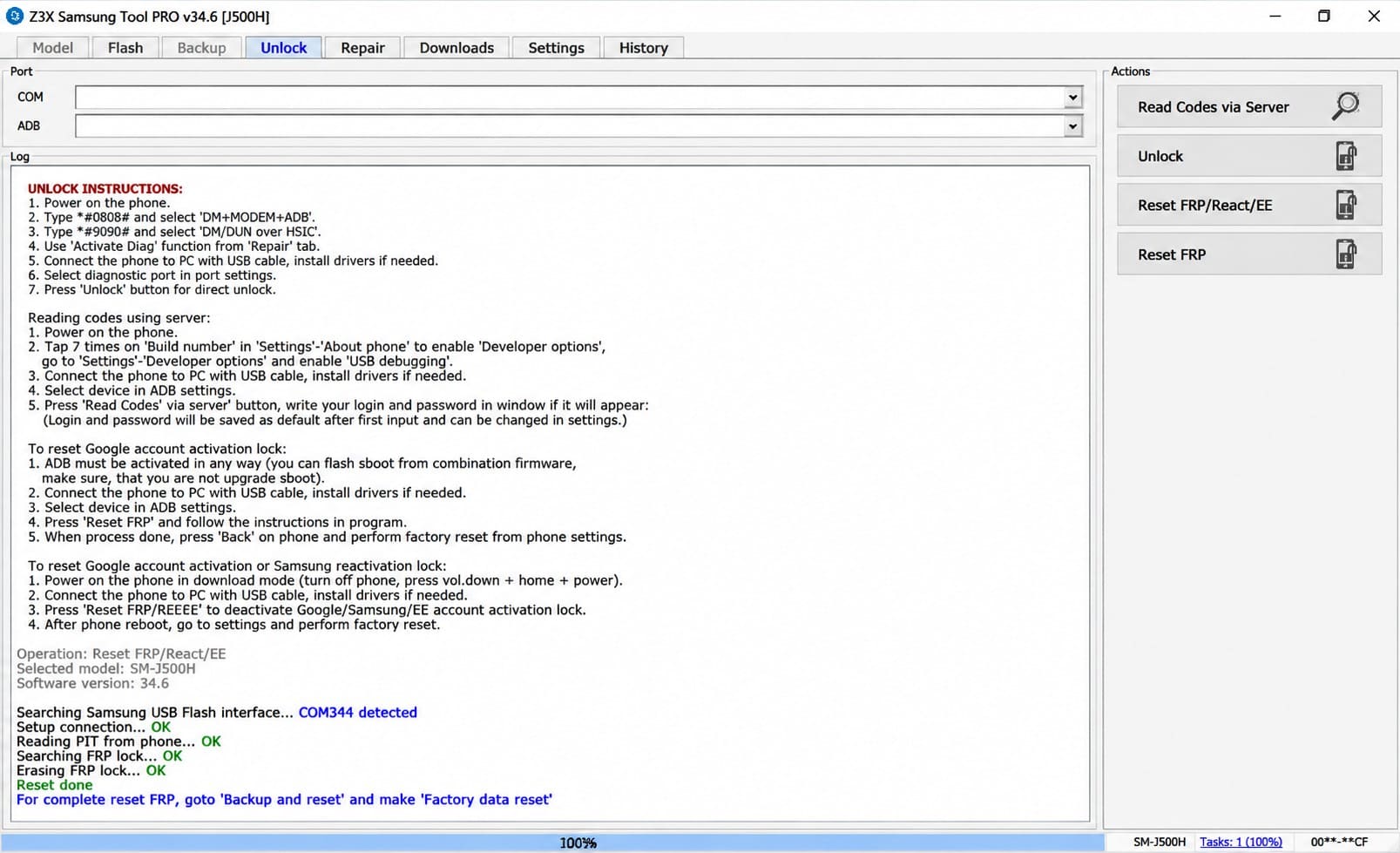
Z3X lists Samsung Tool PRO as a professional servicing product for tasks such as firmware flashing, unlocking, and screen-lock servicing. It can also be used for FRP removal, reading and writing service data, and other supported Samsung repair functions. To use Z3X Samsung Tool PRO, Z3X documented these main requirements:
| Requirement | What Z3X Required |
|---|---|
| Z3X Hardware | Z3X Box or Z3X Dongle |
| Activation | Key activation card with Samsung Tool PRO activation |
| Computer | Windows-based PC |
| Phone Connection | Compatible cable between the Samsung device and PC |
| Credits | Z3X credit account for supported server-based operations |
| Internet Access | Recommended for activation, downloads, and server functions |
Z3X Samsung Tool vs Samsung Tool PRO
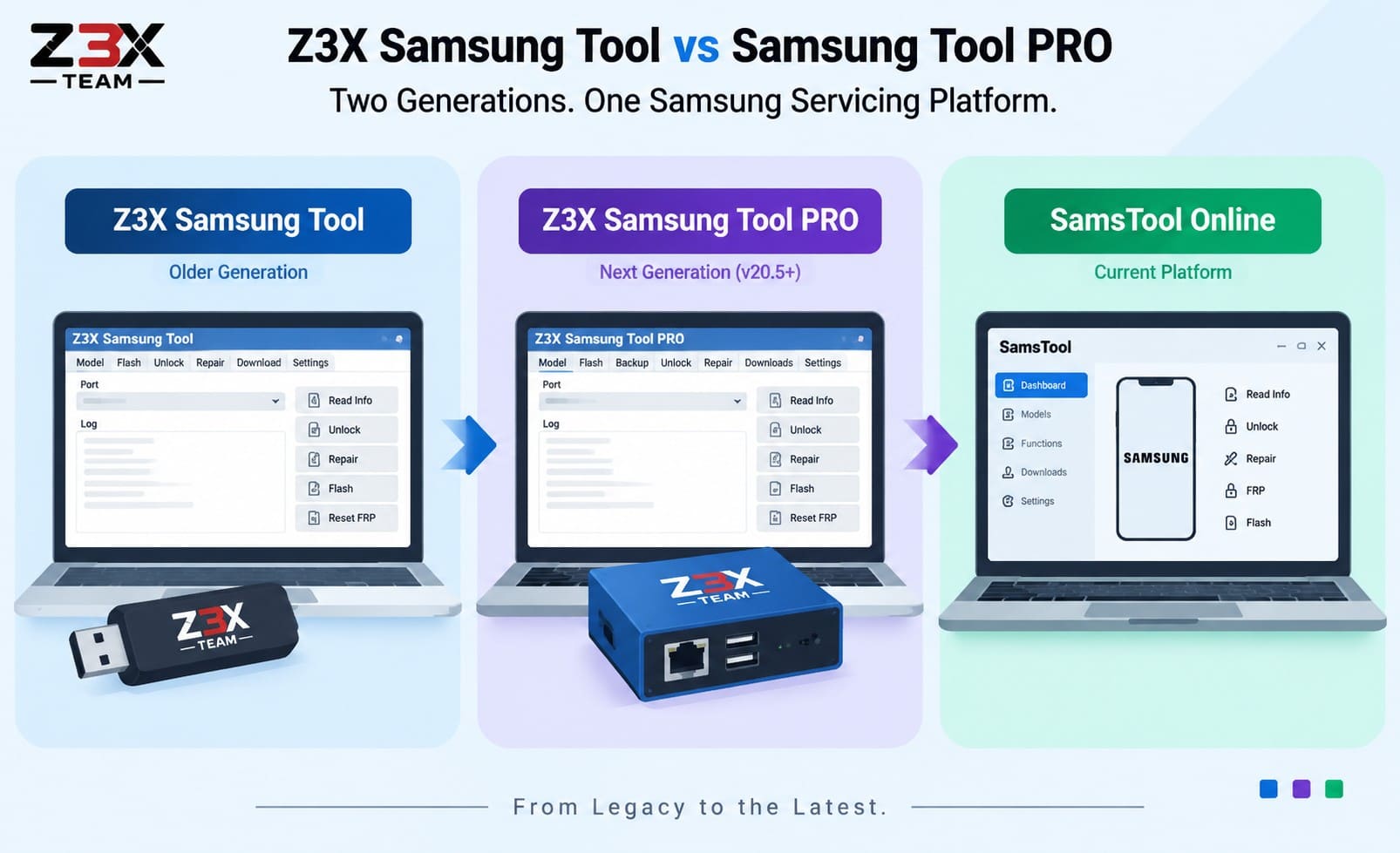
The names refer to two generations of the same Samsung servicing platform. According to Z3X, Samsung Tool PRO started with version 20.5 and developed from the older Samsung Tool. The PRO edition added newer solutions and server-based functions, while the older Samsung Tool was limited to functions that did not require Z3X server login.
Neither is the current platform. Z3X now marks Samsung Tool PRO as discontinued and directs current Samsung servicing to SamsTool Online. For searches like download Z3X Samsung Tool PRO or Z3X Samsung Tool PRO download, understanding the official download situation is important.
Z3X still provides its Shell and legacy support file system, but accessing older software files requires appropriate Z3X hardware or a card. The current SamsTool installer is distributed through the official Z3X system rather than unofficial “latest” packages.
Part 2. What Can Z3X Samsung Tool PRO Do?
The Z3X PRO Samsung Tool covered much more than flashing firmware. Z3X’s own changelogs show that the exact feature set changed from one model to another. Here is a breakdown of its main supported functions and their key limitations:
| Feature | What It Does | Main Limitation |
|---|---|---|
| Firmware Flashing | Installs Samsung firmware and performs software servicing, including firmware changes on listed devices. | Available firmware operations differ across Samsung models and Tool PRO releases. |
| Direct Unlock / Read Codes | Removes supported carrier locks or reads network unlock codes for compatible Samsung phones. | Several newer models require Z3X server access and credits for code reading or unlocking. |
| FRP Remove / Reset | Removes Google account verification after a factory reset on supported Samsung devices. | Z3X added FRP functions for specific models and firmware versions rather than every Samsung device. |
| Read / Write EFS | Reads, writes, backs up, or restores EFS data containing device and network-related information. | Writing incorrect EFS data can damage network-related information and other critical device data. |
| Read / Write QCN | Reads or writes Qualcomm calibration and network data on compatible Qualcomm-based Samsung models. | QCN functions apply only to compatible Qualcomm-based models with specific Z3X support. |
| Screen Lock Reset | Resets screen locks on specific Samsung Galaxy models listed as compatible by Z3X. | Z3X provides this function for specific devices rather than as a universal Samsung unlock feature. |
| Device / Service Information | Reads available device, hardware, firmware, and service information used during Samsung diagnostics and servicing. | Available information varies by Samsung model, chipset, connection mode, and servicing function. |
| Backup and Restore | Backs up and restores service data such as EFS, CERT, EEP, and other supported information. | Z3X cannot automatically save every calibration and security setting before each critical operation. |
| Reboot to Download / Recovery Mode | Reboots compatible Samsung phones into Download or Recovery Mode for flashing and servicing tasks. | This function is available only for devices where Z3X specifically provides the required reboot operation. |

Which Samsung Devices Does Z3X Support?
Support with Samsung Z3X depends on the exact model, chipset, firmware, and security level. Older Samsung Tool PRO releases supported Samsung devices across Qualcomm, Shannon, Exynos, MTK, and several other hardware platforms. However, available functions varied by model and software version. For current Samsung servicing, Z3X now points users to SamsTool Online.
Its official page lists support for the latest generation of Exynos, MTK, Unisoc, and Qualcomm-based Samsung devices. Z3X also provides a model checker so you can confirm support for a specific phone before attempting any repair. The table below compares the main chipset coverage documented for legacy Samsung Tool PRO and current SamsTool Online:
| Platform | Legacy Samsung Tool PRO | Current SamsTool Online |
|---|---|---|
| Exynos | Flashing, EFS/CERT backup, FRP reset, unlock, repair, and Patch CERT appeared on documented models. | Includes EUB servicing, FRP reset, boot repair, firmware updates, Patch CERT, and certificate operations. |
| Qualcomm | Flashing, QCN/EFS operations, network unlocking, and server-based code reading were available on documented models. | Includes FRP, network/regional lock, firmware, backup, IMEI, SN, and certificate servicing where listed. |
| MediaTek / MTK | MTK support was added for individual Samsung models, with functions varying by device and release. | Officially included among the latest supported Samsung platforms, with functions listed by exact device model. |
| Shannon | Included direct code reading without a server or credits and DIAG-based CERT reading on documented phones. | Not listed as a separate chipset platform in the current SamsTool Online documentation. |
| Unisoc | Not listed among the primary platforms in Samsung Tool PRO’s official platform documentation. | Officially included among the latest supported Samsung platforms, with functions determined by the device model. |
Part 3. Is Z3X Samsung Tool PRO Still Available in 2026?
If you search for download Z3X Samsung Tool PRO in 2026, the key point is that the software is no longer the current Z3X Samsung platform. Z3X now marks Samsung Tool PRO as discontinued and replaced by SamsTool Online. Legacy Samsung Tool PRO files remain available for users with compatible Z3X hardware and activation. As mentioned, SamsTool Online now provides new Samsung support, fixes, and model coverage.
How Official Z3X Downloads Work
Official Z3X tool downloads come from Z3X’s own download and account systems. The public download page provides Z3X Shell, current SamsTool software, drivers, and support files. Z3X allows users to browse legacy support directories, but downloading these files requires Z3X Shell and a connected card.
For SamsTool Online, Z3X’s installation guide instructs users to register on the user portal. Then, download the latest installer from the portal’s download page, install it, and sign in using credentials obtained through the official reseller process.
How to Download Z3X Software Officially
To download Z3X, use the official Z3X website instead of third-party sites offering unofficial “latest” packages.
1. Download SamsTool Online
-
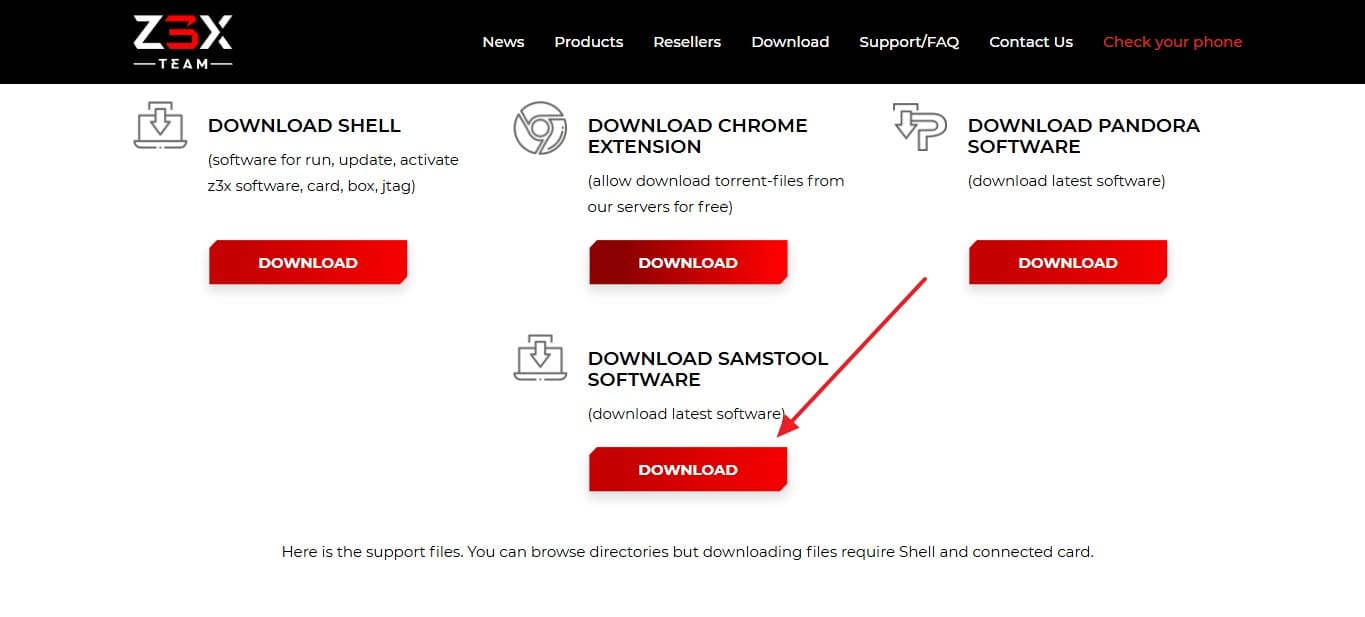
Step 1 Go to the official Z3X portal and create an account or sign in. Buy or activate SamsTool Online through an authorized Z3X reseller. Go to the “Download” page and select the “Download” button to get the latest SamsTool installer.
-
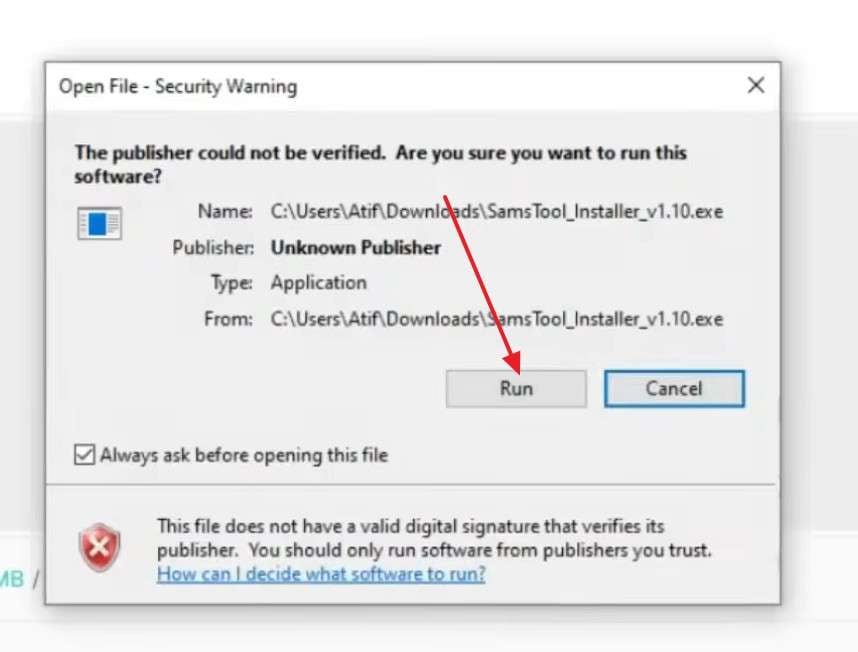
Step 2 When the warning pops up, choose the "Run" option and select a language. After that, accept the agreement and continue the installation.
-
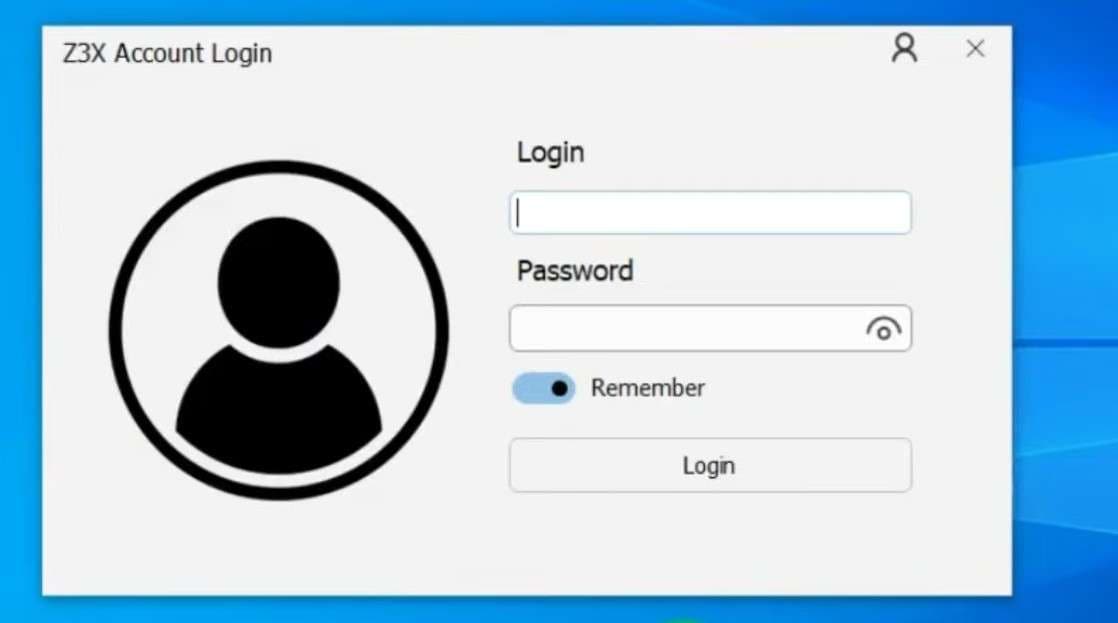
Step 3 Click “Finish,” agree to the license agreement, and sign in with the credentials linked to your activation. Z3X documents this as the current installation route for SamsTool Online.
2. Download Legacy Z3X Samsung Tool PRO Files
-
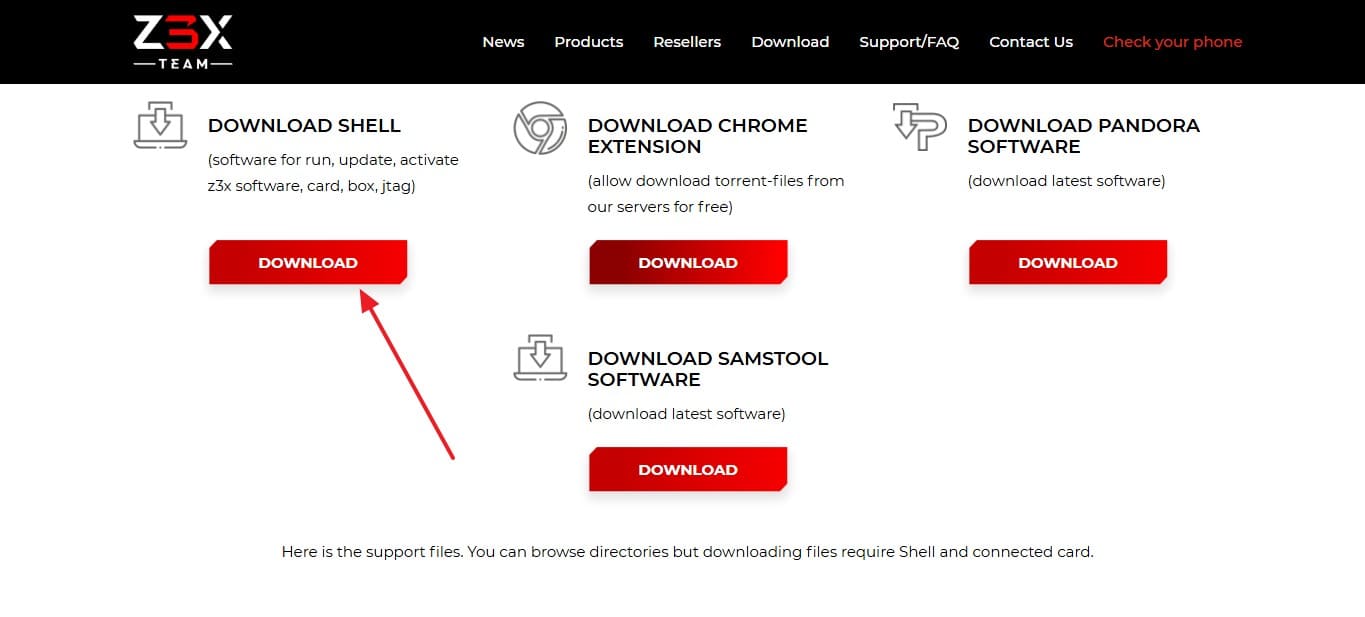
Step 1 Tap on the “Download” button under “DOWNLOAD SHELL” and connect your activated Z3X Box or Dongle/card to the PC. Open Z3X Shell and complete the card/hardware setup if required to continue with the Samsung Tool PRO Z3X download.
-
Step 2 Open Z3X Shell and go to Support Files to access the legacy Samsung Tool PRO files available for your activation.
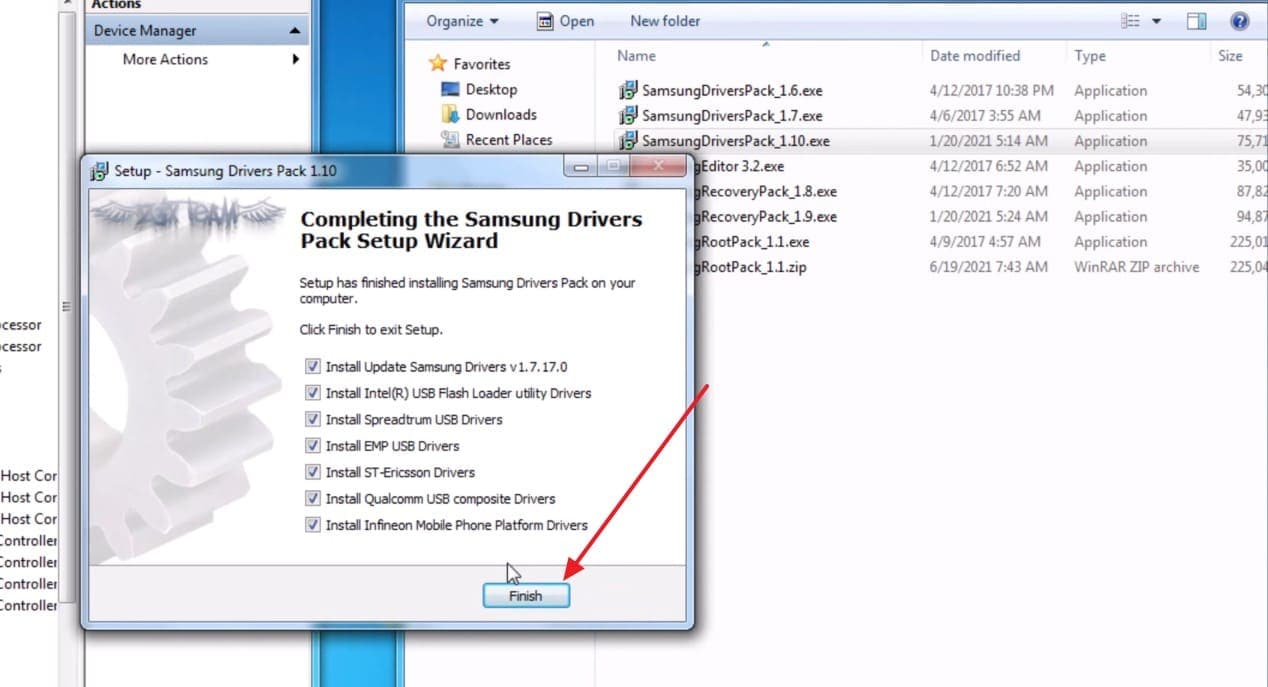
-
Step 3 Download and install Samsung Tool PRO, then launch it with the Z3X hardware connected.
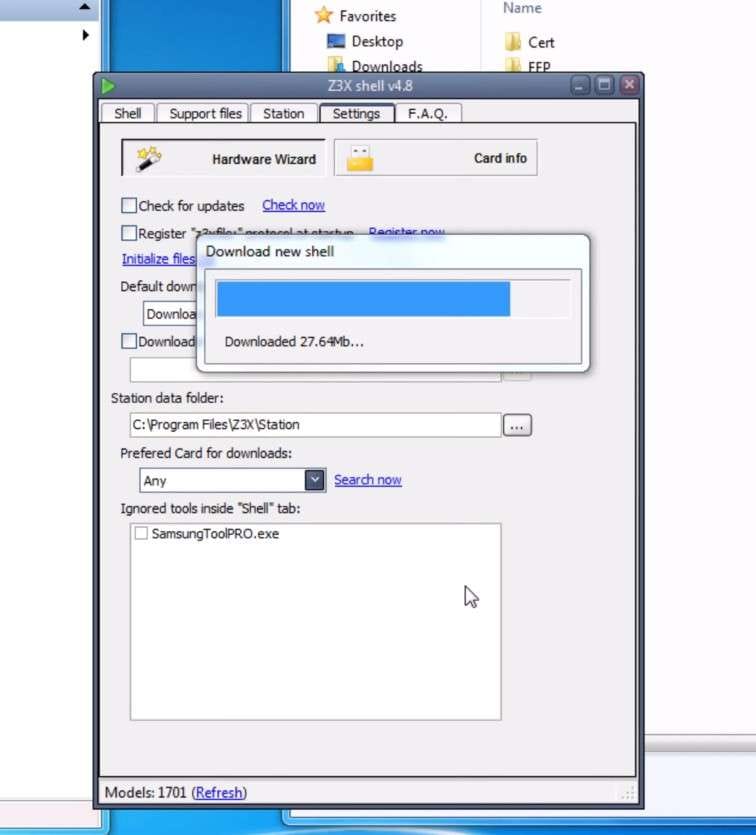
Z3X Samsung Tool PRO vs SamsTool Online
For anyone comparing Z3X Samsung Tool PRO with the current Z3X platform, the biggest difference is their availability and support status.
| Factor | Samsung Tool PRO | SamsTool Online |
|---|---|---|
| Current Status | Discontinued and no longer receives new Samsung support. | Active platform receiving new models, functions, and fixes. |
| Hardware Requirement | Requires a Z3X Box or Dongle with Samsung Tool PRO activation. | No Z3X Box required for the standard subscription workflow. |
| Licensing | Uses Z3X hardware/card-based activation. | One license is activated for one Windows PC for one year. |
| Device Support | Limited to models and functions covered by legacy releases. | Supports newer Exynos, Qualcomm, MTK, and Unisoc Samsung devices. |
| FRP Functions | Provides FRP reset or removal methods for compatible legacy devices. | Provides “Reset FRP” and “FRP Remove” operations for listed devices. |
| Network Unlock | Provides direct unlock and code reading, with some services requiring credits. | Provides network/regional lock operations and online code reading for listed devices. |
| Firmware Servicing | Provides firmware flashing and software-change operations for compatible devices. | Provides “SW Change” and other firmware-related servicing for listed devices. |
| Official Download | Legacy files are accessed through Z3X Shell/Support with eligible hardware and activation. | The installer is obtained through Z3X's current user portal and activation system. |
Part 4. Z3X Licensing, Credits, and Support Explained
For anyone searching for “support Z3X,” understanding the licensing system is important. This section explains the old Samsung Tool PRO requirements, current SamsTool Online licensing and credits, and where to get official Z3X support.
What Did Samsung Tool PRO Require?
Using Z3X Samsung Tool PRO required several components before technicians could access its supported servicing functions:
- Z3X Hardware: Z3X Box or Z3X Dongle with the required activation.
- Windows PC: A Windows-based computer for running the software.
- USB Connection: A compatible cable for connecting the Samsung device.
- Z3X Credits: A credit account for supported server-based PRO operations.
- Internet Access: Recommended for activation, component downloads, and online functions.
How SamsTool Online Licensing Works Now
Unlike Z3X Samsung Tool PRO, SamsTool Online uses a subscription-based licensing model. Z3X issues each license for one Windows PC for one year and allows operations on up to 10,000 unique mobile devices during that term. A license can be moved to another computer only if the original PC develops a technical problem.
Z3X credits are separate from the subscription and apply to specific credit-based operations. The required amount varies by operation and is displayed in SamsTool after selecting the device model. Existing users must keep their SamsTool subscription and Z3X credits on the same account. Z3X instructs users with an existing credit account to ask an official reseller to apply the activation to that account.
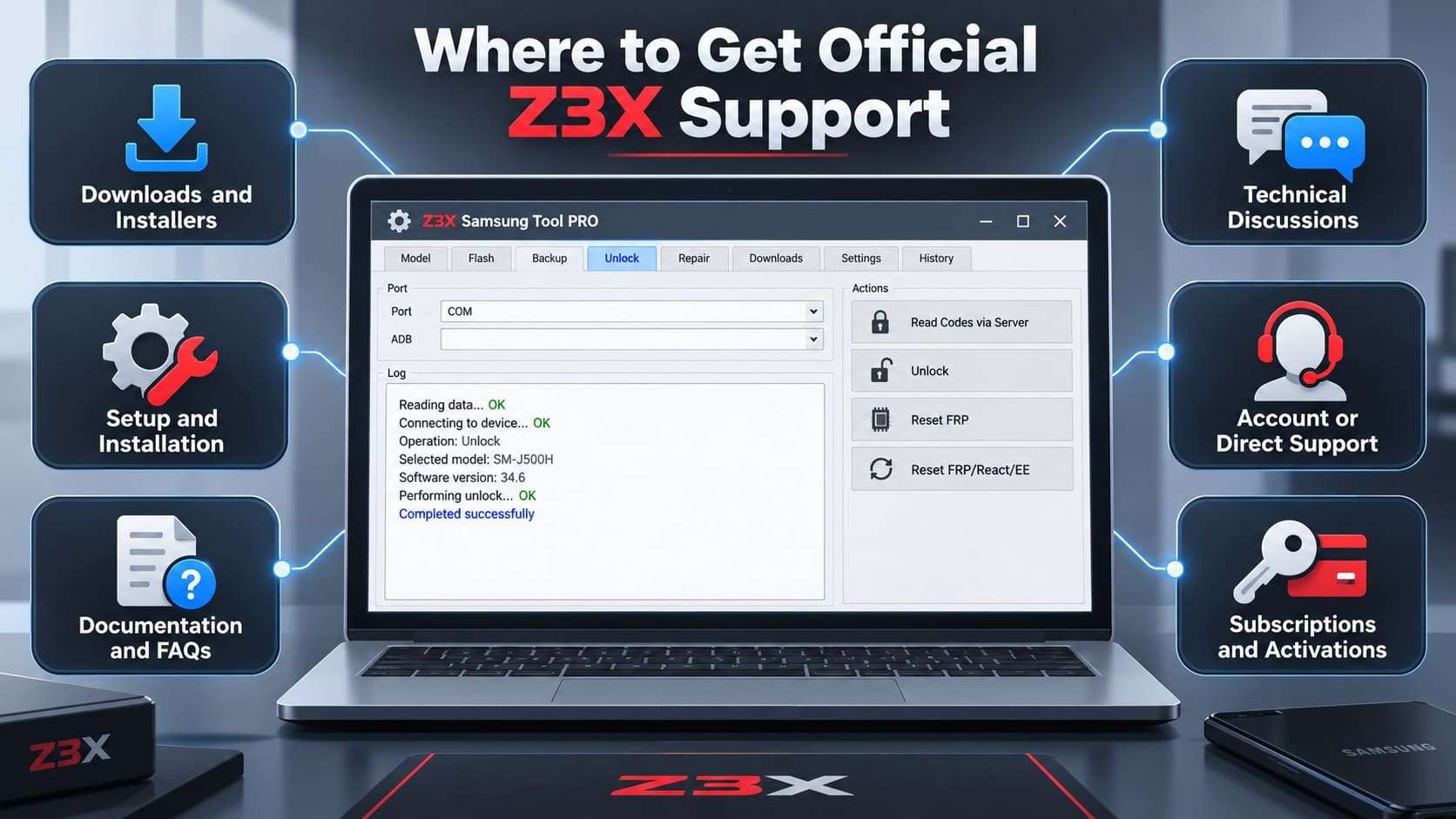
Where to Get Official Z3X Support
For Z3X tool users, Z3X provides different support resources depending on whether the issue involves downloads, installation, troubleshooting, or activation.
-
1 Downloads and Installers
Download Z3X Shell and current SamsTool software through the official Z3X download system. Legacy support-file downloads require Z3X Shell and a connected card.
-
2 Setup and Installation
Follow the official installation manual for SamsTool Online setup, Z3X Box and card drivers, activation, and access to legacy software.
-
3 Documentation and FAQs
Use the Z3X Wiki, FAQs, Questions2Answers resources, and video instructions for documented product information and common troubleshooting issues.
-
4 Technical Discussions
Use the Z3X Questions2Answers community or its linked GSM-Forum section for technical discussions. Z3X identifies the GSM-Forum resource as unofficial.
-
5 Account or Direct Support
Contact Z3X through its official support channels for account or technical assistance. Z3X states that incoming emails are answered within 24 hours, Monday through Friday.
-
6 Subscriptions and Activations
Contact an official reseller for SamsTool Online subscriptions, credentials, and Z3X activation assistance when required by the documented setup process.
Part 5. Dr.Fone - Screen Unlock (Android) as an Easier Alternative for Samsung Lock Issues
If you found Z3X Samsung Tool PRO while searching for a way to unlock a Samsung Galaxy, Dr.Fone provides a more direct approach without requiring a technician-focused repair setup. Dr.Fone - Screen Unlock (Android) removes common screen locks, including PINs, patterns, passwords, fingerprints, and face locks. It also provides dedicated Google FRP removal for Samsung and other supported Android devices.
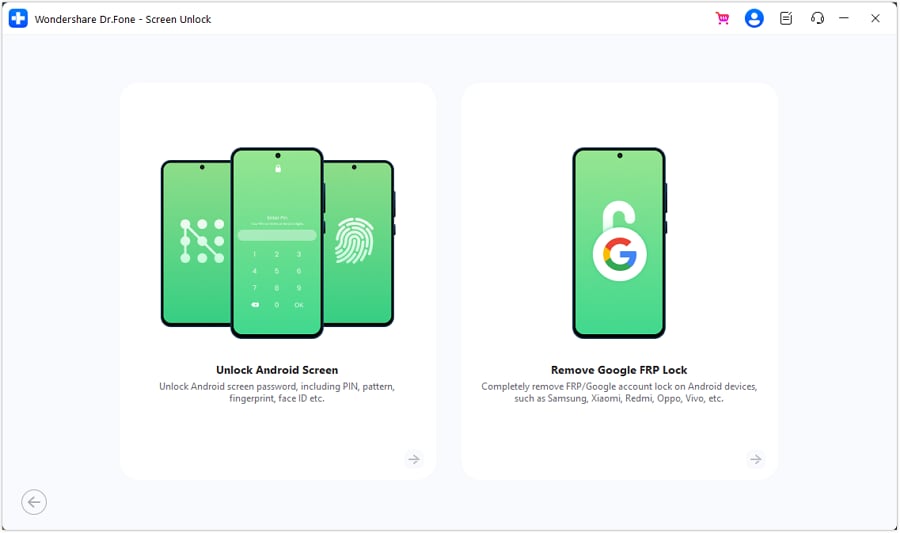
Dr.Fone supports screen unlocking across 32 Android brands, while its FRP solutions cover 21 brands. For Samsung devices, it provides dedicated FRP methods for supported Snapdragon and MediaTek models. Dr.Fone also offers an online Samsung FRP removal service that works using the device IMEI. This option removes the need to connect the phone to a PC with a USB cable or install desktop software.
 Unlock Android phone in seconds.
- Remove PIN, pattern, password, fingerprint.
- Bypass Google FRP lock easily.
- Works on all Android brands & models.
- No tech skills required – user-friendly.

Z3X Samsung Tool PRO vs Dr.Fone - Screen Unlock (Android)
The two tools serve different needs, so the right approach depends on the task. Z3X Samsung Tool PRO handles technician-level flashing, network servicing, FRP, and repairs, while Dr.Fone - Screen Unlock (Android) focuses on screen locks and FRP removal.
| Factor | Z3X Samsung Tool PRO / SamsTool | Dr.Fone - Screen Unlock (Android) |
|---|---|---|
| Main Audience | Samsung repair technicians and professional servicing environments. | Android users handling screen-lock and FRP issues. |
| Screen Lock Removal | Provides lock-removal functions for supported Samsung models. | Removes PINs, patterns, passwords, fingerprints, and face locks on supported devices. |
| Google FRP Removal | Provides FRP operations for supported Samsung devices. | Provides dedicated FRP removal for supported Samsung and other Android devices. |
| Firmware / System Repair | Supports firmware flashing and software servicing on compatible Samsung devices. | Dr.Fone also offers System Repair (Android) for supported Android system issues. |
| Network / SIM Unlock | Supports network unlocking and code-reading operations on compatible Samsung models. | Wondershare also offers Dr.Fone Online Unlock for supported SIM unlocking. |
| Service Data Operations | Supports EFS, QCN, certificate, and other service-data operations. | Focuses on screen-lock and FRP removal rather than service-data repair. |
| Hardware Setup | Legacy PRO requires Z3X hardware, while SamsTool uses an account-based workflow. | No dedicated servicing box or dongle is required. |
| Platform | Windows | Windows and macOS |
Conclusion
Z3X Samsung Tool PRO is now a legacy Samsung servicing solution, with SamsTool Online replacing it as Z3X’s current platform for supported repairs and updates. Professional technicians can use SamsTool Online for advanced firmware, FRP, network, and service operations on compatible devices.
For users who only need to remove a Samsung screen lock or handle supported FRP protection, Dr.Fone - Screen Unlock (Android) provides a more consumer-friendly option without requiring dedicated Z3X hardware.




Frequently Asked Questions
-
1. Can old Z3X Samsung Tool PRO credits be used with SamsTool Online?
Yes. Existing Z3X credits can be used for supported SamsTool Online operations when the subscription is activated on the same Z3X account. The subscription and credit balance remain separate, and only specific operations require credits. -
2. Can one SamsTool Online subscription be used on multiple computers?
Each SamsTool Online license is limited to one Windows PC for one year. Z3X allows a transfer to another computer only when the original PC develops a genuine technical problem. -
3. Does Z3X SamsTool Online support the latest Samsung Galaxy models?
SamsTool Online supports newer Samsung devices across Exynos, MTK, Unisoc, and Qualcomm platforms. Exact servicing functions vary by device model, firmware version, and security level. -
4. Does Z3X Samsung Tool work on phones from brands other than Samsung?
Z3X Samsung Tool and Samsung Tool PRO were designed specifically for Samsung devices. For supported screen-lock or FRP issues on other Android brands, Dr.Fone - Screen Unlock (Android) provides broader multi-brand Android support.
 Add Wondershare Dr.Fone as a preferred source on Google